







You can create a data migration task to seamlessly migrate the existing business data and incremental data from a PostgreSQL database to an OceanBase database (including MySQL and Oracle compatible modes) through schema migration, full migration, and incremental synchronization.
Notice
If a data migration task remains inactive for an extended period (with a status of Failed, Paused, or Completed), it may become unrecoverable due to factors such as the retention duration of incremental logs. Data Migration actively releases tasks that have been inactive for more than 7 days to reclaim related resources. It is recommended that you configure alerts for your tasks and promptly handle any task-related exceptions.
Prerequisites
You have created a source database instance.
You have created a cluster and tenant in the target OceanBase Database. For more information, see Create an instance and Create a tenant.
You have created dedicated database users for data migration on both the source and target sides and granted them the required permissions. For more information, see User privileges.
If you need to perform incremental synchronization, complete the following prerequisites:
By default, data transmission during incremental synchronization does not support automatic DDL capture. If DDL statements are executed at the source, data transmission will fail to parse the DML correctly due to the lack of DDL information. To support normal DML parsing and DDL synchronization, you need to create corresponding triggers and tables that record DDL statements. For more information, see Create a trigger.
After enabling incremental synchronization, the wal_level parameter must be set to logical. For details on self-managed PostgreSQL, see Modify the log level of a self-managed PostgreSQL instance.
Limitations
Only users with the project role of Project Owner, Project Admin, or Data Service Administrator can create a data migration task.
Limitations on the source database
Do not perform DDL operations that modify database or table schemas during schema migration or full migration. Otherwise, the data migration task may be interrupted.
Currently, data migration supports PostgreSQL databases of versions V10.x, V11.x, V12.x, and V13.x, and OceanBase Database (including MySQL and Oracle compatibility modes) of versions V2.x, V3.x, and V4.x.
The data migration service does not support migrating partitioned tables, unlogged tables, or temporary tables from PostgreSQL databases.
The data migration service supports migrating tables with primary keys or NOT NULL unique keys from PostgreSQL databases to OceanBase Database.
The data migration service only supports migrating objects whose database, table, and column names are ASCII-compliant and do not contain special characters (including .|"'`()=;/& and line breaks).
The data migration service does not support triggers (Triggers) on the target side. If triggers exist, data migration may fail.
Considerations
After enabling incremental synchronization, the requirements for the table-level replication identifier
REPLICA IDENTITYare as follows:If you select migration objects via the Specify Objects entry, the specified tables must have primary keys, or the table-level replication identifier
REPLICA IDENTITYmust beFULL. Otherwise, update and delete operations on business data will fail.If you select migration objects via the Match by Rule entry, the PostgreSQL database must subscribe to all tables of the selected database (including selected, unselected, and new tables), and all tables must have primary keys, or the table-level replication identifier
REPLICA IDENTITYmust beFULL. Otherwise, update and delete operations on business data will fail.If the primary keys or unique keys of the source and target are not fully aligned, the table-level replication identifier
REPLICA IDENTITYfor the corresponding tables is set to FULL.Since the default mode of PostgreSQL does not return a complete preimage, data migration serializes processing for the corresponding tables to ensure data quality, which affects the efficiency of incremental synchronization. Therefore, it is recommended to set the table-level replication identifier
REPLICA IDENTITYto FULL for all tables.
The command to modify the table-level replication identifier
REPLICA IDENTITYto FULL is as follows.Note
If row filter conditions are set for the migrated table objects, the corresponding tables must have the
FULLmode enabled.ALTER TABLE table_name REPLICA IDENTITY FULL;When migrating data from a PostgreSQL database (either schema migration or incremental DDL) to the Oracle compatible mode of OceanBase Database, table and column names are converted to uppercase by default according to the Data Migration Service's default strategy. For example, if the source table name is 'a', it will be converted to 'A' by default at the target. You can use the table or column name in the forms 'a', 'A', or "A", but using it in the form "a" is not supported.
The incremental component of a PostgreSQL database automatically creates publications and slots, but you need to monitor the disk usage of the PostgreSQL database log files. By default, the Data Migration Service notifies every 10 minutes to update the confirmed_flush_lsn of a slot to the lsn from 10 minutes ago. Therefore, each incremental component retains PostgreSQL database log files for at least 10 minutes.
Note
If you need to modify the notification interval or how long back PostgreSQL database log files can be cleaned up, contact technical support.
During data migration, if PostgreSQL database log files cannot be cleaned up due to the existence of a slot, you must completely delete the data migration task before cleaning up the PostgreSQL database logs. Whether PostgreSQL database log files can be recycled depends on whether the earliest slot restart_lsn among all slots is within the range of the log files.
If a table has no primary key or all columns have a NOT NULL unique key, duplicate data may appear when migrating data to the target.
If the source character set is UTF-8, it is recommended that the target use a character set compatible with the source (for example, UTF-8, UTF-16, etc.) to avoid issues such as garbled characters at the target caused by character set incompatibility.
Please confirm whether the migration precision for column types such as DECIMAL, FLOAT, and DATETIME meets your expectations. If the precision of the target field type is less than that of the source field type, truncation may occur, leading to data inconsistency between the source and target.
If you need to modify a unique index at the target, you must restart the data migration task; otherwise, data inconsistency may occur.
Clock desynchronization between nodes, or between the client terminal and the server, can cause inaccurate latency reporting during incremental synchronization.
For example, if a clock is earlier than standard time, the reported latency may be negative. If a clock is later than standard time, it may cause a positive latency.
In database/table consolidation scenarios:
It is recommended that you use matching rules to map the relationship between the source and target.
It is recommended that you create the table structure at the target manually. If you use the Data Migration Service to create it, skip failed objects during the schema migration step.
If the table structures at the source and target are not identical, data inconsistency may occur. Known scenarios include:
When manually creating a table structure, if it exceeds the Data Migration Service's support scope, implicit conversion issues may arise, leading to inconsistent column types between the source and target.
If the data length at the target is shorter than at the source, data truncation may occur, causing inconsistency between the source and target data.
If you configure only Incremental Synchronization when creating a data migration task, the service requires local incremental logs in the source database to be retained for more than 48 hours.
If you configure both Full Migration and Incremental Synchronization when creating a data migration task, the service requires local incremental logs in the source database to be retained for at least 7 days. Otherwise, the data migration task may fail due to inability to obtain incremental logs, potentially leading to data inconsistency between the source and target.
If table objects differing only in case exist at the source or target, the data migration result may not meet expectations due to case-insensitivity at the source or target.
If a UNIQUE KEY column allows NULL values, data loss may occur. When multiple NULL values are synchronized from a PostgreSQL database to OceanBase Database, only the first NULL value is successfully inserted; subsequent NULL values are discarded due to UNIQUE KEY constraint violations.
Supported Source and Target Instance Types
Cloud Vendor |
Source |
destination |
|---|---|---|
| AWS | Self-managed PostgreSQL | OceanBase MySQL Compatible(Transactional) |
| AWS | Self-managed PostgreSQL | OceanBase MySQL Compatible(Self-managed database) |
| AWS | RDS PostgreSQL | OceanBase MySQL Compatible(Transactional) |
| AWS | RDS PostgreSQL | OceanBase MySQL Compatible(Self-managed database) |
| AWS | Aurora PostgreSQL | OceanBase MySQL Compatible(Transactional) |
| AWS | Aurora PostgreSQL | OceanBase MySQL Compatible(Self-managed database) |
| AWS | Self-managed PostgreSQL | OceanBase Oracle Compatible(Transactional) |
| AWS | Self-managed PostgreSQL | OceanBase Oracle Compatible(Self-managed database) |
| AWS | RDS PostgreSQL | OceanBase Oracle Compatible(Transactional) |
| AWS | RDS PostgreSQL | OceanBase Oracle Compatible(Self-managed database) |
| AWS | Aurora PostgreSQL | OceanBase Oracle Compatible(Transactional) |
| AWS | Aurora PostgreSQL | OceanBase Oracle Compatible(Self-managed database) |
| Google Cloud | Self-managed PostgreSQL | OceanBase MySQL Compatible(Transactional) |
| Google Cloud | Self-managed PostgreSQL | OceanBase MySQL Compatible(Self-managed database) |
| Google Cloud | Cloud PostgreSQL | OceanBase MySQL Compatible(Transactional) |
| Google Cloud | Cloud PostgreSQL | OceanBase MySQL Compatible(Self-managed database) |
| Google Cloud | Self-managed PostgreSQL | OceanBase Oracle Compatible(Transactional) |
| Google Cloud | Self-managed PostgreSQL | OceanBase Oracle Compatible(Self-managed database) |
| Google Cloud | Cloud PostgreSQL | OceanBase Oracle Compatible(Transactional) |
| Google Cloud | Cloud PostgreSQL | OceanBase Oracle Compatible(Self-managed database) |
| Alibaba Cloud | Self-managed PostgreSQL | OceanBase MySQL Compatible(Transactional) |
| Alibaba Cloud | Self-managed PostgreSQL | OceanBase MySQL Compatible(Self-managed database) |
| Alibaba Cloud | RDS PostgreSQL | OceanBase MySQL Compatible(Transactional) |
| Alibaba Cloud | RDS PostgreSQL | OceanBase MySQL Compatible(Self-managed database) |
| Alibaba Cloud | Self-managed PostgreSQL | OceanBase Oracle Compatible(Transactional) |
| Alibaba Cloud | Self-managed PostgreSQL | OceanBase Oracle Compatible(Self-managed database) |
| Alibaba Cloud | RDS PostgreSQL | OceanBase Oracle Compatible(Transactional) |
| Alibaba Cloud | RDS PostgreSQL | OceanBase Oracle Compatible(Self-managed database) |
Data type mappings
Data type mappings from PostgreSQL to the MySQL-compatible mode of OceanBase Database
PostgreSQL data typeMySQL-compatible mode of OceanBase DatabaseINT INTEGER INT2 SMALLINT INT4 INTEGER INT8 BIGINT SMALLINT SMALLINT INTEGER INTEGER BIGINT BIGINT DECIMAL(M, D) DECIMAL NUMERIC(M, D) NUMERIC The maximum value of M is 65 and the maximum value of D is 30. If D is omitted, it defaults to 0. If M is omitted, it defaults to 10.
SMALLSERIAL SMALLINT SERIAL INTEGER BIGSERIAL BIGINT REAL FLOAT FLOAT FLOAT/DOUBLE FLOAT4 FLOAT FLOAT8 DOUBLE DOUBLE PRECISION DOUBLE CHAR In PostgreSQL, the maximum length is 10,485,760. If not specified, the length is 1.
CHAR/LONGTEXT In OceanBase Database, the column length can be a value between 0 and 255.
VARCHAR In PostgreSQL, the maximum length is 10,485,760. If not specified, the length is arbitrary.
VARCHAR/LONGTEXT In OceanBase Database, the column length can be a value between 0 and 65,535.
CHARACTER VARYING In PostgreSQL, the maximum length is 10,485,760. If not specified, the length is arbitrary.
VARCHAR/LONGTEXT CHAR VARYING In PostgreSQL, the maximum length is 10,485,760. If not specified, the length is arbitrary.
VARCHAR/LONGTEXT DATE DATE TIME [(p)] [WITHOUT TIME ZONE] TIME TIME [(p)] [WITH TIME ZONE] p indicates the precision of the decimal point, with a range of 0 to 6.
TIME TIMESTAMP [(p)] [WITHOUT TIME ZONE] DATETIME TIMESTAMP [(p)] WITH TIME ZONE TIMESTAMP BOOLEAN BOOLEAN UUID VARCHAR(36) MONEY DECIMAL(19,2) CIDR VARCHAR(43) INET VARCHAR(43) MACADDR VARCHAR(17) MACADDR8 VARCHAR(23) BYTEA LONGBLOB BIT BIT TEXT LONGTEXT TSVECTOR LONGTEXT TSQUERY LONGTEXT XML LONGTEXT JSON TEXT/JSON In MySQL-compatible mode of OceanBase Database V3.2.2 and later, this data type is converted to JSON.
POINT POINT Supported only in MySQL-compatible mode of OceanBase Database V3.2.4 and V4.1.0.
LINE LINESTRING Supported only in MySQL-compatible mode of OceanBase Database V3.2.4 and V4.1.0.
LSEG LINESTRING Supported only in MySQL-compatible mode of OceanBase Database V3.2.4 and V4.1.0.
BOX POLYGON Supported only in MySQL-compatible mode of OceanBase Database V3.2.4 and V4.1.0.
PATH LINESTRING Supported only in OceanBase Database MySQL mode V3.2.4 and V4.1.0
POLYGON POLYGON Supported only in OceanBase Database MySQL mode V3.2.4 and V4.1.0
CIRCLE POLYGON Supported only in OceanBase Database MySQL mode V3.2.4 and V4.1.0
INTERVAL YEAR VARCHAR(64) INTERVAL MONTH VARCHAR(64) INTERVAL DAY VARCHAR(64) INTERVAL HOUR VARCHAR(64) INTERVAL MINUTE VARCHAR(64) INTERVAL SECOND VARCHAR(64) INTERVAL YEAR TO MONTH VARCHAR(64) INTERVAL DAY TO HOUR VARCHAR(64) INTERVAL DAY TO MINUTE VARCHAR(64) INTERVAL DAY TO SECOND VARCHAR(64) INTERVAL HOUR TO MINUTE VARCHAR(64) INTERVAL HOUR TO SECOND VARCHAR(64) INTERVAL MINUTE TO SECOND VARCHAR(64) INTERVAL VARCHAR(64) Data type mappings from PostgreSQL to OceanBase Database Oracle mode
PostgreSQL databaseOceanBase Database in Oracle compatible modeINT NUMBER(11,0) INT2 NUMBER(6,0) INT4 NUMBER(11,0) INT8 NUMBER(20,0) SMALLINT NUMBER(6,0) INTEGER NUMBER(11,0) BIGINT NUMBER(20,0) DECIMAL(M, D) NUMBER(M,D) The value of M is in the range [1,38] and the value of D is in the range [-84,127].
NUMERIC(M, D) NUMBER(M,D) - If the source value of M is greater than 38, the target value of M is set to 38.
- If the source value of D is greater than 38, the target value of D is set to 19.
- If the source value of D is less than -84, the target value of D is set to -84.
SMALLSERIAL NUMBER(6,0) SERIAL NUMBER(11,0) BIGSERIAL NUMBER(20,0) REAL BINARY_FLOAT FLOAT FLOAT/BINARY_DOUBLE FLOAT4 FLOAT FLOAT8 BINARY_DOUBLE DOUBLE PRECISION BINARY_DOUBLE CHAR | CHARACTER In PostgreSQL, the maximum length of a character type is 10485760. If this option is not specified, the length is 1.
CHAR/CLOB VARCHAR In PostgreSQL, the maximum length of a character type is 10485760. If this option is not specified, the length can be any value. The value is converted to CLOB on the target side.
VARCHAR2/CLOB CHARACTER VARYING In PostgreSQL, the maximum length of a character type is 10485760. If this option is not specified, the length can be any value.
VARCHAR2/CLOB CHAR VARYING In PostgreSQL, the maximum length of a character type is 10485760. If this option is not specified, the length can be any value.
VARCHAR2/CLOB DATE DATE TIME [(p)] [WITHOUT TIME ZONE] TIMESTAMP(p) TIME [(p)] [WITH TIME ZONE] TIMESTAMP(p) WITH TIME ZONE TIMESTAMP [(p)] [WITHOUT TIME ZONE] TIMESTAMP(p) If the value of p is greater than 9 in the source data, the value of p is set to 9 in the target data.
TIMESTAMP [(p)] WITH TIME ZONE TIMESTAMP(P) WITH TIME ZONE If the value of p is greater than 9 in the source data, the value of p is set to 9 in the target data.
INTERVAL [ fields ] [ (p) ] VARCHAR2(50) BOOLEAN NUMBER(1) UUID VARCHAR2(36) MONEY NUMBER(19,2) CIDR VARCHAR2(43) INET VARCHAR2(43) MACADDR VARCHAR2(17) MACADDR8 VARCHAR2(23) BYTEA BLOB BIT(n) RAW(n) TEXT CLOB TSVECTOR CLOB TSQUERY CLOB XML CLOB JSON TEXT/JSON JSON format is used for conversion in OceanBase Database in Oracle compatible mode V4.1.0 and later.
POINT SDO_GEOMETRY Supported in OceanBase Database in Oracle compatible mode V4.2.2 and later.
LINE SDO_GEOMETRY Supported in OceanBase Database in Oracle compatible mode V4.2.2 and later.
LSEG SDO_GEOMETRY Supported in OceanBase Database in Oracle compatible mode V4.2.2 and later.
BOX SDO_GEOMETRY Supported in OceanBase Database in Oracle compatible mode V4.2.2 and later.
PATH SDO_GEOMETRY Supported in OceanBase Database in Oracle compatible mode V4.2.2 and later.
POLYGON SDO_GEOMETRY Supported in OceanBase Database in Oracle compatible mode V4.2.2 and later.
CIRCLE SDO_GEOMETRY Supported in OceanBase Database in Oracle compatible mode V4.2.2 and later.
INTERVAL YEAR INTERVAL YEAR TO MONTH INTERVAL MONTH INTERVAL YEAR TO MONTH INTERVAL DAY INTERVAL DAY TO SECOND INTERVAL HOUR INTERVAL DAY TO SECOND INTERVAL MINUTE INTERVAL DAY TO SECOND INTERVAL SECOND INTERVAL DAY TO SECOND INTERVAL YEAR TO MONTH INTERVAL YEAR TO MONTH INTERVAL DAY TO HOUR INTERVAL DAY TO SECOND INTERVAL DAY TO MINUTE INTERVAL DAY TO SECOND INTERVAL DAY TO SECOND INTERVAL DAY TO SECOND INTERVAL HOUR TO MINUTE INTERVAL DAY TO SECOND INTERVAL HOUR TO SECOND INTERVAL DAY TO SECOND INTERVAL MINUTE TO SECOND INTERVAL DAY TO SECOND INTERVAL VARCHAR2(64)
Procedure
Create a data migration task.
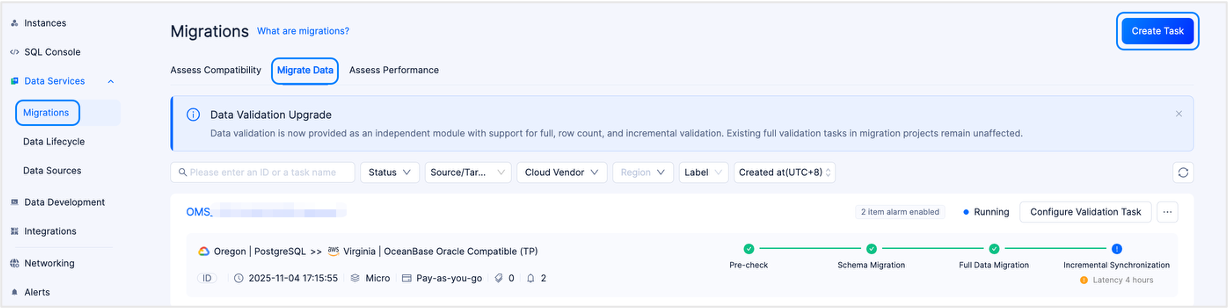
Log in to the OceanBase Cloud console.
In the left-side navigation pane, click Data Services > Data Migration.
On the Data Migration page, click the Data Migration tab.
On the Data Migration tab, click Create Task in the upper-right corner.
In the Edit Task Name text box, enter a custom name for the migration task.
We recommend that you use a combination of Chinese characters, numbers, and letters. The name must not contain spaces and must be no longer than 64 characters in length.
On the Configure Source & Target page, configure the parameters.
In the Source section, configure the parameters.
If you need to reference an existing and saved data source, you can click Quick Fill on the right side of Source and select the target data source from the drop-down list. After selection, the configurations in the source section will be automatically populated. If you want to save the current configuration as a new data source, click the Save icon in the upper-right corner of the Source area.
You can also click Manage Data Source in the Quick Fill drop-down list to go to the Data Source page to view and manage data sources. This page provides unified management for different types of data sources. For more information, see the documentation in the Data sources module.
ParameterDescriptionCloud Provider Currently supports Alibaba Cloud, AWS, and Google Cloud. Database Type Select PostgreSQL as the source database type. Instance Type - When the cloud provider is AWS, the supported instance types are RDS PostgreSQL, Aurora PostgreSQL, and Self-managed PostgreSQL.
- When the cloud provider is Google Cloud, the supported instance types are Cloud PostgreSQL and Self-managed PostgreSQL.
- When the cloud provider is Alibaba Cloud, the supported instance types are RDS PostgreSQL and Self-managed PostgreSQL.
Region Select the region where the source database is located. Connection Type Includes Endpoint and Public IP. For Alibaba Cloud, AWS, and Google Cloud, you can also select Peering Connection. - If you select Endpoint, add the account ID displayed on the page to the allowlist of your Endpoint service to allow connections from this account's endpoint to the Endpoint service. For more information, see Select Private Connection.
- When Cloud Vendor is set to AWS and Enable is selected for the Require Acceptance to Use Endpoint parameter when creating the Endpoint service, the Data Migration service prompts you to open the AWS console and perform the Accept endpoint connection request operation for the incoming request the first time it accesses the private connection.
- When the cloud provider is Google Cloud, add the authorized project to Published Services. After authorization, no further manual authorization is required when you test the data source connection.
- If you select Public IP, add the data source IP address displayed on the page to the allowlist of the PostgreSQL database instance to ensure connectivity. For more information, see Select Public Connection.
Note
The data source IP address to be added to the allowlist is displayed on the page only after you have selected the regions for the source and target.
- If you select Peering Connection, choose an available peering connection from the drop-down list. Add the IP address displayed on the page to the PostgreSQL instance's inbound security group rules or allowlist to ensure connectivity. For more information, see AWS peering connection, Alibaba Cloud peering connection, and Google Cloud peering connection.
Peering Connection ID This parameter is displayed only when Connection Type is set to Peering Connection. Select an available peering connection from the drop-down list. The list displays only connections that match the current cloud provider and region and are in the Connected state. It also displays the corresponding VPC ID and CIDR block. If no connection is available, click Create to open a new tab and create a data service peering connection. Connection Information - When Connection Type is set to Endpoint, enter the name of the Endpoint service.
- When Connection Type is set to Public IP, enter the IP address and port number of the database host.
- When Connection Type is set to Peering Connection, enter the private IP address or hostname and port number of the database host.
Database Name The name of the PostgreSQL database. Database Account The username of the PostgreSQL database user used for data migration. Password The password of the database user. In the Target section, configure the parameters.
If you need to reference an existing and saved data source, you can click Target on the right side of Quick Fill and select the target data source from the drop-down list. After selection, the configurations in the target section will be automatically populated. If you want to save the current configuration as a new data source, click the Save icon in the upper-right corner of the Target area.
You can also click Manage Data Source in the Quick Fill drop-down list to go to the Data Source page, where you can view and manage data sources. This page provides unified management for different types of data sources. For more information, see the Data sources topic.
ParameterDescriptionCloud Provider Currently supports Alibaba Cloud, AWS, and Google Cloud. You can choose the same cloud provider as the source or perform cross-cloud data migration. Note
The cross-cloud data migration feature is not currently available by default. To use this feature, contact OceanBase Cloud Technical Support.
Database Type Select the target database type as OceanBase MySQL Compatible or OceanBase Oracle Compatible based on your actual situation. Instance Type Currently supports Cluster Instance (Transactional) and Self-managed Database. Region Select the region where the target database will be located. Connection Type Includes Endpoint and Public IP. For Alibaba Cloud, AWS, and Google Cloud, you can also select Peering Connection. - If you select Endpoint, add the account ID displayed on the page to the allowlist of your Endpoint service to allow connections from this account's endpoint to the Endpoint service. For more information, see Select Private Network Connection.
- If you select Public IP, add the data source IP address displayed on the page to the allowlist of the OceanBase database instance to ensure connectivity. For more information, see Select Public Network Connection.
Note
This parameter is displayed only when the instance type is Self-Built Database. After you select the regions for the source and target, the data source IP address to be added to the allowlist is displayed on the page.
- If you select Peering Connection, choose an available peering connection from the drop-down list. Add the IP address displayed on the page to the OceanBase Database instance's inbound security group rules or allowlist to ensure connectivity. For more information, see AWS peering connection, Alibaba Cloud peering connection, and Google Cloud peering connection.
Peering Connection ID This parameter is displayed only when Instance Type is set to Self-managed Database and Connection Type is set to Peering Connection. Select an available peering connection from the drop-down list. The list displays only connections that match the current cloud provider and region and are in the Connected state. It also displays the corresponding VPC ID and CIDR block. If no connection is available, click Create to open a new tab and create a data service peering connection. Connection Information This parameter is displayed only when the instance type is Self-Built Database. - When Connection Type is set to Endpoint, enter the name of the Endpoint service.
- When Connection Type is set to Public IP, enter the IP address and port number of the database host.
- When Connection Type is set to Peering Connection, enter the private IP address or hostname and port number of the database host.
Instance The ID or name of the instance where the OceanBase database resides. You can view the ID or name of the target instance on the Instances page. Note
For Alibaba Cloud as the cloud provider, you can also select an Alibaba Cloud root account instance with cross-account authorization. For details, see Alibaba Cloud Account Authorization.
Tenant The ID or name of the tenant in the OceanBase database. You can expand the target instance on the Instances page to view the ID or name of the target tenant under that instance. Database Account The username of the OceanBase database user used for data migration. Password The password of the database user. When you select Instance Type as Self-managed Database, you can also decide whether to perform advanced settings based on your actual situation.
Notice
If the new migration task requires incremental synchronization, enable both the sys tenant account and the incremental log proxy service.
ParameterDescriptionsys Tenant Account After enabling the sys tenant account, you need to enter the sys account and password. - Sys Account: The name of the sys user. This user is mainly used to read incremental logs and database object structure information from OceanBase Database. Please create it under the sys tenant of the business cluster.
- Password: The password of the sys user.
Incremental Log Proxy Service After enabling the incremental log proxy service, you need to fill in the OBLogProxy Connection Information. This is a service provided by OceanBase Database's incremental log proxy service, offering access and management capabilities for real-time incremental projects, facilitating application access to OceanBase Database's incremental logs. It also addresses the need to subscribe to incremental logs when network isolation is in place. The format is OBLogProxy IP:OBLogProxy Port.
Click Test and Continue.
On the Select Type & Objects page, configure the parameters.
Note
Currently, migrating data from a PostgreSQL database to OceanBase Database in MySQL-compatible mode supports only unidirectional synchronization.
In the Migration Type section, select the migration type for the current data migration task.
Migration Type includes Schema Migration, Full Migration, and Incremental Synchronization.
ParameterDescriptionSchema Migration Schema migration requires you to define the character set mapping relationships yourself. Data migration only copies the data (schema) from the source database to the target database without affecting the source data (schema). Full Migration After a full migration task starts, the data migration service migrates the existing data in the source database tables to the corresponding tables in the target database. Incremental Synchronization After an incremental synchronization task starts, data migration synchronizes the changed data (newly added, modified, or deleted) in the source database to the corresponding tables in the target database. Incremental Synchronization includes DML Synchronization and DDL Synchronization, which you can configure as needed. For details, see Configure DML/DDL synchronization. In the Select Migration Objects section, configure the method for selecting migration objects.
You can select migration objects using either Specify Objects or Match by Rule.

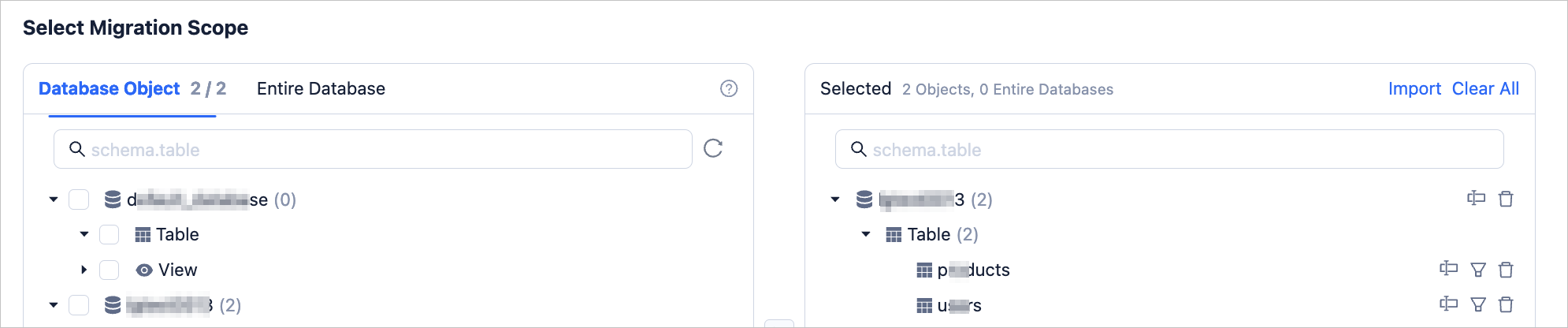
In the Select Migration Scope section, select the objects to migrate.
When you select Specify Objects, data migration supports Table-level and Database-level. Database table migration allows you to select one or more tables or views within a database as migration objects. Full database migration allows you to select an entire database as the migration object. If you select database table migration for a database, that database cannot be used for full database migration. If you select full database migration for a database, that database cannot be used for database table migration.
After selecting Table-level or Database-level, select the objects you want to migrate on the left and click > to add them to the list on the right.
Data migration supports importing objects via text, and you can perform operations such as renaming target objects, setting row filters, viewing column information, and removing single or all migration objects.
Note
When you select Full Database Migration, only the database name is displayed in the list on the right; specific objects are not supported.
OperationDescriptionImport Objects In the list on the right side of the selection area, click Import Object in the upper-right corner. For details, see Import migration objects. Rename Data migration supports renaming migration objects. For details, see Rename a database or table. Row Filter Data migration supports filtering rows using WHEREconditions. For details, see Filter data with SQL conditions. You can also view the column information of migration objects in the View Column section.Remove/Clear All Data migration supports removing one or more temporarily selected objects to the target during data mapping. - Remove a single migration object
In the list on the right side of the selection area, click the Remove icon next to the target object to remove it. - Remove all migration objects
In the list on the right side of the selection area, click Clear All in the upper-right corner. In the dialog box, click OK to remove all migration objects.
- Remove a single migration object
To select Match by Rule, see Configure database-to-database matching rules.
Click Next. On the Migration Options page, configure the parameters.
Full Migration
The following parameters are displayed only if you have selected One-way Sync > Full Migration in the Select Type & Objects step.
ParameterDescriptionRead Concurrency Configuration This parameter specifies the number of concurrent reads from the source during full migration. The maximum value is 512. A high concurrency may cause excessive load on the source and affect your business. Write Concurrency Configuration This parameter specifies the number of concurrent data writes to the target during full migration. The maximum value is 512. A high concurrency may cause excessive load on the target and affect your business. Whether to Limit Full Migration Rate You can decide whether to enable the full migration rate limit based on your actual needs. If enabled, set the Source Read RPS (the maximum number of rows that can be read from the source per second during full migration), Source Read BPS (the maximum amount of traffic that can be read from the source per second during full migration), Target Write RPS (the maximum number of rows that can be written to the target per second during full migration), and Target Write BPS (the maximum amount of traffic that can be written to the target per second during full migration). Note
The RPS and BPS set here are only for rate limiting. The actual achievable performance during full migration is subject to factors such as the source, target, and instance specifications.
Processing Strategy When Target Table Has Records Valid values: Stop Migration and Ignore. - If you select Stop Migration, an error is returned during full migration if the target table has data. In this case, you must handle the data in the target table before you can continue the migration.
Notice
If you click Resume after an error occurs, the data migration will ignore this configuration option and continue migrating table data. Proceed with caution.
- If you select Ignore, when the target table has data, if the original data conflicts with the data to be written, data migration logs the conflicting data and retains the original data unchanged during write operations.
Whether to Allow Post-indexing The post-indexing feature can shorten the time consumed by full migration. You can specify whether to allow indexes to be created after full data migration is completed. For considerations on selecting post-indexing, see the description below the table. Notice
This option is available only if you have selected both Schema Migration and Full Migration on the Select Migration Type page.
- Only non-unique key indexes support post-creation.
If post-indexing is allowed, we recommend that you adjust the following business tenant parameters using the command-line client tool based on the hardware conditions of your OceanBase database and the current business traffic.
// File memory buffer size limit ALTER SYSTEM SET _temporary_file_io_area_size = '10' tenant = 'xxx'; // Disable throttling for OceanBase Database V4.x ALTER SYSTEM SET sys_bkgd_net_percentage = 100;- If you select Stop Migration, an error is returned during full migration if the target table has data. In this case, you must handle the data in the target table before you can continue the migration.
Incremental Synchronization
The following parameters are displayed only if you have selected One-way Sync > Incremental Synchronization in the Select Type & Objects step.
ParameterDescriptionWrite Concurrency Configuration This parameter specifies the number of concurrent data writes to the target during incremental synchronization. The maximum value is 512. A high concurrency may cause excessive load on the target and affect your business. Whether to Limit Incremental Migration Rate You can decide whether to enable the incremental synchronization rate limit based on your actual needs. If enabled, set the Target Write RPS (the maximum number of data rows that can be synchronized to the target per second during incremental synchronization) and Target Write BPS (the maximum amount of traffic that can be synchronized to the target per second during incremental synchronization). Note
The RPS and BPS set here are only for rate limiting. The actual achievable performance during incremental synchronization is subject to factors such as the source, target, and instance specifications.
Incremental Synchronization Start Timestamp - If you selected Full Migration as the migration type, this parameter is not displayed.
- If you did not select Full Migration but selected Incremental Synchronization as the migration type, the default is the start time of incremental synchronization and cannot be modified.
Advanced Options
The parameters in this section are displayed only if the target OceanBase Database is V4.3.0 or later and you have selected Schema Migration in the Select Type & Objects step.

The storage types for target table objects include Default, Row Storage, Columnar Storage, and Hybrid Row-Column Storage. This configuration determines the storage type for target table objects during schema migration or incremental synchronization.
Note
The Default option adapts other options based on the target parameters. It writes the corresponding schema for schema migration table objects according to the specified storage type.
Click Pre-check to have the system perform a precheck on the data migration task.
During the Pre-check step, data migration checks whether the database user's read/write permissions, network connectivity, and other requirements are met. The data migration task can only be started after all checks pass. If the precheck fails:
You can troubleshoot and resolve the issue, then re-execute the precheck until it succeeds.
You can also click Skip in the Actions column for the failed precheck item. A dialog box appears, explaining the specific impact of skipping the operation. After confirming you can skip, click OK in the dialog box.
After the precheck passes, click Purchase to go to the Purchase Data Migration Instance page for purchase.
After a data migration task is purchased, you can start it. For purchase details, see Purchase a data migration instance. If you do not need to purchase a data migration instance for now, click Save to go to the data migration task details page, where you can manually purchase one later if needed.
You can click Configure Validation Task in the upper-right corner of the data migration details page to compare data differences between the source and target databases. For more information, see Create a data verification task.
The data migration service supports modifying migration objects during the execution of a data migration task. For more information, see View and modify migration objects. After a data migration task is started, it is executed in sequence according to the selected migration type. For more information, see the "View migration details" section in View the details of a data migration task.