The storage architecture of OceanBase Cloud supports two modes: Shared Nothing Architecture and Shared Storage Architecture, to meet the needs of different scenarios and applications. This topic provides a systematic introduction to the design principles, technical features, and suitable scenarios of these two architectures.
Overview
The storage architecture of OceanBase Cloud supports two modes: Shared Nothing Architecture and Shared Storage Architecture, to meet different scenarios and application requirements.
Architecture comparison
Feature |
Shared Nothing Architecture |
Shared Storage Architecture |
|---|---|---|
| Data access latency | Low latency, direct local access | Low latency when cache hit, higher latency when cache miss |
| Scalability | Good horizontal scalability | Good horizontal scalability, supports independent scaling of compute and storage |
| Data scale | Suitable for small and medium-sized data scenarios | Suitable for ultra-large data scenarios |
| Cost | Reduced storage costs through high compression in databases | Even lower cost, reduced storage costs through high compression in databases and shared storage architecture |
| O&M complexity | Easy to maintain, unified management | Cloud-native architecture, component-based services, more complex O&M |
| Disaster recovery capability | Comprehensive node-level disaster recovery capability | More comprehensive disaster recovery capability, offers single-replica, multi-replica, primary/standby, and cold standby solutions for high availability |
What is the Shared Storage Architecture
The Shared Storage Architecture refers to the architecture that multiple compute nodes in the cluster implement separated storage and compute based on shared storage technology. Compute and storage are decoupled and layered. Full data is stored in an object storage system. Each compute node locally caches hot data. The cache hit rate is generally less than 100%. For businesses that can clearly distinguish hot and cold data, the cache hit rate of shared storage is generally 99% to 99.9%. The latency of requests that hit the cache is the same as that of the Shared Nothing Architecture. However, a small number of requests still read data from the object storage system. The latency of accessing the object storage system is more than 80 ms. Businesses must tolerate some latency jitter. This architecture is not suitable for businesses that are highly sensitive to latency jitter. Compared with the Shared Nothing Architecture, this architecture reduces storage costs and allows independent scaling of compute and storage resources, offering greater flexibility. For more information, see OceanBase Database architecture.
Advantages of the architecture
- Low costs:
- Reduces storage costs by using inexpensive object storage as the primary storage medium.
- Implements high availability based on single replicas by high availability separation of data storage and compute.
- Elastic resource management: Storage resources and compute resources can be independently scaled, making better use of hardware resources. Compute resources can be horizontally scaled in or scaled out without physically migrating data.
- High availability: RPO = 0, single-replica RTO is in minutes, multi-replica RTO <= 8s.
Technical features
- Independent scaling: Compute resources and storage resources can be independently scaled to meet business needs.
- High availability: The storage layer typically uses a distributed storage system, offering higher data reliability and disaster recovery capabilities.
- Resource isolation: Compute tasks and storage tasks are independent, reducing resource contention and improving overall system stability.
- Elastic scaling: Compute and storage are decoupled, reducing storage costs compared to the Shared Nothing Architecture. This allows independent scaling in compute and storage, offering greater flexibility.
Scenarios
The architecture is suitable for scenarios involving large amounts of data with significant hot/cold data separation, where latency jitter is not a concern.
TP
Supports the storage of complex query and analysis data from historical databases, backup databases, order databases, billing databases, message databases, access footprint databases, log databases, and IoT monitoring data. For example, banks must retain years of historical data to meet regulatory compliance requirements. By using OceanBase shared storage to manage these data, storage costs can be significantly reduced.
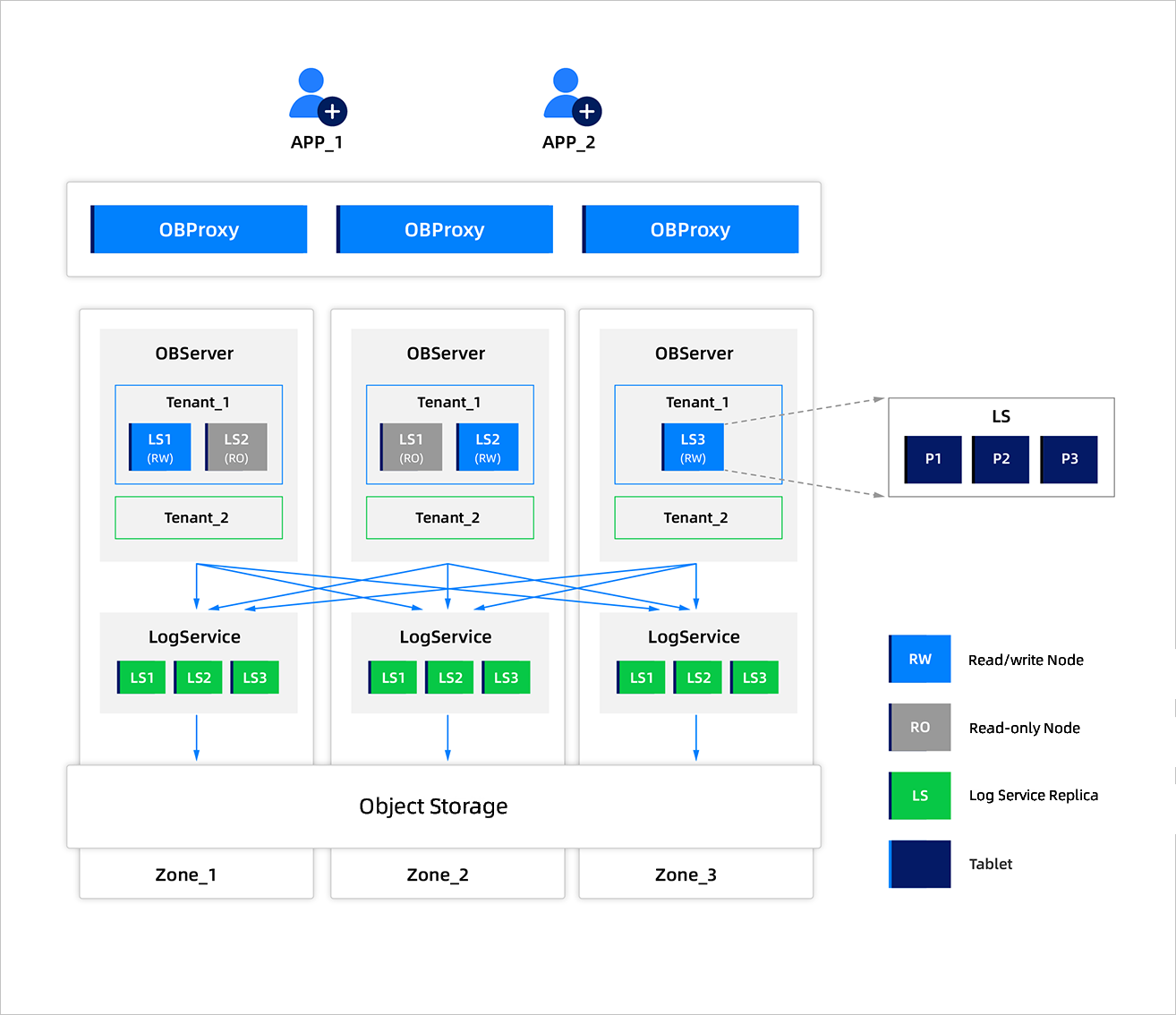
High availability is required in this scenario, ensuring zero data loss in case of disasters. When an IDC or AZ fails, RPO = 0 and RTO < 8s are required. Low latency is also required for data reads, with cold data stored locally and hot data cached. Automatic hot/cold separation and manual hot data rules are supported.
The following example shows a three-replica deployment. The corresponding instances are dedicated instances that support multiple tenants, with storage billed by the amount used.
AP
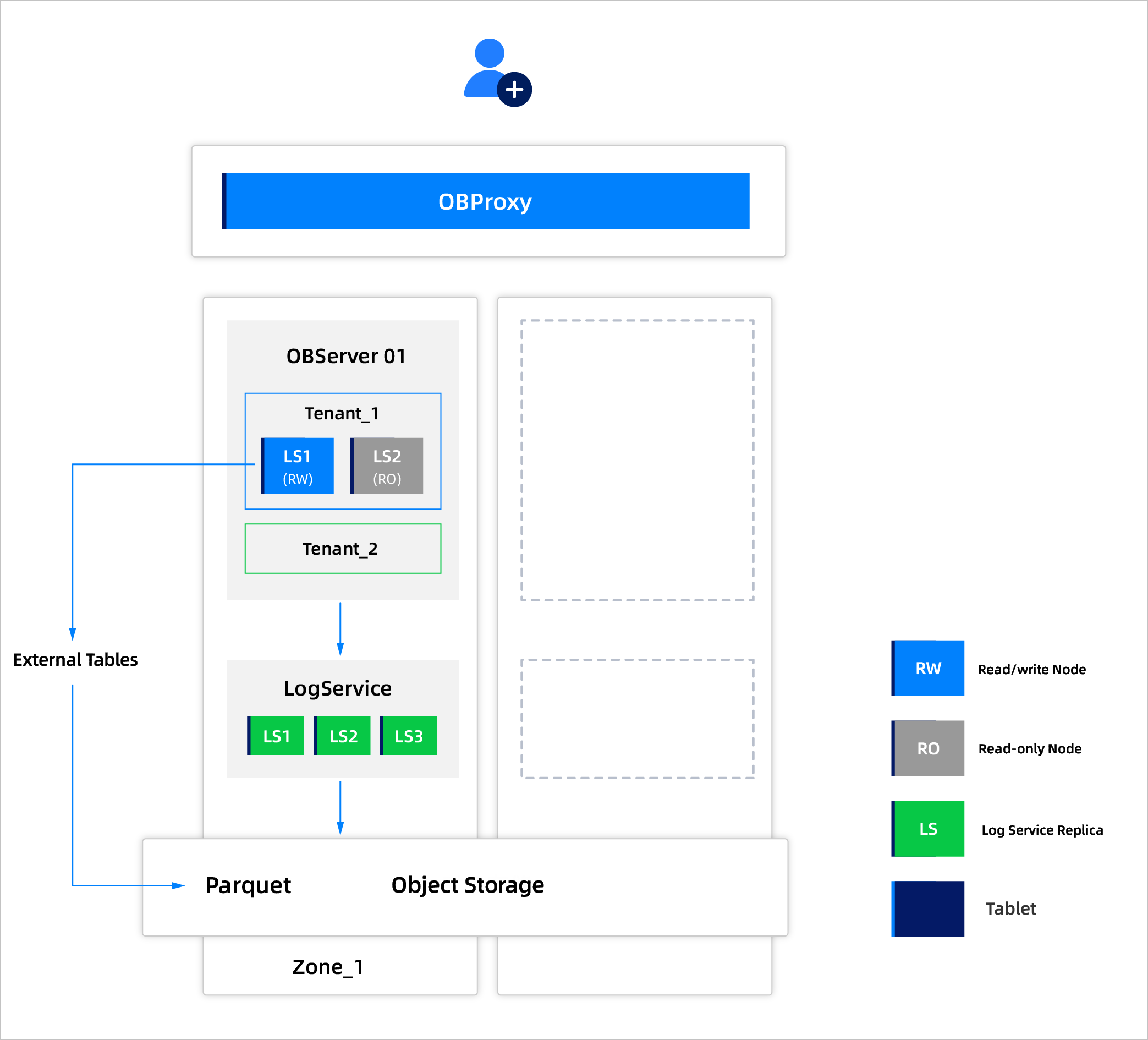
Supports the cost-effective storage and analysis of massive amounts of data for lakehouse businesses. For example, internet companies and social media platforms generate massive amounts of user behavior data every day and display real-time leaderboards.
High availability is not a high priority in this scenario, with RPO > 0 and RTO of about 10 minutes required when an IDC or AZ fails. High throughput is also required, with queries being insensitive to latency. Local caching is required for hot data, and automatic hot/cold separation and manual hot data rules are supported.
The single-replica deployment mode for shared AP tenant instances is as follows. This mode involves deploying a single zone and horizontally scaling out or scaling in by adding or removing tenant units within the zone. Object storage can be configured for city-region redundancy or local redundancy. In this deployment mode, RPO = 0 and RTO is in minutes when a single OBServer node fails, and RPO = 0 and RTO is in minutes when an AZ fails.
KV
Supports the storage and querying of massive amounts of data. For example, user behavior logs are stored and analyzed, collecting data on user clicks, browsing, and searches.
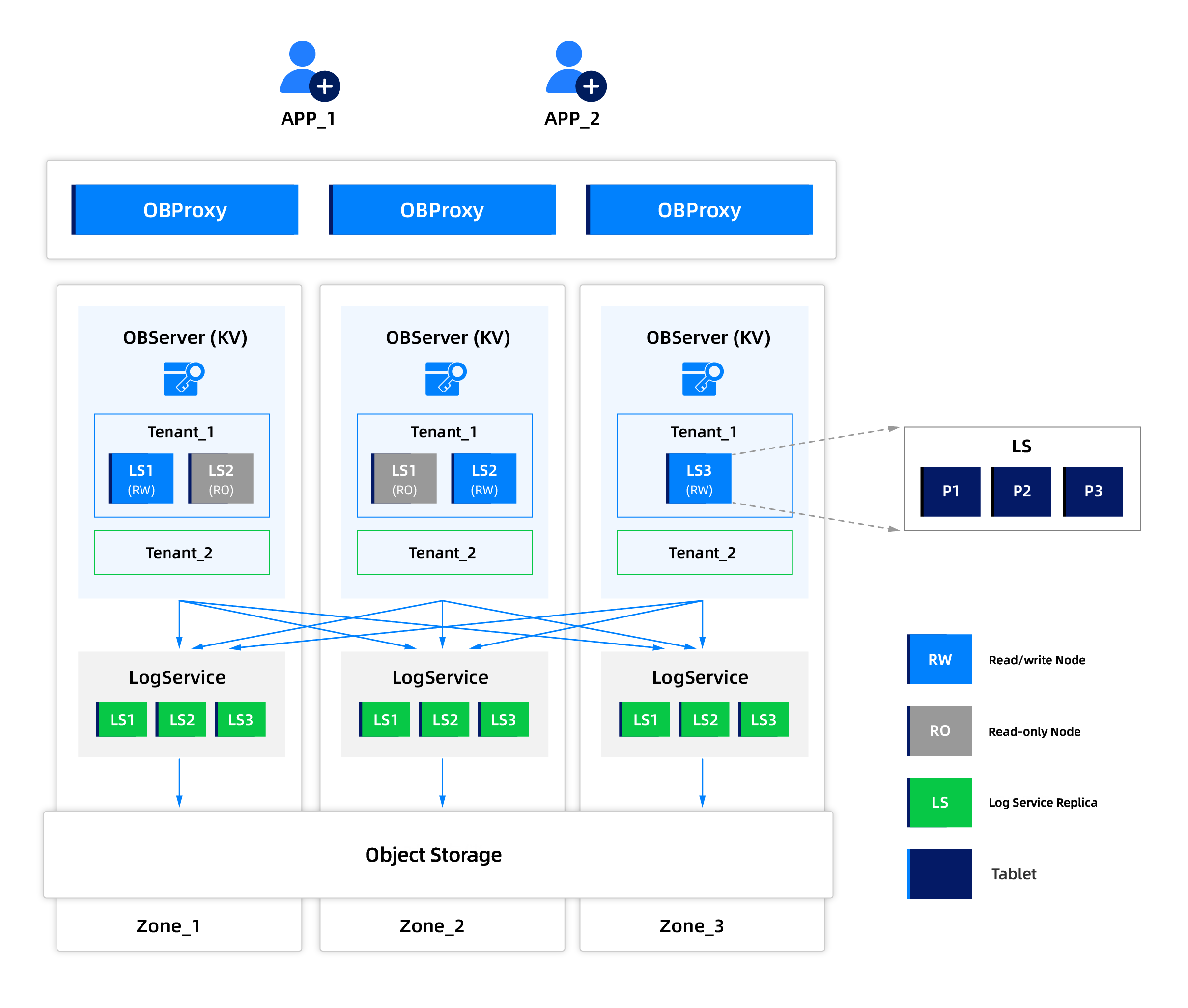
High availability is not a high priority in this scenario, with RPO > 0 and RTO of about 10 minutes required when an IDC or AZ fails. Queries are infrequent and insensitive to latency. Local caching is required for hot data, and automatic hot/cold separation and manual hot data rules are supported. This allows for more cost-effective storage of wide tables and key-value data.
The following example shows a deployment mode with three replicas. The corresponding instances are dedicated instances that support multiple tenants, and storage is billed on a pay-as-you-go basis.
What is the Shared Nothing Architecture
The Shared Nothing Architecture refers to the integration of storage and compute resources on the same node, enabling local data processing and reducing transmission overhead. This architecture simplifies maintenance and management, improves compute efficiency, and reduces node-to-node communication overheads.
In OceanBase Database, this architecture is known as the Shared-Nothing (SN) multi-level cache architecture. Its cache design is significantly different from that of Oracle or MySQL. The storage engine in OceanBase Database is based on the LSM-Tree, where all modifications are written to MemTables, and SSTables are read-only. This means OceanBase Database operates with a read-only cache and lacks the logic for dirt page flushes, making it simpler compared to conventional databases. However, OceanBase Database applies data encoding and compression to the data stored in SSTables, making the data variable-length instead of fixed-length. This significantly complicates cache memory management in OceanBase Database compared to conventional databases. Additionally, OceanBase Database is a multi-tenant distributed database system. In addition to managing cache memory evictions, as in conventional databases, OceanBase Database also needs to handle multi-tenant memory isolation within the cache. For more information, see Multi-level caching in shared-nothing architecture.
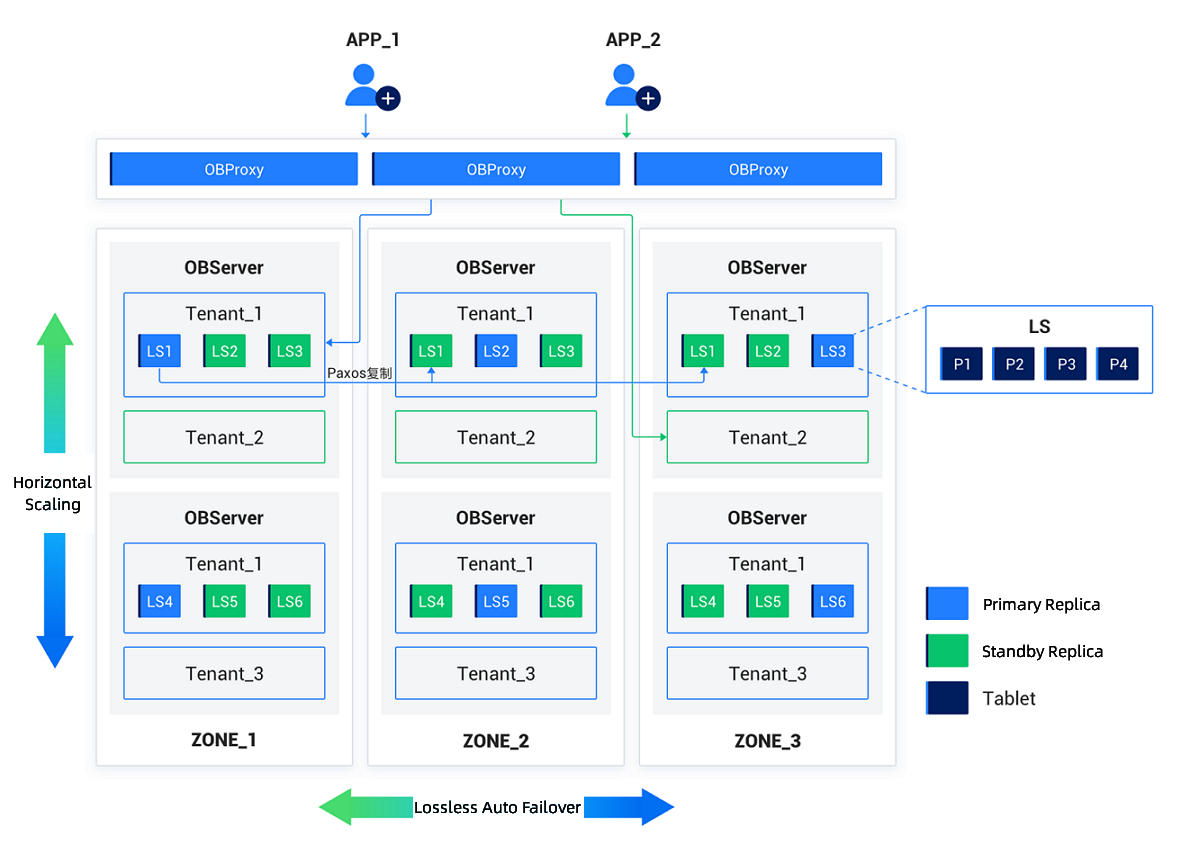
Technical characteristics
- Data localization: Computes directly accesses data on local nodes, reducing latency.
- High performance: Since data storage and compute are integrated at the same node, the network overhead is avoided when data is transferred between storage and compute.
- Scalability: By adding nodes, the system can scale out the storage and compute, making it suitable for small to medium-sized clusters or data volumes.
- Ease of management: The integrated data and compute resource management simplifies the architectural complexity.
Scenarios
Small to medium-sized database clusters:
- In scenarios with a limited amount of data and frequent read and write operations where low latency is required, the Shared Nothing Architecture has obvious advantages.
- This architecture is ideal for applications such as internet-based services and internal enterprise systems, where quick responses are crucial.
Resource-constrained environments:
- When resources are limited, this architecture helps avoid extra cross-node network overheads, thereby enhancing overall resource efficiency.
The following describes the various types of instances:
TP
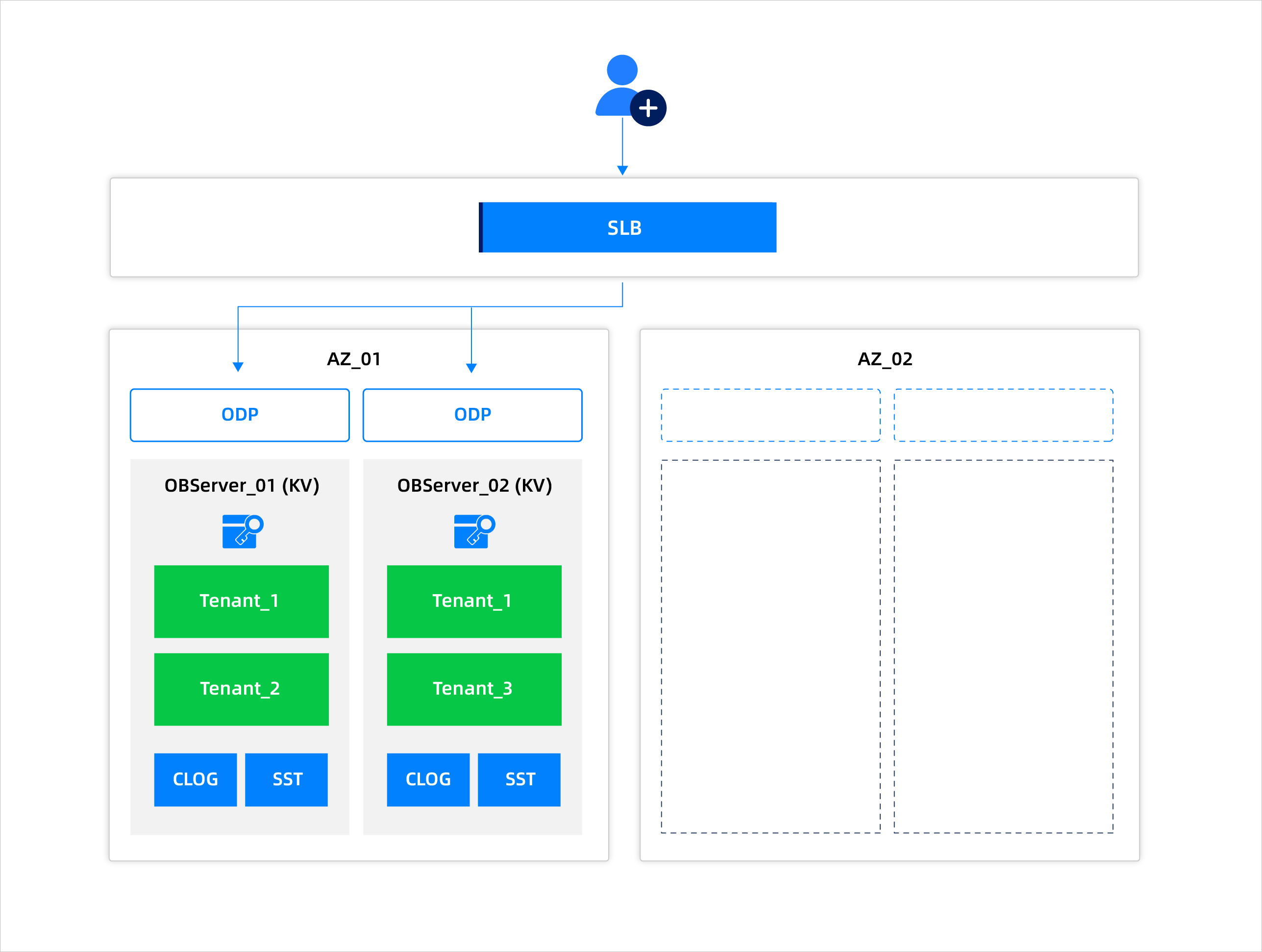
A 2F1A deployment example is given here. This deployment uses two replicas and a shared arbitration service node. The corresponding instance is a dedicated instance in a cluster that supports multi-tenancy and on-demand billing.
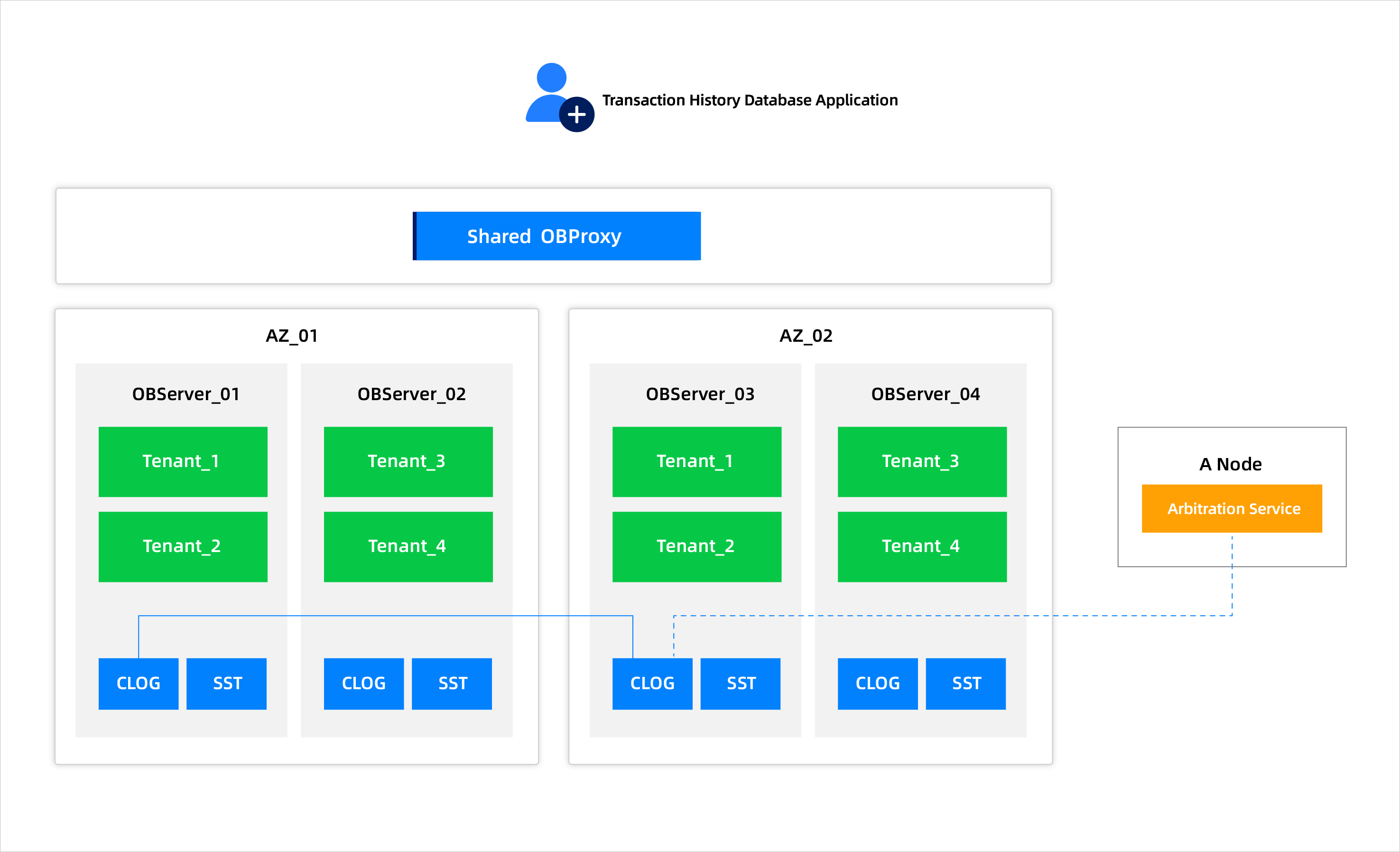
AP
This deployment mode is for a single IDC with dual replicas. You can scale the system horizontally by adding or removing tenant OBServer nodes. The object storage can be deployed in either intra-region redundancy or local redundancy. In this deployment mode, when an OBServer node fails, the RPO is 0, and the RTO is at the minute level. When an AZ fails, the RPO is 0, and the RTO is in the range of several minutes.
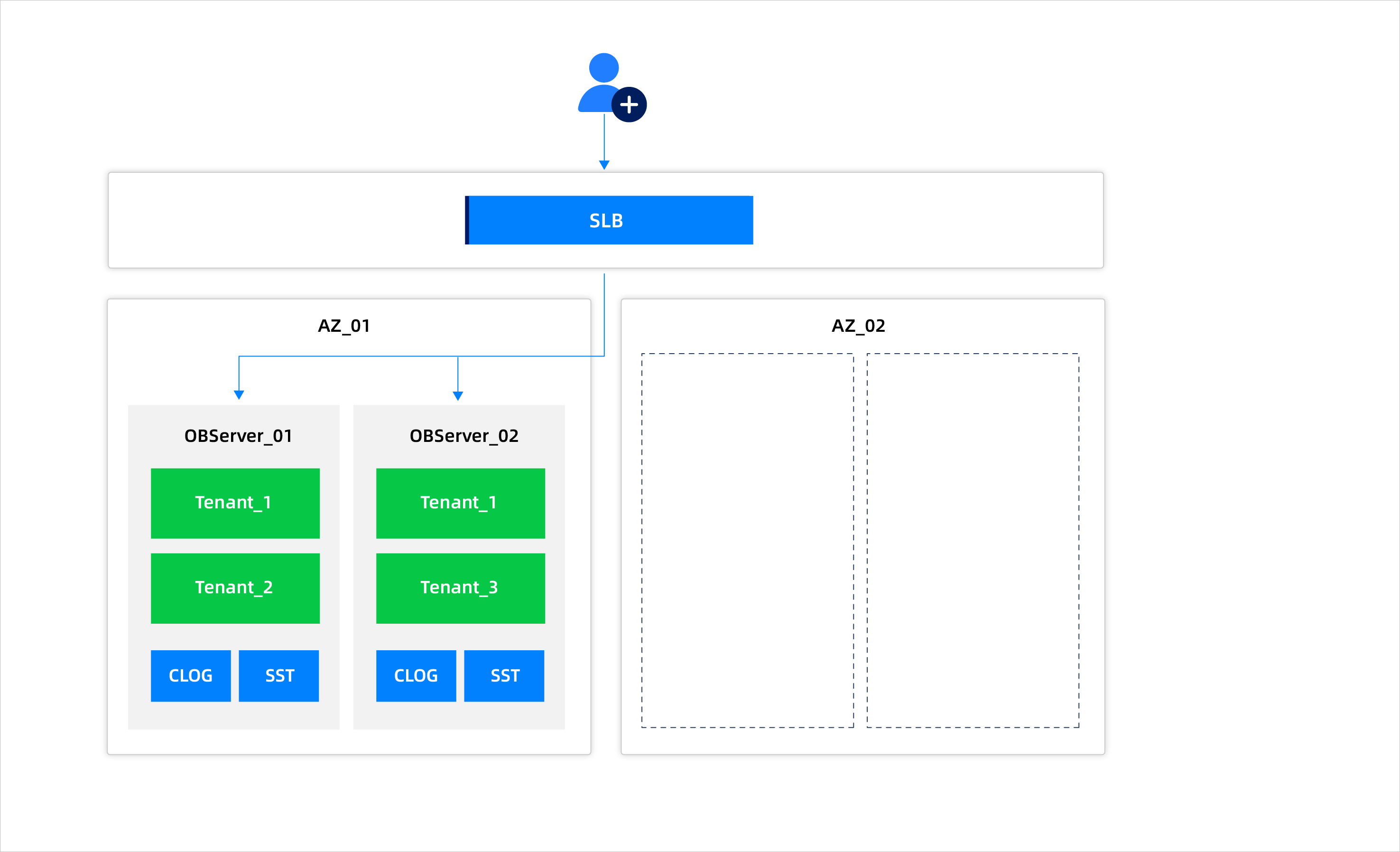
KV
The deployment of this type is two-replica deployment in one IDC. The horizontal scale-up and scale-down of the cluster is achieved by adding or deleting a tenant unit. The objects can be stored in the same city with cross-region redundancy or the same region with cross-IDC redundancy. In this type of deployment, when an OBServer node fails, RPO = 0 and RTO is at the minute level. When an AZ fails, RPO = 0 and RTO is at the minute level. In this case, a dedicated cluster instance is created. The dedicated cluster instance supports multi-tenant deployment.