







This topic describes how to create an account for a database user in a tenant.
Prerequisites
You have created an instance. For more information, see Create an instance.
You have created a tenant. For more information, see Create a tenant.
Procedure
Log in to the OceanBase Cloud console.
In the left-side navigation pane, click Instances.
In the instance list, click the name of the target cluster instance to go to the Overview page of the instance.
In the left-side navigation pane, click Tenants.
In the tenant list, click the ... icon in the row of the target tenant and select Create Account.
Configure the following parameters.
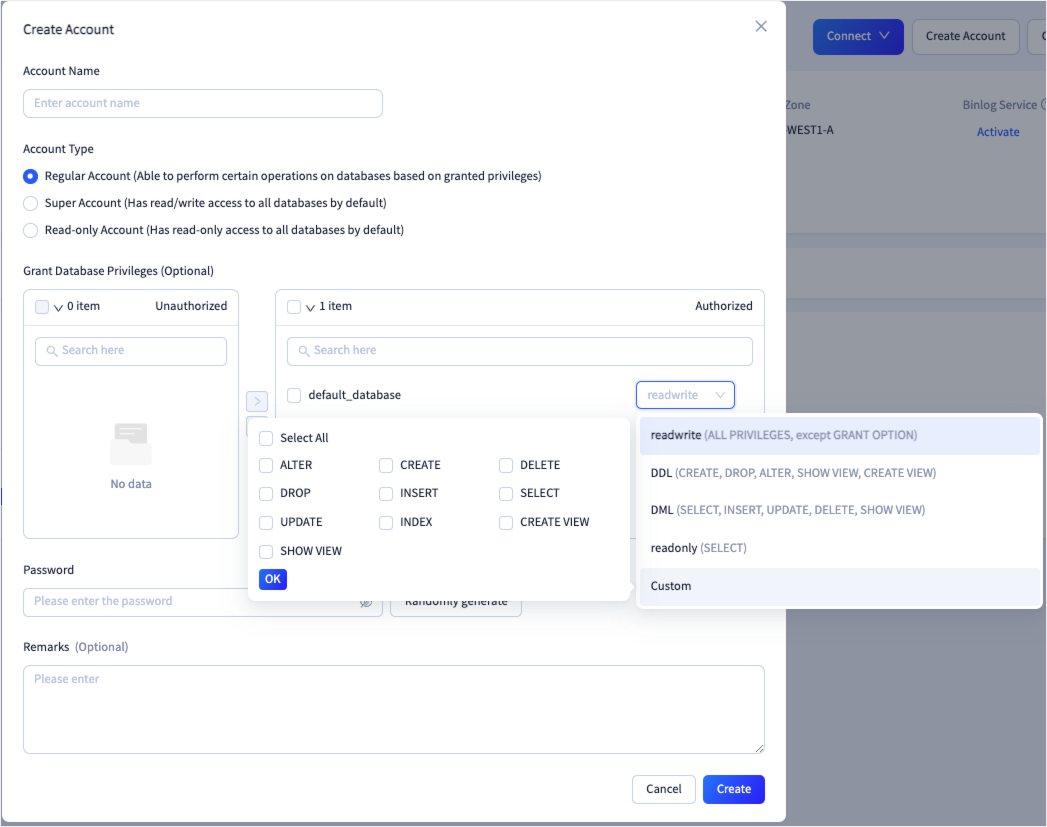 ParameterDescription
Account Name The name of the account. The account name must start with a lowercase letter and be 2 to 32 characters in length. It can contain uppercase letters, lowercase letters, hyphens (-), underscores (_), and digits, and cannot contain reserved keywords (case-insensitive), such as SYS, OCEANBASE, ROOT, OPERATOR, LBACSYS, ORAAUDITOR, OBMIGRATE, OMC, IDB_DDL, ODC_RND, ODC_DDL, and DWEXP. Account Type The type of the account. Valid values for MySQL-compatible tenants: Regular Account,Super Account, andRead-only Account. Valid values for Oracle-compatible tenants:Regular AccountandSuper Account.- A regular account has the privileges to execute DML and DDL statements in the database. For more information, refer to Account privileges.
- By default, the super account has read/write privileges on all databases.
- By default, a read-only account has the read privilege on all databases.
Note
DML statements access and manipulate data in existing schema objects. DDL statements create, alter, and drop schema objects. For more information, refer to SQL statement overview.
Grant Database Privileges This parameter is displayed only when you create a regular account in a MySQL-compatible tenant. You can grant privileges of the following types to an unauthorized account: Custom, readonly, readwrite, DDL, and DML.
You can grant the following database privileges to an account in the MySQL compatible mode:- Custom: ALTER, CREATE, DELETE, DROP, INSERT, SELECT, UPDATE, INDEX, CREATE VIEW, and SHOW VIEW. You can select multiple privileges.
- readonly: CREATE SESSION, SELECT, and SHOW VIEW.
- readwrite: all privileges except GRANT OPTION.
- DDL: CREATE, DROP, ALTER, SHOW VIEW, and CREATE VIEW.
- DML: SELECT, INSERT, UPDATE, DELETE, SHOW VIEW, and PROCESS.
Password The password of the account. The password must be 8 to 32 characters in length and contain at least two uppercase letters, two lowercase letters, two digits, and two special characters. Supported special characters are ~!@#%^&*_-+=\|(){}[]:;,.?/".Randomly generate If you click this button, the system automatically generates a password. You need to copy and keep the password confidential. Remarks (Optional) Additional information about the account. The remarks cannot exceed 30 characters in length. Click Create.