







In addition to supporting multiple cloud vendors, OceanBase Cloud now offers cross-cloud primary-standby database capabilities to meet the business needs of cross-cloud disaster recovery.
The cross-cloud primary-standby database feature has the following characteristics:
Stronger disaster recovery capabilities: By deploying the primary-standby databases in geographically separated regions, the system can effectively resist regional disasters such as natural disasters and data center failures. If the primary database on one cloud vendor experiences an issue, the standby database on another cloud vendor can quickly take over, minimizing business interruption.
Improved service availability: Cross-cloud deployment reduces the risk of service disruptions caused by internal issues within a single cloud vendor. If a cloud platform encounters a failure, the system can quickly switch to the standby database on another cloud, ensuring business continuity.
Cost-effectiveness: While cross-cloud deployment may introduce some management complexity and data synchronization costs, the flexibility to allocate resources across different cloud vendors allows enterprises to better balance costs and service quality.
Concepts
Global endpoint
The global endpoint is a single endpoint that can be used to access both the primary-standby databases. This configuration allows the system to route requests to the standby database without changing the application's connection endpoint when the primary database fails, minimizing the need for invasive changes to the application's address management and ensuring high availability for the business.
When the primary database is running normally, the global endpoint points to the primary database.
If the primary database fails, after you click Initiate Failover, the requests are switched to the standby database (which becomes the new primary database), and the primary database triggers a decoupling action.
Data synchronization methods
OceanBase Cloud supports two data synchronization methods for cross-cloud primary-standby databases: direct network connection and log archiving.
Direct network connection
The direct network connection method establishes a network connection between the VPCs of the primary-standby databases. Transaction logs are transmitted in real-time from the primary database to the standby databases using the Log Transport Service (LTS). The standby databases then apply these logs to their memory (MemStore) using the Log Replay Service (LRS), achieving data synchronization between the primary-standby databases. This method is characterized by low latency, high reliability, and strong security.
Working principle: The primary database provides read and write services. The standby databases synchronize data in real-time using redo logs, ensuring data consistency. The primary database connects directly to the standby databases through a VPC network, dedicated line, or public internet to achieve data synchronization.
Log archiving
The log archiving method involves the primary database periodically archiving transaction logs to the Object Storage Service (OSS). The standby databases then read these archived logs from OSS and apply them locally, achieving data synchronization and maintaining data consistency.
Applicable scenarios: This method is suitable for scenarios where a certain tolerance for data synchronization latency is acceptable and where cost efficiency is a priority. It is commonly used in non-real-time scenarios such as data backup, report analysis, and read/write separation.
Comparison of the two methods
Aspect |
Direct network connection |
Log archiving |
|---|---|---|
| Primary-standby synchronization latency | Milliseconds | Seconds |
| Standby database read/write separation | Supported | Not supported |
| Cost | Relatively high (cross-cloud private network channel) | Relatively low (cross-cloud object storage access) |
Architecture patterns
Cross-cloud primary-standby architecture supports two patterns: one-primary-one-standby, and one-primary-multi-standby. The one-primary-one-standby pattern is suitable for standard disaster recovery scenarios, while the one-primary-multi-standby pattern provides higher disaster recovery redundancy and availability.
One-primary-one-standby
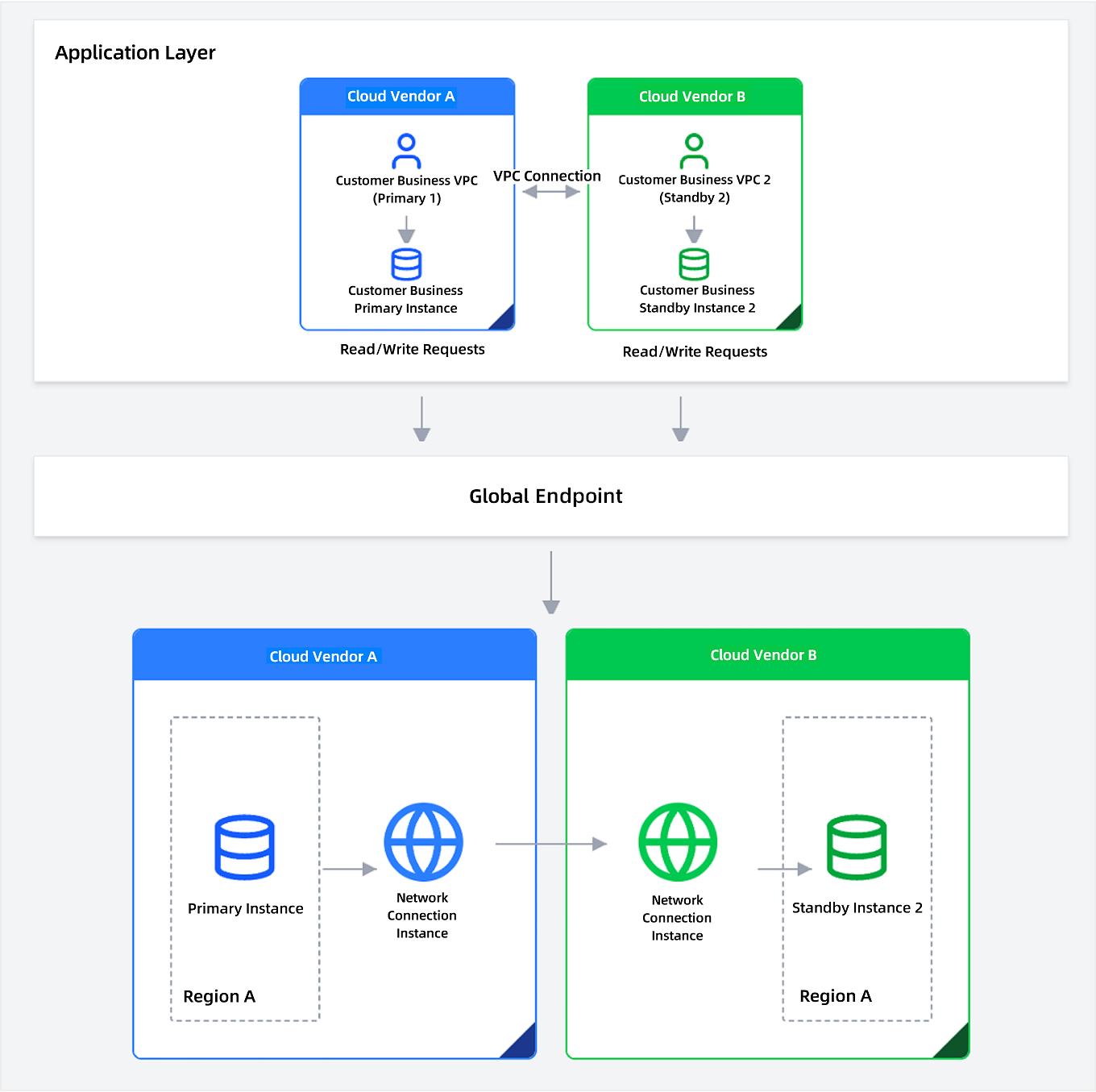
The one-primary-one-standby pattern uses a dual-cloud primary-standby architecture, consisting of a primary cloud (Cloud A) and a standby cloud (Cloud B). This design ensures high availability and disaster recovery.
Deployment method: Deploy a primary database in Cloud A and a standby database in Cloud B to establish a cross-cloud one-primary-one-standby relationship.
Application connection method: Business instances connect to their respective cloud vendor's OceanBase instance through a VPC network, or access through a global endpoint to ensure automatic traffic routing during failover.
One-primary-multi-standby
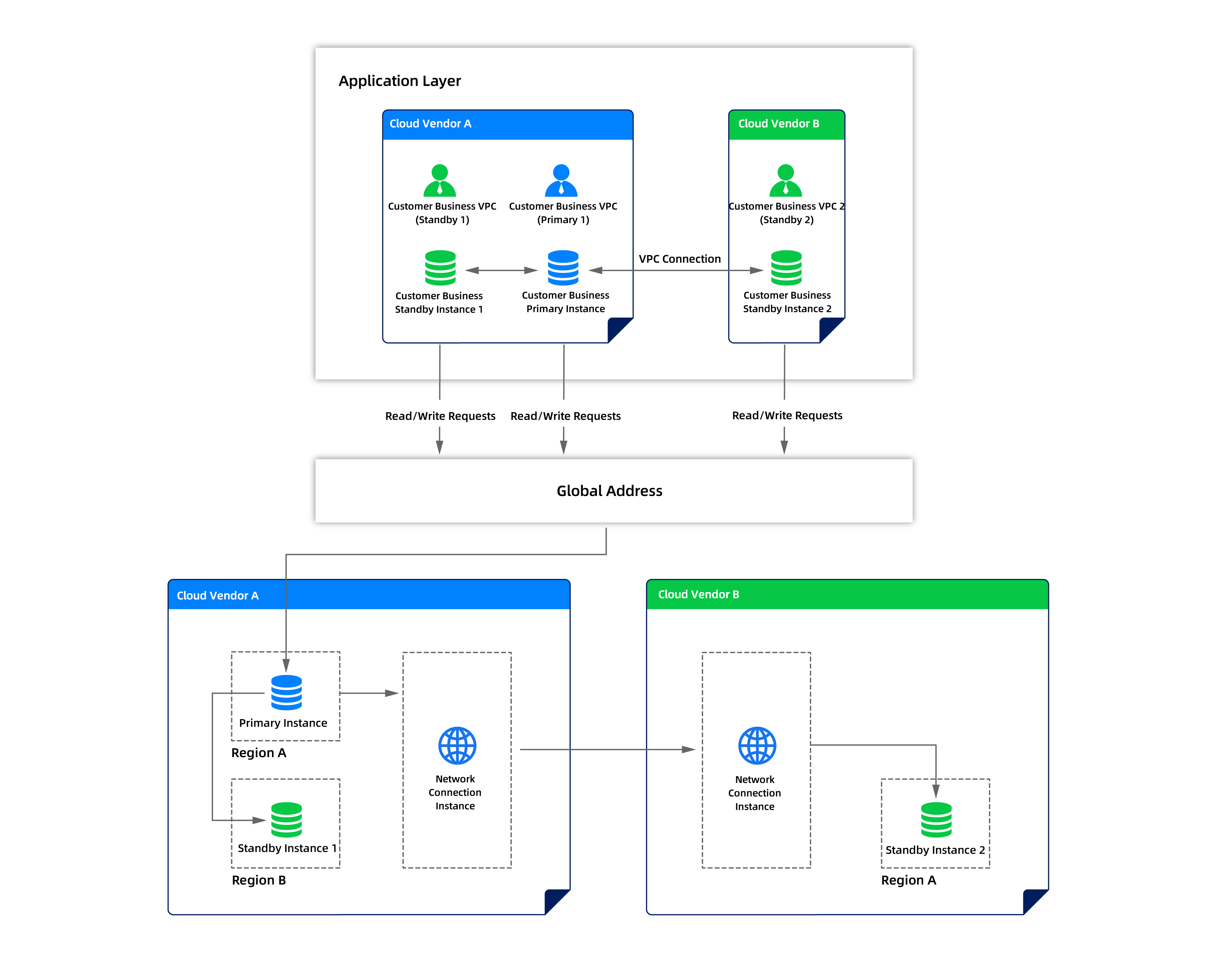
The one-primary-multi-standby pattern allows for multiple standby databases to be configured with a single primary database, providing higher disaster recovery redundancy and availability.
Deployment method: Deploy the primary database and multiple standby databases across different cloud vendors or regions, connecting them through cross-cloud networks to synchronize data. This forms a cross-cloud one-primary-multi-standby disaster recovery architecture. The primary-standby databases can be flexibly distributed across multiple cloud vendors, enhancing disaster recovery redundancy. Business applications access through a global endpoint, and the system automatically routes requests based on the primary/standby status, allowing for disaster recovery switching without changing the connection address.
Application connection method: Multiple business instances connect to their respective cloud vendor's OceanBase instance through a VPC network, accessing through a global endpoint to ensure automatic traffic routing during failover. If the primary database fails, the system selects one of the standby databases as the new primary, and the global endpoint automatically points to the new primary, enabling seamless business switching.
Standby database selection strategy: The disaster recovery switching feature automatically ensures that all candidate standby databases are in sync and available. Regardless of which standby database is selected as the new primary, the system synchronizes its data to the largest synchronization point among all standby databases and ensures they are in a normal operational state.
When initiating a disaster recovery switch, users need to select an appropriate new primary database based on the following factors:
- Geographic location: Consider network latency and business proximity, prioritizing standby databases closer to the business application.
Disaster recovery
Cross-cloud primary-standby databases provide two types of disaster recovery capabilities: disaster recovery switching and primary-standby switching. This ensures that business can be quickly restored when the primary database fails.
Disaster recovery switchover
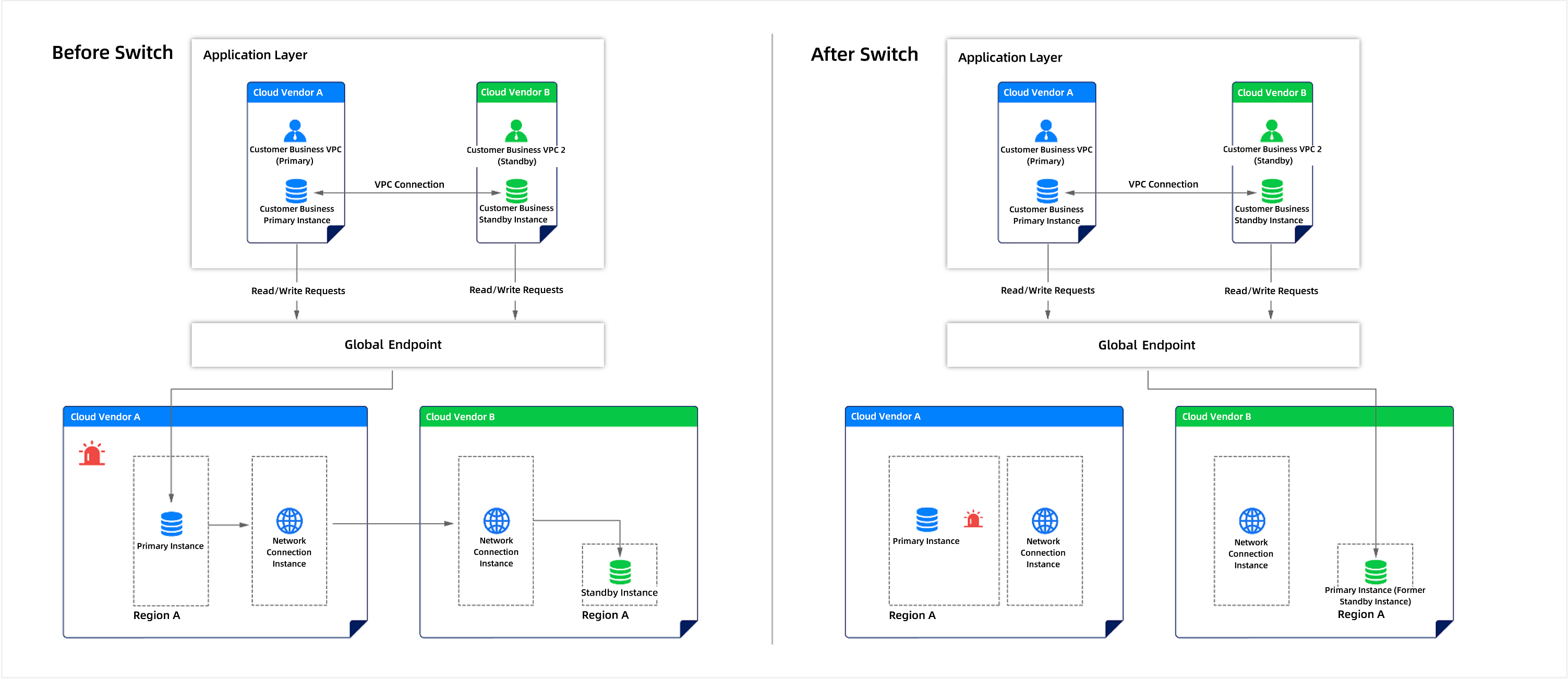
Disaster recovery switchover refers to the process where, after a failure occurs in the primary database, the system automatically switches the business traffic to the standby database. In a normal primary-standby mode, the primary database mainly handles the business traffic, while the standby database synchronizes data from the primary database but does not handle business traffic, serving only as a disaster recovery preparation. Global endpoints work in conjunction with disaster recovery switchover to achieve high availability and disaster recovery capabilities, ensuring that the business does not experience any interruption.
Disaster recovery switchover in the one-primary-one-standby architecture
Process |
Description |
|---|---|
| Normal operation | The primary database processes business traffic.
|
| Normal operation | The standby database serves as a disaster recovery environment
|
| Disaster recovery switchover | Primary database failure
|
| Disaster recovery switchover | Standby database becomes the primary database
|
| Disaster recovery switchover | Standby database handles business read/write operations
|
| Post-disaster recovery switchover | The customer's business can continue to operate with high availability. |
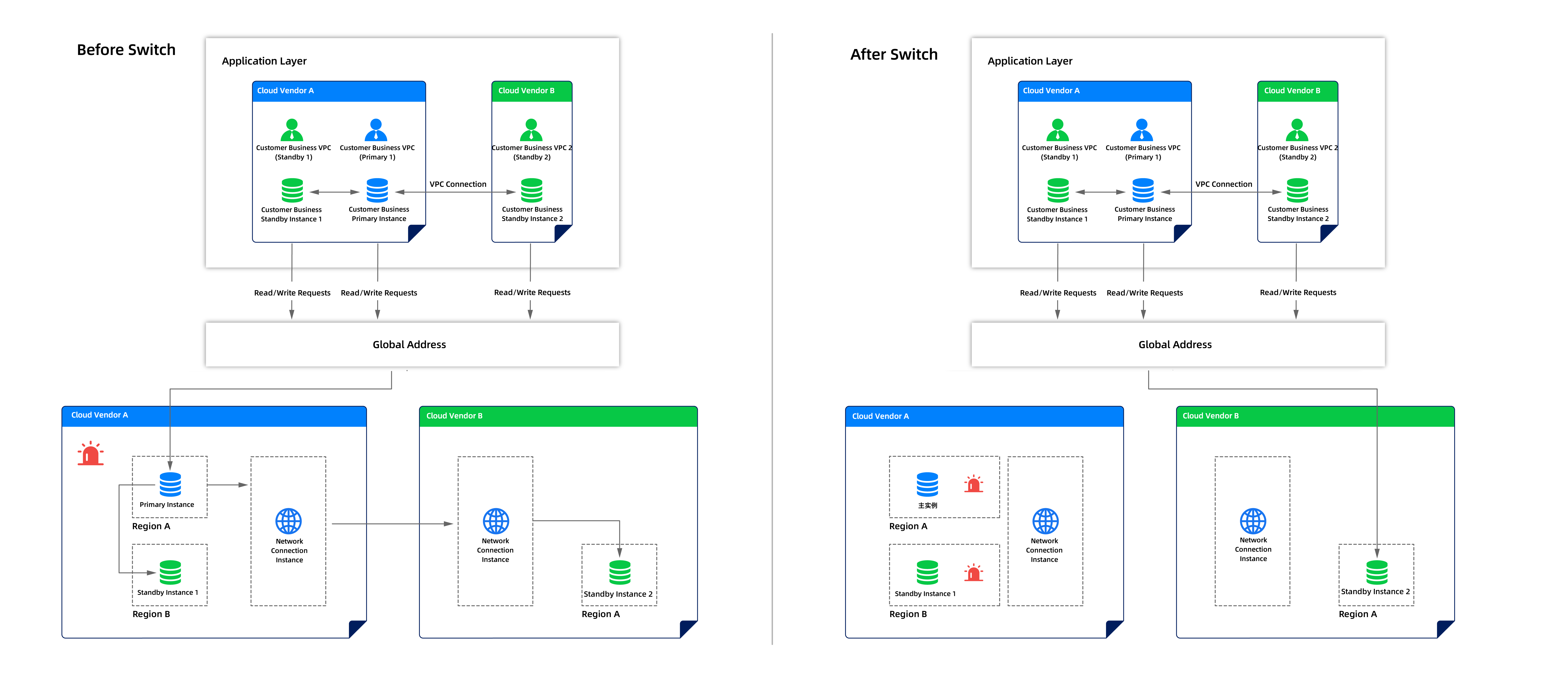
Disaster recovery switchover in the one-primary-multi-standby architecture
- When a cloud vendor fails
- When a region fails
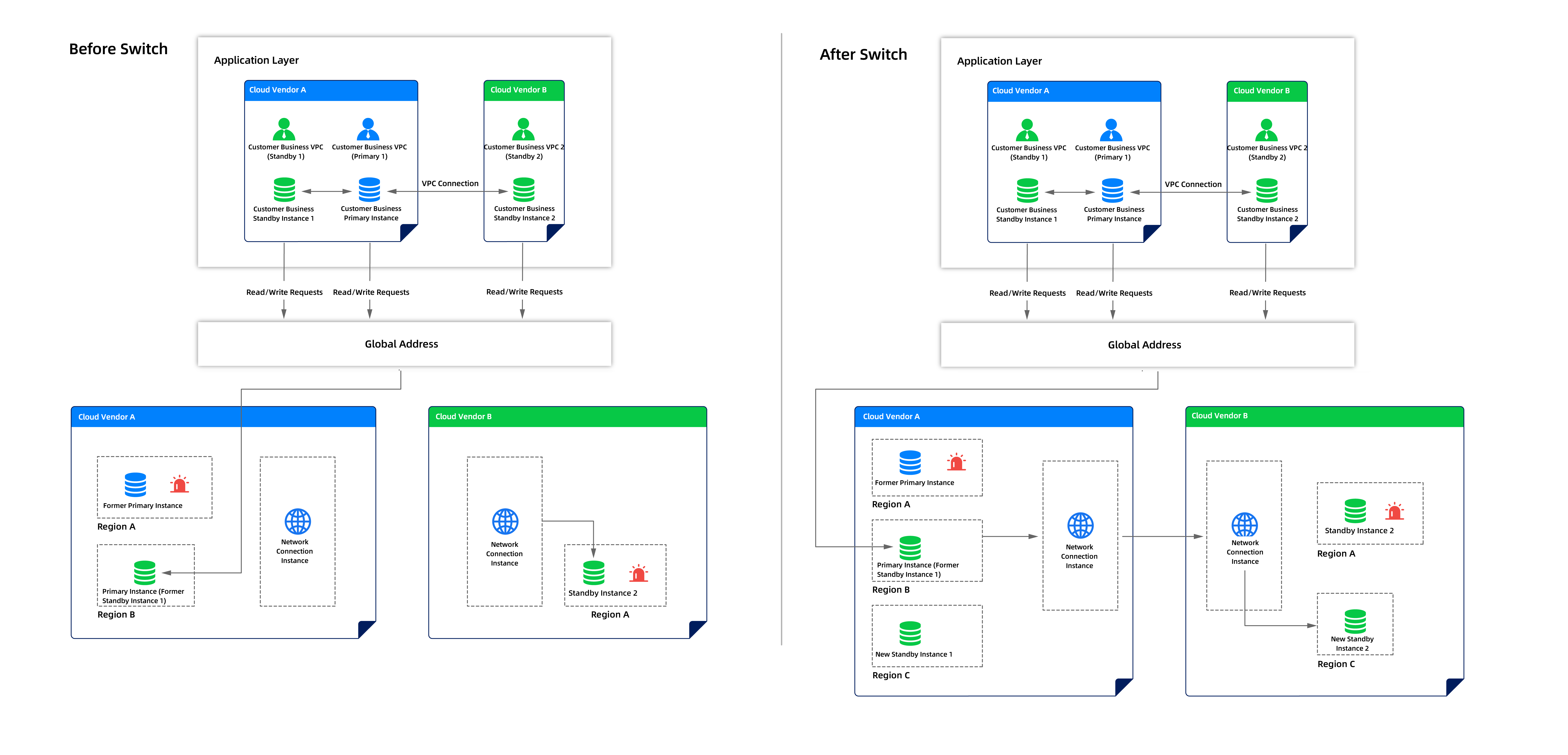
Process |
Description |
|---|---|
| Normal operation | The customer's business system operates across multiple business VPCs.
|
| Normal operation | Database architecture and operations
|
| Disaster recovery switchover | Primary database failure
|
| Disaster recovery switchover | Select the optimal standby instance to take over production traffic from multiple standby instances
|
| Disaster recovery switchover | New primary database handles business read/write operations
|
| Post-disaster recovery switchover | The customer's business can continue to operate with high availability. |
Primary-standby switching
Primary-standby switching refers to the scenario where the standby database takes over the business operations when the primary database fails. The standby database quickly becomes the new primary database, and the business can resume without any noticeable impact. Real-time data synchronization is implemented between the primary-standby databases to ensure data consistency. The global endpoint resolution works in conjunction with primary-standby switching to automatically route traffic. In the event of a single point of failure (such as a primary database failure), disaster recovery switching is performed to maintain business continuity, achieving high availability and disaster recovery capabilities.
Primary-standby switching in the one-primary-one-standby architecture
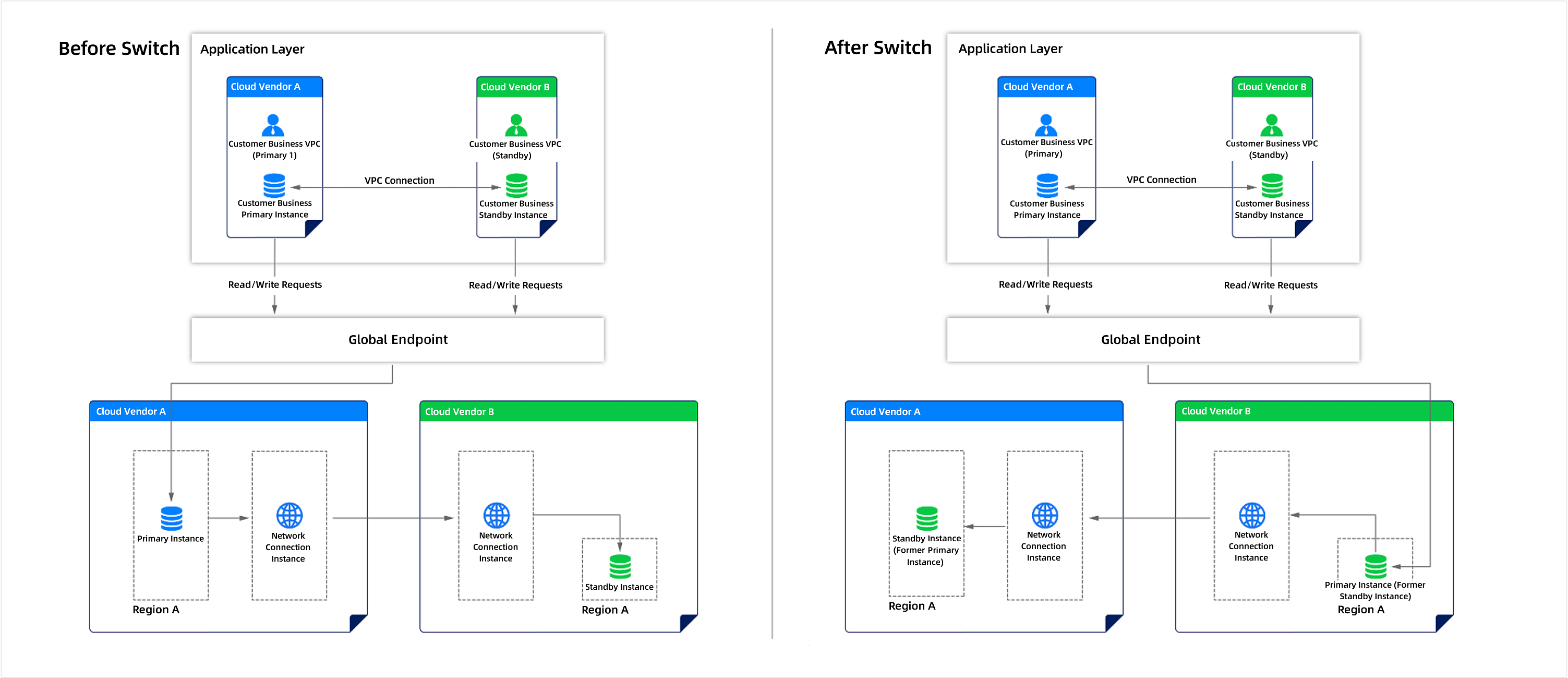
Process |
Description |
|---|---|
| Normal operation | The customer's business system runs in two business VPCs.
|
| Normal operation | Database architecture and operations
|
| Normal operation | Global endpoint resolution
|
| Normal operation | The primary database regularly backs up and archives logs to the backup environment. |
| Primary-standby switching | Primary database failure
|
| Primary-standby switching | Standby database takes over production traffic
|
| Primary-standby switching | New backups are established. After the primary-standby switch is completed, new standby environments may be deployed to restore the primary-standby architecture to its normal state. |
| Post-primary-standby switching | The customer's business can continue to operate with high availability. |
Primary-standby switching in the one-primary-multi-standby architecture
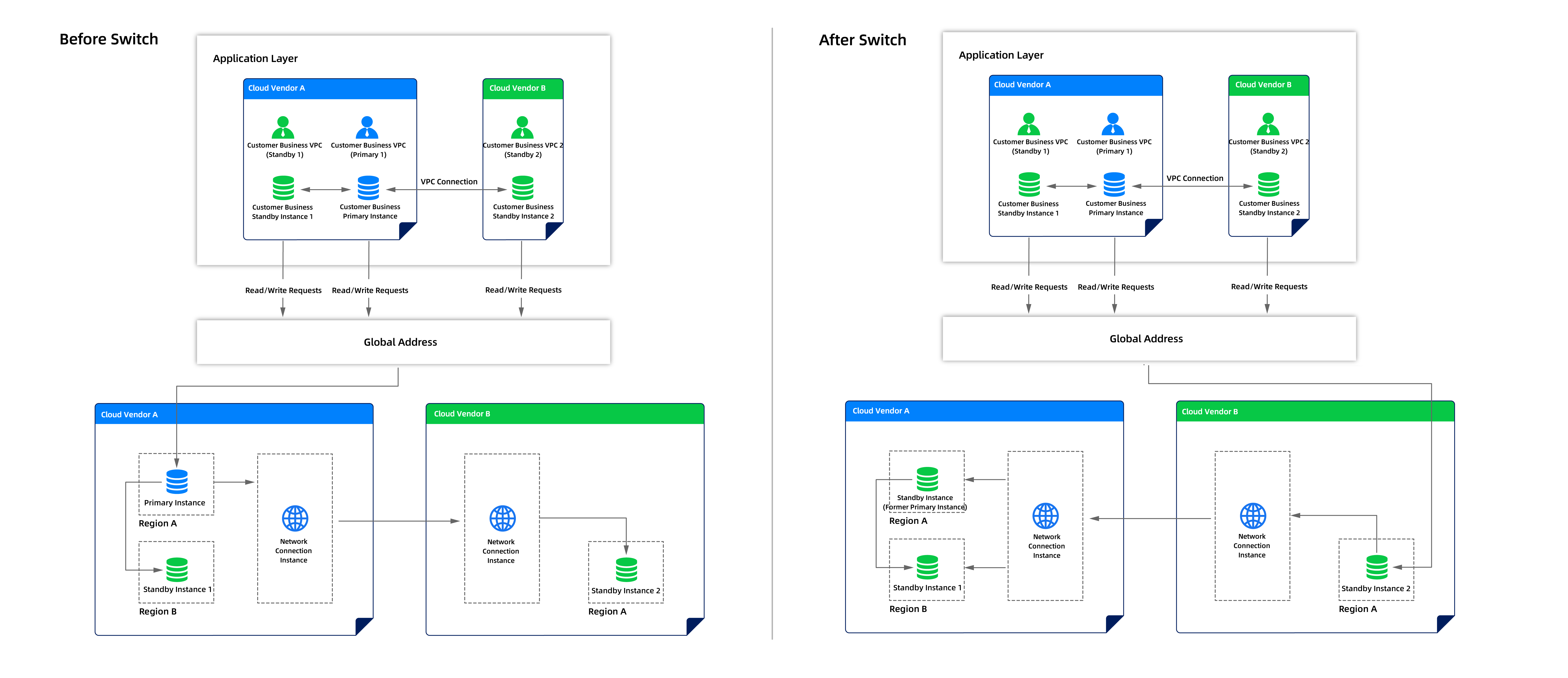
Process |
Description |
|---|---|
| Normal operation | The customer's business system runs in multiple business VPCs.
|
| Normal operation | Database architecture and operations
|
| Normal operation | Global endpoint resolution
|
| Normal operation | The primary database regularly backs up and archives logs to the backup environment. Multiple standby instances provide higher redundancy, distributed across different cloud vendors and availability zones. |
| Primary-standby switching | Primary database failure
|
| Primary-standby switching | Select the optimal standby instance to take over production traffic from multiple standby instances
|
| Primary-standby switching | New backups are established. After the primary-standby switch is completed, new standby environments may be deployed to restore the primary-standby architecture to its normal state. |
| Post-primary-standby switching | The customer's business can continue to operate with high availability. |