







December 23, 2025
This update focuses on optimizing database O&M features, covering primary/standby architecture and enhanced observability. It also extends the Open API capabilities (session management, request analysis, and billing query) to improve availability and O&M efficiency in multi-cloud scenarios.
Database disaster recovery architecture
- Global addresses for primary/standby instances support a one-primary-multiple-standby architecture.
Database O&M
Optimized the experience of copying instance IDs in the instance list to improve daily O&M efficiency.
Optimized the display of alert notification templates to enhance readability and consistency of alert information.
Optimized the calculation method for tenant memory usage monitoring and added the KVCache metric to the monitoring indicators.
Added or improved function-level I/O resource metrics to help identify I/O bottlenecks.
Open APIs
Open APIs now support scaling out read-only replicas, facilitating automated O&M and integration.
Open APIs now support session management and request analysis, improving diagnostic and governance efficiency.
Open APIs now support billing queries, facilitating cost reconciliation and platform integration.
November 24, 2025
This update focuses on enhancing product capabilities and optimizing user experience in multi-cloud environments. Key highlights include the introduction of cross-cloud primary-standby instances, a major new feature that significantly improves disaster recovery capabilities. Additionally, database operations and monitoring have been enhanced, with optimizations to disaster recovery architecture and ecosystem integration. Security compliance and account permission management have also been improved.
Cross-Cloud primary-standby instances
Introduced cross-cloud primary-standby instances based on direct network connection, offering a more flexible and lower-latency disaster recovery solution compared to cross-cloud primary-standby instances based on log archiving.
Cross-cloud primary-standby instances support complete database disaster recovery capabilities, including primary-standby switchover, failover, and primary-standby synchronization latency monitoring.
Cross-cloud primary-standby instances support a one-primary-multi-standby architecture, enhancing disaster recovery capabilities and availability, with the same architecture supported for instances within the same cloud.
Switching from Alibaba Cloud official website to cloud marketplace
Supports 3F architecture for OceanBase 2.x/3.x versions.
Supports PL0 storage disk type.
Supports direct load port.
Supports exclusive database proxy.
Database O&M
Instance O&M
Read-only replicas and read-only columnar replicas now support automatic storage expansion and unified storage management.
Alibaba Cloud channels now support independent VPC deployment.
Tenant O&M
Added duplicate name check when creating or modifying tenant names, preventing duplicate tenant names within the same instance.
Tenant resource isolation configuration no longer relies on cgroup, simplifying the configuration process.
Monitoring
Optimized connection number monitoring view for clearer visualization.
Improved accuracy of host bandwidth usage rate metrics for more accurate monitoring data.
Optimized monitoring links for better data collection and display performance.
Alerts
Added support for materialized view alerts, allowing configuration of refresh time alerts to promptly detect refresh anomalies.
Added support for configuring alerts for host I/O and bandwidth usage to promptly detect resource usage anomalies.
Optimized alert navigation to monitoring for improved alert handling efficiency.
Security and compliance
Alibaba Cloud channels now support audit data push to customer-specified SLS.
Instances now support mandatory SSL configuration to meet security compliance requirements.
Accounts and permissions
Added support for searching members by email to improve member management efficiency.
Optimized project owner and member management for more granular permission control.
Added UID field display on the members page for easier user information retrieval.
Added support for unbinding Alibaba Cloud cloud marketplace and OceanBase Cloud accounts without incurring charges.
Added support for third-party account authentication binding when OceanBase Cloud accounts are logged in.
Usability improvements
Added TraceId display on pages for easier issue troubleshooting and faster issue localization.
Instance order page now supports viewing network latency between zones to help users select the optimal zone.
Optimized main address line display in tenant topology diagrams to fix main address line pointing issues.
October 15, 2025
This release introduces key enhancements including support for Hygon in transactional instances, and the commercial availability of the Binlog service.
Channel and product updates
- Transactional instances now support Hygon servers. This version is available through the Alibaba Cloud Marketplace (China Site) and supports the China East 2 Finance region.
- Binlog service is now commercially available. When the free quota is insufficient, you can configure larger Binlog compute units and storage capacity. Automatic storage scaling policies are also supported.
Database operations and management
- The SQL RT metric for Key-Value instances now supports displaying max, P999, P99, P95, P90, and P50 values.
Instance list page interactions have been optimized to improve management efficiency when handling a large number of instances and tenants:
- You can now search instances by instance ID, tenant name, or tenant ID.
- Instances can be filtered by instance type, storage architecture, version, cloud vendor, region, status, or tag.
- When a large number of tenants exist, tenant cards are now displayed in pages.
- The tenant performance trend charts within the instance list have been enhanced: TPS, QPS, and session count now show trends over the past hour, while storage usage shows trends over the past seven days.
Security and compliance
- Historical events now include operations related to organization and project permissions.
September 16, 2025
The updates in this version mainly focus on expanding cross-cloud primary and standby instance coverage to more channels, improving the usability of performance monitoring and alerts, and adding ecosystem integrations for various AI tools.
Database disaster recovery architecture
OceanBase Cloud China has added support for creating cross-cloud primary and standby instances between the following cloud vendors/channels:
Alibaba Cloud China (self-managed) and Huawei Cloud (self-managed)
Alibaba Cloud China (self-managed) and Tencent Cloud (self-managed)
Tencent Cloud China (self-managed) and Huawei Cloud (self-managed)
Alibaba Cloud China (selected marketplace) and China-based self-managed channels
OceanBase Cloud International has added support for creating cross-cloud primary and standby instances between the following cloud vendors/channels:
AWS (self-managed) and GCP (self-managed)
AWS Marketplace and GCP Marketplace
AWS Marketplace and Alibaba Cloud International Marketplace
AWS Marketplace and Azure Marketplace
AWS Marketplace and Huawei Cloud International Marketplace
GCP Marketplace and Azure Marketplace
GCP Marketplace and Huawei Cloud International Marketplace
GCP Marketplace and Alibaba Cloud International Marketplace
Huawei Cloud International Marketplace and Alibaba Cloud International Marketplace
Huawei Cloud International Marketplace and Azure Marketplace
Alibaba Cloud International Marketplace and Azure Marketplace
Creating a standby instance now supports different deployment modes than the primary instance. This release supports AWS and Azure.
Database products and commercialization
The Azure Marketplace East 2 region now supports dual-IDC deployment.
Alibaba Cloud China marketplace now offers read-only replicas for financial cloud and government cloud channels.
Huawei Cloud China's joint operation and distribution channel now charges for backup and restore.
Alibaba Cloud China marketplace now supports archive backup.
Alibaba Cloud International Marketplace now supports archive backup.
Networking and database proxy
Direct load ports are now supported for access endpoints, supported in AWS and GCP.
Private Link now supports AWS China and Huawei Cloud International.
Connection management now supports Huawei Cloud and Azure.
Access endpoint balancing strategy now supports same-zone priority, supported in Alibaba Cloud.
Database O&M
Enhanced usability of performance monitoring:
Creating alert rules on the monitoring page is now done in a new browser tab.
The monitoring drill-down drawer displays tenant names.
You can now jump from cluster database performance metrics to the corresponding SQL diagnostics page for the selected tenant and time period.
You can now drill down into performance metrics of cluster host after selecting the node to analyze the metrics in detail.
Enhanced alert management:
Zoom is now supported as an alert channel.
Sensitive information such as email and phone numbers of alert contacts is displayed in a desensitized manner.
Enhanced database account management:
Database accounts now support global permissions for encryption and decryption functions.
Database accounts now support PL object permissions.
Accounts and permissions
- Support for logging in to OceanBase Cloud using an Azure account is now available.
Ecosystem integration
New examples of integrating Cursor, Trae, Cline, and Continue with OceanBase MCP are provided.
New examples of integrating Dify and n8n, an AI product, with OceanBase are provided.
New examples of integrating SQLShift with OceanBase for converting stored procedures is provided.
OpenAPI incompatibility changes
- The DescribeNodeMetrics API is deprecated. The related functionality is now provided by the DescribeMetricsData API.
August 7, 2025
This release introduces support for the Azure Marketplace channel, adds Google account login, and improves the user experience for private network connection setup and the instance purchase page.
New Azure Marketplace channel
- OceanBase Cloud (International site) is now available on the Azure Marketplace. You can search for OceanBase on the Azure Marketplace to purchase OceanBase Cloud database instances. See the OceanBase listing on Azure Marketplace. The service is initially available in the Malaysia (Kuala Lumpur) region.
- Data development, data lifecycle, data import, and the standalone OceanBase Developer Center (ODC) now support Azure. Data migration support for Azure is coming soon.
Instance operations
- Transparent Data Encryption (TDE) now supports integration with the KMS services of GCP, and Tencent Cloud.
- Database connection endpoints now support custom port and domain prefix configuration. This feature is currently available for Alibaba Cloud.
Account and access control
- OceanBase Cloud now supports Google account login without registration.
- OceanBase Cloud now supports Azure Marketplace login without registration.
Experience enhancements
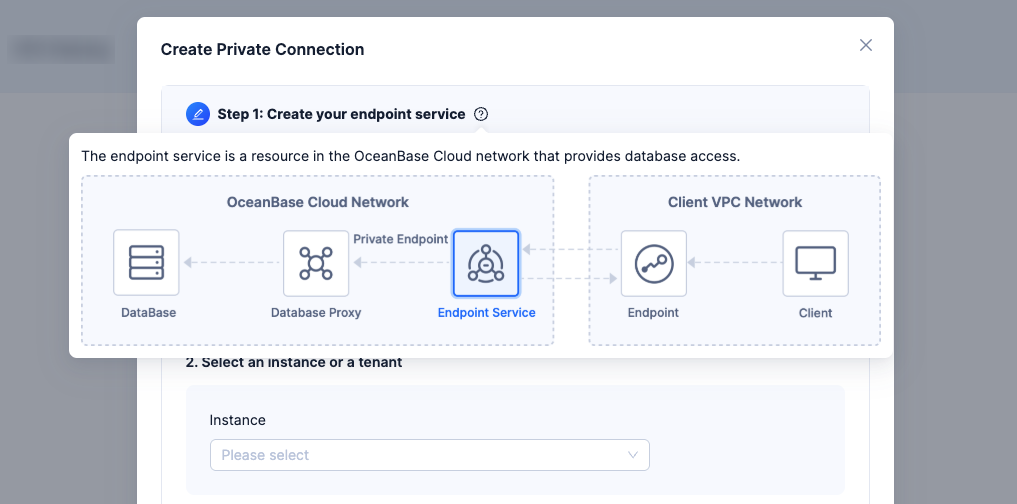
The private endpoint configuration guide has been improved with:
- Visual explanations of endpoints and key concepts
- Visual aids for common configuration errors
- Additional tips for using connection strings
These updates help improve the accuracy and success rate of private endpoint setup.
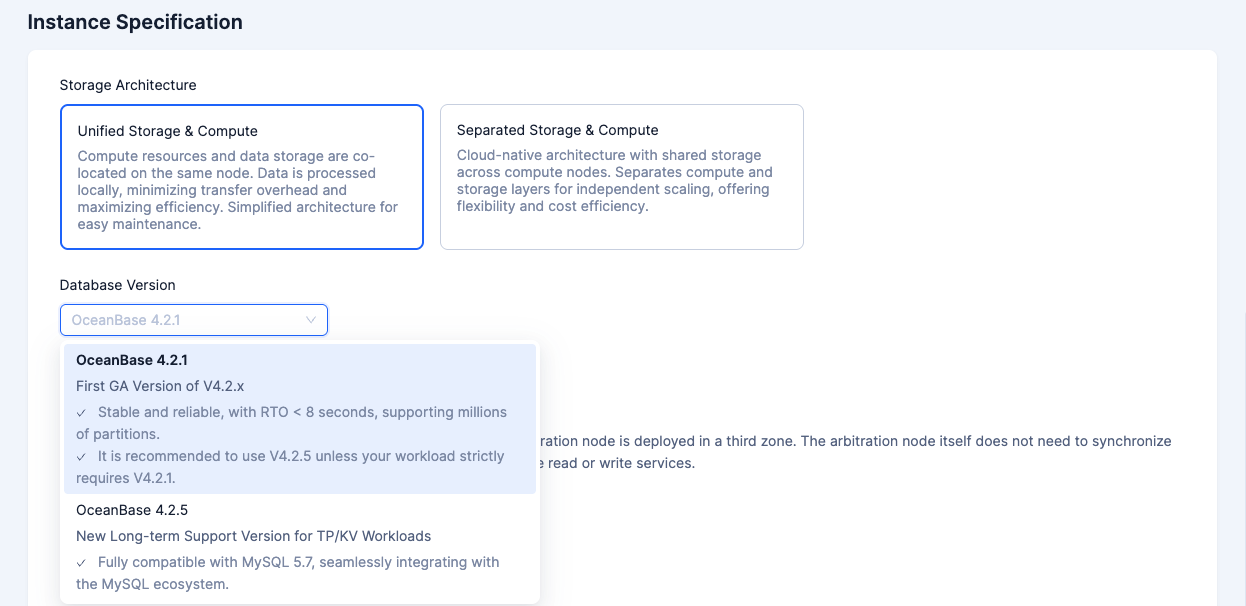
On the instance purchase page, the database version selection section now includes a summary of key features for each version, helping users quickly choose the most suitable option.
July 14, 2025
we have enhanced instance operations, data development, and data migration features and coverage.Instance operations
Added support for creating pay‑as‑you‑go instances via Open API, covering the self‑operated channels and the Alibaba Cloud Marketplace channel.
Binlog monitoring is now supported for analytical instances.
When an account is overdue, instances in the recycle bin are automatically deleted to prevent additional charges.
Data development
- On the domestic site of OceanBase Cloud, Data Archiving and Data Cleanup now support AWS China.
Data migration
- On the domestic site of OceanBase Cloud, Data Migration now supports the AWS cloud vendor.
June 18, 2025
This release includes significant enhancements in intelligent operations, database stability, and database security. Additionally, 17 new regions have been added for global deployment, continuing OceanBase Cloud's commitment to providing stable, secure, and flexible global multi-cloud database services.Channel and product expansion
- Read-only columnstore replicas are now available on additional channels, including Huawei Cloud (self-managed), Tencent Cloud (self-managed), AWS (self-managed), and GCP (self-managed).
Enhanced intelligent operations and stability
IOPS resource isolation:
- New IOPS resource isolation feature allows users to view current instance IOPS resources and allocate them as needed. Users can set IOPS upper and lower limits, configure resource group weights, and implement more flexible strategies for balancing resource contention. Default background task resource isolation policies are provided to prevent background tasks from competing with business IOPS.
Proactive operations and fault self-healing:
New proactive operations events feature supports proactive operations event notifications, enabling users to respond and manage them uniformly.
New in-platform messaging feature allows users to receive proactive operations event notifications.
New fault self-healing feature (allowlist access) can automatically recover from business anomalies, reducing fault response time and ensuring service continuity.
Instance recycle bin supports instance recovery:
- Enhanced instance recycle bin capabilities now support instance recovery based on backup data stored in the recycle bin, with support for querying recovery history records. This completes the cycle from instance deletion and backup storage to instance recovery.
Feature extensions:
Custom alert templates now support webhook channels.
Database proxy introduces maximum connection management, allowing users to configure appropriate maximum connection numbers based on business needs.
Enhanced database security capabilities
Database account security: Extended database password character range and optimized complexity rule display, improving password management flexibility.
Enhanced transparent data encryption (TDE) capabilities: TDE now supports KMS from Alibaba Cloud, Huawei Cloud, and AWS cloud vendors, meeting key management requirements in multi-cloud environments and strengthening data privacy protection.
Accelerated global deployment
17 new regions have been launched, covering cloud vendors including Alibaba Cloud, Huawei Cloud, Tencent Cloud, AWS, and GCP. These include regions such as Hong Kong (China), Singapore, Seoul (South Korea), Jakarta (Indonesia), São Paulo (Brazil), Oregon (US), Virginia (US), and Frankfurt (Germany), supporting enterprise global business low-latency deployment and compliance requirements. The 17 newly launched regions are as follows:
No. |
OceanBase Cloud Site |
Cloud Vendor |
Channel |
Region |
Launch Date |
|---|---|---|---|---|---|
| 1 | OceanBase Cloud China | Huawei Cloud China | Joint Operation/self-managed | Singapore | May 5, 2025 |
| 2 | OceanBase Cloud China | Alibaba Cloud China | Marketplace/self-managed | China - Zhangjiakou | May 5, 2025 |
| 3 | OceanBase Cloud China | Alibaba Cloud China | Marketplace/self-managed | China - Shenzhen | May 5, 2025 |
| 4 | OceanBase Cloud China | Alibaba Cloud China | Marketplace/self-managed | China - Guangzhou | May 15, 2025 |
| 5 | OceanBase Cloud International | Alibaba Cloud International | Marketplace/self-managed | South Korea - Seoul | May 15, 2025 |
| 6 | OceanBase Cloud China | Alibaba Cloud China | Marketplace/self-managed | China - Hong Kong | May 26, 2025 |
| 7 | OceanBase Cloud International | Alibaba Cloud International | Marketplace/self-managed | India - Jakarta | May 26, 2025 |
| 8 | OceanBase Cloud China | Tencent Cloud | self-managed | Singapore | May 27, 2025 |
| 9 | OceanBase Cloud International | AWS Global | Marketplace/self-managed | Brazil - São Paulo | June 3, 2025 |
| 10 | OceanBase Cloud International | GCP | Marketplace/self-managed | US - Oregon | June 3, 2025 |
| 11 | OceanBase Cloud China | Alibaba Cloud China | Marketplace/self-managed | China - Qingdao | June 9, 2025 |
| 12 | OceanBase Cloud International | Alibaba Cloud International | Marketplace/self-managed | China - Hong Kong | June 9, 2025 |
| 13 | OceanBase Cloud China | Alibaba Cloud China | Marketplace/self-managed | US - Virginia | June 10, 2025 |
| 14 | OceanBase Cloud China | Alibaba Cloud China | Marketplace/self-managed | Germany - Frankfurt | June 16, 2025 |
| 15 | OceanBase Cloud China | Alibaba Cloud China | Marketplace/self-managed | Singapore | June 16, 2025 |
June 5, 2025
The main updates in this release include the upgrade of SQL console cross-instance capabilities and natural language development features, as well as the addition of support for data synchronization, data import, and Git integration in AP scenarios. The specific updates are as follows:
Major upgrade to natural language development capabilities
Improved NL2SQL accuracy: The accuracy of natural language to SQL conversion has significantly improved, now reaching around 60%.
Launch of AI Developer Assistant: Introduces new capabilities such as SQL optimization, error diagnosis, and OceanBase knowledge base Q&A to boost development efficiency.
New interactive AI experience: Enables multiple ways to trigger the AI assistant, toggle AI-powered SQL suggestions, and compare AI-processed and original results.
More efficient cross-instance development
Unified multi-instance management: The console now supports simultaneous connections to multiple database instances, streamlining workflows.
Custom development preferences: Users can personalize their development environment with customized settings.
Secure account management: Users can clear saved passwords for remembered accounts to enhance security.
Full support for data integration in AP scenarios
Visual workflow builder: Drag-and-drop interface for building data integration workflows including offline sync and cloud file import.
Offline data sync: Supports MySQL, Oracle, OceanBase MySQL compatible, and OceanBase Oracle compatible as data sources for offline data synchronization.
Cloud file import: Supports importing data files from major object storage services such as S3, OSS, OBS, and COS.
Git integration introduced to enable repo cloning, content management, and commit submission.
Data lifecycle management
- Search strategies can be configured for data archiving and cleanup tasks.
May 15, 2025
This update focuses on cloud vendor channel expansion and O&M capability upgrades. The key highlights are as follows.
Cloud vendor channel and product expansion
- Alibaba Cloud Marketplace (both Chinese Mainland site and international site) now supports disk type selection during instance purchase.
Enhanced instance O&M capabilities
- The Open APIs now support historical events.
- Monitoring metrics in alert rule configurations are now categorized, simplifying alert setup.
April 15, 2025
This release launches OceanBase Database V4.3.5 (LTS version) and adds AWS China as a cloud marketplace channel. It also introduces two new regions for Alibaba Cloud Chinese Mainland site and Huawei Cloud Chinese Mainland site. The primary/standby instances are now available on all self-operation channels, while transactional instances support read-only replicas and read-only columnstore replicas. This release includes numerous enhancements across instance operations, backup and restore, networks and security, SQL diagnostics, and data development, fully meeting the requirements for migration from Alibaba Cloud database product portal to Alibaba Cloud Marketplace.
This release includes the following main updates:
Database products
This release launches OceanBase V4.3.5 (LTS version), which serves as the default version for OceanBase V4.3.x. OceanBase V4.3.5 LTS is the first feature-complete version of OceanBase Database tailored for AP scenarios, offering comprehensive features for data analytics and reaching high performance levels for real-time data warehouses. It also introduces vector types and vector indexes for multi-model integration. We recommend using OceanBase V4.3.5 LTS for OLAP and AI scenarios.
Channels and commercialization
- Added AWS China as a cloud marketplace channel, with Beijing as the initial region.
- For Huawei Cloud Chinese Mainland site, added node configurations of 2-2-2 and 3-3-3 for deployment and introduced two new regions: Singapore and Qingdao.
- For Alibaba Cloud Marketplace (Chinese Mainland site), added two new regions: China North 2 Finance and China North 2 Ali Gov.
- All channels of Alibaba Cloud (Alibaba Cloud self-managed, Alibaba Cloud Marketplace of both Chinese Mainland site and international site) now support selecting disk types when purchasing instance.
- self-managed channels now offer the option to switch from pay-as-you-go to subscription billing.
Database architecture
- Cross-cloud primary/standby instances can now be created between self-managed channels, with automatic read/write splitting supported within a single cloud environment.
- For transactional instances of Alibaba Cloud with pay-as-you-go billing, read-only replicas and read-only columnstore replicas can now be created. Traffic access policies for these replicas can be managed through read-only endpoint and read-write splitting endpoint settings.
Instance O&M
- Introduced custom alert notification templates with customizable notification methods and content.
- Added a multidimensional metrics monitoring page for performance monitoring, allowing for monitoring at the instance, tenant, replica, and node levels.
- New tenants and databases can now specify collation during creation.
- Users can now set maintenance windows for instances.
Networks and security
- Database proxies now support customizing the maximum number of connections allowed for proxy endpoints. This feature is currently supported for instances on Alibaba Cloud.
- Transparent Data Encryption (TDE) is now supported, using default keys provided by OceanBase Cloud.
- Instance-level IP allowlists are now supported, with tenants automatically inheriting these allowlists from their parent instances.
Backup and restore
- Optimized resource calculation logic for auxiliary tenants during database and table restoration, reducing resource consumption during the restoration process.
- Added storage resource pre-check functionality for tenant restoration, helping prevent failures caused by insufficient storage space.
- Enhanced the presentation of primary backup billing strategies to help users better understand the backup billing logic.
Data development
- OceanBase Developer Center (ODC) now supports connecting to and managing OceanBase Cloud instances, with integration into the OceanBase Cloud account system. Visit ODC Domestic Site/ODC International Site for more information.
- Enhanced SSL compatibility: SQL Console, Load Data, and OceanBase Developer Center have been adapted to support SSL connections for OceanBase instances.
- Improved ease-of-use for OLAP data development: The SQL Editor module now supports renaming worksheets, workflows, charts, and dashboards. Additionally, status indicators are displayed when unsaved changes are made to these elements, and notifications are shown when a worksheet is referenced by a workflow, chart, or dashboard.
- Data import: Optimized the process for selecting databases and submitting tasks during data import.
SQL Diagnostics
Autonomous capabilities:
- When root cause analysis and suspicious SQL detection indicate that SQL execution plan fluctuations are affecting performance degradation, the system automatically binds execution plans with customer authorization, facilitating quick business recovery.
Diagnostic capabilities:
- Enhanced TOPSQL comparison, allowing users to compare consumption of a single SQL statement at different points in time across various nodes to evaluate its performance in different phases and detect potential optimizations or anomalies.
- Introduced customizable thresholds for slow SQL identification, enabling users to set thresholds based on their business characteristics.
- All session-related operations are recorded in operation history, ensuring traceability for all actions.
Emergency response capabilities:
- Session pages now support throttling configuration, allowing direct throttling of specific SQL statements.
- INSQL aggregation is supported, reducing issues related to difficult SQL statement localization solely due to varying IN parameters.
- Keyword-based throttling is supported, enabling throttling of fixed parameters in specific SQL statements.
- Session pages and SQL diagnostics pages are now integrated, providing direct SQL optimization strategy suggestions if an executing SQL statement encounters issues, along with detailed consumption information such as CPU time, streamlining troubleshooting.
- On the TOPSQL page, multiple SQL statements can be throttled simultaneously, enhancing emergency response efficiency.
- Database session IDs are exposed, supporting searches by database session ID, proxy session ID, SQL ID, or SQL text for rapid issue identification.
Product integrations
- Added integrations for Flyway, NiFi, OceanBase Developer Center, and Alibaba Cloud DMS.
January 22, 2025
This release includes significant updates across multiple modules. Primary and standby instances now support automatic read/write splitting and global endpoints within the same cloud. Instance management introduces tenant parameter templates, database/table recycle bin, and SSL encryption. Monitoring and alerting features enhanced precision to second-level sampling and support diverse notification channels. Database proxy introduces read traffic policies and configurable read/write splitting endpoints. SQL diagnostics leverages AI for execution plan interpretation and optimization suggestions. Data development enhances SQL Editor's Copilot functionality and adds workflow and dashboard features. Data archiving now supports Oracle to OceanBase Oracle-compatible tenants and GCP instances. Project settings include redesigned AI feature controls.
Primary and standby instances
Automatic read/write splitting: Supports automatic read/write splitting between primary and standby instances using private endpoints within the same cloud (currently limited to Alibaba Cloud). When enabled in the Overview page of the tenant, all write requests to the standby database's private endpoint are automatically routed to the primary database, while the standby database only receives read requests.
Global endpoint: Provides a single connection endpoint for accessing both primary and standby instances. During primary instance failures, requests can be routed to the standby instance without modifying application connection endpoints, reducing business disruption and ensuring high availability.
Cross-cloud primary/standby instances: Added support for creating standby instances on Huawei Cloud joint operation SaaS from Alibaba Cloud primary instances.
Instance management
Tenant parameter templates: For OceanBase Database V4.3.0 and above, tenant creation now supports parameter templates with default configurations for OLTP (row-store), OLAP (column-store), and HTAP (hybrid) scenarios.
Database/Table recycle bin: Enables recovery of deleted databases and tables when the feature is enabled.
SSL encryption: Supports SSL management, including proxy address encryption, certificate validity period updates, automatic certificate renewal, and SSL encryption deactivation.
Support access control: Enables customers to authorize OceanBase support team access through the console for emergency troubleshooting scenarios.
Instance deployment switching: Pay-as-you-go cluster instances can now switch deployment modes and zones, such as transitioning from single-IDC deployment to dual-IDC deployment.
Monitoring and alerting
Second-level monitoring support, improving metric sampling precision from 1 minute to 5 seconds.
Enhanced monitoring chart interactions, supporting auto-refresh, time period comparison, chart linkage display, and layout settings.
Extended webhook alert contact support beyond DingTalk, WeCom, Lark, and Telegram to include custom webhook URLs for broader notification channel compatibility.
Database proxy
Read-only endpoints support configurable read traffic and disaster recovery policies, with options for same-zone priority or automatic balancing, and failover settings for primary replica routing when standby replicas are unavailable.
New read/write splitting endpoints with configurable query policies for primary and standby replicas, including same-zone priority and automatic balancing options.
Diagnostics and optimization
- Enhanced SQL diagnostics with AI-powered execution plan interpretation and optimization suggestions, leveraging LLM capabilities to analyze physical execution plans, SQL history, table information, current outlines, and diagnostic details.
Data development
Enhanced SQL Editor Copilot functionality with intelligent SQL formatting, error correction, and automatic optimization.
New workflow feature supporting SQL node orchestration.
Added dashboard functionality for visualizing multiple result sets, supporting basic business reporting requirements.
Improved sample data import process in workspaces.
Data lifecycle
Added support for data archiving from Oracle databases to OceanBase Oracle-compatible tenants.
Introduced data archiving capabilities for Google Cloud instances.
Project settings
- Redesigned global AI feature controls, allowing project admins to configure project-level AI service switches for SQL intelligent assistant, AI execution plan interpretation, and AI root cause analysis features.
January 2, 2025
This release includes significant updates to backup and restore capabilities, diagnostic features, and more. Key improvements include cross-region disaster recovery, sparse backup retention policies, and instance recycle bin functionality. The release also introduces AI-powered root cause analysis, one-click diagnostics, and AI SQL interpretation. For organization and project management, new features support IAM account authorization scenarios for Huawei Cloud joint operations.
Backup and restore
Introduced sparse backup retention policies with yearly, monthly, and weekly granularity, reducing backup storage costs while ensuring compliance requirements are met.
Added instance recycle bin functionality to retain data and log backups after instance deletion, ensuring critical information security while potentially reducing database operational costs in specific scenarios.
Diagnostics and optimization
Added root cause analysis and one-click diagnostics
Integrated diagnostic topology maps to visualize OceanBase's diagnostic process, using system-defined anomaly events for root cause analysis, identifying anomalous nodes and providing detailed anomaly information.
Root cause analysis now supports two new scenarios: tenant CPU anomalies and tenant queue anomalies.
Introduced AI SQL Interpretation: Leveraging large language models for text generation and reasoning capabilities to analyze SQL execution details, execution plans, execution history, and database schema information, providing intelligent interpretation of SQL execution plans and optimization suggestions.
Usability improvements: SQL diagnostics now supports filtering multiple SQL IDs simultaneously, and session management includes global session search capabilities.
Organization and project management
- For Huawei Cloud joint operation scenarios, Huawei Cloud IAM accounts can now access OceanBase Cloud through the Huawei Cloud console, and main accounts can manage IAM account authorization through the OceanBase Cloud console.
Product integration
Added integration solutions between OceanBase Cloud and AI large language models, including detailed integration steps with Langchain, LlamaIndex, OpenAI, and Tongyi Qianwen. Users can quickly build AI applications like intelligent Q&A robots using OceanBase's vector capabilities.
Added integration solution between OceanBase Cloud and Alibaba Cloud DataWorks, detailing how to integrate OceanBase Cloud instances on Alibaba Cloud with DataWorks using PrivateLink.
Enhanced OceanBase Cloud and Flink integration documentation with instructions for connecting to OceanBase Cloud database instances via PrivateLink.