







OceanBase Cloud supports four deployment modes: single-IDC deployment (2 nodes), single-IDC deployment (3 nodes), dual-IDC deployment, and multi-IDC deployment.
Concepts
- Full-featured replica: A full-featured replica, also known as a regular replica, is named FULL and abbreviated as F. It has all the complete data and features, including RedoLog, MemTable, and SSTable. Full-featured replicas have roles, specifically for data partitions, which are the leader and the follower. The leader mainly provides write services and strong-consistency read services, and can also provide weak-consistency read services. The follower provides weak-consistency read services and can quickly switch to the Leader to provide services when the leader fails.
- Arbitration service: OceanBase Database supports the arbitration service, abbreviated as A. The arbitration service maintains arbitration members corresponding to tenant log streams. The arbitration members have the following characteristics. For more information, see Arbitration service overview.
- They participate only in elections, Paxos prepare, and member group change voting, and do not participate in Paxos accept (log majority voting).
- They do not store logs, have no MemTable or SSTable, and consume minimal resources (bandwidth, memory, disk, and CPU).
- They cannot be elected as the leader to provide services.
The deployment modes of OceanBase Cloud data vary based on the replicas and the arbitration service deployed across one or more zones.
Transactional instance
Single-IDC deployment (2 nodes)
In the single-IDC deployment (2 nodes), two full-featured nodes are deployed in the same zone to eliminate latency caused by cross-zone or cross-IDC deployment. This mode is suitable for scenarios that require low latency and strong cost reduction. This mode offers host-level disaster recovery capabilities, and has the following advantages:
Multiple full-featured replicas provide read and write capabilities simultaneously, offering higher performance in load balancing.
Write requests in this mode do not require cross-IDC synchronization, only intra-IDC synchronization and access, resulting in lower latency.

Single-IDC deployment (3 nodes)
In the single-IDC deployment (3 nodes), three full-featured nodes are deployed in the same zone to eliminate latency caused by cross-zone or cross-IDC deployment. This mode is suitable for scenarios that require low latency and a high total compute power of a single cluster.
This mode offers host-level disaster recovery capabilities, and has the following advantages:
Multiple full-featured replicas provide read and write capabilities simultaneously, offering higher performance in load balancing.
Write requests in this mode do not require cross-IDC synchronization, only intra-IDC synchronization and access, resulting in lower latency.

Dual-IDC deployment
The dual-IDC deployment deploys two full-featured nodes in two zones and one arbitration node in a third zone. The arbitration node does not synchronize or replay logs, does not store redo logs or baseline data, and does not provide read or write services. This mode is supported in OceanBase Database V4.1.0.0 and later.

Multi-IDC deployment
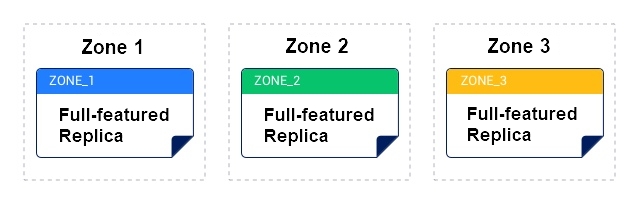
The multi-IDC deployment deploys three nodes in three different zones to achieve cross-zone disaster recovery. Each node is a full-featured replica. One of the nodes serves as the leader to provide read and write services, and the other two nodes serve as read-only replicas. When the leader fails, one of the read-only replicas becomes the leader to continue providing read and write services.
Customers with higher performance and multi-IDC availability requirements are recommended to choose the multi-IDC deployment.
Differences between deployment modes
Deployment mode |
Single-IDC (2 nodes) |
Single-IDC (3 nodes) |
Dual-IDC |
Multi-IDC |
|---|---|---|---|---|
| Nodes | 3 | 3 | 3 | 3 |
| Full-featured replica nodes | 2 | 3 | 2 | 3 |
| Arbitration node | 1 | 0 | 1 | 0 |
Analytical instance
Single-IDC deployment (1 node)
The single-IDC deployment (1 node) of OceanBase Cloud is a lightweight deployment mode that has only one full-featured replica. It provides cross-zone disaster recovery capability (the disaster recovery zone can be specified in the instance console). This mode is suitable for scenarios such as testing and learning, cost optimization for non-core businesses, and situations where high availability and business continuity are not highly required.
This mode has the following characteristics:
Only one data replica is maintained. Data is stored in only one replica without data synchronization or replication mechanisms. Compared with the multi-replica strategy (which typically stores three copies of data to ensure high availability), the single-replica strategy saves storage space and reduces replication overheads.
Low resource consumption. In the single-replica strategy, you do not need to maintain data consistency between multiple replicas. This reduces the consumption of compute resources and network traffic. This mode is more suitable for scenarios with a low budget or where disaster recovery requirements are low.
Higher performance. In a single-replica deployment, there is no data replication or consistency verification overhead. All requests are processed on a single replica, resulting in lower latency and higher throughput.
Single-IDC deployment (2 nodes)
In single-IDC deployment (2 nodes), two full-featured nodes are deployed in the same zone. This eliminates latency caused by cross-zone or cross-IDC deployment. This mode is suitable for scenarios that require low latency and strong cost-saving requirements. This provides host-level disaster recovery capability. In addition, it has the following advantages:
Multiple full-featured replicas provide read and write capabilities, offering higher performance in load balancing.
Write requests in this mode do not require cross-IDC synchronization. They are synchronized and accessed within the same IDC, resulting in lower latency.
Dual-IDC deployment
In the dual-IDC deployment of OceanBase Cloud, two full-featured nodes are deployed in two zones, and one arbitration node is deployed in a third zone. The arbitration node does not synchronize or replay logs, does not store redo logs or baseline data, and does not provide read or write services to external applications. Dual-IDC deployment is supported in OceanBase Cloud V4.1.0.0 and later.
Differences between deployment modes
Deployment mode |
Single-IDC (1 node) |
Single-IDC (2 nodes) |
Dual-IDC |
|---|---|---|---|
| Nodes | 1 | 3 | 3 |
| Full-featured replica nodes | 1 | 2 | 2 |
| Arbitration node | 0 | 1 | 1 |
Note
In the 2F1A (2 full-featured replicas and 1 arbitration service) strategy, the arbitration service node is invisible to users. Therefore, if you purchase three nodes, only two nodes are actually visible in the system.
Key-Value instance
Single-IDC deployment (2 nodes)
The single-IDC deployment of OceanBase Cloud deploys two full-featured nodes in the same zone to eliminate latency caused by cross-zone or cross-IDC deployment, suitable for scenarios requiring low latency and strong cost reduction demands. The single-IDC deployment offers the following advantages:
Multiple full-featured replicas provide read and write capabilities, delivering higher performance in load balancing.
Write requests in the single-IDC deployment do not require cross-IDC synchronization, only intra-IDC data synchronization and access, resulting in lower latency.
Dual-IDC deployment
The dual-IDC deployment of OceanBase Cloud deploys two full-featured nodes in two zones and deploys an arbitration node in a third zone. The arbitration node does not store redo logs or baseline data, does not replay logs, and does not provide read or write services to external applications. This deployment mode is supported in OceanBase Cloud V4.1.0.0 and later.
Differences between deployment modes
Deployment mode |
Single-IDC (2 nodes) |
Dual-IDC |
|---|---|---|
| Nodes | 3 | 3 |
| Full-featured replica nodes | 2 | 2 |
| Arbitration node | 1 | 1 |
Note
In the 2F1A (2 full-featured replicas and 1 arbitration service) strategy, the arbitration service node is invisible to users. Therefore, three nodes are purchased, but only two nodes are visible in the system.