







The SQL Console provides you with the GUI to accomplish SQL queries, development tasks, and database object management, aiming to streamline your database management workflow.
User interface
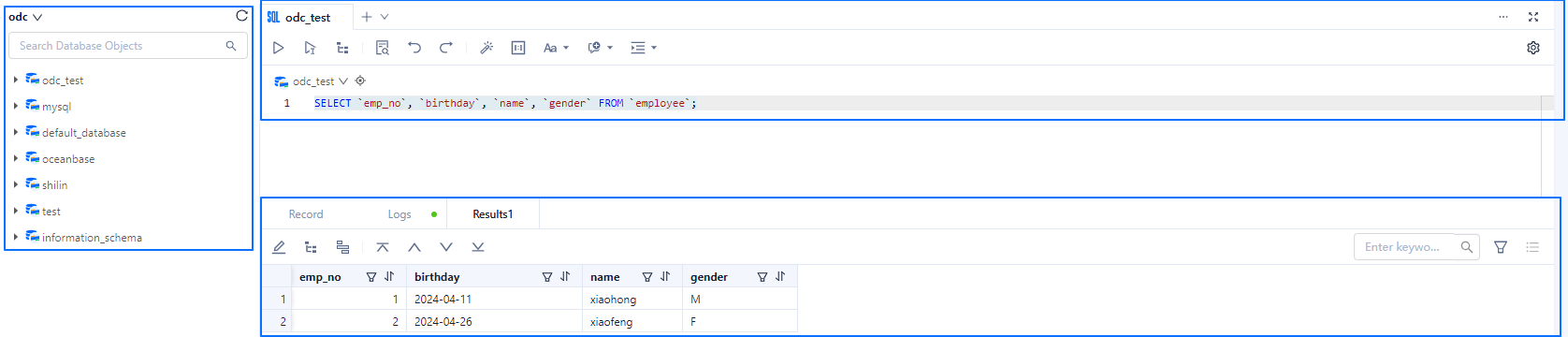
After logging into the SQL Console, you can open the SQL window, which primarily consists of three areas: SQL editing, result display, and the database object list.
SQL editing
The SQL editing area is the primary workspace for handling your data. For guidance on editing and executing SQL statements, refer to SQL editing and execution.
The toolbar above the SQL editing area provides a range of commonly used functional keys to assist you in editing and executing SQL statements. For a detailed introduction to these functional keys, refer to Functional keys in SQL Console.

Result display
This area has three tabs, each displaying relevant content regarding the execution of SQL statements.
Record tab: Displays records of each SQL statement executed in the current connection process.

Logs tab: Shows the execution logs of the current SQL window.

Results tab: Presents the execution results of the current SQL statement. Additionally, you can sort, filter, add, edit, delete data, and execute database objects under this tab. For specific operations, refer to Result set editing.

Database list
The database object list area lists all objects under the current database. Here, you can switch database accounts and create and manage database objects, including tables, views, stored procedures, etc., under the current account. For detailed operations on managing database objects, refer to Database object management.
