







This topic introduces how to view and modify the parameters of data migration tasks.
View parameters
For data migration tasks in the Not Purchased, Not Started, Running, Modifying, Compacting, Completed, and Changing Configurations states, you can view the parameters.
Log in to the OceanBase Cloud Console.
In the left navigation bar, click Data Services > Migrations.
On the Migrations page, click the Migrate Data tab.
On the Task List page, click ... > View Parameters next to the target task.
You can also click the name of the target task to enter the details page, and click View Parameters in the upper right corner.
In the View Parameters panel, view the configuration of the current task.
Modify parameters
Parameters that can be modified
For data migration tasks in the Not Purchased, Not Started, Stopped, and Failed states, you can modify the parameter. The parameters that can be modified differ depending on the state of the data migration task.
Status of data migration task |
Parameters that can be modified |
|---|---|
| Not Purchased/Not Started |
|
| Stopped/Failed |
|
Procedure
Log in to the OceanBase Cloud Console.
In the left navigation bar, click Data Services > Migrations.
On the Migrations page, click the Migrate Data tab.
On the Task List page, click ... > Modify Parameters next to the target task.
You can also click the name of the target task to enter the details page, and click ... > Modify Parameters in the upper right corner.
In the Modify Parameters panel, modify your configurations.
Schema Migration
On the Select Type & Objects page for data migration tasks from Oracle Database to OceanBase Database Oracle-compatible tenant, select Schema Migration, and the following parameters will be displayed only if the character sets of the source and target are different.
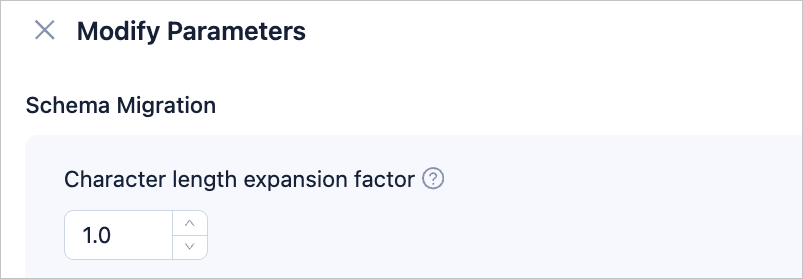
When the character sets of the source and target are different (e.g., the source is GBK and the target is UTF-8), there may be cases of field truncation and data inconsistency. You can configure the Character Length Expansion Factor to increase the length of character type fields.
Note
The extended length cannot exceed the maximum limit of the target.
Full Migration
On the Select Type & Objects page, select Full Migration to display the following parameters.
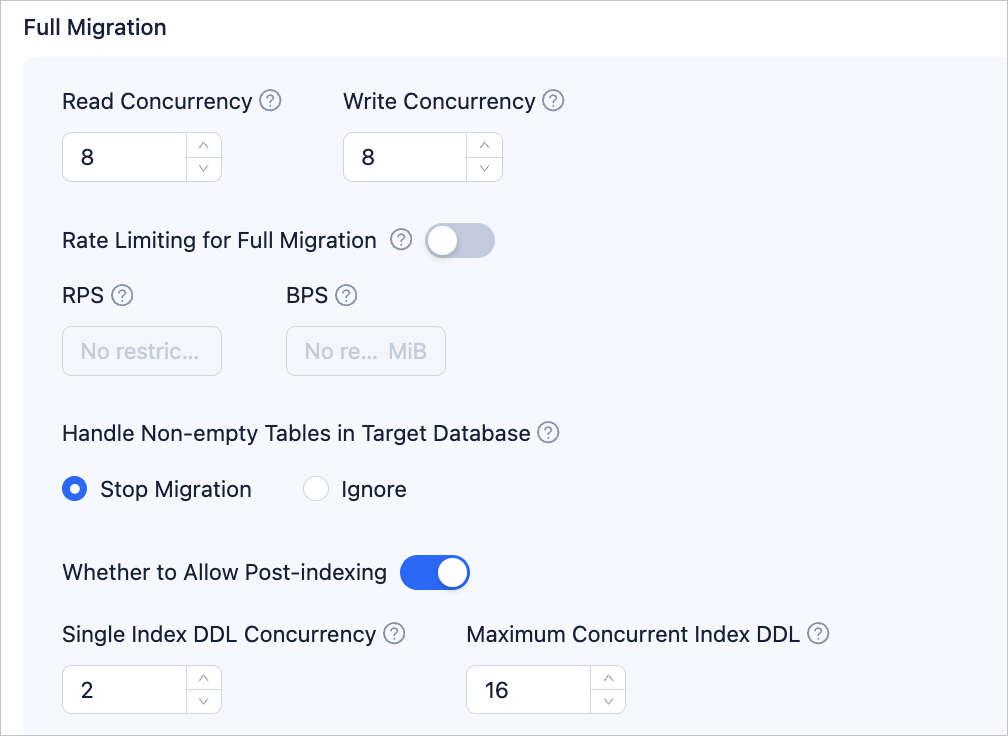 ParameterDescription
Read Concurrency Specifies source data read concurrency during full migration. The maximum limit is 512. Excessive concurrency may overload the source system and impact business operations. Write Concurrency Specifies target data write concurrency during full migration. The maximum limit is 512. Excessive concurrency may overload the target system and impact business operations. Rate Limiting for Full Migration Enable the full migration rate limit based on your needs. If enabled, set the RPS (maximum data limit that can be migrated to the target per second during full migration) and BPS (maximum data limit that can be migrated to the target per second during full migration). Notice
The RPS and BPS settings here only serve as rate limiting. The actual performance of full migration is limited by factors such as the source, target, and instance specification.
Handle Non-empty Tables in Target Database Policies include Stop Migration and Ignore: - Choose Stop Migration, if there are data in the target table, the full migration will fail and prompt to handle the target data before continuing the migration.
Note:
If you click resume after an error, the data migration will ignore this option and continue to migrate table data, please proceed with caution.
- Choose Ignore, if there are data in the target table, and if there is a conflict with the incoming data, the data migration will log the conflict and retain the original data without changes.
Post-Indexing Delayed index creation can shorten the time taken for a full migration. You can choose whether to allow post-indexing after the full data migration is completed. For considerations on delayed index creation, see the notes below.
Note:- Both Schema Migration and Full Migration must be selected on the Select Migration Type page to enable this option.
- Only non-unique key indexes support delayed creation.
If post-indexing is allowed, it is recommended to adjust the following business tenant parameters using a command-line tool according to the hardware conditions of OceanBase Database and the current business traffic.
// File memory buffer limit ALTER SYSTEM SET _temporary_file_io_area_size = '10' tenant = 'xxx'; // Disable throttling in OceanBase Database V4.x ALTER SYSTEM SET sys_bkgd_net_percentage = 100;- Choose Stop Migration, if there are data in the target table, the full migration will fail and prompt to handle the target data before continuing the migration.
Incremental Synchronization
On the Select Type & Objects page, select Incremental Synchronization to display the following parameters.
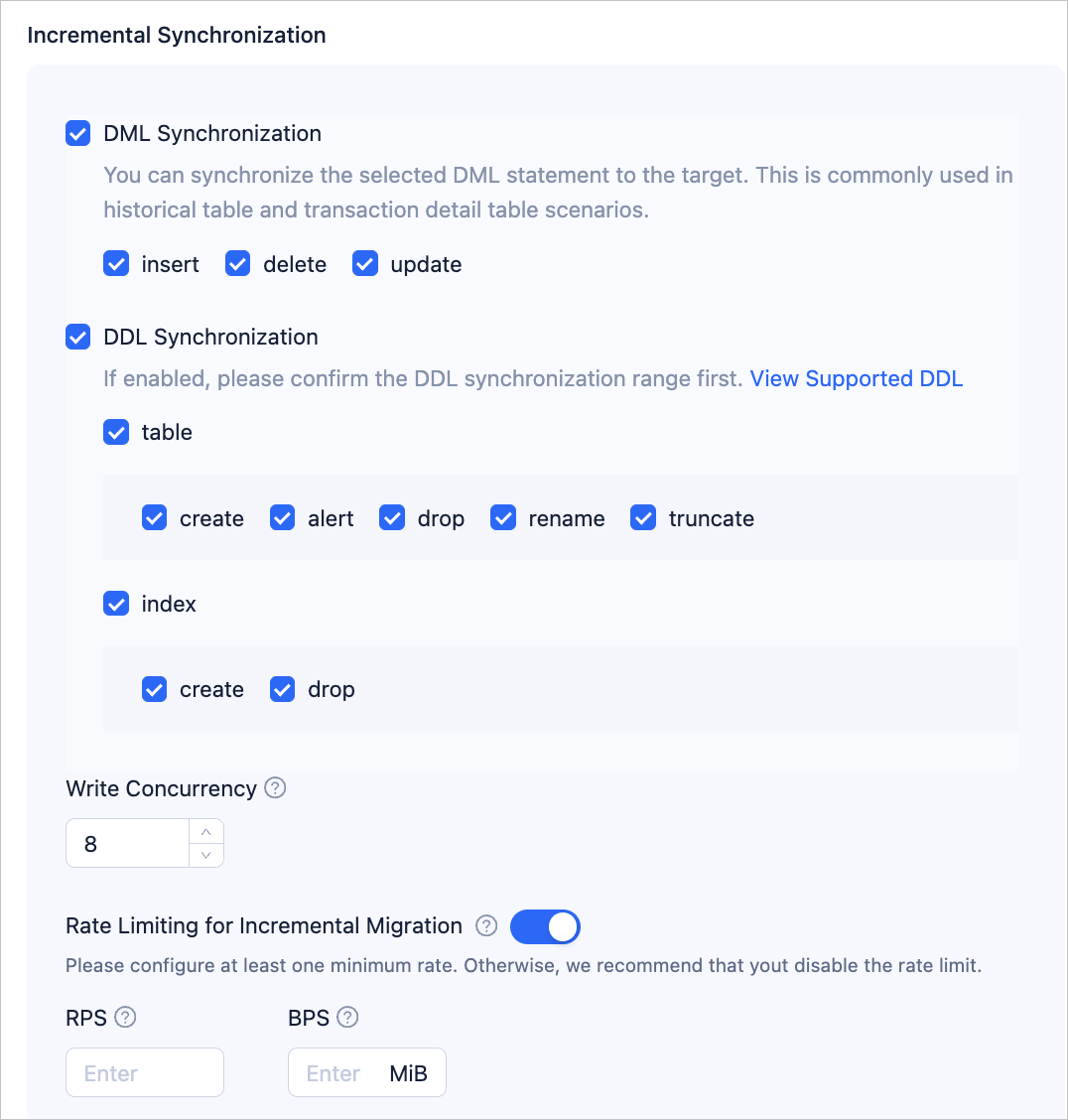 ParameterDescription
DML/DDL Synchronization Incremental Synchronization includes DML Synchronization and DDL Synchronization. Customize your setting based on you needs. For more information, see DML filtering. Write Concurrency Specifies target data write concurrency during incremental synchronization. The maximum limit is 512. Excessive concurrency may overload the target system and impact business operations. Rate Limiting for Incremental Migration Enable the incremental migration rate limit based on your needs. If enabled, set the RPS (maximum data limit that can be migrated to the target per second during incremental migration) and BPS (maximum data limit that can be migrated to the target per second during incremental migration). Notice
The RPS and BPS settings here only serve as rate limiting. The actual performance of incremental migration is limited by factors such as the source, target, and instance specification.
Incremental Synchronization Start Timestamp - If Full Migration has been selected when choosing the migration type, this parameter will not be displayed.
- If Full Migration has not been selected when choosing the migration type, but Incremental Synchronization has been selected, please specify here the data to be migrated after a certain timestamp. The default is the current system time. For more information, see Set incremental synchronization timestamp.
Note
This parameter is only displayed when modifying the parameters of a two-way synchronization task.
Handle Data Conflicts Includes Ignore Errors and Keep Original Data on Target and Ignore Conflicts and Overwrite Target Data with Source Data. Schedule Advancement of Binlog Timestamp If you enable this feature, you need to configure the frequency. The supported frequency range is 1~60 seconds.
After configuration, during the incremental synchronization phase, data migration will periodically execute theCREATE DATABASE IF NOT EXISTS testcommand in the MySQL source database according to the frequency you configured, in order to advance the Binlog timestamp.Note
This parameter is only displayed when migrating data from a MySQL database to an OceanBase database MySQL-compatible tenant.
Adapt to Online DDL Tool If you enable this feature, the database will use an online DDL tool to perform online schema changes. Data migration will filter temporary table objects to enhance the stability of the data migration task. For more information, see Online DDL tools. Note
At present, the Online DDL tools are only supported for scenarios where the source is a MySQL database and online schema changes are performed using Alibaba Cloud DMS, gh-ost, or pt-osc.
Advanced Options
When the target OceanBase Database is V4.3.0 or later, and on the Modify Parameters page, you additionally select Incremental Synchronization > DDL Synchronization, the parameters in this section will be displayed. If the Target Table Storage Type was configured when creating the data migration task, this option is not modifiable here.

The storage type of target table objects includes Default, Row Storage, Column Storage, and Hybrid Row-Column Storage, used to determine the storage type of table objects during structure migration or incremental synchronization.
Notice
Default option adapts to other options based on the target-side parameter, meaning the table objects in structure migration or new table objects in incremental DDL will be written according to the set storage type.
After you complete the modifications, click Save.