







This topic describes how to use the Spring Boot framework and OceanBase Cloud to build an application for basic database operations, such as table creation, data insertion, and data query.
 Download the java-oceanbase-springboot sample project
  Connect to OceanBase Database by using Spring Boot (Oracle compatible mode)
Prerequisites
- You have registered an OceanBase Cloud account, and created an instance and an Oracle-compatible tenant in OceanBase Cloud. For more information,see Create an instance and Create a tenant.
- You have installed Java Development Kit (JDK) 1.8 and Maven.
- You have installed IntelliJ IDEA.
Note
This topic uses IntelliJ IDEA Community Edition 2021.3.2 to run the sample code. You can also choose a suitable tool as needed.
Procedure
Note
The following procedure applies to Windows. If you use another operating system or compiler, the procedure can be slightly different.
- Obtain the connection information of the OceanBase Cloud database.
- Import the
java-oceanbase-springbootproject to IntelliJ IDEA. - Modify the database connection information in the
java-oceanbase-springbootproject. - Run the
java-oceanbase-springbootproject.
Step 1: Obtain the connection information of the OceanBase Cloud database
Log in to the OceanBase Cloud console. In the instance list, expand the information of the target instance, and in the target tenant, choose Connect > Get Connection String.
For more information, see Get connection string.
Fill in the following URL with the information of the created OceanBase Cloud database.
Note
You need the URL information in the
application.propertiesfile.jdbc:oceanbase://host:port/schema_name?user=$user_name&password=$password&useSSL=false&useUnicode=true&characterEncoding=utf-8Parameter description:
host: the connection address of the OceanBase Cloud database, for example,t********.********.oceanbase.cloud.port: the connection port of the OceanBase Cloud database. The default value is 1521.schema_name: the name of the schema to be accessed.user_name: the account for accessing the database.-
$password: the password of the account.
useSSL=false&useUnicode=true&characterEncoding=utf-8: additional connection attributes.useSSL: specifies whether to useSSL/TLSwhen a connection is forcibly established. Default value:false.useUnicode: specifies the encoding and decoding format of characters. Default value:true.characterEncoding: specifies the character encoding supported by the database URL option. Default value:utf8.socketTimeout: specifies the network Socket timeout (SO_TIMEOUT) in milliseconds. If the value is 0, this timeout is disabled.
For more information about URL parameters, see Database URL.
Step 2: Import the java-oceanbase-springboot project to IntelliJ IDEA
Start IntelliJ IDEA and choose File > Open....

In the Open File or Project window, select the project files and click OK to import the files.
IntelliJ IDEA automatically identifies various files in the project. You can view project information such as the directory structure, file list, module list, and dependencies in the Project window. Generally, the Project window is at the leftmost of the UI of IntelliJ IDEA and is opened by default. If the Project window is closed, you can choose View > Tool Windows > Project in the menu bar or press Alt + 1 to open it.
Note
When you use IntelliJ IDEA to import a project, IntelliJ IDEA automatically detects the `pom.xml` file in the project, downloads the required dependency libraries based on the dependencies described in the file, and adds them to the project.
View the project.
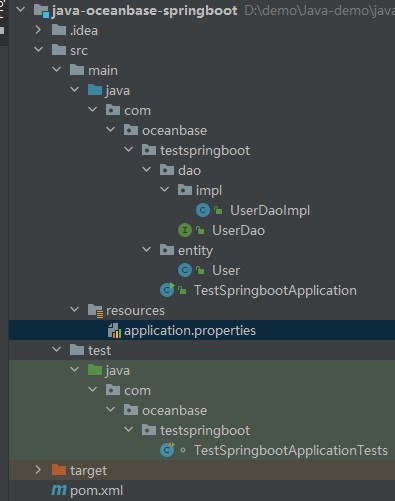
Step 3: Modify the database connection information in the java-oceanbase-springboot project
Modify the database connection information in the application.properties file based on the information obtained in Step 1: Obtain the connection information of OceanBase Cloud.
Here is an example:
- The name of the database driver is
com.oceanbase.jdbc.Driver. - The endpoint of OceanBase Cloud is
t5******.********.oceanbase.cloud. - The access port is
1521. - The name of the schema to be accessed is
sys. - The tenant account is
oracle001. - The password is
******.
Here is the sample code:
spring.datasource.driverClassName=com.oceanbase.jdbc.Driver
spring.datasource.url=jdbc:oceanbase://t5******.********.oceanbase.cloud:1521/sys?useSSL=false&useUnicode=true&characterEncoding=utf-8
spring.datasource.username=oracle001
spring.datasource.password=******
Step 4: Run the java-oceanbase-hibernate project
Run path
- Find the
TestSpringbootApplicationTests.javafile under src > test > java in the project package. - Choose Run > Run... > TestSpringbootApplicationTests in the menu bar or click the green triangle in the upper-right corner to run the project.
- View the logs and output of the project in the Console window of IDEA.
Running result
test_springboot delete successfully!
test_springboot create successfully!
user = User{id=2, name='update'}
User{id=2, name='update'}
User{id=3, name='insert3'}
User{id=4, name='insert4'}
User{id=5, name='insert5'}
User{id=6, name='insert6'}
User{id=7, name='insert7'}
User{id=8, name='insert8'}
User{id=9, name='insert9'}
User{id=10, name='insert10'}
Project code
Click here to download the project code, which is a package named java-oceanbase-springboot.
Decompress the package to obtain a folder named java-oceanbase-springboot. The directory structure is as follows:
│--pom.xml
│
├─.idea
├─src
│  ├─main
│  │  ├─java
│  │  │  └─com
│  │  │      └─oceanbase
│  │  │          └─testspringboot
│  │  │              │--TestSpringbootApplication.java
│  │  │              │
│  │  │              ├─dao
│  │  │              │  │--UserDao.java
│  │  │              │  │
│  │  │              │  └─impl
│  │  │              │      └─--UserDaoImpl.java
│  │  │              │
│  │  │              └─entity
│  │  │                  └─--User.java
│  │  │
│  │  └─resources
│  │      └─--application.properties
│  │
│  └─test
│      └─java
│          └─com
│              └─oceanbase
│                  └─testspringboot
│                      └─--TestSpringbootApplicationTests.java
│
└─target
The files and directories are described as follows:
pom.xml: the configuration file of the Maven project, which contains the dependencies, plug-ins, and build rules of the project..idea: a directory used in an Integrated Development Environment (IDE) to store configuration information related to the project.src: a directory that stores the source code in the project.main: a directory that stores the main source code and resource files.java: a directory that stores the Java source code.com: the root directory of the Java package.oceanbase: the root directory of the project.testspringboot: the root directory of the Java package, which contains all the Java classes of the project.TestSpringbootApplication.java: the main class of the project and contains themainmethod.dao: stores the data access object (DAO) package for accessing databases or other data storage services.UserDao.java: the user DAO that is used to add, delete, modify, and query user data.impl: the implementation directory of DAO interfaces.UserDaoImpl.java: the implementation class of the user DAO interface.entity: the entity class directory, which stores the Java classes corresponding to the database tables.User.java: the user persistent object that is mapped to fields in a user data table.resources: a directory that stores resource files, such as configuration files and SQL files.application.properties: the configuration file of the project, which defines the properties and parameters of the application.test: a directory that stores the test code and resource files.TestSpringbootApplicationTests.java: stores the Java class for testing Spring Boot.target: a directory that stores compiled class files and .jar packages.
Code in pom.xml
Note
You can retain the default code in this file for verification purposes or modify the code in the file as needed.
Perform the following steps to configure the pom.xml file:
Declare the file.
Declare the file to be an XML file that uses XML standard 1.0 and the character encoding UTF-8.
The sample code is as follows:
<?xml version="1.0" encoding="UTF-8"?>Configure namespaces and the POM model version.
xmlns: the default XML namespace for the POM, which is set tohttp://maven.apache.org/POM/4.0.0.xmlns:xsi: the XML namespace for XML elements prefixed withxsi, which is set tohttp://www.w3.org/2001/XMLSchema-instance.xsi:schemaLocation: the location of an XML schema definition (XSD) file. The value consists of two parts: the default XML namespace(http://maven.apache.org/POM/4.0.0)and the URI of the XSD file (http://maven.apache.org/xsd/maven-4.0.0.xsd).<modelVersion>: the POM model version used by the POM file, which is set to4.0.0.
The sample code is as follows:
<project xmlns="http://maven.apache.org/POM/4.0.0" xmlns:xsi="http://www.w3.org/2001/XMLSchema-instance"
  xsi:schemaLocation="http://maven.apache.org/POM/4.0.0 https://maven.apache.org/xsd/maven-4.0.0.xsd">
 <modelVersion>4.0.0</modelVersion>
</project>
Configure parent project information.
<groupId>: the ID of the parent project group, which is set toorg.springframework.boot.<artifactId>: the parent project, which is set tospring-boot-starter-parent.- the version of the parent project, which is set to
2.7.11. <relativePath>: an empty path for the parent project.
The sample code is as follows:
 <groupId>org.springframework.boot</groupId>
 <artifactId>spring-boot-starter-parent</artifactId>
 <version>2.7.11</version>
 <relativePath/>
Configure basic information.
<groupId>: the ID of the project group, which is set tocom.oceanbase.<artifactId>: the name of the project, which is set tojava-oceanbase-springboot.<version>: the version of the project, which is set to0.0.1-SNAPSHOT.<description>: the project information, which is set toDemo project for Spring Boot.
The sample code is as follows:
 <groupId>com.oceanbase</groupId>
 <artifactId>java-oceanbase-springboot</artifactId>
 <version>0.0.1-SNAPSHOT</version>
 <name>java-oceanbase-springboot</name>
 <description>Demo project for Spring Boot</description>
Configure the Java version.
Specify to use Java 1.8 for the project.
The sample code is as follows:
  <properties>
      <java.version>1.8</java.version>
  </properties>
Configure core dependencies.
Define a dependency named
spring-boot-starterthat belongs to theorg.springframework.bootgroup. This dependency contains default features provided by Spring Boot, such as web, data processing, security, and testing.The sample code is as follows:
<dependency>
    <groupId>org.springframework.boot</groupId>
    <artifactId>spring-boot-starter</artifactId>
</dependency>
Define a dependency named
spring-boot-starter-jdbcthat belongs to theorg.springframework.bootgroup. This dependency contains Java Database Connectivity (JDBC) features provided by Spring Boot, such as connection pool and data source configuration.The sample code is as follows:
<dependency>
    <groupId>org.springframework.boot</groupId>
    <artifactId>spring-boot-starter-jdbc</artifactId>
</dependency>
Define a dependency named
spring-boot-starter-testthat belongs to theorg.springframework.bootgroup. This dependency takes effect in thetestscope and provides test frameworks and tools of Spring Boot, such as JUnit, Mockito, and Hamcrest.The sample code is as follows:
<dependency>
    <groupId>org.springframework.boot</groupId>
    <artifactId>spring-boot-starter-test</artifactId>
    <scope>test</scope>
</dependency>
Define a dependency named
oceanbase-clientthat belongs to thecom.oceanbasegroup and whose version is2.4.3. With this dependency, you can use the features of OBClient, such as connections, queries, and transactions.The sample code is as follows:
    <dependencies>
    <dependency>
        <groupId>com.oceanbase</groupId>
        <artifactId>oceanbase-client</artifactId>
        <version>2.4.3</version>
    </dependency>
    </dependencies>
Configure the Maven plug-in.
Define a plug-in named
spring-boot-maven-pluginthat belongs to theorg.springframework.bootgroup. This plug-in can be used to package Spring Boot applications as executable JAR packages or WAR packages, or directly run Spring Boot applications.The sample code is as follows:
 <build>
     <plugins>
         <plugin>
             <groupId>org.springframework.boot</groupId>
             <artifactId>spring-boot-maven-plugin</artifactId>
         </plugin>
     </plugins>
 </build>
Code in application.properties
The application.properties file configures the data source of the Spring Boot application by specifying the driver class name, URL, username, and password for connecting to OceanBase Cloud. With these configurations, the application can connect to and operate OceanBase Cloud.
spring.datasource.driverClassName: the database driver used to establish a connection with OceanBase Cloud, which is set tocom.oceanbase.jdbc.Driver.spring.datasource.url: the URL for connecting to the database.spring.datasource.username: the username for connecting to the database.spring.datasource.password: the password for connecting to the database.The sample code is as follows:
spring.datasource.driverClassName=com.oceanbase.jdbc.Driver
spring.datasource.url=jdbc:oceanbase://host:port/schema_name?useSSL=false&useUnicode=true&characterEncoding=utf-8
spring.datasource.username=user_name
spring.datasource.password=******
Code in UserDaoImpl.java
In the UserDaoImpl.java file, a JdbcTemplate object is used to execute SQL statements that insert, delete, update, and query user data.
Perform the following steps to configure the UserDaoImpl.java file:
Reference other classes and APIs.
Declare that the current file belongs to the
com.oceanbase.testspringboot.dao.implpackage and contains the following interfaces and classes:UserDaointerface: the interface whose methods are implemented in this file.Userclass: transmits and stores user data.Autowiredannotation: injects theJdbcTemplateobject into this class to execute SQL statements.BeanPropertyRowMapperclass: maps database query results to Java objects.JdbcTemplateclass: executes SQL statements and handles database accesses.Repositoryannotation: marks a Spring repository that is used for data access.Listinterface: operates the query result set.
The sample code is as follows:
import com.oceanbase.testspringboot.dao.UserDao;
import com.oceanbase.testspringboot.entity.User;
import org.springframework.beans.factory.annotation.Autowired;
import org.springframework.jdbc.core.BeanPropertyRowMapper;
import org.springframework.jdbc.core.JdbcTemplate;
import org.springframework.stereotype.Repository;
import java.util.List;
Define the
UserDaoImplclass.Use the
Repositoryannotation to specifyuserDaoas the bean name of the class, and use theJdbcTemplateobject to execute SQL statements that insert, delete, update, and query user data.Insert user data.
Call the
insertmethod of theJdbcTemplateobject to insert the user ID and name into thetest_springboottable in the database and return a Boolean value based on the result of the insert operation.The sample code is as follows:
@Autowired
    private JdbcTemplate jdbcTemplate; //Jdbc connection tool class
    @Override
    public boolean insertUser(User user) {
        String sql = "insert into test_springboot(id,name)values(?,?) ";
        Object[] params = {user.getId(), user.getName()};
        return jdbcTemplate.update(sql, params) > 0;
    }
Delete user data.
Call the
deletemethod of theJdbcTemplateobject to delete user data from a table by user ID and return a Boolean value based on the result of the delete operation.The sample code is as follows:
@Override
public boolean deleteById(Long id) {
    String sql = "delete from test_springboot where id=?";
    Object[] params = {id};
    return jdbcTemplate.update(sql, params) > 0;
}
Update user data.
Call the
updatemethod of theJdbcTemplateobject to update a username in thetest_springboottable by user ID, and return a Boolean value based on the result of the update operation.The sample code is as follows:
@Override
public boolean updateUser(User user) {
    String sql = "update test_springboot set name=? where id=?";
    Object[] params = {user.getName(), user.getId()};
    return jdbcTemplate.update(sql, params) > 0;
}
Query user data.
Call the
JdbcTemplateobject to execute the SQL statement that queries thetest_springboottable for the user record with the specified ID, and callBeanPropertyRowMapperto map the results. Return the query result object.The sample code is as follows:
@Override
public User selectUserById(Long id) {
    String sql = "select * from test_springboot where id=?";
    Object[] params = new Object[]{id};
    return jdbcTemplate.queryForObject(
            sql,
            params,
            new BeanPropertyRowMapper<>(User.class));
}
Query all user data.
Call the
querymethod of theJdbcTemplateobject to query all user data in a table, map the query results to a list of objects of theUsertype, and return the list.The sample code is as follows:
@Override
public List<User> selectAllUsers() {
    String sql = "select * from test_springboot";
    return jdbcTemplate.query(sql, new BeanPropertyRowMapper<User>(User.class));
}
Code in UserDao.java
The UserDao.java file defines user data operations in the UserDao interface.
Perform the following steps to configure the UserDao.java file:
Reference other classes and APIs.
Declare that the current file belongs to the
package com.oceanbase.testspringboot.daopackage and contains the following interfaces and classes:Userclass: transmits and stores user data.Listinterface: operates the query result set.
The sample code is as follows:
import com.oceanbase.testspringboot.entity.User;
import java.util.List;
Define the
UserDaointerface.Define user data operations in the
UserDaointerface, including the insert, delete, and update operations, and the operations to query user data by user ID and query all user data.The sample code is as follows:
public interface UserDao {
    boolean insertUser(User user);
    boolean deleteById(Long id);
    boolean updateUser(User user);
    User selectUserById(Long id);
    List<User> selectAllUsers();
}
Code in User.java
The User.java file defines the User class to represent user objects.
Declare the
Userobject. Declare that theUserclass contains two private fields:idandname, and provides a no-argument constructor. The application operates user data by getting and setting theidandnamefields.The sample code is as follows:
private Long id;
private String name;

public User() {
}
Create the
Userobject. Define the constructor with arguments of theUserclass for creating aUserobject with the specifiedidandnamefields.The sample code is as follows:
public User(Long id, String name) {
    this.id = id;
    this.name = name;
}
Get and set the
idandnamevalues. Define four methods in theUserclass to get and set the values of theidandnameattributes. ThegetIdmethod gets theidvalue. ThesetIdmethod sets theidvalue. ThegetNamemethod gets thenamevalue. ThesetNamemethod sets thenamevalue.The sample code is as follows:
public Long getId() {
    return id;
}

public void setId(Long id) {
    this.id = id;
}

public String getName() {
    return name;
}

public void setName(String name) {
    this.name = name;
}
Return a string that represents the
Userobject.Override the
toStringmethod in theUserclass to return a string that represents theUserobject. Use the@Overrideannotation to override the method of the same name in the parent class. Define thetoStringmethod that returns a string representation of theUserobject. Concatenate theidandnamevalues to generate a string and return it to the caller.The sample code is as follows:
@Override
public String toString() {
    return "User{" +
            "id=" + id +
            ", name='" + name + '\'' +
            '}';
}
Code in TestSpringbootApplication.java
The TestSpringbootApplication.java file launches the Spring Boot application by using the UserDao interface.
Perform the following steps to configure the TestSpringbootApplication.java file:
Define classes and interfaces.
Declare that the current file belongs to the
com.oceanbase.testspringbootpackage and contains the following interfaces and classes:SpringApplicationclass: launches the Spring Boot application.@SpringBootApplicationannotation: marks the class as the entry to the Spring Boot application.
The sample code is as follows:
import org.springframework.boot.SpringApplication;
import org.springframework.boot.autoconfigure.SpringBootApplication;
Define the
TestSpringbootApplicationclass.Use the
SpringBootApplicationannotation to specify that this class is the entry class for the Spring Boot application. Call therunmethod of theSpringApplicationclass to launch the Spring Boot application.The sample code is as follows:
@SpringBootApplication
public class TestSpringbootApplication {

    public static void main(String[] args) {
        SpringApplication.run(TestSpringbootApplication.class, args);
    }
}
Code in TestSpringbootApplicationTests.java
The TestSpringbootApplicationTests.java file launches the Spring Boot application by using the UserDao interface.
Perform the following steps to configure the TestSpringbootApplicationTests.java file:
Reference other classes and APIs.
Declare that the current file belongs to the
com.oceanbase.testspringbootpackage and contains the following interfaces and classes:UserDaointerface: the interface whose methods are implemented in this file.Userclass: transmits and stores user data.Testannotation: marks a test method.Autowiredannotation: injects theJdbcTemplateobject into this class to execute SQL statements.SpringBootTestannotation: marks the class as the Spring Boot test class.JdbcTemplateclass: executes SQL statements and handles database accesses.Listinterface: operates the query result set.
The sample code is as follows:
import com.oceanbase.testspringboot.dao.UserDao;
import com.oceanbase.testspringboot.entity.User;
import org.junit.jupiter.api.Test;
import org.springframework.beans.factory.annotation.Autowired;
import org.springframework.boot.test.context.SpringBootTest;
import org.springframework.jdbc.core.JdbcTemplate;
import java.util.List;
Define the
TestSpringbootApplicationTestsclass.Use the
SpringBootTestannotation to mark this class as one that tests features of the Spring Boot application. Use theUserDaoandJdbcTemplateobjects to add, delete, modify, and query user data and output the results.Define objects.
Use the
Autowiredannotation to automatically inject theUserDaoandJdbcTemplateobjects.The sample code is as follows:
@Autowired
private UserDao userDao;
@Autowired
private JdbcTemplate jdbcTemplate;
Define the
contextLoadsmethod.Call the
contextLoadsmethod as a concrete implementation of the test method.Drop the
test_springboottable.Call the
jdbcTemplate.executemethod to execute the SQL statementdrop table test_springbootto drop thetest_springboottable.The sample code is as follows:
try {
      jdbcTemplate.execute("drop table test_springboot");
      System.out.println("test_springboot delete successfully!");
    }
Create the
test_springboottable.Call the
jdbcTemplate.executemethod to execute the SQL statementcreate table test_springboot (id int primary key, name varchar(50))to create a table namedtest_springboot. The table contains theidandnamefields.The sample code is as follows:
catch (Exception ignore) {

        } finally {
            jdbcTemplate.execute("create table test_springboot (" +
                    "id int primary key," +
                    "name varchar(50))");
            System.out.println("test_springboot create successfully!");
        }
Insert data.
Call the
userDao.insertUsermethod to insert 10 user data records into thetest_springboottable. The values of theidfield are 1 to 10, and the values ofnameare"insert" + i.The sample code is as follows:
for (int i = 1; i <= 10; i++) {
    userDao.insertUser(new User((long) i, "insert" + i));
}
Delete data.
Call the
userDao.deleteByIdmethod to delete the user data record whereidis1.The sample code is as follows:
userDao.deleteById(1L);Update data.
Call the
userDao.updateUsermethod to change the value ofnametoupdatein the user data record whereidis2.The sample code is as follows:
userDao.updateUser(new User(2L, "update"));Query data.
Call the
userDao.selectUserByIdmethod to query the user data record whereidis2and print the result.The sample code is as follows:
User user = userDao.selectUserById(2L);
System.out.println("user = " + user);
Query all user data.
Call the
userDao.selectAllUsersmethod to query all user data in thetest_springboottable and print the results.The sample code is as follows:
List<User> userList = userDao.selectAllUsers();
userList.forEach(System.out::println);
Complete code
<?xml version="1.0" encoding="UTF-8"?>
<project xmlns="http://maven.apache.org/POM/4.0.0" xmlns:xsi="http://www.w3.org/2001/XMLSchema-instance"
         xsi:schemaLocation="http://maven.apache.org/POM/4.0.0 https://maven.apache.org/xsd/maven-4.0.0.xsd">
    <modelVersion>4.0.0</modelVersion>
    <parent>
        <groupId>org.springframework.boot</groupId>
        <artifactId>spring-boot-starter-parent</artifactId>
        <version>2.7.11</version>
        <relativePath/> <!-- lookup parent from repository -->
    </parent>
    <groupId>com.oceanbase</groupId>
    <artifactId>java-oceanbase-springboot</artifactId>
    <version>0.0.1-SNAPSHOT</version>
    <name>java-oceanbase-springboot</name>
    <description>Demo project for Spring Boot</description>
    <properties>
        <java.version>1.8</java.version>
    </properties>
    <dependencies>
        <dependency>
            <groupId>org.springframework.boot</groupId>
            <artifactId>spring-boot-starter</artifactId>
        </dependency>
        <dependency>
            <groupId>com.oceanbase</groupId>
            <artifactId>oceanbase-client</artifactId>
            <version>2.4.3</version>
        </dependency>
        <dependency>
            <groupId>org.springframework.boot</groupId>
            <artifactId>spring-boot-starter-jdbc</artifactId>
        </dependency>
        <dependency>
            <groupId>org.springframework.boot</groupId>
            <artifactId>spring-boot-starter-test</artifactId>
            <scope>test</scope>
        </dependency>
    </dependencies>

    <build>
        <plugins>
            <plugin>
                <groupId>org.springframework.boot</groupId>
                <artifactId>spring-boot-maven-plugin</artifactId>
            </plugin>
        </plugins>
    </build>

</project>
  spring.datasource.driverClassName=com.oceanbase.jdbc.Driver
  spring.datasource.url=jdbc:oceanbase://host:port/schema_name?useSSL=false&useUnicode=true&characterEncoding=utf-8
  spring.datasource.username=user_name
  spring.datasource.password=******
package com.oceanbase.testspringboot.dao.impl;

import com.oceanbase.testspringboot.dao.UserDao;
import com.oceanbase.testspringboot.entity.User;
import org.springframework.beans.factory.annotation.Autowired;
import org.springframework.jdbc.core.BeanPropertyRowMapper;
import org.springframework.jdbc.core.JdbcTemplate;
import org.springframework.stereotype.Repository;

import java.util.List;

@Repository("userDao")
public class UserDaoImpl implements UserDao {
    @Autowired
    private JdbcTemplate jdbcTemplate; //Jdbc connection tool class

    @Override
    public boolean insertUser(User user) {
        String sql = "insert into test_springboot(id,name)values(?,?) ";
        Object[] params = {user.getId(), user.getName()};
        return jdbcTemplate.update(sql, params) > 0;
    }

    @Override
    public boolean deleteById(Long id) {
        String sql = "delete from test_springboot where id=?";
        Object[] params = {id};
        return jdbcTemplate.update(sql, params) > 0;
    }

    @Override
    public boolean updateUser(User user) {
        String sql = "update test_springboot set name=? where id=?";
        Object[] params = {user.getName(), user.getId()};
        return jdbcTemplate.update(sql, params) > 0;
    }

    @Override
    public User selectUserById(Long id) {
        String sql = "select * from test_springboot where id=?";
        Object[] params = new Object[]{id};
        return jdbcTemplate.queryForObject(
                sql,
                params,
                new BeanPropertyRowMapper<>(User.class));
    }

    @Override
    public List<User> selectAllUsers() {
        String sql = "select * from test_springboot";
        return jdbcTemplate.query(sql, new BeanPropertyRowMapper<User>(User.class));
    }
}
package com.oceanbase.testspringboot.dao;

import com.oceanbase.testspringboot.entity.User;

import java.util.List;


public interface UserDao {
    boolean insertUser(User user);

    boolean deleteById(Long id);

    boolean updateUser(User user);

    User selectUserById(Long id);

    List<User> selectAllUsers();
}
package com.oceanbase.testspringboot.entity;


public class User {
    private Long id;
    private String name;

    public User() {
    }

    public User(Long id, String name) {
        this.id = id;
        this.name = name;
    }

    public Long getId() {
        return id;
    }

    public void setId(Long id) {
        this.id = id;
    }

    public String getName() {
        return name;
    }

    public void setName(String name) {
        this.name = name;
    }

    @Override
    public String toString() {
        return "User{" +
                "id=" + id +
                ", name='" + name + '\'' +
                '}';
    }
}
package com.oceanbase.testspringboot;

import org.springframework.boot.SpringApplication;
import org.springframework.boot.autoconfigure.SpringBootApplication;

@SpringBootApplication
public class TestSpringbootApplication {

    public static void main(String[] args) {
        SpringApplication.run(TestSpringbootApplication.class, args);
    }
}
package com.oceanbase.testspringboot;

import com.oceanbase.testspringboot.dao.UserDao;
import com.oceanbase.testspringboot.entity.User;
import org.junit.jupiter.api.Test;
import org.springframework.beans.factory.annotation.Autowired;
import org.springframework.boot.test.context.SpringBootTest;
import org.springframework.jdbc.core.JdbcTemplate;

import java.util.List;

@SpringBootTest
class TestSpringbootApplicationTests {
    @Autowired
    private UserDao userDao;
    @Autowired
    private JdbcTemplate jdbcTemplate; //Jdbc connection tool class

    @Test
    void contextLoads() {
        try {
            // Use the execute() method to execute SQL statements and delete the user table test_springboot
            jdbcTemplate.execute("drop table test_springboot");
            System.out.println("test_springboot delete successfully!");
        } catch (Exception ignore) {

        } finally {
            // Use the execute() method to execute SQL statements and create user table tests_ user
            jdbcTemplate.execute("create table test_springboot (" +
                    "id int primary key," +
                    "name varchar(50))");
            System.out.println("test_springboot create successfully!");
        }
        //UserDao userDao=new UserDaoImpl();

        //ApplicationContext ioc=new ApplicationContext("/appli");`
        //add
        for (int i = 1; i <= 10; i++) {
            userDao.insertUser(new User((long) i, "insert" + i));
        }
        //delete
        userDao.deleteById(1L);
        //update
        userDao.updateUser(new User(2L, "update"));
        //selectUserById
        User user = userDao.selectUserById(2L);
        System.out.println("user = " + user);
        //query all users
        List<User> userList = userDao.selectAllUsers();
        userList.forEach(System.out::println);
    }

}
References
For more information about OceanBase Connector/J, see OceanBase Connector/J