







This topic describes how to use the SpringBatch framework and OceanBase Cloud to build an application that performs basic operations such as creating tables, inserting data, and querying data.
 Download the Java OceanBase SpringBatch sample project
 Prerequisites
- You have registered an Alibaba Cloud account and created an instance and a MySQL compatible tenant. For more information, see Create an instance and Create a tenant.
- You have installed JDK 1.8 and Maven.
- You have installed IntelliJ IDEA.
Note
The code examples in this topic are run in IntelliJ IDEA 2021.3.2 (Community Edition). You can also use your preferred tool to run the code examples.
Procedure
Note
The operations described in this topic are performed in the Windows environment. If you are using other operating systems or compilers, the operations may vary slightly.
- Obtain the connection string of the OceanBase Cloud database.
- Import the
java-oceanbase-springbatchproject into IntelliJ IDEA. - Modify the database connection information in the
java-oceanbase-springbatchproject. - Run the
java-oceanbase-springbatchproject.
Step 1: Obtain the connection string of the OceanBase Cloud database
Log in to the OceanBase Cloud console. In the instance list, find the target instance and click the Connect > Get Connection String option in the target tenant.
For more information, see Obtain the connection string.
Fill in the following URL based on the information of the created OceanBase Cloud database.
Note
The URL information is required in the
application.propertiesfile.jdbc:oceanbase://host:port/schema_name?user=$user_name&password=$password&characterEncoding=utf-8Parameter description:
host: the endpoint of the OceanBase Cloud database, for example,t********.********.oceanbase.cloud.port: the port of the OceanBase Cloud database. The default value is 3306.schema_name: the name of the schema to be accessed.user_name: the username for accessing the database.password: the password for the account.characterEncoding: the character encoding.
For more information about the URL parameters, see Database URL.
Step 2: Import the java-oceanbase-springbatch project into IntelliJ IDEA
Open IntelliJ IDEA and choose File > Open....

In the Open File or Project window that appears, select the project file and click OK.
IntelliJ IDEA automatically identifies various files in the project and displays the project structure, file list, module list, and dependency relationships in the Project tool window. The Project tool window is usually located on the left side of the IntelliJ IDEA interface and is open by default. If the Project tool window is closed, you can click View > Tool Windows > Project in the menu bar or press Alt + 1 to reopen it.
Note
When you import a project using IntelliJ IDEA, it automatically detects the pom.xml file in the project, downloads the required dependency libraries based on the described dependencies, and adds them to the project.
View the project.
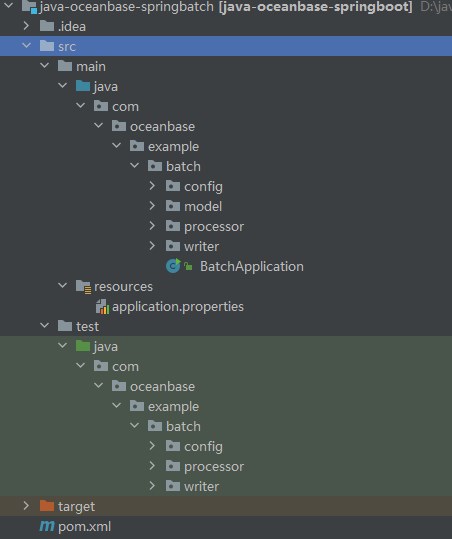
Step 3: Modify the database connection information in the java-oceanbase-springbatch project
Modify the database connection information in the application.properties file based on the information obtained in Step 1: Obtain the connection string of the OceanBase Cloud database.
Here is an example:
- The name of the database driver is
com.mysql.cj.jdbc.Driver. - The endpoint of the OceanBase Cloud database is
t5******.********.oceanbase.cloud. - The port is 3306.
- The name of the schema to be accessed is
test. - The username of the tenant is
mysql001. - The password is
******.
Here is the sample code:
spring.datasource.driver-class-name=com.mysql.cj.jdbc.Driver
spring.datasource.url=jdbc:oceanbase://t********.********.oceanbase.cloud:3306/test?characterEncoding=utf-8
spring.datasource.username=mysql001
spring.datasource.password=******

spring.jpa.show-sql=true
spring.jpa.hibernate.ddl-auto=update

spring.batch.job.enabled=false

logging.level.org.springframework=INFO
logging.level.com.example=DEBUG
Step 4: Run the java-oceanbase-springbatch project
Run the
AddDescPeopleWriterTest.javafile.- In the project structure, go to src > test > java and find the
AddDescPeopleWriterTest.javafile. - In the tool menu bar, choose Run > Run... > AddDescPeopleWriterTest.testWrite, or click the green triangle in the upper-right corner to run.
- View the log information and output results in the console of IntelliJ IDEA.
Data in the people_desc table: PeopleDESC [name=John, age=25, desc=This is John with age 25] PeopleDESC [name=Alice, age=30, desc=This is Alice with age 30] Batch Job execution completed.- In the project structure, go to src > test > java and find the
Run the
AddPeopleWriterTest.javafile.- In the project structure, go to src > test > java and find the
AddDescPeopleWriterTest.javafile. - In the tool menu bar, choose Run > Run... > AddPeopleWriterTest.testWrite, or click the green triangle in the upper-right corner to run.
- View the log information and output results in the console of IntelliJ IDEA.
Data in the people table: People [name=zhangsan, age=27] People [name=lisi, age=35] Batch Job execution completed.- In the project structure, go to src > test > java and find the
FAQ
1. Connection timeout
If you encounter a connection timeout issue, you can configure the connection timeout parameter in the JDBC URL:
jdbc:mysql://host:port/database?connectTimeout=30000&socketTimeout=60000
2. Character set
To ensure the correct character encoding, set the appropriate character set parameter in the JDBC URL:
jdbc:mysql://host:port/database?characterEncoding=utf8&useUnicode=true
3. SSL connection
To enable an SSL connection to OceanBase Cloud, add the following parameter to the JDBC URL:
jdbc:mysql://host:port/database?useSSL=true&requireSSL=true
4. Special characters in the account password
If the username or password contains special characters (such as #), you need to URL-encode them:
String encodedPassword = URLEncoder.encode(password, "UTF-8");
Notice
When using MySQL Connector/J 8.x, ensure that the account password does not contain the # character. Otherwise, you may encounter a connection error.
Project code
Click java-oceanbase-springbatch to download the project code, which is a compressed file named java-oceanbase-springbatch.
After decompressing it, you will find a folder named java-oceanbase-springbatch. The directory structure is as follows:
│  pom.xml
│
├─.idea
│
├─src
│  ├─main
│  │  ├─java
│  │  │  └─com
│  │  │      └─oceanbase
│  │  │          └─example
│  │  │              └─batch
│  │  │                  │──BatchApplication.java
│  │  │                  │
│  │  │                  ├─config
│  │  │                  │   └─BatchConfig.java
│  │  │                  │
│  │  │                  ├─model
│  │  │                  │   ├─People.java
│  │  │                  │   └─PeopleDESC.java
│  │  │                  │
│  │  │                  ├─processor
│  │  │                  │   └─AddPeopleDescProcessor.java
│  │  │                  │
│  │  │                  └─writer
│  │  │                      ├─AddDescPeopleWriter.java
│  │  │                      └─AddPeopleWriter.java
│  │  │
│  │  └─resources
│  │      └─application.properties
│  │
│  └─test
│      └─java
│          └─com
│              └─oceanbase
│                  └─example
│                      └─batch
│                          ├─config
│                          │   └─BatchConfigTest.java
│                          │
│                          ├─processor
│                          │   └─AddPeopleDescProcessorTest.java
│                          │
│                          └─writer
│                              ├─AddDescPeopleWriterTest.java
│                              └─AddPeopleWriterTest.java
│
└─target
File description:
pom.xml: the configuration file of the Maven project, which contains information about the project's dependencies, plugins, and build process..idea: a directory used by the IDE (Integrated Development Environment) to store project-related configuration information.src: a directory typically used to store the source code of the project.main: a directory that stores the main source code and resource files.java: a directory that stores the Java source code.com.oceanbase.example.batch: the package name.BatchApplication.java: the entry class of the application, which contains the main method of the application.config: a directory that stores the configuration classes of the application.BatchConfig.java: the configuration class of the application, used to configure some properties and behaviors of the application.model: a directory that stores the data model classes of the application.People.java: a data model class for people.PeopleDESC.java: a data model class for people's DESC information.processor: a directory that stores the processor classes of the application.AddPeopleDescProcessor.java: a processor class for adding people's DESC information.writer: a directory that stores the writer classes of the application.AddDescPeopleWriter.java: a writer class for writing people's DESC information.AddPeopleWriter.java: a writer class for writing people's information.resources: a directory that stores the configuration files and other static resources of the application.application.properties: the configuration file of the application, used to configure the properties of the application.test: a directory that stores the test code and resource files.BatchConfigTest.java: the test class of the application's configuration class.AddPeopleDescProcessorTest.java: the test class of the add-people-DESC processor.AddDescPeopleWriterTest.java: the test class of the writer for writing people's DESC information.AddPeopleWriterTest.java: the test class of the writer for writing people's information.target: a directory that stores the compiled Class files, JAR packages, and other files.
Introduction to the pom.xml file
Note
If you only want to verify the example, you can use the default code without any modifications. You can also modify the pom.xml file according to your needs as described below.
The content of the pom.xml configuration file is as follows:
File declaration statement.
This statement declares that the file is an XML file using XML version
1.0and character encodingUTF-8.Sample code:
<?xml version="1.0" encoding="UTF-8"?>Configure the namespaces and POM model version.
- Use
xmlnsto set the POM namespace tohttp://maven.apache.org/POM/4.0.0. - Use
xmlns:xsito set the XML namespace tohttp://www.w3.org/2001/XMLSchema-instance. - Use
xsi:schemaLocationto set the POM namespace tohttp://maven.apache.org/POM/4.0.0and the location of the POM's XSD file tohttps://maven.apache.org/xsd/maven-4.0.0.xsd. - Use the
<modelVersion>element to set the POM model version used by the POM file to4.0.0.
Sample code:
<project xmlns="http://maven.apache.org/POM/4.0.0" xmlns:xsi="http://www.w3.org/2001/XMLSchema-instance" xsi:schemaLocation="http://maven.apache.org/POM/4.0.0 https://maven.apache.org/xsd/maven-4.0.0.xsd"> <modelVersion>4.0.0</modelVersion> </project>- Use
Configure the parent project information.
- Use
<groupId>to set the parent project identifier toorg.springframework.boot. - Use
<artifactId>to set the parent project dependency tospring-boot-starter-parent. - Use
<version>to set the parent project version to2.7.11. - Use
relativePathto indicate that the parent project path is empty.
Sample code:
<parent> <groupId>org.springframework.boot</groupId> <artifactId>spring-boot-starter-parent</artifactId> <version>2.7.11</version> <relativePath/> </parent>- Use
Configure the basic information.
- Use
<groupId>to set the project identifier tocom.oceanbase. - Use
<artifactId>to set the project dependency tojava-oceanbase-springboot. - Use
<version>to set the project version to0.0.1-SNAPSHOT. - Use
descriptionto describe the project information asDemo project for Spring Batch.
Sample code:
<groupId>com.oceanbase</groupId> <artifactId>java-oceanbase-springboot</artifactId> <version>0.0.1-SNAPSHOT</version> <name>java-oceanbase-springbatch</name> <description>Demo project for Spring Batch</description>- Use
Configure the Java version.
Set the Java version used by the project to 1.8.
Sample code:
  <properties>
      <java.version>1.8</java.version>
  </properties>
Configure the core dependencies.
Set the organization to
org.springframework.boot, the name tospring-boot-starter, and use this dependency to access the components supported by Spring Boot, including Web, data processing, security, and Test.Sample code:
<dependency>
    <groupId>org.springframework.boot</groupId>
    <artifactId>spring-boot-starter</artifactId>
</dependency>
Set the organization to
org.springframework.boot, the name tospring-boot-starter-jdbc, and use this dependency to access the JDBC-related features provided by Spring Boot, including connection pools and data source configurations.Sample code:
<dependency>
    <groupId>org.springframework.boot</groupId>
    <artifactId>spring-boot-starter-jdbc</artifactId>
</dependency>
Set the organization to
org.springframework.boot, the name tospring-boot-starter-test, and the scope totest. Use this dependency to access the testing framework and tools provided by Spring Boot, including JUnit, Mockito, and Hamcrest.Sample code:
<dependency>
    <groupId>org.springframework.boot</groupId>
    <artifactId>spring-boot-starter-test</artifactId>
    <scope>test</scope>
</dependency>
Set the organization to
com.oceanbase, the name tooceanbase-client, and the version to2.4.12. Use this dependency to access the client features provided by OceanBase, including connections, queries, and transactions.Sample code:
    <dependency>
        <groupId>com.oceanbase</groupId>
        <artifactId>oceanbase-client</artifactId>
        <version>2.4.12</version>
    </dependency>
Set the organization to
org.springframework.boot, the name tospring-boot-starter-batch, and use this dependency to access the batch processing features provided by Spring Boot.Sample code:
<dependency>
    <groupId>org.springframework.boot</groupId>
    <artifactId>spring-boot-starter-batch</artifactId>
</dependency>
Set the organization to
org.springframework.boot, the name tospring-boot-starter-data-jpa, and use this dependency to access the necessary dependencies and configurations for data access using JPA. Spring Boot Starter Data JPA is a Spring Boot starter.Sample code:
<dependency>
    <groupId>org.springframework.boot</groupId>
    <artifactId>spring-boot-starter-data-jpa</artifactId>
</dependency>
Set the organization to
org.apache.tomcat, the name totomcat-jdbc, and use this dependency to access the JDBC connection pool features provided by Tomcat, including connection pool configurations, connection acquisition and release, and connection management.Sample code:
<dependency>
    <groupId>org.apache.tomcat</groupId>
    <artifactId>tomcat-jdbc</artifactId>
</dependency>
Set the dependency architecture to
junit, the name tojunit, the version to4.10, and the scope totest. Use this dependency to add the JUnit unit test dependency configuration.Sample code:
<dependency>
    <groupId>junit</groupId>
    <artifactId>junit</artifactId>
    <version>4.10</version>
    <scope>test</scope>
</dependency>
Set the organization to
javax.activation, the name tojavax.activation-api, and the version to1.2.0. Use this dependency to import the Java Activation Framework (JAF) library.Sample code:
<dependency>
    <groupId>javax.activation</groupId>
    <artifactId>javax.activation-api</artifactId>
    <version>1.2.0</version>
</dependency>
Set the organization to
jakarta.persistence, the name tojakarta.persistence-api, and the version to2.2.3. Use this dependency to add the Jakarta Persistence API dependency configuration. Sample code:<dependency> <groupId>jakarta.persistence</groupId> <artifactId>jakarta.persistence-api</artifactId> <version>2.2.3</version> </dependency>
Configure the Maven plugin.
Set the organization to
org.springframework.boot, the name tospring-boot-maven-plugin, and use this plugin to package Spring Boot applications into executable JAR or WAR packages that can be directly run.Sample code:
<build> <plugins> <plugin> <groupId>org.springframework.boot</groupId> <artifactId>spring-boot-maven-plugin</artifactId> </plugin> </plugins> </build>
application.properties file
The application.properties file is used to configure database connections and other related settings. This includes database drivers, connection URLs, usernames, and passwords. It also contains configurations for JPA (Java Persistence API) and Spring Batch, as well as log level settings.
Database connection configuration.
- Use
spring.datasource.driverto specify the database driver ascom.mysql.cj.jdbc.Driver, which is used to connect to the OceanBase Cloud database. - Use
spring.datasource.urlto specify the URL for connecting to the database. - Use
spring.datasource.usernameto specify the username for connecting to the database. - Use
spring.datasource.passwordto specify the password for connecting to the database.
Sample code:
spring.datasource.driver-class-name=com.mysql.cj.jdbc.Driver spring.datasource.url=jdbc:oceanbase://host:port/schema_name?characterEncoding=utf-8 spring.datasource.username=user_name spring.datasource.password=******- Use
JPA configuration.
- Use
spring.jpa.show-sqlto specify whether to display SQL statements in the log, set totrueto display SQL statements. - Use
spring.jpa.hibernate.ddl-autoto specify the Hibernate DDL operation behavior, set toupdateto automatically update the database structure when the application starts.
Sample code:
spring.jpa.show-sql=true spring.jpa.hibernate.ddl-auto=update- Use
Spring Batch configuration:
Use
spring.batch.job.enabledto specify whether to enable Spring Batch jobs, set tofalseto disable automatic execution of batch jobs.Sample code:
spring.batch.job.enabled=falseNote
In Spring Batch, the
spring.batch.job.enabledproperty controls the execution behavior of batch jobs.spring.batch.job.enabled=true(default): Indicates that all defined batch jobs are automatically executed when the Spring Boot application starts. This means that Spring Batch automatically discovers and executes all defined jobs when the application starts.spring.batch.job.enabled=false: Indicates that automatic execution of batch jobs is disabled. This is typically used in development or testing environments, or when you want to manually control job execution. When set tofalse, jobs will not be automatically executed when the application starts. You can manually trigger jobs using other methods such as REST APIs or command-line interfaces.
spring.batch.job.enabled=falsehelps prevent jobs from being automatically executed when the application starts, providing greater flexibility in controlling when batch jobs are executed.Log configuration:
- Use
logging.level.org.springframeworkto set the log level for the Spring framework toINFO. - Use
logging.level.com.exampleto set the log level for custom application code toDEBUG.
Sample code:
logging.level.org.springframework=INFO logging.level.com.example=DEBUG- Use
BatchApplication.java file
The BatchApplication.java file is the entry point of the Spring Boot application.
The code in the BatchApplication.java file mainly includes the following parts:
Import other classes and interfaces.
Declare the interfaces and classes included in the current file:
SpringApplicationclass: used to start the Spring Boot application.SpringBootApplicationannotation: used to mark the class as the entry point of the Spring Boot application.
Sample code:
import org.springframework.boot.SpringApplication; import org.springframework.boot.autoconfigure.SpringBootApplication;Define the
BatchApplicationclass.Use the
@SpringBootApplicationannotation to mark theBatchApplicationclass as the entry point of the Spring Boot application. In theBatchApplicationclass, define a staticmainmethod as the entry point of the application. In this method, use theSpringApplication.runmethod to start the Spring Boot application. Also, define a method namedrunBatchJobto run the batch job.Sample code:
@SpringBootApplication public class BatchApplication { public static void main(String[] args) { SpringApplication.run(BatchApplication.class, args); } public void runBatchJob() { } }
Introduction to the BatchConfig.java file
The BatchConfig.java file is used to configure components such as steps, readers, processors, and writers for batch processing jobs.
The code in the BatchConfig.java file mainly includes the following parts:
Import other classes and interfaces.
The following interfaces and classes are declared in this file:
Peopleclass: used to store personnel information read from the database.PeopleDESCclass: used to store description information after the personnel information is converted or processed.AddPeopleDescProcessorclass: an implementation class of theItemProcessorinterface. It converts thePeopleobject read to thePeopleDESCobject.AddDescPeopleWriterclass: an implementation class of theItemWriterinterface. It writes thePeopleDESCobject to the target location.Jobinterface: represents a batch processing job.Stepinterface: represents a step in a job.EnableBatchProcessingannotation: a Spring Batch configuration annotation used to enable and configure the Spring Batch processing feature.JobBuilderFactoryclass: used to create and configure jobs.StepBuilderFactoryclass: used to create and configure steps.RunIdIncrementerclass: a Spring Batch run ID (Run ID) auto-incrementer. It is used to increase the run ID each time the job is run.ItemProcessorinterface: used to process or convert the read items.ItemReaderinterface: used to read items from the data source.ItemWriterinterface: used to write the processed or converted items to the specified target location.JdbcCursorItemReaderclass: used to read data from the database and return the cursor result set.Autowiredannotation: used for dependency injection.Beanannotation: used to create and configure beans.ComponentScanannotation: used to specify the package or class to be scanned for components.Configurationannotation: used to mark a class as a configuration class.EnableAutoConfigurationannotation: used to enable Spring Boot auto-configuration.SpringBootApplicationannotation: used to mark the class as the entry point of the Spring Boot application.DataSourceinterface: used to represent the database connection.
Code:
import com.oceanbase.example.batch.model.People; import com.oceanbase.example.batch.model.PeopleDESC; import com.oceanbase.example.batch.processor.AddPeopleDescProcessor; import com.oceanbase.example.batch.writer.AddDescPeopleWriter; import org.springframework.batch.core.Job; import org.springframework.batch.core.Step; import org.springframework.batch.core.configuration.annotation.EnableBatchProcessing; import org.springframework.batch.core.configuration.annotation.JobBuilderFactory; import org.springframework.batch.core.configuration.annotation.StepBuilderFactory; import org.springframework.batch.core.launch.support.RunIdIncrementer; import org.springframework.batch.item.ItemProcessor; import org.springframework.batch.item.ItemReader; import org.springframework.batch.item.ItemWriter; import org.springframework.batch.item.database.JdbcCursorItemReader; import org.springframework.beans.factory.annotation.Autowired; import org.springframework.boot.autoconfigure.EnableAutoConfiguration; import org.springframework.boot.autoconfigure.SpringBootApplication; import org.springframework.context.annotation.Bean; import org.springframework.context.annotation.ComponentScan; import org.springframework.context.annotation.Configuration; import org.springframework.jdbc.core.BeanPropertyRowMapper; import javax.sql.DataSource;Define the
BatchConfigclass.This is a simple Spring Batch batch processing job. It defines the methods for reading, processing, and writing data, and encapsulates these steps into a job. By using Spring Batch annotations and auto-configuration features, you can create corresponding component instances through the
@Beanmethods in the configuration class and use these components instep1to complete data reading, processing, and writing.- Use
@Configurationto indicate that this class is a configuration class. - Use
@EnableBatchProcessingto enable the Spring Batch processing feature. This annotation automatically creates necessary beans, such asJobRepositoryandJobLauncher. - Use
@SpringBootApplicationas the main class annotation for Spring Boot applications, which is the starting point of the Spring Boot application. - Use
@ComponentScanto specify the package to be scanned for components. It tells Spring to scan and register all components in this package and its subpackages. - Use
@EnableAutoConfigurationto automatically configure the infrastructure of the Spring Boot application.
Code:
@Configuration @EnableBatchProcessing @SpringBootApplication @ComponentScan("com.oceanbase.example.batch.writer") @EnableAutoConfiguration public class BatchConfig { }Define the
@Autowiredannotation.Use the
@Autowiredannotation to injectJobBuilderFactory,StepBuilderFactory, andDataSourceinto the member variables of theBatchConfigclass.JobBuilderFactoryis a factory class used to create and configure jobs (Job),StepBuilderFactoryis a factory class used to create and configure steps (Step), andDataSourceis an interface used to obtain the database connection.Code:
@Autowired private JobBuilderFactory jobBuilderFactory; @Autowired private StepBuilderFactory stepBuilderFactory; @Autowired private DataSource dataSource;Define the
@Beanannotation.Use the
@Beanannotation to define several methods for creating the reader, processor, writer, step, and job components of the batch processing job.Use the
peopleReadermethod to create anItemReadercomponent instance. This component usesJdbcCursorItemReaderto readPeopleobject data from the database. Set the data sourcedataSource, set theRowMapperto map database rows toPeopleobjects, and set the SQL query statement toSELECT * FROM people.Use the
addPeopleDescProcessormethod to create anItemProcessorcomponent instance. This component usesAddPeopleDescProcessorto processPeopleobjects and returns the convertedPeopleDESCobjects.Use the
addDescPeopleWritermethod to create anItemWritercomponent instance. This component usesAddDescPeopleWriterto writePeopleDESCobjects to the target location.Use the
step1method to create aStepcomponent instance. The step name isstep1. Obtain the step builder throughstepBuilderFactory.get, set the reader to theItemReadercomponent, set the processor to theItemProcessorcomponent, set the writer to theItemWritercomponent, set thechunksize to10, and finally callbuildto build and return the configuredStep.Use the
importJobmethod to create aJobcomponent instance. The job name isimportJob. Obtain the job builder throughjobBuilderFactory.get, set the incrementer toRunIdIncrementer, set the initial step of the jobflowtoStep, and finally callbuildto build and return the configuredJob.Code:
@Bean public ItemReader<People> peopleReader() { JdbcCursorItemReader<People> reader = new JdbcCursorItemReader<>(); reader.setDataSource((javax.sql.DataSource) dataSource); reader.setRowMapper(new BeanPropertyRowMapper<>(People.class)); reader.setSql("SELECT * FROM people"); return reader; } @Bean public ItemProcessor<People, PeopleDESC> addPeopleDescProcessor() { return new AddPeopleDescProcessor(); } @Bean public ItemWriter<PeopleDESC> addDescPeopleWriter() { return new AddDescPeopleWriter(); } @Bean public Step step1(ItemReader<People> reader, ItemProcessor<People, PeopleDESC> processor, ItemWriter<PeopleDESC> writer) { return stepBuilderFactory.get("step1") .<People, PeopleDESC>chunk(10) .reader(reader) .processor(processor) .writer(writer) .build(); } @Bean public Job importJob(Step step1) { return jobBuilderFactory.get("importJob") .incrementer(new RunIdIncrementer()) .flow(step1) .end() .build(); }
- Use
Introduction to the People.java file
The People.java file defines a People class that stores information about a person. The class contains two private member variables, name and age, and corresponding getter and setter methods. It also overrides the toString method to print the information of an object. In this class, name indicates the name of a person, and age indicates the age of a person. You can use the getter and setter methods to obtain and set the values of these attributes.
The People class is used to store and pass data in the input and output of a batch program. In the read and write operations of a batch program, you use the People object to store data, use the setter method to set data, and use the getter method to obtain data.
Sample code:
public class People {
private String name;
private int age;
// getters and setters
public String getName() {
return name;
}
public void setName(String name) {
this.name = name;
}
public int getAge() {
return age;
}
public void setAge(int age) {
this.age = age;
}
@Override
public String toString() {
return "People [name=" + name + ", age=" + age + "]";
}
// Getters and setters
}
Introduction to the PeopleDESC.java file
The PeopleDESC.java file defines a PeopleDESC class that stores information about a person. The PeopleDESC class has four attributes: name, age, desc, and id, which indicate the name, age, description, and ID of a person, respectively. The class contains corresponding getter and setter methods to access and set the values of these attributes. It also overrides the toString method to return the string representation of the class, which contains the name, age, and description.
Similar to the People class, the PeopleDESC class is used to store and pass data in the input and output of a batch program.
Sample code:
public class PeopleDESC {
private String name;
private int age;
private String desc;
private int id;
public String getName() {
return name;
}
public void setName(String name) {
this.name = name;
}
public int getAge() {
return age;
}
public void setAge(int age) {
this.age = age;
}
public String getDesc() {
return desc;
}
public void setDesc(String desc) {
this.desc = desc;
}
public int getId() {
return id;
}
public void setId(int id) {
this.id = id;
}
@Override
public String toString() {
return "PeopleDESC [name=" + name + ", age=" + age + ", desc=" + desc + "]";
}
}
Introduction to the AddPeopleDescProcessor.java file
The AddPeopleDescProcessor.java file defines a AddPeopleDescProcessor class that implements the ItemProcessor interface. This class is used to convert a People object to a PeopleDESC object.
The code in the AddPeopleDescProcessor.java file mainly includes the following parts:
Import other classes and interfaces.
The code declares that the current file contains the following interfaces and classes:
Peopleclass: stores the information of a person read from a database.PeopleDESCclass: stores the description of a person after the information is converted or processed.ItemProcessorinterface: processes or converts the read items.
Sample code:
import com.oceanbase.example.batch.model.People; import com.oceanbase.example.batch.model.PeopleDESC; import org.springframework.batch.item.ItemProcessor;Define the
AddPeopleDescProcessorclass.The
AddPeopleDescProcessorclass of theItemProcessorinterface is used to convert aPeopleobject to aPeopleDESCobject, and implement the logic for processing input data in a batch program.In the
processmethod of this class, first, aPeopleDESCobjectdescis created. Then, thenameandageattributes of thePeopleobject are obtained from theitemparameter, and the values of these attributes are set to thedescobject. Thedescattribute of thedescobject is also set to a description generated based on the attributes of thePeopleobject. Finally, the processedPeopleDESCobject is returned.Sample code:
public class AddPeopleDescProcessor implements ItemProcessor<People, PeopleDESC> { @Override public PeopleDESC process(People item) throws Exception { PeopleDESC desc = new PeopleDESC(); desc.setName(item.getName()); desc.setAge(item.getAge()); desc.setDesc("This is " + item.getName() + " with age " + item.getAge()); return desc; } }
Introduction to AddDescPeopleWriter.java
The AddDescPeopleWriter.java file implements the AddDescPeopleWriter class, which implements the ItemWriter interface. This class is used to write People objects to a database.
The code in the AddDescPeopleWriter.java file mainly includes the following parts:
Import other classes and interfaces.
Declare that the current file contains the following interfaces and classes:
PeopleDESCclass: used to store description information after conversion or processing of personnel information.ItemWriterinterface: used to write processed or converted items to the specified target location.@Autowiredannotation: used for dependency injection.JdbcTemplateclass: provides methods for executing SQL statements.Listinterface: used to operate on query result sets.
Code:
import com.oceanbase.example.batch.model.PeopleDESC; import org.springframework.batch.item.ItemWriter; import org.springframework.beans.factory.annotation.Autowired; import org.springframework.jdbc.core.JdbcTemplate; import java.util.List;Define the
AddDescPeopleWriterclass.Use the
@Autowiredannotation to automatically inject theJdbcTemplateinstance. This instance is used to perform database operations when writing data.Code:
@Autowired private JdbcTemplate jdbcTemplate;In the
writemethod, iterate through the inputList<? extends PeopleDESC>and extract eachPeopleDESCobject. First, execute the SQL statementDROP TABLE people_descto delete thepeople_desctable if it exists. Then, execute the SQL statementCREATE TABLE people_desc (id INT PRIMARY KEY, name VARCHAR2(255), age INT, description VARCHAR2(255))to create apeople_desctable with columnsid,name,age, anddescription. Finally, use the SQL statementINSERT INTO people_desc (id, name, age, description) VALUES (?, ?, ?, ?)to insert the attribute values of eachPeopleDESCobject into thepeople_desctable.Code:
@Override public void write(List<? extends PeopleDESC> items) throws Exception { // Drop the table if it exists jdbcTemplate.execute("DROP TABLE people_desc"); // Create the table String createTableSql = "CREATE TABLE people_desc (id INT PRIMARY KEY, name VARCHAR2(255), age INT, description VARCHAR2(255))"; jdbcTemplate.execute(createTableSql); for (PeopleDESC item : items) { String sql = "INSERT INTO people_desc (id, name, age, description) VALUES (?, ?, ?, ?)"; jdbcTemplate.update(sql, item.getId(), item.getName(), item.getAge(), item.getDesc()); } }
Introduction to the AddPeopleWriter.java file
The AddPeopleWriter.java file implements the AddDescPeopleWriter class of the ItemWriter interface, which is used to write PeopleDESC objects to a database.
The AddPeopleWriter.java file contains the following code:
Import other classes and interfaces.
Declare the following interfaces and classes in the current file:
Peopleclass: used to store personnel information read from a database.ItemWriterinterface: used to write processed or converted items to a specified target location.Autowiredannotation: used for dependency injection.JdbcTemplateclass: provides methods for executing SQL statements.Componentannotation: used to mark the class as a Spring component.Listinterface: used to operate on query result sets.
Code:
import com.oceanbase.example.batch.model.People; import org.springframework.batch.item.ItemWriter; import org.springframework.beans.factory.annotation.Autowired; import org.springframework.jdbc.core.JdbcTemplate; import org.springframework.stereotype.Component; import java.util.List;Define the
AddPeopleWriterclass.Use the
@Autowiredannotation to automatically inject theJdbcTemplateinstance, which is used to execute database operations when writing data.Code:
@Autowired private JdbcTemplate jdbcTemplate;In the
writemethod, traverse the inputList<? extends People>and extract eachPeopleobject. First, execute the SQL statementDROP TABLE peopleto delete an existing table namedpeople. Then, execute the SQL statementCREATE TABLE people (name VARCHAR2(255), age INT)to create a table namedpeoplewith two columns:nameandage. Finally, use the SQL statementINSERT INTO people (name, age) VALUES (?, ?)to insert the attribute values of eachPeopleobject into thepeopletable.Code:
@Override public void write(List<? extends People> items) throws Exception { // Drop the table if it exists jdbcTemplate.execute("DROP TABLE people"); // Create the table String createTableSql = "CREATE TABLE people (name VARCHAR2(255), age INT)"; jdbcTemplate.execute(createTableSql); for (People item : items) { String sql = "INSERT INTO people (name, age) VALUES (?, ?)"; jdbcTemplate.update(sql, item.getName(), item.getAge()); } }
Introduction to the BatchConfigTest.java file
The BatchConfigTest.java file is a class that uses JUnit for testing, used to test the job configuration of Spring Batch.
The BatchConfigTest.java file contains the following code:
Import other classes and interfaces.
Declare the following interfaces and classes in the current file:
Assertclass: used to assert test results.Testannotation: used to mark a method as a test method.RunWithannotation: used to specify a test runner.Jobinterface: represents a batch processing job.JobExecutionclass: used to represent the execution of a batch processing job.JobParametersclass: used to represent the parameters of a batch processing job.JobParametersBuilderclass: used to build the parameters of a batch processing job.JobLauncherinterface: used to start a batch processing job.Autowiredannotation: used for dependency injection.SpringBootTestannotation: used to specify the test class as a Spring Boot test.SpringRunnerclass: used to specify the test runner as SpringRunner.
Code:
import org.junit.Assert; import org.junit.jupiter.api.Test; import org.junit.runner.RunWith; import org.springframework.batch.core.Job; import org.springframework.batch.core.JobExecution; import org.springframework.batch.core.JobParameters; import org.springframework.batch.core.JobParametersBuilder; import org.springframework.batch.core.launch.JobLauncher; import org.springframework.beans.factory.annotation.Autowired; import org.springframework.boot.test.context.SpringBootTest; import org.springframework.test.context.junit4.SpringRunner; import javax.batch.runtime.BatchStatus; import java.util.UUID;Define the
BatchConfigTestclass.Use the
SpringBootTestannotation andSpringRunnerrunner to perform integration tests for Spring Boot. In thetestJobmethod, use theJobLauncherTestUtilshelper class to start a batch processing job and use assertions to verify the job's execution status.Use the
@Autowiredannotation to automatically inject theJobLauncherTestUtilsinstance.Code:
@Autowired private JobLauncherTestUtils jobLauncherTestUtils;Use the
@Testannotation to mark thetestJobmethod as a test method. In this method, first create aJobParametersobject, then use thejobLauncherTestUtils.launchJobmethod to start the batch processing job, and use theAssert.assertEqualsmethod to assert that the job's execution status isCOMPLETED.Code:
@Test public void testJob() throws Exception { JobParameters jobParameters = new JobParametersBuilder() .addString("jobParam", "paramValue") .toJobParameters(); JobExecution jobExecution = jobLauncherTestUtils.launchJob(jobParameters); Assert.assertEquals(BatchStatus.COMPLETED, jobExecution.getStatus()); }Use the
@Autowiredannotation to automatically inject theJobLauncherinstance.Code:
@Autowired private JobLauncher jobLauncher;Use the
@Autowiredannotation to automatically inject theJobinstance.Code:
@Autowired private Job job;Define an internal class named
JobLauncherTestUtilsto assist in starting the batch processing job. In this class, define alaunchJobmethod to start the batch processing job. In this method, use thejobLauncher.runmethod to start the job and return the job's execution result.Code:
private class JobLauncherTestUtils { public JobExecution launchJob(JobParameters jobParameters) throws Exception { return jobLauncher.run(job, jobParameters); } }
AddPeopleDescProcessorTest.java file
The AddPeopleDescProcessorTest.java file is a class that uses JUnit for testing Spring Batch job configurations.
The code in the AddPeopleDescProcessorTest.java file mainly includes the following parts:
Import other classes and interfaces.
Declare the interfaces and classes included in the current file:
Peopleclass: stores the personnel information read from the database.PeopleDESCclass: stores the description information after the personnel information is converted or processed.Assertclass: verifies whether the expected results and actual results in the test are consistent.Testannotation: marks the test method.RunWithannotation: specifies the test runner.Autowiredannotation: performs dependency injection.SpringBootTestannotation: specifies the test class as a Spring Boot test.SpringRunnerclass: specifies the test runner as SpringRunner.
Code:
import com.oceanbase.example.batch.model.People; import com.oceanbase.example.batch.model.PeopleDESC; import org.junit.Assert; import org.junit.jupiter.api.Test; import org.junit.runner.RunWith; import org.springframework.beans.factory.annotation.Autowired; import org.springframework.boot.test.context.SpringBootTest; import org.springframework.test.context.junit4.SpringRunner;Define the
AddPeopleDescProcessorTestclass.Use the
SpringBootTestannotation andSpringRunnerrunner for Spring Boot integration testing.Use the
@Autowiredannotation to automatically inject theAddPeopleDescProcessorinstance.Code:
@Autowired private AddPeopleDescProcessor processor;Use the
@Testannotation to mark thetestProcessmethod as a test method. In this method, first create aPeopleobject, then use theprocessor.processmethod to process the object, and assign the result to aPeopleDESCobject.Code:
@Test public void testProcess() throws Exception { People people = new People(); people.setName("John"); people.setAge(25); PeopleDESC desc = processor.process(people); }
AddDescPeopleWriterTest.java
AddDescPeopleWriterTest.java is a class that uses JUnit for testing the write logic of AddDescPeopleWriter.
The AddDescPeopleWriterTest.java file contains the following code:
Reference other classes and interfaces.
This file contains the following interfaces and classes:
- The
PeopleDESCclass: used for storing the converted or processed description information for persons. Assertclass: Used to assert test results.@Testannotation: marks a method as a test method.RunWithannotation: specifies the test runner.- The
@Autowiredannotation: used for dependency injection. - The
SpringBootTestannotation: specifies that the test class is for Spring Boot tests. JdbcTemplateclass: provides methods for executing SQL statements.SpringRunnerclass: specifies the test runner as SpringRunner.ArrayListclass for creating an empty list.- List interface: used to operate on the query result set.
The following code:
import com.oceanbase.example.batch.model.PeopleDESC; import org.junit.Assert; import org.junit.jupiter.api.Test; import org.junit.runner.RunWith; import org.springframework.beans.factory.annotation.Autowired; import org.springframework.boot.test.context.SpringBootTest; import org.springframework.jdbc.core.JdbcTemplate; import org.springframework.test.context.junit4.SpringRunner; import java.util.ArrayList; import java.util.List;- The
Define the
AddDescPeopleWriterTestclass.You can perform integrated testing of Spring Boot applications using the
SpringBootTestannotation and theSpringRunnerrunner.Inject instances by using the
@Autowiredannotation. Autowire theAddPeopleDescProcessorandJdbcTemplateinstances by using the@Autowiredannotation.Code example:
@Autowired private AddDescPeopleWriter writer; @Autowired private JdbcTemplate jdbcTemplate;Run the
@Testmethod to insert and query the test data. ThetestWritemethod is marked as the test method by using the@Testannotation. In this method, apeopleDescListlist is created and twoPeopleDESCobjects are added to the list. Then, the data in the list is written to the database by using thewriter.writemethod. Next, thejdbcTemplatemethod is called to execute a query statement, and data is retrieved from thepeople_desctable. Assertions are used to verify the data. Finally, the query result is output to the console, and a job execution completion message is printed.Insert data into the
people_desctable. First, an empty list ofPeopleDESCobjects,peopleDescList, is created. Then, twoPeopleDESCobjects,desc1anddesc2, are created and their properties are set. Thedesc1anddesc2objects are added to thepeopleDescListlist. Thewritemethod ofwriteris then called to write the objects in thepeopleDescListlist to thepeople_desctable in the database. TheJdbcTemplateis used to execute a query statementSELECT COUNT(*) FROM people_descto obtain the number of records in thepeople_desctable and assign the result to the variablecount. Finally, theAssert.assertEqualsmethod is used to perform an assertion to verify whether the value ofcountis equal to2.The code is as follows:
List<PeopleDESC> peopleDescList = new ArrayList<>(); PeopleDESC desc1 = new PeopleDESC(); desc1.setId(1); desc1.setName("John"); desc1.setAge(25); desc1.setDesc("This is John with age 25"); peopleDescList.add(desc1); PeopleDESC desc2 = new PeopleDESC(); desc2.setId(2); desc2.setName("Alice"); desc2.setAge(30); desc2.setDesc("This is Alice with age 30"); peopleDescList.add(desc2); writer.write(peopleDescList); String selectSql = "SELECT COUNT(*) FROM people_desc"; int count = jdbcTemplate.queryForObject(selectSql, Integer.class); Assert.assertEquals(2, count);Output the data of the
people_desctable. First, theJdbcTemplateexecutes the statementSELECT * FROM people_descand uses alambdaexpression to handle the query result. In thelambdaexpression, the methods such asrs.getIntandrs.getStringare used to obtain the field values from the result set and set them to a newPeopleDESCobject. The newPeopleDESCobject is added to a result listresultDesc. Then, a prompt messagepeople_desc table data:is printed, followed by aforloop to traverse eachPeopleDESCobject in theresultDesclist. TheSystem.out.printlnmethod is used to print each object. Finally, an execution completion message is printed.The code is as follows:
List<PeopleDESC> resultDesc = jdbcTemplate.query("SELECT * FROM people_desc", (rs, rowNum) -> { PeopleDESC desc = new PeopleDESC(); desc.setId(rs.getInt("id")); desc.setName(rs.getString("name")); desc.setAge(rs.getInt("age")); desc.setDesc(rs.getString("description")); return desc; }); System.out.println("people_desc table data:"); for (PeopleDESC desc : resultDesc) { System.out.println(desc); } // Output information after the job finishes. System.out.println("Batch Job execution completed.");
AddPeopleWriterTest.java File Introduction
The AddPeopleWriterTest.java file is a class that uses JUnit to test the writing logic of the AddPeopleWriterTest class.
The code in the AddPeopleWriterTest.java file is as follows:
References other classes and interfaces.
This file contains the following interfaces and classes:
- The
Peopleclass: Used to store personnel information read from the database. Testannotation: used to mark test methods.RunWithannotation: specifies the test runner.Autowired: A dependency injection annotation.@SpringBootApplicationannotation: indicates the class as the entry point of a Spring Boot application.SpringBootTestannotation: used to specify that the test class is a Spring Boot test.ComponentScanAnnotation: specifies the package or class for which the component scan is performed.JdbcTemplateclass: provides methods to execute SQL statements.SpringRunnerclass: specifies the test runner asSpringRunner.ArrayListclass, which is used to create an empty list.- The
Listinterface: used for operating on the query result set.
Here is the code:
import com.oceanbase.example.batch.model.People; import org.junit.jupiter.api.Test; import org.junit.runner.RunWith; import org.springframework.beans.factory.annotation.Autowired; import org.springframework.boot.autoconfigure.SpringBootApplication; import org.springframework.boot.test.context.SpringBootTest; import org.springframework.context.annotation.ComponentScan; import org.springframework.jdbc.core.JdbcTemplate; import org.springframework.test.context.junit4.SpringRunner; import java.util.ArrayList; import java.util.List;- The
Define the
AddPeopleWriterTestclass.Use the
SpringBootTestannotation and theSpringRunnerrunner to perform integration testing in Spring Boot. Use the@ComponentScanannotation to specify the package paths to be scanned.Inject instances by using
@Autowired. Use the@Autowiredannotation to injectaddPeopleWriterandJdbcTemplateinstances.Sample code:
@Autowired private AddPeopleWriter addPeopleWriter; @Autowired private JdbcTemplate jdbcTemplate;Insert and output the test data.
Insert data into the
peopletable. First, create an emptypeopleListlist ofPeopleobjects. Then, create twoPeopleobjects namedperson1andperson2and set their Name and Age attributes. Next, add thesePeopleobjects to thepeopleListlist. Then, call thewritemethod ofaddPeopleWriterand passpeopleListas the parameter to write these objects to the database.Here is the code:
List<People> peopleList = new ArrayList<>(); People person1 = new People(); person1.setName("zhangsan"); person1.setAge(27); peopleList.add(person1); People person2 = new People(); person2.setName("lisi"); person2.setAge(35); peopleList.add(person2); addPeopleWriter.write(peopleList);Output data from the
peopletable. Then, a query statementSELECT * FROM peopleis executed by using theJdbcTemplateobject, and the query result is processed by using alambdaexpression. In thelambdaexpression, thers.getStringandrs.getIntmethods are used to obtain field values from the result set. Then, the field values are set to a newly createdPeopleobject. Each newly createdPeopleobject is added to a result listresult. Then, a prompt messagepeople table data:is printed. Then, eachPeopleobject in theresultlist is traversed by using aforloop, and theSystem.out.printlnmethod is used to print the contents of each object. Finally, a message indicating that the operation is completed is printed.Code example:
List<People> result = jdbcTemplate.query("SELECT * FROM people", (rs, rowNum) -> { People person = new People(); person.setName(rs.getString("name")); person.setAge(rs.getInt("age")); return person; }); System.out.println("people table data:"); for (People person : result) { System.out.println(person); } // Output information after the job is completed. System.out.println("Batch Job execution completed.");
Full code
<?xml version="1.0" encoding="UTF-8"?>
<project xmlns="http://maven.apache.org/POM/4.0.0" xmlns:xsi="http://www.w3.org/2001/XMLSchema-instance"
xsi:schemaLocation="http://maven.apache.org/POM/4.0.0 https://maven.apache.org/xsd/maven-4.0.0.xsd">
<modelVersion>4.0.0</modelVersion>
<parent>
<groupId>org.springframework.boot</groupId>
<artifactId>spring-boot-starter-parent</artifactId>
<version>2.7.11</version>
<relativePath/> <!-- lookup parent from repository -->
</parent>
<groupId>com.oceanbase</groupId>
<artifactId>java-oceanbase-springboot</artifactId>
<version>0.0.1-SNAPSHOT</version>
<name>java-oceanbase-springbatch</name>
<description>Demo project for Spring Batch</description>
<properties>
<java.version>1.8</java.version>
</properties>
<dependencies>
<dependency>
<groupId>org.springframework.boot</groupId>
<artifactId>spring-boot-starter</artifactId>
</dependency>
<dependency>
<groupId>com.oceanbase</groupId>
<artifactId>oceanbase-client</artifactId>
<version>2.4.3</version>
</dependency>
<dependency>
<groupId>org.springframework.boot</groupId>
<artifactId>spring-boot-starter-jdbc</artifactId>
</dependency>
<dependency>
<groupId>org.springframework.boot</groupId>
<artifactId>spring-boot-starter-test</artifactId>
<scope>test</scope>
</dependency>
<dependency>
<groupId>org.springframework.boot</groupId>
<artifactId>spring-boot-starter-batch</artifactId>
</dependency>
<dependency>
<groupId>org.springframework.boot</groupId>
<artifactId>spring-boot-starter-data-jpa</artifactId>
</dependency>
<dependency>
<groupId>org.apache.tomcat</groupId>
<artifactId>tomcat-jdbc</artifactId>
</dependency>
<dependency>
<groupId>junit</groupId>
<artifactId>junit</artifactId>
<version>4.10</version>
<scope>test</scope>
</dependency>
<dependency>
<groupId>javax.activation</groupId>
<artifactId>javax.activation-api</artifactId>
<version>1.2.0</version>
</dependency>
<dependency>
    <groupId>jakarta.persistence</groupId>
    <artifactId>jakarta.persistence-api</artifactId>
    <version>2.2.3</version>
</dependency>
</dependencies>
 <build>
     <plugins>
         <plugin>
             <groupId>org.springframework.boot</groupId>
             <artifactId>spring-boot-maven-plugin</artifactId>
         </plugin>
     </plugins>
 </build>
</project>
#configuration database
spring.datasource.driver-class-name=com.mysql.cj.jdbc.Driver
spring.datasource.url=jdbc:oceanbase://host:port/schema_name?characterEncoding=utf-8
spring.datasource.username=user_name
spring.datasource.password=
# JPA
spring.jpa.show-sql=true
spring.jpa.hibernate.ddl-auto=update
# Spring Batch
spring.batch.job.enabled=false
#
logging.level.org.springframework=INFO
logging.level.com.example=DEBUG
package com.oceanbase.example.batch;
    import org.springframework.boot.SpringApplication;
    import org.springframework.boot.autoconfigure.SpringBootApplication;
    @SpringBootApplication
    public class BatchApplication {
        public static void main(String[] args) {
            SpringApplication.run(BatchApplication.class, args);
        }

        public void runBatchJob() {
        }
    }
package com.oceanbase.example.batch.config;
import com.oceanbase.example.batch.model.People;
import com.oceanbase.example.batch.model.PeopleDESC;
import com.oceanbase.example.batch.processor.AddPeopleDescProcessor;
import com.oceanbase.example.batch.writer.AddDescPeopleWriter;
import org.springframework.batch.core.Job;
import org.springframework.batch.core.Step;
import org.springframework.batch.core.configuration.annotation.EnableBatchProcessing;
import org.springframework.batch.core.configuration.annotation.JobBuilderFactory;
import org.springframework.batch.core.configuration.annotation.StepBuilderFactory;
import org.springframework.batch.core.launch.support.RunIdIncrementer;
import org.springframework.batch.item.ItemProcessor;
import org.springframework.batch.item.ItemReader;
import org.springframework.batch.item.ItemWriter;
import org.springframework.batch.item.database.JdbcCursorItemReader;
import org.springframework.beans.factory.annotation.Autowired;
import org.springframework.boot.autoconfigure.EnableAutoConfiguration;
import org.springframework.boot.autoconfigure.SpringBootApplication;
import org.springframework.context.annotation.Bean;
import org.springframework.context.annotation.ComponentScan;
import org.springframework.context.annotation.Configuration;
import org.springframework.jdbc.core.BeanPropertyRowMapper;

import javax.sql.DataSource;
//import javax.activation.DataSource;
@Configuration
@EnableBatchProcessing
@SpringBootApplication
@ComponentScan("com.oceanbase.example.batch.writer")
@EnableAutoConfiguration
public class BatchConfig {
@Autowired
private JobBuilderFactory jobBuilderFactory;

@Autowired
private StepBuilderFactory stepBuilderFactory;

@Autowired
private DataSource dataSource;// Use the default dataSource provided by Spring Boot auto-configuration
@Bean
public ItemReader<People> peopleReader() {
    JdbcCursorItemReader<People> reader = new JdbcCursorItemReader<>();
    reader.setDataSource((javax.sql.DataSource) dataSource);
    reader.setRowMapper(new BeanPropertyRowMapper<>(People.class));
    reader.setSql("SELECT * FROM people");
    return reader;
}

@Bean
public ItemProcessor<People, PeopleDESC> addPeopleDescProcessor() {
    return new AddPeopleDescProcessor();
}

@Bean
public ItemWriter<PeopleDESC> addDescPeopleWriter() {
    return new AddDescPeopleWriter();
}

@Bean
public Step step1(ItemReader<People> reader, ItemProcessor<People, PeopleDESC> processor,
                ItemWriter<PeopleDESC> writer) {
    return stepBuilderFactory.get("step1")
            .<People, PeopleDESC>chunk(10)
            .reader(reader)
            .processor(processor)
            .writer(writer)
            .build();
}

@Bean
public Job importJob(Step step1) {
    return jobBuilderFactory.get("importJob")
            .incrementer(new RunIdIncrementer())
            .flow(step1)
            .end()
            .build();
}
}
package com.oceanbase.example.batch.model;
    public class People {
        private String name;
        private int age;

            // getters and setters

        public String getName() {
            return name;
        }

        public void setName(String name) {
            this.name = name;
        }

        public int getAge() {
            return age;
        }

        public void setAge(int age) {
            this.age = age;
        }
        @Override
        public String toString() {
            return "People [name=" + name + ", age=" + age + "]";
        }
        // Getters and setters
    }
package com.oceanbase.example.batch.model;
    public class PeopleDESC {
        private String name;
        private int age;
        private String desc;
        private int id;

        public String getName() {
            return name;
        }

        public void setName(String name) {
            this.name = name;
        }

        public int getAge() {
            return age;
        }

        public void setAge(int age) {
            this.age = age;
        }

        public String getDesc() {
            return desc;
        }

        public void setDesc(String desc) {
            this.desc = desc;
        }

        public int getId() {
            return id;
        }

        public void setId(int id) {
            this.id = id;
        }

        @Override
        public String toString() {
            return "PeopleDESC [name=" + name + ", age=" + age + ", desc=" + desc + "]";
        }
    }
package com.oceanbase.example.batch.processor;
import com.oceanbase.example.batch.model.People;
import com.oceanbase.example.batch.model.PeopleDESC;
import org.springframework.batch.item.ItemProcessor;
public class AddPeopleDescProcessor implements ItemProcessor<People, PeopleDESC> {
    @Override
    public PeopleDESC process(People item) throws Exception {
        PeopleDESC desc = new PeopleDESC();
        desc.setName(item.getName());
        desc.setAge(item.getAge());
        desc.setDesc("This is " + item.getName() + " with age " + item.getAge());
        return desc;
    }
}
package com.oceanbase.example.batch.writer;
import com.oceanbase.example.batch.model.PeopleDESC;
import org.springframework.batch.item.ItemWriter;
import org.springframework.beans.factory.annotation.Autowired;
import org.springframework.jdbc.core.JdbcTemplate;

import java.util.List;
public class AddDescPeopleWriter implements ItemWriter<PeopleDESC> {
    @Autowired
    private JdbcTemplate jdbcTemplate;
@Override
public void write(List<? extends PeopleDESC> items) throws Exception {
// Drop the table if it already exists.
jdbcTemplate.execute("DROP TABLE people_desc");
// Table creation statement
String createTableSql = "CREATE TABLE people_desc (id INT PRIMARY KEY, name VARCHAR2(255), age INT, description VARCHAR2(255))";
jdbcTemplate.execute(createTableSql);
for (PeopleDESC item : items) {
String sql = "INSERT INTO people_desc (id, name, age, description) VALUES (?, ?, ?, ?)";
jdbcTemplate.update(sql, item.getId(), item.getName(), item.getAge(), item.getDesc());
}
}
}
package com.oceanbase.example.batch.writer;
import com.oceanbase.example.batch.model.People;
import org.springframework.batch.item.ItemWriter;
import org.springframework.beans.factory.annotation.Autowired;
import org.springframework.jdbc.core.JdbcTemplate;
import org.springframework.stereotype.Component;

import java.util.List;
@Component
public class AddPeopleWriter implements ItemWriter<People> {
    @Autowired
    private JdbcTemplate jdbcTemplate;
@Override
public void write(List<? extends People> items) throws Exception {
// First, delete existing tables.
jdbcTemplate.execute("DROP TABLE people");
// The CREATE TABLE statement.
String createTableSql = "CREATE TABLE people (name VARCHAR2(255), age INT)";
jdbcTemplate.execute(createTableSql);
for (People item : items) {
String sql = "INSERT INTO people (name, age) VALUES (?, ?)";
jdbcTemplate.update(sql, item.getName(), item.getAge());
}
}
}
package com.oceanbase.example.batch.config;
import com.oceanbase.example.batch.writer.AddDescPeopleWriter;
import org.junit.Assert;
import org.junit.jupiter.api.Test;
import org.junit.runner.RunWith;
import org.springframework.batch.core.Job;
import org.springframework.batch.core.JobExecution;
import org.springframework.batch.core.JobParameters;
import org.springframework.batch.core.JobParametersBuilder;
import org.springframework.batch.core.launch.JobLauncher;
import org.springframework.beans.factory.annotation.Autowired;
import org.springframework.boot.test.context.SpringBootTest;
import org.springframework.test.context.junit4.SpringRunner;
import javax.annotation.Resource;
import javax.batch.runtime.BatchStatus;
import java.util.UUID;
@RunWith(SpringRunner.class)
@SpringBootTest
public class BatchConfigTest {
@Test
public void testJob() throws Exception {
JobParameters jobParameters = new JobParametersBuilder()
.addString("jobParam", UUID.randomUUID().toString())
.toJobParameters();
JobLauncherTestUtils jobLauncherTestUtils = new JobLauncherTestUtils();
JobExecution jobExecution = jobLauncherTestUtils.launchJob(jobParameters);
Assert.assertEquals(BatchStatus.COMPLETED.toString(), jobExecution.getStatus().toString());
}
@Autowired
private JobLauncher jobLauncher;
@Autowired
private Job job;
private class JobLauncherTestUtils {
    public JobExecution launchJob(JobParameters jobParameters) throws Exception {
        return jobLauncher.run(job, jobParameters);
    }
}
}
package com.oceanbase.example.batch.processor;
import com.oceanbase.example.batch.model.People;
import com.oceanbase.example.batch.model.PeopleDESC;
import org.junit.jupiter.api.Test;
import org.junit.runner.RunWith;
import org.springframework.beans.factory.annotation.Autowired;
import org.springframework.boot.test.context.SpringBootTest;
import org.springframework.test.context.junit4.SpringRunner;
@RunWith(SpringRunner.class)
@SpringBootTest
public class AddPeopleDescProcessorTest {
@Autowired
private AddPeopleDescProcessor processor;
@Test
public void testProcess() throws Exception {
People people = new People();
// people.setName("John");
// people.setAge(25);
PeopleDESC desc = processor.process(people);
// Assert.assertEquals("John", desc.getName());
// Assert.assertEquals(25, desc.getAge());
// Assert.assertEquals("This is John with age 25", desc.getDesc());
}
}
package com.oceanbase.example.batch.writer;
import com.oceanbase.example.batch.model.PeopleDESC;
import org.junit.Assert;
import org.junit.jupiter.api.Test;
import org.junit.runner.RunWith;
import org.springframework.beans.factory.annotation.Autowired;
import org.springframework.boot.test.context.SpringBootTest;
import org.springframework.jdbc.core.JdbcTemplate;
import org.springframework.test.context.junit4.SpringRunner;

import java.util.ArrayList;
import java.util.List;
@RunWith(SpringRunner.class)
@SpringBootTest
public class AddDescPeopleWriterTest {
@Autowired
private AddDescPeopleWriter writer;
@Autowired
private JdbcTemplate jdbcTemplate;
@Test
public void testWrite() throws Exception {
// Insert data into the people_desc table.
   List<PeopleDESC> peopleDescList = new ArrayList<>();
   PeopleDESC desc1 = new PeopleDESC();
   desc1.setId(1);
   desc1.setName("John");
   desc1.setAge(25);
   desc1.setDesc("This is John with age 25");
   peopleDescList.add(desc1);
   PeopleDESC desc2 = new PeopleDESC();
   desc2.setId(2);
   desc2.setName("Alice");
   desc2.setAge(30);
   desc2.setDesc("This is Alice with age 30");
   peopleDescList.add(desc2);
   writer.write(peopleDescList);

   String selectSql = "SELECT COUNT(*) FROM people_desc";
   int count = jdbcTemplate.queryForObject(selectSql, Integer.class);
   Assert.assertEquals(2, count);
// Output the data in the people_desc table.
List<PeopleDESC> resultDesc = jdbcTemplate.query("SELECT * FROM people_desc", (rs, rowNum) -> {
PeopleDESC desc = new PeopleDESC();
desc.setId(rs.getInt("id"));
desc.setName(rs.getString("name"));
desc.setAge(rs.getInt("age"));
desc.setDesc(rs.getString("description"));
return desc;
});
System.out.println("people_desc table data:");
for (PeopleDESC desc : resultDesc) {
System.out.println(desc);
}
// Output the information after the job is completed.
System.out.println("Batch Job execution completed.");
}
}
package com.oceanbase.example.batch.writer;
import com.oceanbase.example.batch.model.People;
import org.junit.jupiter.api.Test;
import org.junit.runner.RunWith;
import org.springframework.beans.factory.annotation.Autowired;
import org.springframework.boot.autoconfigure.SpringBootApplication;
import org.springframework.boot.test.context.SpringBootTest;
import org.springframework.context.annotation.ComponentScan;
import org.springframework.jdbc.core.JdbcTemplate;
import org.springframework.test.context.junit4.SpringRunner;

import java.util.ArrayList;
import java.util.List;
@RunWith(SpringRunner.class)
@SpringBootTest
@SpringBootApplication
@ComponentScan("com.oceanbase.example.batch.writer")
public class AddPeopleWriterTest {
@Autowired
private AddPeopleWriter addPeopleWriter;
@Autowired
private JdbcTemplate jdbcTemplate;
@Test
public void testWrite() throws Exception {
// Insert data into the people table.
   List<People> peopleList = new ArrayList<>();
   People person1 = new People();
   person1.setName("zhangsan");
   person1.setAge(27);
   peopleList.add(person1);
   People person2 = new People();
   person2.setName("lisi");
   person2.setAge(35);
   peopleList.add(person2);
   addPeopleWriter.write(peopleList);
// Query and output the result.
List<People> result = jdbcTemplate.query("SELECT * FROM people", (rs, rowNum) -> {
People person = new People();
person.setName(rs.getString("name"));
person.setAge(rs.getInt("age"));
return person;
});
System.out.println("people table data:");
for (People person : result) {
System.out.println(person);
}
// Output the information after the job is completed.
System.out.println("Batch Job execution completed.");
}
}
References
For more information about OceanBase Connector/J, see OceanBase JDBC driver.