







TestContainers is an open-source Java library that supports automated integration testing using Docker containers. This topic describes how to use TestContainers to connect to and use OceanBase Cloud.
 Download the TestcontainersDemo sample project
 Prerequisites
- You have downloaded, installed, and started Docker.
- You have downloaded and installed IntelliJ IDEA.
- You have downloaded JDK 1.8.0.
- (Optional) You have downloaded and configured Maven in IntelliJ IDEA.
After installation
Check whether Docker is installed:
docker -vYou do not need to manually start Docker. Docker will be automatically started or stopped when you run the sample program in the following steps.
Check whether JDK is installed:
java -versionCheck whether Maven is installed:
mvn -version(Optional) Check whether Maven is configured correctly in IntelliJ IDEA:
This topic provides only a simple sample project for your reference. If you want to develop more complex samples, you can download the Maven version suitable for your development environment and configure it in IntelliJ IDEA.
Check whether Maven is installed:
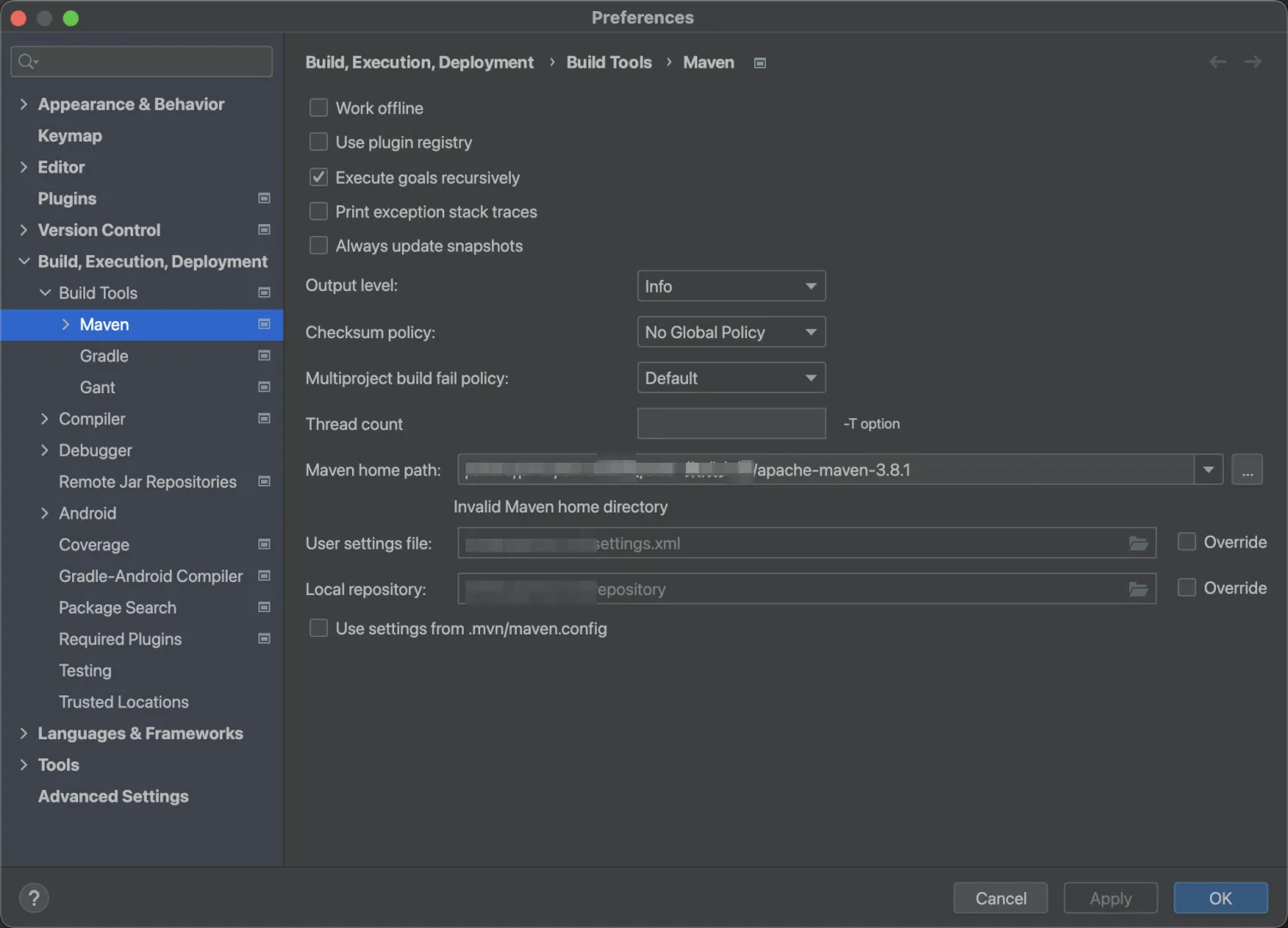
mvn -versionOpen IntelliJ IDEA, choose IntelliJ IDEA > Settings > Build,Execution,Development > Build Tools > Maven, and set the Maven home path to the path where the Maven installation package is located.
Procedure
Decompress the sample project code that you have downloaded and open the sample project code in IDEA.
Run the ExampleTest project in the src > test > java directory.
If the following result is returned, the database connection is successful and the sample project is executed correctly.
...
53575 [main] INFO  com.oceanbase.example.ExampleTest - Connect to OceanBase docker container successfully.
53577 [main] INFO  com.oceanbase.example.ExampleTest - Prepare database and table.
53892 [main] INFO  com.oceanbase.example.ExampleTest - Insert data to table `testcontainers`.`person`.
53928 [main] INFO  com.oceanbase.example.ExampleTest - Query rows from `testcontainers`.`person`.
53932 [main] INFO  com.oceanbase.example.ExampleTest - Row 0: name Adam, age 28.
53932 [main] INFO  com.oceanbase.example.ExampleTest - Row 1: name Eve, age 26.
Project code
Click Testcontainers to download the project code, which is a compressed file named TestcontainersDemo.zip.
After decompressing it, you will find a folder named TestcontainersDemo. The directory structure is as follows:
JDBCDemo
├── src
│   └── test
│       └── java
│           └── ExampleTest.java
└── pom.xml
File description:
src: the root directory for source code.test: the main code directory, containing the core logic of the application.java: the directory for Java source code.ExampleTest.java: the main class, containing logic for creating tables and inserting data.pom.xml: the configuration file for the Maven project, used to manage project dependencies and build settings.
Introduction to the pom.xml file
The pom.xml file is a configuration file for Maven projects, defining dependencies, plugins, and build rules. Maven is a Java project management tool that can automatically download dependencies, compile, and package projects.
The pom.xml file in this topic includes the following main parts:
File declaration statement.
This statement declares the file as an XML file using XML version
1.0and character encodingUTF-8.Sample code:
<?xml version="1.0" encoding="UTF-8"?>Configure the namespace and POM model version.
- Use
xmlnsto specify the POM namespace ashttp://maven.apache.org/POM/4.0.0. - Use
xmlns:xsito specify the XML namespace ashttp://www.w3.org/2001/XMLSchema-instance. - Use
xsi:schemaLocationto specify the POM namespace ashttp://maven.apache.org/POM/4.0.0and the location of the POM XSD file ashttp://maven.apache.org/xsd/maven-4.0.0.xsd. - Use the
<modelVersion>element to specify the POM model version as4.0.0.
Sample code:
<project xmlns="http://maven.apache.org/POM/4.0.0" xmlns:xsi="http://www.w3.org/2001/XMLSchema-instance" xsi:schemaLocation="http://maven.apache.org/POM/4.0.0 http://maven.apache.org/xsd/maven-4.0.0.xsd"> <modelVersion>4.0.0</modelVersion> <!-- Other configurations --> </project>- Use
Configure basic information.
- Use
<groupId>to specify the project's organization ascom.example. - Use
<artifactId>to specify the project's name asJDBCDemo. - Use
<version>to specify the project's version as1.0-SNAPSHOT.
Sample code:
<groupId>org.example</groupId> <artifactId>JDBCDemo</artifactId> <version>1.0-SNAPSHOT</version>- Use
Configure the external packages that the project depends on, each with groupId, artifactId, and version defined.
- Use
<groupId>to specify the organization of the dependency. - Use
<artifactId>to specify the name of the dependency. - Use
<version>to specify the version of the dependency. - Use
<scope>to specify the scope of the dependency, indicating that the dependency is only used during testing.
Sample code:
<dependencies> <dependency> //If you are using the MySQL JDBC driver, replace the groupId, artifactId, and version information here. <groupId>com.oceanbase</groupId> <artifactId>oceanbase-client</artifactId> <version>2.4.9</version> </dependency> <dependency> <groupId>org.testcontainers</groupId> <artifactId>oceanbase</artifactId> <version>1.19.7</version> <scope>test</scope> </dependency> <dependency> <groupId>org.apache.logging.log4j</groupId> <artifactId>log4j-slf4j-impl</artifactId> <version>2.17.1</version> <scope>test</scope> </dependency> </dependencies>- Use
Introduction to the ExampleTest.java file
The ExampleTest.java file is part of the sample program and creates a Java class for testing using the Testcontainers framework and JUnit.
It sets up a test environment to run an OceanBase Cloud database container using Testcontainers and defines the basic settings for the test class.
Sample code:
import java.sql.Connection;
import java.sql.PreparedStatement;
import java.sql.ResultSet;
import java.sql.SQLException;
import java.sql.Statement;

// Test class definition starts
public class ExampleTest {
    // Create an SLF4J Logger instance to log information for the ExampleTest class
    private static final Logger LOG = LoggerFactory.getLogger(ExampleTest.class);
    // Create an OceanBase container instance, use the specified Docker image, and configure environment variables
    public static final OceanBaseCEContainer CONTAINER =
            new OceanBaseCEContainer("oceanbase/oceanbase-ce:4.2.2")
                    .withEnv("MODE", "slim")        // Set the environment variable MODE to slim
                    .withEnv("FASTBOOT", "true")    // Set the environment variable FASTBOOT to true
                    .withLogConsumer(new Slf4jLogConsumer(LOG)); // Add a log consumer to use SLF4J to record container logs

    // This method is executed before all tests start to prepare the environment
    @BeforeClass
    public static void startContainers() {
        // Start the CONTAINER asynchronously and wait for it to start
        Startables.deepStart(Stream.of(CONTAINER)).join();
        // Output information about the container startup, including the Docker image name, container host address, and mapped port
        LOG.info(
                "OceanBase docker container started, image: {}, host: {}, sql port: {}, rpc port:{}.",
                CONTAINER.getDockerImageName(),
                CONTAINER.getHost(),
                CONTAINER.getMappedPort(2881),
                CONTAINER.getMappedPort(2882));
    }

    // This method is executed after all tests end to clean up resources
    @AfterClass
    public static void closeContainers() {
        // Stop the container
        CONTAINER.close();
        // Record the container stop log
        LOG.info("OceanBase docker container stopped.");
    }
    ```
Write the test logic.
Sample code:
// Test the add and query operations of the database
@Test
public void test() {
    // Database and table names
    String database = "testcontainers";
    String table = "person";
    // Format the full name of the database and table, using backticks to avoid SQL keyword conflicts
    String tableName = String.format("`%s`.`%s`", database, table);

    // Output a log indicating an attempt to connect to the OceanBase container
    LOG.info(
            "Try to connect to OceanBase docker container with url: {}.",
            CONTAINER.getJdbcUrl());
    // Create a database connection to the OceanBase container
    try (Connection connection = CONTAINER.createConnection("?useSSL=false")) {
        LOG.info("Connect to OceanBase docker container successfully.");
        LOG.info("Prepare database and table.");
Create a table.
Sample code:
// Create the database and table
    try (Statement statement = connection.createStatement()) {
        statement.execute("CREATE DATABASE IF NOT EXISTS " + database);
        statement.execute("USE " + database);
        statement.execute(
                "CREATE TABLE IF NOT EXISTS " + table + " (name VARCHAR(50), age INT)");
    } catch (SQLException e) {
        throw new RuntimeException(e);
    }
Insert data.
Sample code:
LOG.info("Insert data to table {}.", tableName);
      try (PreparedStatement ps =
              connection.prepareStatement("INSERT INTO " + tableName + " values(?, ?)")) {
          ps.setString(1, "Adam");
          ps.setInt(2, 28);
          ps.executeUpdate();
          ps.setString(1, "Eve");
          ps.setInt(2, 26);
          ps.executeUpdate();
      }
Query data.
Sample code:
LOG.info("Query rows from {}.", tableName);
    try (PreparedStatement ps =
            connection.prepareStatement(
                    "SELECT * from " + tableName,
                    ResultSet.TYPE_FORWARD_ONLY,
                    ResultSet.CONCUR_READ_ONLY)) {
        ResultSet rs = ps.executeQuery();
        int count = 0;
        while (rs.next()) {
            LOG.info("Row {}: name {}, age {}.", count++, rs.getString(1), rs.getInt(2));
        }
Handle exceptions.
Any exceptions that occur during the execution of the database operations will be caught, and the error message and stack trace details will be printed.
Sample code:
   } catch (SQLException e) {
    // If an exception occurs, rethrow it as a runtime exception
    throw new RuntimeException(e);
}
Complete code
<?xml version="1.0" encoding="UTF-8"?>
<project xmlns="http://maven.apache.org/POM/4.0.0"
         xmlns:xsi="http://www.w3.org/2001/XMLSchema-instance"
         xsi:schemaLocation="http://maven.apache.org/POM/4.0.0 http://maven.apache.org/xsd/maven-4.0.0.xsd">
    <modelVersion>4.0.0</modelVersion>

    <groupId>com.oceanbase.example</groupId>
    <artifactId>testcontainers-java</artifactId>
    <version>1.0-SNAPSHOT</version>

    <properties>
        <maven.compiler.source>8</maven.compiler.source>
        <maven.compiler.target>8</maven.compiler.target>
        <project.build.sourceEncoding>UTF-8</project.build.sourceEncoding>
    </properties>

    <dependencies>
        <dependency>
            <groupId>com.oceanbase</groupId>
            <artifactId>oceanbase-client</artifactId>
            <version>2.4.9</version>
        </dependency>
        <dependency>
            <groupId>org.testcontainers</groupId>
            <artifactId>oceanbase</artifactId>
            <version>1.19.7</version>
            <scope>test</scope>
        </dependency>
        <dependency>
            <groupId>org.apache.logging.log4j</groupId>
            <artifactId>log4j-slf4j-impl</artifactId>
            <version>2.17.1</version>
            <scope>test</scope>
        </dependency>
    </dependencies>

</project>
package com.oceanbase.example;

import org.junit.AfterClass;
import org.junit.BeforeClass;
import org.junit.Test;
import org.slf4j.Logger;
import org.slf4j.LoggerFactory;
import org.testcontainers.containers.output.Slf4jLogConsumer;
import org.testcontainers.lifecycle.Startables;
import org.testcontainers.oceanbase.OceanBaseCEContainer;

import java.sql.Connection;
import java.sql.PreparedStatement;
import java.sql.ResultSet;
import java.sql.SQLException;
import java.sql.Statement;
import java.util.stream.Stream;

public class ExampleTest {

    private static final Logger LOG = LoggerFactory.getLogger(ExampleTest.class);

    public static final OceanBaseCEContainer CONTAINER =
            new OceanBaseCEContainer("oceanbase/oceanbase-ce:4.2.2")
                    .withEnv("MODE", "slim")
                    .withEnv("FASTBOOT", "true")
                    .withLogConsumer(new Slf4jLogConsumer(LOG));

    @BeforeClass
    public static void startContainers() {
        Startables.deepStart(Stream.of(CONTAINER)).join();
        LOG.info(
                "OceanBase docker container started, image: {}, host: {}, sql port: {}, rpc port:{}.",
                CONTAINER.getDockerImageName(),
                CONTAINER.getHost(),
                CONTAINER.getMappedPort(2881),
                CONTAINER.getMappedPort(2882));
    }

    @AfterClass
    public static void closeContainers() {
        CONTAINER.close();
        LOG.info("OceanBase docker container stopped.");
    }

    @Test
    public void test() {
        String database = "testcontainers";
        String table = "person";
        String tableName = String.format("`%s`.`%s`", database, table);

        LOG.info(
                "Try to connect to OceanBase docker container with url: {}.",
                CONTAINER.getJdbcUrl());
        try (Connection connection = CONTAINER.createConnection("?useSSL=false")) {
            LOG.info("Connect to OceanBase docker container successfully.");

            LOG.info("Prepare database and table.");
            try (Statement statement = connection.createStatement()) {
                statement.execute("CREATE DATABASE IF NOT EXISTS " + database);
                statement.execute("USE " + database);
                statement.execute(
                        "CREATE TABLE IF NOT EXISTS " + table + " (name VARCHAR(50), age INT)");
            } catch (SQLException e) {
                throw new RuntimeException(e);
            }

            LOG.info("Insert data to table {}.", tableName);
            try (PreparedStatement ps =
                    connection.prepareStatement("INSERT INTO " + tableName + " values(?, ?)")) {
                ps.setString(1, "Adam");
                ps.setInt(2, 28);
                ps.executeUpdate();
                ps.setString(1, "Eve");
                ps.setInt(2, 26);
                ps.executeUpdate();
            }

            LOG.info("Query rows from {}.", tableName);
            try (PreparedStatement ps =
                    connection.prepareStatement(
                            "SELECT * from " + tableName,
                            ResultSet.TYPE_FORWARD_ONLY,
                            ResultSet.CONCUR_READ_ONLY)) {
                ResultSet rs = ps.executeQuery();
                int count = 0;
                while (rs.next()) {
                    LOG.info("Row {}: name {}, age {}.", count++, rs.getString(1), rs.getInt(2));
                }
                assert count == 2;
            }
        } catch (SQLException e) {
            throw new RuntimeException(e);
        }
    }
}
References
- Testcontainers for Java official documentation
- To use the Docker image of OceanBase Database, you must use GenericContainer. For more information, see OceanBase Module.