







This topic describes how to build an application by using a Druid connection pool, OceanBase Connector/J, and OceanBase Cloud. The application can perform basic database operations, including creating tables, inserting data, updating data, deleting data, querying data, and dropping tables.
 Download the druid-oceanbase-client sample project
  Connect to OceanBase Cloud by using a Druid connection pool (Oracle compatible mode)
Prerequisites
You have registered an Alibaba Cloud account and created an instance and an Oracle-compatible tenant. For more information, see Create an instance and Create a tenant.
You have obtained the connection string of the target Oracle-compatible tenant. For more information, see Obtain the connection string.
You have installed JDK 1.8 and Maven.
You have installed Eclipse.
Note
The code examples in this topic are run in Eclipse IDE for Java Developers 2022-03. You can also use other tools that you prefer to run the code examples.
Procedure
Note
The following steps describe how to compile and run the project in the Windows environment by using Eclipse IDE for Java Developers 2022-03. If you are using a different operating system or compiler, the steps may vary slightly.
Step 1: Import the druid-oceanbase-client project into Eclipse
Start Eclipse and choose File > Open Projects from File System.
In the dialog box that appears, click Directory to select the project directory and then click Finish.
Note
When you import a Maven project into Eclipse, it will automatically detect the
pom.xmlfile in the project, download the required dependency libraries based on the described dependencies in the file, and add them to the project.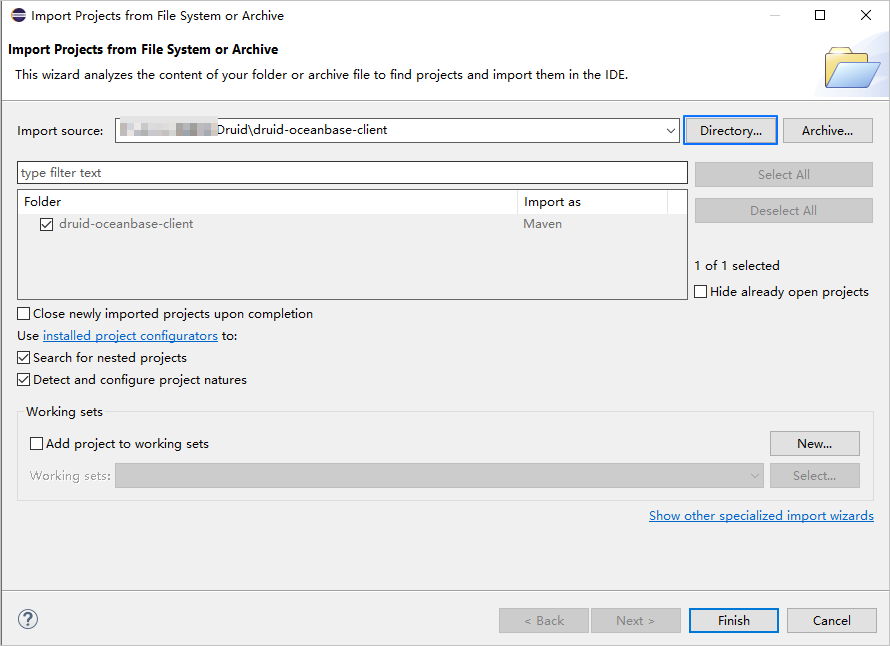
View the project.
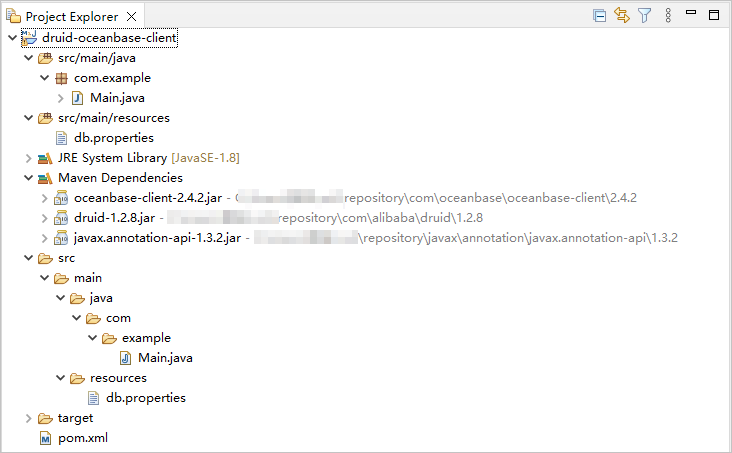
Step 2: Modify the database connection information in the druid-oceanbase-client project
Modify the database connection information in the druid-oceanbase-client/src/main/resources/db.properties file based on the connection string obtained from the prerequisites.
Sample code:
...
url=jdbc:oceanbase://t5******.********.oceanbase.cloud:1521/test_schema001
username=test_user
password=******
...
- The connection address is
t5******.********.oceanbase.cloud. - The access port is 1521.
- The name of the database to be accessed is
test_schema001. - The tenant account is
test_user. - The password is
******.
Step 3: Run the druid-oceanbase-client project
In the Project Explorer view, locate and expand the druid-oceanbase-client/src/main/java directory.
Right-click the Main.java file and select Run As > Java Application.
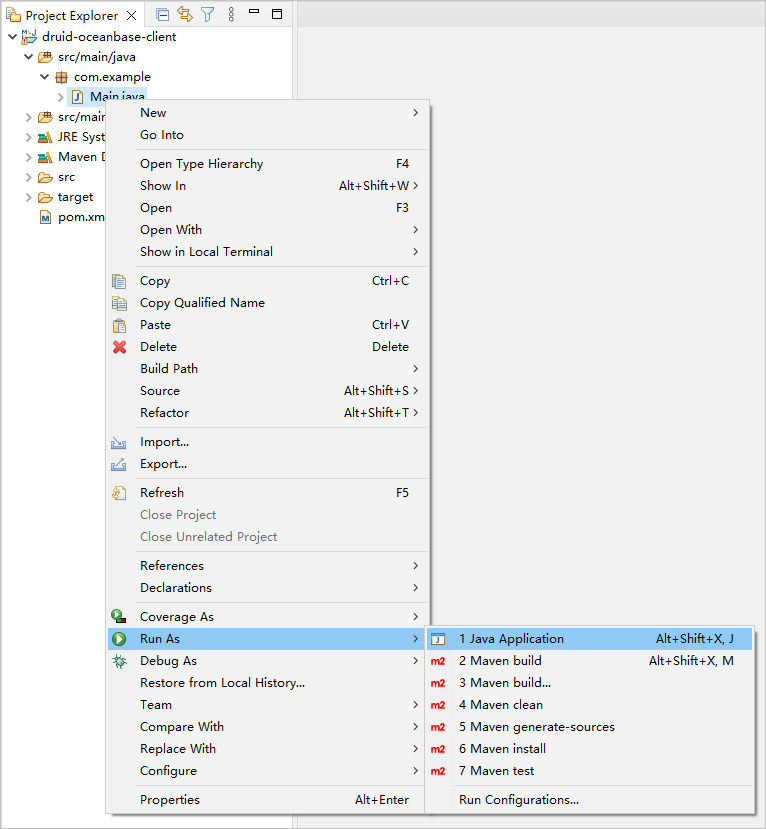
View the output results in the Eclipse console window.
Project code
Click druid-oceanbase-client to download the project code, which is a compressed file named druid-oceanbase-client.zip.
After decompressing the file, you will find a folder named druid-oceanbase-client. The directory structure is as follows:
druid-oceanbase-client
├── src
│   └── main
│       ├── java
│       │   └── com
│       │       └── example
│       │           └── Main.java
│       └── resources
│           └── db.properties
└── pom.xml
File description:
src: the root directory of the source code.main: the main code directory, containing the core logic of the application.java: the directory for Java source code.com: the directory for Java packages.example: the directory for packages of the sample project.Main.java: the main class file, containing logic for creating tables, inserting, deleting, updating, and querying data.resources: the directory for resource files, including configuration files.db.properties: the configuration file for the connection pool, containing relevant database connection parameters.pom.xml: the configuration file for the Maven project, used to manage project dependencies and build settings.
Introduction to the pom.xml file
The pom.xml file is a configuration file for Maven projects. It defines project dependencies, plugins, and build rules. Maven is a Java project management tool that can automatically download dependencies, compile, and package projects.
The code in the pom.xml file in this topic includes the following parts:
File declaration statements.
This section declares that the file is an XML file using XML version
1.0and character encodingUTF-8.Sample code:
<?xml version="1.0" encoding="UTF-8"?>Configure the namespaces and POM model version.
- Use
xmlnsto specify the POM namespace ashttp://maven.apache.org/POM/4.0.0. - Use
xmlns:xsito specify the XML namespace ashttp://www.w3.org/2001/XMLSchema-instance. - Use
xsi:schemaLocationto specify the POM namespace ashttp://maven.apache.org/POM/4.0.0and the location of the POM XSD file ashttp://maven.apache.org/xsd/maven-4.0.0.xsd. - Use
<modelVersion>to specify the POM model version as4.0.0.
Sample code:
<project xmlns="http://maven.apache.org/POM/4.0.0" xmlns:xsi="http://www.w3.org/2001/XMLSchema-instance" xsi:schemaLocation="http://maven.apache.org/POM/4.0.0 http://maven.apache.org/xsd/maven-4.0.0.xsd"> <modelVersion>4.0.0</modelVersion> <!-- Other configurations --> </project>- Use
Configure basic information.
- Use
<groupId>to specify the project's organization ascom.example. - Use
<artifactId>to specify the project name asdruid-oceanbase-client. - Use
<version>to specify the project version as1.0-SNAPSHOT.
Sample code:
<groupId>com.example</groupId> <artifactId>druid-oceanbase-client</artifactId> <version>1.0-SNAPSHOT</version>- Use
Configure the properties of the project's source files.
Specify the Maven compiler plugin as
maven-compiler-pluginand set both the source and target Java versions to 8. This means that the project's source code uses Java 8 features, and the compiled bytecode will also be compatible with the Java 8 runtime environment. This configuration ensures that the project can correctly handle Java 8 syntax and features during compilation and runtime.Note
Java 1.8 and Java 8 are different names for the same version.
Sample code:
    <build>
        <plugins>
            <plugin>
                <groupId>org.apache.maven.plugins</groupId>
                <artifactId>maven-compiler-plugin</artifactId>
                <configuration>
                    <source>8</source>
                    <target>8</target>
                </configuration>
            </plugin>
        </plugins>
    </build>
Configure the components that the project depends on.
Add the
oceanbase-clientdependency library for interacting with the database:- Use
<groupId>to specify the dependency's organization ascom.oceanbase. - Use
<artifactId>to specify the dependency name asoceanbase-client. - Use
<version>to specify the dependency version as2.4.2.
Note
This section defines the project's dependency as OceanBase Connector/J V2.4.2. For information about other versions, see OceanBase JDBC driver
Sample code:
<dependency> <groupId>com.oceanbase</groupId> <artifactId>oceanbase-client</artifactId> <version>2.4.2</version> </dependency>- Use
Add the
druiddependency library:- Use
<groupId>to specify the dependency's organization ascom.alibaba. - Use
<artifactId>to specify the dependency name asdruid. - Use
<version>to specify the dependency version as1.2.8.
Sample code:
<dependency> <groupId>com.alibaba</groupId> <artifactId>druid</artifactId> <version>1.2.8</version> </dependency>- Use
Introduction to db.properties
db.properties is the connection pool configuration file used in this example. It contains the configuration parameters for the connection pool, including the database URL, username, password, and other optional settings.
The db.properties file in this example primarily includes the following sections:
Configure the database connection parameters.
- Specify the class name of the database driver program as
com.oceanbase.jdbc.Driver. - Specify the database connection URL, including the host IP, port number, and the schema to be accessed.
- Specify the username for the database.
- Specify the password for the database.
Sample code:
driverClassName=com.oceanbase.jdbc.Driver
url=jdbc:oceanbase://$host:$port/$schema_name
username=$user_name
password=$password
Parameter description:
$host: The connection address of the OceanBase Cloud database, obtained from the-hparameter in the connection string.$port: The connection port of the OceanBase Cloud database, obtained from the-Pparameter in the connection string.$schema_name: The name of the database to be accessed, obtained from the-Dparameter in the connection string.$user_name: The account name, obtained from the-uparameter in the connection string.$password: The account password, obtained from the-pparameter in the connection string.
- Specify the class name of the database driver program as
Configure other connection pool parameters.
- Specify the SQL statement for validating connections as
select 1 from dual. - Specify the initial number of connections in the connection pool as 3. This means that 3 initial connections will be created when the connection pool is started.
- Specify the maximum number of active connections in the connection pool as 30. This means that the connection pool can have a maximum of 30 active connections at the same time.
- Specify whether to print logs for abandoned connections as
true. This means that when abandoned connections are recycled, information will be output to the error log. In a test environment, this can be set totrue, while in a production environment, it should be set tofalseto avoid performance issues. - Specify the minimum number of idle connections in the connection pool as 5. This means that when the number of idle connections in the connection pool is less than 5, the connection pool will automatically create new connections.
- Specify the maximum wait time for obtaining a connection as 1000 milliseconds. This means that if all connections in the connection pool are occupied and the wait time exceeds 1000 milliseconds, an exception will be thrown when attempting to obtain a connection.
- Specify the minimum idle time for a connection as 300000 milliseconds. This means that if a connection is idle for 300000 milliseconds (5 minutes) and has not been used, it will be recycled.
- Specify whether to recycle abandoned connections as
true. This means that when a connection exceeds the time defined byremoveAbandonedTimeout, it will be recycled. - Specify the timeout time for abandoned connections as 300 seconds. This means that connections that have not been used for more than 300 seconds (5 minutes) will be recycled.
- Specify the interval time for the idle connection recycling thread as 10000 milliseconds. This means that the idle connection recycling thread will execute the idle connection recycling operation every 10000 milliseconds (10 seconds).
- Specify whether to validate the availability of a connection when obtaining it as
false. Setting this tofalsecan improve performance, but may result in obtaining an unavailable connection. - Specify whether to validate the availability of a connection when returning it as
false. Setting this tofalsecan improve performance, but may result in returning an unavailable connection. - Specify whether to validate a connection when it is idle as
true. When set totrue, the connection pool will periodically executevalidationQueryto validate the availability of the connection. - Specify whether to enable the keep-alive feature for long connections as
false. Setting this tofalsemeans that the keep-alive feature for long connections is disabled. - Specify the idle time threshold for a connection as 60000 milliseconds. This means that if the idle time of a connection exceeds the threshold of 60000 milliseconds (1 minute), the keep-alive mechanism will detect the connection to ensure its availability. If there is any operation on the connection within the threshold time, the idle time will be recalculated.
Sample code:
validationQuery=select 1 from dual initialSize=3 maxActive=30 logAbandoned=true minIdle=5 maxWait=1000 minEvictableIdleTimeMillis=300000 removeAbandoned=true removeAbandonedTimeout=300 timeBetweenEvictionRunsMillis=10000 testOnBorrow=false testOnReturn=false testWhileIdle=true keepAlive=false keepAliveBetweenTimeMillis=60000- Specify the SQL statement for validating connections as
Notice
The specific configuration of parameters depends on the project requirements and the characteristics of the database. We recommend that you adjust and configure the parameters based on your actual situation.
Common configuration parameters for the Druid connection pool:
Parameter |
Description |
|---|---|
| url | The URL of the database, including the database type, host name, port number, and database name. |
| username | The username for connecting to the database. |
| password | The password for connecting to the database. |
| driverClassName | The name of the database driver class. If you do not explicitly configure driverClassName, the Druid connection pool automatically identifies the database type (dbType) based on url and selects the corresponding driverClassName. This automatic identification mechanism reduces the configuration workload and simplifies the configuration process. However, if url cannot be correctly resolved or a non-standard database driver class is required, you must explicitly configure the driverClassName parameter to ensure that the correct driver class is loaded. |
| initialSize | The number of connections created when the connection pool is initialized. When the application starts, the connection pool creates the specified number of connections and adds them to the connection pool. |
| maxActive | The maximum number of active connections in the connection pool. When the number of active connections reaches the maximum value, subsequent connection requests will wait until a connection is released. |
| maxIdle | The maximum number of idle connections in the connection pool (this parameter is deprecated). When the number of idle connections reaches the maximum value, the extra connections will be closed. |
| minIdle | The minimum number of idle connections in the connection pool. When the number of idle connections is less than the minimum value, the connection pool creates new connections. |
| maxWait | The maximum waiting time for obtaining a connection. If this value is set to a positive number, it represents the number of milliseconds to wait. If the waiting time exceeds this value, an exception will be thrown. |
| poolPreparedStatements | Specifies whether to enable the PreparedStatement cache (PSCache) mechanism. If set to true, PreparedStatement objects will be cached to improve performance. However, in this scenario, the memory usage of OBProxy may continuously increase. Therefore, you must configure and monitor the memory usage reasonably to avoid memory leaks or memory overflow. |
| validationQuery | The SQL query statement for validating connections. When a connection is taken from the connection pool, this query statement is executed to verify whether the connection is valid. |
| timeBetweenEvictionRunsMillis | The interval for the connection pool to detect idle connections, in milliseconds. If the idle time of a connection exceeds the value set for timeBetweenEvictionRunsMillis, the connection will be closed. |
| minEvictableIdleTimeMillis | The minimum idle time for connections in the connection pool, in milliseconds. If this value is set to a negative number, connections will not be recycled. |
| testWhileIdle | Specifies whether to test connections while they are idle. If set to true, the validationQuery will be executed to verify whether the connection is valid when the connection is idle. |
| testOnBorrow | Specifies whether to test connections when they are borrowed. If set to true, the validationQuery will be executed to verify whether the connection is valid when the connection is borrowed. |
| testOnReturn | Specifies whether to test connections when they are returned. If set to true, the validationQuery will be executed to verify whether the connection is valid when the connection is returned. |
| filters | The predefined set of filters in the connection pool. These filters can preprocess and postprocess connections in a specific order to provide additional features and enhance the performance of the connection pool. Common filters include:
filters property, the connection pool will apply the filters in the specified order. You can separate the names of multiple filters with commas, for example: filters=stat,wall,log4j. |
Main.java code introduction
The Main.java file is the main program of the sample program in this topic. This sample program shows how to interact with a database by using a data source, a connection object, and various database operation methods.
The Main.java file in this topic contains the following parts:
Import the required classes and interfaces.
- Declare the package name of the current code as
com.example. - Import the
IOExceptionclass of Java, which is used to handle input and output exceptions. - Import the
InputStreamclass of Java, which is used to obtain an input stream from a file or other source. - Import the
Connectioninterface of Java, which is used to represent a connection to a database. - Import the
ResultSetinterface of Java, which is used to represent a dataset of database query results. - Import the
SQLExceptionclass of Java, which is used to handle SQL exceptions. - Import the
Statementinterface of Java, which is used to execute SQL statements. - Import the
PreparedStatementinterface of Java, which is used to execute precompiled SQL statements. - Import the
Propertiesclass of Java, which is used to handle property files. - Import the
DataSourceinterface of Java, which is used to manage database connections. - Import the
DruidDataSourceFactoryclass of Alibaba Druid connection pool, which is used to create a Druid data source.
Sample code:
package com.example; import java.io.IOException; import java.io.InputStream; import java.sql.Connection; import java.sql.ResultSet; import java.sql.SQLException; import java.sql.Statement; import java.sql.PreparedStatement; import java.util.Properties; import javax.sql.DataSource; import com.alibaba.druid.pool.DruidDataSourceFactory;- Declare the package name of the current code as
Create a
Mainclass and define themainmethod.Define a
Mainclass and amainmethod. Themainmethod is used to demonstrate how to use a connection pool to perform a series of operations on a database. The steps are as follows:Define a public class named
Mainas the entry point of the program. The class name must be consistent with the file name.Define a public static method
mainas the entry point of the program, which receives command-line parameters.Use the exception handling mechanism to capture and handle exceptions that may occur.
Call the
loadPropertiesFilemethod to load a property file and return aPropertiesobject.Call the
createDataSource()method to create a data source object based on the configuration in the property file.Use the
try-with-resourcesstatement to obtain a database connection and automatically close the connection after it is used.- Call the
createTable()method to create a table. - Call the
insertData()method to insert data. - Call the
selectData()method to query data. - Call the
updateData()method to update data. - Call the
selectData()method again to query the updated data. - Call the
deleteData()method to delete data. - Call the
selectData()method again to query the data after deletion. - Call the
dropTable()method to delete the table.
- Call the
Sample code:
public class Main {

    public static void main(String[] args) {
        try {
            Properties properties = loadPropertiesFile();
            DataSource dataSource = createDataSource(properties);
            try (Connection conn = dataSource.getConnection()) {
                // Create table
                createTable(conn);
                // Insert data
                insertData(conn);
                // Query data
                selectData(conn);

                // Update data
                updateData(conn);
                // Query the updated data
                selectData(conn);

                // Delete data
                deleteData(conn);
                // Query the data after deletion
                selectData(conn);

                // Drop table
                dropTable(conn);
            }
        } catch (Exception e) {
            e.printStackTrace();
        }
    }

    // Define a method for obtaining and using configuration information from the property file
    // Define a method for obtaining a data source object
    // Define a method for creating a table
    // Define a method for inserting data
    // Define a method for updating data
    // Define a method for deleting data
    // Define a method for querying data
    // Define a method for deleting a table
}
Define a method for obtaining and using configuration information from the property file.
Define a private static method
loadPropertiesFile()that is used to load a property file and return aPropertiesobject. The steps are as follows:- Define a private static method
loadPropertiesFile()that returns aPropertiesobject and declares that it may throw anIOExceptionexception. - Create a
Propertiesobject to store key-value pairs in the property file. - Use the
try-with-resourcesstatement to obtain an input streamisof the property filedb.propertiesby using the class loader. - Use the
loadmethod to load the properties in the input stream to thepropertiesobject. - Return the loaded
propertiesobject.
Sample code:
private static Properties loadPropertiesFile() throws IOException { Properties properties = new Properties(); try (InputStream is = Main.class.getClassLoader().getResourceAsStream("db.properties")) { properties.load(is); } return properties; }- Define a private static method
Define a method for obtaining a data source object.
Define a private static method
createDataSource()that is used to create aDataSourceobject based on the configuration in the property file. TheDataSourceobject is used to manage and obtain database connections. The steps are as follows:- Define a private static method
createDataSource()that receives aPropertiesobject as a parameter and declares that it may throw anExceptionexception. - Call the
createDataSource()method of theDruidDataSourceFactoryclass and pass thepropertiesparameter to return aDataSourceobject.
Sample code:
private static DataSource createDataSource(Properties properties) throws Exception { return DruidDataSourceFactory.createDataSource(properties); }- Define a private static method
Define a method for creating a table.
Define a private static method
createTable()that is used to create a data table in a database. The steps are as follows:- Define a private static method
createTable()that takes aConnectionobject as a parameter and declares that it may throw anSQLException. - Use the
try-with-resourcesstatement to create aStatementobjectstmtby calling thecreateStatement()method of the connection objectconn. - Define a string variable
sqlto store the SQL statement for creating the table. - Use the
executeUpdate()method to execute the SQL statement and create the data table. - Print a message indicating that the table was created successfully.
Sample code:
private static void createTable(Connection conn) throws SQLException { try (Statement stmt = conn.createStatement()) { String sql = "CREATE TABLE test_druid (id NUMBER, name VARCHAR2(20))"; stmt.executeUpdate(sql); System.out.println("Table created successfully."); } }- Define a private static method
Define a method for inserting data.
Define a private static method
insertData()for inserting data into the database. The steps are as follows:Define a private static method
insertData()that takes aConnectionobject as a parameter and declares that it may throw anSQLException.Define a string variable
insertDataSqlto store the SQL statement for inserting data.Define an integer variable
insertedRowsinitialized to 0 to record the number of rows inserted.Use the
try-with-resourcesstatement to create aPreparedStatementobjectinsertDataStmtby calling theprepareStatement()method of the connection objectconnwith the SQL statement for inserting data.Use a
forloop to iterate 5 times, representing the insertion of 5 data records.- Use the
setInt()method to set the value of the first parameter to the loop variablei. - Use the
setString()method to set the value of the second parameter to the stringtest_insertconcatenated with the value of the loop variablei. - Use the
executeUpdate()method to execute the SQL statement for inserting data and accumulate the number of affected rows to theinsertedRowsvariable.
- Use the
Print a message indicating that the data was inserted successfully, along with the total number of rows inserted.
Return the total number of rows inserted.
Sample code:
    private static int insertData(Connection conn) throws SQLException {
        String insertDataSql = "INSERT INTO test_druid (id, name) VALUES (?, ?)";
        int insertedRows = 0;
        try (PreparedStatement insertDataStmt = conn.prepareStatement(insertDataSql)) {
            for (int i = 1; i < 6; i++) {
                insertDataStmt.setInt(1, i);
                insertDataStmt.setString(2, "test_insert" + i);
                insertedRows += insertDataStmt.executeUpdate();
            }
            System.out.println("Data inserted successfully. Inserted rows: " + insertedRows);
        }
        return insertedRows;
    }
Define a method for updating data.
Define a private static method
updateData()for updating data in the database. The steps are as follows:- Define a private static method
updateData()that takes aConnectionobject as a parameter and declares that it may throw anSQLException. - Use the
try-with-resourcesstatement to create aPreparedStatementobjectpstmtby calling theprepareStatement()method of the connection objectconnwith the SQL statement for updating data. - Use the
setString()method to set the value of the first parameter to the stringtest_update. - Use the
setInt()method to set the value of the second parameter to the integer value 3. - Use the
executeUpdate()method to execute the SQL statement for updating data and assign the number of affected rows to theupdatedRowsvariable. - Print a message indicating that the data was updated successfully, along with the total number of rows updated.
Sample code:
private static void updateData(Connection conn) throws SQLException { try (PreparedStatement pstmt = conn.prepareStatement("UPDATE test_druid SET name = ? WHERE id = ?")) { pstmt.setString(1, "test_update"); pstmt.setInt(2, 3); int updatedRows = pstmt.executeUpdate(); System.out.println("Data updated successfully. Updated rows: " + updatedRows); } }- Define a private static method
Define a method for deleting data.
Define a private static method
deleteData()for deleting data from the database. The steps are as follows:- Define a private static method
deleteData()that takes aConnectionobject as a parameter and declares that it may throw anSQLException. - Use the
try-with-resourcesstatement to create aPreparedStatementobjectpstmtby calling theprepareStatement()method of the connection objectconnwith the SQL statement for deleting data. - Use the
setInt()method to set the value of the first parameter to the integer value 3. - Use the
executeUpdate()method to execute the SQL statement for deleting data and assign the number of affected rows to thedeletedRowsvariable. - Print a message indicating that the data was deleted successfully, along with the total number of rows deleted.
Sample code:
private static void deleteData(Connection conn) throws SQLException { try (PreparedStatement pstmt = conn.prepareStatement("DELETE FROM test_druid WHERE id < ?")) { pstmt.setInt(1, 3); int deletedRows = pstmt.executeUpdate(); System.out.println("Data deleted successfully. Deleted rows: " + deletedRows); } }- Define a private static method
Define a method for querying data.
Define a private static method
selectData()for querying data from the database. The steps are as follows:Define a private static method
selectData()that takes aConnectionobject as a parameter and declares that it may throw anSQLException.Use the
try-with-resourcesstatement to create aStatementobjectstmtby calling thecreateStatement()method of the connection objectconn.Define a string variable
sqlto store the SQL statement for querying data.Use the
executeQuery()method to execute the SQL statement for querying data and assign the result set to theresultSetvariable.Use a
whileloop to traverse each row in the result set.- Use the
getInt()method to retrieve the integer value of theidfield in the current row and assign it to theidvariable. - Use the
getString()method to retrieve the string value of thenamefield in the current row and assign it to thenamevariable. - Print the values of the
idandnamefields in the current row.
- Use the
Sample code:
    private static void selectData(Connection conn) throws SQLException {
        try (Statement stmt = conn.createStatement()) {
            String sql = "SELECT * FROM test_druid";
            ResultSet resultSet = stmt.executeQuery(sql);
            while (resultSet.next()) {
                int id = resultSet.getInt("id");
                String name = resultSet.getString("name");
                System.out.println("id: " + id + ", name: " + name);
            }
        }
    }
Define a method for dropping the table.
Define a private static method
dropTable()for dropping the table in the database. The steps are as follows:- Define a private static method
dropTable()that takes aConnectionobject as a parameter and declares that it may throw anSQLException. - Use the
try-with-resourcesstatement to create aStatementobjectstmtby calling thecreateStatement()method of the connection objectconn. - Define a string variable
sqlto store the SQL statement for dropping the table. - Use the
executeUpdate()method to execute the SQL statement for dropping the table. - Print a message indicating that the table was dropped successfully.
Sample code:
private static void dropTable(Connection conn) throws SQLException { try (Statement stmt = conn.createStatement()) { String sql = "DROP TABLE test_druid"; stmt.executeUpdate(sql); System.out.println("Table dropped successfully."); } }- Define a private static method
Complete code
<?xml version="1.0" encoding="UTF-8"?>
<project xmlns="http://maven.apache.org/POM/4.0.0"
         xmlns:xsi="http://www.w3.org/2001/XMLSchema-instance"
         xsi:schemaLocation="http://maven.apache.org/POM/4.0.0 http://maven.apache.org/xsd/maven-4.0.0.xsd">
    <modelVersion>4.0.0</modelVersion>

    <groupId>com.example</groupId>
    <artifactId>druid-oceanbase-client</artifactId>
    <version>1.0-SNAPSHOT</version>
    <build>
        <plugins>
            <plugin>
                <groupId>org.apache.maven.plugins</groupId>
                <artifactId>maven-compiler-plugin</artifactId>
                <configuration>
                    <source>8</source>
                    <target>8</target>
                </configuration>
            </plugin>
        </plugins>
    </build>

    <dependencies>
        <dependency>
            <groupId>com.oceanbase</groupId>
            <artifactId>oceanbase-client</artifactId>
            <version>2.4.2</version>
        </dependency>
        <dependency>
            <groupId>com.alibaba</groupId>
            <artifactId>druid</artifactId>
            <version>1.2.8</version>
        </dependency>
    </dependencies>
</project>
# Database Configuration
driverClassName=com.oceanbase.jdbc.Driver
url=jdbc:oceanbase://$host:$port/$schema_name
username=$user_name
password=$password

# Connection Pool Configuration
#To check whether the database link is valid, MySQL must be configured to select 1; Oracle is select 1 from dual
validationQuery=select 1 from dual
#Initial number of connections
initialSize=3
#Maximum number of activations, that is, the maximum number of Connection pool
maxActive=30
#When closing the Abandoned connection, the error log is output. When the link is recycled, the console prints information. The test environment can add true, while the online environment is false. Will affect performance.
logAbandoned=true
#Minimum number of activations during idle time
minIdle=5
#The maximum waiting time for a connection, in milliseconds
maxWait=1000
#The maximum time to start the eviction thread is the survival time of a link (previous value: 25200000, the converted result of this time is: 2520000/1000/60/60=7 hours)
minEvictableIdleTimeMillis=300000
#Whether to recycle after exceeding the time limit
removeAbandoned=true
#Exceeding the time limit (in seconds), currently 5 minutes. If any business processing time exceeds 5 minutes, it can be adjusted appropriately.
removeAbandonedTimeout=300
# Run the idle connection collector Destroy thread every 10 seconds to detect the interval time between connections, based on the judgment of testWhileIdle
timeBetweenEvictionRunsMillis=10000
#When obtaining a link, not verifying its availability can affect performance.
testOnBorrow=false
#Check whether the link is available when returning the link to the Connection pool.
testOnReturn=false
#This configuration can be set to true, without affecting performance and ensuring security. The meaning is: Detect when applying for a connection. If the idle time is greater than timeBetweenEviceRunsMillis, execute validationQuery to check if the connection is valid.
testWhileIdle=true
#Default false, if configured as true, connection detection will be performed in the DestroyConnectionThread thread (timeBetweenEvaluation once)
keepAlive=false
#If keepAlive rule takes effect and the idle time of the connection exceeds it, the connection will only be detected
keepAliveBetweenTimeMillis=60000
package com.example;

import java.io.IOException;
import java.io.InputStream;
import java.sql.Connection;
import java.sql.ResultSet;
import java.sql.SQLException;
import java.sql.Statement;
import java.sql.PreparedStatement;
import java.util.Properties;
import javax.sql.DataSource;
import com.alibaba.druid.pool.DruidDataSourceFactory;

public class Main {

    public static void main(String[] args) {
        try {
            Properties properties = loadPropertiesFile();
            DataSource dataSource = createDataSource(properties);
            try (Connection conn = dataSource.getConnection()) {
                // Create table
                createTable(conn);
                // Insert data
                insertData(conn);
                // Query data
                selectData(conn);

                // Update data
                updateData(conn);
                // Query the updated data
                selectData(conn);

                // Delete data
                deleteData(conn);
                // Query the data after deletion
                selectData(conn);

                // Drop table
                dropTable(conn);
            }
        } catch (Exception e) {
            e.printStackTrace();
        }
    }

    private static Properties loadPropertiesFile() throws IOException {
        Properties properties = new Properties();
        try (InputStream is = Main.class.getClassLoader().getResourceAsStream("db.properties")) {
            properties.load(is);
        }
        return properties;
    }

    private static DataSource createDataSource(Properties properties) throws Exception {
        return DruidDataSourceFactory.createDataSource(properties);
    }

    private static void createTable(Connection conn) throws SQLException {
        try (Statement stmt = conn.createStatement()) {
            String sql = "CREATE TABLE test_druid (id NUMBER, name VARCHAR2(20))";
            stmt.executeUpdate(sql);
            System.out.println("Table created successfully.");
        }
    }

    private static int insertData(Connection conn) throws SQLException {
        String insertDataSql = "INSERT INTO test_druid (id, name) VALUES (?, ?)";
        int insertedRows = 0;
        try (PreparedStatement insertDataStmt = conn.prepareStatement(insertDataSql)) {
            for (int i = 1; i < 6; i++) {
                insertDataStmt.setInt(1, i);
                insertDataStmt.setString(2, "test_insert" + i);
                insertedRows += insertDataStmt.executeUpdate();
            }
            System.out.println("Data inserted successfully. Inserted rows: " + insertedRows);
        }
        return insertedRows;
    }

    private static void updateData(Connection conn) throws SQLException {
        try (PreparedStatement pstmt = conn.prepareStatement("UPDATE test_druid SET name = ? WHERE id = ?")) {
            pstmt.setString(1, "test_update");
            pstmt.setInt(2, 3);
            int updatedRows = pstmt.executeUpdate();
            System.out.println("Data updated successfully. Updated rows: " + updatedRows);
        }
    }

    private static void deleteData(Connection conn) throws SQLException {
        try (PreparedStatement pstmt = conn.prepareStatement("DELETE FROM test_druid WHERE id < ?")) {
            pstmt.setInt(1, 3);
            int deletedRows = pstmt.executeUpdate();
            System.out.println("Data deleted successfully. Deleted rows: " + deletedRows);
        }
    }

    private static void selectData(Connection conn) throws SQLException {
        try (Statement stmt = conn.createStatement()) {
            String sql = "SELECT * FROM test_druid";
            ResultSet resultSet = stmt.executeQuery(sql);
            while (resultSet.next()) {
                int id = resultSet.getInt("id");
                String name = resultSet.getString("name");
                System.out.println("id: " + id + ", name: " + name);
            }
        }
    }

    private static void dropTable(Connection conn) throws SQLException {
        try (Statement stmt = conn.createStatement()) {
            String sql = "DROP TABLE test_druid";
            stmt.executeUpdate(sql);
            System.out.println("Table dropped successfully.");
        }
    }
}
References
For more information about OceanBase Connector/J, see OceanBase JDBC driver.