







This topic describes how to build an application by using a Tomcat connection pool, OceanBase Connector/J, and OceanBase Cloud. The application can perform basic database operations, such as creating a table, inserting data, deleting data, updating data, and querying data.
 Download the tomcat-oceanbase-client sample project
  Sample program that uses a Tomcat connection pool to connect to OceanBase Cloud (Oracle compatible mode)
Prerequisites
- You have registered an account for OceanBase Cloud, created an instance and an Oracle-compatible tenant. For more information, see Create an instance and Create a tenant.
- You have obtained the connection string for the target Oracle-compatible tenant. For more information, see Obtain the connection string.
- You have installed JDK 1.8 and Maven.
- You have installed IntelliJ IDEA.
Note
The code examples in this topic are run in IntelliJ IDEA 2021.3.2 (Community Edition). You can also use other tools that you prefer.
Procedure
Note
The steps in this topic are based on the Windows environment. If you are using a different operating system or compiler, the steps may vary.
Step 1: Import the tomcat-oceanbase-client project into IntelliJ IDEA
Open IntelliJ IDEA and select File > Open....

In the Open File or Project window that appears, select the project file and click OK.
IntelliJ IDEA will automatically identify the various types of files in the project and display the project's directory structure, file list, module list, and dependency relationships in the Project tool window. The Project tool window is usually located on the far left of the IntelliJ IDEA interface and is typically open by default. If it is closed, you can reopen it by selecting View > Tool Windows > Project from the menu bar or by using the shortcut key Alt + 1.
Note
When importing a project into IntelliJ IDEA, it will automatically detect the pom.xml file in the project, download the required dependency libraries based on the described dependencies in the file, and add them to the project.
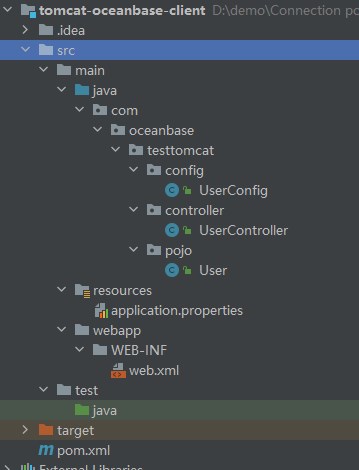
View the project.
Step 2: Modify the database connection information in the tomcat-oceanbase-client project
Modify the database connection information in the application.properties file based on the connection string information obtained from the prerequisites.
Here is an example:
#Apache Commons DBCP2 Connection Pool
#Database Connection Pool Driver Class Name
db.app.pool.driverClassName=com.oceanbase.jdbc.Driver
#Database URL
db.app.pool.url=jdbc:oceanbase://t5******.********.oceanbase.cloud:1521/SYS?characterEncoding=UTF-8
#Database username
db.app.pool.username=test_user
#Database password
db.app.pool.password=******
#Initial size of connection pool
db.app.pool.initialSize=3
#Maximum number of connections in the connection pool
db.app.pool.maxTotal=10
#Maximum number of idle connections in the connection pool
db.app.pool.maxIdle=20
#Minimum number of idle connections in the connection pool
db.app.pool.minIdle=5
#Maximum wait time for obtaining connections (in milliseconds)
db.app.pool.maxWaitMillis=5000
#Verify the connection's query statement
db.app.pool.validationQuery=select 1 from dual
- The name of the database driver is:
com.oceanbase.jdbc.Driver - The connection address is
t5******.********.oceanbase.cloud. - The access port is 1521.
- The schema to be accessed is
sys. - The tenant connection account is
test_user. - The password is
******.
Step 3: Set up the Tomcat runtime environment for the tomcat-oceanbase-client project
Download Tomcat 8.5.95.
Download the compressed package of Tomcat 8.5.95 from the Apache Tomcat official website and decompress it to the directory where you want to install Tomcat.
Configure Tomcat in IDEA.
Open IntelliJ IDEA, go to the File menu, and select Settings > Plugins. In the middle search box of the Settings window, search for Smart Tomcat, download it, and select Apply. At this point, the Tomcat Server tab will appear at the bottom left of the Settings window. Enter the Tomcat Server tab, click the + button on the right, select the decompressed Tomcat directory, click Apply, and then click OK to complete the configuration.
Create a Tomcat runtime configuration.
In the top toolbar of IDEA, select Run > Edit Configurations. In the Run/Debug Configurations window, click the + button, select Tomcat Server, enter the server name in the Name field, select the installed version of Tomcat in the Configuration dropdown list, change the Context path value to
/, enter8080in the SSL port field. In the Before launch dropdown list, click + and select Launch Web Browser. Click Edit and enter the URL ashttp://localhost:8080/hello/getData. Click Apply and then OK to complete the configuration.Run the Tomcat server.
In the top toolbar of IDEA, select the Tomcat runtime configuration you just created. Click the green triangle button to start the Tomcat server. You can view the startup logs of the Tomcat server in the Run window of IDEA.
Step 4: Run the tomcat-oceanbase-client project
Run the project.
In the top toolbar of IDEA, select the Tomcat runtime configuration you just created. Click the green triangle button to start the Tomcat server. Open the path
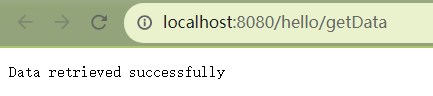
http://localhost:8080/hello/getDatain Google or IE browser to view the running results.View the running results.
View the project's log information and output results in the console window of IDEA.
The result after data insertion.
tomcat connection pool test0
tomcat connection pool test1
tomcat connection pool test2
tomcat connection pool test3
tomcat connection pool test4
tomcat connection pool test5
tomcat connection pool test6
tomcat connection pool test7
tomcat connection pool test8
tomcat connection pool test9
The result after data modification.
-----After modification-----
POOl connection pool test0
POOl connection pool test1
POOl connection pool test2
POOl connection pool test3
POOl connection pool test4
POOl connection pool test5
POOl connection pool test6
POOl connection pool test7
POOl connection pool test8
POOl connection pool test9
The result returned to the web interface.
Project code
Click tomcat-oceanbase-client to download the project code. This is a compressed package named tomcat-oceanbase-client.
After decompressing it, you will find a folder named tomcat-oceanbase-client. The directory structure is as follows:
│--pom.xml
│
├─.idea
│
├─src
│  ├─main
│  │  ├─java
│  │  │  └─com
│  │  │      └─oceanbase
│  │  │          └─testtomcat
│  │  │              ├─config
│  │  │              │   └─UserConfig.java
│  │  │              │
│  │  │              ├─controller
│  │  │              │   └─UserController.java
│  │  │              │
│  │  │              └─pojo
│  │  │                  └─User.java
│  │  │
│  │  ├─resources
│  │  │    └─application.properties
│  │  │
│  │  └─webapp
│  │      └─WEB-INF
│  │          └─web.xml
│  │
│  │
│  │
│  └─test
│      └─java
│
│
└─target
File description:
pom.xml: the configuration file of the Maven project, which contains information about the project's dependencies, plugins, and build process..idea: a directory used in the IDE (Integrated Development Environment) to store project-related configuration information.src: a directory typically used to store the source code of the project.main: a directory for storing the main source code and resource files.java: a directory for storing Java source code.com: the root directory for storing Java packages.oceanbase: the root directory for storing the project.testtomcat: a directory for storing the relevant code of the JFinal framework.config: a directory for storing configuration files, including the configuration class files of the application.UserConfig.java: the user configuration class file.controller: a directory for storing the controller class files of the application.UserController.java: the user controller class file.pojo: a directory for storing JavaBeans or entity classes.User.java: the user entity class file.resources: a directory for storing resource files, such as configuration files and SQL files.application.properties: the configuration file for storing database connection information.webapp: the directory for storing the static resources and configuration files of the Web application.WEB-INF: the WEB-INF directory of the Web application, used for storing configuration files and other protected resource files.web.xml: the deployment descriptor file of the Web application.test: a directory for storing test code and resource files.target: a directory for storing the compiled Class files, Jar packages, and other files.
Introduction to the pom.xml file
Note
If you only want to verify the example, you can use the default code without any modifications. Alternatively, you can modify the pom.xml file based on your specific requirements, as explained below.
The content of the pom.xml configuration file is as follows:
File declaration statement.
This statement declares the file as an XML file using XML version
1.0and character encodingUTF-8.Sample code:
<?xml version="1.0" encoding="UTF-8"?>Configure the POM namespace and model version.
- Use
xmlnsto specify the POM namespace ashttp://maven.apache.org/POM/4.0.0. - Use
xmlns:xsito specify the XML namespace ashttp://www.w3.org/2001/XMLSchema-instance. - Use
xsi:schemaLocationto specify the POM namespace ashttp://maven.apache.org/POM/4.0.0and the location of the POM XSD file ashttp://maven.apache.org/xsd/maven-4.0.0.xsd. - Use the
<modelVersion>element to specify the POM model version used by this POM file as4.0.0.
Sample code:
<project xmlns="http://maven.apache.org/POM/4.0.0" xmlns:xsi="http://www.w3.org/2001/XMLSchema-instance" xsi:schemaLocation="http://maven.apache.org/POM/4.0.0 http://maven.apache.org/xsd/maven-4.0.0.xsd"> <modelVersion>4.0.0</modelVersion> </project>- Use
Configure basic information.
- Use
<groupId>to specify the project identifier ascom.oceanbase. - Use
<artifactId>to specify the project dependency astomcat-oceanbase-client. - Use
<version>to specify the project version as1.0-SNAPSHOT. - Use
<packaging>to specify the project packaging method as a WAR file (Web Application Archive).
Sample code:
<groupId>com.oceanbase</groupId> <artifactId>tomcat-oceanbase-client</artifactId> <version>1.0-SNAPSHOT</version> <!-- Packaging method (default to jar) --> <packaging>war</packaging>- Use
Configure the Maven version.
The <maven.compiler.source> and <maven.compiler.target> elements specify that both the source code version and target code version of the compiler are Java 8.
Sample code:
 <properties>
     <maven.compiler.source>8</maven.compiler.source>
     <maven.compiler.target>8</maven.compiler.target>
 </properties>
Configure core dependencies.
Specify the organization as
com.jfinal, the name asjfinal, and the version as5.0.6. This dependency allows you to use the features of the JFinal framework.Sample code:
<dependency>
    <groupId>com.jfinal</groupId>
    <artifactId>jfinal</artifactId>
    <version>5.0.6</version>
</dependency>
Specify the organization as
com.alibaba, the name asdruid, and the version as1.2.8. This dependency allows you to use the Druid library for managing and optimizing the retrieval and release of database connections.Sample code:
<dependency>
    <groupId>com.alibaba</groupId>
    <artifactId>druid</artifactId>
    <version>1.2.8</version>
</dependency>
Specify the organization as
org.apache.commons, the name ascommons-dbcp2, and the version as2.9.0. This dependency allows you to use the Apache Commons DBCP2 library for managing and optimizing the retrieval and release of database connections.Sample code:
<dependency>
    <groupId>org.apache.commons</groupId>
    <artifactId>commons-dbcp2</artifactId>
    <version>2.9.0</version>
</dependency>
Specify the organization as
com.oceanbase, the name asoceanbase-client, and the version as2.4.3. This dependency allows you to use the client features provided by OceanBase, such as connection, query, and transaction.Sample code:
    <dependencies>
    <dependency>
        <groupId>com.oceanbase</groupId>
        <artifactId>oceanbase-client</artifactId>
        <version>2.4.3</version>
    </dependency>
    </dependencies>
Introduction to the application.properties file
The application.properties file is used to configure database connection information for connecting to OceanBase Database. It includes the class name of the database driver, connection URL, username, password, and related connection pool configurations. These configurations are used to obtain and manage database connections in the application for database operations.
Use
db.app.pool.driverClassNameto specify the database driver ascom.oceanbase.jdbc.Driver, which is used to establish a connection with OceanBase Database.Use
db.app.pool.urlto specify the URL for connecting to the database.Use
db.app.pool.usernameto specify the username for connecting to the database.Use
db.app.pool.passwordto specify the password for connecting to the database.Use
db.app.pool.initialSizeto specify the initial size of the connection pool as3, which means that 3 database connections are created initially.Use
db.app.pool.maxTotalto specify the maximum size of the connection pool as10, which means that up to 10 database connections can be created in the connection pool.Use
db.app.pool.maxIdleto specify the maximum number of idle connections in the connection pool as20.Use
db.app.pool.minIdleto specify the minimum number of idle connections in the connection pool as5.Use
db.app.pool.maxWaitMillisto specify the timeout for database connections as5000ms, which means that if a database connection cannot be obtained within 5000ms, a timeout exception is thrown.Use
db.app.pool.validationQueryto specify the SQL query statement for validating database connections asselect 1 from dual, which is executed when a connection is obtained from the connection pool to verify its validity.Sample code:
  #Apache Commons DBCP2 Connection Pool
  #Database Connection Pool Driver Class Name
  db.app.pool.driverClassName=com.oceanbase.jdbc.Driver
  #Database URL
  db.app.pool.url=jdbc:oceanbase:////host:port/schema_name?characterEncoding=UTF-8
  #Database username
  db.app.pool.username=user_name
  #Database password
  db.app.pool.password=******
  #Initial size of connection pool
  db.app.pool.initialSize=3
  #Maximum number of connections in the connection pool
  db.app.pool.maxTotal=10
  #Maximum number of idle connections in the connection pool
  db.app.pool.maxIdle=20
  #Minimum number of idle connections in the connection pool
  db.app.pool.minIdle=5
  #Maximum wait time for obtaining connections (in milliseconds)
  db.app.pool.maxWaitMillis=5000
  #Verify the connection's query statement
  db.app.pool.validationQuery=select 1 from dual
Common DBCP configurations for the built-in connection pool of Tomcat:
Notice
The specific attribute (parameter) configurations depend on the project requirements and the characteristics of the database. We recommend that you adjust and configure them based on your actual situation.
Attribute |
Default Value |
Description |
|---|---|---|
| username | N/A | The username used to connect to the database. |
| password | N/A | The password used to connect to the database. |
| url | N/A | The URL used to connect to the database. |
| driverClassName | N/A | The standard Java class name of the database driver. |
| connectionProperties | N/A | The connection properties sent to the JDBC driver when a new connection is established, in the format of [propertyName=property;]. |
| defaultAutoCommit | driver default | The default auto-commit state when a connection is created by the connection pool. If this attribute is not set, the setAutoCommit method will not be called. |
| defaultReadOnly | driver default | The default read-only state when a connection is created by the connection pool. If this attribute is not set, the setReadOnly method will not be called. |
| defaultTransactionIsolation | driver default | The default transaction isolation level when a connection is created by the connection pool. |
| defaultCatalog | N/A | The default catalog when a connection is created by the connection pool. |
| cacheState | true | Specifies whether to cache the read-only and auto-commit settings of the connection. If this attribute is set to true, the current read-only and auto-commit settings will be cached during the first read or write and all subsequent writes. This eliminates the need for any further database queries when calling getter. |
| defaultQueryTimeout | null | The query timeout for the connection creation statement in the connection pool. If this attribute is not null, the value of this Integer attribute determines the query timeout for creating a connection from the pool; if this attribute is null, the driver's default value will be used. |
| enableAutoCommitOnReturn | true | Specifies whether to check and configure the auto-commit setting of the returned connection. |
| rollbackOnReturn | true | Specifies whether to roll back non-read-only connections that have auto-commit disabled when they are returned to the pool. If this attribute is set to true, non-read-only connections that have auto-commit disabled will be rolled back when they are returned to the pool. |
| initialSize | 0 | The initial number of connections created when the connection pool starts. |
| maxTotal | 8 | The maximum number of active connections that can be allocated from the connection pool. |
| maxIdle | 8 | The maximum number of idle connections to keep in the connection pool, without releasing additional connections. A negative value indicates no limit. |
| minIdle | 0 | The minimum number of idle connections to keep in the connection pool, without creating additional connections. A value of 0 means no connections will be created. |
| maxWaitMillis | indefinitely | The maximum number of milliseconds to wait (when no connections are available) before an exception is thrown, with a value of -1 indicating an indefinite wait. |
| validationQuery | N/A | The SQL query statement used to validate a connection. If this attribute is specified, it must be at least an SQL SELECT statement that returns one row; if this attribute is not specified, the connection will be validated by calling the isValid method. |
| validationQueryTimeout | no timeout | The timeout in seconds before a connection validation query fails. If this attribute is set to a positive value, this value will be passed to the driver's Statement using the setQueryTimeout method when executing the validation query. |
| testOnCreate | false | Specifies whether to validate the object after it is created. If the object cannot be validated, the borrow attempt that triggered its creation will fail. |
| testOnBorrow | true | Specifies whether to validate the object before borrowing it from the connection pool. If the object cannot be validated, it will be removed from the connection pool, and another object will be borrowed. |
| testOnReturn | false | Specifies whether to validate the object before it is returned to the pool. |
| testWhileIdle | false | Specifies whether to validate the object if an idle object evictor (if present) validates it. If the object fails validation, it will be removed from the connection pool. |
| timeBetweenEvictionRunsMillis | -1 | The number of milliseconds to sleep between runs of the idle object evictor thread. If this attribute is set to a non-positive value, the idle object evictor thread will not run. |
| numTestsPerEvictionRun | 3 | The number of objects to check during each run of the idle object evictor thread. |
| minEvictableIdleTimeMillis | 1000 * 60 * 30 | The minimum amount of time an object can be idle in the connection pool. |
| softMinEvictableIdleTimeMillis | -1 | The minimum amount of time a connection can be idle in the pool, including the MinIdle constraint. |
| maxConnLifetimeMillis | -1 | The maximum lifetime of a connection, in milliseconds. After this time, the connection will not be activated, passivated, or validated. A value of 0 or less means the connection has an infinite lifetime. |
| logExpiredConnections | true | Specifies whether to log connections that are closed by the pool due to exceeding the maximum lifetime. A value of false means that expired connection logging is disabled. |
| connectionInitSqls | null | The set of SQL statements used to initialize a physical connection when it is first created. These statements are only executed when a connection factory configured with this attribute creates a connection. |
| lifo | true | Specifies whether the borrowObject method returns the most recently used connection from the pool. A value of true means that the borrowObject method returns the most recently used last in connection (if an idle connection is available); a value of false means that connections are retrieved from the idle instance pool in the order they were returned to the pool (FIFO queue). |
| poolPreparedStatements | false | Specifies whether to enable the prepared statement pool. |
| maxOpenPreparedStatements | unlimited | The maximum number of open statements that can be allocated from the connection pool. A negative value indicates no limit. |
| accessToUnderlyingConnectionAllowed | false | Specifies whether to allow access to the underlying connection. |
| removeAbandonedOnMaintenance | false | Specifies whether to remove abandoned connections during the maintenance period of the connection pool. If this attribute is set to true, abandoned connections will be removed during the maintenance period (at the end of eviction) unless maintenance is enabled by setting timeBetweenEvictionRunsMillis to a positive value, in which case this attribute is ineffective. |
| removeAbandonedOnBorrow | false | Specifies whether to remove abandoned connections when they are borrowed from the connection pool. If set to True, abandoned connections are removed each time a connection is borrowed from the pool, with the following additional requirements:
|
| removeAbandonedTimeout | 300 | Specifies the timeout period before abandoned connections are removed, in seconds. This parameter specifies the maximum idle time before a connection is considered abandoned and can be removed. |
| logAbandoned | false | Specifies whether to log the stack trace of the application code that abandoned the connection. Generating a stack trace increases the overhead for each connection open or new statement. |
| abandonedUsageTracking | false | Specifies whether to log the stack trace of abandoned connections. If set to True, the connection pool logs the stack trace each time a method is called on a pooled connection and retains the most recent stack trace to help debug abandoned connections. This setting increases overhead. |
| fastFailValidation | false | Specifies whether to quickly fail for connections that throw a fatal SQLException. If set to True, validation requests for disconnected connections immediately fail without calling the driver's isValid method or attempting to execute a validation query. The default SQL_STATE codes that are considered fatal disconnection signals are as follows:
|
| disconnectionSqlCodes | null | Specifies a comma-separated list of SQL_STATE codes that are considered fatal disconnection signals. This setting is effective only when fastFailValidation is set to True. |
| jmxName | N/A | Specifies the data source object that is operable and monitorable, and registers the data source as a JMX MBean under the specified name. The name must comply with the JMX object name syntax (see javadoc). |
web.xml
The web.xml file is used to configure the filters of a Web application.
The content of the web.xml configuration file is as follows:
A file declaration statement.
This statement declares that the file is an XML file, the XML version is
1.0, and the character encoding isUTF-8.Sample code:
<?xml version="1.0" encoding="UTF-8"?>The XML namespace and XML model version are configured.
- The
xmlns:xsiattribute specifies the XML namespace ashttp://www.w3.org/2001/XMLSchema-instance. - The
xmlnsattribute specifies the XML namespace ashttp://java.sun.com/xml/ns/javaee. - The
xsi:schemaLocationattribute specifies the XML namespace ashttp://java.sun.com/xml/ns/javaeeand the location of the XML XSD file ashttp://java.sun.com/xml/ns/javaee/web-app_3_0.xsd. - The
<id>and<version>elements specify the ID of the Web application asWebApp_IDand the version number as3.0.
Sample code:
<web-app xmlns:xsi="http://www.w3.org/2001/XMLSchema-instance" xmlns="http://java.sun.com/xml/ns/javaee" xsi:schemaLocation="http://java.sun.com/xml/ns/javaee http://java.sun.com/xml/ns/javaee/web-app_3_0.xsd" id="WebApp_ID" version="3.0">- The
The JFinal filter is configured.
A filter named
jfinalis configured to use the JFinal framework in the Web application. The class of the filter is specified ascom.jfinal.core.JFinalFilter. TheconfigClassinitialization parameter is specified to indicate the location of the JFinal framework configuration class ascom.oceanbase.testtomcat.config.UserConfig. The JFinal filter is used to use the JFinal framework in the Web application and configure the behavior of the JFinal framework based on the specified configuration class.Sample code:
 <filter>
     <filter-name>jfinal</filter-name>
     <filter-class>com.jfinal.core.JFinalFilter</filter-class>
     <init-param>
         <param-name>configClass</param-name>
         <!-- your jfinal configuration location -->
         <param-value>com.oceanbase.testtomcat.config.UserConfig</param-value>
     </init-param>
 </filter>
The JFinal filter mapping is configured.
The
jfinalfilter is applied to all request paths, meaning that the filter will be applied to all requests in the application.Sample code:
 <filter-mapping>
     <filter-name>jfinal</filter-name>
     <url-pattern>/*</url-pattern>
 </filter-mapping>
UserConfig.java file
The UserConfig.java file is used to configure the routing, plugins, database connections, and other related information of an application.
The code in the UserConfig.java file mainly includes the following parts:
Import other classes and interfaces.
Declare the interfaces and classes included in the current file:
StatFilterclass: used to statistics the performance of database access.JdbcConstantsclass: used to define constants for database types.WallFilterclass: used to prevent SQL injection attacks.PropKitclass: used to read configuration files.ActiveRecordPluginclass: used to operate databases.Dbclass: used to execute database operations.OracleDialectclass: used to specify the dialect of a database.DruidPluginclass: used to connect to a database.Engineclass: used to configure a template engine.UserControllerclass: used to handle requests related to users.Userclass: used to pass and store user data.
Sample code:
import com.alibaba.druid.filter.stat.StatFilter;
import com.alibaba.druid.util.JdbcConstants;
import com.alibaba.druid.wall.WallFilter;
import com.jfinal.config.*;
import com.jfinal.kit.PropKit;
import com.jfinal.plugin.activerecord.ActiveRecordPlugin;
import com.jfinal.plugin.activerecord.Db;
import com.jfinal.plugin.activerecord.dialect.OracleDialect;
import com.jfinal.plugin.druid.DruidPlugin;
import com.jfinal.template.Engine;
import com.oceanbase.testjfinal.controller.UserController;
import com.oceanbase.testjfinal.pojo.User;
Define the
UserConfigclass.By overriding the methods of the
JFinalConfigclass, you can configure constants, routing, plugins, and database connections.Define the
configConstantmethod.Used to configure constants of the JFinal framework. The
PropKitclass is used to read the configuration from the configuration file.Sample code:
@Override
public void configConstant(Constants constants) {
    PropKit.use("application.properties");
}
Define the
configRoutemethod.Used to configure routing mappings. The
routes.addmethod is used to map the"/hello"path to the default access page of theUserControllerclass.Sample code:
@Override
public void configRoute(Routes routes) {
    routes.add("/hello", UserController.class, "/");
}
Define the
configEnginemethod.Used to configure the template engine.
Sample code:
@Override
public void configEngine(Engine engine) {
}
Define the
configPluginmethod.Used to configure plugins of the application. The
initmethod is called to initialize the database connection and table structure. TheDruidPluginandActiveRecordPluginplugins are created and added toplugins. TheaddMappingmethod ofactiveRecordPluginis called to add the mapping between the database table and the entity class. TheTEST_USERtable is mapped to theUserclass.Sample code:
@Override
public void configPlugin(Plugins plugins) {
    init();
    DruidPlugin druidPlugin = createDruidPlugin();
    plugins.add(druidPlugin);

    ActiveRecordPlugin activeRecordPlugin = createActiveRecordPlugin(druidPlugin);
    activeRecordPlugin.addMapping("TOMCAT_TEST", User.class);
    plugins.add(activeRecordPlugin);
}
Define the
createDruidPluginmethod.Used to create the
DruidPluginplugin and configure related parameters, including the connection pool size, SQL firewall, and connection error handling.The
getmethod ofPropKitis called to obtain the database connection-related attribute values from the configuration file, including the URL, username, password, and driver class. Then, theDruidPluginobject is created and initialized using the obtained attribute values.The
addFiltermethod is called to add aStatFilterinstance to theDruidPluginfor statistics of database access performance. AWallFilterinstance is created, thesetDbTypemethod is called to set the database type to OceanBase, and theWallFilterinstance is added to theDruidPluginfor SQL firewall filtering.The
setInitialSizemethod is called to set the initial size of the connection pool; thesetMaxPoolPreparedStatementPerConnectionSizemethod is called to set the maximum number of prepared statements per connection pool; thesetTimeBetweenConnectErrorMillismethod is called to set the time interval between two connection errors; and thesetValidationQuerymethod is called to set the connection validation query statement. Finally, the createdDruidPlugininstance is returned.Sample code:
private DruidPlugin createDruidPlugin() {
    DruidPlugin druidPlugin = new DruidPlugin(
        PropKit.get("db.app.pool.url"),
        PropKit.get("db.app.pool.username"),
        PropKit.get("db.app.pool.password"),
        PropKit.get("db.app.pool.driverClassName")
    );

    druidPlugin.addFilter(new StatFilter());
    WallFilter wallFilter = new WallFilter();
    wallFilter.setDbType(JdbcConstants.OCEANBASE);
    druidPlugin.addFilter(wallFilter);

    druidPlugin.setInitialSize(PropKit.getInt("db.app.pool.initialSize"));
    druidPlugin.setMaxPoolPreparedStatementPerConnectionSize(PropKit.getInt("db.app.pool.maxTotal"));
    druidPlugin.setTimeBetweenConnectErrorMillis(PropKit.getInt("db.app.pool.maxWaitMillis"));
    druidPlugin.setValidationQuery("select 1 from dual");

    return druidPlugin;
}
Define the
initmethod.Used to initialize the database connection and create the database table. The
initDbConnectionmethod is called to initialize the database connection, and anActiveRecordPlugininstance is returned. Then, an SQL statement is executed to query whether theTOMCAT_TESTuser table exists. If theTOMCAT_TESTtable exists, the SQL statementDROP TABLE TOMCAT_TESTis executed to delete the table. Then, theCREATE TABLEstatement is executed to create a database table namedTOMCAT_TEST, which contains theIDandUSERNAMEfields. Finally, the connection of theActiveRecordPluginplugin is closed to release the database connection.Sample code:
public void init() {
    ActiveRecordPlugin arp = initDbConnection();

    // Check if table exists
    boolean tableExists = Db.queryInt("SELECT COUNT(*) FROM USER_TABLES WHERE TABLE_NAME = 'TOMCAT_TEST'") > 0;

    // Drop table if it exists
    if (tableExists) {
        Db.update("DROP TABLE TOMCAT_TEST");
    }

    // Create table
    String sql = "CREATE TABLE TOMCAT_TEST (ID NUMBER(10), USERNAME VARCHAR2(50))";
    Db.update(sql);

    arp.stop();
}
Define the
initDbConnectionmethod.Used to initialize the database connection. First, the
createDruidPluginmethod is called to create theDruidPluginobject and assign it to thedruidPluginvariable. This method is responsible for creating and configuring theDruidPluginfor database connection pool management. Then, thecreateActiveRecordPluginmethod is called to create theActiveRecordPluginobject and pass theDruidPluginobject as a parameter to this method. This method is responsible for creating and configuring theActiveRecordPluginfor database operation management. Then, thedruidPlugin.startmethod is called to start theDruidPluginand initialize the database connection pool. Finally, theactiveRecordPlugin.startmethod is called to start theActiveRecordPlugin, which will initialize the database operation-related settings based on the configuration.Sample code:
private ActiveRecordPlugin initDbConnection() {
    DruidPlugin druidPlugin = createDruidPlugin();
    ActiveRecordPlugin activeRecordPlugin = createActiveRecordPlugin(druidPlugin);

    druidPlugin.start();
    activeRecordPlugin.start();

    return activeRecordPlugin;
}
Define the
ConfigInterceptorandConfigHandlermethods.Used to perform global configuration during system initialization.
Sample code:
@Override
public void configInterceptor(Interceptors interceptors) {
}

@Override
public void configHandler(Handlers handlers) {
}
Introduction to the UserController.java file
The UserController.java file uses the getData method to insert data into a database, query data, and return the query results in JSON format to the client. It uses the Db class provided by the JFinal framework to perform database operations and the custom User class for data mapping to achieve database operations and data return functionality.
The UserController.java file contains the following code:
Import other classes and interfaces.
Declare the interfaces and classes included in this file:
Controllerclass: used to handle requests and responses.Dbclass: used to perform database operations.Recordclass: used to perform database operations, such as querying, inserting, updating, and deleting data.ArrayListclass: used to create an empty list.Userclass: used to map database tables.Listinterface: used to operate on query result sets.
Sample code:
import com.jfinal.core.Controller;
import com.jfinal.plugin.activerecord.Db;
import com.jfinal.plugin.activerecord.Record;

import java.util.ArrayList;
import java.util.List;
Define the
UserControllerclass.This class provides a controller for the JFinal framework and uses the
getDatamethod to insert data into and query data from a database.Insert data. Create a list
dataListcontaining 10Recordobjects, each with differentIDandUSERNAMEfield values. Then, use theDb.batchSavemethod to batch save the records in thedataListlist to a database table namedTOMCAT_TEST.Sample code:
        for (int i = 0; i < 10; i++) {
            Record record = new Record().set("ID", i).set("USERNAME", "tomcat connection pool test" + i);
            dataList.add(record);
        }
        Db.batchSave("TOMCAT_TEST", dataList, dataList.size());
Query data. Use the
Db.findmethod to execute an SQL query and store the results in theresultListlist. Use an enhancedforloop to traverse eachRecordobject in theresultListlist. Use thegetStrmethod to obtain the value of the specified field in theRecordobject and use theSystem.out.printlnmethod to print the value.Sample code:
    List<Record> resultList = Db.find("SELECT * FROM TOMCAT_TEST");
    for (Record result : resultList) {
        System.out.println(result.getStr("USERNAME"));
    }
Modify data. Use a loop to iterate 10 times and execute an update statement in each iteration. The update statement uses the
Db.updatemethod to update records in theTOMCAT_TESTdatabase table based on conditions.Sample code:
    for (int i = 0; i < 10; i++) {
        Db.update("UPDATE TOMCAT_TEST SET USERNAME = 'POOl connection pool test" + i + "' WHERE ID = " + i);
    }
Query the modified data. Query the
TOMCAT_TESTdatabase table and save the results in themodifiedListlist. Print the prompt-----Modified-----. Traverse themodifiedListlist and print the value of theUSERNAMEfield for each record. Use therenderJsonmethod to render the response messageData retrieved successfullyin JSON format and return it to the client.Sample code:
        List<Record> modifiedList = Db.find("SELECT * FROM TOMCAT_TEST");
        System.out.println("-----Modified-----");
        for (Record modified : modifiedList) {
            System.out.println(modified.getStr("USERNAME"));
        }
        renderJson("Data retrieved successfully");
Introduction to the User.java file
The User.java file is used to implement the mapping between a database table and a Java object.
The User.java file contains the following code:
Import the
Modelclass.The
Modelclass is used to map database tables and operate on data.Define the
Userclass.The
Userclass uses the methods provided by the inheritedModelclass to perform database operations.Sample code:
import com.jfinal.plugin.activerecord.Model;


    public class User extends Model<User> {
        public static final User dao = new User();

}
Complete code
<?xml version="1.0" encoding="UTF-8"?>
<project xmlns="http://maven.apache.org/POM/4.0.0"
         xmlns:xsi="http://www.w3.org/2001/XMLSchema-instance"
         xsi:schemaLocation="http://maven.apache.org/POM/4.0.0 http://maven.apache.org/xsd/maven-4.0.0.xsd">
    <modelVersion>4.0.0</modelVersion>

    <groupId>com.oceanbase</groupId>
    <artifactId>tomcat-oceanbase-client</artifactId>
    <version>1.0-SNAPSHOT</version>
    <!-- Packaging method (default to jar) -->
    <packaging>war</packaging>

    <properties>
        <maven.compiler.source>8</maven.compiler.source>
        <maven.compiler.target>8</maven.compiler.target>
    </properties>
    <dependencies>
        <dependency>
            <groupId>com.jfinal</groupId>
            <artifactId>jfinal</artifactId>
            <version>5.0.6</version>
        </dependency>


        <dependency>
            <groupId>com.alibaba</groupId>
            <artifactId>druid</artifactId>
            <version>1.2.8</version>
        </dependency>

        <dependency>
            <groupId>org.apache.commons</groupId>
            <artifactId>commons-dbcp2</artifactId>
            <version>2.9.0</version>
        </dependency>
        <dependency>
            <groupId>com.oceanbase</groupId>
            <artifactId>oceanbase-client</artifactId>
            <version>2.4.3</version>
        </dependency>

    </dependencies>
</project>
    #Apache Commons DBCP2 Connection Pool
    #Database Connection Pool Driver Class Name
    db.app.pool.driverClassName=com.oceanbase.jdbc.Driver
    #Database URL
    db.app.pool.url=jdbc:oceanbase://host:port/schema_name?characterEncoding=UTF-8
    #Database username
    db.app.pool.username=user_name
    #Database password
    db.app.pool.password=******
    #Initial size of connection pool
    db.app.pool.initialSize=3
    #Maximum number of connections in the connection pool
    db.app.pool.maxTotal=10
    #Maximum number of idle connections in the connection pool
    db.app.pool.maxIdle=20
    #Minimum number of idle connections in the connection pool
    db.app.pool.minIdle=5
    #Maximum wait time for obtaining connections (in milliseconds)
    db.app.pool.maxWaitMillis=5000
    #Verify the connection's query statement
    db.app.pool.validationQuery=select 1 from dual
<?xml version="1.0" encoding="UTF-8"?>
<web-app xmlns:xsi="http://www.w3.org/2001/XMLSchema-instance" xmlns="http://java.sun.com/xml/ns/javaee" xsi:schemaLocation="http://java.sun.com/xml/ns/javaee http://java.sun.com/xml/ns/javaee/web-app_3_0.xsd" id="WebApp_ID" version="3.0">
    <filter>
        <filter-name>jfinal</filter-name>
        <filter-class>com.jfinal.core.JFinalFilter</filter-class>
        <init-param>
            <param-name>configClass</param-name>
            <!-- your jfinal configuration location -->
            <param-value>com.oceanbase.testjfinal.config.UserConfig</param-value>
        </init-param>
    </filter>

    <filter-mapping>
        <filter-name>jfinal</filter-name>
        <url-pattern>/*</url-pattern>
    </filter-mapping>
</web-app>
package com.oceanbase.testtomcat.config;

import com.alibaba.druid.filter.stat.StatFilter;
import com.alibaba.druid.util.JdbcConstants;
import com.alibaba.druid.wall.WallFilter;
import com.jfinal.config.*;
import com.jfinal.kit.PropKit;
import com.jfinal.plugin.activerecord.ActiveRecordPlugin;
import com.jfinal.plugin.activerecord.Db;
import com.jfinal.plugin.activerecord.dialect.OracleDialect;
import com.jfinal.plugin.druid.DruidPlugin;
import com.jfinal.template.Engine;
import com.oceanbase.testtomcat.controller.UserController;
import com.oceanbase.testtomcat.pojo.User;

public class UserConfig extends JFinalConfig {
    @Override
    public void configConstant(Constants constants) {
        // Read properties configuration
        PropKit.use("application.properties");
    }

    @Override
    public void configRoute(Routes routes) {
        // Set the default access page for project startup, which does not need to be set in the web.
        routes.add("/hello", UserController.class);

    }

    @Override
    public void configEngine(Engine engine) {
    }

    @Override
    public void configPlugin(Plugins plugins) {
        init();
        DruidPlugin druidPlugin = createDruidPlugin();
        plugins.add(druidPlugin);

        ActiveRecordPlugin activeRecordPlugin = createActiveRecordPlugin(druidPlugin);
        activeRecordPlugin.addMapping("TOMCAT_TEST", User.class);
        plugins.add(activeRecordPlugin);
    }

    private DruidPlugin createDruidPlugin() {
        DruidPlugin druidPlugin = new DruidPlugin(
                PropKit.get("db.app.pool.url"),
                PropKit.get("db.app.pool.username"),
                PropKit.get("db.app.pool.password"),
                PropKit.get("db.app.pool.driverClassName")
        );

        druidPlugin.addFilter(new StatFilter());
        WallFilter wallFilter = new WallFilter();
        wallFilter.setDbType(JdbcConstants.OCEANBASE);
        druidPlugin.addFilter(wallFilter);

        druidPlugin.setInitialSize(PropKit.getInt("db.app.pool.initialSize"));
        druidPlugin.setMaxPoolPreparedStatementPerConnectionSize(PropKit.getInt("db.app.pool.maxTotal"));
        druidPlugin.setTimeBetweenConnectErrorMillis(PropKit.getInt("db.app.pool.maxWaitMillis"));
        druidPlugin.setValidationQuery("select 1 from dual");

        return druidPlugin;
    }

    private ActiveRecordPlugin createActiveRecordPlugin(DruidPlugin druidPlugin) {
        ActiveRecordPlugin activeRecordPlugin = new ActiveRecordPlugin(druidPlugin);
        activeRecordPlugin.setDialect(new OracleDialect());

        return activeRecordPlugin;
    }

    public void init() {
        ActiveRecordPlugin arp = initDbConnection();

        // Check if table exists
        boolean tableExists = Db.queryInt("SELECT COUNT(*) FROM USER_TABLES WHERE TABLE_NAME = 'TOMCAT_TEST'") > 0;

        // Drop table if it exists
        if (tableExists) {
            Db.update("DROP TABLE TOMCAT_TEST");
        }

        // Create table
        String sql = "CREATE TABLE TOMCAT_TEST (ID NUMBER(10), USERNAME VARCHAR2(50))";
        Db.update(sql);

        arp.stop();
    }
    private ActiveRecordPlugin initDbConnection() {
        DruidPlugin druidPlugin = createDruidPlugin();
        ActiveRecordPlugin activeRecordPlugin = createActiveRecordPlugin(druidPlugin);

        druidPlugin.start();
        activeRecordPlugin.start();

        return activeRecordPlugin;
    }

    @Override
    public void configInterceptor(Interceptors interceptors) {
    }

    @Override
    public void configHandler(Handlers handlers) {
    }
}
package com.oceanbase.testtomcat.controller;

import com.jfinal.core.Controller;
import com.jfinal.plugin.activerecord.Db;
import com.jfinal.plugin.activerecord.Record;

import java.util.ArrayList;
import java.util.List;

public class UserController extends Controller {

    public void getData() {
        try {
            List<Record> dataList = new ArrayList<>();
            // Insert data
            for (int i = 0; i < 10; i++) {
                Record record = new Record().set("ID", i).set("USERNAME", "tomcat connection pool test" + i);
                dataList.add(record);
            }
            Db.batchSave("TOMCAT_TEST", dataList, dataList.size());
            // Query data
            List<Record> resultList = Db.find("SELECT * FROM TOMCAT_TEST");
            for (Record result : resultList) {
                System.out.println(result.getStr("USERNAME"));
            }
            // Modify data
            for (int i = 0; i < 10; i++) {
                Db.update("UPDATE TOMCAT_TEST SET USERNAME = 'POOl connection pool test" + i + "' WHERE ID = " + i);
            }
            // Query modified data
            List<Record> modifiedList = Db.find("SELECT * FROM TOMCAT_TEST");
            System.out.println("-----Modified-----");
            for (Record modified : modifiedList) {
                System.out.println(modified.getStr("USERNAME"));
            }
            renderJson("Data retrieved successfully");
        } catch (Exception e) {
            e.printStackTrace();
            renderJson("Error occurred");
        }
    }
}
package com.oceanbase.testtomcat.pojo;

import com.jfinal.plugin.activerecord.Model;


    public class User extends Model<User> {
        public static final User dao = new User();

}
References
For more information about OceanBase Connector/J, see OceanBase JDBC driver.