







This topic describes how to use the Hibernate framework and OceanBase Cloud to build an application for basic database operations, such as table creation, data insertion, and data query.
 Download the java-oceanbase-hibernate sample project
  Connect to OceanBase Database by using Hibernate (Oracle compatible mode)
Prerequisites
- You have registered an OceanBase Cloud account, and created an instance and an Oracle-compatible tenant in OceanBase Cloud. For more information, see Create an instance and Create a tenant.
- You have installed Java Development Kit (JDK) 1.8 and Maven.
- You have installed IntelliJ IDEA.
Note
This topic uses IntelliJ IDEA Community Edition 2021.3.2 to run the sample code. You can also choose a suitable tool as needed.
Procedure
Note
The following procedure applies to Windows. If you use another operating system or compiler, the procedure can be slightly different.
- Obtain the connection string of the OceanBase Cloud database.
- Import the
java-oceanbase-hibernateproject to IntelliJ IDEA. - Modify the database connection information in the
java-oceanbase-hibernateproject. - Run the
java-oceanbase-hibernateproject.
Step 1: Obtain the connection string of the OceanBase Cloud database
Log in to the OceanBase Cloud console. In the instance list, find the target instance, expand its information, and select Connect > Get Connection String.
For more information, see Obtain the connection string.
Fill in the following URL with the information of the created OceanBase Cloud database.
Note
The URL information is required in the
hibernate.cfg.xmlfile.jdbc:oceanbase://host:port/schema_name?user=$user_name&password=$passwordParameter description:
$host: the connection address of the OceanBase Cloud database, for example,t********.********.oceanbase.cloud.$port: the connection port of the OceanBase Cloud database, which is 1521 by default.$schema_name: the name of the schema to be accessed.$user_name: the account for accessing the database.$password: the password of the account.
For more information about the URL parameters, see Database URL.
Step 2: Import the java-oceanbase-hibernate project to IntelliJ IDEA
Start IntelliJ IDEA and choose File > Open....

In the Open File or Project window, select the project files and click OK to import the files.
IntelliJ IDEA automatically identifies various files in the project. You can view project information such as the directory structure, file list, module list, and dependencies in the Project window. Generally, the Project window is at the leftmost of the UI of IntelliJ IDEA and is opened by default. If the Project window is closed, you can choose View > Tool Windows > Project in the menu bar or press Alt + 1 to open it.
Note
When you use IntelliJ IDEA to import a project, IntelliJ IDEA automatically detects the `pom.xml` file in the project, downloads the required dependency libraries based on the dependencies described in the file, and adds them to the project.
View the project.
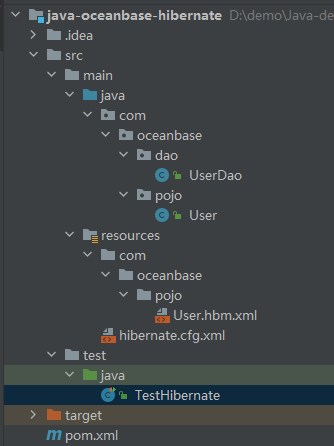
Step 3: Modify the database connection information in the java-oceanbase-hibernate project
Modify the database connection information in the hibernate.cfg.xml file based on the information obtained in Step 1: Obtain the connection string of the cloud database of OceanBase Cloud.
Note
If you need to add additional properties to the JDBC connection string, see Database URL.
Here is an example:
- The name of the database driver is
com.oceanbase.jdbc.Driver. - The endpoint of the cloud database of OceanBase Cloud is
t5******.********.oceanbase.cloud. - The access port is
1521. - The name of the schema to be accessed is
sys. - The tenant account is oracle001.
- The password is
******.
Here is the sample code:
<property name="hibernate.connection.driver_class">com.oceanbase.jdbc.Driver</property>
<property name="hibernate.connection.url">jdbc:oceanbase://t5******.********.oceanbase.cloud:1521/sys</property>
<property name="hibernate.connection.username">oracle001</property>
<property name="hibernate.connection.password">******</property>
Step 4: Run the java-oceanbase-hibernate project
Run path
- Find the
TestHibernate.javafile under src > test > java in the project package. - Choose Run > Run... > TestHibernate in the menu bar or click the green triangle in the upper-right corner to run the project.
- View the logs and output of the project in the Console window of IDEA.
Running result
User{id=2, name='update'}
User{id=3, name='user_insert3'}
User{id=4, name='user_insert4'}
User{id=5, name='user_insert5'}
Project code
Click here to download the project code, which is a package named java-oceanbase-hibernate.zip.
Decompress the package to obtain a folder named java-oceanbase-hibernate. The directory structure is as follows:
│--pom.xml
│
├─.idea
├─src
│  ├─main
│  │  ├─java
│  │  │  └─com
│  │  │      └─oceanbase
│  │  │          ├─dao
│  │  │          │   └─--UserDao.java
│  │  │          │
│  │  │          └─pojo
│  │  │              └─--User.java
│  │  │
│  │  └─resources
│  │      │--hibernate.cfg.xml
│  │      │
│  │      └─com
│  │          └─oceanbase
│  │              └─pojo
│  │                  └─--User.hbm.xml
│  │
│  └─test
│      └─java
│          └─--TestHibernate.java
│
└─target
The files and directories are described as follows:
pom.xml: the configuration file of the Maven project, which contains the dependencies, plug-ins, and build rules of the project..idea: a directory used in an Integrated Development Environment (IDE) to store configuration information related to the project.src: a directory that stores the source code in the project.main: a directory that stores the main source code and resource files.java: a directory that stores the Java source code.com: the root directory of the Java package.oceanbase: the root directory of the project.dao: stores the data access object (DAO) package for accessing databases or other data storage services.UserDao.java: the user DAO that is used to add, delete, modify, and query user data.User.java: the user persistent object that is mapped to fields in a user data table.pojo: stores the persistent Java class, which follows the Plain Old Java Object (POJO) programming model, mapped to a database table. It is used for the mapping to a database table or another database storage structure.resources: a directory that stores resource files, such as configuration files and SQL files.hibernate.cfg.xml: the Hibernate configuration file, which is used to configure the basic parameters of Hibernate and other information such as the data source.User.hbm.xml: defines the mapping between the user persistent object and the user data table.test: a directory that stores the test code and resource files.TestHibernate.java: the directory that stores the Java class for testing Hibernate.target: a directory that stores compiled class files and .jar packages.
Code in pom.xml
Note
You can retain the default code in this file for verification purposes or modify the code in the file as needed.
Perform the following steps to configure the pom.xml file:
Declare the file.
Declare the file to be an XML file that uses XML standard 1.0 and the character encoding UTF-8.
The sample code is as follows:
<?xml version="1.0" encoding="UTF-8"?>Configure namespaces and the POM model version.
xmlns: the default XML namespace for the POM, which is set tohttp://maven.apache.org/POM/4.0.0.xmlns:xsi: the XML namespace for XML elements prefixed withxsi, which is set tohttp://www.w3.org/2001/XMLSchema-instance.xsi:schemaLocation: the location of an XML schema definition (XSD) file. The value consists of two parts: the default XML namespace(http://maven.apache.org/POM/4.0.0)and the URI of the XSD file (http://maven.apache.org/xsd/maven-4.0.0.xsd).<modelVersion>: the POM model version used by the POM file, which is set to4.0.0.
The sample code is as follows:
<project xmlns="http://maven.apache.org/POM/4.0.0"
      xmlns:xsi="http://www.w3.org/2001/XMLSchema-instance"
      xsi:schemaLocation="http://maven.apache.org/POM/4.0.0 http://maven.apache.org/xsd/maven-4.0.0.xsd">
 <modelVersion>4.0.0</modelVersion>
</project>
Configure basic project information.
<groupId>: the ID of the project group, which is set tocom.oceanbase.<artifactId>: the name of the project, which is set tojava-oceanbase-hibernate.<version>: the project version, which is set to1.0-SNAPSHOT.
The sample code is as follows:
 <groupId>com.oceanbase</groupId>
 <artifactId>java-oceanbase-hibernate</artifactId>
 <version>1.0-SNAPSHOT</version>
Use
<build>to define the build process for the project.<plugins>: the plug-ins in the project.<plugin>a plug-in in the project.<groupId>: the ID of the project group, which is set toorg.apache.maven.plugins.<artifactId>: the name of the project, which is set tomaven-compiler-plugin.<configuration>: the parameters of the plug-in.<source>: the source code version for the compiler, which is set to8.<target>: the target code version for the compiler, which is set to8.
The sample code is as follows:
 <build>
     <plugins>
         <plugin>
             <groupId>org.apache.maven.plugins</groupId>
             <artifactId>maven-compiler-plugin</artifactId>
             <configuration>
                 <source>8</source>
                 <target>8</target>
             </configuration>
         </plugin>
     </plugins>
 </build>
Configure project dependencies in
<dependencies>.Define a dependency named
oceanbase-clientthat belongs to thecom.oceanbasegroup and whose version is2.4.2.The sample code is as follows:
    <dependencies>
    <dependency>
        <groupId>com.oceanbase</groupId>
        <artifactId>oceanbase-client</artifactId>
        <version>2.4.2</version>
    </dependency>
    </dependencies>
Define a dependency named
junitthat belongs to thejunitgroup and whose version is4.13.The sample code is as follows:
    <dependencies>
    <dependency>
        <groupId>junit</groupId>
        <artifactId>junit</artifactId>
        <version>4.13</version>
    </dependency>
    </dependencies>
Define a dependency named
hibernate-corethat belongs to theorg.hibernategroup and whose version is5.2.17.Final.The sample code is as follows:
<dependencies>
  <dependency>
      <groupId>org.mybatis</groupId>
      <artifactId>hibernate-core</artifactId>
      <version>5.2.17.Final</version>
  </dependency>
</dependencies>
Define a dependency named
hibernate-c3p0that belongs to theorg.hibernategroup and whose version is5.2.17.Final.The sample code is as follows:
<dependencies>
  <dependency>
      <groupId>org.mybatis</groupId>
      <artifactId>hibernate-c3p0</artifactId>
      <version>5.2.17.Final</version>
  </dependency>
</dependencies>
Code in User.hbm.xml
The User.hbm.xml file is a Hibernate mapping file that maps Java objects to database tables.
Perform the following steps to configure the User.hbm.xml file:
Declare the file.
Declare the file to be an XML file that uses XML standard 1.0 and the character encoding UTF-8. Specify the Document Type Definition (DTD) of the Hibernate mapping file by setting the type of the DTD file to
hibernate-mapping, the version to3.0, the language toEN, and the URL tohttp://www.hibernate.org/dtd/hibernate-mapping-3.0.dtd.The sample code is as follows:
<?xml version="1.0" encoding="UTF-8"?>
<!DOCTYPE hibernate-mapping PUBLIC
        "-//Hibernate/Hibernate Mapping DTD 3.0//EN"
        "http://www.hibernate.org/dtd/hibernate-mapping-3.0.dtd">
Configure the mapping file.
Define a Hibernate mapping file that maps an entity class named
Userto a database table namedtest_hibernate_oracle.- Use the
packageattribute to specifycom.oceanbase.pojoas the Java package in the mapping file. - Use the
classtag to map a Java class to a database table. In the tag, use thenameattribute to specifyUseras the name of the Java class, and use thetableattribute to specifytest_hibernate_oracleas the mapped-to database table. - Use the
idtag to define a member variable for the Java classUseras the primary key. In the tag, use thenameattribute to specifyidas the member variable name, and use thecolumnattribute to specifyUSER_IDas the name of the mapped-to database field. - Use the
generatortag to define the strategy for primary key generation. In the tag, use theclassattribute to specifysequenceas the type of the primary key generator, and use theparamelement to specifySQ_USERas the sequence name. Use thepropertytag to define another member variable for the Java class. In the tag, use thenameattribute to specifyUSER_NAMEas the name of the mapped-to database field, and use thetypeattribute to specifystringas the data type of the member variable.
The sample code is as follows:
<hibernate-mapping package="com.oceanbase.pojo"> <class name="User" table="test_hibernate_oracle"> <id name="id" column="USER_ID"> <generator class="sequence"> <param name="sequence">SQ_USER</param> </generator> </id> <property name="name" column="USER_NAME" type="string"/> </class> </hibernate-mapping>- Use the
Code in hibernate.cfg.xml
The hibernate.cfg.xml file is a Hibernate configuration file that configures the operating environment of Hibernate and the parameters for connecting to the database.
Perform the following steps to configure the hibernate.cfg.xml file:
Declare the file.
Declare the file to be an XML file that uses XML standard 1.0 and the character encoding UTF-8. Specify the DTD of the Hibernate configuration file by setting the type of the DTD file to
hibernate-configuration, the version to3.0, the language toEN, and the URL tohttp://www.hibernate.org/dtd/hibernate-configuration-3.0.dtd.The sample code is as follows:
<?xml version="1.0" encoding="utf-8"?>
<!DOCTYPE hibernate-configuration PUBLIC
        "-//Hibernate/Hibernate Configuration DTD 3.0//EN"
        "http://www.hibernate.org/dtd/hibernate-configuration-3.0.dtd">
Configure the
configurationparameter.In the
<hibernate-configuration>root element, use the<session-factory>element to configure the Hibernate session factory for creating and managing session objects. The session factory contains database connection configurations (such as the driver class name, URL, username, and password), connection pool configurations, as well as SQL interaction configurations (such as the database dialect, SQL printing and formatting, automatic creation of database tables, current session context, batch size, and use of secondary cache).Configure database connection properties.
Configure the properties that Hibernate uses to connect to the database, including the driver class name, URL, username, and password.
hibernate.connection.driver_class: the database driver used to establish a connection with OceanBase Cloud, which is set tocom.oceanbase.jdbc.Driver.hibernate.connection.url: the URL of the database, which contains the IP address, port number, and name of the database.hibernate.connection.username: the username for connecting to the database.hibernate.connection.password: the password for connecting to the database.
The sample code is as follows:
    <property name="hibernate.connection.driver_class">com.oceanbase.jdbc.Driver</property>
    <property name="hibernate.connection.url">jdbc:oceanbase://host:port/schema_name</property>
    <property name="hibernate.connection.username">user_name</property>
    <property name="hibernate.connection.password">******</property>
Configure connection pool properties.
Configure the properties of the connection pool used by Hibernate. Specify C3P0 as the connection pool, and set the maximum and minimum number of connections in the connection pool, timeout for obtaining a connection, timeout for an idle connection, maximum number of cached statements, interval for testing idle connections, number of connections to acquire at a time, and connection validation method.
Note
The following properties are not a complete list and are for reference only. If you need to configure other properties, refer to the relevant documentation for more detailed property information.
hibernate.connection.provider_class: the connection pool used to manage the creation and release of database connections, which is set toC3P0.hibernate.c3p0.max_size: the maximum number of connections in the connection pool, which is set to60.hibernate.c3p0.min_size: the minimum number of connections in the connection pool, which is set to30.hibernate.c3p0.checkoutTimeout: the timeout period for obtaining a connection from the connection pool, which is set to 30,000 milliseconds.hibernate.c3p0.timeout: the timeout period after which an idle connection in the connection pool is closed, which is set to 2,000 milliseconds.hibernate.c3p0.max_statements: the maximum number of SQL statements that can be cached in the connection pool, which is set to100.hibernate.c3p0.idle_test_period: the interval at which idle connections in the connection pool are tested, which set to 3,000 milliseconds.hibernate.c3p0.acquire_increment: the number of connections to acquire at a time by the connection pool when the pool is exhausted, which is set to3.hibernate.c3p0.validate: specifies whether to perform verification when the connection pool is used for connection, which is set totrue.
The sample code is as follows:
<property name="hibernate.connection.provider_class">org.hibernate.c3p0.internal.C3P0ConnectionProvider</property>
<property name="hibernate.c3p0.max_size">60</property>
<property name="hibernate.c3p0.min_size">30</property>
<property name="hibernate.c3p0.checkoutTimeout">30000</property>
<property name="hibernate.c3p0.timeout">20000</property>
<property name="hibernate.c3p0.max_statements">100</property>
<property name="hibernate.c3p0.idle_test_period">3000</property>
<property name="hibernate.c3p0.acquire_increment">3</property>
<property name="hibernate.c3p0.validate">true</property>
Configure SQL interaction properties. Configure the properties used by Hibernate to map the database, including the database dialect, SQL printing and formatting, automatic creation of tables, current session context, batch size, cache usage, and mapping file to load.
dialect: the database dialect for ensuring compatibility with OceanBase Cloud in the Oracle compatible mode, which is set toOracle 12c.hibernate.show_sql: specifies whether to print SQL statements generated by Hibernate in the console.hibernate.format_sql: specifies whether to format the SQL statements to print.hbm2ddl.auto: specifies to automatically create tables.current_session_context_class: specifies to use thread-level current session context.hibernate.jdbc.batch_size: the batch size.hibernate.cache.use_second_level_cache: specifies whether to use a second-level cache.- Specify
User.hbm.xmlin thecom/oceanbase/pojo/directory as the mapping file to load.
The sample code is as follows:
  <property name="dialect">org.hibernate.dialect.Oracle12cDialect</property>
  <property name="hibernate.show_sql">true</property>
  <property name="hibernate.format_sql">true</property>
  <property name="hbm2ddl.auto">create</property>
  <property name="current_session_context_class">thread</property>
  <property name="hibernate.jdbc.batch_size">10</property>
  <property name="hibernate.cache.use_second_level_cache">false</property>
  <mapping resource="com/oceanbase/pojo/User.hbm.xml"/>
Code in UserDao.java
The UserDao.java file defines a user DAO class and creates a Session object to add, delete, modify, and query user data.
Perform the following steps to configure the UserDao.java file:
Reference other classes and APIs.
Declare this file to contain the following APIs and classes:
Userclass: operates user objects.Sessionclass: interacts with the database.SessionFactoryclass: createsSessioninstances.Transactionclass: manages database transactions.Configurationclass: loads the configuration file of Hibernate.Queryclass: performs query operations.Listinterface: operates the query result set.
The sample code is as follows:
import com.oceanbase.pojo.User;
import org.hibernate.Session;
import org.hibernate.SessionFactory;
import org.hibernate.Transaction;
import org.hibernate.cfg.Configuration;
import org.hibernate.query.Query;
import java.util.List;
Define the
UserDaoclass.
The Java class UserDao is a DAO class for persisting user objects. This class encapsulates a series of methods related to database interaction, such as adding, deleting, modifying, and querying user objects. By calling methods in the UserDao class, the application can easily interact with the database to implement persistence operations.
Initialize a
UserDaoinstance.Use an object initialization block to initialize the
Sessionobject during the instantiation of the class.First, create a
Configurationobject and call theconfiguremethod to read the Hibernate configuration file (hibernate.cfg.xml). Then, call thebuildSessionFactorymethod to create aSessionFactoryobject. Finally, call theopenSessionmethod to create aSessionobject and assign the object to thesessionvariable.The sample code is as follows:
  private Session session;
  {
      Configuration cfg = new Configuration().configure();
      // Create SessionFactory
      SessionFactory sessionFactory = cfg.buildSessionFactory();
      session = sessionFactory.openSession();
  } //Read the hibernate.cfg.xml file
Query user data by user ID.
Call the
selectUserByIdmethod to query user data by user ID.Use the
getmethod ofsessionto obtain the user record of the specified ID according to the inputUser.classandIDparameters, and store the record in theuservariable.The sample code is as follows:
  public User selectUserById(int ID) {
      User user = session.get(User.class, ID);
      return user;
  }
Query user data by username.
Call the
selectUserbyNamemethod to query user data by username. First, define a Hibernate Query Language (HQL) statement to query user data with a specified username. The table name istest_hibernate_oracle, the table alias isu, and the query field name isname. Call thecreateQuerymethod of theSessionobject to create aQueryobject and pass in the HQL statement and the entity class as parameters. Call thesetParametermethod of theQueryobject to set query parameters, where0represents the parameter position andnamerepresents the parameter value. Call thelistmethod of theQueryobject to execute the query and convert the query results into a list ofUserobjects.The sample code is as follows:
  public List<User> selectUserbyName(String name) {
      String sql = "FROM test_hibernate_oracle u WHERE u.name =?";
      Query<User> query = session.createQuery(sql, User.class);
      query.setParameter(0, name);
      List<User> users = query.list();
      return users;
  }
Query all user data.
Call the
selectUsermethod to query all user data. Define an SQL statement to query all user data. Call thecreateNativeQuerymethod of theSessionobject to create aQueryobject and pass in the SQL statement as a parameter. Then, call theaddEntitymethod to add the entity classUserto the query, so that the query results can be converted into a list ofUserobjects. Call thegetResultListmethod of theQueryobject to execute the query and convert the query results into a list ofUserobjects.The sample code is as follows:
  public List<User> selectUser() {
      String sql = "SELECT * FROM test_hibernate_oracle";
      Query<User> query = session.createNativeQuery(sql).addEntity(User.class);
      List<User> users = query.getResultList();
      return users;
  }
Insert user data.
Call the
insertUsermethod to insert user data. Specify theuserparameter of theUsertype, which is passed in as theuserobject to be inserted. Call thebeginTransactionmethod of theSessionobject to create a transaction object and assign the object to thebeginTransactionvariable. Call thesavemethod to save the user object to the database. Call thegetTransactionmethod of theSessionobject to obtain the current transaction, call thecommitmethod to commit the transaction to persist the previous operation to the database, and return the insertion result.The sample code is as follows:
  public int insertUser(User user) {
      // open transaction
      Transaction beginTransaction = session.beginTransaction();
      session.save(user);
      session.getTransaction().commit();
      return 1;
  }
Delete user data.
Call the
deleteUserByIdmethod to delete the user record of the corresponding ID from the database. Specify theidparameter of the integer type to pass in the ID of the user to be deleted. Call thebeginTransactionmethod of theSessionobject to start a new transaction. Call thegetmethod to get the user object that matches the specified user ID and the entity class typeUser.class. Call thedeletemethod to delete the user object. Call thegetTransactionmethod ofSessionto obtain the current transaction, call thecommitmethod to commit the transaction to persist the user delete operation to the database, and return the result of the delete operation.The sample code is as follows:
  public int deleteUserById(int id) {
      // open transaction
      session.beginTransaction();
      User user = session.get(User.class, id);
      session.delete(user);
      session.getTransaction().commit();
      return 1;
  }
Modify user data.
Call the
updateUserByIdmethod to update the corresponding user data. Specify theuserparameter of theUsertype. Call thebeginTransactionmethod of theSessionobject to start a transaction. Call thegetmethod of theSessionobject to obtain the correspondingUserobject by user ID. Call themergemethod of theSessionobject to merge the inputUserobject with the obtainedUserobject and update the input user data to the database. Call thegetTransactionmethod of theSessionobject to obtain the current transaction, and call thecommitmethod to commit the transaction. Return the result of the modify operation.The sample code is as follows:
  public int updateUserById(User user) {
      // open transaction
      session.beginTransaction();
      User user1 = session.get(User.class, user.getId());
      session.merge(user);
      session.getTransaction().commit();
      return 1;
  }
Code in User.java
The User.java file is used for the mapping to a database table.
Perform the following steps to configure the User.java file:
Reference other classes.
Declare that the current file uses JPA annotations to configure the mapping between a class and a database table.
Columnannotation: specifies the mapping between an attribute in the entity class and a column in the database table.Entityannotation: maps to a table in the database.GeneratedValueannotation: specifies that values of the attribute are automatically generated.GenerationTypeannotation: specifies the primary key generation strategy.Idannotation: marks an attribute as the unique identifier attribute.Tableannotation: specifies the name of the table that the entity class is mapped to.
The sample code is as follows:
import javax.persistence.Column;
import javax.persistence.Entity;
import javax.persistence.GeneratedValue;
import javax.persistence.GenerationType;
import javax.persistence.Id;
import javax.persistence.Table;
Map to a table in the database.
Map the entity class to a table named
test_hibernate_oraclein the database.The sample code is as follows:
@Entity
@Table(name = "test_hibernate_oracle")
Define the
Userclass.This class is mapped to a table named
test_hibernate_oraclein the database.Define the
idandnameattributes. Use annotations to mark the mappings between theidandnameattributes of theUserclass and columns in the database table. Specifically, use the@Idannotation to mark theidattribute as the primary key, use the@GeneratedValueannotation to specifysequenceas the primary key generation strategy, and use the@Columnannotation to specify mappings between attributes in the class and columns in the database table. Theidattribute stores the user ID, and thenameattribute stores the username.The sample code is as follows:
@Id
@GeneratedValue(strategy = GenerationType.SEQUENCE)
@Column(name = "user_id")
private int id;

@Column(name = "user_name")
private String name;
Create a
Userobject.Define two constructors of the
Userclass for creating aUserobject. Define a parameterless constructor for Hibernate query operations. Define a constructor with parameters for initializing theidandnameattributes.The sample code is as follows:
public User() {
}

public User(int id, String name) {
    this.id = id;
    this.name = name;
}
Get and set the
idandnamevalues.Define four methods in the
Userclass to get and set the values of theidandnameattributes. ThegetIdmethod gets theidvalue. ThesetIdmethod sets theidvalue. ThegetNamemethod gets thenamevalue. ThesetNamemethod sets thenamevalue.The sample code is as follows:
public int getId() {
    return id;
}

public void setId(int id) {
    this.id = id;
}

public String getName() {
    return name;
}

public void setName(String name) {
    this.name = name;
}
Return a string that represents the
Userobject.Override the
toStringmethod in theUserclass to return a string that represents theUserobject. Use the@Overrideannotation to override the method of the same name in the parent class. Define thetoStringmethod that returns a string representation of theUserobject. Concatenate theidandnamevalues to generate a string and return it to the caller.The sample code is as follows:
@Override
public String toString() {
    return "User{" +
            "id=" + id +
            ", name='" + name + '\'' +
            '}';
}
Code in TestHibernate.java
The TestHibernate.java file uses the UserDao object to demonstrate basic database operations of Hibernate, such as the insert, delete, update, and query operations.
Perform the following steps to configure the TestHibernate.java file:
Reference other classes and APIs.
Declare the classes and interfaces related to the current file, such as
UserDao,User,Session,SessionFactory, andConfiguration.UserDaoclass: performs user-related database operations.Userclass: operates user objects.Sessionclass: performs database session operations.SessionFactoryclass: creates session objects.Configurationclass: configures Hibernate.SessionImplclass: obtains underlying JDBC connections.Testannotation: marks a test method.IOExceptionclass: handles I/O exceptions.Connectionclass: obtains JDBC connections.SQLExceptionclass: handles SQL exceptions.Listclass: stores query result sets.UUIDclass: generates unique identifiers.
The sample code is as follows:
import com.oceanbase.dao.UserDao;
import com.oceanbase.pojo.User;
import org.hibernate.Session;
import org.hibernate.SessionFactory;
import org.hibernate.cfg.Configuration;
import org.hibernate.internal.SessionImpl;
import org.junit.Test;
import java.io.IOException;
import java.sql.Connection;
import java.sql.SQLException;
import java.util.List;
import java.util.UUID;
Define the
testHibernatemethod. ThetestHibernatemethod provides basic database operations such as inserting, deleting, updating, and querying data. Create aUserDaoobject and insert five user data records in a loop. Call theinsertUsermethod to insert user data. Call thedeleteUserByIdmethod to delete the data of the user with the ID1. Call theupdateUserByIdmethod to update the data of the user with the ID2. Call theselectUsermethod to query all user data. Traverse the query results and print them to the console.The sample code is as follows:
public class TestHibernate {
    @Test
    public void testHibernate() throws SQLException, IOException {
        UserDao userDao = new UserDao();
        for (int i = 1; i <= 5; i++) {
            userDao.insertUser(new User(i, "user_insert" + i));
        }
        int deleteUserById = userDao.deleteUserById(1);
        int update = userDao.updateUserById(new User(2, "update"));
        List<User> users = userDao.selectUser();
        users.forEach(System.out::println);
    }
}
Complete code
<?xml version="1.0" encoding="UTF-8"?>
<project xmlns="http://maven.apache.org/POM/4.0.0"
         xmlns:xsi="http://www.w3.org/2001/XMLSchema-instance"
         xsi:schemaLocation="http://maven.apache.org/POM/4.0.0 http://maven.apache.org/xsd/maven-4.0.0.xsd">
    <modelVersion>4.0.0</modelVersion>

    <groupId>com.oceanbase</groupId>
    <artifactId>java-oceanbase-hibernate</artifactId>
    <version>1.0-SNAPSHOT</version>
    <build>
        <plugins>
            <plugin>
                <groupId>org.apache.maven.plugins</groupId>
                <artifactId>maven-compiler-plugin</artifactId>
                <configuration>
                    <source>8</source>
                    <target>8</target>
                </configuration>
            </plugin>
        </plugins>
    </build>
    <dependencies>
        <dependency>
            <groupId>junit</groupId>
            <artifactId>junit</artifactId>
            <version>4.13</version>
        </dependency>
        <dependency>
            <groupId>com.oceanbase</groupId>
            <artifactId>oceanbase-client</artifactId>
            <version>2.4.2</version>
        </dependency>
        <dependency>
            <groupId>org.hibernate</groupId>
            <artifactId>hibernate-core</artifactId>
            <version>5.2.17.Final</version>
        </dependency>
        <!-- Hibernate c3p0 connection pool-->
        <dependency>
            <groupId>org.hibernate</groupId>
            <artifactId>hibernate-c3p0</artifactId>
            <version>5.2.17.Final</version>
        </dependency>

    </dependencies>

</project>
<?xml version="1.0" encoding="UTF-8"?>
<!DOCTYPE hibernate-mapping PUBLIC
        "-//Hibernate/Hibernate Mapping DTD 3.0//EN"
        "http://www.hibernate.org/dtd/hibernate-mapping-3.0.dtd">
<hibernate-mapping package="com.oceanbase.pojo">
    <class name="User" table="test_hibernate_oracle">
        <!-- Configure primary key generation strategy -->
        <id name="id" column="USER_ID">
            <generator class="sequence">
                <param name="sequence">SQ_USER</param>
            </generator>
        </id>
        <!-- Configuration Tables and Properties -->
        <property name="name" column="USER_NAME" type="string"/>
    </class>
</hibernate-mapping>
<?xml version="1.0" encoding="utf-8"?>
<!DOCTYPE hibernate-configuration PUBLIC
        "-//Hibernate/Hibernate Configuration DTD 3.0//EN"
        "http://www.hibernate.org/dtd/hibernate-configuration-3.0.dtd">
<hibernate-configuration>

    <session-factory>
        <property name="hibernate.connection.driver_class">com.oceanbase.jdbc.Driver</property>
        <property name="hibernate.connection.url">jdbc:oceanbase://host:port/schema_name</property>
        <property name="hibernate.connection.username">user_name</property>
        <property name="hibernate.connection.password">******</property>
        <property name="hibernate.connection.provider_class">org.hibernate.c3p0.internal.C3P0ConnectionProvider</property>
        <property name="hibernate.c3p0.max_size">60</property>
        <property name="hibernate.c3p0.min_size">30</property>

        <property name="hibernate.c3p0.checkoutTimeout">30000</property>
        <property name="hibernate.c3p0.timeout">20000</property>

        <property name="hibernate.c3p0.max_statements">100</property>
        <property name="hibernate.c3p0.idle_test_period">3000</property>
        <property name="hibernate.c3p0.acquire_increment">3</property>
        <property name="hibernate.c3p0.validate">true</property>

        <property name="dialect">org.hibernate.dialect.Oracle12cDialect</property>
        <property name="hibernate.show_sql">true</property>
        <property name="hibernate.format_sql">true</property>
        <property name="hbm2ddl.auto">create</property>
        <property name="current_session_context_class">thread</property>
        <property name="hibernate.jdbc.batch_size">10</property>
        <property name="hibernate.cache.use_second_level_cache">false</property>
        <mapping resource="com/oceanbase/pojo/User.hbm.xml"/>
    </session-factory>
</hibernate-configuration>
package com.oceanbase.dao;

import com.oceanbase.pojo.User;
import org.hibernate.Session;
import org.hibernate.SessionFactory;
import org.hibernate.Transaction;
import org.hibernate.cfg.Configuration;
import org.hibernate.query.Query;

import java.util.List;


public class UserDao {
    private Session session;
    {
        Configuration cfg = new Configuration().configure();
        // Create SessionFactory
        SessionFactory sessionFactory = cfg.buildSessionFactory();
        session = sessionFactory.openSession();
    } //Read the hibernate.cfg.xml file
//    private Session session = HibernateUtil.getSession();

    public User selectUserById(int ID) {
        User user = session.get(User.class, ID);
        return user;
    }

    public List<User> selectUserbyName(String name) {
        String sql = "FROM test_hibernate_oracle u WHERE u.name =?";
        Query<User> query = session.createQuery(sql, User.class);
        query.setParameter(0, name);
        List<User> users = query.list();
        return users;
    }

    public List<User> selectUser() {
        String sql = "SELECT * FROM test_hibernate_oracle";
        Query<User> query = session.createNativeQuery(sql).addEntity(User.class);
        List<User> users = query.getResultList();
        return users;
    }

    public int insertUser(User user) {
        // open transaction
        Transaction beginTransaction = session.beginTransaction();
        session.save(user);
        session.getTransaction().commit();
        return 1;
    }

    public int deleteUserById(int id) {
        // open transaction
        session.beginTransaction();
        User user = session.get(User.class, id);
        session.delete(user);
        session.getTransaction().commit();
        return 1;
    }

    public int updateUserById(User user) {
        // open transaction
        session.beginTransaction();
        User user1 = session.get(User.class, user.getId());
        session.merge(user);
        session.getTransaction().commit();
        return 1;
    }

}
package com.oceanbase.pojo;

import javax.persistence.Column;
import javax.persistence.Entity;
import javax.persistence.GeneratedValue;
import javax.persistence.GenerationType;
import javax.persistence.Id;
import javax.persistence.Table;


@Entity
@Table(name = "test_hibernate_oracle")
public class User {
    @Id
    @GeneratedValue(strategy = GenerationType.SEQUENCE)
    @Column(name = "user_id")
    private int id;

    @Column(name = "user_name")
    private String name;

    public User() {
    }

    public User(int id, String name) {
        this.id = id;
        this.name = name;
    }

    public int getId() {
        return id;
    }

    public void setId(int id) {
        this.id = id;
    }

    public String getName() {
        return name;
    }

    public void setName(String name) {
        this.name = name;
    }

    @Override
    public String toString() {
        return "User{" +
                "id=" + id +
                ", name='" + name + '\'' +
                '}';
    }
}
import com.oceanbase.dao.UserDao;
import com.oceanbase.pojo.User;
import org.hibernate.Session;
import org.hibernate.SessionFactory;
import org.hibernate.cfg.Configuration;
import org.hibernate.internal.SessionImpl;
import org.junit.Test;

import java.io.IOException;
import java.sql.Connection;
import java.sql.SQLException;
import java.util.List;
import java.util.UUID;


public class TestHibernate {
    @Test
    public void testHibernate() throws SQLException, IOException {
        UserDao userDao = new UserDao();
        for (int i = 1; i <= 5; i++) {
            userDao.insertUser(new User(i, "user_insert" + i));
        }
        int deleteUserById = userDao.deleteUserById(1);
        int update = userDao.updateUserById(new User(2, "update"));
        List<User> users = userDao.selectUser();
        users.forEach(System.out::println);
    }
}
References
For more information about OceanBase Connector/J, see OceanBase Connector/J