







This topic describes how to use Commons Pool, MySQL Connector/J, and OceanBase Cloud to build an application for basic database operations, such as table creation, data insertion, data modification, data deletion, data query, and table deletion.
 Download the commonpool-mysql-client sample project
  Connect to OceanBase Database by using Commons Pool (MySQL compatible mode)
Prerequisites
You have registered an OceanBase Cloud account, and created an instance and a MySQL-compatible tenant in OceanBase Cloud. For more information, see Create an instance and Create a tenant.
You have obtained the connection string of the MySQL-compatible tenant. For more information, see Obtain the connection string.
You have installed Java Development Kit (JDK) 1.8 and Maven.
You have installed Eclipse.
Note
This topic uses Eclipse IDE for Java Developers 2022-03 to run the sample code. You can also choose a suitable tool as needed.
Procedure
Note
The following procedure uses Eclipse IDE for Java Developers 2022-03 to compile and run this project in Windows. If you use another operating system or compiler, the procedure can be slightly different.
Step 1: Import the commonpool-mysql-client project to Eclipse
Start Eclipse and choose File > Open Projects from File System.
In the dialog box that appears, click Directory, navigate to the directory where the project is located, and click Finish to import the project.
Note
When you use Eclipse to import a Maven project, Eclipse automatically detects the
pom.xmlfile in the project, downloads the required dependency libraries based on the dependencies described in the file, and adds them to the project.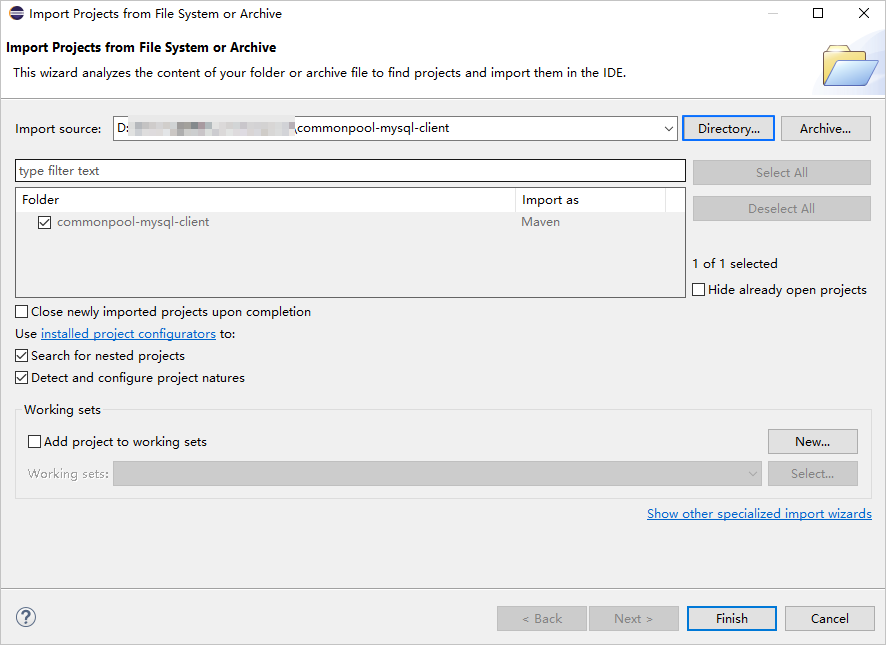
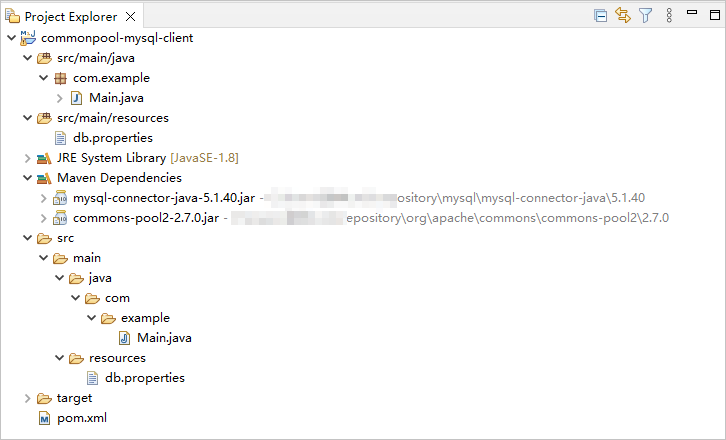
View the project.
Step 2: Modify the database connection information in the commonpool-mysql-client project
Modify the database connection information in the db.properties file in the commonpool-mysql-client/src/main/resources/ directory based on the obtained connection string mentioned in the "Prerequisites" section.
Here is an example:
- The endpoint is
t5******.********.oceanbase.cloud. - The access port is
3306. - The name of the database to be accessed is
test. - The tenant account is
test_user001. - The password is
******.
The sample code is as follows:
...
db.url=jdbc:mysql://t5******.********.oceanbase.cloud:3306/test?useSSL=false
db.username=test_user001
db.password=******
...
Step 4: Run the commonpool-mysql-client project
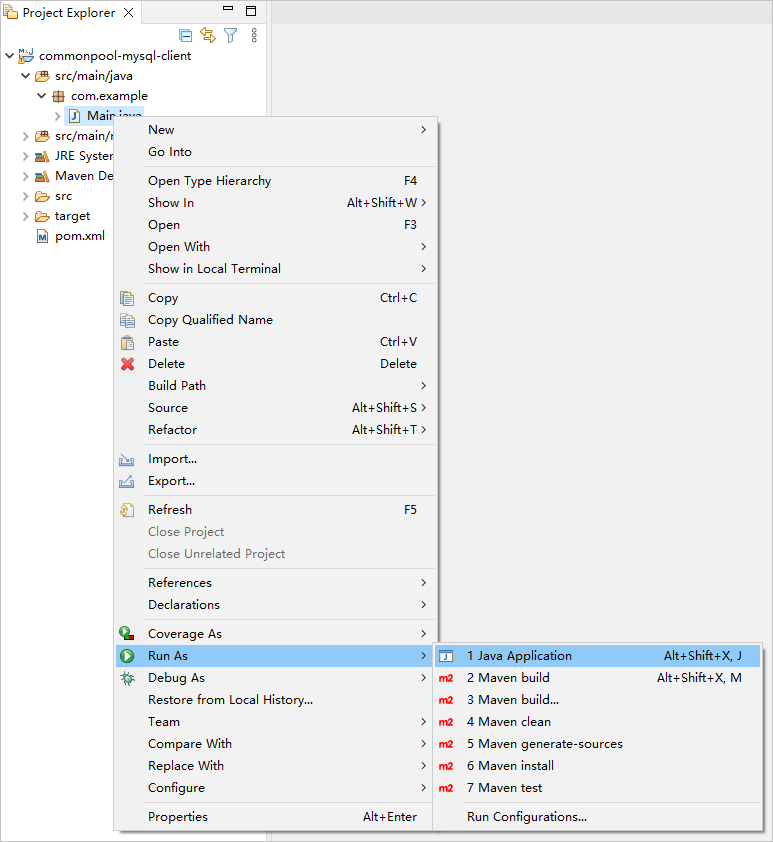
In the project navigation view, find and expand the src/main/java directory.
Right-click the Main.java file and choose Run As > Java Application.
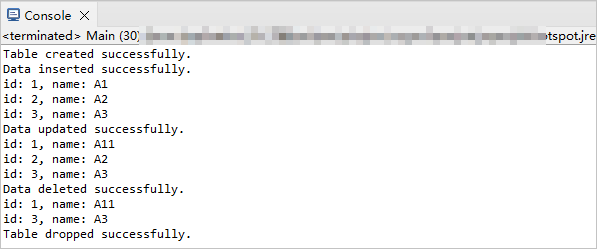
In the Console window of Eclipse, view the output results.
Project code
Click here to download the project code, which is a package named commonpool-mysql-client.zip.
Decompress the package to obtain a folder named commonpool-mysql-client. The directory structure is as follows:
commonpool-mysql-client
├── src
│   └── main
│       ├── java
│       │   └── com
│       │       └── example
│       │           └── Main.java
│       └── resources
│           └── db.properties
└── pom.xml
The files and directories are described as follows:
src: the root directory that stores the source code.main: a directory that stores the main code, including the major logic of the application.java: a directory that stores the Java source code.com: a directory that stores the Java package.example: a directory that stores the packages of the sample project.Main.java: a sample file of themainclass that contains logic such as the table creation, data insertion, data deletion, data modification, and data query logic.resources: a directory that stores resource files, including configuration files.db.properties: the configuration file of the connection pool, which contains relevant database connection parameters.pom.xml: the configuration file of the Maven project, which is used to manage project dependencies and build settings.
Code in pom.xml
pom.xml is the configuration file of the Maven project, which defines the dependencies, plug-ins, and build rules of the project. Maven is a Java project management tool that can automatically download dependencies and compile and package projects.
Perform the following steps to configure the pom.xml file:
Declare the file.
Declare the file to be an XML file that uses XML standard 1.0 and the character encoding UTF-8.
The sample code is as follows:
<?xml version="1.0" encoding="UTF-8"?>Configure namespaces and the POM model version.
xmlns: the default XML namespace for the POM, which is set tohttp://maven.apache.org/POM/4.0.0.xmlns:xsi: the XML namespace for XML elements prefixed withxsi, which is set tohttp://www.w3.org/2001/XMLSchema-instance.xsi:schemaLocation: the location of an XML schema definition (XSD) file. The value consists of two parts: the default XML namespace(http://maven.apache.org/POM/4.0.0)and the URI of the XSD file (http://maven.apache.org/xsd/maven-4.0.0.xsd).<modelVersion>: the POM model version used by the POM file, which is set to 4.0.0.
The sample code is as follows:
<project xmlns="http://maven.apache.org/POM/4.0.0"
         xmlns:xsi="http://www.w3.org/2001/XMLSchema-instance"
         xsi:schemaLocation="http://maven.apache.org/POM/4.0.0 http://maven.apache.org/xsd/maven-4.0.0.xsd">
  <modelVersion>4.0.0</modelVersion>

 <!-- Other configurations -->

</project>
Configure basic information.
<groupId>: the ID of the group to which the project belongs, which is set tocom.example.<artifactId>: the name of the project, which is set tocommonpool-mysql-client.<version>: the project version, which is set to1.0-SNAPSHOT.
The sample code is as follows:
    <groupId>com.example</groupId>
    <artifactId>commonpool-mysql-client</artifactId>
    <version>1.0-SNAPSHOT</version>
Configure the attributes of the project source file.
Specify
maven-compiler-pluginas the compiler plug-in of Maven, and set the source code version and target code version of the compiler to Java 8. This means that the project source code is compiled by using Java 8 and the compiled bytecode is compatible with the Java 8 runtime environment. This ensures that Java 8 syntax and characteristics can be correctly processed during the compilation and running of the project.Note
Java 1.8 and Java 8 are different names for the same version.
The sample code is as follows:
    <build>
        <plugins>
            <plugin>
                <groupId>org.apache.maven.plugins</groupId>
                <artifactId>maven-compiler-plugin</artifactId>
                <configuration>
                    <source>8</source>
                    <target>8</target>
                </configuration>
            </plugin>
        </plugins>
    </build>
Configure the components on which the project depends.
Add the
mysql-connector-javadependency library for interactions with the database, and configure the following parameters:<groupId>: the ID of the group to which the dependency belongs, which is set tomysql.<artifactId>: the name of the dependency, which is set tomysql-connector-java.<version>: the version of the dependency, which is set to5.1.40.
The sample code is as follows:
        <dependency>
            <groupId>mysql</groupId>
            <artifactId>mysql-connector-java</artifactId>
            <version>5.1.40</version>
        </dependency>
Add the
commons-pool2dependency library to use its features and classes in the project, and configure the following parameters:<groupId>: the ID of the group to which the dependency belongs, which is set toorg.apache.commons.<artifactId>: the name of the dependency, which is set tocommons-pool2.<version>: the version of the dependency, which is set to2.7.0.
The sample code is as follows:
        <dependency>
            <groupId>org.apache.commons</groupId>
            <artifactId>commons-pool2</artifactId>
            <version>2.7.0</version>
        </dependency>
Code in db.properties
db.properties is a sample configuration file of the connection pool. The configuration file contains the URL, username, and password for connecting to the database, and other optional parameters of the connection pool.
Perform the following steps to configure the db.properties file:
Configure database connection parameters.
- Specify the URL for connecting to the database, including the host IP address, port number, and database to be accessed.
- Specify the username for connecting to the database.
- Specify the password for connecting to the database.
The sample code is as follows:
db.url=jdbc:mysql://$host:$port/$database_name?useSSL=false
db.username=$user_name
db.password=$password
The parameters are described as follows:
$host: the access address of OceanBase Cloud. The value is sourced from the-hparameter in the connection string.$port: the access port of OceanBase Cloud. The value is sourced from the-Pparameter in the connection string.$database_name: the name of the database to be accessed. The value is sourced from the-Dparameter in the connection string.$user_name: the account name. The value is sourced from the-uparameter in the connection string.$password: the account password. The value is sourced from the-pparameter in the connection string.
Configure other connection pool parameters.
- Set the maximum number of active connections allowed in the connection pool to 10.
- Set the maximum number of idle connections allowed in the connection pool to 5. When the number of idle connections in the connection pool exceeds the specified value, excess connections will be closed.
- Set the minimum number of idle connections in the connection pool to 2. The connection pool will retain at least two idle connections even if no connection is in use.
- Set the maximum waiting time for requesting a connection from the connection pool to 5,000 ms. If no connection is available in the connection pool, the application has to wait until the maximum waiting time elapses.
The sample code is as follows:
pool.maxTotal=10
pool.maxIdle=5
pool.minIdle=2
pool.maxWaitMillis=5000
Notice
The actual parameter configurations depend on the project requirements and database characteristics. We recommend that you adjust and configure the parameters based on the actual situation.
General parameters of Commons Pool 2
Parameter |
Description |
|---|---|
| url | The URL for connecting to the database. The value contains the database type, host name, port number, and database name. |
| username | The username for connecting to the database. |
| password | The password for connecting to the database. |
| maxTotal | The maximum number of objects that can be created in the object pool. |
| maxIdle | The maximum number of idle objects allowed in the object pool. |
| minIdle | The minimum number of idle objects in the object pool. |
| blockWhenExhausted | Specifies whether to block the borrowObject method when all objects in the object pool are occupied. Valid values:
|
| maxWaitMillis | The maximum waiting time for the borrowObject method when all objects in the object pool are occupied, in ms. |
| testOnBorrow | Specifies whether to verify objects when the borrowObject method is called. Valid values:
|
| testOnReturn | Specifies whether to verify objects when the returnObject method is called. Valid values:
|
| testWhileIdle | Specifies whether to verify idle objects. Valid values:
|
| timeBetweenEvictionRunsMillis | The interval for scheduling the eviction thread for evicting idle objects, in ms. |
| numTestsPerEvictionRun | The number of idle objects to verify when the eviction thread is scheduled. |
Code in Main.java
The Main.java file is a part of the sample application. It demonstrates how to use Commons Pool 2 for database operations. Perform the following steps to configure the Main.java file:
Define the package and import required classes.
- Declare the name of the package to which the current code belongs as
com.example. - Import the
java.io.IOExceptionclass for handling input/output exceptions. - Import the
java.sql.Connectionclass for representing connections with the database. You can use this object to execute an SQL statement and obtain the result. - Import the
java.sql.DriverManagerclass for managing the loading of the database driver and the establishment of database connections. You can use this class to request a database connection. - Import the
java.sql.ResultSetclass for representing result sets of SQL queries. You can use this object to traverse and operate the query result set. - Import the
java.sql.SQLExceptionclass for handling exceptions related to SQL statements. - Import the
java.sql.Statementclass for executing SQL statement objects. You can call thecreateStatementmethod of the Connection object to create a statement. - Import the
java.util.Propertiesclass, which is a collection of key-value pairs for loading and saving configuration information. You can load the database connection information from the configuration file. - Import the
org.apache.commons.pool2.ObjectPoolclass, which is an object pool interface that defines basic operations on pooled objects, such as requesting and returning objects. - Import the
org.apache.commons.pool2.PoolUtilsclass, which provides some tool methods for operating the object pool. - Import the
org.apache.commons.pool2.PooledObjectclass, which is a wrapper object for object pool management. You can implement this interface to manage the lifetime of pooled objects. - Import the
org.apache.commons.pool2.impl.GenericObjectPoolclass, which is the default implementation class of theObjectPoolinterface and implements basic features of the connection pool. - Import the
org.apache.commons.pool2.impl.GenericObjectPoolConfigclass for setting attributes of the connection pool. It is the configuration class ofGenericObjectPool. - Import the
org.apache.commons.pool2.impl.DefaultPooledObjectclass for managing the wrapping of pooled objects. It is the default implementation class of thePooledObjectinterface. It can contain actual connection objects and some management information.
The sample code is as follows:
package com.example; import java.io.IOException; import java.sql.Connection; import java.sql.DriverManager; import java.sql.ResultSet; import java.sql.SQLException; import java.sql.Statement; import java.util.Properties; import org.apache.commons.pool2.ObjectPool; import org.apache.commons.pool2.PoolUtils; import org.apache.commons.pool2.PooledObject; import org.apache.commons.pool2.impl.GenericObjectPool; import org.apache.commons.pool2.impl.GenericObjectPoolConfig; import org.apache.commons.pool2.impl.DefaultPooledObject;- Declare the name of the package to which the current code belongs as
Create a
Mainclass and define amainmethod.Define a
Mainclass and amainmethod. Themainmethod demonstrates how to use the connection pool to execute a series of operations in the database. Perform the following steps:Define a public class named
Mainas the entry to the application. The class name must be the same as the file name.Define a public static method named
main, which is used as the execution start point of the application.Load the database configuration file.
- Create a
Propertiesobject for storing the database configuration information. - Use the class loader of the
Mainclass to obtain the input stream of thedb.propertiesconfiguration file. Call theload()method of thePropertiesobject to load this input stream so as to load the key-value pairs in the configuration file to thepropsobject. - Capture possible
IOExceptionsand record their stack information.
- Create a
Create database connection pool configurations.
- Create a generic object pool configuration object for configuring a connection pool.
- Set the maximum number of connections allowed in the connection pool.
- Set the maximum number of idle connections allowed in the connection pool.
- Set the minimum number of idle connections allowed in the connection pool.
- Set the maximum waiting time for requesting a connection.
Create a database connection pool. Create a thread-safe connection pool object
connectionPool. Use theConnectionFactoryandpoolConfigobjects to create a generic object pool and wrap it in a thread-safe object pool. Wrapping the connection pool to be thread-safe can ensure the security when connections are requested and released in a multi-thread environment.Call the
borrowObject()method of the connection pool to obtain a database connection and use this connection in thetryblock for database operations.- Call the
createTable()method to create a table. - Call the
insertData()method to insert data. - Call the
selectData()method to query data. - Call the
updateData()method to update data. - Call the
selectData()method again to query the updated data. - Call the
deleteData()method to delete data. - Call the
selectData()method again to query data after the deletion. - Call the
dropTable()method to drop the table. - Capture and record exceptions.
- Call the
Define other database operation methods.
The sample code is as follows:
public class Main {

    public static void main(String[] args) {
        // Load the database configuration file.
        Properties props = new Properties();
        try {
            props.load(Main.class.getClassLoader().getResourceAsStream("db.properties"));
        } catch (IOException e) {
            e.printStackTrace();
        }

        // Create the database connection pool configuration.
        GenericObjectPoolConfig<Connection> poolConfig = new GenericObjectPoolConfig<>();
        poolConfig.setMaxTotal(Integer.parseInt(props.getProperty("pool.maxTotal")));
        poolConfig.setMaxIdle(Integer.parseInt(props.getProperty("pool.maxIdle")));
        poolConfig.setMinIdle(Integer.parseInt(props.getProperty("pool.minIdle")));
        poolConfig.setMaxWaitMillis(Long.parseLong(props.getProperty("pool.maxWaitMillis")));

        // Create the database connection pool.
        ObjectPool<Connection> connectionPool = PoolUtils.synchronizedPool(new GenericObjectPool<>(new ConnectionFactory(
                props.getProperty("db.url"), props.getProperty("db.username"), props.getProperty("db.password")), poolConfig));

        // Obtain a database connection.
        try (Connection connection = connectionPool.borrowObject()) {

            // Create a table.
            createTable(connection);

            // Insert data.
            insertData(connection);
            // Query data.
            selectData(connection);

            // Update data.
            updateData(connection);
            // Query the updated data.
            selectData(connection);

            // Delete data.
            deleteData(connection);
            // Query the data after deletion.

            selectData(connection);

            // Drop the table.
            dropTable(connection);
        } catch (Exception e) {
            e.printStackTrace();
        }
    }

    // Define a method for creating tables.
    // Define a method for inserting data.
    // Define a method for updating data.
    // Define a method for deleting data.
    // Define a method for querying data.
    // Define a method for dropping tables.
    // Define a ConnectionFactory class.
}
Define a method for creating tables.
Define a method named
createTable. The method receives aConnectionobject as parameters. Perform the following steps:- Define a private static method
createTable()that receives aConnectionobject as parameters, and declare that the method can throw anSQLException. - Call the
createStatement()method to create aStatementobject and use this object in thetry-with-resourcesblock to perform database operations. - Define a string variable
sqlfor storing the table creation statement. - Call the
executeUpdate()method of theStatementobject to execute the SQL statement to create a table. - Return a message in the console indicating that the table is created.
The sample code is as follows:
private static void createTable(Connection connection) throws SQLException { try (Statement statement = connection.createStatement()) { String sql = "CREATE TABLE test_commonpool (id INT,name VARCHAR(20))"; statement.executeUpdate(sql); System.out.println("Table created successfully."); } }- Define a private static method
Define a method for inserting data.
Define a method named
insertData(). The method receives aConnectionobject as parameters. Perform the following steps:- Define a private static method
insertData()that receives aConnectionobject as parameters, and declare that the method can throw anSQLException. - Call the
createStatement()method to create aStatementobject and use this object in thetry-with-resourcesblock to perform database operations. - Define a string variable
sqlfor storing the data insertion statement. - Call the
executeUpdate()method of theStatementobject to execute the SQL statement to insert data. - Return a message in the console indicating that the data is inserted.
The sample code is as follows:
private static void insertData(Connection connection) throws SQLException { try (Statement statement = connection.createStatement()) { String sql = "INSERT INTO test_commonpool (id, name) VALUES (1,'A1'), (2,'A2'), (3,'A3')"; statement.executeUpdate(sql); System.out.println("Data inserted successfully."); } }- Define a private static method
Define a method for updating data.
Define a method named
updateData(). The method receives aConnectionobject as parameters. Perform the following steps:- Define a private static method
updateData()that receives aConnectionobject as parameters, and declare that the method can throw anSQLException. - Call the
createStatement()method to create aStatementobject and use this object in thetry-with-resourcesblock to perform database operations. - Define a string variable
sqlfor storing the data update statement. - Call the
executeUpdate()method of theStatementobject to execute the SQL statement to update data. - Return a message in the console indicating that the data is updated.
The sample code is as follows:
private static void updateData(Connection connection) throws SQLException { try (Statement statement = connection.createStatement()) { String sql = "UPDATE test_commonpool SET name = 'A11' WHERE id = 1"; statement.executeUpdate(sql); System.out.println("Data updated successfully."); } }- Define a private static method
Define a method for deleting data.
Define a method named
deleteData(). The method receives aConnectionobject as parameters. Perform the following steps:- Define a private static method
deleteData()that receives aConnectionobject as parameters, and declare that the method can throw anSQLException. - Call the
createStatement()method to create aStatementobject and use this object in thetry-with-resourcesblock to perform database operations. - Define a string variable
sqlfor storing the data deletion statement. - Call the
executeUpdate()method of theStatementobject to execute the SQL statement to delete data. - Return a message in the console indicating that the data is deleted.
The sample code is as follows:
private static void deleteData(Connection connection) throws SQLException { try (Statement statement = connection.createStatement()) { String sql = "DELETE FROM test_commonpool WHERE id = 2"; statement.executeUpdate(sql); System.out.println("Data deleted successfully."); } }- Define a private static method
Define a method for querying data.
Define a method named
selectData(). The method receives aConnectionobject as parameters. Perform the following steps:- Define a private static method
selectData()that receives aConnectionobject as parameters, and declare that the method can throw anSQLException. - Call the
createStatement()method to create aStatementobject and use this object in thetry-with-resourcesblock to perform database operations. - Define a string variable
sqlfor storing the data query statement. - Call the
executeQuery()method to execute a statement and store the result in aResultSetobject. - Call the
resultSet.next()method to check whether a next row exists. If yes, a loop begins. - Call the
resultSet.getInt()method to obtain the integer values of the current row. The parameters of this method are the names of the columns corresponding to the integer values. - Call the
resultSet.getString()method to obtain the string values of the current row. The parameters of this method are the names of the columns corresponding to the string values. - Return the current row in the console.
The sample code is as follows:
private static void selectData(Connection connection) throws SQLException { try (Statement statement = connection.createStatement()) { String sql = "SELECT * FROM test_commonpool"; ResultSet resultSet = statement.executeQuery(sql); while (resultSet.next()) { int id = resultSet.getInt("id"); String name = resultSet.getString("name"); System.out.println("id: " + id + ", name: " + name); } } }- Define a private static method
Define a method for dropping tables.
Define a method named
dropTable(). The method receives aConnectionobject as parameters. Perform the following steps:- Define a private static method
dropTable()that receives aConnectionobject as parameters, and declare that the method can throw anSQLException. - Call the
createStatement()method to create aStatementobject and use this object in thetry-with-resourcesblock to perform database operations. - Define a string variable
sqlfor storing the table dropping statement. - Call the
executeUpdate()method of theStatementobject to execute the SQL statement to drop a table. - Return a message in the console indicating that the table is dropped.
The sample code is as follows:
private static void dropTable(Connection connection) throws SQLException { try (Statement statement = connection.createStatement()) { String sql = "DROP TABLE test_commonpool"; statement.executeUpdate(sql); System.out.println("Table dropped successfully."); } }- Define a private static method
Define a
ConnectionFactoryclass.Define a static internal class
ConnectionFactorythat inherits theBasePooledObjectFactoryclass and implements methods for creating and managing connection objects. Perform the following steps:Note
@Overrideis an annotation indicating that the method overrides the corresponding method in the parent class.- Define a static internal class named
ConnectionFactory. It inherits theorg.apache.commons.pool2.BasePooledObjectFactory<Connection>class and is a factory class used to create and manage connection objects. - Define a private immutable string variable for storing the database URL.
- Define a private immutable string variable for storing the username for connecting to the database.
- Define a private immutable string variable for storing the password for connecting to the database.
- Define a constructor function of the
ConnectionFactoryclass for initializing the member variables such asurl,username, andpasswordof the class. The constructor function receives the database URL and the username and password for connecting to the database as its parameters, and assign the values of these parameters to the corresponding member variables. This way, database connection information can be passed in by using the constructor function when aConnectionFactoryobject is created. - Rewrite the
create()method in theBasePooledObjectFactoryclass to create a new connection object. - Call the
getConnection()method of theDriverManagerclass to create and return a connection object. - Rewrite the
destroyObject()method in theBasePooledObjectFactoryclass to destroy the connection object. - Call the
close()method of the connection object to close the connection. - Rewrite the
validateObject()method in theBasePooledObjectFactoryclass to verify the connection object. - Call the
isValid()method of the connection object to check whether the connection is valid. Set the timeout value to 5,000 ms. - Rewrite the
wrap()method in theBasePooledObjectFactoryclass to wrap the connection object as aPooledObjectobject. - Call the constructor function of the
DefaultPooledObjectclass to create aPooledObjectobject and pass in the connection object as parameters.
The sample code is as follows:
static class ConnectionFactory extends org.apache.commons.pool2.BasePooledObjectFactory<Connection> { private final String url; private final String username; private final String password; public ConnectionFactory(String url, String username, String password) { this.url = url; this.username = username; this.password = password; } @Override public Connection create() throws Exception { return DriverManager.getConnection(url, username, password); } @Override public void destroyObject(org.apache.commons.pool2.PooledObject<Connection> p) throws Exception { p.getObject().close(); } @Override public boolean validateObject(org.apache.commons.pool2.PooledObject<Connection> p) { try { return p.getObject().isValid(5000); } catch (SQLException e) { return false; } } @Override public PooledObject<Connection> wrap(Connection connection) { return new DefaultPooledObject<>(connection); } }- Define a static internal class named
Complete code
<?xml version="1.0" encoding="UTF-8"?>
<project xmlns="http://maven.apache.org/POM/4.0.0"
         xmlns:xsi="http://www.w3.org/2001/XMLSchema-instance"
         xsi:schemaLocation="http://maven.apache.org/POM/4.0.0 http://maven.apache.org/xsd/maven-4.0.0.xsd">
    <modelVersion>4.0.0</modelVersion>

    <groupId>com.example</groupId>
    <artifactId>commonpool-mysql-client</artifactId>
    <version>1.0-SNAPSHOT</version>
    <build>
        <plugins>
            <plugin>
                <groupId>org.apache.maven.plugins</groupId>
                <artifactId>maven-compiler-plugin</artifactId>
                <configuration>
                    <source>8</source>
                    <target>8</target>
                </configuration>
            </plugin>
        </plugins>
    </build>

    <dependencies>
        <dependency>
            <groupId>mysql</groupId>
            <artifactId>mysql-connector-java</artifactId>
            <version>5.1.40</version>
        </dependency>
        <dependency>
            <groupId>org.apache.commons</groupId>
            <artifactId>commons-pool2</artifactId>
            <version>2.7.0</version>
        </dependency>
    </dependencies>
</project>
# Database Configuration
db.url=jdbc:mysql://$host:$port/$database_name?useSSL=false
db.username=$user_name
db.password=$password

# Connection Pool Configuration
pool.maxTotal=10
pool.maxIdle=5
pool.minIdle=2
pool.maxWaitMillis=5000
package com.example;

import java.io.IOException;
import java.sql.Connection;
import java.sql.DriverManager;
import java.sql.ResultSet;
import java.sql.SQLException;
import java.sql.Statement;
import java.util.Properties;

import org.apache.commons.pool2.ObjectPool;
import org.apache.commons.pool2.PoolUtils;
import org.apache.commons.pool2.PooledObject;
import org.apache.commons.pool2.impl.GenericObjectPool;
import org.apache.commons.pool2.impl.GenericObjectPoolConfig;
import org.apache.commons.pool2.impl.DefaultPooledObject;

public class Main {

    public static void main(String[] args) {
        // Load the database configuration file.
        Properties props = new Properties();
        try {
            props.load(Main.class.getClassLoader().getResourceAsStream("db.properties"));
        } catch (IOException e) {
            e.printStackTrace();
        }

        // Create the database connection pool configuration.
        GenericObjectPoolConfig<Connection> poolConfig = new GenericObjectPoolConfig<>();
        poolConfig.setMaxTotal(Integer.parseInt(props.getProperty("pool.maxTotal")));
        poolConfig.setMaxIdle(Integer.parseInt(props.getProperty("pool.maxIdle")));
        poolConfig.setMinIdle(Integer.parseInt(props.getProperty("pool.minIdle")));
        poolConfig.setMaxWaitMillis(Long.parseLong(props.getProperty("pool.maxWaitMillis")));

        // Create the database connection pool.
        ObjectPool<Connection> connectionPool = PoolUtils.synchronizedPool(new GenericObjectPool<>(new ConnectionFactory(
                props.getProperty("db.url"), props.getProperty("db.username"), props.getProperty("db.password")), poolConfig));

        // Obtain a database connection.
        try (Connection connection = connectionPool.borrowObject()) {

            // Create a table.
            createTable(connection);

            // Insert data.
            insertData(connection);
            // Query data.
            selectData(connection);

            // Update data.
            updateData(connection);
            // Query the updated data.
            selectData(connection);

            // Delete data.
            deleteData(connection);
            // Query the data after deletion.
            selectData(connection);

            // Drop the table.
            dropTable(connection);
        } catch (Exception e) {
            e.printStackTrace();
        }
    }

    private static void createTable(Connection connection) throws SQLException {
        try (Statement statement = connection.createStatement()) {
            String sql = "CREATE TABLE test_commonpool (id INT,name VARCHAR(20))";
            statement.executeUpdate(sql);
            System.out.println("Table created successfully.");
        }
    }

    private static void insertData(Connection connection) throws SQLException {
        try (Statement statement = connection.createStatement()) {
            String sql = "INSERT INTO test_commonpool (id, name) VALUES (1,'A1'), (2,'A2'), (3,'A3')";
            statement.executeUpdate(sql);
            System.out.println("Data inserted successfully.");
        }
    }

    private static void updateData(Connection connection) throws SQLException {
        try (Statement statement = connection.createStatement()) {
            String sql = "UPDATE test_commonpool SET name = 'A11' WHERE id = 1";
            statement.executeUpdate(sql);
            System.out.println("Data updated successfully.");
        }
    }

    private static void deleteData(Connection connection) throws SQLException {
        try (Statement statement = connection.createStatement()) {
            String sql = "DELETE FROM test_commonpool WHERE id = 2";
            statement.executeUpdate(sql);
            System.out.println("Data deleted successfully.");
        }
    }

    private static void selectData(Connection connection) throws SQLException {
        try (Statement statement = connection.createStatement()) {
            String sql = "SELECT * FROM test_commonpool";
            ResultSet resultSet = statement.executeQuery(sql);
            while (resultSet.next()) {
                int id = resultSet.getInt("id");
                String name = resultSet.getString("name");
                System.out.println("id: " + id + ", name: " + name);
            }
        }
    }

    private static void dropTable(Connection connection) throws SQLException {
        try (Statement statement = connection.createStatement()) {
            String sql = "DROP TABLE test_commonpool";
            statement.executeUpdate(sql);
            System.out.println("Table dropped successfully.");
        }
    }

    static class ConnectionFactory extends org.apache.commons.pool2.BasePooledObjectFactory<Connection> {
        private final String url;
        private final String username;
        private final String password;

        public ConnectionFactory(String url, String username, String password) {
            this.url = url;
            this.username = username;
            this.password = password;
        }

        @Override
        public Connection create() throws Exception {
            return DriverManager.getConnection(url, username, password);
        }

        @Override
        public void destroyObject(org.apache.commons.pool2.PooledObject<Connection> p) throws Exception {
            p.getObject().close();
        }

        @Override
        public boolean validateObject(org.apache.commons.pool2.PooledObject<Connection> p) {
            try {
                return p.getObject().isValid(5000);
            } catch (SQLException e) {
                return false;
            }
        }

        @Override
        public PooledObject<Connection> wrap(Connection connection) {
            return new DefaultPooledObject<>(connection);
        }
    }
}
References
For more information about MySQL Connector/J, see Overview of MySQL Connector/J.