







This topic describes how to use the Hibernate framework and OceanBase Cloud to build an application that can perform basic operations such as table creation, data insertion, and data query.
 Download the Java OceanBase Hibernate sample project
 Prerequisites
- You have registered an Alibaba Cloud account and created an instance and a MySQL compatible tenant. For more information, see Create an instance and Create a tenant.
- You have installed JDK 1.8 and Maven.
- You have installed IntelliJ IDEA.
Note
The code examples in this topic are run in IntelliJ IDEA 2021.3.2 (Community Edition). You can also use any other tool of your choice to run the code examples.
Procedure
Note
The steps provided in this topic are based on a Windows environment. If you are using a different operating system or compiler, the steps may vary slightly.
- Obtain the connection string of the OceanBase Cloud database.
- Import the
java-oceanbase-hibernateproject into IntelliJ IDEA. - Modify the database connection information in the
java-oceanbase-hibernateproject. - Run the
java-oceanbase-hibernateproject.
Step 1: Obtain the connection string of the OceanBase Cloud database
Log in to the OceanBase Cloud console. In the instance list, expand the information of the target instance, and in the target tenant, choose Connect > Get Connection String.
For more information, see Obtain the connection string.
Fill in the corresponding information in the URL based on the created OceanBase Cloud database.
Note
The URL information is required in the
hibernate.cfg.xmlfile.jdbc:oceanbase://host:port/schema_name?user=$user_name&password=$passwordParameter description:
host: the connection address of the OceanBase Cloud database, for example,t********.********.oceanbase.cloud.port: the connection port of the OceanBase Cloud database, which is 3306 by default.schema_name: the name of the schema to be accessed.user_name: the account for accessing the database.password: the password of the account.
For more information about the URL parameters, see Database URL.
Step 2: Import the java-oceanbase-hibernate project into IntelliJ IDEA
Start IntelliJ IDEA and choose File > Open....

In the Open File or Project window that appears, select the project file and click OK.
IntelliJ IDEA automatically identifies the various files in the project and displays the project structure, file list, module list, and dependencies in the Project tool window. The Project tool window is usually located on the left side of the IntelliJ IDEA interface and is open by default. If it is closed, you can click View > Tool Windows > Project in the menu bar or press the shortcut key Alt + 1 to reopen it.
Note
When you import a project using IntelliJ IDEA, it automatically detects the pom.xml file in the project, downloads the required dependency libraries based on the described dependencies in the file, and adds them to the project.
View the project.
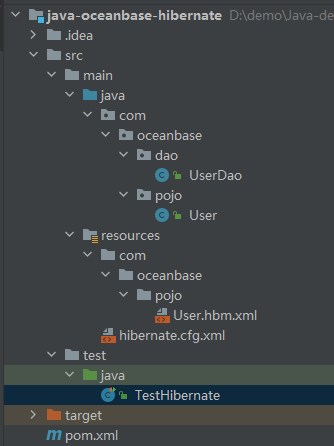
Step 3: Modify the database connection information in the java-oceanbase-hibernate project
Modify the database connection information in the hibernate.cfg.xml file based on the information obtained in Step 1: Obtain the connection string of the OceanBase Cloud database.
Note
If you need to add additional properties for the JDBC connection string, see Database URL.
Here is an example:
- The name of the database driver is
com.mysql.cj.jdbc.Driver. - The connection address of the OceanBase Cloud database is
t5******.********.oceanbase.cloud. - The access port is 3306.
- The name of the schema to be accessed is
test. - The tenant account is
mysql001. - The password is
******.
Here is the sample code:
<property name="hibernate.connection.driver_class">com.mysql.cj.jdbc.Driver</property>
<property name="hibernate.connection.url">jdbc:mysql://t5******.********.oceanbase.cloud:3306/test</property>
<property name="hibernate.connection.username">mysql001</property>
<property name="hibernate.connection.password">******</property>
Step 4: Run the java-oceanbase-hibernate project
Running path
- In the project structure, go to src > test > java and locate the
TestHibernate.javafile. - In the tool menu bar, choose Run(U) > Run > TestHibernate, or click the green triangle in the upper right corner to run.
- View the log information and output results in the console of IntelliJ IDEA.
Running result
User{id=2, name='update'}
User{id=3, name='user_insert3'}
User{id=4, name='user_insert4'}
User{id=5, name='user_insert5'}
FAQ
1. Connection timeout
If you encounter a connection timeout issue, you can configure the connection timeout parameter in the JDBC URL:
jdbc:mysql://host:port/database?connectTimeout=30000&socketTimeout=60000
2. Character set
To ensure the correct character encoding, set the appropriate character set parameter in the JDBC URL:
jdbc:mysql://host:port/database?characterEncoding=utf8&useUnicode=true
3. SSL connection
To enable an SSL connection with OceanBase Cloud, add the following parameter to the JDBC URL:
jdbc:mysql://host:port/database?useSSL=true&requireSSL=true
4. Special characters in the account password
If the username or password contains special characters (such as #), you need to URL-encode them:
String encodedPassword = URLEncoder.encode(password, "UTF-8");
Notice
When using MySQL Connector/J 8.x, ensure that the account password does not contain the # character. Otherwise, you may encounter a connection error.
Project code
Click java-oceanbase-hibernate to download the project code. The code is stored in a compressed file named java-oceanbase-hibernate.zip.
After you decompress the file, a folder named java-oceanbase-hibernate is created. The directory structure is as follows:
│--pom.xml
│
├─.idea
├─src
│  ├─main
│  │  ├─java
│  │  │  └─com
│  │  │      └─oceanbase
│  │  │          ├─dao
│  │  │          │   └─--UserDao.java
│  │  │          │
│  │  │          └─pojo
│  │  │              └─--User.java
│  │  │
│  │  └─resources
│  │      │--hibernate.cfg.xml
│  │      │
│  │      └─com
│  │          └─oceanbase
│  │              └─pojo
│  │                  └─--User.hbm.xml
│  │
│  └─test
│      └─java
│          └─--TestHibernate.java
│
└─target
File description:
pom.xml: the configuration file of the Maven project. It contains the project dependencies, plugins, and build information..idea: the directory used by the integrated development environment (IDE) to store project-related configuration information.src: the directory where the source code of the project is stored.main: the directory where the main source code and resource files are stored.java: the directory where the Java source code is stored.com: the root directory where the Java packages are stored.oceanbase: the root directory where the project is stored.dao: the directory where the data access object (DAO) packages are stored. The DAO packages are used to access the database or other data storage services.UserDao.java: the user data access object. It is used to perform operations such as adding, deleting, modifying, and querying user data.User.java: the user persistence object. It is used to map the fields of the user data table.pojo: the plain old Java object (POJO) that is used to map the database table or other data storage structures. The POJO is stored in thepojodirectory.resources: the directory where the resource files such as the configuration files and SQL files are stored.hibernate.cfg.xml: the configuration file of Hibernate. It is used to configure the basic parameters and data source of Hibernate.User.hbm.xml: the mapping file of the user persistence object. It is used to define the mapping relationship between the user persistence object and the user data table.test: the directory where the test code and resource files are stored.TestHibernate.java: the Java class that is used to test Hibernate.target: the directory where the compiled class files and jar packages are stored.
pom.xml
Note
If you want to verify the sample code, you can use the default code without any modifications. Alternatively, you can modify the pom.xml file as needed based on the following instructions.
The content of the pom.xml configuration file is as follows:
File declaration statement.
This statement declares the file as an XML file using XML version
1.0and character encodingUTF-8.Sample code:
<?xml version="1.0" encoding="UTF-8"?>Configure the namespaces and model version of the POM.
- Use
xmlnsto set the POM namespace tohttp://maven.apache.org/POM/4.0.0. - Use
xmlns:xsito set the XML namespace tohttp://www.w3.org/2001/XMLSchema-instance. - Use
xsi:schemaLocationto set the POM namespace tohttp://maven.apache.org/POM/4.0.0and the location of the POM XSD file tohttp://maven.apache.org/xsd/maven-4.0.0.xsd. - Use the
<modelVersion>element to set the POM model version to4.0.0.
Sample code:
<project xmlns="http://maven.apache.org/POM/4.0.0" xmlns:xsi="http://www.w3.org/2001/XMLSchema-instance" xsi:schemaLocation="http://maven.apache.org/POM/4.0.0 http://maven.apache.org/xsd/maven-4.0.0.xsd"> <modelVersion>4.0.0</modelVersion> </project>- Use
Configure basic information.
- Use
<groupId>to set the project identifier tocom.oceanbase. - Use
<artifactId>to set the project dependency tojava-oceanbase-hibernate. - Use
<version>to set the project version to1.0-SNAPSHOT.
Sample code:
<groupId>com.oceanbase</groupId> <artifactId>java-oceanbase-hibernate</artifactId> <version>1.0-SNAPSHOT</version>- Use
Use
<build>to define the project build process.- Use
<plugins>to specify the plugins configured in the project. - Use
<plugin>to specify a plugin configured in the project. - Use
<groupId>to set the project identifier toorg.apache.maven.plugins. - Use
<artifactId>to set the project dependency tomaven-compiler-plugin. - Use
<configuration>to specify the parameters of the configured plugin. - Use
<source>to set the source code version of the compiler to 8. - Use
<target>to set the source code version of the compiler to 8.
Sample code:
<build> <plugins> <plugin> <groupId>org.apache.maven.plugins</groupId> <artifactId>maven-compiler-plugin</artifactId> <configuration> <source>8</source> <target>8</target> </configuration> </plugin> </plugins> </build>- Use
Use
<dependencies>to define the components that the project depends on.Set the organization of the dependency to
com.oceanbase, the name tooceanbase-client, and the version to2.4.2.Sample code:
    <dependencies>
    <dependency>
        <groupId>com.oceanbase</groupId>
        <artifactId>oceanbase-client</artifactId>
        <version>2.4.2</version>
    </dependency>
    </dependencies>
Set the test framework of the dependency to
junit, the name tojunit, and the version to4.13.Sample code:
    <dependencies>
    <dependency>
        <groupId>junit</groupId>
        <artifactId>junit</artifactId>
        <version>4.13</version>
    </dependency>
    </dependencies>
Set the architecture of the dependency to
org.hibernate, the core library tohibernate-core, and the version to5.2.17.Final.Sample code:
<dependencies>
  <dependency>
      <groupId>org.hibernate</groupId>
      <artifactId>hibernate-core</artifactId>
      <version>5.2.17.Final</version>
  </dependency>
</dependencies>
Set the architecture of the dependency to
org.hibernate, the data source library tohibernate-c3p0, and the version to5.2.17.Final.Sample code:
<dependencies>
  <dependency>
      <groupId>org.hibernate</groupId>
      <artifactId>hibernate-c3p0</artifactId>
      <version>5.2.17.Final</version>
  </dependency>
</dependencies>
User.hbm.xml
The User.hbm.xml file is a Hibernate mapping file that maps Java objects to database tables.
The User.hbm.xml file contains the following parts:
File declaration statement.
This statement declares the file as an XML file using XML version
1.0and character encodingUTF-8. It also specifies the DTD version and location of the Hibernate mapping file. The DTD document type is set tohibernate-mapping, the version to 3.0, the language to EN, and the URL of the file tohttp://www.hibernate.org/dtd/hibernate-mapping-3.0.dtd.Sample code:
<?xml version="1.0" encoding="UTF-8"?>
<!DOCTYPE hibernate-mapping PUBLIC
        "-//Hibernate/Hibernate Mapping DTD 3.0//EN"
        "http://www.hibernate.org/dtd/hibernate-mapping-3.0.dtd">
Configure the mapping file.
Define a Hibernate mapping file that maps the
Userentity class to thetest_hibernate_mysqldatabase table.- Use the
packageattribute to set the Java package in the mapping file tocom.oceanbase.pojo. - Use the
classtag to map data in the data table. Set thenameattribute toUserto specify the Java class name, and set thetableattribute totest_hibernate_mysqlto specify the database table name. - Use
idto define the primary key attribute. Set thenameattribute toidto specify the member variable of theUserJava class, and set thecolumnattribute toUSER_IDto specify the database field name. - Use
generatorto define the primary key generation strategy. Set theclassattribute tosequenceto specify the type of the primary key generator, theparamelement toSQ_USERto specify the sequence name in the database, thenameattribute toUSER_NAMEto specify the column in the database table corresponding to the attribute, and the data type to string.
Sample code:
<hibernate-mapping package="com.oceanbase.pojo"> <class name="User" table="test_hibernate_mysql"> <!-- Configure primary key generation strategy --> <id name="id" column="USER_ID"> <generator class="sequence"> <param name="sequence">SQ_USER</param> </generator> </id> <!-- Configuration Tables and Properties --> <property name="name" column="USER_NAME" type="string"/> </class> </hibernate-mapping>- Use the
Introduction to the hibernate.cfg.xml file
The hibernate.cfg.xml file is a configuration file for Hibernate, which is used to configure the running environment of Hibernate and the parameters for connecting to a database.
The hibernate.cfg.xml file contains the following main parts:
File declaration statements.
This statement declares that the file is an XML file using XML version
1.0and character encodingUTF-8. It also specifies the DTD version and location of the Hibernate configuration file, setting the DTD document type tohibernate-configuration, the version to 3.0, the language to EN, and the URL tohttp://www.hibernate.org/dtd/hibernate-configuration-3.0.dtd.Sample code:
<?xml version="1.0" encoding="utf-8"?>
<!DOCTYPE hibernate-configuration PUBLIC
        "-//Hibernate/Hibernate Configuration DTD 3.0//EN"
        "http://www.hibernate.org/dtd/hibernate-configuration-3.0.dtd">
Configure the
configurationparameter.The
root element contains the element, which is used to set the session factory of Hibernate. The session factory is used to create and manage session objects. The session factory includes parameters such as the driver class name, URL, username, and password for connecting to a database, connection pool parameters, database dialect, SQL output and formatting, automatic creation of database tables, current session context, batch processing, and second-level cache. Configure the database information.
This section configures the parameters for connecting to a database, including the driver class name, URL, username, and password for connecting to a database.
- Use
hibernate.connection.driver_classto specify the database driver class ascom.mysql.cj.jdbc.Driver, which is used to establish a connection with the database. - Use
hibernate.connection.urlto specify the database URL, including the database address, port number, and database name. - Use
hibernate.connection.usernameto specify the username for connecting to the database. - Use
hibernate.connection.passwordto specify the password for connecting to the database.
Sample code:
<property name="hibernate.connection.driver_class">com.mysql.cj.jdbc.Driver</property> <property name="hibernate.connection.url">jdbc:oceanbase://host:port/schema_name</property> <property name="hibernate.connection.username">user_name</property> <property name="hibernate.connection.password">******</property>- Use
Configure the connection pool information.
This section configures the parameters for the connection pool used by Hibernate. The connection pool is set to C3P0, and the parameters include the maximum and minimum number of connections, timeout, maximum idle time, number of cached Statement objects, idle test time, number of connections obtained at once, and connection verification method.
Note
The following parameters are for reference only and do not represent a complete list of supported parameters. For information about other parameters, see the related topics.
- Use
hibernate.connection.provider_classto specify the connection pool as C3P0, which is used to manage the creation and release of database connections. - Use
hibernate.c3p0.max_sizeto specify the maximum number of connections in the connection pool as 60. - Use
hibernate.c3p0.min_sizeto specify the minimum number of connections in the connection pool as 30. - Use
hibernate.c3p0.checkoutTimeoutto specify the timeout for obtaining a connection in the connection pool as 30000 milliseconds. - Use
hibernate.c3p0.timeoutto specify the maximum idle time in the connection pool as 2000 milliseconds. Connections that exceed this time will be closed. - Use
hibernate.c3p0.max_statementsto specify the maximum number of cached SQL statements in the connection pool as 100. - Use
hibernate.c3p0.idle_test_periodto specify the idle connection detection period in the connection pool as 3000 milliseconds. - Use
hibernate.c3p0.acquire_incrementto specify the increment in the number of connections when the connection pool dynamically grows as 3. - Use
hibernate.c3p0.validateto specify the connection verification method as true.
Sample code:
<property name="hibernate.connection.provider_class">org.hibernate.c3p0.internal.C3P0ConnectionProvider</property> <property name="hibernate.c3p0.max_size">60</property> <property name="hibernate.c3p0.min_size">30</property> <property name="hibernate.c3p0.checkoutTimeout">30000</property> <property name="hibernate.c3p0.timeout">20000</property> <property name="hibernate.c3p0.max_statements">100</property> <property name="hibernate.c3p0.idle_test_period">3000</property> <property name="hibernate.c3p0.acquire_increment">3</property> <property name="hibernate.c3p0.validate">true</property>- Use
Configure the SQL interaction information. This section configures the information for connecting to a database. It includes the database dialect, SQL printing and formatting, automatic table creation, current session context, batch size, cache usage, and mapping file loading.
- Use
dialectto specify the database dialect as MySQL 5.7 to ensure compatibility with the specific database. - Use
hibernate.show_sqlto specify whether to print the SQL statements generated by Hibernate on the console. - Use
hibernate.format_sqlto specify whether to format the printed SQL statements. - Use
hbm2ddl.autoto specify whether to automatically create tables. - Use
current_session_context_classto specify the current session context as thread-level. - Use
hibernate.jdbc.batch_sizeto specify the batch size. - Use
hibernate.cache.use_second_level_cacheto specify whether to enable the second-level cache. - Specify the mapping file to be loaded as
com/oceanbase/pojo/User.hbm.xml.
Sample code:
<property name="dialect">org.hibernate.dialect.MySQL57Dialect</property> <property name="hibernate.show_sql">true</property> <property name="hibernate.format_sql">true</property> <property name="hbm2ddl.auto">create</property> <property name="current_session_context_class">thread</property> <property name="hibernate.jdbc.batch_size">10</property> <property name="hibernate.cache.use_second_level_cache">false</property> <mapping resource="com/oceanbase/pojo/User.hbm.xml"/>- Use
Introduction to UserDao.java
The UserDao.java file implements the add, delete, modify, and query operations of user data by using the Session object in the user data access object (DAO) class.
The UserDao.java file contains the following code:
Import other classes and interfaces.
Declare the following interfaces and classes in the current file:
Userclass: used to operate on user objects.Sessionclass: used to interact with the database.SessionFactoryclass: used to create a Session instance.Transactionclass: used to manage database transactions.Configurationclass: used to load the Hibernate configuration file.Queryclass: used to execute query operations.Listinterface: used to operate on query result sets.
Sample code:
import com.oceanbase.pojo.User;
import org.hibernate.Session;
import org.hibernate.SessionFactory;
import org.hibernate.Transaction;
import org.hibernate.cfg.Configuration;
import org.hibernate.query.Query;
import java.util.List;
Define the
UserDaoclass.
The UserDao class is a Java class that serves as a data access object for persisting user objects. This class encapsulates a series of methods related to database interaction for adding, deleting, modifying, and querying user objects. By calling methods in the UserDao class, you can easily interact with the database to perform persistence operations.
Initialize the
UserDaoclass instance.Use an object initialization block to initialize the
Sessionobject during the class instantiation.First, create a
Configurationobject and call theconfiguremethod to read the Hibernate configuration file (hibernate.cfg.xml). Then, call thebuildSessionFactorymethod to create aSessionFactoryobject. Finally, call theopenSessionmethod to create aSessionobject and assign it to thesessionvariable.Sample code:
private Session session;
{
    Configuration cfg = new Configuration().configure();
    // Create SessionFactory
    SessionFactory sessionFactory = cfg.buildSessionFactory();
    session = sessionFactory.openSession();
} //Read the hibernate.cfg.xml file
Set the user information corresponding to the specified ID.
The
selectUserByIdmethod queries the user information corresponding to the specified ID.Call the
getmethod of thesessionobject, passing in theUser.classandIDparameters, to obtain the User record corresponding to the specified ID from the database and store it in theuservariable.Sample code:
public User selectUserById(int ID) {
    User user = session.get(User.class, ID);
    return user;
}
Query user information based on the username.
The
selectUserbyNamemethod queries the user information based on the username. First, define a Hibernate Query Language (HQL) statement to query the user data with the specified name. The table name istest_hibernate_mysql, the table alias isu, and the query field name isname. Call thecreateQuerymethod of theSessionobject to create aQueryobject and pass in the HQL statement and entity class as parameters. Call thesetParametermethod of theQueryobject to set the query parameters, where0indicates the parameter position andnameindicates the parameter value. Call thelistmethod of theQueryobject to execute the query and convert the query result to a list ofUserobjects.Sample code:
public List<User> selectUserbyName(String name) {
  String sql = "FROM test_hibernate_mysql u WHERE u.name =?";
  Query<User> query = session.createQuery(sql, User.class);
  query.setParameter(0, name);
  List<User> users = query.list();
  return users;
}
Query all user data.
The
selectUsermethod implements the method for querying all user data. Define an SQL statement to query all user data. Call thecreateNativeQuerymethod of theSessionobject to create aQueryobject and pass in the SQL statement as a parameter. Then, call theaddEntitymethod to add theUserentity class to the query so that the query result can be converted to a list ofUserobjects. Call thegetResultListmethod of theQueryobject to execute the query and convert the query result to a list of User objects.Sample code:
public List<User> selectUser() {
    String sql = "SELECT * FROM test_hibernate_mysql";
    Query<User> query = session.createNativeQuery(sql).addEntity(User.class);
    List<User> users = query.getResultList();
    return users;
}
Insert user data.
The
insertUsermethod inserts user information. Specify aUserparameteruserto pass in the user object to be inserted. Call thebeginTransactionmethod of the Hibernate Session to create a transaction object and save it in thebeginTransactionvariable. Call thesavemethod to save the user object to the database. Call thegetTransactionmethod of theSessionobject to obtain the current transaction and call thecommitmethod to commit the transaction, persisting the previous operations to the database and returning the result of the insert operation.Sample code:
public int insertUser(User user) {
    // open transaction
    Transaction beginTransaction = session.beginTransaction();
    session.save(user);
    session.getTransaction().commit();
    return 1;
}
Delete user data.
The
deleteUserByIdmethod deletes the user record corresponding to the specified ID from the database. Specify an integer parameteridto pass in the user ID to be deleted. Call thebeginTransactionmethod of the Hibernate Session to start a new transaction. Call thegetmethod to obtain the corresponding user object based on the specified userIDand entity class type (User.class). Call thedeletemethod to delete the user object. Call thegetTransactionmethod of theSessionobject to obtain the current transaction and call thecommitmethod to commit the transaction, persisting the user information to the database and returning the result of the delete operation.Sample code:
public int deleteUserById(int id) {
    // open transaction
    session.beginTransaction();
    User user = session.get(User.class, id);
    session.delete(user);
    session.getTransaction().commit();
    return 1;
}
Modify user data.
The
updateUserByIdmethod updates the corresponding user information. Specify aUserparameteruserto specify the user data to be updated. Call thebeginTransactionmethod of the Session object to start a transaction. Call thegetmethod of theSessionobject to obtain the correspondingUserobject based on the user ID. Call themergemethod of theSessionobject to merge the passed-inUserobject with the obtainedUserobject, updating the passed-in user data to the database. Call thegetTransactionmethod of theSessionobject to obtain the current transaction and call thecommitmethod to commit the transaction, returning the result of the modify operation.Sample code:
public int updateUserById(User user) {
    // open transaction
    session.beginTransaction();
    User user1 = session.get(User.class, user.getId());
    session.merge(user);
    session.getTransaction().commit();
    return 1;
}
User.java code
The User.java file implements the operations of adding, deleting, modifying, and querying user data by using the Session object and the data access object (DAO) class.
The User.java file contains the following code:
Import other classes.
Declare the classes that are used in the current file and are configured by using Java Persistence API (JPA) annotations to map the classes to database tables:
Columnannotation: specifies the mapping between the attributes of an entity class and the columns of a database table.Entityannotation: maps a database table.GeneratedValueannotation: specifies that the value of the attribute is automatically generated.GenerationTypeannotation: specifies the primary key generation strategy.Idannotation: specifies the unique identifier attribute.Tableannotation: specifies the name of the table corresponding to the entity class.
Sample code:
import javax.persistence.Column;
import javax.persistence.Entity;
import javax.persistence.GeneratedValue;
import javax.persistence.GenerationType;
import javax.persistence.Id;
import javax.persistence.Table;
Map the database table.
Map the entity class to the database table and specify the table name as
test_hibernate_mysql.Sample code:
@Entity
@Table(name = "test_hibernate_mysql")
Define the
Userclass.Map the
Userclass to thetest_hibernate_mysqltable in the database.Define two attributes,
idandname. Use annotations to specify the mapping between theidandnameattributes of theUserclass and the columns of the database table. Use the@Idannotation to specify theidattribute as the primary key. Use the@GeneratedValueannotation to specify the sequence as the primary key generation strategy. Use the@Columnannotation to specify the mapping between the attributes and the columns of the database table. Theidattribute stores the user ID, and thenameattribute stores the username.Sample code:
@Id
@GeneratedValue(strategy = GenerationType.SEQUENCE)
@Column(name = "user_id")
private int id;

@Column(name = "user_name")
private String name;
Create a
Userobject.Define two constructors of the
Userclass to create aUserobject. Define an empty constructor for Hibernate query operations. Define a constructor with parameters to initialize theidandnameattributes.Sample code:
public User() {
}

public User(int id, String name) {
    this.id = id;
    this.name = name;
}
Get and set the
idandnamevalues.Define four methods of the
Userclass to get and set the values of theidandnameattributes. ThegetIdmethod is used to get theidvalue. ThesetIdmethod is used to set theidvalue. ThegetNamemethod is used to get the usernamenamevalue. ThesetNamemethod is used to set the usernamenamevalue.Sample code:
public int getId() {
    return id;
}

public void setId(int id) {
    this.id = id;
}

public String getName() {
    return name;
}

public void setName(String name) {
    this.name = name;
}
Return the string representation of the
Userobject.Override the
toStringmethod of theUserclass to return the string representation of theUserobject. Define@Overrideto override the method with the same name in the parent class. Define thetoStringmethod to return the string representation of theUserobject. Concatenate theidandnameattribute values into a string and return the string to the callerUser.Sample code:
@Override
public String toString() {
    return "User{" +
            "id=" + id +
            ", name='" + name + '\'' +
            '}';
}
TestHibernate.java code
The TestHibernate.java file executes the insert, delete, update, and query operations on the UserDao object to demonstrate the basic database operations of Hibernate.
The TestHibernate.java file contains the following code:
Import other classes and interfaces.
Declare the classes and interfaces that are used in the current file, including
UserDao,User,Session,SessionFactory,Configuration, and so on.UserDaoclass: executes database operations related to users.Userclass: operates on user objects.Sessionclass: executes session operations on the database.SessionFactoryclass: creates a Session object.Configurationclass: configures Hibernate.SessionImplclass: obtains the underlying JDBC connection.Testannotation: marks a test method.IOExceptionclass: handles I/O exceptions.Connectionclass: obtains the JDBC connection.SQLExceptionclass: handles SQL exceptions.Listclass: stores query result sets.UUIDclass: generates a unique identifier.
Sample code:
import com.oceanbase.dao.UserDao;
import com.oceanbase.pojo.User;
import org.hibernate.Session;
import org.hibernate.SessionFactory;
import org.hibernate.cfg.Configuration;
import org.hibernate.internal.SessionImpl;
import org.junit.Test;
import java.io.IOException;
import java.sql.Connection;
import java.sql.SQLException;
import java.util.List;
import java.util.UUID;
Define the
testHibernatemethod. ThetestHibernatemethod contains the basic operations, including insert, delete, update, and query. Create aUserDaoobject, and insert five user records in a loop. Call theinsertUsermethod to insert user records. Call thedeleteUserByIdmethod to delete user records with ID 1. Call theupdateUserByIdmethod to update user records with ID 2. Call theselectUsermethod to query all user records. Traverse the query results and print them to the console.Sample code:
public class TestHibernate {
    @Test
    public void testHibernate() throws SQLException, IOException {
        UserDao userDao = new UserDao();
        for (int i = 1; i <= 5; i++) {
            userDao.insertUser(new User(i, "user_insert" + i));
        }
        int deleteUserById = userDao.deleteUserById(1);
        int update = userDao.updateUserById(new User(2, "update"));
        List<User> users = userDao.selectUser();
        users.forEach(System.out::println);
    }
}
Complete code
<?xml version="1.0" encoding="UTF-8"?>
<project xmlns="http://maven.apache.org/POM/4.0.0"
         xmlns:xsi="http://www.w3.org/2001/XMLSchema-instance"
         xsi:schemaLocation="http://maven.apache.org/POM/4.0.0 http://maven.apache.org/xsd/maven-4.0.0.xsd">
    <modelVersion>4.0.0</modelVersion>

    <groupId>com.oceanbase</groupId>
    <artifactId>java-oceanbase-hibernate</artifactId>
    <version>1.0-SNAPSHOT</version>
    <build>
        <plugins>
            <plugin>
                <groupId>org.apache.maven.plugins</groupId>
                <artifactId>maven-compiler-plugin</artifactId>
                <configuration>
                    <source>8</source>
                    <target>8</target>
                </configuration>
            </plugin>
        </plugins>
    </build>
    <dependencies>
        <dependency>
            <groupId>junit</groupId>
            <artifactId>junit</artifactId>
            <version>4.13</version>
        </dependency>
        <dependency>
            <groupId>mysql</groupId>
            <artifactId>mysql-connector-java</artifactId>
            <version>8.0.27</version>
        </dependency>
        <dependency>
            <groupId>org.hibernate</groupId>
            <artifactId>hibernate-core</artifactId>
            <version>5.2.17.Final</version>
        </dependency>
        <!-- Hibernate c3p0 connection pool-->
        <dependency>
            <groupId>org.hibernate</groupId>
            <artifactId>hibernate-c3p0</artifactId>
            <version>5.2.17.Final</version>
        </dependency>

    </dependencies>

</project>
<?xml version="1.0" encoding="UTF-8"?>
<!DOCTYPE hibernate-mapping PUBLIC
        "-//Hibernate/Hibernate Mapping DTD 3.0//EN"
        "http://www.hibernate.org/dtd/hibernate-mapping-3.0.dtd">
<hibernate-mapping package="com.oceanbase.pojo">
    <class name="User" table="test_hibernate_mysql">
        <!-- Configure primary key generation strategy -->
        <id name="id" column="USER_ID">
            <generator class="sequence">
                <param name="sequence">SQ_USER</param>
            </generator>
        </id>
        <!-- Configuration Tables and Properties -->
        <property name="name" column="USER_NAME" type="string"/>
    </class>
</hibernate-mapping>
<?xml version="1.0" encoding="utf-8"?>
<!DOCTYPE hibernate-configuration PUBLIC
        "-//Hibernate/Hibernate Configuration DTD 3.0//EN"
        "http://www.hibernate.org/dtd/hibernate-configuration-3.0.dtd">
<hibernate-configuration>

    <session-factory>
        <property name="hibernate.connection.driver_class">com.mysql.cj.jdbc.Driver</property>
        <property name="hibernate.connection.url">jdbc:mysql://host:port/schema_name</property>
        <property name="hibernate.connection.username">user_name</property>
        <property name="hibernate.connection.password">******</property>
        <property name="hibernate.connection.provider_class">org.hibernate.c3p0.internal.C3P0ConnectionProvider</property>
        <property name="hibernate.c3p0.max_size">60</property>
        <property name="hibernate.c3p0.min_size">30</property>

        <property name="hibernate.c3p0.checkoutTimeout">30000</property>
        <property name="hibernate.c3p0.timeout">20000</property>

        <property name="hibernate.c3p0.max_statements">100</property>
        <property name="hibernate.c3p0.idle_test_period">3000</property>
        <property name="hibernate.c3p0.acquire_increment">3</property>
        <property name="hibernate.c3p0.validate">true</property>

        <property name="dialect">org.hibernate.dialect.MySQL57Dialect</property>
        <property name="hibernate.show_sql">true</property>
        <property name="hibernate.format_sql">true</property>
        <property name="hbm2ddl.auto">create</property>
        <property name="current_session_context_class">thread</property>
        <property name="hibernate.jdbc.batch_size">10</property>
        <property name="hibernate.cache.use_second_level_cache">false</property>
        <mapping resource="com/oceanbase/pojo/User.hbm.xml"/>
    </session-factory>
</hibernate-configuration>
package com.oceanbase.dao;

import com.oceanbase.pojo.User;
import org.hibernate.Session;
import org.hibernate.SessionFactory;
import org.hibernate.Transaction;
import org.hibernate.cfg.Configuration;
import org.hibernate.query.Query;

import java.util.List;


public class UserDao {
    private Session session;
    {
        Configuration cfg = new Configuration().configure();
        // Create SessionFactory
        SessionFactory sessionFactory = cfg.buildSessionFactory();
        session = sessionFactory.openSession();
    } //Read the hibernate.cfg.xml file
//    private Session session = HibernateUtil.getSession();

    public User selectUserById(int ID) {
        User user = session.get(User.class, ID);
        return user;
    }

    public List<User> selectUserbyName(String name) {
        String sql = "FROM test_hibernate_mysql u WHERE u.name =?";
        Query<User> query = session.createQuery(sql, User.class);
        query.setParameter(0, name);
        List<User> users = query.list();
        return users;
    }

    public List<User> selectUser() {
        String sql = "SELECT * FROM test_hibernate_mysql";
        Query<User> query = session.createNativeQuery(sql).addEntity(User.class);
        List<User> users = query.getResultList();
        return users;
    }

    public int insertUser(User user) {
        // open transaction
        Transaction beginTransaction = session.beginTransaction();
        session.save(user);
        session.getTransaction().commit();
        return 1;
    }

    public int deleteUserById(int id) {
        // open transaction
        session.beginTransaction();
        User user = session.get(User.class, id);
        session.delete(user);
        session.getTransaction().commit();
        return 1;
    }

    public int updateUserById(User user) {
        // open transaction
        session.beginTransaction();
        User user1 = session.get(User.class, user.getId());
        session.merge(user);
        session.getTransaction().commit();
        return 1;
    }

}
package com.oceanbase.pojo;

import javax.persistence.Column;
import javax.persistence.Entity;
import javax.persistence.GeneratedValue;
import javax.persistence.GenerationType;
import javax.persistence.Id;
import javax.persistence.Table;


@Entity
@Table(name = "test_hibernate_mysql")
public class User {
    @Id
    @GeneratedValue(strategy = GenerationType.SEQUENCE)
    @Column(name = "user_id")
    private int id;

    @Column(name = "user_name")
    private String name;

    public User() {
    }

    public User(int id, String name) {
        this.id = id;
        this.name = name;
    }

    public int getId() {
        return id;
    }

    public void setId(int id) {
        this.id = id;
    }

    public String getName() {
        return name;
    }

    public void setName(String name) {
        this.name = name;
    }

    @Override
    public String toString() {
        return "User{" +
                "id=" + id +
                ", name='" + name + '\'' +
                '}';
    }
}
import com.oceanbase.dao.UserDao;
import com.oceanbase.pojo.User;
import org.hibernate.Session;
import org.hibernate.SessionFactory;
import org.hibernate.cfg.Configuration;
import org.hibernate.internal.SessionImpl;
import org.junit.Test;

import java.io.IOException;
import java.sql.Connection;
import java.sql.SQLException;
import java.util.List;
import java.util.UUID;


public class TestHibernate {
    @Test
    public void testHibernate() throws SQLException, IOException {
        UserDao userDao = new UserDao();
        for (int i = 1; i <= 5; i++) {
            userDao.insertUser(new User(i, "user_insert" + i));
        }
        int deleteUserById = userDao.deleteUserById(1);
        int update = userDao.updateUserById(new User(2, "update"));
        List<User> users = userDao.selectUser();
        users.forEach(System.out::println);
    }
}
References
For more information about OceanBase Connector/J, see OceanBase JDBC driver.