







This topic describes how to connect to an OceanBase Cloud database by using a Huawei Cloud peering connection.
Prerequisites
You have registered an OceanBase Cloud account, have created an instance and a tenant, and have added the IP address of your client to the tenant's allowlist. For more information, see Set allowlist groups.
You have completed the creation of a VPC on the Huawei Cloud network console.
Note
The region of the Huawei Cloud VPC must be the same as that of the OceanBase Cloud instance.
Create a peering connection
If your instance does not have any available peering connections, you must create one before you can obtain the connection string.
Log in to the OceanBase Cloud console. In the left-side navigation pane, click Networking.
On the network configuration page, click Create Peering Connection under the VPC Peering tab.
In the dialog box that appears, complete the Step 1: Configure Peering Connection configuration based on the following information, and then click Create.
ParameterDescriptionSelect Cloud Vendor Select Huawei Cloud. OceanBase VPC Select the local region where your OceanBase Cloud instance is located. Peer Application VPC Obtain the required information from the My VPCs page in the Huawei Cloud console and enter it here. - Peer project ID: the ID of the project that owns the target VPC.
- Peer VPC ID: the ID of the target VPC.
- Peer CIDR: the IPv4 network segment of the target VPC.
After the peering connection is established, go to the VPC Peering Connections page of the Huawei Cloud console to accept the connection.
After the peering connection is accepted, click the name of the target peering connection on the peering connections page to view the connection details.
Click Add Route on the associated routes tab.
After you fill in the required information in the Add Route dialog box, click OK.
ParameterDescriptionVPC The current VPC in the peering connection is selected by default. You do not need to manually enter it. Route Table Select the route table for the VPC. For more information about route tables, see Huawei Cloud official documentation. Destination Enter the local CIDR obtained from the OceanBase Cloud console. You can obtain it in the Step 3: Add a Route section. Next Hop The current peering connection is selected by default. You do not need to manually enter it. 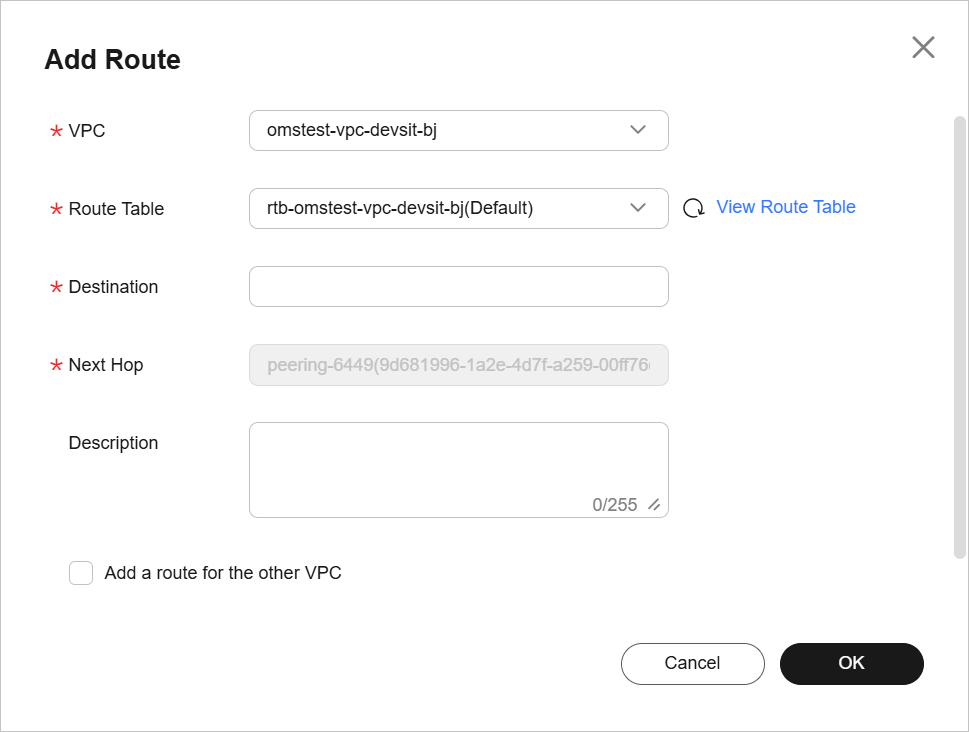
Return to the OceanBase Cloud console. In the Step 3: Add a Route section, click Done.

Use an existing peering connection
If you already have an available peering connection, you can directly use it to connect to the database. The following section describes how to use an existing peering connection. If you need to create a new peering connection, refer to the Create a peering connection section.
Log in to the OceanBase Cloud console. On the instance list page, expand the information of the target instance. In the target tenant, select Connect > Get Connection String.
In the dialog box, select VPC Peering.
In the Step 1: Configure Peering Connection section, select the peering connection ID that you want to use to connect to the database. Then, click Create VPC Peering Endpoint.
In the Step 2: Access Database section, create a database and an account, select a connection method, such as MySQL CLI, and copy the generated connection string to your client for connection. After the connection is established, you can access and use the database.
Notice
If you choose to create a new account, please make sure to keep the password generated when creating the account.
What to do next
After a peering connection is established, you can view the peering connection endpoint information on the topology diagram of the overview page of the tenant. If you need to modify the endpoint for reasons such as VPC changes, you can delete the existing peering connection endpoint and create a new one. The procedure is as follows:
On the instance list page of OceanBase Cloud console, click the name of the target tenant to go to the overview page of the tenant.
Under Topology Diagram, click the delete icon to delete the existing peering connection endpoint.