







The MySQL Connector/C (or MySQL C API) driver provides a set of C language functions and data structures, allowing developers to connect, query, and manage MySQL databases using C/C++ languages. It also enables developers to directly utilize MySQL databases in their C/C++ applications.
This topic uses C++ as an example to demonstrate how to connect to OceanBase Cloud using the MySQL Connector/C driver and build an application to perform basic operations such as creating tables, inserting data, and querying data.
Prerequisites
- Your operating system is CentOS or Ubuntu.
- You have installed the g++ compiler.
- You have registered an OceanBase Cloud account and have created an instance. For details, refer to Create an instance.
Procedure
Step 1: Obtain an OceanBase Cloud connection string
Log in to the OceanBase Cloud console. On the Instances page, expand the target instance and click Create under the target instance.
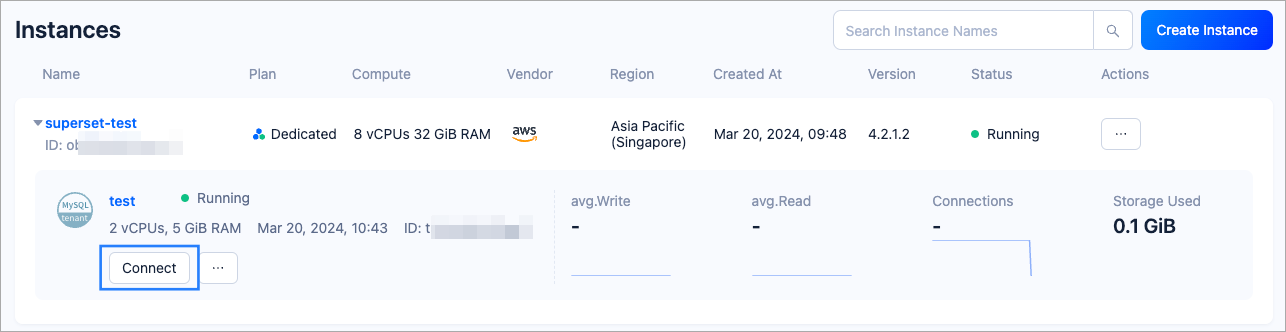
In the pop-up window, click Connect with Public IP.
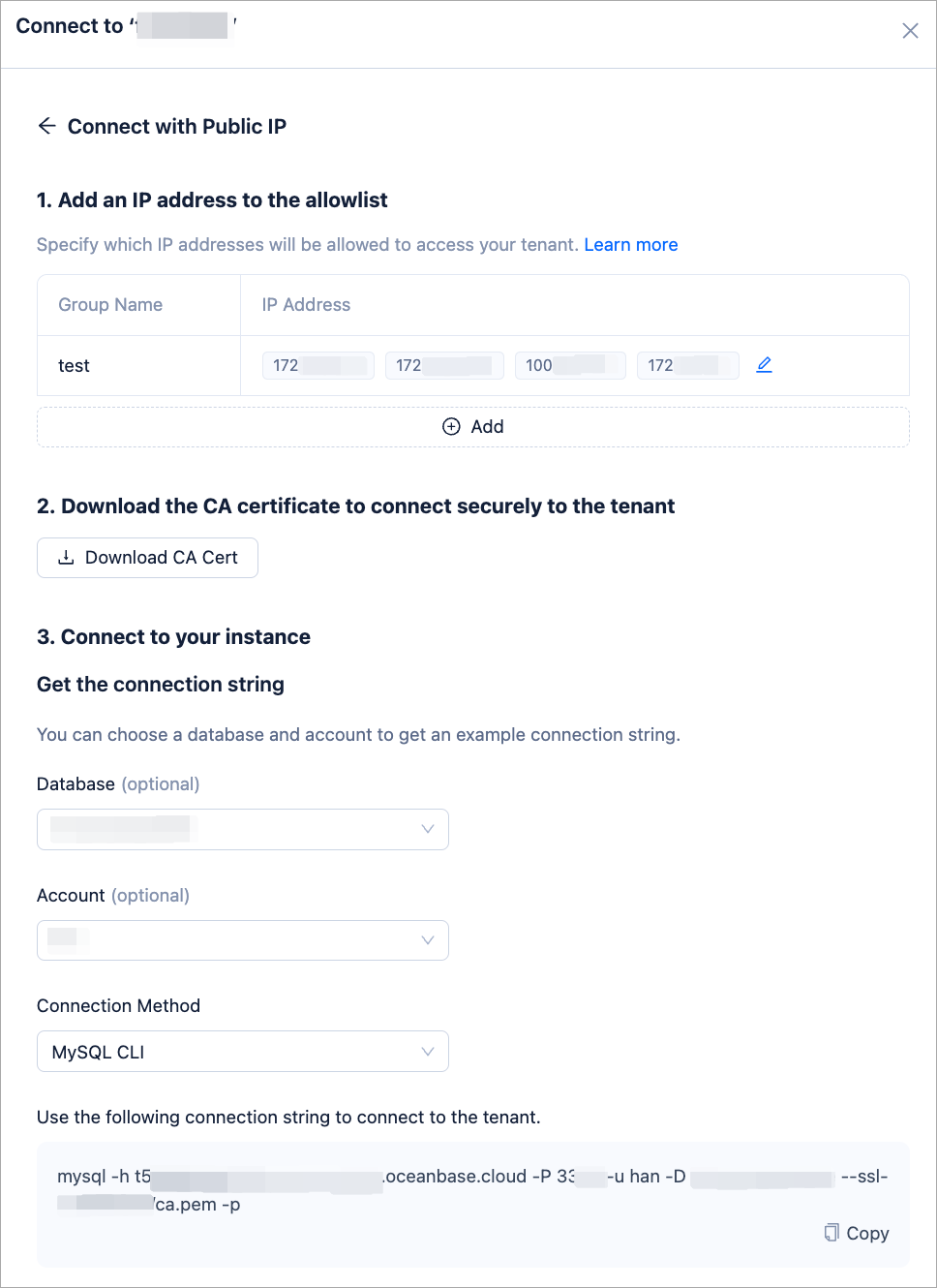
In the Connect with Public IP window, complete the following settings to generate the connection string:
- Under 1. Add an IP address to the allowlist, click Add to add your exit IP address(es) used for the connection to the allowlist.
- (Optional) Under 2. Download the CA certificate to connect securely to the instance, download the CA certificate and complete the verification.
- Under 3. Connect to your instance, click the drop-down list for Database and Account to create a database and an account for the connection. Select MySQL CLI as the connection method.
Notice
Please keep your password in a secure place after creating your account.
Step 2: Install the MySQL Connector/C driver
Execute the following command to install the driver.
For Ubuntu systems:
sudo apt-get install libmysqlclient-devFor CentOS systems:
sudo yum install mysql-devel
Execute the following command to verify if the installation was successful.
mysql_config --version
Step 3: Write the application
Create the
test.ccfile using the sample code below in a text editor, and save it.#include <stdio.h> #include <stdlib.h> #include <mysql/mysql.h> int main() { MYSQL *conn = mysql_init(NULL); // Initialize MySQL connection if (conn == NULL) { fprintf(stderr, "mysql_init() failed\n"); return 1; } // Connect to the MySQL database server if (mysql_real_connect(conn, "{host}", "{user}", "{password}", "{database}", {port}, NULL, 0) == NULL) { fprintf(stderr, "mysql_real_connect() failed\n"); mysql_close(conn); return 1; } // Create a user table if (mysql_query(conn, "CREATE TABLE IF NOT EXISTS users (id INT AUTO_INCREMENT, name VARCHAR(255), email VARCHAR(255), PRIMARY KEY(id))") != 0) { fprintf(stderr, "Error in creating table: %s\n", mysql_error(conn)); mysql_close(conn); return 1; } // Insert data if (mysql_query(conn, "INSERT INTO users (name, email) VALUES ('Xiaoming', 'xiaoming@example.com')") != 0) { fprintf(stderr, "Error in inserting data: %s\n", mysql_error(conn)); mysql_close(conn); return 1; } // Query data if (mysql_query(conn, "SELECT * FROM users") == 0) { MYSQL_RES *result = mysql_store_result(conn); if (result != NULL) { int num_fields = mysql_num_fields(result); MYSQL_ROW row; while ((row = mysql_fetch_row(result))) { for (int i = 0; i < num_fields; i++) { printf("%s ", row[i] ? row[i] : "NULL"); } printf("\n"); } mysql_free_result(result); } else { fprintf(stderr, "Error in retrieving result: %s\n", mysql_error(conn)); } } else { fprintf(stderr, "Error in selecting data: %s\n", mysql_error(conn)); } // Drop the table if (mysql_query(conn, "DROP TABLE IF EXISTS users") != 0) { fprintf(stderr, "Error in dropping table: %s\n", mysql_error(conn)); mysql_close(conn); return 1; } mysql_close(conn); // Close connection return 0; }Based on the connection string obtained from Step 1: Obtain an OceanBase Cloud connection string, modify the content of the Connect to the MySQL database server part in the code file
test.ccand save it. For example:// Connect to the MySQL database server if (mysql_real_connect(conn, "t5********.aws-ap-southeast-1.oceanbase.cloud", "test", "12*****!", "dbtest", 3306, NULL, 0) == NULL) { fprintf(stderr, "mysql_real_connect() failed\n"); mysql_close(conn); return 1; }- host: Taken from the
-hparameter in the connection string, which is the hostname of OceanBase Cloud database. - user: Taken from the
-uparameter in the connection string, which is the account name. - password: Taken from the
-pparameter in the connection string, which is the account password. - database: Taken from the
-Dparameter in the connection string, which is the name of the database to be accessed. - port: Taken from the
-Pparameter in the connection string, which is the OceanBase Cloud database connection port.
- host: Taken from the
Step 4: Compile the application
After editing the code file, compile it with the following command:
g++ -o test test.cc `mysql_config --cflags --libs`
After successful compilation, an executable file named test will be generated.
Step 5: Run the application
Run the application program using the following command:
./test
If the output is as follows, the database connection is successful, and the sample application executes correctly:
1 Xiaoming xiaoming@example.com
This output indicates that the program has successfully inserted data into the database and queried it.