







This topic describes how to enable SSL encryption.
Background information
To improve link security, OceanBase Database supports Secure Sockets Layer (SSL) encryption. This involves encrypting network connections at the transport layer to enhance the security of communication data. If SSL encryption is enabled for connections, you can configure the system to require clients to use SSL connections when accessing the database.
Note
- Enabling SSL encryption may slightly reduce instance performance (certificate encryption/decryption consumes compute resources). It is recommended to enable SSL encryption only when external network connections are required or when data transmission encryption is needed.
- SSL encryption does not take effect for direct connection addresses.
TLS versions
Transport Layer Security (TLS) is a widely adopted protocol for ensuring the privacy and security of internet communications and data. TLS has several versions. The following table describes the support for TLS by different combinations of JDK versions and MySQL Connector/J versions.
JDK version |
Connector/J version |
TLSv1.0 |
TLSv1.1 |
TLSv1.2 |
TLSv1.3 |
|---|---|---|---|---|---|
| JDK 8 < 8u291 | - | Supported | Supported | Supported | Not supported |
| JDK 8: 8u291 ~ 8u333 | - | Not supported | Not supported | Supported | Not supported |
| JDK 8 >= 8u341 | < 8.0.19 | Not supported | Not supported | Supported | Not supported |
| JDK 8 >= 8u341 | = 8.0.19 | Not supported | Not supported | Supported | Supported |
| JDK 9 | - | Supported | Supported | Supported | Not supported |
| JDK 11 < 11.0.11 | < 8.0.19 | Supported | Supported | Supported | Not supported |
| JDK 11 < 11.0.11 | >= 8.0.19 | Supported | Supported | Supported | Supported |
| JDK 11 >= 11.0.11 | < 8.0.19 | Not supported | Not supported | Supported | Not supported |
| JDK 11 >= 11.0.11 | >= 8.0.19 | Not supported | Not supported | Supported | Supported |
Note
TLSv1.0 and TLSv1.1 were deprecated by IETF in 2021 (RFC 8996). For security reasons, it is recommended to use TLSv1.2 or later for secure communications.
Procedure
Log in to the OceanBase Cloud console.
On the instance list page, click your target instance to enter the Overview page of the instance.
In the left-side navigation pane, click Security.
On the SSL Encryption tab of the Security page, you can perform the following operations:
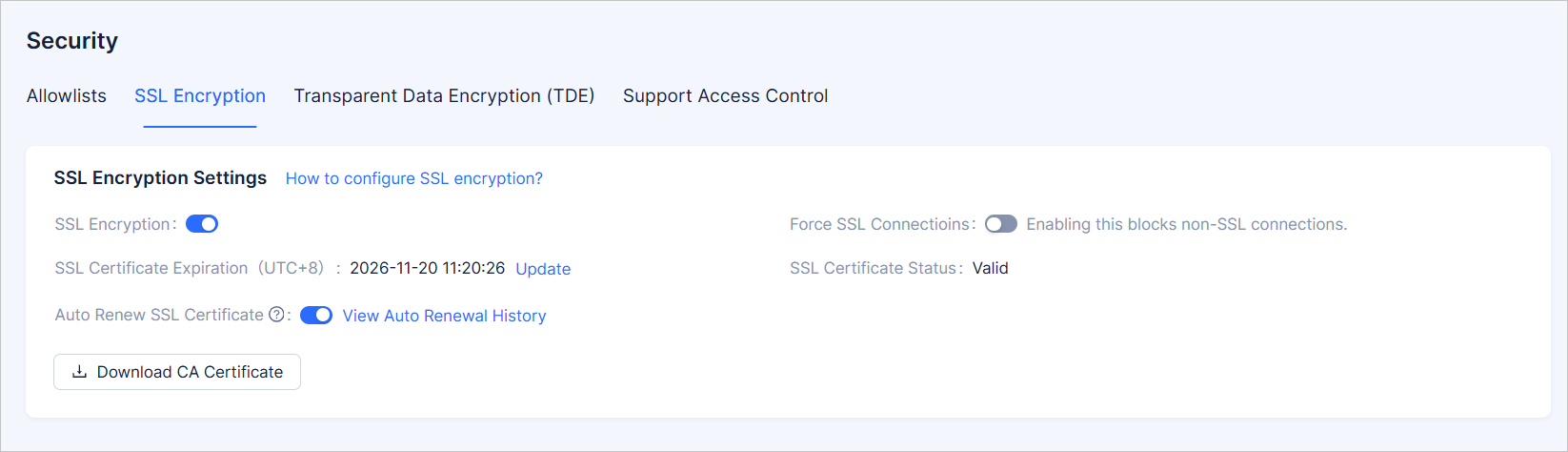
Click the toggle switch next to SSL Encryption to enable it. The enabling process takes approximately 3-5 minutes.
Click the toggle switch next to Force SSL Connectioins to enable it. Enabling it blocks non-SSL connections.
Click Download CA Certificate. The file you download is a compressed package that contains the following three files:
p7b file: used to import the CA certificate into Windows systems.
PEM file: used to import the CA certificate into other systems or applications.
JKS file: a truststore certificate storage file used for importing the CA certificate chain into Java programs. The password is OceanBase.
When you use a JKS certificate file in Java, you need to modify the default JDK security configuration for JDK 7 and JDK 8. In the
jre/lib/security/java.securityfile on the server that runs the application, modify the following two settings:jdk.tls.disabledAlgorithms=SSLv3, RC4, DH keySize < 224 jdk.certpath.disabledAlgorithms=MD2, RSA keySize < 1024If you do not modify the JDK security configuration, the following error is reported. Other similar errors are generally also caused by Java security configuration.
javax.net.ssl.SSLHandshakeException: DHPublicKey does not comply to algorithm constraints
You can click Update next to SSL Certificate Expiration to refresh the SSL certificate validity period.
Click the Auto Renew SSL Certificate switch. If enabled, the certificate will be automatically renewed 7 days before its expiration. Each renewal extends the validity period by 360 days.
You can click View Auto Renewal History to go to the Events page to view the details of the automatically updated certificates.
FAQ
When a Java program connection encounters the error javax.net.ssl.SSLHandshakeException: No appropriate protocol (protocol is disabled or cipher suites are inappropriate), you can resolve it by using one of the following methods:
- Specify the TLS version in the URL parameter of the JDBC connection string. For example, you can set enabledTLSProtocols to TLSv1.2.
- Lower the JDK version to up to 1.8.0_291.