







OceanBase Cloud allows project owners or project admins to request cross-project bidirectional authorization from another project under another organization or the same organization. If the other project agrees, both project team can create cross-project standby instances for instances of their respective projects.
Background information
In the multi-cloud architecture of OceanBase Cloud, each organization under an OceanBase account is created based on different cloud vendors. By default, resources are isolated across these organizations. Previously, users could not create primary and standby instances across organizations, limiting cross-cloud disaster recovery capabilities. Now, the cross-project bidirectional authorization feature has overcome this obstacle, enabling users to build more flexible and robust cross-cloud disaster recovery solutions, significantly enhancing business continuity and data security.
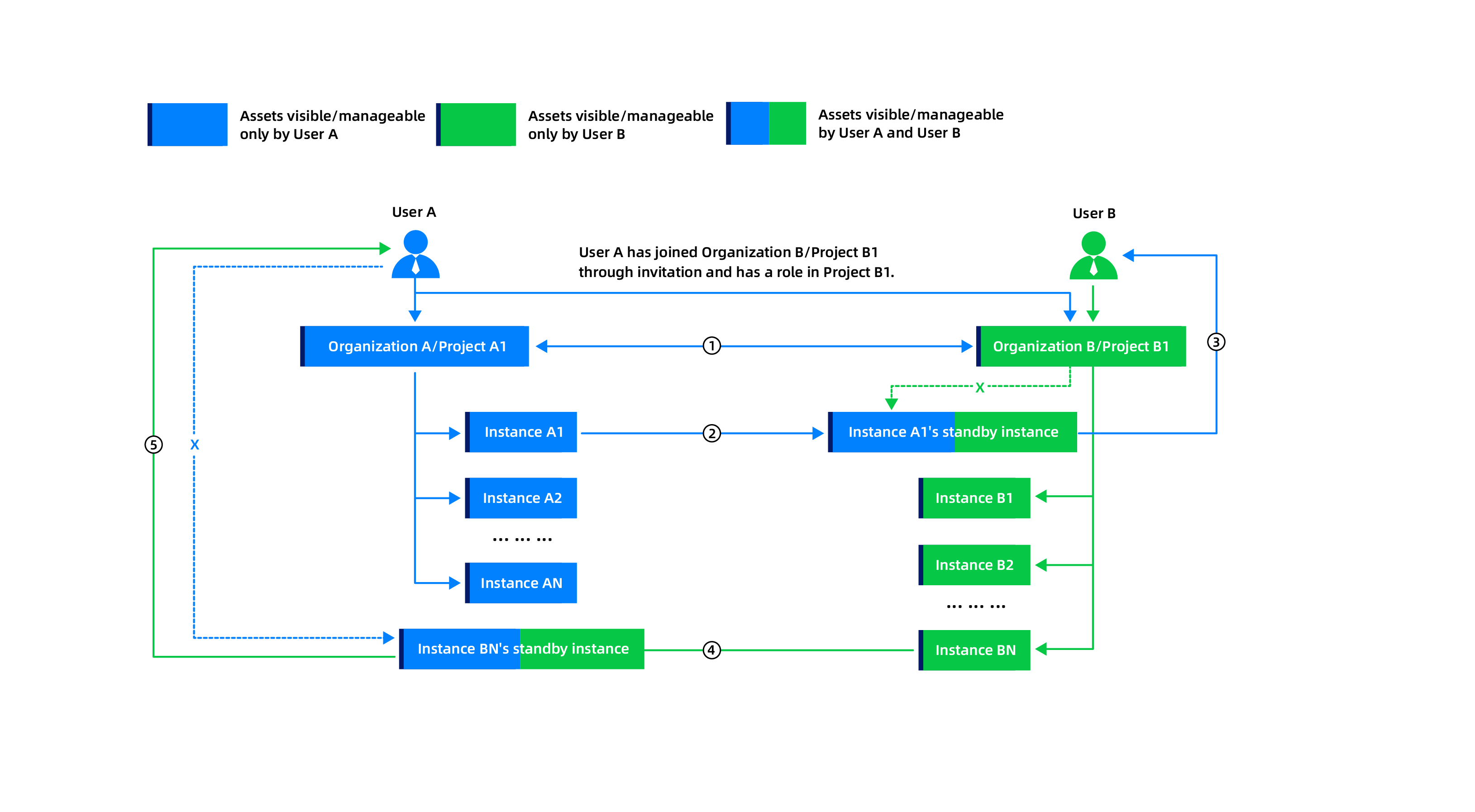
The cross-project bidirectional authorization process is as follows:
Step |
Description |
|---|---|
| 1 | User A and User B complete cross-project resource authorization. |
| 2 | User A creates a standby instance of Instance A1 (of Project A1 of Organization A) in Project B1 of Organization B. Now, User A has operation permissions on the standby instance, while User B can only view the standby instance. |
| 3 | The fees for Instance A1'standby instance will be deducted from Organization B/Project B1. |
| 4 | User B creates a standby instance of Instance BN (of Project B1 of Organization B) in Project A1 of Organization A. Now, User B has operation permissions on the standby instance, while User A can only view the standby instance. |
| 5 | The fees for Instance BN'standby instance will be deducted from Organization A/Project A1. |
After cross-project authorization, the operation permissions of each role in both projects are as follows:
Role type |
Role in Organization A/Project A1 |
Role in Organization B/Project B1 |
Permissions |
|---|---|---|---|
| User A | Organization admin, project owner | Project owner |
|
| User A | Organization admin, project owner | Project admin |
|
| User A | Organization admin, project owner | Instance admin |
|
| User A | Organization admin, project owner | Project member |
|
| User B | Not joined | Organization admin, project owner |
|
Prerequisites
The project owner or project admin has the permission to initiate cross-project bidirectional authorization. After cross-project authorization is established, the user can create cross-project primary and standby instances.
The project members can view the primary and standby instances of the project and the corresponding cross-project primary and standby instances.
They can view the primary and standby instances of the other project created in this project by using the permissions of this projects.
They can view the primary and standby instances of this project created in the other project by using the permissions of this projects.
If the primary and standby instances are decoupled, they become ordinary instances. The permission principle remains the same as before the change. The cross-project logic no longer exists.
The operation permissions of cross-project primary and standby instances always belong to the project team of the creator. The team of the project where the standby instance is created can only view the standby instance.
The resource costs of the standby instance are deducted from the organization admin account of the project where the standby instance is created.
The project owner or project admin of the authorization initiator project has been added to the target project. For more information, see Manage members.
Procedure
Go to the project configuration page
Log in to the OceanBase Cloud console. In the upper-left corner, click your organization name and select All Organizations from the drop-down list.
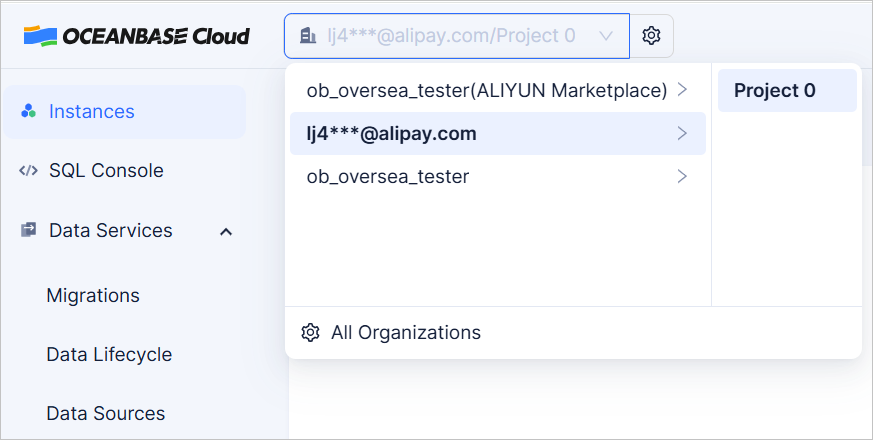
In the organization list, click the name of the target organization.
In the project list, click Configure Project in the Actions column.
Click the Cross-project Bidirectional Authorization tab.
Initiate cross-project bidirectional authorization
Click Initiate Cross-project Bidirectional Authorization and select the organization and project to which you want to apply for authorization from the drop-down list. You can select a project in another organization or the same organization.
Click OK. You can view the authorization status on the Initiate Cross-project Bidirectional Authorization tab. If the target project does not accept your application for a long time, you can choose to re-initiate or withdraw the application.
Re-initiate the application: After re-initiation, the application notification will be resent to the project owner and project admin of the target project.
Withdraw the application: After withdrawal, the target project will no longer be able to accept this application.
Accept cross-project bidirectional authorization
After the project owner or project admin of another project initiates a cross-project bidirectional authorization to your project, you can accept the authorization by clicking Approve after logging in to the project configuration page. After the approval:
Both project teams can create cross-project standby instances for instances of their respective projects.
The operation permissions of cross-project primary and standby instances always belong to the project team of the creator. The team of the project where the standby instance is created can only view the standby instance.
The resource costs of the standby instance are deducted from the organization admin account of the project where the standby instance is created.