







This topic describes how to switch the deployment mode of an instance.
Background information
Switching the deployment mode of an instance may change the number of full-featured replicas and the zones.
Considerations
Switching the deployment mode may cause a few seconds of service interruption. We recommend that you avoid switching during peak hours.
After the deployment mode is switched, the monitoring information of the nodes that are taken offline is lost.
When you switch the zones of an instance, make sure that the zones of the instance and the database proxy are consistent. If they are inconsistent, you can change the zone of the database proxy first. For more information, see Manage a database proxy.
When you switch the deployment mode of an instance from the AWS channel, make sure that the zones of the instance and the database proxy are consistent. If they are inconsistent, you can change the zone of the database proxy first. For more information, see Manage a database proxy.
For a proxy cluster of architecture version 1.0, an error message in red appears when you change the zone of OceanBase Database. To resolve this issue, you must upgrade the proxy cluster to architecture version 2.0 and change the zone of the proxy cluster to the target zone.
If the target zone cannot cover the zone of the primary node of the proxy cluster, you must go to the database proxy page and change the zone of the primary node to the target zone by clicking Change Configuration. If the target zone cannot cover the zone of the standby node of the proxy cluster, the system randomly assigns a zone to the standby node of the proxy cluster. If you want to specify the zone, you must go to the database proxy page and change the zone of the standby node to the target zone by clicking Change Configuration.
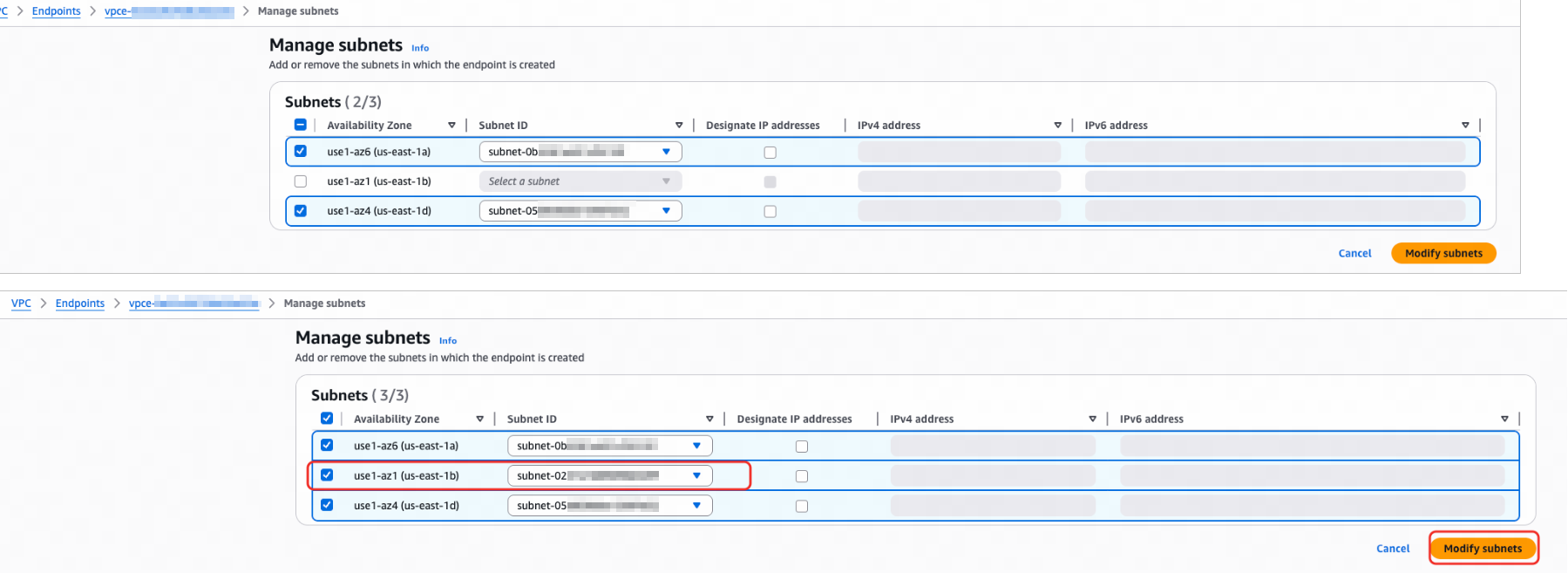
To ensure the availability of the private network connection, we recommend that you log in to the AWS console after you change the deployment mode of the instance, find all endpoints associated with the instance, and select all subnets in the target zone.
Prerequisites
Before you switch the deployment mode, make sure that the following conditions are met:
The instance is in the Running state.
All tenants in the instance are in the Running state.
The database version of the instance is V3.x or later.
The instance is charged on a pay-as-you-go basis.
You have the organization admin or billing admin permissions.
Procedure
Log in to the OceanBase Cloud console.
In the left-side navigation pane, click Instances.
In the instance list, click Switch Deployment Mode in the Actions column of the target instance.
Select the deployment mode and the zones to switch to. For more information, see Deployment modes and Billing overview.
In the right-side Summary section, verify the billing information, check the service agreement, and click Confirm Order.
What to do next
You can view the execution result in the Events > historical Events page.
After the deployment mode is switched, you can go to the Overview page of the instance to view the current deployment mode of the instance.