DataWorks is a data development and governance platform on Alibaba Cloud, based on big data engines such as MaxCompute, Hologres, EMR, AnalyticDB, and CDP, providing unified end-to-end processing capabilities for data warehouses, data lakes, and lakehouse solutions. DataWorks offers a variety of functions including data integration, data development, data modeling, and data analysis.
If your OceanBase Cloud cluster vendor is Alibaba Cloud, DataWorks can connect to the cluster via a private network.
Prerequisites
Your instance type must be a cluster instance.
Notice
Using DataWorks is subject to Alibaba Cloud's billing rules and may incur corresponding charges. Please visit its official website or view the relevant documentation to confirm and accept its billing standards before proceeding. If you disagree, please do not proceed with the operation.
Procedure
Connect to OceanBase Cloud by using Alibaba Cloud's private network. For more information, refer to Using Alibaba Cloud's Private Network Connection for Database Connection.
Note
The VPC and VSwitch must be in the same region as the OceanBase Cloud cluster.
Go to the DataWorks management center, Data Source List -> Add Data Source, and select ApsaraDB for OceanBase.
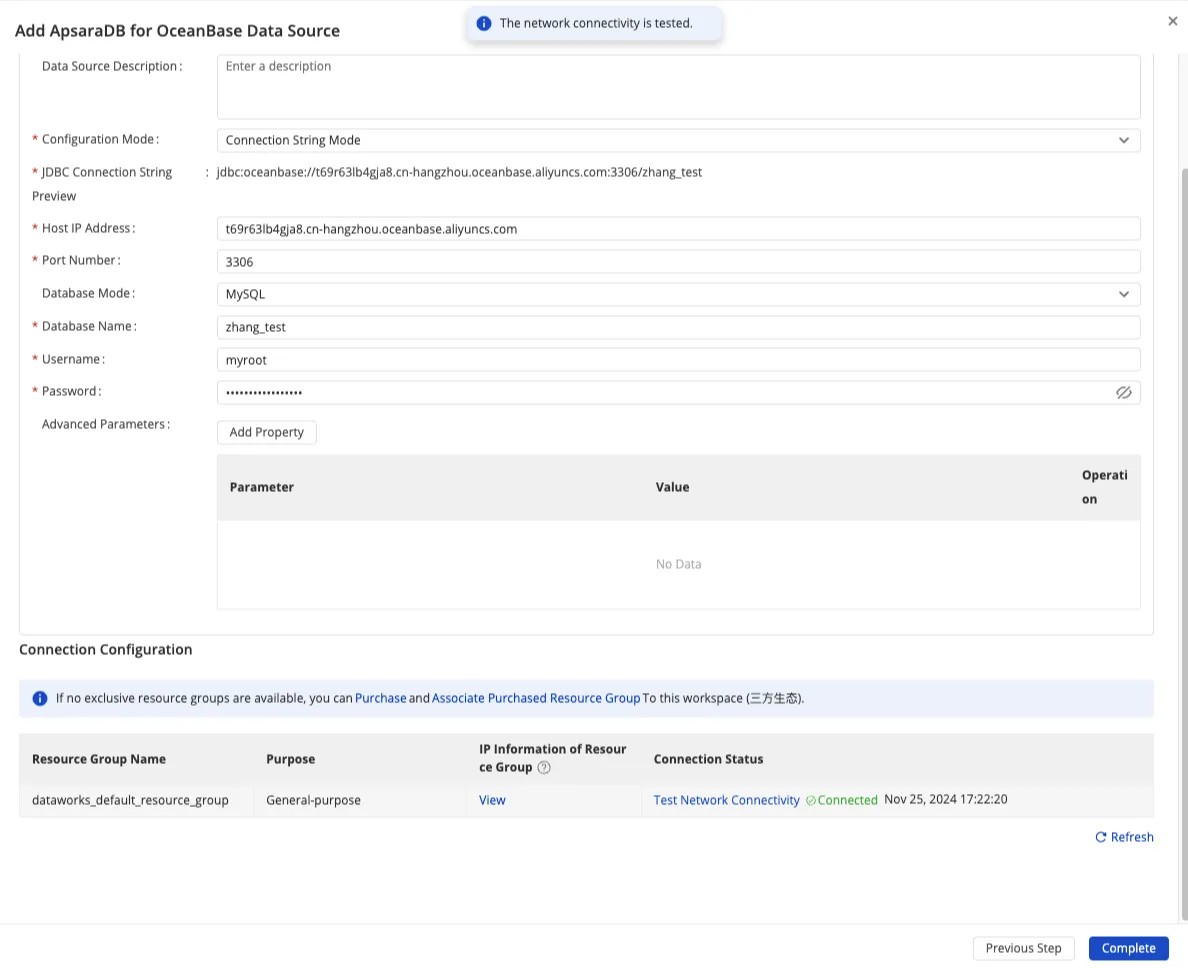
Select Connection String Mode, fill in OceanBase PrivateLink, use the DataWorks exclusive resource group, and click Test Connectivity. If the connection is successful, it will display Connected.
If you do not have an exclusive resource group, please purchase and bind it to the DataWorks workspace.