OceanBase logo

OceanBase

A unified distributed database ready for your transactional, analytical, and AI workloads.

Product Overview
DEPLOY YOUR WAY

OceanBase Cloud

The best way to deploy and scale OceanBase

OceanBase Enterprise

Run and manage OceanBase on your infra

TRY OPEN SOURCE

OceanBase Community Edition

The free, open-source distributed database

OceanBase seekdb

Open source AI native search database

Customer Stories

Real-world success stories from enterprises across diverse industries.

View All
BY USE CASES

Mission-Critical Transactions

Global & Multicloud Application

Elastic Scaling for Peak Traffic

Real-time Analytics

Active Geo-redundancy

Database Consolidation

Resources

Comprehensive knowledge hub for OceanBase.

Blog

Live Demos

Training & Certification

Documentation

Official technical guides, tutorials, API references, and manuals for all OceanBase products.

View All
PRODUCTS

OceanBase Cloud

OceanBase Database

Tools

Connectors and Middleware

QUICK START

OceanBase Cloud

OceanBase Database

BEST PRACTICES

Practical guides for utilizing OceanBase more effectively and conveniently

Company

Learn more about OceanBase – our company, partnerships, and trust and security initiatives.

About OceanBase

Partner

Trust Center

Contact Us

International - English
中国站 - 简体中文
日本 - 日本語
Sign In
Start on Cloud

OceanBase

A unified distributed database ready for your transactional, analytical, and AI workloads.

Product Overview
DEPLOY YOUR WAY

OceanBase Cloud

The best way to deploy and scale OceanBase

OceanBase Enterprise

Run and manage OceanBase on your infra

TRY OPEN SOURCE

OceanBase Community Edition

The free, open-source distributed database

OceanBase seekdb

Open source AI native search database

Customer Stories

Real-world success stories from enterprises across diverse industries.

View All
BY USE CASES

Mission-Critical Transactions

Global & Multicloud Application

Elastic Scaling for Peak Traffic

Real-time Analytics

Active Geo-redundancy

Database Consolidation

Comprehensive knowledge hub for OceanBase.

Blog

Live Demos

Training & Certification

Documentation

Official technical guides, tutorials, API references, and manuals for all OceanBase products.

View All
PRODUCTS
OceanBase CloudOceanBase Database
ToolsConnectors and Middleware
QUICK START
OceanBase CloudOceanBase Database
BEST PRACTICES

Practical guides for utilizing OceanBase more effectively and conveniently

Learn more about OceanBase – our company, partnerships, and trust and security initiatives.

About OceanBase

Partner

Trust Center

Contact Us

Start on Cloud
编组
All Products
    • Databases
    • iconOceanBase Database
    • iconOceanBase Cloud
    • iconOceanBase Tugraph
    • iconInteractive Tutorials
    • iconOceanBase Best Practices
    • Tools
    • iconOceanBase Cloud Platform
    • iconOceanBase Migration Service
    • iconOceanBase Developer Center
    • iconOceanBase Migration Assessment
    • iconOceanBase Admin Tool
    • iconOceanBase Loader and Dumper
    • iconOceanBase Deployer
    • iconKubernetes operator for OceanBase
    • iconOceanBase Diagnostic Tool
    • iconOceanBase Binlog Service
    • Connectors and Middleware
    • iconOceanBase Database Proxy
    • iconEmbedded SQL in C for OceanBase
    • iconOceanBase Call Interface
    • iconOceanBase Connector/C
    • iconOceanBase Connector/J
    • iconOceanBase Connector/ODBC
    • iconOceanBase Connector/NET
icon

OceanBase Cloud

    Download PDF

    OceanBase logo

    The Unified Distributed Database for the AI Era.

    Follow Us
    Products
    OceanBase CloudOceanBase EnterpriseOceanBase Community EditionOceanBase seekdb
    Resources
    DocsBlogWhite PaperLive DemosTraining & CertificationTicket
    Company
    About OceanBaseTrust CenterLegalPartnerContact Us
    Follow Us

    © OceanBase 2026. All rights reserved

    Cloud Service AgreementPrivacy PolicySecurity
    Contact Us
    Document Feedback
    1. Documentation Center
    2. OceanBase Cloud
    iconOceanBase Cloud
    Databases
    • OceanBase Database
    • OceanBase Cloud
    • OceanBase Tugraph
    • Interactive Tutorials
    • OceanBase Best Practices
    Tools
    • OceanBase Cloud Platform
    • OceanBase Migration Service
    • OceanBase Developer Center
    • OceanBase Migration Assessment
    • OceanBase Admin Tool
    • OceanBase Loader and Dumper
    • OceanBase Deployer
    • Kubernetes operator for OceanBase
    • OceanBase Diagnostic Tool
    • OceanBase Binlog Service
    Connectors and Middleware
    • OceanBase Database Proxy
    • Embedded SQL in C for OceanBase
    • OceanBase Call Interface
    • OceanBase Connector/C
    • OceanBase Connector/J
    • OceanBase Connector/ODBC
    • OceanBase Connector/NET

      Execution analysis

      Last Updated:2026-04-07 08:08:34  Updated
      Share
      What is on this page
      Execution plan
      Execution details
      Accessing the execution profile
      Execution analysis
      Execution plan
      End-to-end trace diagnostics
      DB time

      folded

      Share

      The OceanBase Developer Center (ODC) SQL window provides a user interface for processing data. Within this window, you can evaluate SQL statements, review execution details, and analyze the full execution timeline. This topic uses the employee table as an example to demonstrate how to evaluate SQL queries.

      Execution plan

      1. In the SQL window, enter the SQL statement to query the data in the employee table.

         SELECT `emp_no`, `birthday`, `name`, `time`, `test_col`, `status`, `age`, `state` FROM `employee`;
        
      2. As shown in the image above, select the SQL statement and click the Execution Plan icon. This allows you to estimate the execution data before running the SQL statement (EXPLAINPLAN). Note that the estimated execution data may differ slightly from the actual results after execution.
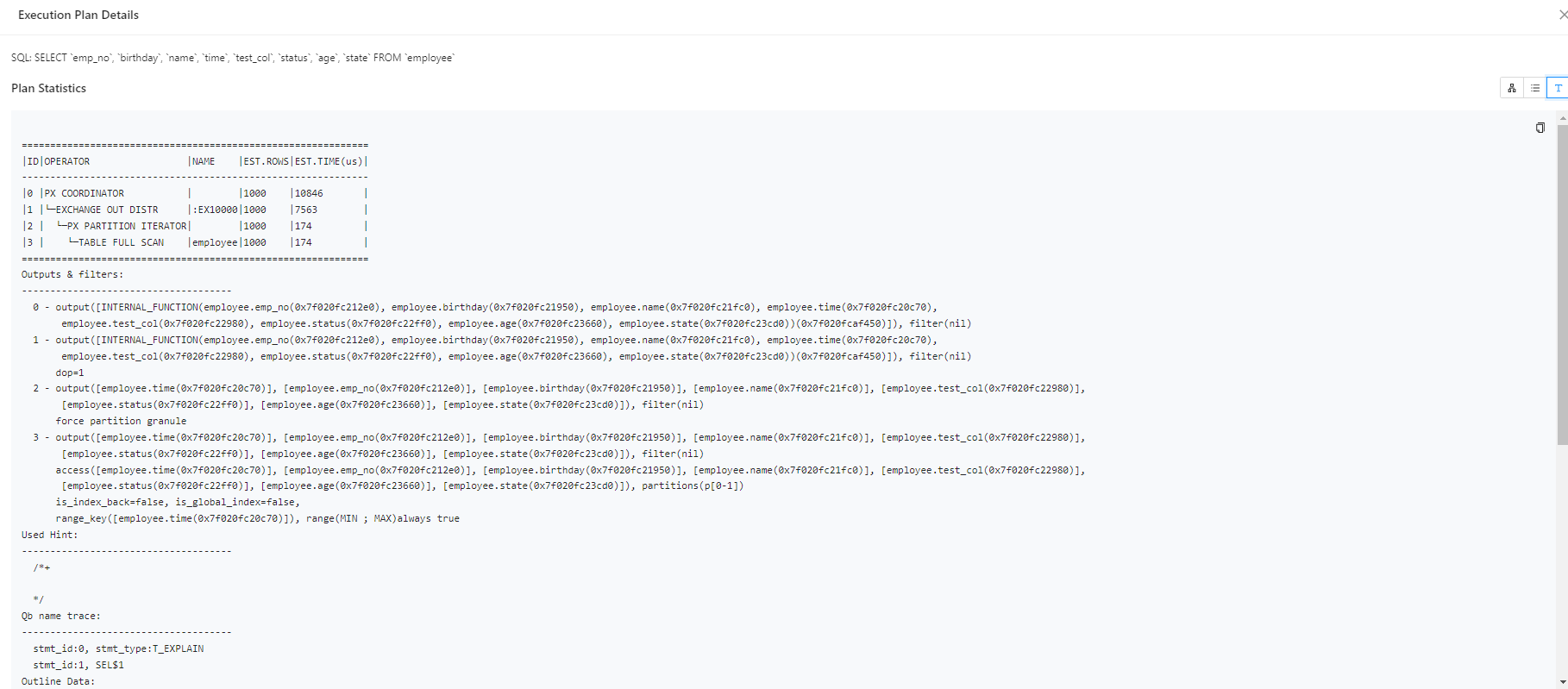
      3. On the Plan Details page, click Text View to switch to a formatted display of the plan.

      Execution details

      Note

      • For OceanBase versions prior to V4.2.4, when executing SQL statements, you can view basic execution details, time statistics, I/O statistics, SQL execution statements, plan statistics, and outlines through the Execution Details tab on the results page.
      • For OceanBase V4.2.4 and later, but before OceanBase V4.3.0, or OceanBase V4.3.3.1 and later, you can use the Execution Profile to monitor SQL execution in real-time when executing queries/inserts/updates/deletes/retrieving data from the database. The Execution Profile helps you quickly view execution details and identify performance bottlenecks.

      Accessing the execution profile

      • Option 1: While the SQL statement is executing in the SQL window, click View Execution Profile in the Logs tab.

        Notice

        If the SQL statement execution time is less than one second, the option to view the execution profile may not be available in the Logs tab.

      • Option 2: After the SQL statement has executed, click the Execution Profile icon in the results.
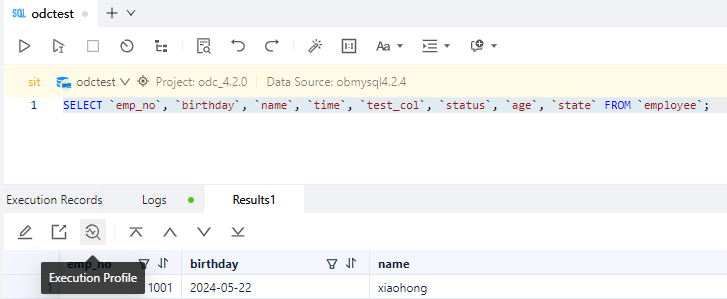
      • Option 3: After the SQL statement has executed, click the TRACE ID in the Execution Records tab to access the execution profile.

      Execution analysis

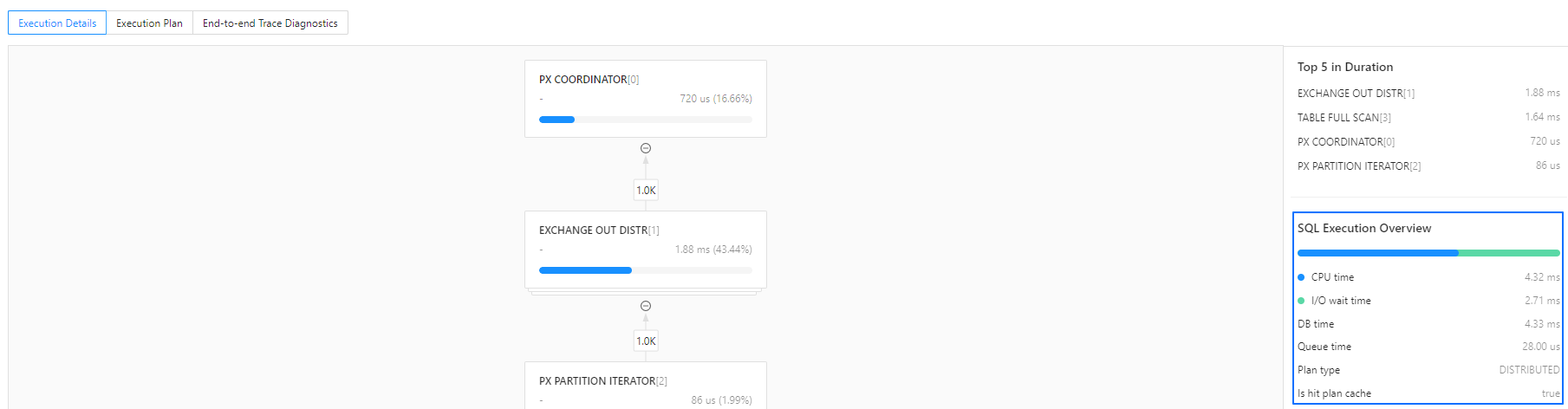
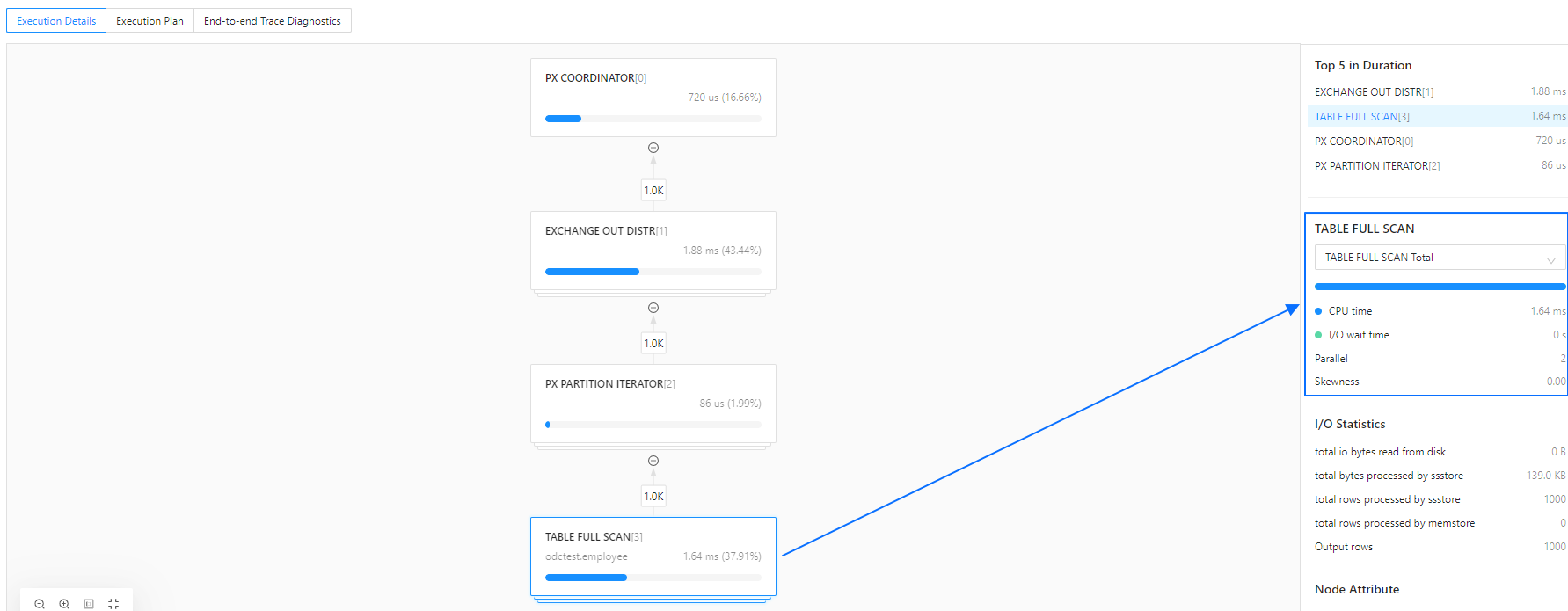
      The Execution Details, or Execution Profile, provides a visual representation and data collection for SQL execution plans. It allows real-time monitoring of operator execution status, time details, I/O, and runtime data, while summarizing and ranking the overall execution time.
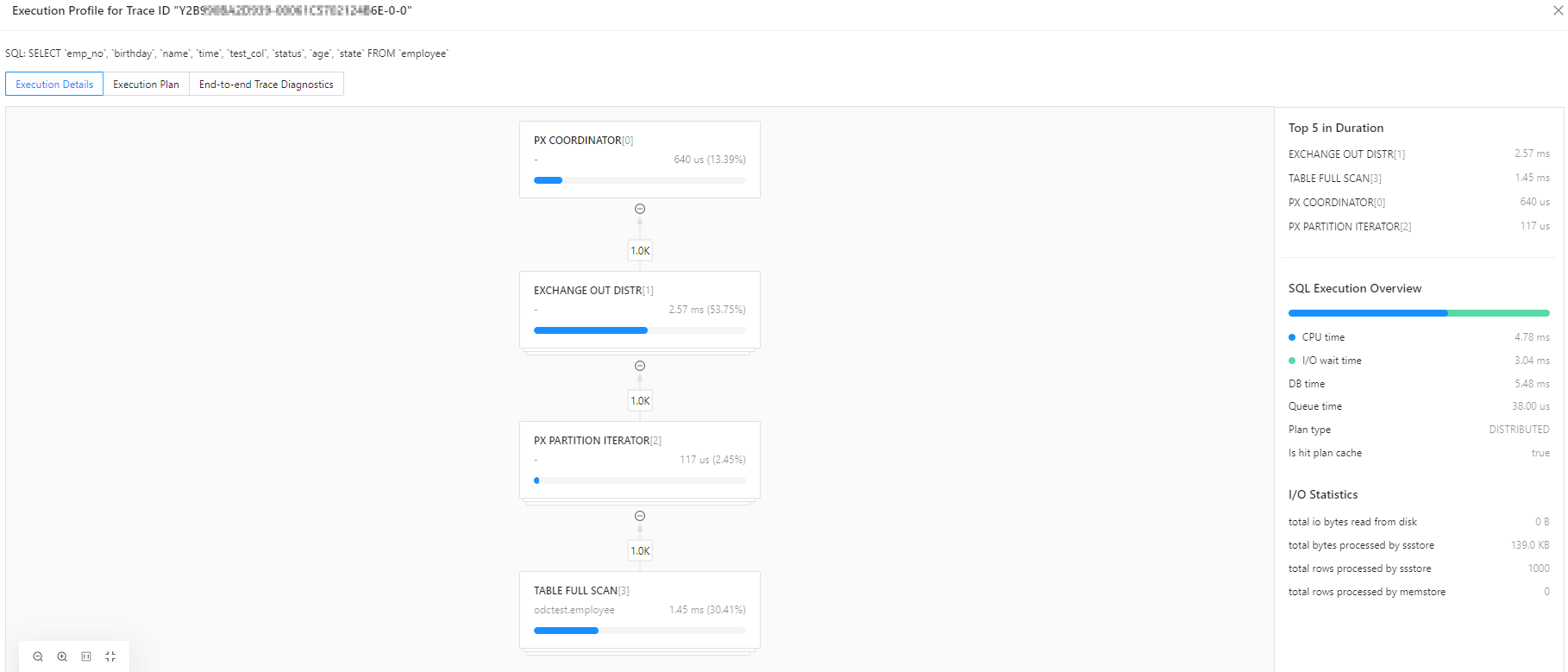
      Using the execution profile, you can:

      • View the actual execution plan of OceanBase in a graphical format, making it easier to understand the execution sequence and relationships of operators.

      • Quickly identify execution bottlenecks using execution overviews, real-time I/O statistics, and the top 5 time-consuming operations. ODC sorts these based on CPU time.

      • Monitor the execution status, timing, and output rows of operators in real-time. By clicking on an operator node, you can access operator attributes, time details, and I/O and other runtime data on the right side of the screen.
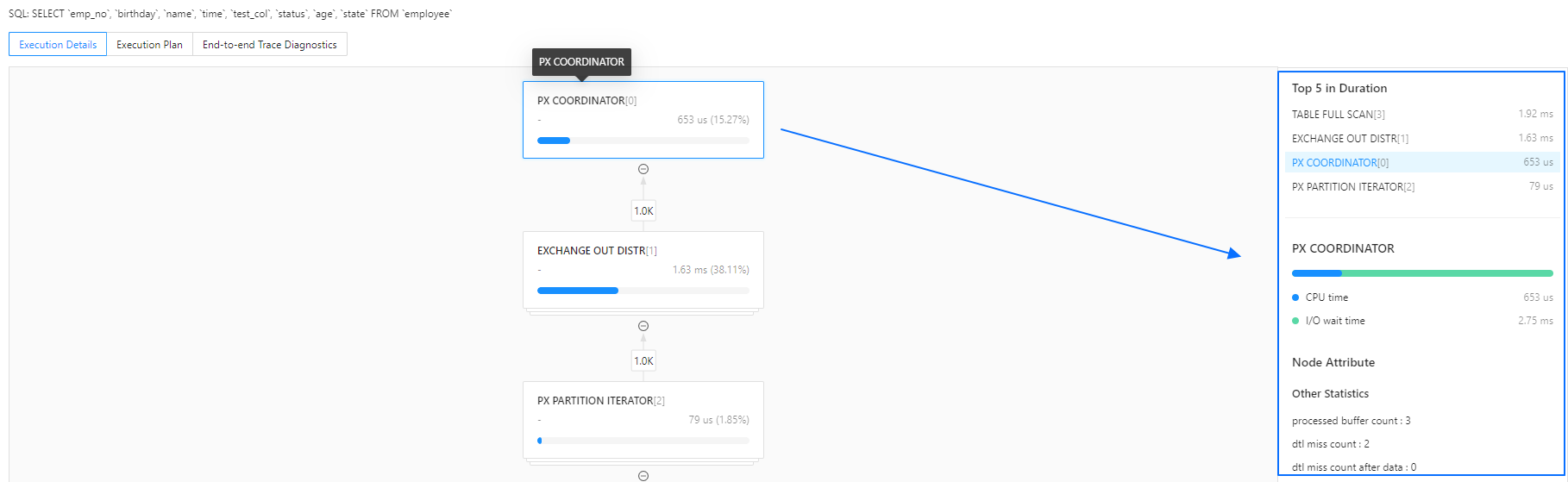
      • Analyze single-node and distributed execution plans. Parallel operators can be sorted by DB time, I/O memory, and output rows to quickly locate data skew.

      SQL execution overview

      Type
      Description
      SQL Execution Overview
      • CPU time: Total CPU time for all operators.
      • I/O wait time: Total I/O wait time for all operators.
      • DB time: Total time taken to execute the plan.
      • Queue time: Time spent waiting in the queue.
      • Plan type: Type of execution plan, which could be Local (LOCAL), Remote (REMOTE), or Distributed (DISTRIBUTED).
      • Is hit plan cache: Indicates whether the plan cache was hit.
      Operator Execution Overview
      • CPU time: Total CPU time consumed by the current operator. For parallel operators, this is the aggregate time for all threads.
      • I/O wait time: I/O wait time for the current operator, including disk I/O and network wait time. For parallel operators, this is the aggregate time for all threads.
      • Parallel: The degree of parallelism, indicating the number of threads running in parallel for the current operator.
      • Skewness: Skewness indicates the disparity in output time among parallel threads. A higher value suggests that one node or thread may be slowing down the entire operator.
      • Process name: Thread number, which can be used to locate the corresponding node's IP and port.
      • Change time: The time taken by the current thread to output rows, calculated as the time difference between the first and last row output.

      I/O statistics

      Type
      Description
      Operator I/O Statistics
      • Output rows: Number of rows output.
      • Start times: Number of times the operator has been rescanned. For example, the right child node of a Nested Loop Join operator may be scanned multiple times.
      • Max memory: Maximum workarea memory used by the operator during runtime.
      • Max disk: Maximum disk space used by the operator during runtime.

      Node attributes

      Node attributes consist of the output information and runtime data (other statistics) of an operator.

      For more details on node output information, refer to the official OceanBase documentation, for example, Table Scan operator's attributes.

      Runtime data vary across different operators and represent important monitoring metrics. For more information on these metrics, refer to the V$SQL_MONITOR_STATNAME view.

      Execution plan

      Unlike the Execution Plan in the SQL window, the Execution Profile displays the actual execution plan, including Actual Rows and Actual Costs. ODC retrieves the current plan using the DBMS_XPLAN package.

      You can also click Text View in the top right corner to switch views and access more detailed plan information, facilitating further SQL optimization.
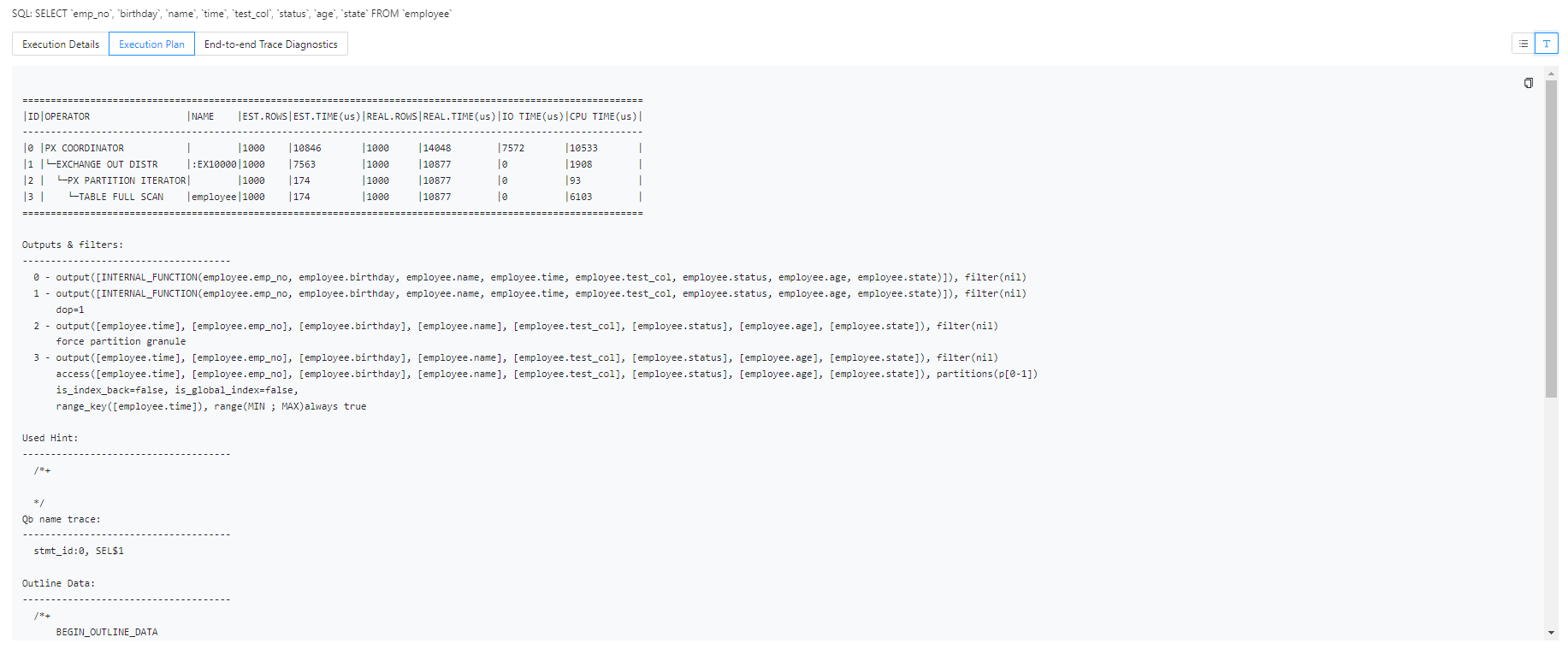
      End-to-end trace diagnostics

      For OceanBase versions above 4.2.0 (with OBProxy version 4.2.0 or later if connected via OBProxy), ODC supports viewing the information on end-to-end trace diagnostics for SQL. For more details, refer to OceanBase End-to-end Tracing Overview.

      ODC offers both Trace View and Table View visualizations for OceanBase's end-to-end trace diagnostic data.

      The Trace View shows the overall SQL execution timeline, with support for node expansion and collapse, as well as search highlighting. Hovering over the timeline allows you to view the execution node, start and end times, and detailed data.
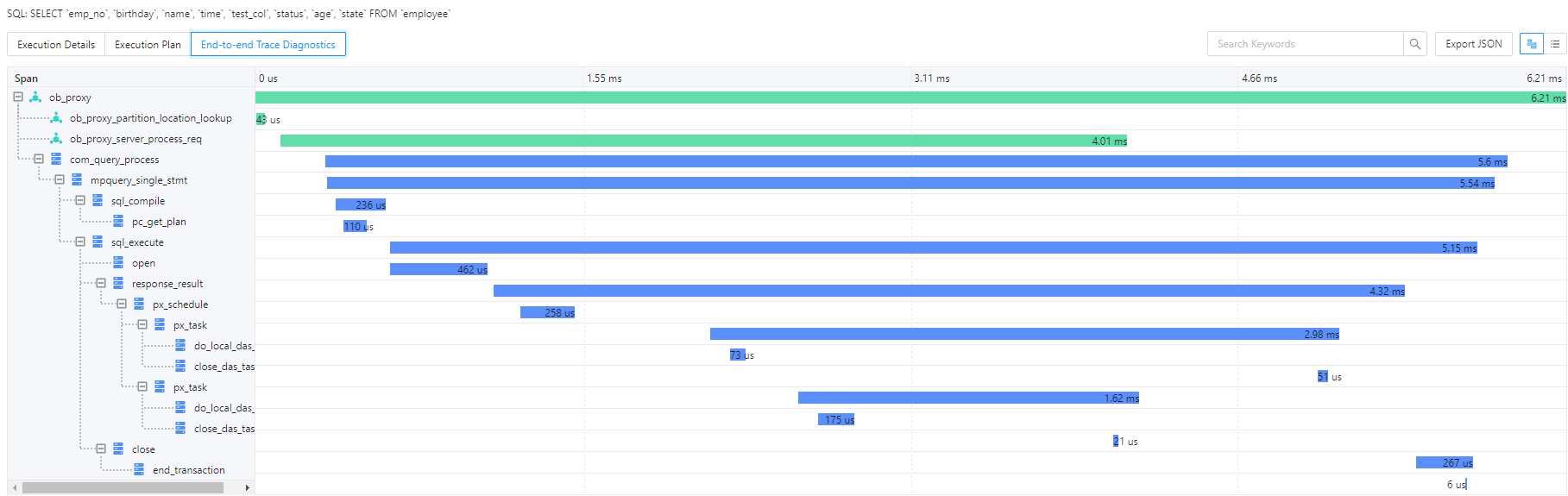
      Clicking Table View allows you to switch views, enabling filtering and sorting of spans across various dimensions.
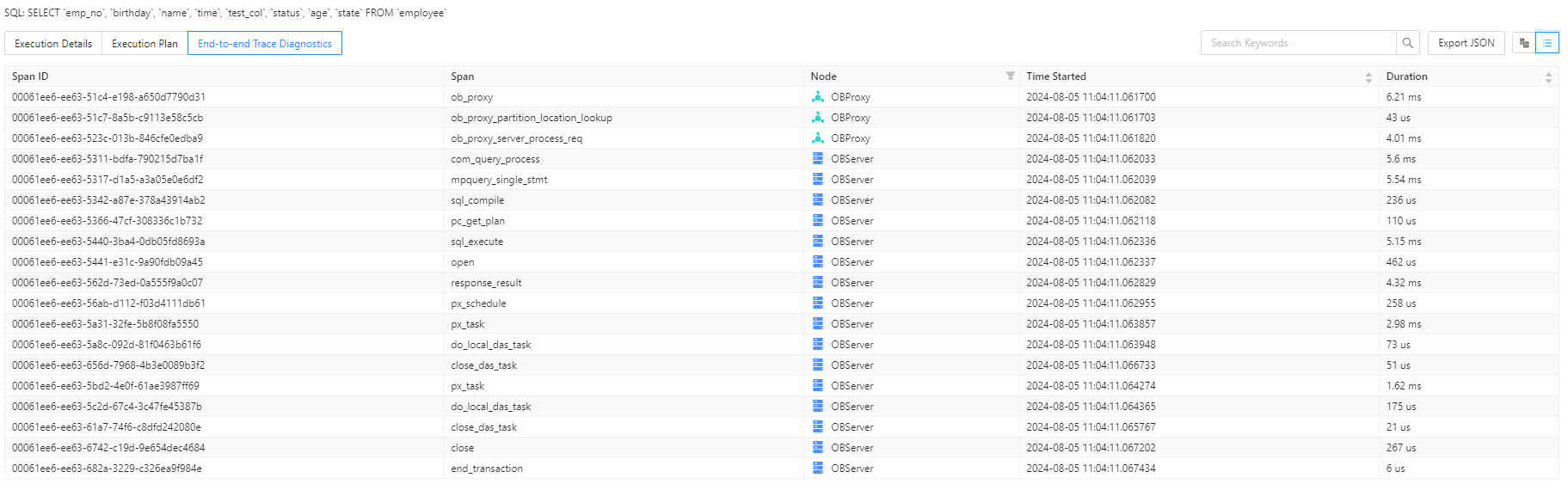
      ODC also supports exporting end-to-end trace diagnostic data in JSON format, compatible with the OpenTracing protocol. You can import this data into Jaeger for further analysis.

      DB time
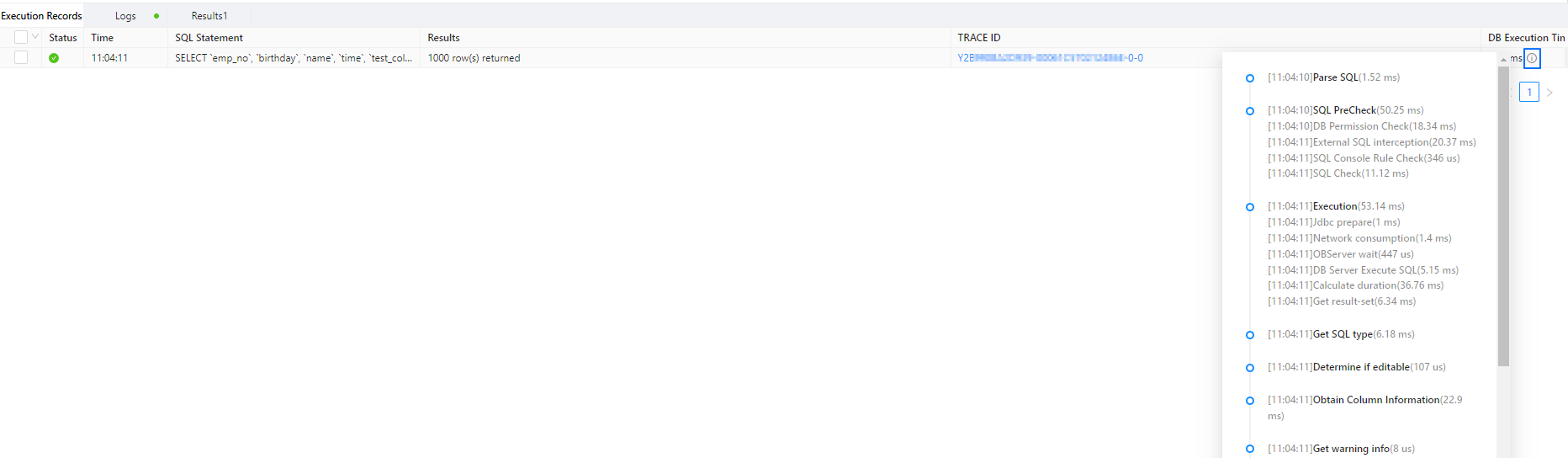
      In the Execution Records tab, hover over the tooltip icon next to DB Time to view end-to-end timing information for SQL execution. This helps verify if the time spent in each stage matches the actual execution.

      Previous topic

      Edit and export the result set of an SQL statement
      Last

      Next topic

      Generate test data
      Next
      What is on this page
      Execution plan
      Execution details
      Accessing the execution profile
      Execution analysis
      Execution plan
      End-to-end trace diagnostics
      DB time