







After initiating a major compaction for an instance in the OceanBase Cloud console, you can navigate to the Overview page of the instance to view the compaction records for that instance.
Prerequisites
A major compaction has been initiated for the target instance. For detailed instructions, refer to Initiate major compactions.
Note
When viewing compaction records, note that:
- For cluster instances V3.x, you can view the three most recent compaction records for the cluster instance through the **Overview** page of the instance.
- For cluster instances V4.x, you can view the three most recent compaction records for a specified tenant through the **Overview** page of the tenant.
View compaction records for cluster instances
Log in to the OceanBase Cloud console. In the left-side navigation pane, click Instances.
Click the name of the target cluster instance to navigate to the Overview page of the instance.
On the overview page, select Operation > View Merge Records under Data merging.
You can view the three most recent compaction records for the target cluster instance, including the start and end time, duration, status of the compaction, as well as the data version.
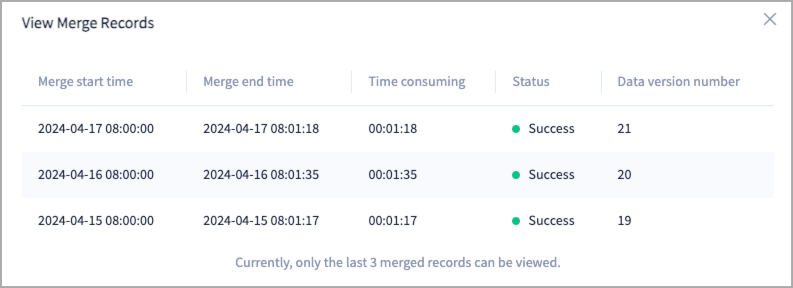
View compaction records for tenants
Log in to the OceanBase Cloud console. In the left-side navigation pane, click Instances.
Expand the target cluster instance and click the name of the target tenant to navigate to the Overview page of the tenant.
On the overview page, select Operation > View Merge Records under Data merging.
You can view the three most recent compaction records for the target tenant, including the start and end time, duration, status of the compaction, as well as the data version.