







This topic describes how to set a partition creation strategy and a partition deletion strategy.
Partition creation strategies
Notice
- Creating partitions for a table within a table group can fail or break the load balancing status. Proceed with caution when you decide to configure a partition creation strategy for such a table.
- Creating partitions for a table within a table group can invalidate the table group, because tables in the same table group must have the same number of partitions.
Custom partition creation strategy
You can create a custom partition creation strategy to generate the upper bound of a partition by using an SQL expression. Perform the following steps:
Use an SQL expression to obtain the reference time, which is the start time for partition creation.
Note
To use the time when the partitioning plan is executed as the start time, use the
now()orsysdatefunction.Set the time interval for generating partitions: The partitioning plan will generate partitions based on the specified time interval. After you enter a time interval in the Interval field, OceanBase Developer Center (ODC) uses the
${INTERVAL}expression to reference this time interval and adds it to the SQL expression generated in Step 1.Generate the partitioning expression of the same data type as the partitioning key: Convert the SQL expression of a time type generated after Step 1 and Step 2 are completed into the actual type of the partitioning key. If the partitioning key and SQL expression are of the same type, skip this step.
You can reference variables in custom partition creation strategies. The following table lists the supported expressions.
Expression |
Description |
Example |
|---|---|---|
| INTERVAL | The time interval for generating partitions. ODC will replace this variable with the value of the Interval field in the Rule column in the Creation Rule section. | ${INTERVAL} |
Generally, if you choose to create a custom partition creation strategy, partitions are generated based on a time type for a partitioning key that is not of a time type. The following quick reference tables can help you quickly write the correct SQL expression.
Expressions for generating upper bounds for partitions in MySQL mode
| Sample partitioning expression | Description | Time interval | SQL expression for calculating the upper bounds of partitions |
... values less than ('2024') |
Generate by year | 1 | date_format(now() + interval ${INTERVAL} year, '''%Y''') |
... values less than ('202401') |
Generate by year | 1 | date_format(now() + interval ${INTERVAL} year, '''%Y01''') |
| Generate by month | 1 | date_format(now() + interval ${INTERVAL} month, '''%Y%m''') |
|
... values less than ('2024-01') |
Generate by year | 1 | date_format(now() + interval ${INTERVAL} year, '''%Y-01''') |
| Generate by month | 1 | date_format(now() + interval ${INTERVAL} month, '''%Y-%m''') |
|
... values less than ('2024/01') |
Generate by year | 1 | date_format(now() + interval ${INTERVAL} year, '''%Y/01''') |
| Generate by month | 1 | date_format(now() + interval ${INTERVAL} month, '''%Y/%m''') |
|
... values less than ('20240101') |
Generate by year | 1 | date_format(now() + interval ${INTERVAL} year, '''%Y0101''') |
| Generate by month | 1 | date_format(now() + interval ${INTERVAL} month, '''%Y%m01''') |
|
| Generate by day | 1 | date_format(now() + interval ${INTERVAL} day, '''%Y%m%d''') |
|
... values less than ('2024-01-01') |
Generate by year | 1 | date_format(now() + interval ${INTERVAL} year, '''%Y-01-01''') |
| Generate by month | 1 | date_format(now() + interval ${INTERVAL} month, '''%Y-%m-01''') |
|
| Generate by day | 1 | date_format(now() + interval ${INTERVAL} day, '''%Y-%m-%d''') |
|
... values less than ('2024/01/01') |
Generate by year | 1 | date_format(now() + interval ${INTERVAL} year, '''%Y/01/01''') |
| Generate by month | 1 | date_format(now() + interval ${INTERVAL} month, '''%Y/%m/01''') |
|
| Generate by day | 1 | date_format(now() + interval ${INTERVAL} day, '''%Y/%m/%d''') |
|
... values less than ('2024-01-01 00:00:00') |
Generate by year | 1 | date_format(now() + interval ${INTERVAL} year, '''%Y-01-01 00:00:00''') |
| Generate by month | 1 | date_format(now() + interval ${INTERVAL} month, '''%Y-%m-01 00:00:00''') |
|
| Generate by day | 1 | date_format(now() + interval ${INTERVAL} day, '''%Y-%m-%d 00:00:00''') |
|
... values less than ('2024/01/01 00:00:00') |
Generate by year | 1 | date_format(now() + interval ${INTERVAL} year, '''%Y/01/01 00:00:00''') |
| Generate by month | 1 | date_format(now() + interval ${INTERVAL} month, '''%Y/%m/01 00:00:00''') |
|
| Generate by day | 1 | date_format(now() + interval ${INTERVAL} day, '''%Y/%m/%d 00:00:00''') |
|
... values less than (2024) |
Generate by year | 1 | date_format(now() + interval ${INTERVAL} year, '%Y') |
... values less than (202401) |
Generate by year | 1 | date_format(now() + interval ${INTERVAL} year, '%Y01') |
| Generate by month | 1 | date_format(now() + interval ${INTERVAL} month, '%Y%m') |
|
... values less than (20240101) |
Generate by year | 1 | date_format(now() + interval ${INTERVAL} year, '%Y0101') |
| Generate by month | 1 | date_format(now() + interval ${INTERVAL} month, '%Y%m01') |
|
| Generate by day | 1 | date_format(now() + interval ${INTERVAL} day, '%Y%m%d') |
|
... values less than (1709222400)Note: Unix timestamp |
Generate by year | 1 | unix_timestamp(str_to_date(date_format(now() + interval ${INTERVAL} year, '%Y-01-01 00:00:00'), '%Y-%m-%d %H:%i:%s')) |
| Generate by month | 1 | unix_timestamp(str_to_date(date_format(now() + interval ${INTERVAL} month, '%Y-%m-01 00:00:00'), '%Y-%m-%d %H:%i:%s')) |
|
| Generate by day | 1 | unix_timestamp(str_to_date(date_format(now() + interval ${INTERVAL} day, '%Y-%m-%d 00:00:00'), '%Y-%m-%d %H:%i:%s')) |
Expressions for generating upper bounds for partitions in Oracle mode
| Sample partitioning expression | Description | Time interval | SQL expression for calculating the upper bounds of partitions |
... values less than ('2024') |
Generate by year | NUMTOYMINTERVAL(1, 'YEAR') |
TO_CHAR(SYSDATE + ${INTERVAL}, '''YYYY''') |
... values less than ('202401') |
Generate by year | NUMTOYMINTERVAL(1, 'YEAR') |
TO_CHAR(SYSDATE + ${INTERVAL}, '''YYYY"01"''') |
| Generate by month | NUMTOYMINTERVAL(1, 'MONTH') |
TO_CHAR(SYSDATE + ${INTERVAL}, '''YYYYMM''') |
|
... values less than ('2024-01') |
Generate by year | NUMTOYMINTERVAL(1, 'YEAR') |
TO_CHAR(SYSDATE + ${INTERVAL}, '''YYYY-"01"''') |
| Generate by month | NUMTOYMINTERVAL(1, 'MONTH') |
TO_CHAR(SYSDATE + ${INTERVAL}, '''YYYY-MM''') |
|
... values less than ('2024/01') |
Generate by year | NUMTOYMINTERVAL(1, 'YEAR') |
TO_CHAR(SYSDATE + ${INTERVAL}, '''YYYY/"01"''') |
| Generate by month | NUMTOYMINTERVAL(1, 'MONTH') |
TO_CHAR(SYSDATE + ${INTERVAL}, '''YYYY/MM''') |
|
... values less than ('20240101') |
Generate by year | NUMTOYMINTERVAL(1, 'YEAR') |
TO_CHAR(SYSDATE + ${INTERVAL}, '''YYYY"01""01"''') |
| Generate by month | NUMTOYMINTERVAL(1, 'MONTH') |
TO_CHAR(SYSDATE + ${INTERVAL}, '''YYYYMM"01"''') |
|
| Generate by day | NUMTODSINTERVAL(1, 'DAY') |
TO_CHAR(SYSDATE + ${INTERVAL}, '''YYYYMMDD''') |
|
... values less than ('2024-01-01') |
Generate by year | NUMTOYMINTERVAL(1, 'YEAR') |
TO_CHAR(SYSDATE + ${INTERVAL}, '''YYYY-"01"-"01"''') |
| Generate by month | NUMTOYMINTERVAL(1, 'MONTH') |
TO_CHAR(SYSDATE + ${INTERVAL}, '''YYYY-MM-"01"''') |
|
| Generate by day | NUMTODSINTERVAL(1, 'DAY') |
TO_CHAR(SYSDATE + ${INTERVAL}, '''YYYY-MM-DD''') |
|
... values less than ('2024/01/01') |
Generate by year | NUMTOYMINTERVAL(1, 'YEAR') |
TO_CHAR(SYSDATE + ${INTERVAL}, '''YYYY/"01"/"01"''') |
| Generate by month | NUMTOYMINTERVAL(1, 'MONTH') |
TO_CHAR(SYSDATE + ${INTERVAL}, '''YYYY/MM/"01"''') |
|
| Generate by day | NUMTODSINTERVAL(1, 'DAY') |
TO_CHAR(SYSDATE + ${INTERVAL}, '''YYYY/MM/DD''') |
|
... values less than ('2024-01-01 00:00:00') |
Generate by year | NUMTOYMINTERVAL(1, 'YEAR') |
TO_CHAR(SYSDATE + ${INTERVAL}, '''YYYY-"01"-"01 00:00:00"''') |
| Generate by month | NUMTOYMINTERVAL(1, 'MONTH') |
TO_CHAR(SYSDATE + ${INTERVAL}, '''YYYY-MM-"01 00:00:00"''') |
|
| Generate by day | NUMTODSINTERVAL(1, 'DAY') |
TO_CHAR(SYSDATE + ${INTERVAL}, '''YYYY-MM-DD "00:00:00"''') |
|
... values less than ('2024/01/01 00:00:00') |
Generate by year | NUMTOYMINTERVAL(1, 'YEAR') |
TO_CHAR(SYSDATE + ${INTERVAL}, '''YYYY/"01"/"01 00:00:00"''') |
| Generate by month | NUMTOYMINTERVAL(1, 'MONTH') |
TO_CHAR(SYSDATE + ${INTERVAL}, '''YYYY/MM/"01 00:00:00"''') |
|
| Generate by day | NUMTODSINTERVAL(1, 'DAY') |
TO_CHAR(SYSDATE + ${INTERVAL}, '''YYYY/MM/DD "00:00:00"''') |
|
... values less than (2024) |
Generate by year | NUMTOYMINTERVAL(1, 'YEAR') |
TO_CHAR(SYSDATE + ${INTERVAL}, 'YYYY') |
... values less than (202401) |
Generate by year | NUMTOYMINTERVAL(1, 'YEAR') |
TO_CHAR(SYSDATE + ${INTERVAL}, 'YYYY"01"') |
| Generate by month | NUMTOYMINTERVAL(1, 'MONTH') |
TO_CHAR(SYSDATE + ${INTERVAL}, 'YYYYMM') |
|
... values less than (20240101) |
Generate by year | NUMTOYMINTERVAL(1, 'YEAR') |
TO_CHAR(SYSDATE + ${INTERVAL}, 'YYYY"01""01"') |
| Generate by month | NUMTOYMINTERVAL(1, 'MONTH') |
TO_CHAR(SYSDATE + ${INTERVAL}, 'YYYYMM"01"') |
|
| Generate by day | NUMTODSINTERVAL(1, 'DAY') |
TO_CHAR(SYSDATE + ${INTERVAL}, 'YYYYMMDD') |
Sequentially Increase creation strategy
The Sequentially Increase method applies only to a partitioning key of a time type.
The reference time for this method can be the current time or a specified time. Partitions are sequentially generated based on the specified time interval.
Partition name generation strategies
You can use different strategies to generate partition names related to the content of the partitions.
At present, two partition name generation strategies are provided:
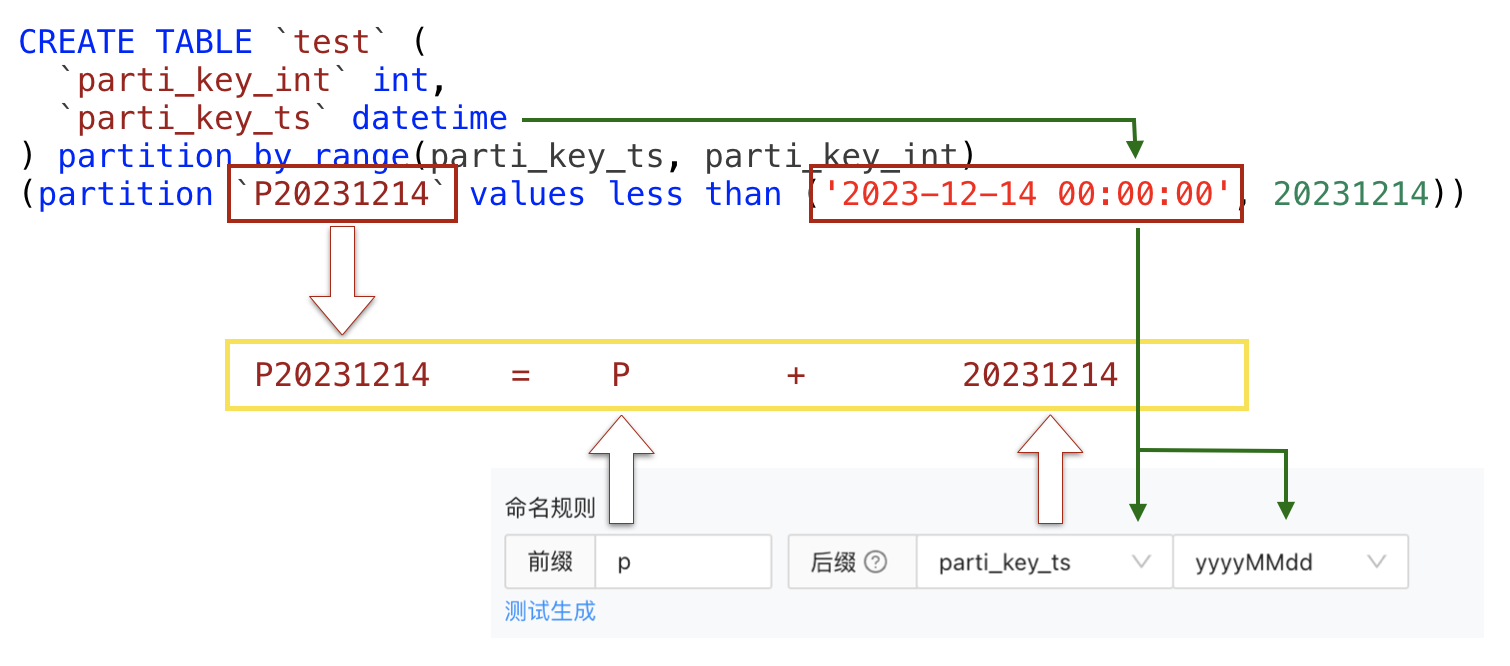
Prefix + suffix strategy: A partition name generated based on this strategy comprises a prefix and a suffix. The prefix is a string constant, and the suffix references the SQL expression value of the specified partitioning key of a time type. You can modify the prefix, suffix, reference time, and output format to generate different partition names.
Notice
This strategy takes effect only for partitioning keys of a time type. Since the partitioning key referenced by the suffix is of a time type, its SQL expression value can be converted into a time value and then formatted and output as the suffix of the partition name.
Custom strategy: This strategy uses a naming expression to generate partition names that meet user requirements. The SQL expression value of the partitioning key can be referenced in the naming expression through
${partitioning key}.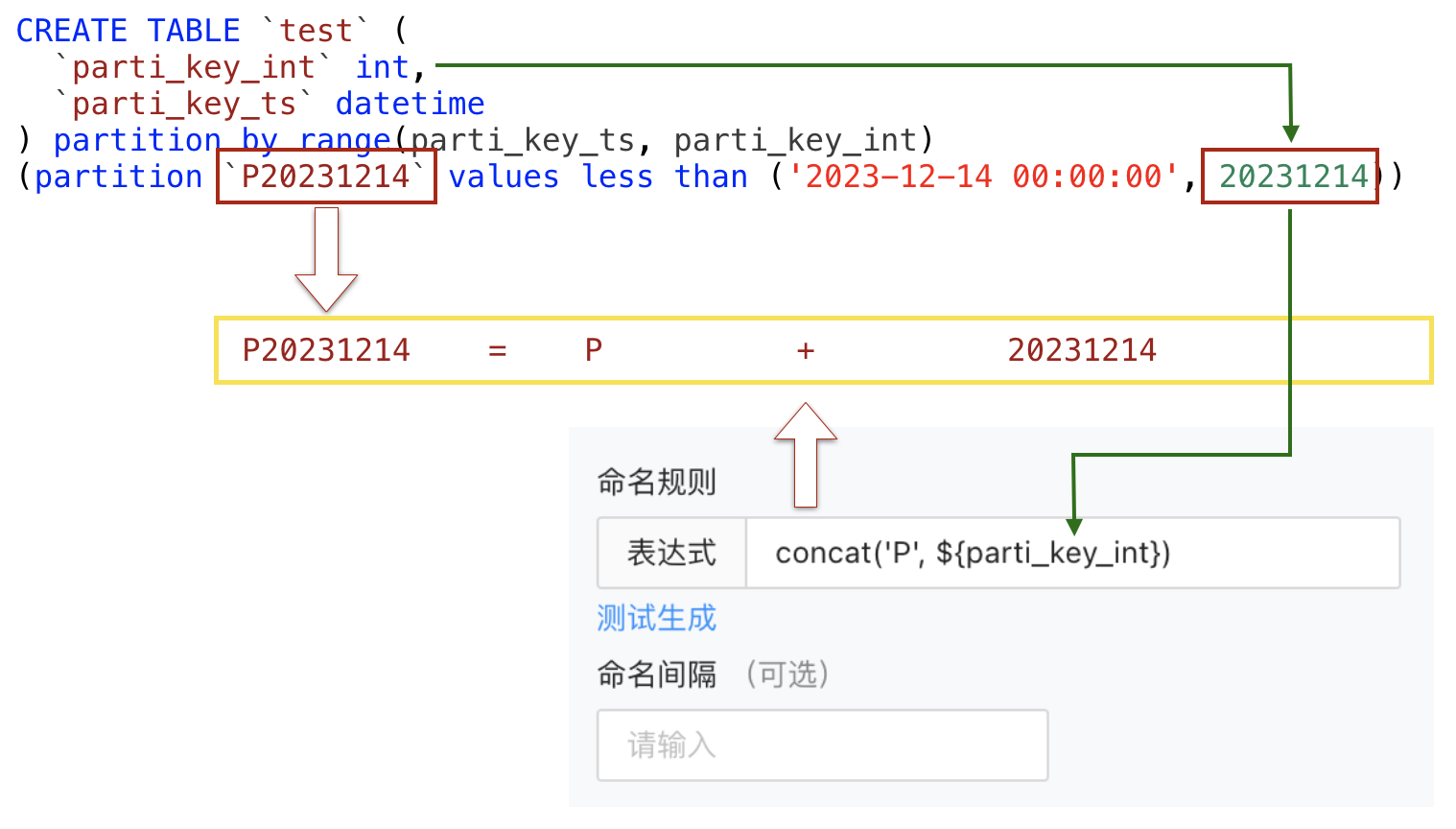
The following quick reference tables list the common expressions provided by ODC for generating partition names. Partitioning keys in the tables must be of the numeric or character type.
Expressions for generating partition names in MySQL mode
| Sample partitioning expression | Naming expression | Preview |
... values less than (..., 2024, ...) |
concat('P', ${Partitioning key}) |
P2024 |
... values less than (..., '2024', ...) |
||
... values less than (..., 202401, ...) |
concat('P', ${Partitioning key}) |
P202401 |
... values less than (..., '202401', ...) |
||
... values less than (..., '2024-01', ...) |
date_format(str_to_date(concat(${Partitioning key}, '-01'), '%Y-%m-%d'), 'P%Y%m') |
P202401 |
date_format(str_to_date(concat(${Partitioning key}, '-01'), '%Y-%m-%d'), 'P%Y_%m') |
P2024_01 | |
... values less than (..., '2024/01', ...) |
date_format(str_to_date(concat(${Partitioning key}, '/01'), '%Y/%m/%d'), 'P%Y%m') |
P202401 |
date_format(str_to_date(concat(${Partitioning key}, '/01'), '%Y/%m/%d'), 'P%Y_%m') |
P2024_01 | |
... values less than (..., 20240101, ...) |
concat('P', ${Partitioning key}) |
P20240101 |
... values less than (..., '20240101', ...) |
||
... values less than (..., '2024-01-01', ...) |
date_format(str_to_date(${Partitioning key}, '%Y-%m-%d'), 'P%Y%m%d') |
P20240101 |
date_format(str_to_date(${Partitioning key}, '%Y-%m-%d'), 'P%Y_%m_%d') |
P2024_01_01 | |
... values less than (..., '2024/01/01', ...) |
date_format(str_to_date(${Partitioning key}, '%Y/%m/%d'), 'P%Y%m%d') |
P20240101 |
date_format(str_to_date(${Partitioning key}, '%Y/%m/%d'), 'P%Y_%m_%d') |
P2024_01_01 | |
... values less than (..., '2024-01-01 00:00:00', ...) |
date_format(str_to_date(${Partitioning key}, '%Y-%m-%d %H:%i:%s'), 'P%Y%m%d') |
P20240101 |
date_format(str_to_date(${Partitioning key}, '%Y-%m-%d %H:%i:%s'), 'P%Y_%m_%d') |
P2024_01_01 | |
... values less than (..., '2024/01/01 00:00:00', ...) |
date_format(str_to_date(${Partitioning key}, '%Y/%m/%d %H:%i:%s'), 'P%Y%m%d') |
P20240101 |
date_format(str_to_date(${Partitioning key}, '%Y/%m/%d %H:%i:%s'), 'P%Y_%m_%d') |
P2024_01_01 | |
... values less than (..., 1709222400, ...) Note: timestamp, in seconds |
date_format(from_unixtime(${Partitioning key}), 'P%Y') |
P2024 |
date_format(from_unixtime(${Partitioning key}), 'P%Y%m') |
P202401 | |
date_format(from_unixtime(${Partitioning key}), 'P%Y_%m') |
P2024_01 | |
date_format(from_unixtime(${Partitioning key}), 'P%Y%m%d') |
P20240101 | |
date_format(from_unixtime(${Partitioning key}), 'P%Y_%m_%d') |
P2024_01_01 |
Expressions for generating partition names in Oracle mode
| Sample partitioning expression | Naming expression | Preview |
... values less than (..., 2024, ...) |
concat('P', ${Partitioning key}) |
P2024 |
... values less than (..., '2024', ...) |
||
... values less than (..., 202401, ...) |
concat('P', ${Partitioning key}) |
P202401 |
... values less than (..., '202401', ...) |
||
... values less than (..., '2024-01', ...) |
TO_CHAR(TO_DATE(CONCAT(${Partitioning key}, '-01'), 'YYYY-MM-DD'), '"P"YYYYMM') |
P202401 |
TO_CHAR(TO_DATE(CONCAT(${Partitioning key}, '-01'), 'YYYY-MM-DD'), '"P"YYYY_MM') |
P2024_01 | |
... values less than (..., '2024/01', ...) |
TO_CHAR(TO_DATE(CONCAT(${Partitioning key}, '/01'), 'YYYY/MM/DD'), '"P"YYYYMM') |
P202401 |
TO_CHAR(TO_DATE(CONCAT(${Partitioning key}, '/01'), 'YYYY/MM/DD'), '"P"YYYY_MM') |
P2024_01 | |
... values less than (..., 20240101, ...) |
concat('P', ${Partitioning key}) |
P20240101 |
... values less than (..., '20240101', ...) |
||
... values less than (..., '2024-01-01', ...) |
TO_CHAR(TO_DATE(${Partitioning key}, 'YYYY-MM-DD'), '"P"YYYYMMDD') |
P20240101 |
TO_CHAR(TO_DATE(${Partitioning key}, 'YYYY-MM-DD'), '"P"YYYY_MM_DD') |
P2024_01_01 | |
... values less than (..., '2024/01/01', ...) |
TO_CHAR(TO_DATE(${Partitioning key}, 'YYYY/MM/DD'), '"P"YYYYMMDD') |
P20240101 |
TO_CHAR(TO_DATE(${Partitioning key}, 'YYYY/MM/DD'), '"P"YYYY_MM_DD') |
P2024_01_01 | |
... values less than (..., '2024-01-01 00:00:00', ...) |
TO_CHAR(TO_DATE(${Partitioning key}, 'YYYY-MM-DD HH24:MI:SS'), '"P"YYYYMMDD') |
P20240101 |
TO_CHAR(TO_DATE(${Partitioning key}, 'YYYY-MM-DD HH24:MI:SS'), '"P"YYYY_MM_DD') |
P2024_01_01 | |
... values less than (..., '2024/01/01 00:00:00', ...) |
TO_CHAR(TO_DATE(${Partitioning key}, 'YYYY/MM/DD HH24:MI:SS'), '"P"YYYYMMDD') |
P20240101 |
TO_CHAR(TO_DATE(${Partitioning key}, 'YYYY/MM/DD HH24:MI:SS'), '"P"YYYY_MM_DD') |
P2024_01_01 |
Partition deletion strategy
Notice
- Deleting partitions from a table that contains a global index will invalidate the global index. Proceed with caution. Choosing to rebuild the global index may cause business issues due to the time-consuming process or online issues resulting from rebuilding failures.
- The option of rebuilding global indexes is provided only in Oracle mode. In MySQL mode, global indexes will be rebuilt by default.
- When you set a partition deletion strategy, you must consider the impact of pre-created partitions and avoid mistakenly deleting historical partitions. For example, assume that partitions are generated for a table by month. To retain partitions generated in the last 12 months, set Number of Reserved Partitions to
12. If the partition creation strategy pre-creates partitions for three months, partitions created in the last nine months and future three months will be actually retained.
A partition deletion strategy applies to existing partitions. At present, only one deletion strategy is supported, where the latest N partitions are retained and others are deleted.
Here is an example:
Create a table named
orderthat contains thep2023_01andp2023_02partitions.CREATE TABLE `order` ( `time` date NOT NULL, `parti_key` int(11), `name` varchar(120) DEFAULT NULL ) partition by range columns(time, parti_key) (partition p2023_01 values less than ('2023-01-01', 20230101), partition p2023_02 values less than ('2023-02-01', 20230201))Configure a partition deletion strategy that retains the latest partition for the
ordertable.The partition deletion statement formed based on the partition deletion strategy will delete the
p2023_01partition.
Considerations
Creating partitions for a table within a table group can fail or break the load balancing status. Proceed with caution when you decide to configure a partition creation strategy for such a table.
Creating partitions for a table within a table group can invalidate the table group, because tables in the same table group must have the same number of partitions.
Deleting partitions from a table that contains a global index will invalidate the global index. Proceed with caution. Choosing to rebuild the global index may cause business issues due to the time-consuming process or online issues resulting from rebuilding failures.
The option of rebuilding global indexes is provided only in Oracle mode. In MySQL mode, global indexes will be rebuilt by default.