







How do I change the session mode in the SQL window?
OceanBase Developer Center (ODC) of a version earlier than V4.2.0 supports the shared session and independent session modes.
Shared session mode: You can open multiple windows in the same connection. The windows share a session. In shared session mode, operations are performed in series. You cannot execute SQL statements in multiple windows in parallel.
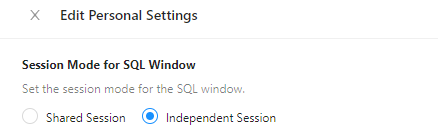
Independent session mode: You can open multiple windows in the same session. Each window corresponds to an independent session. The sessions do not affect each other. In independent session mode, you can execute SQL statements in multiple windows in parallel.
By default, the shared session mode is enabled for the SQL window. You can change the session mode in Preferences or Personal Settings.
Method 1: Log in to ODC. On the homepage of ODC, choose Me > Preferences in the left-side navigation pane.
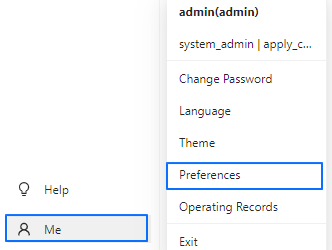
Method 2: In the SQL window of ODC, click the log in to account in the upper-right corner and select Personal Settings from the drop-down list.

On the Edit Personal Settings page, select the session mode of the SQL window.
How do I change the transaction commit mode?
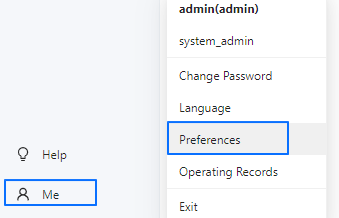
In the left-side navigation pane of the homepage of ODC, choose Me > Preferences in the lower-left corner.
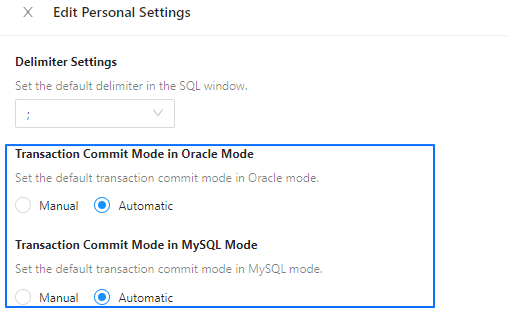
On the Edit Personal Settings page, select the required transaction commit mode.
How do I back up the connection information in ODC?
ODC allows you to back up connection and account information, or migrate the connection or account information from one server to another.
If you are using Web ODC, you can directly migrate or back up the MetaDB created during ODC deployment.
If you are using Client ODC, you can back up the
odc2.0.mv.dbfile in the user directory. If you want to restore the original connection, you can copy this backup file and paste it to the original path.