







This topic provides examples of setting a partition creation strategy and a partition deletion strategy.
Set table partitioning strategies for an OceanBase MySQL data source
The example in this section describes how to set a partition creation strategy and a partition deletion strategy for the order table in the odc_test database of the obmysql4.3.0 data source.
In the SQL window, write an SQL statement to create a table named
order.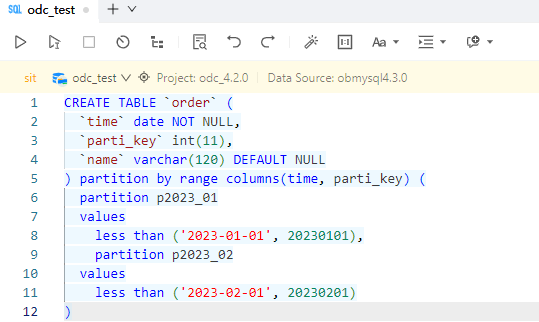
CREATE TABLE `order` (
 `time` date NOT NULL,
 `parti_key` int(11),
 `name` varchar(120) DEFAULT NULL
) partition by range columns(time, parti_key)
(partition p2023_01 values less than ('2023-01-01', 20230101),
partition p2023_02 values less than ('2023-02-01', 20230201))
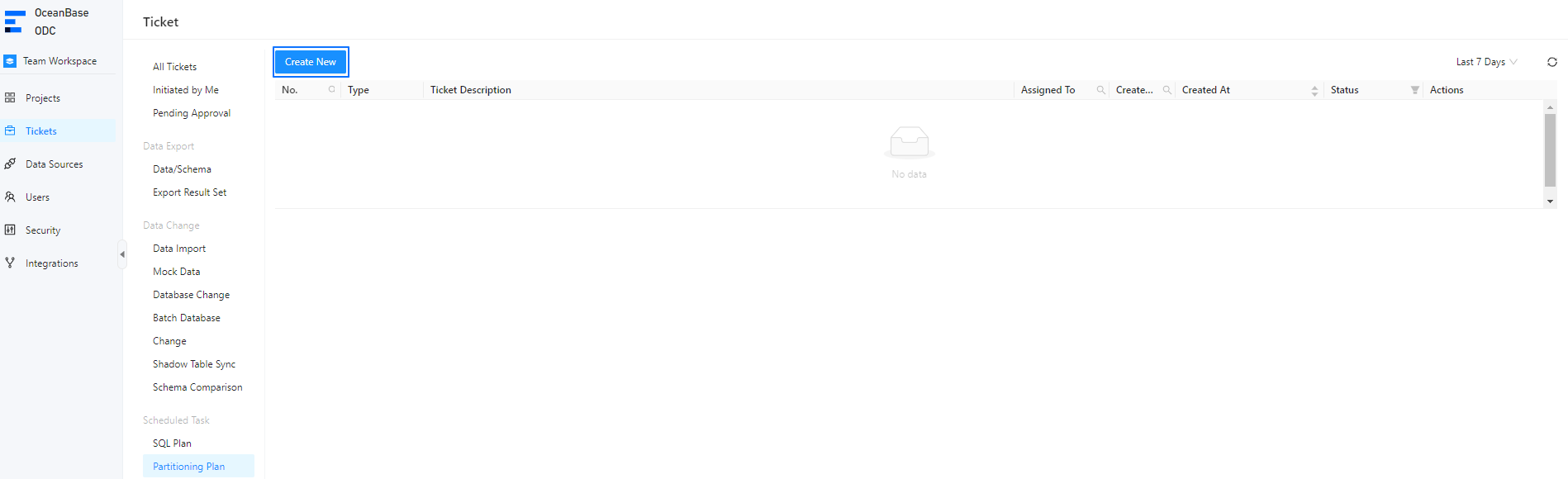
On the Tickets tab of the SQL window, choose Partitioning Plan > Create New.
In the Create Partitioning Plan panel, click
 to set partitioning strategies.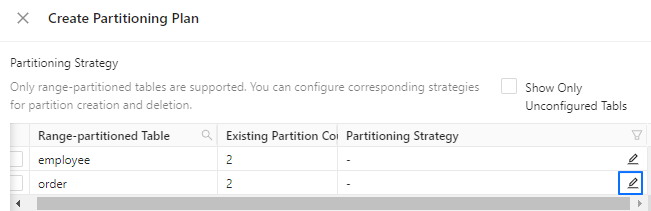
In the Configure partitioning strategy panel, select Creation Strategy and Deletion Strategy under Partitioning Strategy.
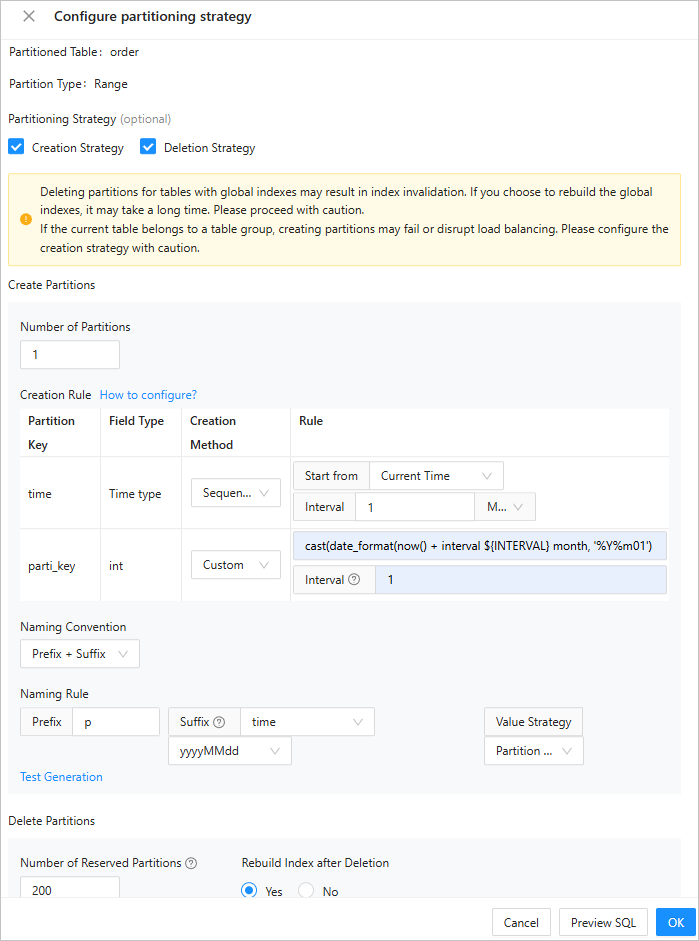
Set the number of partitions to be created.
Configure partition creation rules.
As shown in the preceding figure, you can set a partition creation strategy for the
timeandparti_keypartitioning keys in theordertable.time: The data type of this partitioning key isDATE, which is a time type. Therefore, you can select Sequentially Increase as the creation method. In the example, according to the partition creation strategy for thetimepartitioning key, the current time (the time when the partitioning plan task is run) is used as the reference time and partitions are created at a time interval of 1 month.parti_key: The data type of this partitioning key isINT, which is not a time type. Therefore, you can select only Custom as the creation method. Assume that you need to use the current time as the reference time and create partitions at a time interval of 1 month. According to the description in the Custom partition creation strategy section of the Set partitioning strategies topic, you can perform the following steps to generate the partitioning expression:Obtain the reference time for partition creation: The current time is used as the reference time. Therefore, you can directly use the
now()function.Set the time interval for generating partitions: In the example, the time interval is 1 month. Therefore, you must enter
1in the Interval field in the Rule column in the Creation Rule section, and add an interval expression on the basis of the expression generated in Step 1 to generate the next partition. To be specific, the expression isnow () + interval ${INTERVAL} month, where${INTERVAL}is the value of the Interval field in the Rule column in the Creation Rule section.Generate the partitioning expression of the same data type as the partitioning key: The data type of the
parti_keypartitioning key isINTbut the expression generated in Step 1 is of a time type. Therefore, you must convert the expression into theINTtype. You can convert the expression into a numeric string first and then into theINTtype, namely,cast(date_format(now() + interval ${INTERVAL} month, '%Y%m01') as signed).The fields are described as follows:
CAST(xxx AS SIGNED): converts a field value into an integer.DATE_FORMAT(): converts a field value into the date format.NOW(): returns the current date.INTERVAL ${INTERVAL} MONTH: an expression that specifies an interval by month.${INTERVAL}is a specific syntax for the time interval function in ODC.'%Y%m01': the date format.
Select a partition naming format.
As shown in the preceding figure, select Prefix + Suffix for Naming Convention. This way, the name of a generated partition comprises a fixed string prefix and a time-based variable suffix.
Fixed prefix: You can define a prefix as needed.
Variable suffix: You can select the upper bound of the partition corresponding to the partitioning key of a time type as the suffix of the name of the current partition. You can also select the formatted output format of time and the increment interval of time.
After the configuration, click Test Generation to view the partition name.
In the Delete Partitions section, set the number of partitions to retain and choose whether to rebuild indexes after deletion.
Click Preview SQL in the lower-right corner of the Configure partitioning strategy panel to view the SQL statement generated by the configured partitioning strategies.

Click OK.
Set table partitioning strategies for an OceanBase Oracle data source
The example in this section describes how to set a partition creation strategy and a partition deletion strategy for the order table in the OBORACLE database of the oboracle_430 data source.
In the SQL window, write an SQL statement to create a table named
order.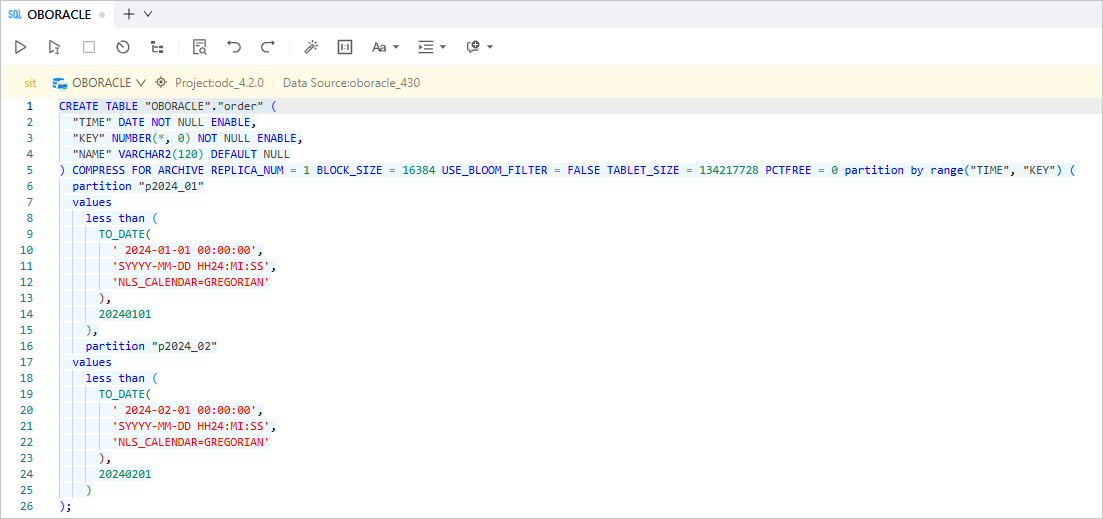
CREATE TABLE "OBORACLE"." order" (
"TIME" DATE NOT NULL ENABLE,
"KEY" NUMBER(*,0) NOT NULL ENABLE,
"NAME" VARCHAR2(120) DEFAULT NULL
) COMPRESS FOR ARCHIVE REPLICA_NUM = 1 BLOCK_SIZE = 16384 USE_BLOOM_FILTER = FALSE TABLET_SIZE = 134217728 PCTFREE = 0
partition by range("TIME", "KEY")
(partition "p2024_01" values less than (TO_DATE(' 2024-01-01 00:00:00', 'SYYYY-MM-DD HH24:MI:SS', 'NLS_CALENDAR=GREGORIAN'),20240101),
partition "p2024_02" values less than (TO_DATE(' 2024-02-01 00:00:00', 'SYYYY-MM-DD HH24:MI:SS', 'NLS_CALENDAR=GREGORIAN'),20240201));
On the Tickets tab of the SQL window, choose Partitioning Plan > Create New.
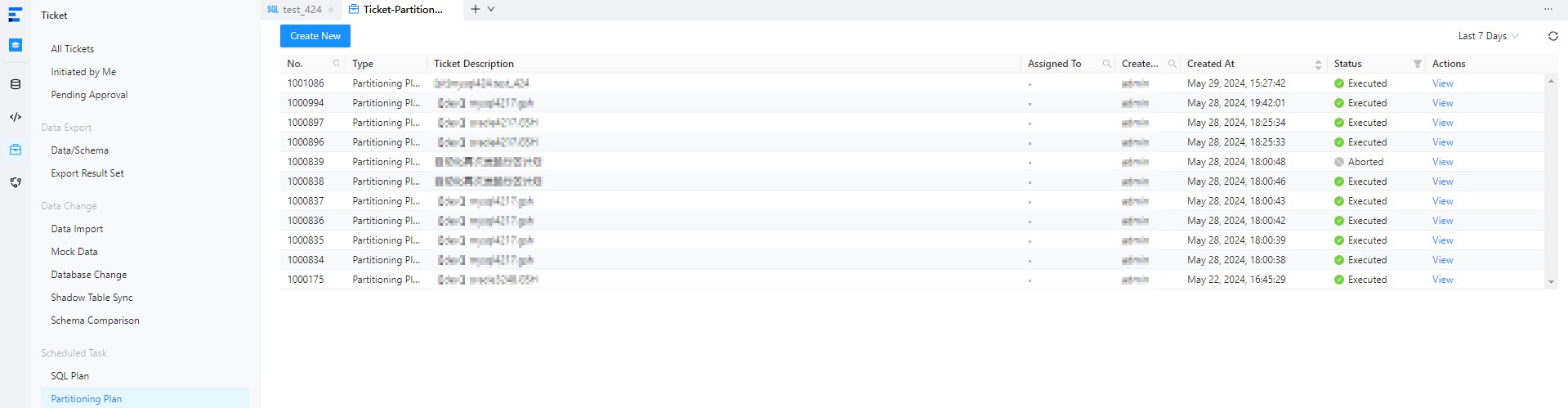
In the Create Partitioning Plan panel, click
to set partitioning strategies.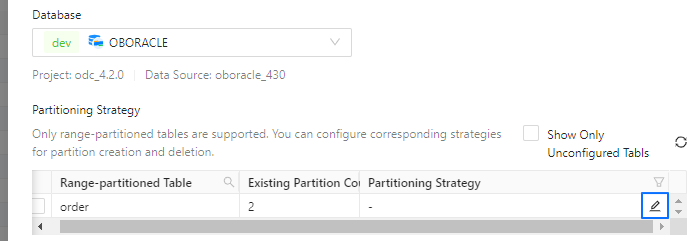
In the Configure partitioning strategy panel, select Creation Strategy and Deletion Strategy under Partitioning Strategy.
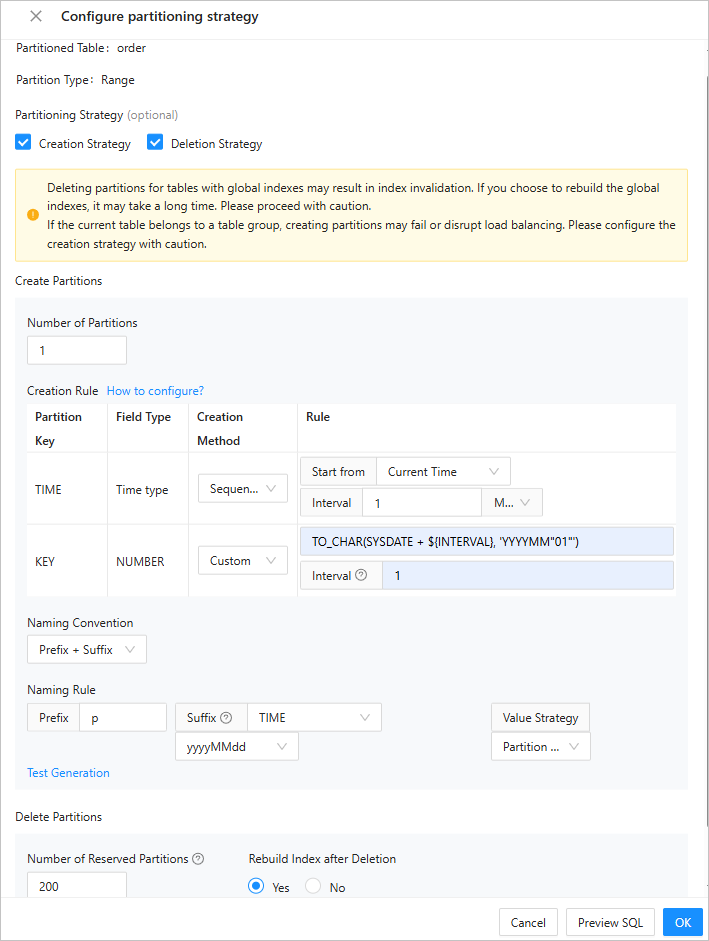
Set the number of partitions to be created.
Configure partition creation rules.
As shown in the preceding figure, you can set a partition creation strategy for the
TIMEandKEYpartitioning keys in theordertable.TIME: The data type of this partitioning key isDATE, which is a time type. Therefore, you can select Sequentially Increase as the creation method. In the example, according to the partition creation strategy for theTIMEpartitioning key, the current time (the time when the partitioning plan task is run) is used as the reference time and partitions are created at a time interval of 1 month.KEY: The data type of this partitioning key isNUMBER, which is not a time type. Therefore, you can select only Custom as the creation method. Assume that you need to use the current system time as the reference time and create partitions at a time interval of 1 month. According to the description in the Custom partition creation strategy section of the Set partitioning strategies topic, you can perform the following steps to generate the partitioning expression:Obtain the reference time for partition creation: The current time is used as the reference time. Therefore, you can directly use the
sysdatefunction.Set the time interval for generating partitions: In the example, the time interval is 1 month. Therefore, you must enter
NUMTOYMINTERVAL(1, 'MONTH')in the Interval field in the Rule column in the Creation Rule section, and add an interval expression on the basis of the expression generated in Step 1 to generate the next partition. To be specific, the expression isSYSDATE + ${INTERVAL}, where${INTERVAL}is the value of the Interval field in the Rule column in the Creation Rule section.Generate the partitioning expression of the same data type as the partitioning key: The data type of the
KEYpartitioning key isNUMBERbut the expression generated in Step 1 is of a time type. Therefore, you must convert the expression into theNUMBERtype. You can convert the expression into a numeric string first and then into theNUMBERtype, namely,TO_CHAR(SYSDATE + ${INTERVAL}, 'YYYYMM"01"').The fields are described as follows:
TO_CHAR: converts a field value into the character type.SYSDATE: returns the current system time.YYYYMM"01": the date format.
Select a partition naming format.
As shown in the preceding figure, select Prefix + Suffix for Naming Convention. This way, the name of a generated partition comprises a fixed string prefix and a time-based variable suffix.
Fixed prefix: You can define a prefix as needed.
Variable suffix: You can select the upper bound of the partition corresponding to the partitioning key of a time type as the suffix of the name of the current partition. You can also select the formatted output format of time and the increment interval of time.
After the configuration, click Test Generation to view the partition name.
In the Delete Partitions section, set the number of partitions to retain and choose whether to rebuild indexes after deletion.
Click Preview SQL in the lower-right corner of the Configure partitioning strategy panel to view the SQL statement generated by the configured partitioning strategies.

Click OK.