







Background information
What is a bastion host?
A bastion host is an O&M security auditing system. To safeguard your network and data from intrusion and damage, you can integrate a bastion host with OceanBase Deployer Center (ODC). This way, users and O&M personnel can access ODC only from the bastion host, and their operations in ODC are monitored and recorded.
What is ODC?
ODC is an enterprise-level database development platform tailored for OceanBase Database. ODC is connected to OceanBase Database in MySQL or Oracle mode. It also provides database developers with various features, such as daily development operations, WebSQL-based workspace, SQL diagnostics, session management, and data import and export. ODC adopts the mature browser/server architecture, which supports cross-platform capabilities and is lightweight and easy to deploy. ODC also provides a client version to help individual developers get started with OceanBase. It also improves the collaboration efficiency between developers and database administrators (DBAs).
Scenarios
ODC is provided in two forms: Client ODC and Web ODC.
Client ODC supports Windows and macOS.
Web ODC supports x86 and ARM architectures.
You can integrate a bastion host with Web ODC, which has a built-in account system. You must configure an external account service for successful integration. The following table describes the scenarios supported by Web ODC.
Supported scenarios |
Description |
|---|---|
| Redirection to the login page | On the login page, you need to enter the account and password to log in to ODC. The administrator can assign privileges by using a public connection and do not need to let regular users know the database account and password. |
| Redirection to the connection list page | Account integration must be configured. The administrator can assign privileges by using a public connection and do not need to let regular users know the database account and password. |
| Redirection to a temporary connection | Account integration must be configured, and the redirection parameters must include database connection information. |
Technical mechanism
Redirections based on a bastion host
Redirections involve many steps, such as parameter passing, account integration, and connection creation. These steps are handled internally by ODC. The caller only needs to include the required parameters in the URL that redirects to ODC.
Account integration and security authentication
The following redirection security mechanism is designed to avoid the leakage of URL parameters, which results in privilege vulnerabilities.
You can specify the URL encryption algorithm and encryption key.
When you deploy the bastion host, make sure that the bastion host and ODC use the same key for parameter passing.
Valid values for the encryption algorithm parameter are
RAW, which specifies not to encrypt the URL, andAES256_BASE64, which specifies to use the AES-256 algorithm. The specified key is used as the seed to generate the actual key secret.
The redirection parameters contain the token for accessing the account query API. ODC uses the token to verify the account identity.
The token can be used only once.
When the request is redirected to ODC, ODC calls the user query API to verify whether the token is valid, and to obtain the account information, such as the username and nickname of the user. If the query of account information succeeds, the user is automatically logged in to ODC. If the queried account does not exist, ODC automatically creates the account. If the query fails, the automatic login fails.
Maintenance of connection settings
The redirection URL can contain connection configuration parameters.
If the redirection URL contains connection configuration parameters, ODC automatically creates a temporary connection and enables the connection to direct the user to the SQL console.
If the redirection URL does not contain connection configuration parameters, ODC directs the user to the connection list page.
Client ODC allows users to specify connection configuration parameters.
Web ODC allows the administrator to configure a public connection and assign privileges to regular users.
Call method
The URL syntax is as follows:
${odc_site}/#/gateway/${param}
Here is an example:
If the access address of ODC is http://xxx.xxx.x.x:2883, and the parameter is abc, the redirection URL is http://xxx.xxx.x.x:2883/#/gateway/abc.
The sample code is as follows:
// A web call in JavaScript is redirected to ODC.
window.open('xxx.xxx.x.x:2883/#/gateway/' + param)

// Evoke the Chrome browser.
chrome.exe --new-window xxx.xxx.x.x:2883/#/gateway/param
Parameters
The redirection URL is a Base64-encoded JSON string.
{
 action: string, // The call type.
  data: any, // The data parameter in a call. If parameter encryption is enabled, parameters are serialized to a string. Otherwise, parameters are directly passed.
  encrypt: boolean // Specifies whether to encrypt the parameters.
}
The following table describes the three parts of the ODC call parameter ODCData.
Parameter |
Description |
|---|---|
| action | The call type. |
| data | The data parameter in a call. If parameter encryption is enabled, parameters are serialized to a string. Otherwise, parameters are directly passed. |
| encrypt | Specifies whether to encrypt the parameters. |
Call type
action: string
Valid value |
Description |
|---|---|
| start | Starts ODC. |
| newTempSession | Creates a connection. |
Data parameter in a call
data: any
action |
Value type |
Value |
Description |
|---|---|---|---|
| start | JSON | accountVerifyToken string | The account login token, which is optional.
|
| newTempSession | JSON | accountVerifyToken string | The login token. This parameter is required if you access ODC by using an external account. |
| newTempSession | JSON | type 'OB_ORACLE' | 'OB_MYSQL' | The database type. This parameter is required. |
| newTempSession | JSON | clusterName string | The cluster name. This parameter is optional, and does not take effect if the unionDbUser parameter is specified. |
| newTempSession | JSON | username string | The username of the database user. This parameter is required if the unionDbUser parameter is not specified. |
| newTempSession | JSON | tenantName string | The tenant name. This parameter is required if the unionDbUser parameter is not specified. |
| newTempSession | JSON | unionDbUser string | A string that combines the database username, tenant name, and cluster name. If you specify this parameter, you do not need to specifically specify information about the cluster, tenant, or user. Examples: username@tenant#clusterName and obdemo:obmysql:username. |
| newTempSession | JSON | defaultSchema string | The default database. In Oracle mode, the username is used by default. |
| newTempSession | JSON | host string | The host IP address or domain name. This parameter is required. |
| newTempSession | JSON | password string | The database password. This parameter is required. |
| newTempSession | JSON | port string | The port number. This parameter is required. |
| newTempSession | JSON | sysTenantUsername string | The sys tenant account. This parameter is optional. |
| newTempSession | JSON | sysTenantPassword string | The sys tenant password. This parameter is optional. |
| newTempSession | JSON | properties map | Contains custom connection configuration parameters for extended features of the integration solution. ODC cannot parse the values of parameters in the properties parameter. This parameter is optional. |
Parameter encryption
encrypt: boolean
It specifies whether to encrypt the data parameters.
true: Specifies to encrypt the data parameters.false: specifies not to encrypt the data parameters.
Procedure
Step 1: Deploy Web ODC
You can integrate a bastion host with Web ODC V4.2.3 or later. For more information, see Deploy Web ODC.
For deployment requirements of Web ODC, see Limitations.
Step 2: Emulate the bastion host account service
ODC queries user account information by calling the account service API of the integrated bastion host. You must configure information of this API in the ODC MetaDB.
In this section, Moco is used to emulate the bastion host service, which receives requests from ODC and returns the user information.
Specify the configuration file, and use the JAR package to start Moco and emulate the web service.
Here is a sample Moco configuration file:
[
    {
        "description": "query bastion user 1",
        "request": {
            "method": "post",
            "uri": "/api/queryUser",
            "text": {
                "json": "{\"accountVerifyToken\":\"token_1\"}"
            }
        },
        "response": {
            "json": {
                "resultCode": 0,
                "userCode": "test_bastion_account_1",
                "userName": "test_account-1"
            }
        }
    },
    {
        "description": "query bastion user 2",
        "request": {
            "method": "post",
            "uri": "/api/queryUser",
            "text": {
                "json": "{\"accountVerifyToken\":\"token_2\"}"
            }
        },
        "response": {
            "json": {
                "resultCode": 0,
                "userCode": "test_bastion_account_2",
                "userName": "test_account-2"
            }
        }
    }
]
The configuration file contains sample responses to two requests, with which you can query two different bastion host users separately.
The
accountVerifyTokenparameter of the two frontend call requests is assigned the valuestoken_1andtoken_2, respectively, and information about the users namedtest_bastion_account_1andtest_bastion_account_2is returned.Log in to a server whose IP address is xx.xx.xx.xx, which will be used for the bastion host configuration. Run the following command to start the Moco service from the ***** port of the server.
nohup java -jar moco-runner-1.4.0-standalone.jar http -p ***** -c moco-bastion.json &
Step 3: Configure the bastion host integration with ODC
Run the following script to modify the metadata for bastion host integration.
Notice
Modifications to some parameters take effect after ODC is restarted.
-- Enable the integrated bastion host.
update `config_system_configuration` set `value` = 'true' where `key` = 'odc.integration.bastion.enabled';

-- Specify not to enable parameter encryption.
update `config_system_configuration` set `value` = 'false' where `key` = 'odc.integration.bastion.encryption.enabled';
update `config_system_configuration` set `value` = 'RAW' where `key` = 'odc.integration.bastion.encryption.algorithm';
update `config_system_configuration` set `value` = '' where `key` = 'odc.integration.bastion.encryption.secret';

-- Enable automatic login.
update `config_system_configuration` set `value` = 'true' where `key` = 'odc.integration.bastion.account.auto-login-enabled';

-- Configure the account query API of the bastion host. The Moco service configured in Step 2 is used as an example. Note that the API configuration must match the Moco configuration.
update `config_system_configuration` set `value` = 'POST' where `key` = 'odc.integration.bastion.account.query.request-method';
update `config_system_configuration` set `value` = 'http://xx.xx.xx.xx:*****/api/queryUser' where `key` = 'odc.integration.bastion.account.query.request-url';
update `config_system_configuration` set `value` = 'Content-Type=application/json;charset=UTF-8,Accept=application/json' where `key` = 'odc.integration.bastion.account.query.request-headers';
update `config_system_configuration` set `value` = '{"accountVerifyToken":"${account_verify_token}"}' where `key` = 'odc.integration.bastion.account.query.request-body';
update `config_system_configuration` set `value` = 'false' where `key` = 'odc.integration.bastion.account.query.request-encrypted';
update `config_system_configuration` set `value` = '[''resultCode''] == 0' where `key` = 'odc.integration.bastion.account.query.response-body-valid-expression';
update `config_system_configuration` set `value` = '[''userCode'']' where `key` = 'odc.integration.bastion.account.query.response-body-username-extract-expression';
update `config_system_configuration` set `value` = '[''userName'']' where `key` = 'odc.integration.bastion.account.query.response-body-nickname-extract-expression';
update `config_system_configuration` set `value` = 'false' where `key` = 'odc.integration.bastion.account.query.response-encrypted';

-- Configure HTTP connection settings.
update `config_system_configuration` set `value` = '5' where `key` = 'odc.integration.bastion.account.http.connect-timeout-seconds';
update `config_system_configuration` set `value` = '20' where `key` = 'odc.integration.bastion.account.query.read-timeout-seconds';

-- Configure GET connection settings.
update `config_system_configuration` set `value` = 'http://xx.xx.xx.xx:*****/api/queryUser2?accountVerifyToken=${account_verify_token}' where `key` = 'odc.integration.bastion.account.query.request-url';
update `config_system_configuration` set `value` = '' where `key` = 'odc.integration.bastion.account.query.request-body';
The system parameters of ODC are maintained in the config_system_configuration table in the ODC MetaDB, and are classified into two types:
Account integration parameters for Web ODC. The keys of these parameters are prefixed with
odc.integration.bastion..The connection retention policy parameter. The key of the parameter is prefixed with
odc.connect.temp..
Account integration parameters
Key |
Default value |
Description |
|---|---|---|
| odc.integration.bastion.enabled | false | Specifies whether to enable the integrated bastion host. |
| odc.integration.bastion.encryption.enabled | false | Specifies whether to encrypt the bastion host integration parameters. |
| odc.integration.bastion.encryption.algorithm | RAW | The algorithm that encrypts the bastion host integration parameters. Valid values: RAW and AES256_BASE64. The default value RAW specifies not to encrypt the parameters. |
| odc.integration.bastion.encryption.secret | <empty> | The key for encrypting the bastion host integration parameters. This parameter does not take effect if you specify RAW for the encryption algorithm. The data parameters are encrypted by using this key and then passed, and ODC uses this key to decrypt the data parameters. |
| odc.integration.bastion.account.auto-login-enabled | false | Specifies whether to enable automatic login. This parameter is required if you use a bastion host for account integration, and is not if you use single sign-on (SSO) for account integration. |
| odc.integration.bastion.account.query.request-url | <empty> | The URL for calling the account query API. When a bastion host is integrated, ODC uses the URL to call the external account service and verify the account information. The template variable ${account_verify_token} can be referenced as the value. |
| odc.integration.bastion.account.query.request-method | POST | The method for calling the account query API. When a bastion host is integrated, ODC uses the URL to call the external account service and verify the account information. Valid values: GET, POST, PUT, and PATCH. |
| odc.integration.bastion.account.query.request-headers | <empty> | The headers of the request for calling the account query API. This parameter is optional. You can specify multiple headers in the format of Header1=Value1,Header2=Value2, or reference the template variable ${account_verify_token} as the value. |
| odc.integration.bastion.account.query.request-encrypted | true | Specifies whether to encrypt the request body when sending the request. The default value true indicates to encrypt the request body. |
| odc.integration.bastion.account.query.response-encrypted | true | Specifies whether to encrypt the response body. The default value true indicates to encrypt the response body. |
| odc.integration.bastion.account.query.request-body | <empty> | The body of the request for calling the account query API. The template variable ${account_verify_token} can be referenced as the value. If you do not specify this parameter, the request does not contain a body. |
| odc.integration.bastion.account.query.response-body-valid-expression | true | The expression that validates the response body if the account query API is called. The default value true indicates not to validate the response body. |
| odc.integration.bastion.account.query.response-body-username-extract-expression | <empty> | The expression that extracts the account username from the response body of the account query API. |
| odc.integration.bastion.account.query.response-body-nickname-extract-expression | <empty> | The expression that extracts the account nickname from the response body of the account query API. |
Temporary connection retention parameter
Key |
Default value |
Description |
|---|---|---|
| odc.connect.temp.expire-after-inactive-interval-seconds | 86400 | Specifies the retention period of an inactive temporary connection, in seconds. |
Step 4: Log in to ODC from the integrated bastion host
In this example, the value of the accountVerifyToken parameter is token_1 and a connection is automatically created to direct the user to the SQL development window. The nickname and username corresponding to token_1 are test_account-1 and test_bastion_account_1, respectively.
Go to the code editor for generating ODC gateway parameters, specify the information, click Generate, and then copy the generated parameter string.
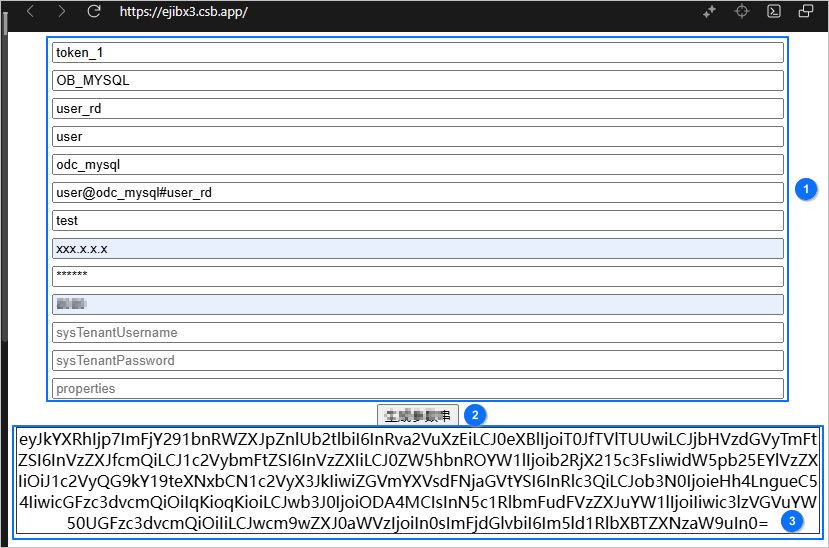
Concatenate the parameters to form a URL based on the syntax
${odc_site}/#/gateway/${param}. Here is an example:http://xx.xx.xx.xx:8080/#/gateway/eyJkYXRhIjp7ImFjY291bnRWZXJpZnlUb2tlbiI6InRva2VuXzEiLCJ0eXBlIjoiT0JfTVlTUUwiLCJjbHVzdGVyTmFtZSI6InVzZXJfcmQiLCJ1c2VybmFtZSI6InVzZXIiLCJ0ZW5hbnROYW1lIjoib2RjX215c3FsIiwidW5pb25EYlVzZXIiOiJ1c2VyQG9kY19teXNxbCN1c2VyX3JkIiwiZGVmYXVsdFNjaGVtYSI6InRlc3QiLCJob3N0IjoieHh4LngueC54IiwicGFzc3dvcmQiOiIqKioqKioiLCJwb3J0IjoiODA4MCIsInN5c1RlbmFudFVzZXJuYW1lIjoiIiwic3lzVGVuYW50UGFzc3dvcmQiOiIiLCJwcm9wZXJ0aWVzIjoiIn0sImFjdGlvbiI6Im5ld1RlbXBTZXNzaW9uIn0=Open a browser and enter the obtained URL to log in to ODC.
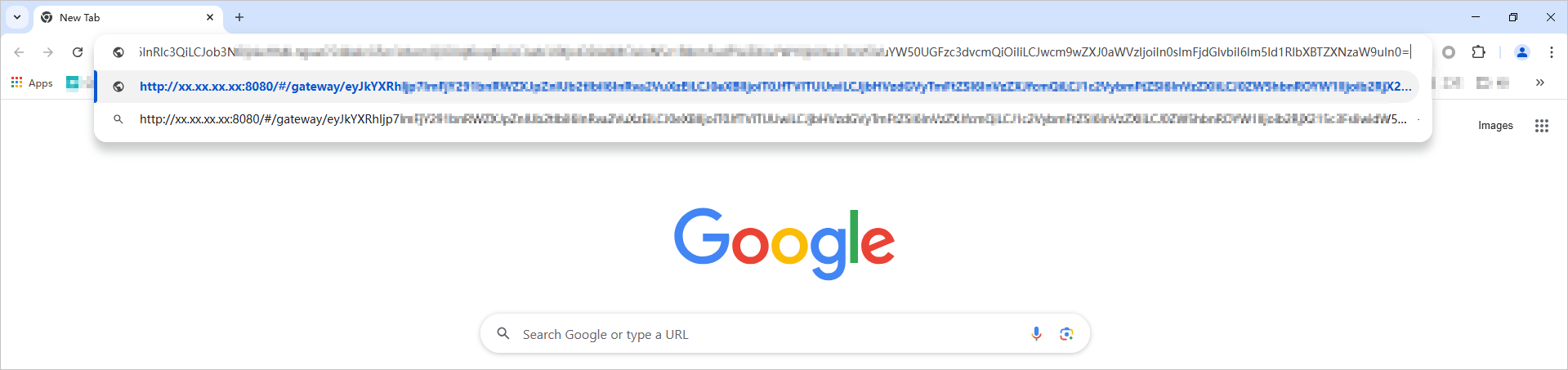
Examples
Scenario 1: Redirection to the connection list page
This scenario does not involve database connection configuration, but only automatic login to ODC.
The sample JavaScript call code is as follows:
// Construct the data parameter.
const data = {
 accountVerifyToken: 'token_value'
}

// Construct the ODC call parameter.
const ODCData = {
 action: 'start',
  data: encrypt(JSON.stringify(data)), // Encrypt data.
  encrypt: true
}

// Convert JSON type data into a Base64 string.
const param = base64(JSON.stringify(ODCData));

// Call Web ODC on a web page.
window.open('xxx.xxx.x.x:2883/#/gateway/' + param)

// Evoke the Chrome browser.
chrome.exe --new-window xxx.xxx.x.x:2883/#/gateway/param
Scenario 2: Redirection to an automatically created temporary connection
If the redirection URL contains connection configuration parameters, ODC automatically creates a temporary connection and enables the connection to direct the user to the SQL development window.
Assume that the database connection settings are as follows:
Database type: OceanBase Database in Oracle mode
Host IP address: 'xxx.xxx.x.x'
Port: 2883
Username: '****'
Password: '*****'
Tenant name: 'oracle'
Default database name: 'default'
The sample JavaScript call code is as follows:
// Construct the data parameter.
// ODC cannot parse the values of parameters in the properties parameter, and must confirm the information with the integrated approval and auditing systems.
const data = {
  accountVerifyToken: 'token_value',
  type: 'OB_ORACLE',
  host: 'xxx.xxx.x.x',
  port: 2883,

  username: 'username',
  password: '****',
  tenantName: 'oracle',
  defaultSchema: 'default',
  properties: {
    accountName: '****',
    dbInstance: '****',
    instanceType: 2,
    ipAddress: '****',
    operateSessionId: '****',
    serviceName: '****',
    userCode: '****',
  }
}

// Construct the ODC call parameter.
const ODCData = {
 action: 'newTempSession',
  data: encrypt(JSON.stringify(data)), // Encrypt data.
  encrypt: true
}

// Convert JSON type data into a Base64 string.
const param = base64(JSON.stringify(ODCData));

// Call Web ODC on a web page.
window.open('xxx.xxx.x.x:2883/#/gateway/' + param)

// Evoke the Chrome browser.
chrome.exe --new-window xxx.xxx.x.x:2883/#/gateway/param
Appendix
AES encryption and decryption
Sample code
Notice
We recommend that you install Oracle JDK 1.8.0_200 or later. Earlier versions do not support 256-bit AES.
package com.oceanbase.odc.example;

import java.nio.charset.StandardCharsets;
import java.security.InvalidAlgorithmParameterException;
import java.security.InvalidKeyException;
import java.security.NoSuchAlgorithmException;
import java.security.SecureRandom;
import java.security.spec.InvalidKeySpecException;
import java.security.spec.KeySpec;
import java.util.Arrays;
import java.util.Base64;
import java.util.Objects;

import javax.crypto.BadPaddingException;
import javax.crypto.Cipher;
import javax.crypto.IllegalBlockSizeException;
import javax.crypto.KeyGenerator;
import javax.crypto.NoSuchPaddingException;
import javax.crypto.SecretKey;
import javax.crypto.SecretKeyFactory;
import javax.crypto.spec.IvParameterSpec;
import javax.crypto.spec.PBEKeySpec;
import javax.crypto.spec.SecretKeySpec;

/**
 * AES encryption and decryption by using Base64
 */
public class AesBase64TextEncryptor {
    private final AesBytesEncryptor encryptDecrypt;

    /**
     * @param key The encryption key string.
     * @param salt The salt value used for generating the key. This parameter is optional. If you do not specify it, salt is not used.
     */
    public AesBase64TextEncryptor(String key, String salt) {
        this.encryptDecrypt = new AesBytesEncryptor(key, salt);
    }

    /**
     * @param key The encryption key string.
     * @param salt The salt value used for generating the key. This parameter is optional.
     * @param keyLength The length of the key.
     */
    public AesBase64TextEncryptor(String key, String salt, int keyLength) {
        this.encryptDecrypt = new AesBytesEncryptor(key, salt, keyLength);
    }

    /**
     * Encryption
     */
    public synchronized String encrypt(String plainText) {
        if (plainText == null) {
            return null;
        }
        byte[] bytes = plainText.getBytes(StandardCharsets.UTF_8);
        byte[] encrypted = encryptDecrypt.encrypt(bytes);
        return base64Encode(encrypted);
    }

    /**
     * Decryption
     */
    public synchronized String decrypt(String encryptedText) {
        if (encryptedText == null) {
            return null;
        }
        byte[] encrypted = base64Decode(encryptedText);
        byte[] decrypt = encryptDecrypt.decrypt(encrypted);
        return new String(decrypt, StandardCharsets.UTF_8);
    }

    private byte[] base64Decode(String right) {
        byte[] bytes = right.getBytes(StandardCharsets.UTF_8);
        return Base64.getDecoder().decode(bytes);
    }

    private String base64Encode(byte[] left) {
        byte[] encoded = Base64.getEncoder().encode(left);
        if (Objects.isNull(encoded)) {
            return null;
        }
        return new String(encoded, StandardCharsets.UTF_8);
    }

    public static class AesBytesEncryptor {

        private static final String FACTORY_INSTANCE = "PBKDF2WithHmacSHA256";
        private static final String CIPHER_INSTANCE = "AES/CBC/PKCS5PADDING";
        private static final String SECRET_KEY_TYPE = "AES";
        private static final String NO_SALT_SECURE_RANDOM_INSTANCE = "SHA1PRNG";

        /**
         * The default length of the key.
         */
        private static final int DEFAULT_KEY_LENGTH = 256;

        /**
         * IV stands for initialization vector.<br>
         * The use of a random IV in Cipher Block Chaining (CBC) mode ensures that a different value is generated each time the same source is encrypted.
         */
        private static final int IV_LENGTH = 16;

        /**
         * More iterations indicate higher encryption and decryption costs, as well as longer time spent on brute force decryption. We recommend that you set a value not less than 1000.
         */
        private static final int ITERATION_COUNT = 1024;

        /**
         * The length of the key.
         */
        private final int keyLength;

        private final SecretKeySpec secretKey;
        private final Cipher encryptor;
        private final Cipher decryptor;

        public AesBytesEncryptor(String key, String salt, int keyLength) {
            Validate.notEmpty(key, "parameter 'key' must not be empty");
            Validate.validState(keyLength > 0, "parameter 'keyLength' must greater than 0");
            this.keyLength = keyLength;
            this.secretKey = newSecretKey(key, salt);
            this.encryptor = createCipher();
            this.decryptor = createCipher();
        }

        public AesBytesEncryptor(String key, String salt) {
            this(key, salt, DEFAULT_KEY_LENGTH);
        }

        public byte[] encrypt(byte[] origin) {
            Validate.notNull(origin, "parameter 'origin' may not be null");
            // Generating a random IV
            SecureRandom random = new SecureRandom();
            byte[] iv = new byte[IV_LENGTH];
            random.nextBytes(iv);
            initCipher(encryptor, Cipher.ENCRYPT_MODE, iv);
            byte[] encrypted = doFinal(encryptor, origin);
            return addIVToCipher(encrypted, iv);
        }

        public byte[] decrypt(byte[] encrypted) {
            Validate.notNull(encrypted, "parameter 'encrypted' may not be null");
            Validate.isTrue(encrypted.length >= IV_LENGTH,
                    "length of parameter 'encrypted' may not less than IV length " + IV_LENGTH);
            byte[] iv = new byte[IV_LENGTH];
            System.arraycopy(encrypted, 0, iv, 0, IV_LENGTH);
            initCipher(decryptor, Cipher.DECRYPT_MODE, iv);
            byte[] original = doFinal(decryptor, encrypted);
            return Arrays.copyOfRange(original, IV_LENGTH, original.length);
        }

        private byte[] doFinal(Cipher cipher, byte[] input) {
            try {
                return cipher.doFinal(input);
            } catch (IllegalBlockSizeException e) {
                throw new IllegalStateException(
                        "Unable to invoke Cipher due to illegal block size", e);
            } catch (BadPaddingException e) {
                throw new IllegalStateException("Unable to invoke Cipher due to bad padding",
                        e);
            }
        }

        private SecretKeySpec newSecretKey(String key, String salt) {
            try {
                if (Objects.isNull(salt) || salt.isEmpty()) {
                    SecureRandom random = SecureRandom.getInstance(NO_SALT_SECURE_RANDOM_INSTANCE);
                    random.setSeed(key.getBytes());

                    KeyGenerator keyGenerator = KeyGenerator.getInstance(SECRET_KEY_TYPE);
                    keyGenerator.init(keyLength, random);

                    SecretKey secretKey = keyGenerator.generateKey();
                    return new SecretKeySpec(secretKey.getEncoded(), SECRET_KEY_TYPE);
                } else {
                    SecretKeyFactory factory = SecretKeyFactory.getInstance(FACTORY_INSTANCE);
                    KeySpec keySpec = new PBEKeySpec(key.toCharArray(), salt.getBytes(), ITERATION_COUNT, keyLength);
                    SecretKey secretKey = factory.generateSecret(keySpec);
                    return new SecretKeySpec(secretKey.getEncoded(), SECRET_KEY_TYPE);
                }
            } catch (

            NoSuchAlgorithmException e) {
                throw new IllegalArgumentException("Not a valid encryption algorithm", e);
            } catch (InvalidKeySpecException e) {
                throw new IllegalArgumentException("Not a valid secret key", e);
            }
        }

        private void initCipher(Cipher cipher, int mode, byte[] iv) {
            try {
                cipher.init(mode, secretKey, new IvParameterSpec(iv));
            } catch (InvalidKeyException e) {
                throw new IllegalArgumentException("Not a valid secret key", e);
            } catch (InvalidAlgorithmParameterException e) {
                throw new IllegalArgumentException("Not a valid encryption algorithm", e);
            }
        }

        private Cipher createCipher() {
            try {
                return Cipher.getInstance(CIPHER_INSTANCE);
            } catch (NoSuchAlgorithmException e) {
                throw new IllegalArgumentException("Not a valid encryption algorithm", e);
            } catch (NoSuchPaddingException e) {
                throw new IllegalStateException("Should not happen", e);
            }
        }

        private byte[] addIVToCipher(byte[] encrypted, byte[] iv) {
            byte[] cipherWithIv = new byte[iv.length + encrypted.length];
            System.arraycopy(iv, 0, cipherWithIv, 0, iv.length);
            System.arraycopy(encrypted, 0, cipherWithIv, iv.length, encrypted.length);
            return cipherWithIv;
        }
    }

    public static class Validate {
        public static <T extends CharSequence> T notEmpty(final T chars, final String message, final Object... values) {
            Objects.requireNonNull(chars, () -> String.format(message, values));
            if (chars.length() == 0) {
                throw new IllegalArgumentException(String.format(message, values));
            }
            return chars;
        }

        public static void validState(final boolean expression, final String message, final Object... values) {
            if (!expression) {
                throw new IllegalStateException(String.format(message, values));
            }
        }

        public static <T> T notNull(final T object, final String message, final Object... values) {
            return Objects.requireNonNull(object, () -> String.format(message, values));
        }

        public static void isTrue(final boolean expression, final String message, final Object... values) {
            if (!expression) {
                throw new IllegalArgumentException(String.format(message, values));
            }
        }
    }
}
Example
package com.oceanbase.odc.example;

import org.junit.Assert;
import org.junit.Test;

public class AesBase64TextEncryptorTest {

    @Test
    public void encryptDecrypt_NoSalt() {
        AesBase64TextEncryptor encryptor = new AesBase64TextEncryptor("1234567890123456_1", null);

        String origin = "abcd1234";
        String encrypt = encryptor.encrypt(origin);
        String decrypt = encryptor.decrypt(encrypt);
        Assert.assertEquals(origin, decrypt);
    }

    @Test
    public void sameKeyTwice_Different() {
        AesBase64TextEncryptor encryptor = new AesBase64TextEncryptor("1234567890123456_1", null);

        String encrypted1 = encryptor.encrypt("123654");
        String encrypted2 = encryptor.encrypt("123654");
        Assert.assertNotEquals(encrypted1, encrypted2);
    }

}