







This topic describes the global inspection feature, including how to view and manage inspection rules and view inspection scripts.
Features
Inspection is an essential method to identify problems in a system and ensure its stable and effective operation. The global inspection feature of OceanBase Cloud Platform (OCP) checks performance of the OceanBase system and its environment based on programmable scripts, and generates reports to expose security risks that cannot be detected by the monitoring or alerting feature. It works in collaboration with the health inspection feature of the cluster.
You can configure inspection rules to enable regular or ad hoc inspections of the partition information, serial number, and parameters of the cluster, and troubleshoot the cluster based on the inspection results to ensure the normal operation of OCP clusters.
If this is your first time to use the inspection feature, take the following steps:
View an inspection script: Select a script as needed. For more information, see Inspection scripts.
Create an inspection rule: Specify the basic information, and select the script selected in Step 1 and scheduling information. For more information, see Create an inspection rule.
View an inspection rule: Click the name of a rule in the list of inspection rules. For more information, see View an inspection rule.
Perform other operations on an inspection rule. For more information, see Initiate an inspection, Modify inspection scheduling, Modify an inspection rule, and Delete an inspection rule.
Inspection rules
An inspection rule defines a template for executing inspection tasks, and specifies the inspection scripts, inspection objects, inspection parameters, risk levels, and scheduling types. An inspection task is executed based on the inspection rules.
On the Inspection Rules tab, you can view the name, inspection scripts, inspection objects, risk level, creator, scheduling type, and scheduling status of an inspection rule. You can also perform routine operations on the inspection rule. For more information, see View an inspection rule, View an inspection script, Create an inspection rule, Initiate an inspection, Modify inspection scheduling, Modify an inspection rule, and Delete an inspection rule.

Parameter |
Description |
|---|---|
| Inspection Rule Name | Click the name of an inspection rule in the Name column. The details page of the rule appears. For more information, see View an inspection rule. |
| Inspection Script | Click the script in the Inspection Script column corresponding to the rule. The details page of the script appears. |
| Objects | You can filter inspection rules by inspection object. |
| Risk Level | Valid values: High Risk, Medium Risk, and Low Risk. |
| Scheduling Type | Valid values: Regular Scheduling, Single Scheduling, and None. |
Inspection scripts
An inspection script describes the general process of inspecting OceanBase Database objects. You can customize some parameters in a template inspection script to meet specific inspection requirements.
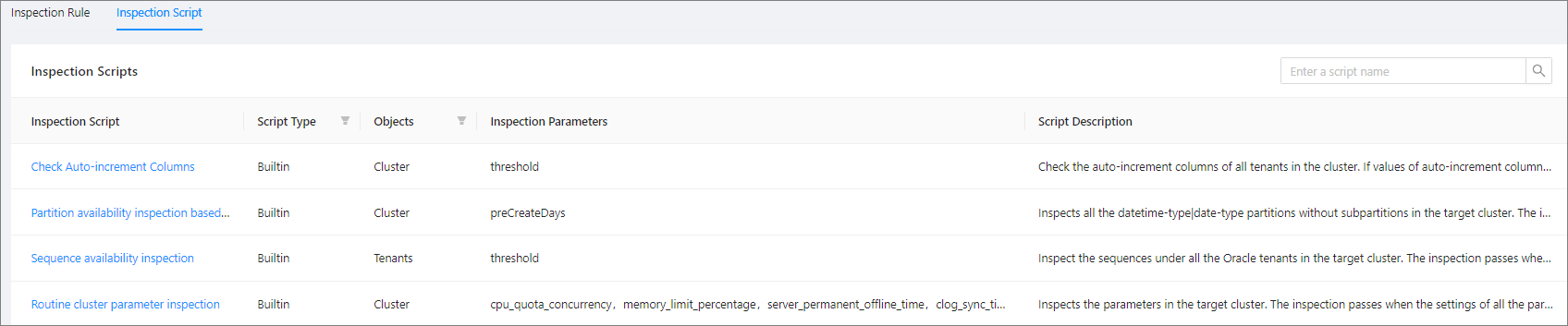
On the Inspection Script tab, you can view the name, type, objects, parameters, and description of an inspection script. At present, OCP provides four default inspection scripts for you to select as needed.
View inspection results
The inspection results are given in a report to indicate potential security risks of the inspection objects. You can choose System Management > Inspection in the left-side navigation pane to view the inspection results in the Inspection Tasks section on the Inspection Rules tab. For more information, see Step 6 in View an inspection rule.