







You can view the tenants, the resource distribution information of all tenants, and monitoring data of top 5 tenants in the cluster that you manage.
Prerequisites
You have all permissions on the cluster and the management permissions on its tenants.
Procedure
Log on to the OceanBase Cloud Platform (OCP) console.
The Cluster Overview page automatically appears.
In the Clusters list, find the target cluster and click its name.
In the left-side navigation pane of the page that appears, click Tenant Management .
You can view the resource distribution on the Tenant Management page.
The resource distribution information includes the CPU utilization, memory usage, and disk usage of each tenant in percentage, as well as the remaining CPU, memory, and disk resources of the system in percentage.

When you move the pointer over a tenant in the pie chart, the chart displays the specific resource usage of the tenant.
Click Create Tenant to create a tenant for the cluster. For more information, see Create a tenant.
The Tenants list displays the basic information of all tenants and contains the following columns: Tenant Name, Replica Distribution, Zone Priority, Tenant Mode, Read-only, Locked, Status, Created On, and Actions.

In the Top 5 Tenants section, you can view the performance metrics of the top 5 tenants by workload, such as the QPS, TPS, SQL response time, transaction response time, sessions, event waiting_count, event waiting_time, capacity_tables, and capacity_partitions. You can also view the monitoring information of the last hour, day, or week as needed.
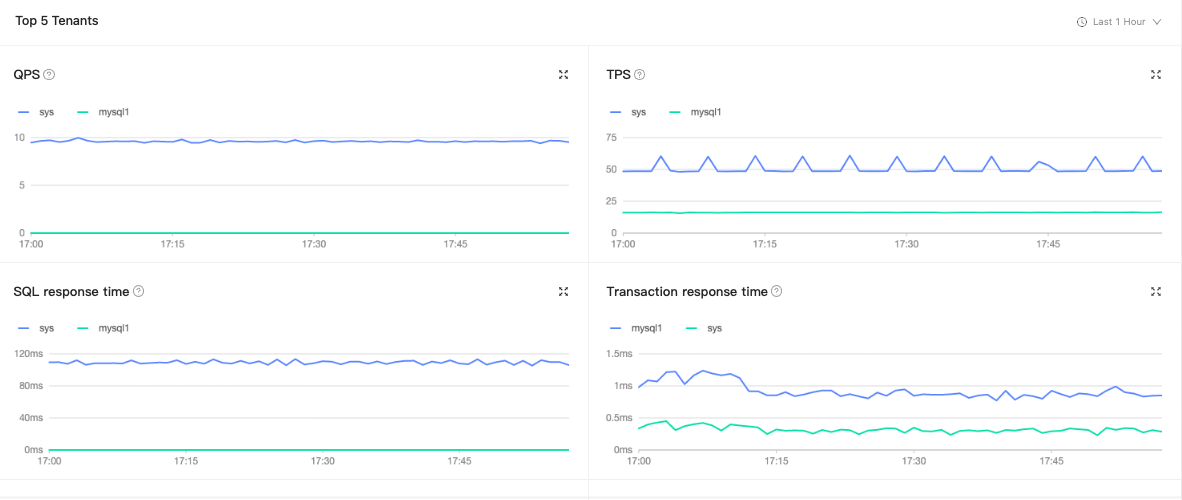 The following table describes the performance monitoring metrics.MetricDescriptionSource
QPS The average number of SQL statements processed per second. v$sysstat TPS The average number of transactions processed per second. v$sysstat SQL response time The SQL response time, in µs. v$sysstat Transaction response time The average time taken by the server to process a transaction, in µs. v$sysstat Sessions The number of active sessions and the number of current sessions. __all_virtual_processlist Event waiting_count The average number of wait events per second. v$system_event Event waiting_time The average wait time of each wait event, in μs. v$system_event Capacity_tables The number of tables. gv$table Capacity_partitions The number of partitions. v$partition