







You can recover a cluster that has a backup.
Prerequisites
You have backed up the cluster to be recovered. For more information, see Back up now.
You cannot recover data for an OceanBase cluster that has been physically backed up from a later version to an earlier version.
Procedure
Log on to the OceanBase Cloud Platform (OCP) console.
Go to the Initiate Recovery page by using one of the following methods.
Method 1: Initiate recovery on the Recovery page.
In the left-side navigation pane, choose Backup & Recovery > Recovery .
On the Recovery page, click Initiate Recovery in the upper-right corner.
Method 2: Initiate recovery on the O&M page of a cluster.
In the left-side navigation pane, click Clusters to go to the Cluster Overview page.
Click the target cluster in Clusters or Resource Usage to go to the O&M page of the cluster.
In the left-side navigation pane, click Backup & Recovery .
On the Backup & Recovery page of the cluster, click Initiate Recovery .
Note
You cannot recover the cluster by using Method 2 in the following circumstances:
The cluster is not in the Running state.
The cluster does not have a backup strategy.
OCP of this version does not support the recovery of clusters without backup strategies by using Method 2.
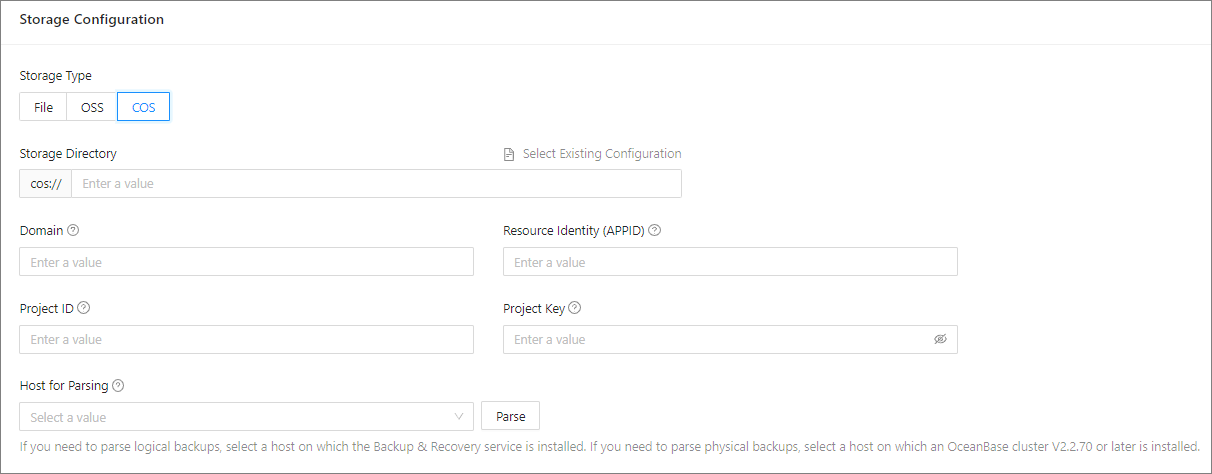
(Optional) If you use Method 1, specify the storage configuration fields, or click Select Existing Configuration .
 ParameterDescription
Storage Type You can select one of the following media: - File: Network File System (NFS) media.
- OSS: Alibaba Cloud Object Storage Service (OSS) is supported only in OceanBase Database V2.2.76 and later.
- COS: Tencent Cloud Object Storage (COS) is supported only in OceanBase Database V2.2.77 BP2 and later.
Storage Directory Select the directory in which the backup files are stored. - You can click Select Existing Configuration to automatically populate the following fields: Domain , User , AccessKey Pair , and Host for Parsing .
- You can also manually specify the fields.
Domain Enter the domain name of the cloud storage of backup files. - If you select OSS in the Storage Type field, enter the domain name to access the file stored at OSS of Alibaba Cloud.
- If you select COS in the Storage Type field, enter the domain name to access the file stored at COS of Tencent Cloud, for example,
cos.ap-shanghai.myqcloud.com.
User This parameter is displayed only when Storage Type is set to OSS. It is the user used to access the cloud storage of backup files. AccessKey Pair This parameter is displayed only when Storage Type is set to OSS. It is the AccessKey used to access the cloud storage of backup files. Resource Identity (APPID) When Storage Type is set to COS, move the pointer over the question mark ( ? ) and specify the value as prompted. Project ID When Storage Type is set to COS, move the pointer over the question mark ( ? ) and specify the value as prompted. Project Key When Storage Type is set to COS, move the pointer over the question mark ( ? ) and specify the value as prompted. Host for Parsing 1. Enter the value When Storage Directory is set to Select Existing Configuration , the host for parsing is automatically populated. Otherwise, select a value as prompted.
2. Click Parse to obtain the list of clusters that can be recovered.Select Recovery Source and Time and select the values from the drop-down list.
ParameterDescriptionSource Cluster If you initiate a recovery task from the O&M page of a cluster, the cluster is the source cluster by default, you do not need to specify this parameter. Source Tenant Select the tenant to recover. Recovery Date Select a date within the specified recoverable time range. Recovery Time Select a point in time within the specified time range. 
Select the destination tenant of the recovery task. Select a cluster in the Running state from the drop-down list and enter the new tenant name.
Note
The following types of clusters cannot be used as the recovery destination:
Clusters in the primary/standby mode.
Clusters in the Unavailable state.
Specify the following fields in the Zone Configuration section and set the priorities of the zones.
ParameterDescriptionReplica Type Valid values: - Full-featured Replica: A general-purpose replica that has a full set of data types and features including transaction logs, a MemTable, and an SSTable. A full-featured replica can switch to the leader role in an efficient manner to provide services.
- Log Replica: A replica that contains only logs. It does not have a MemTable or an SSTable. It provides log services for external applications and participates in log voting. It can facilitate the recovery of other replicas, but it cannot become the leader to provide database services.
- Read-only Replica: A replica that contains full logs, MemTables, and SSTables. You can select this type of replica for applications that does not require high consistency in data reading.
Unit Specification The specification of the resources that the replica occupies. - You can select an existing specification or
- create a specification as needed and select the new one.
Units The amount of resource units occupied by the replica. 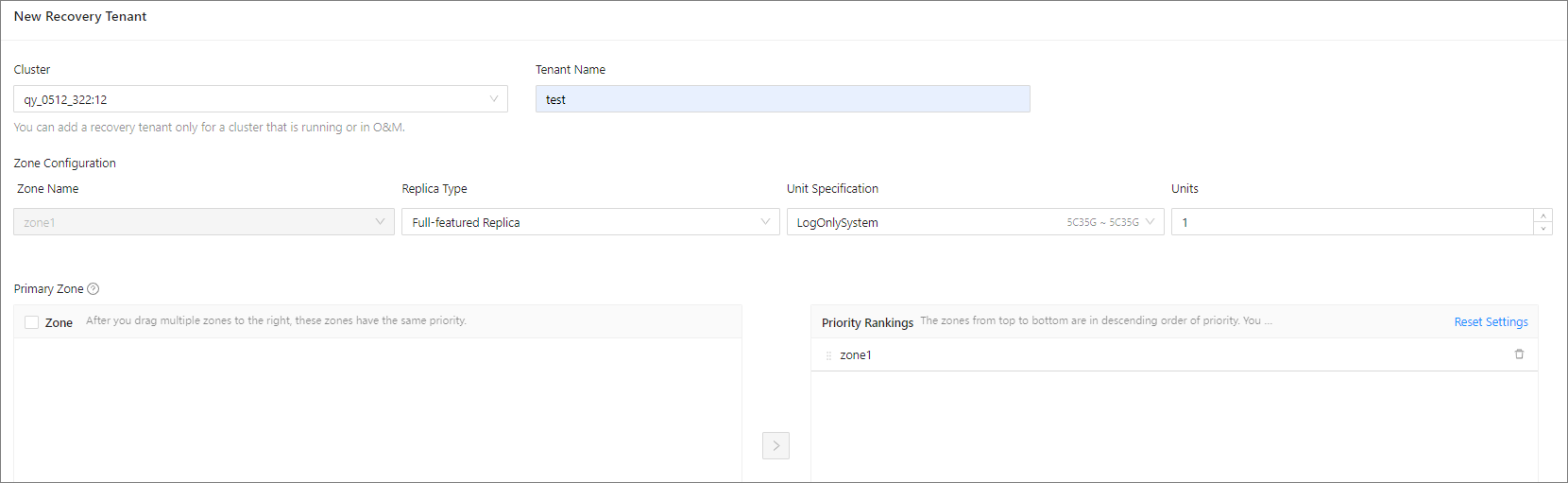
Click Initiate Recovery .