







OceanBase Cloud Platform (OCP) provides built-in alert items to meet the monitoring requirements of your business. You can also customize alert items by referring to this topic. For more information about the built-in alert items, see Alert Reference.
Prerequisites
The logged-on user in the OCP console is granted the ADMIN or ALARM_MANAGER role.
Procedure
Log on to the OCP console.
In the left-side navigation pane, choose System Management > Alerts .
On the Alert Item Configuration tab, click Create Alert Item in the upper-right corner.
Specify fields in the Rule Information section of the alert item.
Specify Alert Item Scope and Matched Object .
Specify Trigger Conditions . Select Has operation rules or No Operation Rules.
Has operation rules
If you select this option, alerts are triggered based on monitoring expressions, and you must configure operation rules for alert reporting.
Metrics: Select a metric from the Application drop-down list. For more information about metrics, see the corresponding topics in Alert Reference.
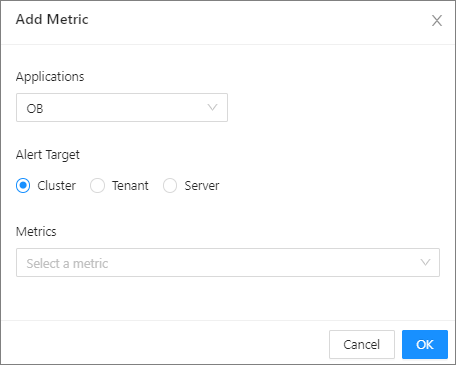
You can click Add Metric in the Application drop-down list to add a custom alert metric.
Operation Rules: You can configure multiple operation rules as needed. The system reports alerts of different levels based on the configured operation rules. You can configure at most five rules because the threshold and level in a rule cannot overlap with those in another rule.
Duration: You can specify the alert duration. The value 0 indicates that an alert is immediately triggered if the specified alert rules are met.
No Operation Rules
If you select this option, alerts are not triggered based on monitoring expressions, and you must configure the alert level.
Specify Alert Cycle .
Alert Cycle is a detection cycle, in which the system detects whether the trigger condition is met. In the following example, the default detection cycle of 60 seconds is used:
The system detects whether the trigger condition is met once every 60 seconds. If yes, the alert is reported.
After the alert is reported, the system continues to detect whether the trigger condition is met once every alert cycle . If yes, the alert will not be eliminated.
Specify Elimination Cycle .
This parameter specifies the retention duration of an alert after the alert is reported. The system automatically clears the alert after the specified duration expires. The default cycle is 5 minutes.

Specify fields in the Basic Information section of the alert item.
Specify Alert Item Name .
Third-party applications identify and connect to alert items in OCP through their names specified by Alert Item Name . An alert item name can contain only letters, digits, and underscores (_). We recommend the following rules for naming alerts:
Use ob_cluster_ as the prefix for alerts related to OceanBase clusters.
Use ob_tenant_ as the prefix for alerts related to OceanBase Database tenants.
Use ob_host_ as the prefix for alerts related to OBServers.
Use host_ as the prefix for alerts related to OCP servers.
Use ob_service_ as the prefix for alerts related to OCP services.
Use obproxy_cluster_ as the prefix for alerts related to OBProxy clusters.
Use obproxy_host_ as the prefix for alerts related to OBProxy servers.
Specify Description .
Briefly describe the purpose of the alert.
Specify Alert Overview Template as prompted.
The alert overview template is referenced by the template field of a channel, and corresponds to the alarm_summary variable.
Specify Alert Details Template as prompted.
The alert details template is referenced by the template field of a channel, and corresponds to the alarm_description variable.
(Optional) Choose whether to disable alerting.
You can disable system built-in alert items and custom alert items that are not temporarily used.
Click Submit .