







OceanBase Migration Service (OMS) provides the data synchronization feature to help you synchronize data between data sources in real time. It is applicable to business scenarios such as active geo-redundancy, remote disaster recovery, data aggregation, and real-time data warehousing.
To prepare for data synchronization and create and manage a data synchronization task, perform the following steps:
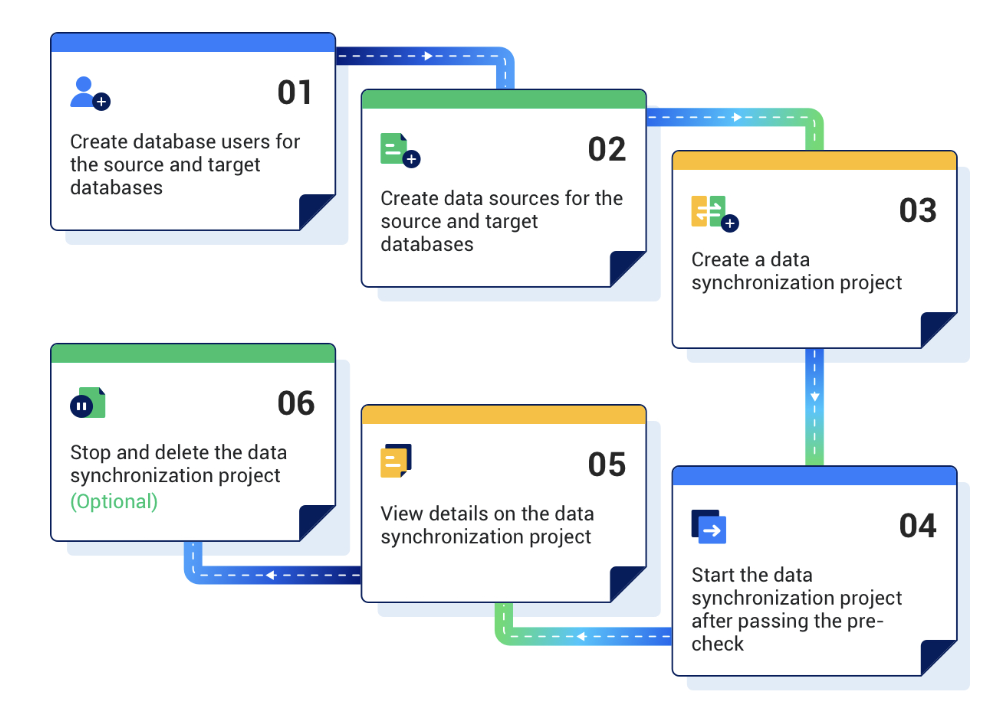
Prepare for data synchronization.
Before you use OMS to synchronize data, you need to create dedicated database users in the source and target databases for the data synchronization task and grant the required data operation privileges to the users. For more information, see Create a database user.
Create data sources.
Log in to the OMS console and create a source data source and a target data source. For more information, see Create a data source.
Create a data synchronization task.
Specify the source database, target database, synchronization types, and synchronization objects for the data synchronization task as needed. For more information, see the topics about data synchronization tasks of the corresponding data source types.
After the synchronization task passes the pre-check, start the task.
View the status of the data synchronization task.
After the data synchronization task is started, it is executed based on the selected synchronization types. For more information, see View details of a data synchronization task.
(Optional) End and delete the data synchronization task.
After the data synchronization task is completed and no further synchronization is needed between the source and target databases, you can clear the current data synchronization task. For more information, see End and delete a data synchronization task.