Overview
OceanBase Migration Service (OMS) is a service provided by OceanBase Database that supports data interaction between homogeneous or heterogeneous data sources and OceanBase Database. OMS provides the capabilities for online migration of existing data and real-time synchronization of incremental data.
OMS provides a visual centralized management platform. You only need to perform simple configurations to real-time migrate data. OMS helps you achieve real-time data migration and synchronization from homogeneous or heterogeneous databases to OceanBase with low risk, low cost, and high efficiency.
Features
OMS supports data migration and synchronization features:
Data migration: As a one-time task, data migration resources can be released after the migration is completed. You can use the data migration feature to migrate data between homogeneous or heterogeneous data sources. This feature is suitable for business scenarios such as database upgrade, cross-instance data migration, database splitting, and scaling.
A data migration task is the basic unit of the data migration feature of OMS. When you create a migration task, you can specify the migration scope at the database or table level. For more information about the types of tasks and migrations supported by OMS, see the Data Migration module.
Data synchronization: As a continuous action, a data synchronization task will synchronize data after it is created, to maintain data consistency between the source and target, and achieve real-time business data flow. You can use the data synchronization feature to synchronize data between data sources in real time. This feature is suitable for business scenarios such as multi-active data deployment across regions, data backup across regions, data aggregation, and real-time data warehousing. For more information, see the Data Synchronization module.
Advantages
Support for multiple data sources
OMS supports real-time data transmission between OceanBase Database and data sources such as MySQL and Kafka. The specific features supported may vary depending on the types of the source and target databases.
Online data migration without interrupting business applications
You can use OMS to seamlessly migrate data to OceanBase without interrupting your business applications. After your applications switch to OceanBase Database, all changes made in OceanBase Database will be synchronized to the original source database.
OMS helps reduce the risk of business migration and enables enterprises to build high-availability and high-reliability data system architectures.
High-performance data migration with security and reliability
OMS can achieve sub-second latency replication of large amounts of data between heterogeneous IT infrastructures in near real time. Therefore, OMS can be used in multiple scenarios including data migration, cross-region data backup, emergency systems, real-time data synchronization, disaster recovery, database upgrade, and migration.
OMS can run data migration and synchronization tasks without interrupting business applications and ensure data integrity and transaction consistency. It can achieve full migration performance of up to 100 MB/s and 200,000 TPS, and synchronization performance of up to 50,000 RPS. Additionally, OMS provides a high-availability deployment architecture to ensure stable and reliable data transmission for migration and real-time synchronization.
One-stop interaction
OMS supports the full lifecycle management of data migration. You can create, configure, and monitor data migration tasks in the console, providing a convenient user experience.
Real-time data synchronization for decoupling businesses
OMS supports real-time data synchronization between OceanBase Database and self-built Kafka and RocketMQ in two compatibility modes of OceanBase Database. It can be used in business scenarios such as real-time data warehousing, data queries, and report distribution.
Multiple data verification methods
OMS provides various data consistency verification methods to ensure data quality in a comprehensive, time-saving, and efficient manner. It also displays the differences and provides quick correction options.
Easy migration to OceanBase
OMS is fully adapted to the features of all versions of OceanBase Database, intelligently handles the collection and conversion of database objects, and supports migration without interrupting the source.
Application scenarios
Migration without interrupting the business
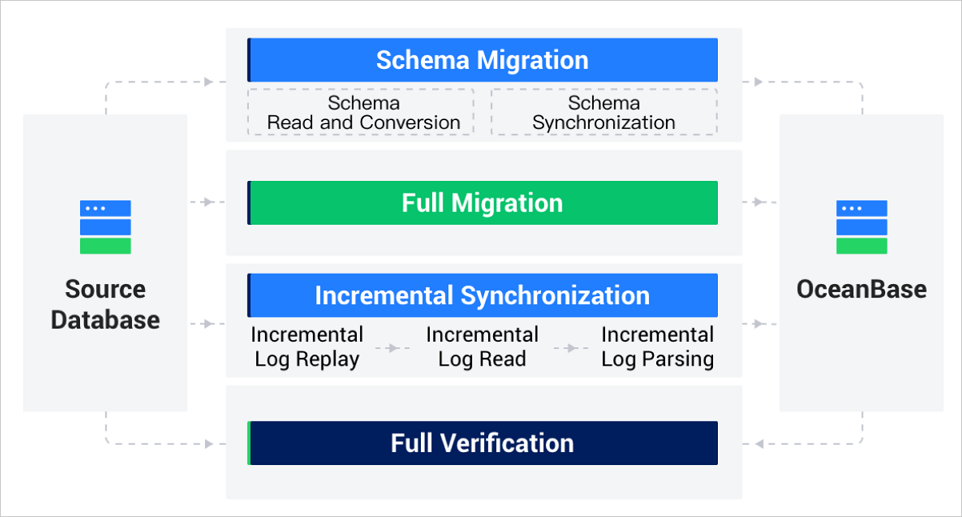
In a conventional database migration solution, to ensure the stability of the migration task and data consistency, scheduled downtime migration is usually adopted. During the scheduled downtime, data writing to the source database is temporarily stopped. After the migration is completed and data consistency is confirmed, the business database is switched.
The duration of scheduled downtime migration depends on the business data volume and network condition. In a case of significant business volume, scheduled downtime migration of a database may take several days, which greatly affects the business.
The data migration feature of OMS that supports migration without interrupting the business ensures that the source database continues to provide services during the data migration process. This minimizes the impact of data migration on the business. After full migration and incremental data migration are completed, the full data and incremental data of the source database are synchronized to the target database in real time. After data verification is passed, the business can be switched from the source database to the target database.
Real-time data synchronization
The data synchronization feature of OMS supports real-time synchronization of incremental data from databases such as OceanBase to a Kafka, RocketMQ, or other message queue instances. This enhances the message processing capability and expands the application of the business in various big data fields, such as monitoring data aggregation, stream data processing, and online and offline analytics.
OMS supports real-time data synchronization between physical tables of OceanBase and a Kafka or other message queue instance. You can apply it to various business scenarios such as cloud business intelligence (BI) analysis, real-time data warehouse construction, data query, and report distribution.
High availability and flexible deployment
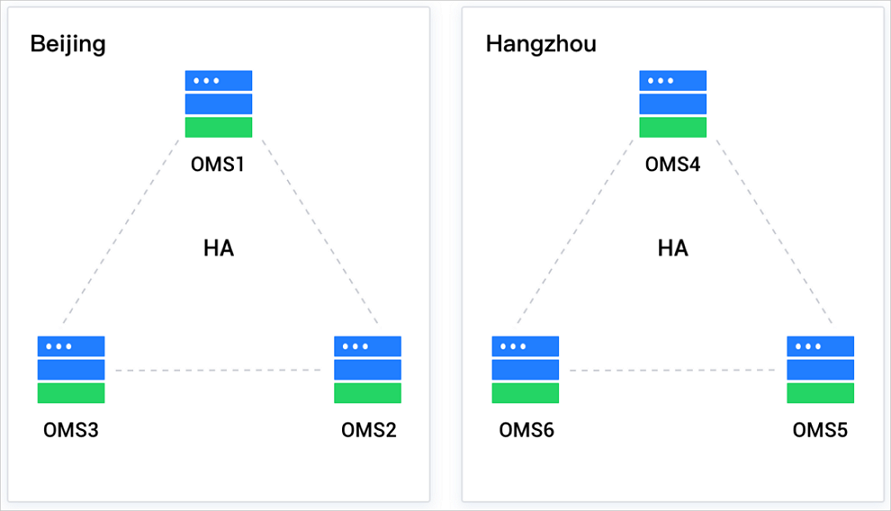
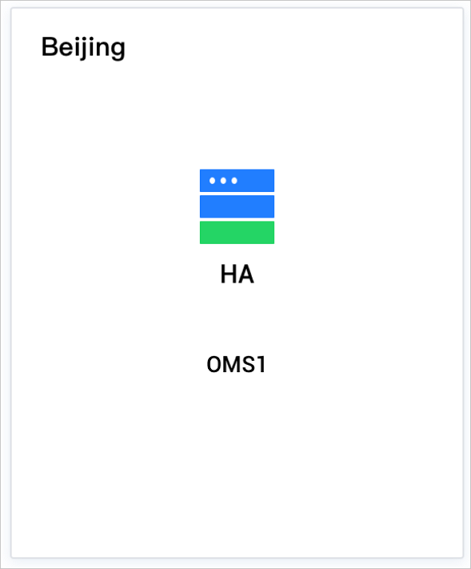
Single-node high availability The Store and Incr-Sync components support high availability. When a fault occurs in the Store or Incr-Sync component, the system restarts the abnormal process.
Disaster recovery at the IDC level
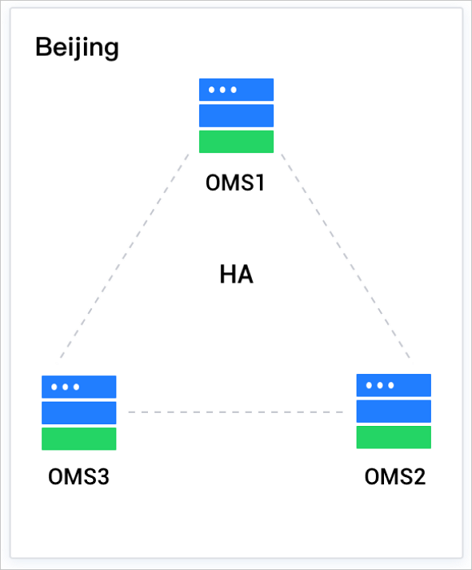
When a server fails, all components on the server are migrated to an appropriate server.
When the resource metrics of a server are abnormal, the system attempts to load balance some components.
When a Store component fails, the system attempts to restart it if sufficient resources are available on the server. If the server resources are insufficient, the system attempts to load balance the components or delete the redundant Store component.
When an Incr-Sync component fails, the system restarts the abnormal process.
Disaster recovery at the regional IDC level
OMS supports the deployment of incremental log reading and incremental synchronization writing separately. This, together with optimized parallel transmission through multiple TCP connections, data compression, and data encryption, overcomes the challenges of long-distance transmission, poor network conditions, and data security. (Cross-region scheduling is not supported.)