







This topic describes the error messages returned by OceanBase Migration Service (OMS) and their solutions.
Error types
OMS error codes are classified by components, including console error codes, precheck error codes, CM error codes, and supervisor error codes. For more information about OMS components, see Concepts.
Error levels
OMS error codes are classified into three levels: FATAL, ERROR, and WARNING. For more information, see the following table.
Error code level |
Description |
|---|---|
| FATAL | FATAL, which may cause system instability or unavailability. |
| ERROR | General error. |
| WARNING | Warning. |
Console error codes
GHANA-OPEROR000001
Error level: ERROR
Error message: Checker status failed.
Cause: Full-Verification component status failed.
Solution: Enter the container and check the logs of the Full-Verification component. If the issue persists, contact on-call support and submit a ticket. To obtain the name of the Full-Verification component, see How to query the name of a Full-Verification component. For example:
/home/ds/run/{component name}/logs/error.log/home/ds/run/{component name}/stdout.out
GHANA-OPERAT000101
Error level: ERROR
Error message: Access denied for user 'root'@'xxx.xxx.xxx.xxx'.
Cause: The data source account or password is incorrect.
Solution: Please enter the correct data source account or password.
GHANA-MIGRAT000201
Error level: ERROR
Error message: Schema, table, or view migration failed.
Cause: Database, table, or view migration failed.
Solution: We recommend that you check the database, table, and view tabs in the Migration Details - Schema Migration section. Select View Exceptions Only and check if any migration objects failed. If they did, review the specific error messages (which often indicate that a table already exists or a table depends on another table that does not exist). If the issue persists, submit a ticket for further assistance.
GHANA-PCHKNP002030
Error level: ERROR
Error message: Precheck {checkType} failed.
Cause: The current account {user} does not have write permissions on {tables}.
Solution: Grant write permissions on {tables} to {user} and retry the precheck. Example for MySQL: GRANT INSERT ON _*.*_ TO {user};.
GHANA-PCHKNP003020
Error level: ERROR
Error message: The precheck for {checkType} failed.
Cause: The full migration account {user} does not have the {privilege} privilege.
Solution: Please grant the {privilege} privilege to the full migration account {user} and retry the precheck. Example: GRANT {privilege} ON _*.*_ TO {user};.
GHANA-PCHKNP003030
Error level: ERROR
Error message: The precheck for {checkType} failed.
Cause: The incremental migration account {user} does not have the {privilege} privilege.
Solution: Please grant the {privilege} privilege to the incremental migration account {user} and retry the precheck. Example: GRANT {privilege} ON _*.*_ TO {user};.
GHANA-PCHKNP003040
Error level: ERROR
Error message: The precheck for {checkType} failed.
Cause: The {tables} table does not have a unique key. OMS does not support this.
Solution: Please drop the table and retry the precheck.
GHANA-PCHKNP003050
Error level: ERROR
Error message: The precheck for {checkType} failed.
Cause: The following tables use a character set that is not supported: {tables}. OMS supports the following character sets: {legalCharsets}.
Solution: Please modify the character set of the tables and retry the precheck.
GHANA-PCHKNP003070
Error level: ERROR
Error message: The precheck for {checkType} failed.
Cause: The following tables {tables} have foreign keys.
Solution: Please modify the table schema or skip the tables and retry the precheck.
Precheck error codes
GHANA-PCHKNP000010
Error level: ERROR
Error message: The precheck {checkType} failed.
Cause: The connectivity test for the database {jdbcUrl} failed. The diagnostic information is {message}.
Solution: Please check whether the data source {endpointName} is properly connected.
GHANA-PCHKNP001010
Error level: ERROR
Error message: The precheck {checkType} failed.
Cause: The database {schemaName} is a system database. Data cannot be migrated or synchronized to a system database.
Solution: {schemaName} is a system database. Please exclude it from the source objects.
GHANA-PCHKNP001011
Error level: ERROR
Error message: The precheck {checkType} failed.
Cause: The database {schemaName} does not exist. Please check whether the database name is correctly specified or whether the database exists.
Solution: The database {schemaName} does not exist. Please select a new source object or use the renaming feature to correct the mapping between the source and target objects.
GHANA-PCHKNP002010
Error level: ERROR
Error message: The precheck {checkType} failed.
Cause: The following table objects cannot be found in the remote database: {tableNames}.
Solution: The table {tableNames} does not exist. Please select a new source object.
GHANA-PCHKNP002020
Error level: ERROR
Error message: The precheck {checkType} failed.
Cause: The allowlist is too long.
Solution: Please reduce the number of objects to be migrated or synchronized, or use the matching rules to select the objects to be migrated or synchronized.
GHANA-PCHKNP003010
Error level: ERROR
Error message: The precheck for {checkType} failed.
Cause: The table {table} contains a LOB field.
Solution: Please remove such tables {tableNames} from the table to be migrated.
CM error codes
CM-RESOIE000201
Error level: FATAL
Error message: No available store. SubTopic:[%s], checkpoint:[%s]
Cause: All store processes have stopped, or the data scope of the current store process does not meet the time point requirements of the Writer component. (Example: The Writer needs to pull data starting at 10:00, but the data scope in the store is from 11:00 to 12:00.)
Solution:
Enterprise Edition:
Restart the existing store. You can click View Component Monitoring in the upper-right corner, and attempt to restore the existing store by troubleshooting the store logs or restarting the store.
If the existing store cannot be restored, you can create a new store. Log in to the OMS console, go to O&M Monitoring > Components > Store, and create a new store based on the link topic information and the current writer position. Note: The store startup time needs to be slightly earlier than the current writer position. Example: If the writer position is at "2022-08-01 10:05:00", you need to set the store position to "2022-08-01 10:00:00" (5-10 minutes earlier) before creating a new store.
CM-RESOIE000202
Error level: FATAL
Error message: No active stores under topic : subTopic.getName()
Cause: The current task has not created a store, or all existing store processes have exited.
Solution:
Enterprise Edition:
Restart the existing store. You can click View Component Monitoring in the upper-right corner, and attempt to restore the existing store by troubleshooting the store logs or restarting the store.
If the existing store cannot be restored, you can create a new store. Log in to the OMS console, go to O&M Monitoring > Components > Store, and create a new store based on the link topic information and the current writer position. Note: The store startup time needs to be slightly earlier than the current writer position. Example: If the writer position is at "2022-08-01 10:05:00", you need to set the store position to "2022-08-01 10:00:00" (5-10 minutes earlier) before creating a new store.
CM-RESOAT000011
Error level: FATAL
Error message: Supervisor does not report any result after CM Retry 60 seconds.
Cause: OMS proxy service component Supervisor does not report task execution results to the management component for a long time.
Solution:
Enterprise Edition:
Go to the OMS container and run the
supervisorctl status oms_drc_supervisorcommand. If the status is notRUNNING, run thesupervisorctl restart oms_drc_supervisorcommand to restart the Supervisor component.Log in to the OMS console, click View Component Monitoring in the upper-right corner of the task, view component logs, and check for any obvious errors.
If there are no obvious errors in the component logs, click Resume in the upper-right corner of the task to attempt to recover the task.
If the task is still not recovered, submit a ticket for support.
CM-RESOAT000012
Error level: FATAL
Error message: Supervisor failed to execute command.
Cause: OMS proxy service component Supervisor failed to execute the command sent by the management component.
Solution:
Enterprise Edition: Try to click Resume to recover the task. If the task is not recovered, run supervisorctl status in the container to check if all OMS components are in the RUNNING state. If not, run supervisorctl restart $component name to restart the component.
CM-RESOAT000013
Error level: FATAL
Error message: Show the specific result of the command.
Cause: OMS proxy service component Supervisor failed to execute the command sent by the management component.
Solution:
Enterprise Edition: Try to recover the task. If the task is not recovered, go to the OMS container and view the /home/admin/logs/supervisor/error.log log, and provide it to the OMS administrator.
CM-SCHEOR000002
Error level: FATAL
Error message: Failed to operate all process. Failed: {$Failed}.
Cause: All components involved in the maintenance operation failed to be operated.
Solution:
Enterprise Edition: You can directly retry the maintenance task. Alternatively, log in to the OMS console, go to the Component Monitoring page under Maintenance Monitoring, enter the specific component type page, search for the failed component process names, and then continue with the corresponding maintenance operations.
CM-SCHEOR000003
Error level: FATAL
Error message: Failed to operate part of process. Failed: {$Failed}, Success: {$Success}
Cause: The maintenance operation failed for some components involved in the maintenance operation.
Solution:
Enterprise Edition: You can directly retry the maintenance task, or log in to the OMS console, go to the Component Monitoring page under Maintenance Monitoring, enter the specific component type page, search for the failed component process names, and then continue with the corresponding maintenance operations.
CM-SCHEOR000203
Error level: FATAL
Error message: Failed to start crawler.
Cause: The incremental pull component (Store) failed to be started.
Solution:
Enterprise Edition: Log in to the OMS console, click View Component Monitoring in the upper-right corner of the task, view the logs of the Store component, and check for any clear error messages.
CM-SCHEAT000001
Error level: FATAL
Error message: Failed to start checker.
Cause: The Full-Verification component failed to be started.
Solution:
Enterprise Edition: Submit a ticket for support. Log in to the OMS console, click View Component Monitoring in the upper-right corner of the task, view the logs of the Full-Verification component, and check for any clear error messages.
CM-SCHEAT000102
Error level: FATAL
Error message: Failed to start writer.
Cause: The incremental transmission component (oboms-connector) failed to start.
Solution:
For Enterprise Edition: Log in to the OMS console, click View Component Monitoring in the upper-right corner of the current task, view the connector component logs, and check for any clear error messages.
CM-RESONF000001
Error level: FATAL
Error message: No alive hosts in current region.
Cause: The OMS proxy service component Supervisor in the container has not reported a heartbeat to the database for a long time.
Solution:
For Enterprise Edition:
Log in to the OMS container and execute the
supervisorctl statuscommand. If the OMS component is not in theRUNNINGstate, executesupervisorctl restart $ComponentNameto restart the component and observe if it recovers.Otherwise, execute the
env | grep OMS_HOST_IPcommand to confirm whether theOMS_HOST_IPparameter was correctly passed when starting the OMS container. If it was not passed or passed incorrectly, delete the current container, correctly pass the parameter, and redeploy.Log in to the database specified by the
drc_cm_dbparameter inconfig.yaml, query the host information table, and check if the IP address in the table matches the actual IP address of the host. If not, check whether thecm_nodesparameter inconfig.yamlis correctly configured. If not, delete the current container, modify theyamlconfiguration file, and redeploy.
CM-RESONF000002
Error level: FATAL
Error message: No available machine in current region.
Cause: The OMS container was not properly initialized.
Solution:
For Enterprise Edition: Enter the OMS container and execute the sh /root/docker_init.sh command again. This operation is idempotent and can be repeated.
CM-RESONF000003
Error level: FATAL
Error message: Not enough machine resources for a $taskType task.
Cause: Some resource metrics of the OMS cluster exceed the system thresholds. The CPU threshold is $(CPU), the memory threshold is $(Mem), and the disk threshold is $(Disk). The actual resource usage of each server is as follows: {$Usage}.
Solution:
Enterprise Edition: You can stop and release long-term unused tasks to reduce the consumption of machine resources.
CM-RESONF000021
Error level: FATAL
Error message: The machine group of region = ($Region) has not been initialized.
Cause: The OMS container was not properly initialized.
Solution:
Enterprise Edition: Go to the OMS container, run the sh /root/docker_init.sh command, and wait for the command to complete. The command will take 3 to 5 minutes to execute. This operation is idempotent and can be repeated.
Connector error codes
CONNECTOR-SOOO04006210
Error level: FATAL
Error message: internal error code, arguments: -6210, Transaction is timeout
Cause: The transaction execution on the source exceeds the timeout period.
Solution: Increase the timeout period by using the statement SET @@global.ob_trx_timeout = a larger value (in microseconds). You can run the statement SHOW VARIABLES LIKE '%ob_trx_timeout%' to view the timeout period.
CONNECTOR-SIOO0400600
Error level: FATAL
Error message: ORA-00600: internal error code, arguments: -6244, out of transaction threshold
Cause: The amount of data committed by a single transaction exceeds the specified value.
Solution: Run the statement SELECT * FROM __all_virtual_sys_parameter_stat WHERE name='_max_trx_size'; to view the current value. If you are using OceanBase Database in the sys tenant, run the statement ALTER system SET _max_trx_size = a larger value to modify the value.
Notice
Transaction data size limits are removed in OceanBase Database V3.X. Therefore, no setting is required.
CONNECTOR-SOOO0400601
Error level: FATAL
Error message: ORA-00600: internal error code, arguments: -4258, Incorrect string value
Cause: ORA-00600: internal error code, arguments: -4258, Incorrect string value. This is a known issue in OceanBase Database V3.1.2.
Solution: If you are using OceanBase Database in the sys tenant, run the statement ALTER system SET _enable_static_typing_engine = false;.
CONNECTOR-SOOO0401555
Error level: FATAL
Error message: ORA-01555 snapshot too old
Cause: OceanBase snapshot is too old.
Solution: Run the SHOW VARIABLES LIKE 'undo_retention'; command in the system tenant to view the current value. Run the SET global undo_retention=larger value; command to increase the snapshot timeout period.
CONNECTOR-SID201000104
Error level: FATAL
Error message: DB2 SQL ERROR: SQL CODE = -104, SQLSTATE = 42610, SQLERRORMC = 2003
Cause: Invalid DB2 syntax.
Solution: OMS internal component DDL conversion issue. Find the DDL statement that caused the error in error.log, locate the original DDL statement in ddl_msg.log based on the DDL statement, and assess the impact of skipping this DDL statement. If it can be skipped, configure the skip and contact the OMS administrator to report the DDL conversion issue. If it cannot be skipped, contact the OMS administrator to report the DDL conversion issue.
CONNECTOR-SIOR01003291
Error level: FATAL
Error message: SQL Error: ORA-03291: Invalid truncate option - missing STORAGE keyword
Cause: Invalid Oracle syntax.
Solution: OMS internal component DDL conversion issue. Find the DDL statement that caused the error in error.log, locate the original DDL statement in ddl_msg.log based on the DDL statement, and assess the impact of skipping this DDL statement. If it can be skipped, configure the skip and contact the OMS administrator to report the DDL conversion issue. If it cannot be skipped, contact the OMS administrator to report the DDL conversion issue.
CONNECTOR-SIOR01001861
Error level: FATAL
Error message: SQL Error: ORA-01861: literal does not match format string
Cause: Invalid expression.
Solution: OMS internal component conversion DDL issue. Please find the DDL statement that caused the error in error.log, locate the original DDL in ddl_msg.log based on this DDL, and assess the impact of skipping this DDL. If it can be skipped, configure the skip and contact the OMS administrator to report the DDL conversion issue. If not, contact the OMS administrator to report the DDL conversion issue.
CONNECTOR-SIOR01014054
Error level: FATAL
Error message: SQL Error: ORA-14054: invalid ALTER TABLE TRUNCATE PARTITION option
Cause: An invalid option was specified after the partition name in the ALTER TABLE TRUNCATE PARTITION statement.
Solution: OMS internal component conversion DDL issue. Please find the DDL statement that caused the error in error.log, locate the original DDL in ddl_msg.log based on this DDL, and assess the impact of skipping this DDL. If it can be skipped, configure the skip and contact the OMS administrator to report the DDL conversion issue. If not, contact the OMS administrator to report the DDL conversion issue.
CONNECTOR-SIOR01000907
Error level: FATAL
Error message: SQL Error: ORA-00907: missing right parenthesis
Cause: Invalid Oracle syntax, missing right parenthesis.
Solution: OMS internal component conversion DDL issue. Please find the DDL statement that caused the error in error.log, locate the original DDL in ddl_msg.log based on this DDL, and assess the impact of skipping this DDL. If it can be skipped, configure the skip and contact the OMS administrator to report the DDL conversion issue. If not, contact the OMS administrator to report the DDL conversion issue.
CONNECTOR-SIOO01000900
Error level: FATAL
Error message: SQL Error: ORA-00900: You have an error in your SQL syntax
Cause: Invalid OB-ORACLE DDL syntax
Solution: The internal component conversion error or the OceanBase Database does not support the execution. Contact OMS technical support.
CONNECTOR-SIOO01001451
Error level: FATAL
Error message: SQL Error: ORA-01451: column to be modified to NULL cannot be modified to NULL
Cause: The current column is already NULL and cannot be modified to NULL.
Solution: Filter this DDL statement.
CONNECTOR-SIMS01001064
Error level: FATAL
Error message: ERROR 1064 (42000): You have an error in your SQL syntax;
Cause: MySQL syntax error
Solution: The DDL statement conversion error of OMS. Please find the DDL statement that caused the error from error.log, find the original DDL statement from ddl_msg.log based on the DDL statement, and assess the impact of skipping this DDL statement. If it can be skipped, configure to skip this DDL statement and contact the OMS administrator to report the DDL statement conversion issue. If it cannot be skipped, contact the OMS administrator to report the DDL statement conversion issue.
CONNECTOR-SIOM01001426
Error level: FATAL
Error message: ERROR 1426 (42000): Too big precision specified for column. Maximum is 65.
Cause: The field precision exceeds the limit.
Solution: The DDL statement conversion error of OMS. Please find the DDL statement that caused the error from error.log, find the original DDL statement from ddl_msg.log based on the DDL statement, and assess the impact of skipping this DDL statement. If it can be skipped, configure to skip this DDL statement and contact the OMS administrator to report the DDL statement conversion issue. If it cannot be skipped, contact the OMS administrator to report the DDL statement conversion issue.
CONNECTOR-SIOM01001064
Error level: FATAL
Error message: You have an error in your SQL syntax;
Cause: Invalid SQL DDL syntax.
Solution: Contact OMS technical support if the internal component conversion error or OceanBase Database does not support the operation.
CONNECTOR-SIDH-{type}-001004
Error level: ERROR
Error message: Exceed limit of bps
Cause: DataHub limits the flow of each shard to 5 M/s, and OMS synchronizes data too quickly.
Solution: Upgrade DataHub by adding more shards (operation performed in the DataHub Console).
CONNECTOR-SIDH-{type}-001005
Error level: FATAL
Error message: MalformedRecordException, Not Found Field
Cause: The schema is incorrect. This usually occurs when DataHub is in Tuple mode, and the source executes a DDL statement to add a field, but the target (DataHub) does not add the corresponding field.
Solution:
Identify the missing DataHub schema fields by comparing the schemas of the source and target.
Modify the DataHub schema. For more information, see Datahub documentation.
CONNECTOR-SIDH-{type}-001006
Error level: FATAL
Error message: exceed max length: 2097152
Cause: DataHub allows the maximum length of a String field to be 2 MB. For more information, see Datahub documentation.
Solution: There is no solution. You can only stop synchronizing this table (you can change the synchronization objects in the console).
CONNECTOR-SIOR00012899
Error level: FATAL
Error message: ORA-12899: value too large for column "MOCK_DATABASE"."MOCK_ALLTYPE_OBORACLE_TABLE"."TCHAR" (actual: 13, maximum: 3)
Cause:
Incremental DDL synchronization is not enabled. Check whether a column was added in the source.
Incremental DDL synchronization is enabled. The DDL conversion may not have been successful.
Solution:
If incremental DDL synchronization is not enabled, check the character sets of the source and target. If they are different (e.g., the source is UTF8 and the target is GBK), set the column length of the target to more than 1.5 times that of the source. If they are the same, set the column length of the target to match that of the source. If the error persists, contact OMS Technical Support.
If incremental DDL synchronization is enabled, check the
ddl_msg.logfile, search for the corresponding column, find the DDL statement, and contact OMS Technical Support.
CONNECTOR-SIOO00012899
Error level: FATAL
Error message: (conn=1055676) ORA-12899: value too large for column "MOCK_DATABASE"."MOCK_ALLTYPE_OBORACLE_TABLE"."TCHAR" (actual: 19, maximum: 1)
Cause:
Incremental DDL synchronization is not enabled. A column may have been added in the source.
Incremental DDL synchronization is enabled. The DDL conversion may not have been successful.
Solution:
If incremental DDL synchronization is not enabled, check the character sets of the source and target. If they are different (e.g., the source is UTF8 and the target is GBK), set the column length of the target to more than 1.5 times that of the source. If they are the same, set the column length of the target to match that of the source. If the error persists, contact OMS Technical Support.
If incremental DDL synchronization is enabled, check the
ddl_msg.logfile, search for the corresponding column, find the DDL statement, and contact OMS Technical Support.
CONNECTOR-SIOO00014400
Error level: FATAL
Error message: The target table has fewer partitions. (conn=2719331) ORA-14400: the inserted partition key does not map to any partition,${db}.${table}
Cause:
Incremental DDL synchronization is not enabled, and the source table was partitioned.
Incremental DDL synchronization is enabled. If the source table was created with syntax that automatically generates partitions, subsequent DDL statements that automatically generate partitions will not be pulled incrementally. In other words, DDL statements that automatically generate partitions will not be synchronized to the target.
Incremental DDL synchronization is enabled. If the source table was not created with syntax that automatically generates partitions, check the
ddl_msg.logfile, search for the corresponding table, find the DDL statement that adds a partition, and contact OMS Technical Support.
Solution: Compare the table schemas of the source and target, and create the missing partitions in the target.
CONNECTOR-SIOO00000942
Error level: FATAL
Error message: The target table does not exist. table: MOCK_ALLTYPE_OBORACLE_TABLE,db: oms_oracle.MOCK_DATABASE
Cause:
Incremental DDL synchronization is not enabled, and the source table was created.
Incremental DDL synchronization is enabled, but the DDL conversion failed.
Solution:
If incremental DDL synchronization is not enabled, create the table in the target.
If incremental DDL synchronization is enabled, check the
ddl_msg.logfile, search for the corresponding table, find the DDL statement that creates the table, and contact OMS Technical Support.
CONNECTOR-SIOO00000060
Error level: FATAL
Error message: A deadlock was detected on the target side while waiting for a resource. (conn=2356749) ORA-00060: deadlock detected while waiting for resource,${db}.${table}
Cause: The lock on the target side was promoted to a row lock, and the deadlock was caused by concurrent execution.
Solution:
Log in to the OMS console.
In the left-side navigation pane, click Data Migration.
On the Data Migration page, click the name of the data migration task to go to the details page.
In the upper-right corner of the page, click View Component Monitoring.
Click Update. Find the
worker_numparameter and set its value to1.After the link runs for some time and the bit moves forward normally, change the value back to the initial value.
CONNECTOR-SIAL00000001
Error level: FATAL
Error message: The source table field does not exist in the target table. handleColumnsOnlyInSource: Field${field} in ${sourceTable} not found in target table ${targetTable}
Cause:
If incremental DDL synchronization is not enabled, check whether an operation to add columns exists on the source side.
If incremental DDL synchronization is enabled, the DDL conversion may have failed.
Solution:
If incremental DDL synchronization is not enabled, create the missing column on the target side.
If incremental DDL synchronization is enabled, check
ddl_msg.log, search for the corresponding column, find the add-column statement, and contact OMS Technical Support.
CONNECTOR-ALAL00000500
Error level: FATAL
Error message: Unknown
Cause: Unknown error
Solution: Contact OMS Technical Support.
CONNECTOR-SIKA-{type}-001101
Error level: ERROR
Error message: TimeoutException
Cause:
It may be caused by poor network connectivity between OMS and the Kafka server. You can test this by using the Ping and Telnet commands.
It may be caused by high network latency between OMS and the Kafka server. You can use this solution to modify the Kafka configuration.
Solution:
Check the status of the Kafka server and its network connectivity. For example, if the
sink.jsonconfiguration file specifies the Kafka server asxxx.xxx.xxx.xxx:9092, you can run thetelnet xxx.xxx.xxx.xxx 9092command to check the network connectivity. If the network connectivity is fine but the latency is high, you can use the steps in solution 2 to modify the timeout setting. If the network connectivity is poor, you must resolve the network connectivity issue first.If the Kafka server is working properly, you can modify the connector configuration.
"properties": {"request.timeout.ms": expected timeout in ms}
To modify the configuration, log in to the OMS console and select the corresponding connector. Then, click Update.
If the
propertiesconfiguration item already exists in the sink configuration, you can add therequest.timeout.msconfiguration item in JSON format.If the
propertiesconfiguration item does not exist in the sink configuration, you can add a configuration item by clicking the + sign when you hover over the sink configuration item.
In the following figure, the timeout is set to 6000 ms. Then, click ✅.

Click Update at the bottom of the page to complete the modification.
CONNECTOR-SIKA-{type}-001205
Error level: FATAL
Error message: No entry found for connection
Cause: The connector cannot connect to Kafka.
This might be because the Kafka instance installed in a Docker container is using the local domain name instead of an IP address, leading to an error when registering the network address in Zookeeper.
If the Kafka instance has multiple replicas and uses a domain name for server connectivity, the issue might be that the domain name is accessible to a limited number of machines in the OMS.
Solution:
You can try setting the following configuration parameters for the Kafka server:
advertised.listeners=PLAINTEXT://{kafkaIp}:9092listeners=PLAINTEXT://{kafkaIp}:9092
Restart the Kafka server.
To verify the solution, you can use the built-in producer script provided with Kafka to test whether you can successfully write messages to the Kafka server from an OMS machine.
./kafka-console-producer.sh --topic TestTopic --bootstrap-server ConnectedKafkaServer
You can then enter some test messages in the pop-up window to confirm the functionality.
CONNECTOR-SIKA-{type}-001301
Error level: FATAL
Error message: RecordTooLargeException
Cause: The message is too large, exceeding the limit of the Kafka server.
Solution:
If the issue is due to the server's limit, you will need to restart the Kafka server.
By default, the client limit is 1 GB. Usually, this limit is not exceeded. If it is, you can configure the
max.request.sizeparameter, which is in bytes, and then restart the connector.The
message.max.bytesparameter needs to be configured for the Kafka server, which is in bytes. If this parameter is not configured, the default value is 1 MB, and the Kafka server needs to be restarted.The specific value to configure depends on the maximum row size of the synchronized table. We recommend that you set the value to twice the maximum row size (for UPDATE operations, the size of the pre-image and post-image is twice the size of a single row).
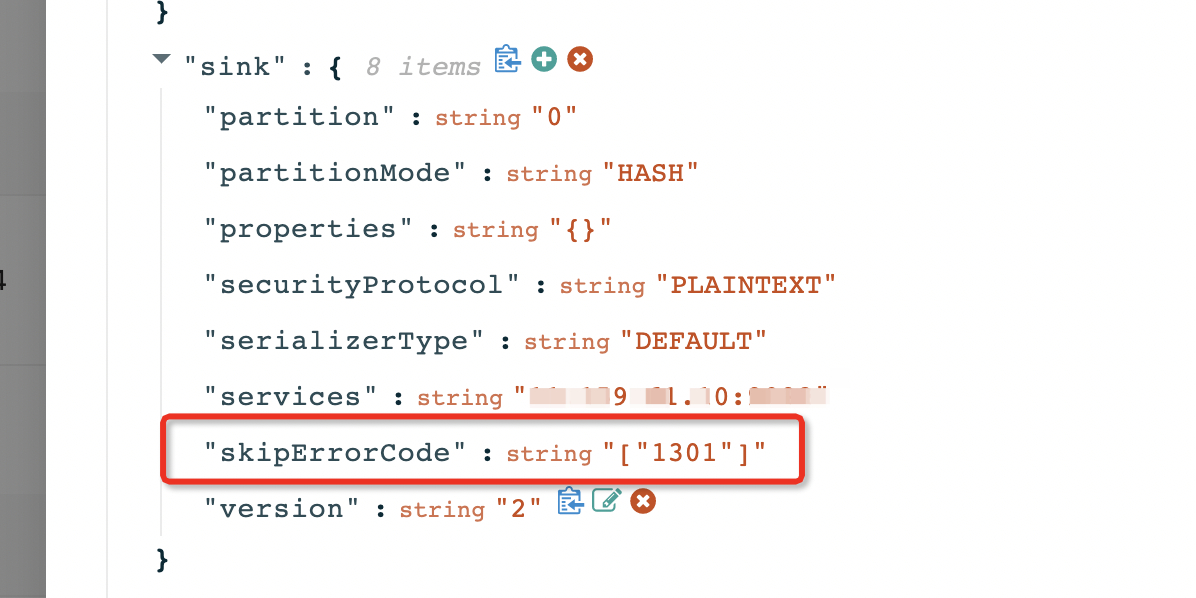
If you are using OMS V3.4.0 or later, you can skip this error by adding the skipErrorCode parameter to skip the error code.
CONNECTOR-SIMS00000000
Error level: FATAL
Error message: The database client execution has timed out. The last packet sent to the server was 0 milliseconds ago. The driver has not received any packets from the server.
Cause: The client execution of DML operations has timed out. The default parameter is 50000 ms, meaning that if an SQL statement takes more than 50000 ms to execute, the client will terminate the execution of this SQL statement.
Solution:
Log in to the OMS console.
In the left-side navigation pane, click Data Migration.
On the Data Migration page, click the name of the target data migration task to go to the details page.
Click View Component Monitoring in the upper-right corner of the page.
After you click the update button, find the
config_urlparameter and increase the value of thesocketTimeoutparameter.
CONNECTOR-SIOM00000000
Error level: FATAL
Error message: The database client execution has timed out. The last packet sent to the server was 0 milliseconds ago. The driver has not received any packets from the server.
Cause: The client execution of DML operations has timed out. The default parameter is 50000 ms, meaning that if an SQL statement takes more than 50000 ms to execute, the client will terminate the execution of this SQL statement.
Solution:
Log in to the OMS console.
In the left-side navigation pane, click Data Migration.
On the Data Migration page, click the name of the target data migration task to go to the details page.
Click View Component Monitoring in the upper-right corner of the page.
After you click the update button, find the
config_urlparameter and increase the value of thesocketTimeoutparameter.
CONNECTOR-SIOM01000000
Error level: FATAL
Error message: The database client execution timed out. The last packet sent to the server was 0 milliseconds ago. The driver has not received any packets from the server.
Cause: The execution of the DDL statement timed out on the client. The default timeout period is 50000 ms, which means that if the execution of an SQL statement exceeds 50000 ms, the execution of the SQL statement is terminated.
Solution:
Log in to the OMS console.
In the left-side navigation pane, click Data Migration.
On the Data Migration page, click the name of the target data migration task to go to the details page.
Click View Component Monitoring in the upper-right corner of the page.
After you click the update button, find the
config_urlparameter and increase the value of thesocketTimeoutparameter.
CONNECTOR-SOOO00000001
Error level: FATAL
Error message: Full migration has exceptions on some tables
Cause: Some table objects encountered exceptions during full migration Solution: Please click View Details to locate the specific table object and find out the cause of the error.
CONNECTOR-SIOM01123500
Error level: FATAL
Error message: Alter charset or collation type is not supported
Cause: OceanBase Database does not support the modification of the character set or collation type of a column.
Solution: Contact OMS Technical Support.
CONNECTOR-SIOM01123501
Error level: FATAL
Error message: Decrease scale of timestamp type not supported
Cause: OceanBase Database does not support decreasing the precision of a timestamp field.
Solution: Contact OMS Technical Support.
Supervisor error codes
SUPERVISOR-CMADIE020101
Error level: ERROR
Error message: ShellCommand execute command: {command} Timeout.
Cause: The script command execution timed out.
Solution: Contact OMS Technical Support.
SUPERVISOR-CMADIE020102
Error level: ERROR
Error message: ShellCommand execute failed, Ret: {exitCode}.
Cause: The script command execution failed.
Solution: Contact OMS Technical Support.
SUPERVISOR-CMADIE020201
Error level: ERROR
Error message: ReadFileCommand execute failed, Ret: {exception message}.
Cause: The file read failed.
Solution: Contact OMS Technical Support.
SUPERVISOR-CMADIE020202
Error level: ERROR
Error message: WriteFileCommand execute failed, Ret: {exception message}
Cause: The file write failed.
Solution: Contact OMS Technical Support.
SUPERVISOR-CMADIE020203
Error level: ERROR
Error message: Illegal Path: {path}
Cause: An attempt was made to write a file to a directory that is not writeable, resulting in the write failure.
Solution: Contact OMS Technical Support.
SUPERVISOR-CMADIE020204
Error level: ERROR
Error message: Null or empty DYNAMIC_PORT args
Cause: DYNAMIC_PORT placeholder parameter is empty.
Solution: Contact OMS technical support.
SUPERVISOR-CMADIE020205
Error level: ERROR
Error message: Failed, Unsupported Placeholder: {placeholder}
Cause: Unsupported placeholder type.
Solution: Contact OMS technical support.
SUPERVISOR-CMADIE020206
Error level: ERROR
Error message: Failed to allocate dynamic port
Cause: No available dynamic ports.
Solution: Contact OMS technical support.
SUPERVISOR-CMADIE020207
Error level: ERROR
Error message: Unsupported file syntax
Cause: Unsupported file type.
Solution: Contact OMS technical support.
SUPERVISOR-CMADIE020208
Error level: ERROR
Error message: Null or empty JSON parser args
Cause: JSON parsing parameters are empty.
Solution: Contact OMS technical support.
SUPERVISOR-CMADIE020208
Error level: ERROR
Error message: Invoke DeleteFileCmd, delete file: {file fullname} failed
Cause: Failed to delete the file.
Solution: Contact OMS Technical Support.
SUPERVISOR-CMADIE020301
Error level: ERROR
Error message: SqlCommand execute failed with sql: {sqls} and exception: {exception message}
Cause: Failed to execute the SQL command.
Solution: Contact OMS Technical Support.
SUPERVISOR-CMADIE020401
Error level: ERROR
Error message: Empty tables or views
Cause: The Table or View parameter requested by DBCat is empty.
Solution: Contact OMS Technical Support.
SUPERVISOR-CMADIE020403
Error level: ERROR
Error message: Invalid byteUsedType: {byteUsedType} / None requireFields
Cause: The DBCat command parameters are invalid.
Solution: Contact OMS Technical Support.
SUPERVISOR-CMADIE020404
Error level: ERROR
Error message: Dbcat fetch DDL failed, with exception {exception message}
Cause: Failed to obtain DDL from DBCat.
Solution: Contact OMS Technical Support.
SUPERVISOR-CMADIE020405
Error level: ERROR
Error message: Dbcat query dependency failed, with exception {exception message}
Cause: DBCat queries failed to obtain metadata of the migration objects.
Solution: Contact OMS Technical Support.
SUPERVISOR-CMADIE020501
Error level: ERROR
Error message: Invalid input key
Cause: The input key is invalid.
Solution: Contact OMS Technical Support.
SUPERVISOR-CMADIE020503
Error level: ERROR
Error message: Unsupported report type
Cause: The reporting method is not supported.
Solution: Contact OMS Technical Support.
SUPERVISOR-CMADIE020601
Error level: ERROR
Error message: InvokeFuncCommand failed with exception {exception message}.
Cause: The function call failed.
Solution: Contact OMS Technical Support.
SUPERVISOR-CMADIE020602
Error level: ERROR
Error message: InvokeFuncCommand unsupported func: {func name}
Cause: The function type is not supported.
Solution: Contact OMS Technical Support.
SUPERVISOR-CMADIE020603
Error level: ERROR
Error message: InvokeFuncCommand timeout with exception: {exception message}
Cause: The function execution has timed out.
Solution: Contact OMS Technical Support.
SUPERVISOR-CMADIE020605
Error level: ERROR
Error message: InvokeFuncCommand fetch message fail with exception: {exception message}
Cause: Failed to obtain the message.
Solution: Contact OMS Technical Support.
SUPERVISOR-CMADIE020606
Error level: ERROR
Error message: InvokeFuncCommand failed to init datahub client with exception: {exception message}
Cause: Failed to initialize the DataHub client.
Solution: Contact OMS Technical Support.
SUPERVISOR-CMADIE020701
Error level: ERROR
Error message: Failed to get process alive job
Cause: Failed to actively pull the heartbeat.
Solution: Contact OMS Technical Support.
SUPERVISOR-CMADIE020702
Error level: ERROR
Error message: Failed to fetch result of task: {taskId}
Cause: Failed to actively pull the task result. |
Solution: Contact OMS Technical Support.
SUPERVISOR-CMADIE020703
Error level: ERROR
Error message: Failed to fetch errors of task: {taskId}
Cause: Active pull for error message failed.
Solution: Contact OMS Technical Support.
SUPERVISOR-CMADIE020704
Error level: ERROR
Error message: No error message to fetch now for task: {taskId}
Cause: The task does not have an error message.
Solution: Contact OMS Technical Support.
SUPERVISOR-CMADIE020705
Error level: ERROR
Error message: FetchReportCommand unsupported report type: {report type}
Cause: Unsupported pull method, not a heartbeat, task, or error message.
Solution: Contact OMS Technical Support.
Store error codes
STORE-MYSQL-MODEL-EXTRA-000001
Error level: FATAL
Error message: Failed to find the Store startup timestamp {timestamp} in the MySQL binlog file.
Cause: The timestamp {timestamp} to be searched is earlier than the minimum timestamp {minBinlogTimestamp} in the first binlog file {binlogFile}.
Solution: Ensure that the Store startup timestamp {timestamp} is greater than or equal to the minimum timestamp {minBinlogTimestamp} of the MySQL binlog.
STORE-MYSQL-MODEL-EXTRA-000002
Error level: FATAL
Error message: Failed to parse the binlog event {fileName}:{fileOffset}: table {table}, event type {eventType}
Cause: During the Store initialization process, the {table} table was dropped.
Solution: If it is a new link, rebuild the link after ensuring that no DDL operations are performed on the MySQL side. For other cases, contact OMS technical support.
STORE-MYSQL-MODEL-EXTRA-000100
Error level: FATAL
Error message: Failed to read the binlog data packet.
Cause: An error occurred while reading the binlog data packet: {errorMsg}.
Solution: Contact OMS technical support.
STORE-MYSQL-MODEL-EXTRA-000101
Error level: FATAL
Error message: Failed to parse the DML event.
Cause: When parsing the DML event, the tableMapData information could not be found. Table ID: {tableId}, binlog position: {position}.
Solution: Contact OMS technical support.
STORE-MYSQL-MODEL-EXTRA-000102
Error level: FATAL
Error message: Failed to parse DML events.
Cause: Table information could not be found when parsing DML events. Table name: {tableName}, Binlog position: {position}.
Solution: Contact OMS Technical Support.
STORE-MYSQL-MODEL-EXTRA-000103
Error level: FATAL
Error message: Failed to parse DML events.
Cause: An error occurred while parsing row data for DML events: {errorMsg}, Binlog position: {position}.
Solution: Contact OMS Technical Support.
STORE-MYSQL-MODEL-EXTRA-000104
Error level: FATAL
Error message: Failed to process XA_ROLLBACK events.
Cause: An unsupported XA_ROLLBACK event was encountered, Binlog position: {position}.
Solution: Configure [{proposalOption}] to ignore XA_ROLLBACK events (which may result in data inconsistencies) or contact OMS Technical Support.
STORE-MYSQL-MODEL-EXTRA-000105
Error level: FATAL
Error message: Failed to parse DDL events.
Cause: An error occurred while processing DDL {ddl}: {errorMsg}, Binlog position: {position}.
Solution: Contact OMS Technical Support.
STORE-MYSQL-MODEL-EXTRA-000106
Error level: FATAL
Error message: Failed to locate the Binlog pull start point.
Cause: Failed to locate the Binlog pull start point. Error message: {errorMsg}, cause: {errorCause}.
Solution: Please troubleshoot the cause based on the error message. If you cannot resolve the issue, contact OMS Technical Support.
STORE-MYSQL-MODEL-EXTRA-000107
Error level: WARNING
Error message: No data was received over the connection for fetching the Binlog package.
Cause: The connection {connection} for fetching the Binlog package was idle for {idleTime}s. Is the connection valid? {active}.
Solution: Please ensure that the Binlog files have been updated and the network is normal for connecting to the source MySQL instance.
STORE-MYSQL-MODEL-EXTRA-000108
Error level: FATAL
Error message: A DDL operation occurred during the process of obtaining the initial table schema.
Cause: A DDL operation {ddl} occurred during the process of obtaining the initial table schema at {ddlPosition}, initial start point: {initialPosition}.
Solution: If it is a new link, please rebuild the link after ensuring that no DDL operations are performed on the MySQL side. For other cases, please contact OMS Technical Support.
STORE-ORACLE-MODEL-EXTRA-000001
Error level: FATAL
Error message: The Oracle log file does not exist.
Cause: The Oracle instance {instance} does not have a log file containing {timestamp_or_scn_key} {timestamp_or_scn_value}.
Solution: Restore the corresponding log file on the Oracle instance or rebuild the migration task.
STORE-ORACLE-MODEL-EXTRA-000002
Error level: FATAL
Error message: The name of a schema, table, or column cannot exceed 30 bytes.
Cause: The name of a schema cannot exceed 30 bytes. The name exceeding this limit is {schema_names}. The name of a table cannot exceed 30 bytes. The name exceeding this limit is {table_names}. The name of a column cannot exceed 30 bytes. The name exceeding this limit is {column_names}.
Solution:
If these tables do not need to be migrated, add them to the deliver2store.logminer.full_table_name_black_list list in the Oracle Store configuration.
If these tables must be migrated, perform the following steps:
Use the SYS account to modify the parameters of the Oracle database.
ALTER SYSTEM SET ENABLE_GOLDENGATE_REPLICATION=true SCOPE=BOTH;Notice
To modify the
ENABLE_GOLDENGATE_REPLICATIONparameter, the Oracle database must have an Oracle GoldenGate (OGG) license (OGG does not need to be installed).If the Oracle database is an Oracle RAC database, all Oracle instances must be modified. This operation does not require a restart of the Oracle database.
If you are pulling data from an ADG standby database, you must configure the ADG standby database.
For each Oracle instance, execute the following three commands alternately.
ALTER SYSTEM SWITCH LOGFILE;Ten minutes later, recreate the data migration task.
Set the deliver2store.logminer.need_check_object_length parameter of the Oracle Store to false.
STORE-ORACLE-MODEL-EXTRA-000003
Error level: FATAL
Error message: If data inconsistency is allowed (such as during testing), you can set the Oracle Store configuration deliver2store.logminer.enable_check_ddl_cause_row_move to false. Otherwise, add this table to the Oracle Store configuration deliver2store.logminer.full_table_name_black_list or rebuild the migration link.
Cause: The table {table} and DDL {DDL} may cause row migration. The DDL operation is not allowed on Oracle because it may lead to data inconsistencies after migration.
Solution: If data inconsistency is allowed (such as during testing), you can set the Oracle Store configuration deliver2store.logminer.enable_check_ddl_cause_row_move to false. Otherwise, add this table to the Oracle Store configuration deliver2store.logminer.full_table_name_black_list or rebuild the migration link.
Validation error code
VERIFIER-PREP01000001
Error level: ERROR
Error message: Precheck for validation failed.
Cause: Slice index matching failed.
Solution: Data validation is not supported for this table. Please contact technical support to blacklist the table and then resume the validation task.
VERIFIER-PREP01000002
Error level: ERROR
Error message: Precheck for validation failed.
Cause: The definitions of unique key indexes are inconsistent between the source and target.
Solution: Data validation is not supported for this table. Please contact technical support to blacklist the table and then resume the validation task.
VERIFIER-PREP01000003
Error level: ERROR
Error message: Precheck for validation failed.
Cause: The source column does not exist in the target table.
Solution: Data validation is not supported for this table. Please contact technical support to blacklist the table and then resume the validation task.
VERIFIER-PREP01000004
Error level: ERROR
Error message: Precheck for validation failed.
Cause: The query for the target table metadata timed out.
Solution: Please contact technical support.
VERIFIER-PREP01000005
Error level: ERROR
Error message: Precheck for validation failed.
Cause: The source table contains an unsupported column name OMS_PK_INCRMT.
Solution: Evaluate the impact of deleting the OMS_PK_INCRMT column from the source. If deletion is possible, remove the column from the source table and then resume the validation task. If deletion is not possible, contact technical support to blacklist the table and then resume the validation task.
VERIFIER-PREP01000006
Error level: ERROR
Error message: Precheck for validation failed.
Cause: The source table lacks a primary key, and data validation for the target table's hidden columns is not supported.
Solution: Please contact technical support to blacklist the table and then resume the validation task.
VERIFIER-PREP01000007
Error level: ERROR
Error message: Precheck for validation failed.
Cause: The columns in the target table do not exist in the source table.
Solution: Check the schemas of the source and target tables, add the columns that do not exist in the target to the source, and then resume the validation task.
VERIFIER-PREP01000008
Error level: ERROR
Error message: Precheck for validation failed.
Cause: The source table lacks a primary key, and the target table lacks hidden columns.
Solution: Data validation is not supported for this table. Please contact technical support to blacklist the table and then resume the validation task.
VERIFIER-PREP01000009
Error level: ERROR
Error message: Precheck for validation failed.
Cause: The source table lacks a primary key, and the target table lacks a unique key on the hidden columns.
Solution: Data validation is not supported for this table. Please contact technical support to blacklist the table and then resume the validation task.
VERIFIER-PREP01000010
Error level: ERROR
Error message: Precheck for validation failed.
Cause: The source table lacks a primary key or unique key, and data validation is not supported when hidden columns are not used.
Solution: Add primary keys to the source and target tables, or enable the use of hidden columns by setting task.verify.split.useInvisibleColumn.
VERIFIER-PREP01000011
Error level: ERROR
Error message: Precheck for validation failed.
Cause: The specified indexes cannot be correctly matched.
Solution: Check the specified index configurations, or contact technical support to blacklist the table and then resume the validation task.
VERIFIER-SDRM02000001
Error level: ERROR
Error message: Validation failed.
Cause: The database query timed out.
Solution: Please contact technical support to investigate the cause of the database query timeout.
VERIFIER-SDRM02000002
Error level: ERROR
Error message: Validation failed.
Cause: The database query caused an OOM (Out of Memory) error.
Solution: Please contact technical support to investigate the cause of the data validation error.
VERIFIER-SDRM02000003
Error level: ERROR
Error message: Validation failed.
Cause: The number of inconsistent rows in the validation result of the table exceeds the threshold set by OMS.
Solution: Please update the parameter limitator.table.diff.max and then restart the validation task.
VERIFIER-SOGE99000001
Error level: ERROR
Error message: Unknown error.
Cause: Data validation for this table is not supported.
Solution: Please drop the table or contact technical support to investigate the cause.