







This topic describes how to configure an alert channel and an alert subscription and provides some useful tips.
Application scenarios
This topic provides configuration examples in the following scenarios:
Send alerts to different users.
Send alert messages in JSON format.
Receive only alert messages, but not alert clearance messages.
Verify whether an alert is sent.
Alert channel and alert subscription
An alert channel is a medium for sending alert messages, for example, sending messages to a DingTalk group or sending messages to the alerting platform of a customer.
Two alert message sending modes are available: group message channel and non-group message channel. The DingTalk group is not a chat group, but rather, is a group of recipients who can receive alert messages sent to the group. Therefore, a group message channel is a medium for sending alert messages to all members of a group. In other words, when an alert is triggered, an alert message is sent through all group message channels. A non-group message channel, however, sends only alert messages in the subscription list of the alert channel.
For example, as shown in the following figure, alerts of the Warning, Stopped, and Critical levels in the OCP and DBA alert item groups of the OceanBase and OceanBase Cloud Platform (OCP) applications are sent through a default channel.
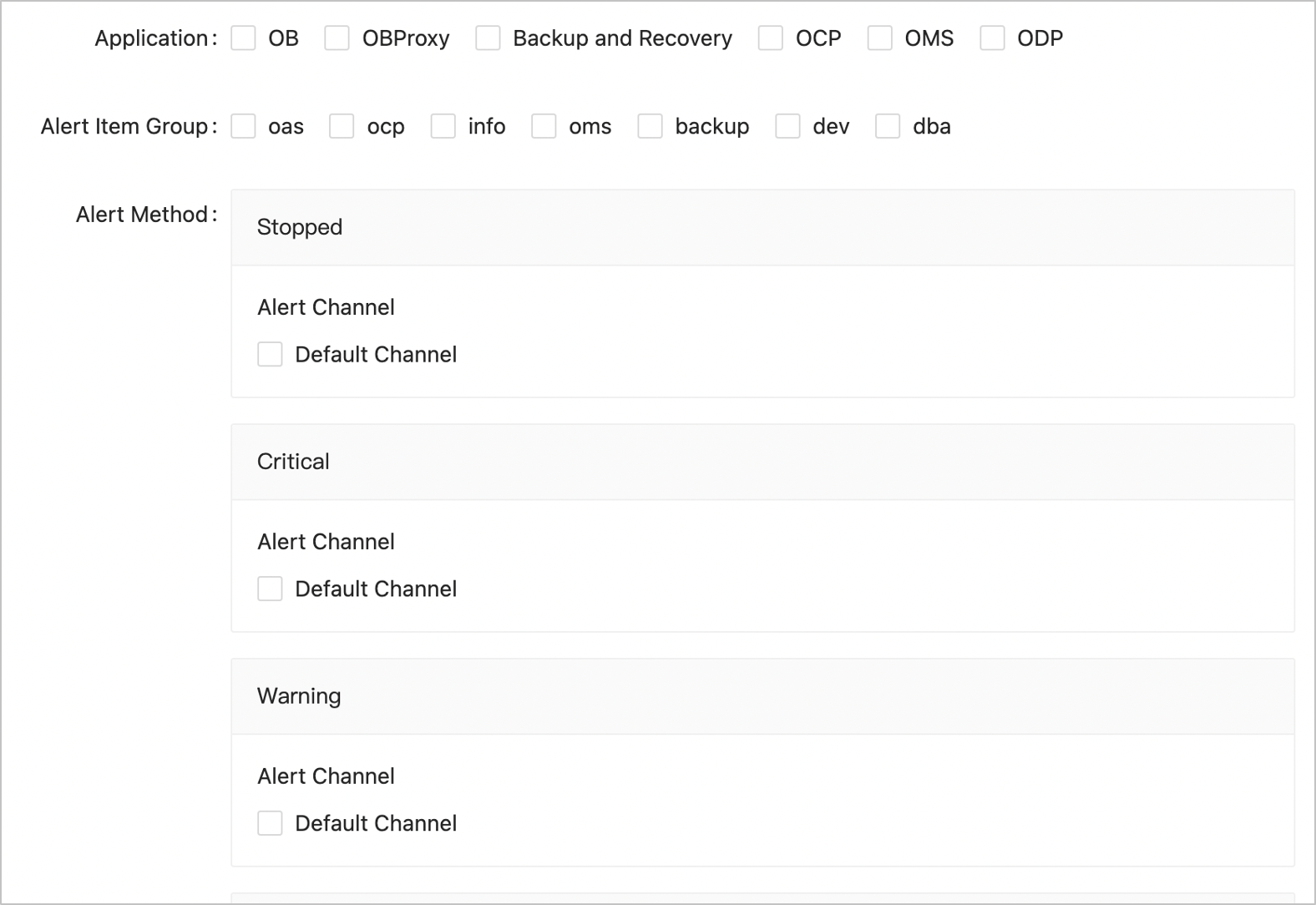
You can configure a non-group message channel and alert subscriptions to send different alerts to different owners. Specifically, alerts are first sent through the specified non-group message channel and then assigned to corresponding owners such as the night duty group or DBA group in another system.
Specify a language for alert messages
OCP supports alert messages in English, Simplified Chinese, and Traditional Chinese. To change the language of alert messages, switch to the required language, configure a message template for the message channel, and execute the following statement in a command-line tool:
UPDATE `ocp2_alarm_channel` SET message_language='en_US' WHERE id=xxx-id;
You can specify different languages for different message channels to meet the personalized requirements of O&M personnel. The available language options include zh_CN (Simplified Chinese), zh_TW (Traditional Chinese), and en_US (English).
Send alert messages in JSON format
Messages include alert messages and alert clearance messages. They are processed in different ways.
Alert messages
On the Alert Channel Configuration page of the OCP console, you can configure an alert message template and an aggregate message template. These templates apply to DingTalk group messages. To receive JSON alert messages, you must perform the following settings: Note
If you expect send alert messages in one language, set the channels in the language specified in message_language.
Set the format of the alert message template and aggregate message template to JSON.
Reference the message template variable ${message_json} in messages. The ${message_json} variable is JSON message format
${message_json}configured in step 1. ${message_json} is already an escaped message string and cannot be packaged again. For example,{"content": ${message_json}}is an invalid JSON string.Notice
If the message templates are not set to the JSON format in step 1, the message content must be set to
{"content": "${message_json}"}in step 2. The double quotations are inserted because ${message_json} is not a JSON string but rather a character string.${alarm_summary} and ${alarm_description} may contain unescaped characters. For example, OceanBase log alerts always contain quotation marks or line breaks. In this case, ${message_json} that contains ${alarm_summary} and ${alarm_description} is an invalid JSON format, and the message content also must be set to
{"content": "${message_json}"}.
Alert clearance messages
The alert clearance message template cannot be configured on the Alert Channel Configuration page, and can be configured only by using the system parameter ocp.alarm.recover-message-template.
If it is not specified, the default configuration is used.
# Recovery message template in English
[Alarm Recover Notification]
- Target ${alarm_target}
- Details ${alarm_description}
- Recovered at ${alarm_resolved_at}

## Recovery message template in Simplified Chinese
【告警恢复通知】
- 告警对象 ${alarm_target}
- 告警详情 ${alarm_description}
- 恢复时间 ${alarm_resolved_at}

## Recovery message template in Traditional Chinese
【警示恢復通知】
- 警示對象 ${alarm_target}
- 警示詳情 ${alarm_description}
- 恢復時間 ${alarm_resolved_at}
If the alert channel is not a group message channel, you can specify whether to receive alert clearance messages on the Settings for Receiving Notifications tab of the Alert Subscription page. By default, alert clearance messages are not received.
Verify the alert sending result
If the OCP version is earlier than V3.3.0, the system only verifies whether an alert message is successfully sent to the destination, but does not verify the response of the alert message. However, verification is required if the response contains an error code or a failed field. Therefore, in OCP V3.3.0, the response_validation field is added to ocp2_alarm_channel for verification. The verification rules are as follows:
If the response is in the JSON format,
response_validationmust also be set to a JSON string ("{}" by default). The response of the alert message must contain all the key-value pairs inresponse_validation. For example, for a DingTalk group message channel, if theresponse_validationfield is set to{"errcode":0,"errmsg":"ok"}, the error code 0 indicates that the alert message is sent successfully.If the response is not a JSON string, it must be the same as the content of
response_validation.
Notice
The response of a script channel contains a standard error and a standard output. The standard error in the script is preferentially matched against response_validation. If the standard error (stderr) of the script is empty, the standard output (stdout) of the script is matched against response_validation. The script observes the following rules :
If the alert messages fail to be sent, the response is output to the standard error.
If the program does not output any information to the standard error, only the response is output to the standard output. If the script outs some other logs, the system erroneously determines that a sending failure has occurred.
Therefore, after you upgrade OCP, you must perform the following operations:
Set
response_validationto an appropriate value.Check whether the script of the alert channel outputs logs. If yes, modify the script so that it only outputs the response body to the standard error or standard output.