







OceanBase Migration Service (OMS) supports the real-time synchronization between a MySQL-compatible or Oracle-compatible tenant of OceanBase Database and a Kafka, RocketMQ, or DataHub data source. OMS can synchronize logical tables from an ODP data source to the physical tables in a MySQL-compatible tenant of OceanBase Database. OMS provides a scalable message processing capability, which is useful for real-time data warehousing, data query, report distribution, and other services. This topic describes the data synchronization process.
To create and manage a data synchronization task, perform the following steps:
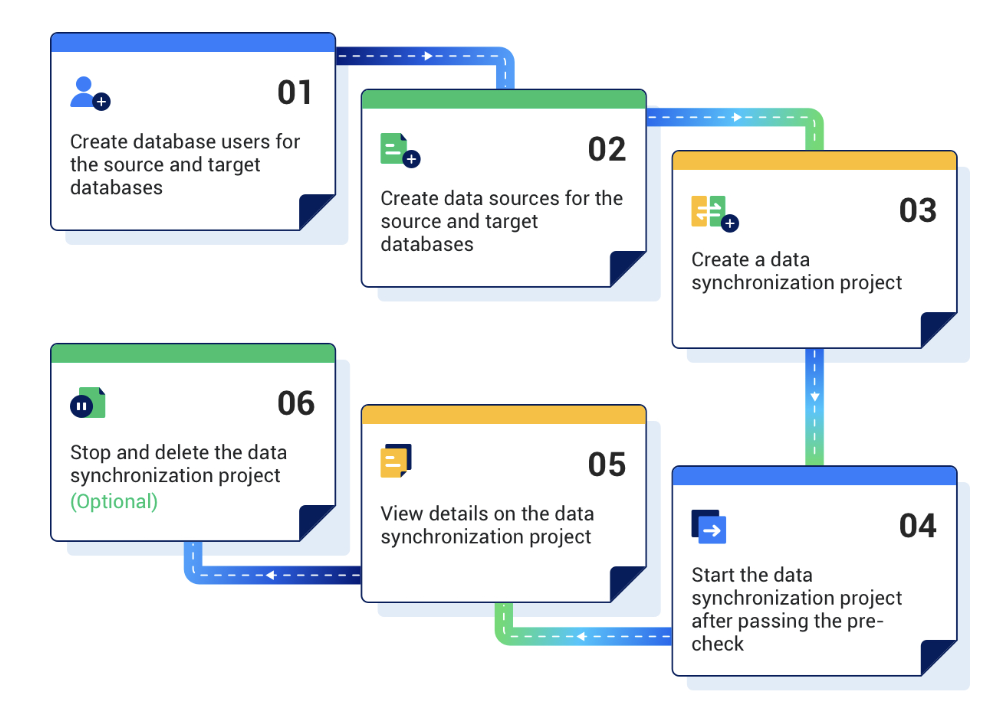
Prepare for data synchronization.
Before you use OMS to synchronize data, we recommend that you create a dedicated database user for the data synchronization task and grant the required data operation privileges to the user. For more information, see Create and authorize a database user.
Add source and destination data sources. For more information, see Create a data source.
Create a data synchronization task.
Log in to the OMS console and complete the required configurations. For more information, see Data synchronization.
After your data synchronization task passes the pre-check, start your task.
View the status of data synchronization tasks.
Once a data synchronization task starts, it executes sequentially based on the selected synchronization type. For more information, see View Details of a Data Synchronization Project.
(Optional) Stop and release the data synchronization task.
If data synchronization is no longer required, you can stop the data synchronization task and release the resources. For more information, see Release and delete a data synchronization task.