







This topic describes the system and network requirements for installing OceanBase Migration Service (OMS).
Operating system
OMS can be deployed only on Linux-based hosts.
Linux operating system |
Version |
Server architecture |
|---|---|---|
| CentOS | V7 | x86_64 (including Hanguang) |
| KylinOS | V10 | ARM_64 (Kunpeng) |
Deploy server port restrictions
When you install OMS on a deployment server, you must use the following ports. Before installation, make sure that the corresponding ports are available and the port policies are enabled.
The server on which OMS is installed must provide the following ports.
PortDescription8089/8090 The port for the OMS management console. 2023 The port for the sshd service. 8084 The port for the supervisorctl Web interface. 8088 The port for the cluster management module of OMS. In supervisorctl, the component is named oms_drc_cm.9000/9001 The service port for the host Agent process. 16000~16499
17000~17499
18000~18499
7100-7499The random ports for internal components of OMS. If you need to change the port for the OMS management console, 8089, perform the following steps:
Enter the Docker container.
docker exec -it ${CONTAINER_NAME} bashNote
CONTAINER_NAMEis the name of the container.Run the
vi /home/ds/ghana/config/tengine.confcommand and change the port number after thelistenparameter in this file.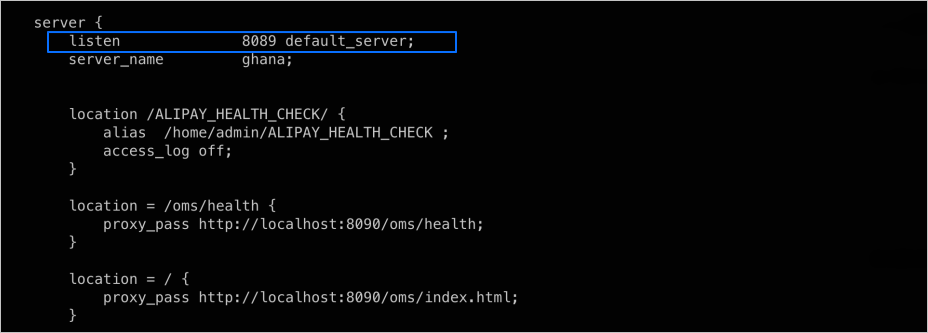
Enter
:wqand press Enter to save the changes and exit the editing mode.Run the
supervisorctl restart nginxcommand.
If you have deployed InfluxDB, make sure that the server on which InfluxDB is deployed provides the InfluxDB service port, 8086, available.
NTP service
Before installation, make sure that the OMS Meta database and all OMS deployment servers are configured and enabled with the NTP service, and that the clocks of the servers are synchronized. Also, make sure that the time zones of the database and the servers are consistent.
Network connectivity
Ensure that the network is connected between the OMS deployment server, obproxy, OBServer node, OCP, and the data sources involved in the migration and synchronization.