







OceanBase Database provides the plan management feature for you to prepare and implement a series of plans for possible database emergencies and crises. This feature enhances your response to emergencies and crises, reduces losses, and ensures database operation stability, thereby mitigating the impact of potential risks on your business and improving the overall response performance of OceanBase Database.
Applicability
This topic applies only to OceanBase Cloud Platform (OCP) Enterprise Edition. OCP Community Edition does not support this feature.
The plan management feature consists of the Plan and Plans tabs.
Prerequisites
To view plans and plan execution information, make sure that you have the following permissions:
- Resource Permissions: Cluster Read-only or Tenant Read-only permission
- Menu Permissions: Permission on the Plan Management menu of O&M Management
The Plan tab
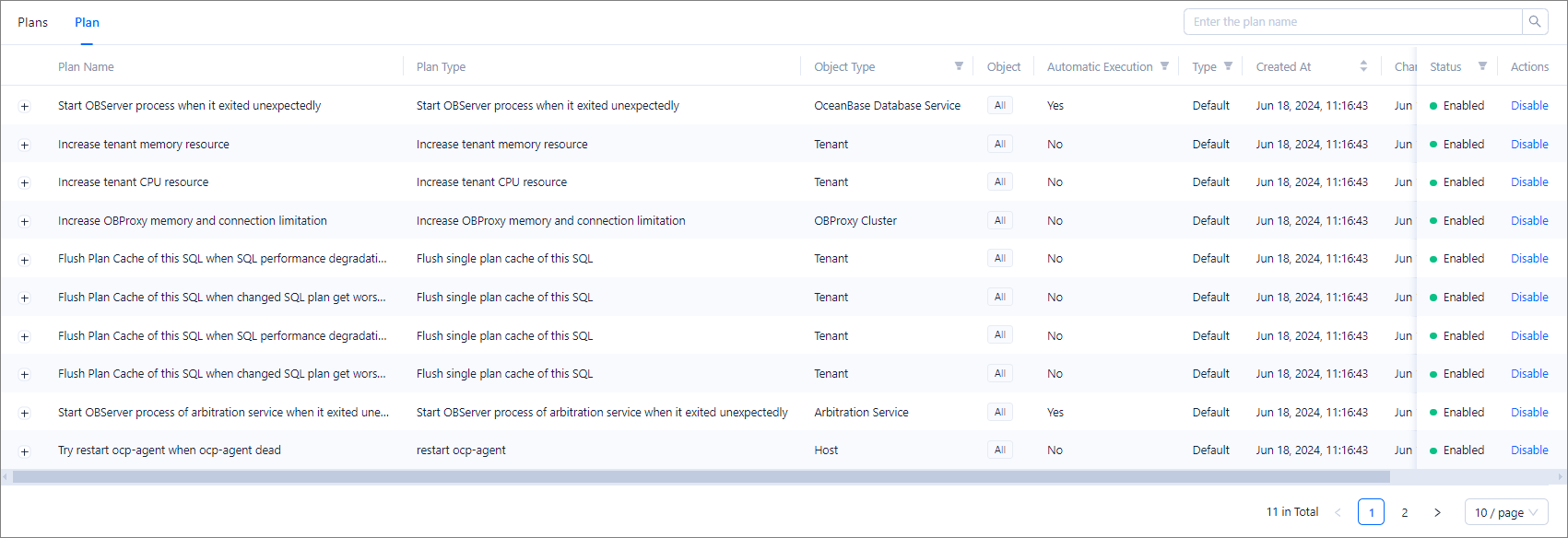
OCP provides more than 10 types of plans for different scenarios, such as automatically reloading the observer process, increasing the CPU and memory resources of a tenant, and flushing the plan cache for an SQL statement. You can create a custom plan based on the business scenario and resource usage. For example, you can create a custom resource increasing plan and specify whether to enable the plan.
On the Plan tab, you can view the details about a plan in the following columns: Plan Name, Plan Type, Object Type, Object, Automatic Execution, Type, Created At, Changed At, Created By, and Status.
- You can also unfold a plan to view its trigger rules. If you unfold a plan about increasing the CPU or memory resources of a tenant or increasing the maximum number of connections to an OBProxy, you can view the increment factor and maximum server memory usage.
- You can enter a plan name in the search box to perform a fuzzy search.
- You can filter plans by Object Type, Automatic Execution, Type, or Status.
- You can sort plans by Created At or Changed At.
- You can perform routine management operations on plans. For example, you can create, enable, disable, edit, and delete a plan. For more information, see Manage plans.
The Plans tab
This tab provides plan execution information and corresponding SQL details, and allows you to manually execute a plan whose automatic execution is disabled. This way, you can establish an emergency management mechanism and O&M specifications for OceanBase Database, ensuring business continuity and stability in an intelligent manner.
On the Plans tab, you can view detailed execution information about plans in the following columns: Plan Type, Object, Event Type, Event Name, Execution Period, and Status.
- You can unfold a row to view information such as the plan name, increment factor, and maximum server memory usage.
- You can enter the object name in the search box to perform a precise search.
- You can sort plans by Execution Period.
- You can perform different O&M operations on emergency plans based on the plan status. For more information, see View plan execution details.

Plan types
The following table describes plan types and their corresponding trigger rules and object types.
Plan type |
Trigger rule |
Object type |
Description |
|---|---|---|---|
| Start observer process when it exited unexpectedly | os_observer_not_exist |
OceanBase Database Service | Start the observer process when it exited unexpectedly. The observer process can be reloaded only once within 12 hours since the event occurs. |
| Increase tenant memory resource | tenant_memstore_percent_over_threshold |
Tenant | Automatically increase the tenant memory when the tenant memory usage exceeds the threshold. |
| Increase tenant CPU resource | ob_tenant_request_queue_over_threshold |
Tenant | Automatically increase the CPU resources of an tenant when the CPU utilization exceeds the threshold. |
| Increase OBProxy memory and connection limitation | obproxy_client_connections_usage_over_threshold |
OBProxy cluster | Automatically increase the value of the cluster-level parameter that specifies the maximum number of connections to an OBProxy. |
| Flush single plan cache of this SQL | oas_anomaly_sql_from_anomaly_event_analysis_perf_degradation |
Tenant | Refresh the plan cache of an SQL statement if the exception analysis result of OceanBase Autonomy Service (OAS) indicates that the SQL performance downgrades . |
| Flush single plan cache of this SQL | oas_anomaly_sql_from_anomaly_event_analysis_plan_changed |
Tenant | Refresh the plan cache of an SQL statement if the exception analysis result of OAS indicates that the SQL execution plan deteriorates. |
| Flush single plan cache of this SQL | oas_anomaly_sql_from_sql_inspection_perf_degradation |
Tenant | Refresh the plan cache of an SQL statement if the SQL inspection result indicates that the SQL execution plan deteriorates. |
| Flush single plan cache of this SQL | oas_anomaly_sql_from_sql_inspection_plan_changed |
Tenant | Refresh the plan cache of an SQL statement if the SQL inspection result indicates that the SQL performance downgrades. |
| Start OBServer process of arbitration service when it exited unexpectedly | arbitration_service_unavailable |
Arbitration service | Start the observer process of arbitration service when it exited unexpectedly. The observer process can be reloaded only once within 12 hours since the event occurs. |
| Restart ocp-agent | obagent_dead |
Host | Restart OCP-Agent when OBAgent is unavailable. |
| Restart ocp-agent | host_unavailable |
Host | Restart OCP-Agent when the host heartbeat detection fails. |