







You can restart the observer processes of all nodes in the cluster or specific zones based on your business requirements.
Prerequisites
Make sure that you have the following permissions:
- Resource Permissions: Cluster Maintenance permission
- Menu Permissions: Permission on the Overview menu of Clusters
If a multi-replica OceanBase cluster is to be restarted, the cluster must have three or more replicas. In this case, the OceanBase cluster is restarted in rolling mode, without affecting the business.
If the OceanBase cluster has less than three replicas, the business will be interrupted during the restart.
A standalone centralized database supports only the Force Restart mode.
Procedure
Log on to the OceanBase Cloud Platform (OCP) console.
In the left-side navigation pane, click Clusters to go to the Clusters page.
In the Clusters list on the page, find the target cluster and click its name.
Click the More icon in the upper-right corner on the Overview page of the cluster and select Restart Cluster.
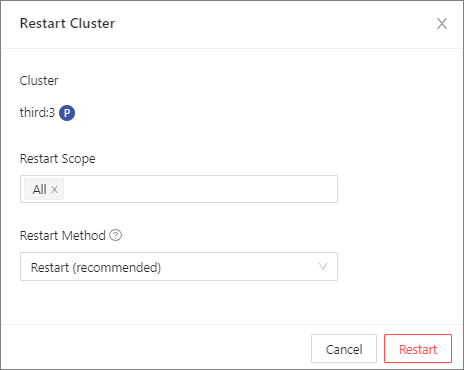
In the dialog box that appears, set the following parameters and click Restart.
Set Restart Scope to All, or specify one or more zones.
If you set Restart Scope to All, the system will restart the observer processes of all nodes in the cluster.
If you set Restart Scope to specific zones, the system will restart the observer processes of these zones.
Set Restart Method to **Restart**or Force Restart.
Restart (recommended): Business access to the database is not interrupted.
Force Restart: Business access to the database is interrupted and the business will become unavailable.
Specify whether to initiate a minor compaction before stopping the observer process. By default, this option is selected. A minor compaction prolongs the response time required to stop the observer process, but significantly shortens the time required to restore the OBServer node.
In the dialog box that appears, click View Task to view the progress.
You can also choose System Management > Tasks to view the progress.
If the task status is Completed, and the specific zones in the Zones list on the Overview page are in the Running state, the cluster is successfully restarted.