This topic describes how to expand the high availability of OceanBase clusters and tenants in the OceanBase Cloud Platform (OCP) console.
Scenarios
- Increase the number of IDCs to provide more reliable high availability. For example, you can switch from the three IDCs across two regions deployment mode to the five IDCs across three regions deployment mode.
- Migrate business to other IDCs. To do so, you need to migrate all servers in an OceanBase cluster to other IDCs without affecting business.
Prerequisites
Make sure that you have the following permissions:
- To add a zone, make sure that you have the following permissions:
- Resource Permissions: Cluster Maintenance permission
- Menu Permissions: Permission on the Overview menu of Clusters
- To add a replica, make sure that you have the following permissions:
- Resource Permissions: Cluster maintenance or tenant maintenance permission
- Menu Permissions: Permission on the Overview menu of Tenants
- To add a zone, make sure that you have the following permissions:
An OceanBase cluster must be in Running state before you add a zone to the cluster.
The hosts for deploying OBServer nodes are available in OCP.
A tenant must be in Running state before you add a replica to the tenant.
Considerations
In OceanBase Database V4.0 and later, the number of units of each replica in a tenant must be the same. Before you add a replica to a tenant, make sure that host resources in the zone are sufficient.
Before you add a zone, make sure that all hosts to be added use the same clock source as the OceanBase cluster, and the time difference does not exceed 10 ms.
To check the time difference between the OceanBase cluster and a host to be added, specify the IP address of the new host in the
clockdiffcommand and run the command on the RootService leader host of the cluster.The arbitration service requires that a tenant must have two or four full-featured replicas. If you have enabled the arbitration service for a tenant with two full-featured replicas, you can only increase the number of full-featured replicas to
4for the tenant.
Procedure
For more information about the procedure, see Add a zone and Add a replica.
A task for adding a replica is asynchronous. Once triggered, the task is scheduled and gradually executed in the backend by RootService. If a large amount of data is involved, the data replication takes a long time to complete. We recommend that you periodically check the data replication status by running the following commands:
# Connect to the oceanbase database of the sys tenant in the OceanBase cluster.
mysql -hxxx.xxx.xxx.xxx -P2881 -uroot@sys -Doceanbase

# Check the task history of RootService. If tenant_balance_finished is displayed, data replication is completed.
select * from __all_rootservice_event_history order by gmt_create desc limit 10;

# Check server information. The value of start_service_time must be later than that of last_offline_time, and the server status must be active.
select svr_ip, gmt_modified, zone, usec_to_time(start_service_time), usec_to_time(last_offline_time), status from __all_server;

# Check whether data replicas are complete. Replace <number of replicas> with the expected number of replicas. If an empty result is returned, data replicas are complete.
select /*+read_consistency(weak)*/ count(*)c from gv$partition group by table_id, partition_id having c != <number of replicas>;

# Check whether clogs are synchronized. If an empty result is returned, clogs are synchronized.
select svr_ip, svr_port, table_id, partition_idx from __all_virtual_clog_stat where is_in_sync= 0 and is_offline = 0 and replica_type != 16;
FAQ
What can I do if data replication is slow when I add a replica to a tenant?
You can increase the values of data replication concurrency parameters to accelerate the migration by running the following commands:
# Query the parameters that specify the data migration concurrency in the cluster and record the parameter values for rollback later.
show parameters like "%data_copy_concurrency%";
show parameters like "%server_data_copy_out_concurrency%";
show parameters like "%server_data_copy_in_concurrency%";

# Set the parameters to larger values.
alter system set data_copy_concurrency=100;
alter system set server_data_copy_out_concurrency=40;
alter system set server_data_copy_in_concurrency=40;
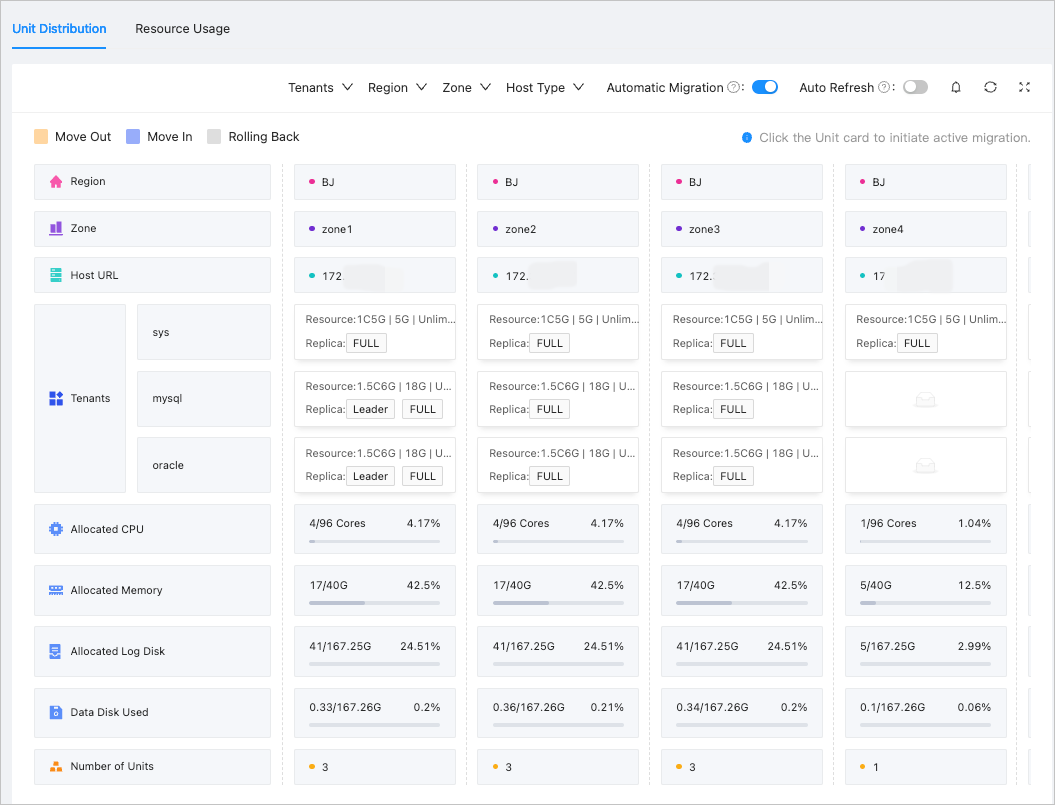
On the Resource Management page in the OCP console, you can view the distribution of replicas for a tenant. For more information, see View the unit distribution.