






This guide helps you quickly unlock the full power of ODC team workspaces, including detailed workspace introduction, activation steps, and application scenarios.
Understand the workspaces: Personal vs. Team
To meet diverse development needs, ODC offers two types of workspaces: personal workspaces and team workspaces, catering to different user groups.
Personal workspace: Designed for individual use, offering basic SQL development and 12 common ticket types to support typical development tasks.
Team workspace: A collaborative platform for multiple users. In addition to basic SQL development and 12 common ticket types, it also offers advanced capabilities such as multi-database changes, logical database changes, development standards enforcement, and data masking.
Comparison of capabilities between personal and team workspaces:
Feature |
Personal workspace |
Team workspace |
|---|---|---|
| SQL Development | Supported | Supported |
| 12 Common Ticket Types | Supported | Supported |
| More Ticket Types (Multi-Database Changes, Logical Database Changes) | Not supported | Supported |
| User Permission Management | Not supported | Supported |
| Project Management | Not supported | Supported |
| Notification and Messaging | Not supported | Supported |
| Development Standards | Not supported | Supported |
| Data Masking | Not supported | Supported |
| Approval Workflow | Not supported | Supported |
Pros and cons of personal and team workspaces:
Item |
Personal workspace |
Team workspace |
|---|---|---|
| Advantages | Easy to get started and flexible. | Supports team collaboration, enforces standardized development, offers rich features, and ensures data compliance. Only administrators need to manage database credentials; other collaborators do not need to handle credentials. |
| Disadvantages | Cannot support team collaboration, fewer features compared to team workspaces. Requires database account and password for development. | Requires higher initial setup cost for administrators, who need to understand basic team workspace concepts. |
The value of team workspaces
Overcoming DevOps collaboration challenges
In most companies, there is a significant imbalance between the size of the DBA (Database Administrator) team and the development team. A single DBA may need to support hundreds or even thousands of developers across various business units, with highly diverse requirements.
At each key project phase (development, testing, and production release), DBAs must deeply participate in the database change process, including table structure design, adjustment, and data modification. If the entire process relies solely on ad hoc communication and manual operations, it severely impacts both the DBA and developer experience, and greatly increases the risk of production incidents, posing a threat to the business.
ODC team workspaces are designed to address these pain points. As the saying goes, "If you want to go fast, go alone; if you want to go far, go together". ODC acts as a powerful partner, enabling DBAs and developers to collaborate efficiently and securely, ensuring steady project delivery and achieving the goal of "going fast and far together".
Recommended scenarios for using team workspaces
The ratio of DBAs to developers is less than 1:20, and frequent database change requests are expected.
The business requires SQL development standards (e.g., naming conventions for tables and columns, prohibition of SELECT * queries).
The business demands high stability (e.g., limiting the number of query results, recognizing offline DDL for non-blocking changes, restricting data exports).
The business involves sensitive data requiring encryption and secure management.
The business handles large data volumes and requires regular data cleanup or archiving.
There is a need to ensure consistent database schemas across development, testing, and production environments.
The business involves sharded databases and requires regular structure maintenance.
Notifications and alerts are needed for abnormal activities within the workspace.
Six steps to activate a team workspace
Starting from ODC V4.3.4, the Quick Start module in the workspace provides a quick path to activate a team workspace. Before activation, it is important to understand the relationships between different concepts within a project.
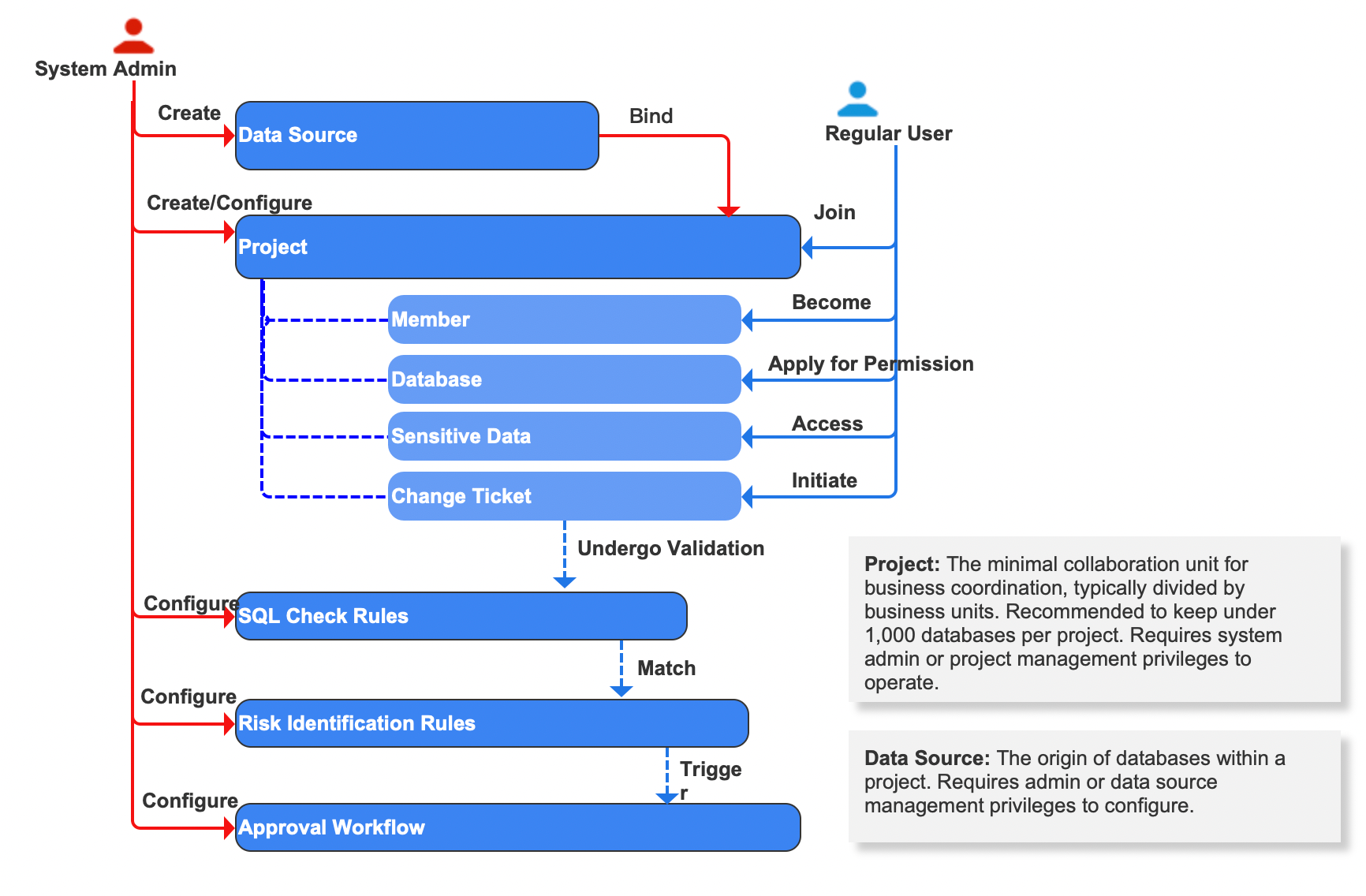
Follow these six steps to activate your team workspace:
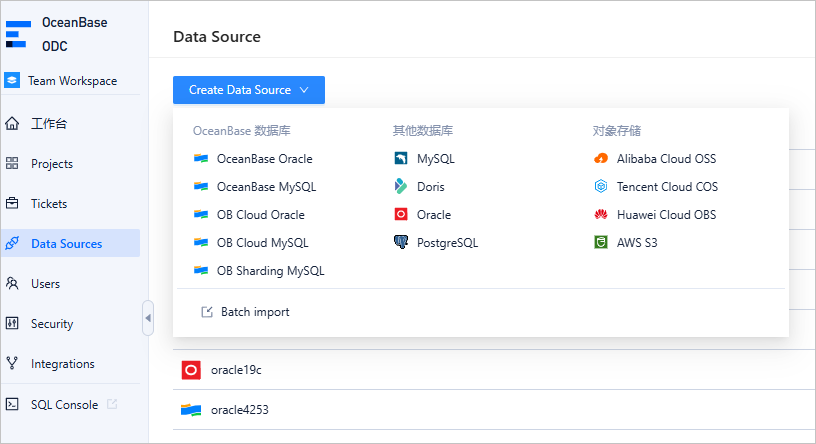
Add a data source
By default, only system admins (system_admin role) can create data sources. However, if the administrator has delegated data source management permissions to specific roles via the User Permissions module, those roles can also manage data sources. A data source must be added before it can be assigned to a project.
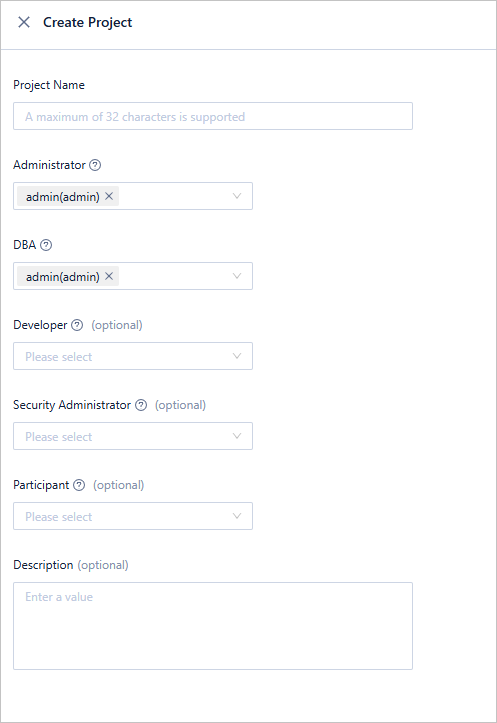
Create a project
Similarly, only system admins (or roles with project management permissions) can create projects. When creating a project, you must assign a project admin and a DBA. These roles default to the project creator. Collaboration in a team workspace is project-based, so creating a project is the first step.
Add business databases
Databases from the data source must be added to the project before project members can access them. Only project admins with edit permissions on the data source can perform this operation. You can also bind the entire data source to a project to automatically synchronize new databases.

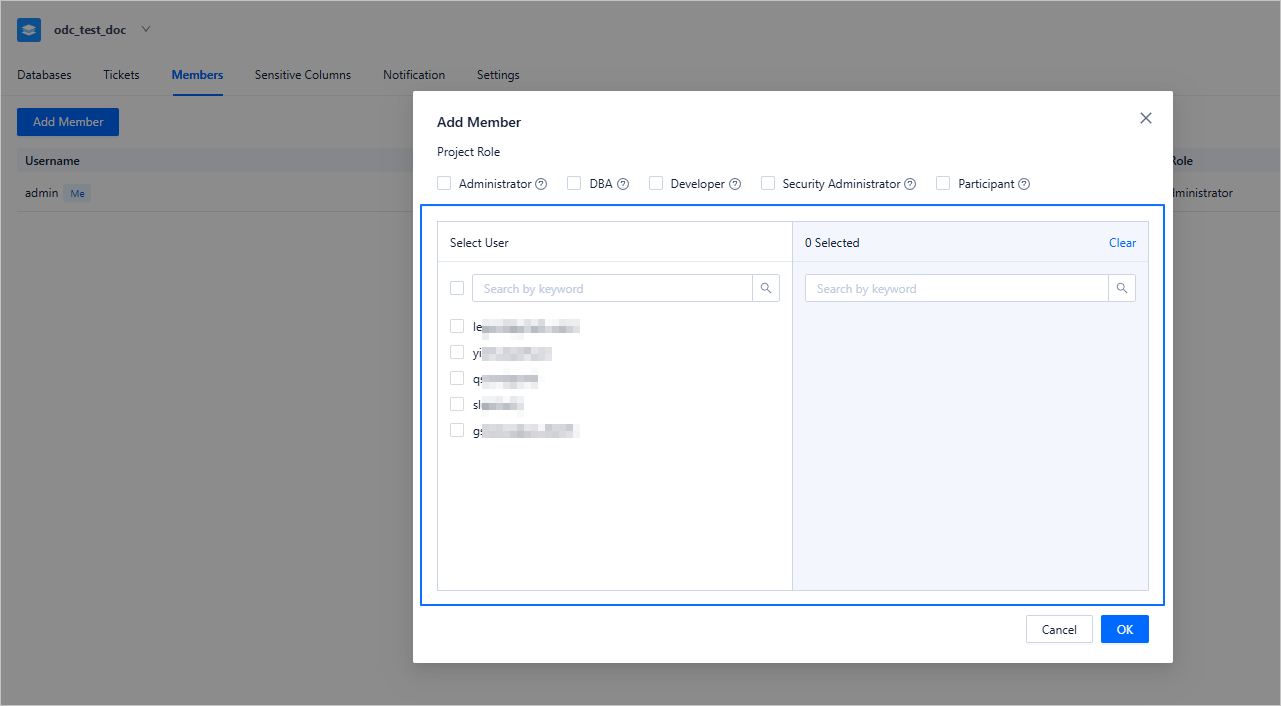
Manage team members
After adding databases, add team members to the project and assign appropriate roles. Role permissions are detailed in the role descriptions. Note that Admins, DBAs, and Developers have access to all project databases by default, while Security Admins and Participants do not. They can apply for access or be granted permissions by project admins.
Adjust development standards
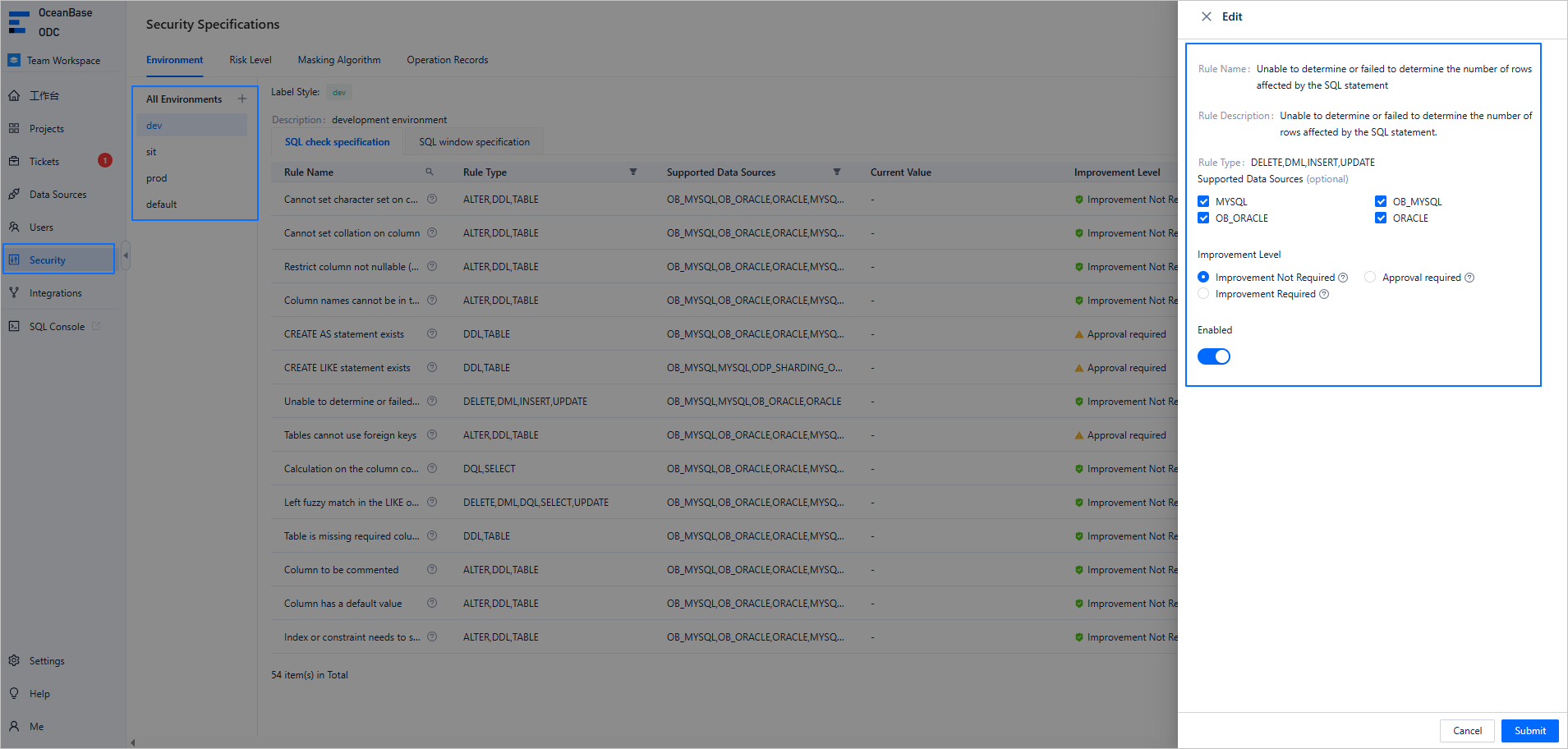
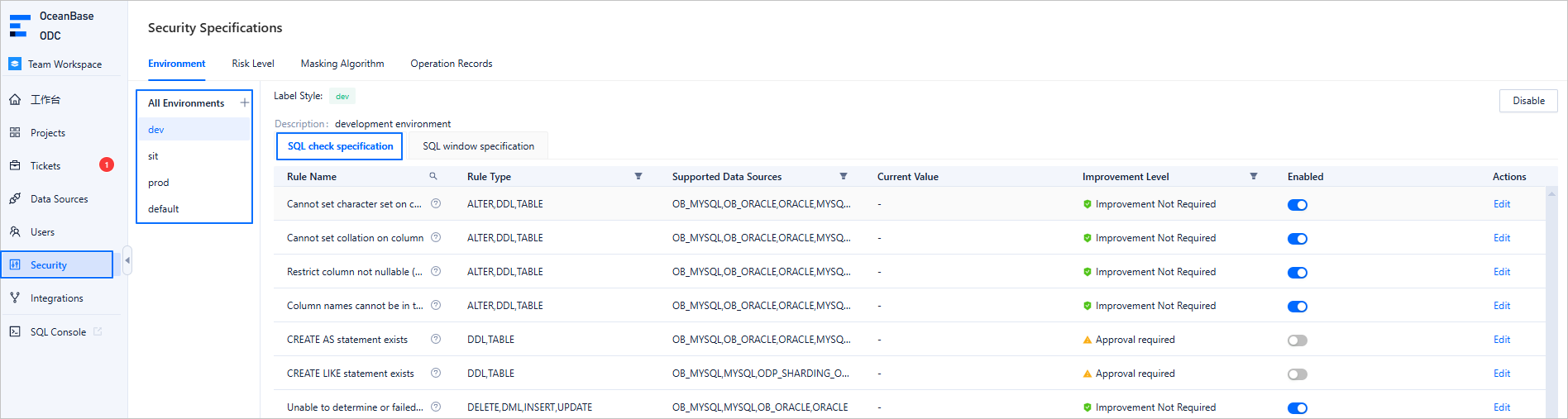
ODC provides 50+ SQL check rules and 8 SQL window rules. Some development standards are enabled by default. To adjust them, system admins can go to the Security module. Common adjustments include:
Disabling certain standards for the development environment.
Adjusting standards for specific data source types in different environments.
Configure approval workflows
ODC offers four risk levels: high, medium, low, and default. If a change does not match high, medium, or low risk rules, it defaults to the default risk level and usually auto-approves. If multiple risk levels are matched, the highest one applies. Admins can adjust rules and workflows in the Security module.
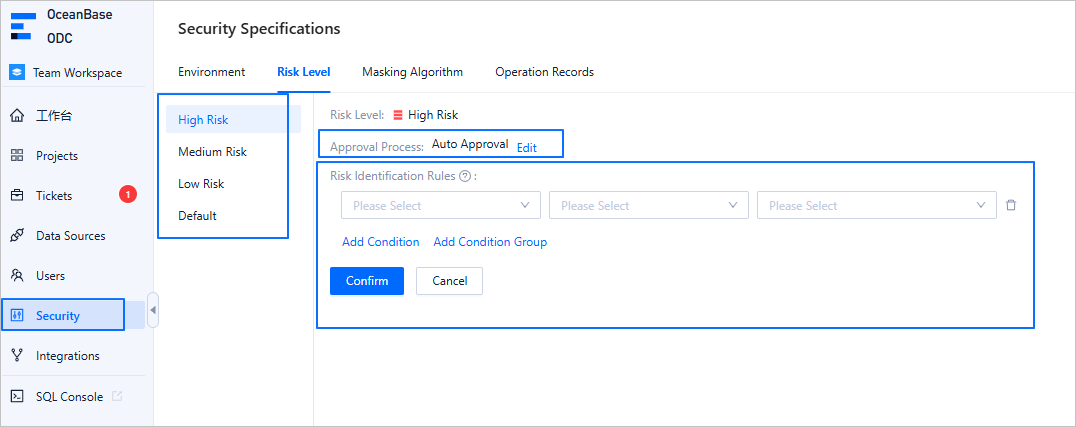
Once completed, your team workspace is fully activated and ready for database development operations.
Key applications of team workspaces
Stable development: SQL development and change approvals
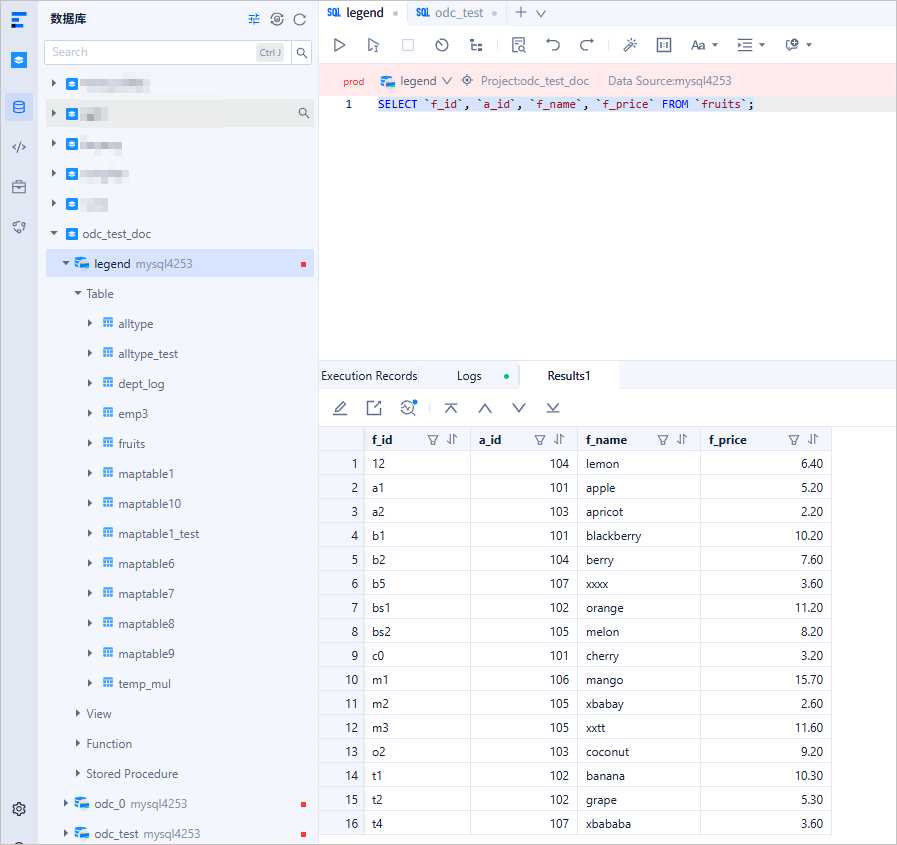
Once activated, you can start database development. From the homepage, click SQL Console or navigate via Recently Accessed Databases to the SQL development page.
In the SQL development page, you can write SQL queries. Features include code snippets, autocomplete, and script saving. For tips, refer to Tips for SQL development. After execution, you can view real-time analysis, edit results, and export result sets. For real-time analysis, see Understanding real-time SQL diagnostics for OceanBase AP.
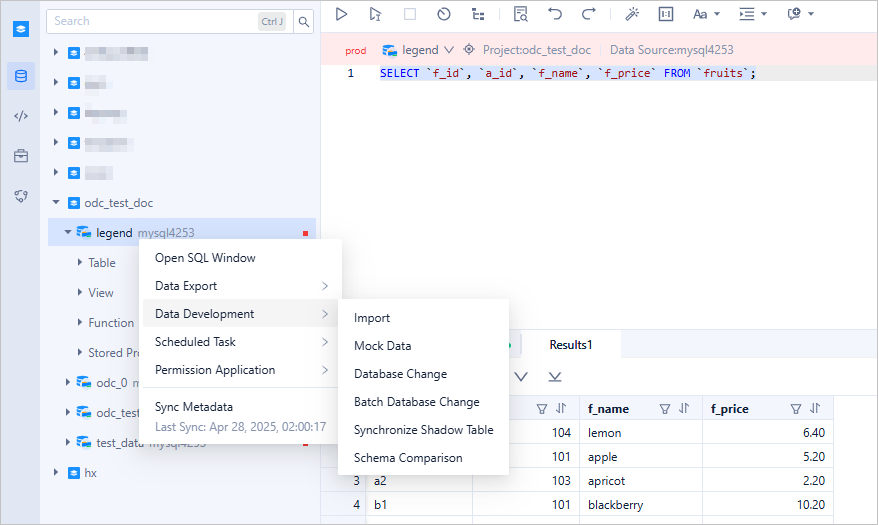
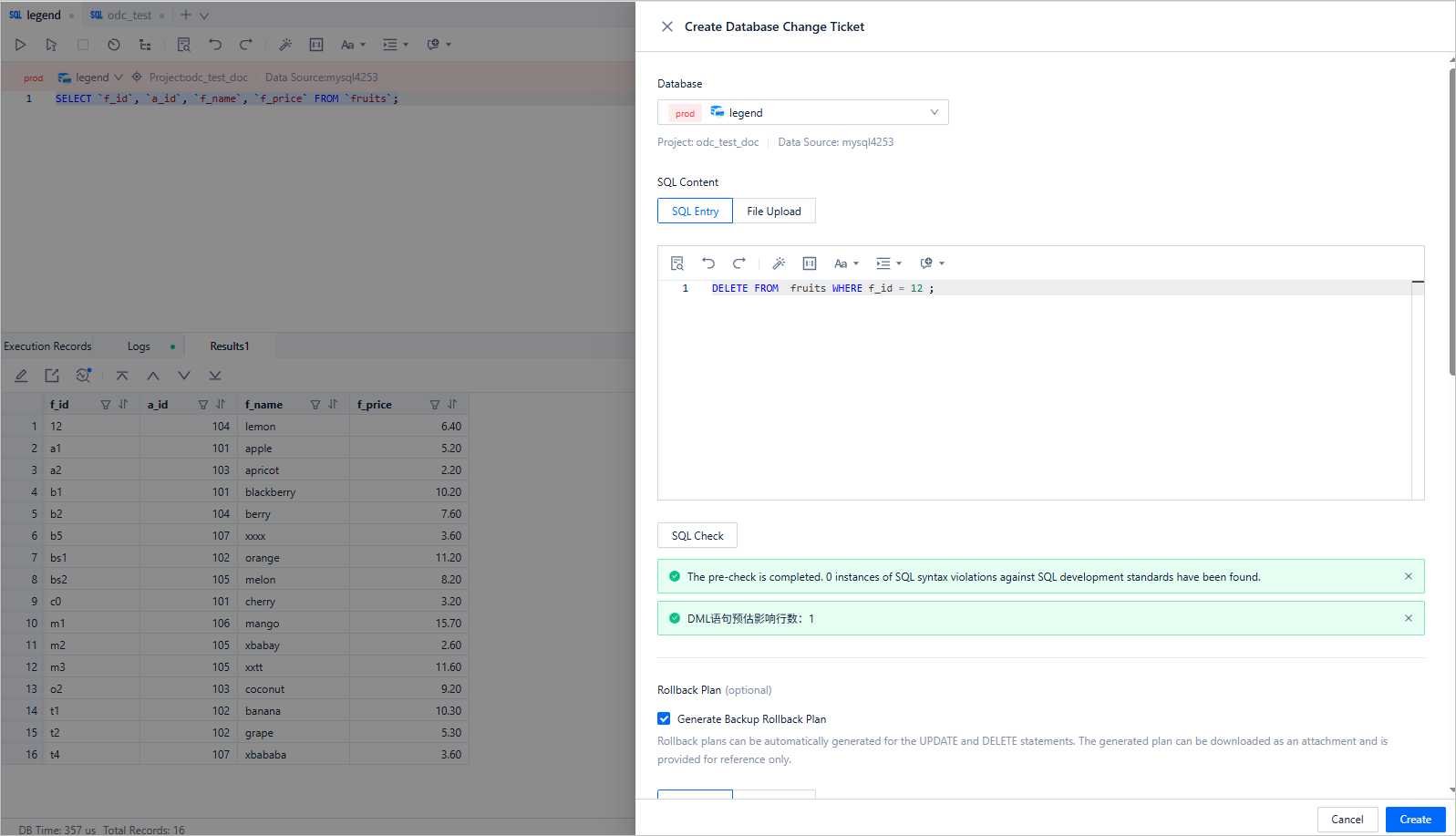
To submit a change request, right-click a database in the resource tree and select a ticket type. ODC supports 12 ticket types including online schema changes, SQL execution plans, partition plans, etc. For details, see Online Schema Changes.
After filling in the ticket parameters, click Submit. The system will perform a development standards check and risk assessment. Changes matching approval workflows will require approver confirmation before execution.
Standardized development: SQL checks
ODC offers a robust set of 50+ SQL rules covering DDL, DML, and DQL, ensuring performance, standardization, and security. Standards can vary by environment to meet different production, test, and development requirements.
SQL checks can be triggered before or during change submission. The pre-submission check entry is shown below:
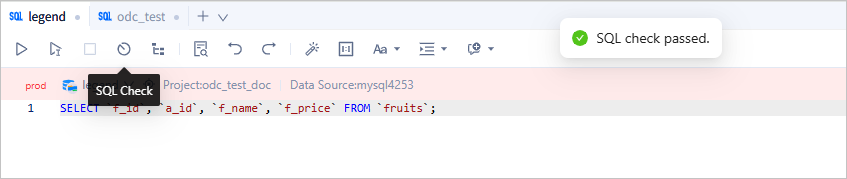
For more on SQL checks, see ODC SQL check for automatic identification of high-risk operations.
Database optimization: Historical database
As a business database runs over time, the data volume grows continuously, leading to rising storage costs, declining database performance, and increasing database maintenance complexity.
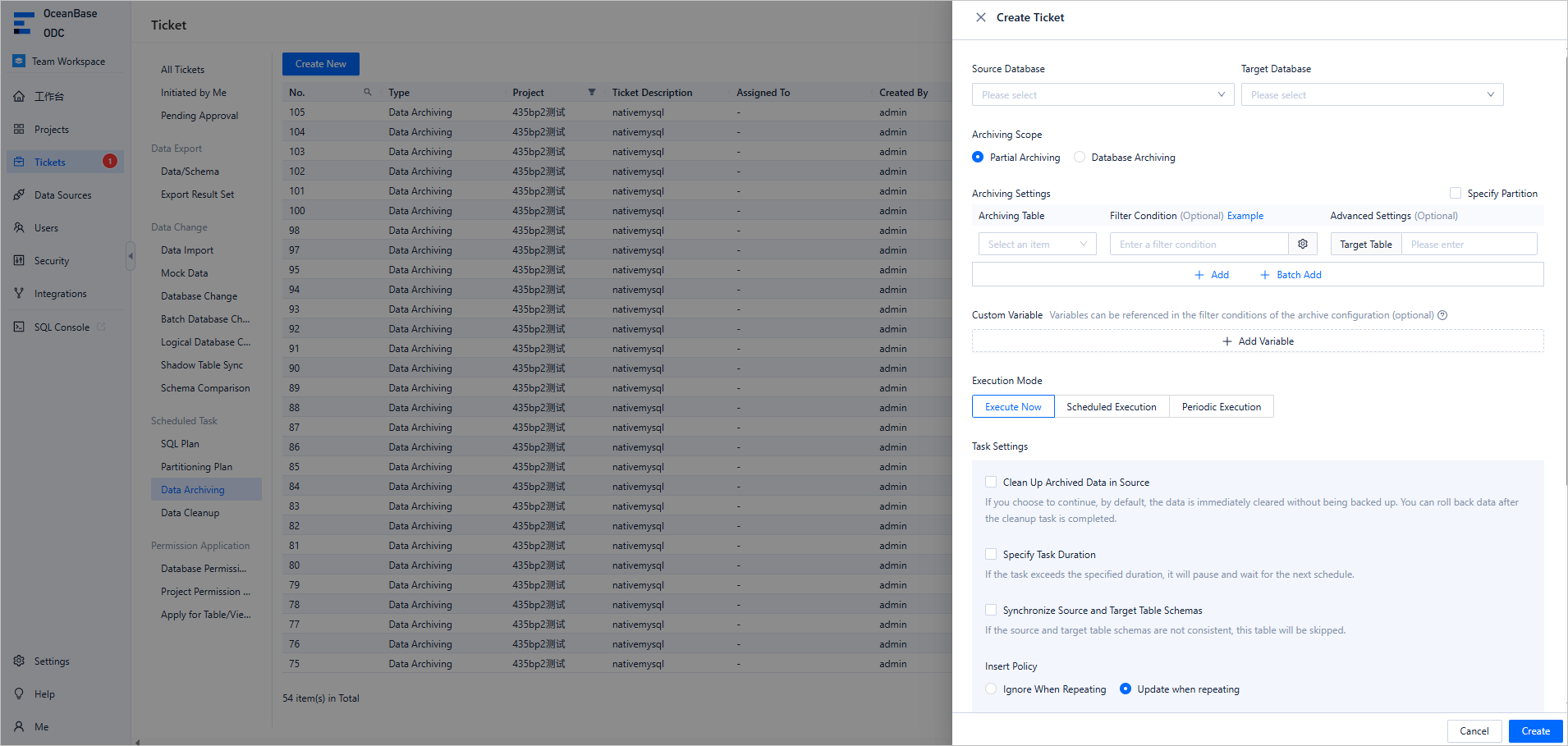
To address these challenges, ODC introduces the historical database feature. Historical databases are designed to archive obsolete or infrequently accessed tables separately, enabling efficient data management and significantly reducing the load on business databases.
ODC supports data archiving and cleanup to support this scenario. Currently, supported archiving links are:
- OceanBase MySQL compatible, MySQL -> OceanBase MySQL compatible
- OceanBase Oracle compatible, Oracle -> OceanBase Oracle compatible
- OceanBase MySQL compatible, MySQL -> MySQL
- OceanBase Oracle compatible, Oracle -> Oracle
- PostgreSQL -> OceanBase MySQL compatible
- OceanBase MySQL compatible, OceanBase Oracle compatible, MySQL, Oracle, PostgreSQL -> Object Storage (OSS, COS, OBS, S3)
For more information, refer to OceanBase historical database solutions.
Security and compliance: data masking
During routine operations such as maintenance, development, and data analysis, enterprises often need to perform database queries. These databases may contain sensitive data that is critical to the business and cannot be separated. Directly querying this data can pose privacy risks, but fully restricting access could lead to inefficiency or even make some tasks impossible.
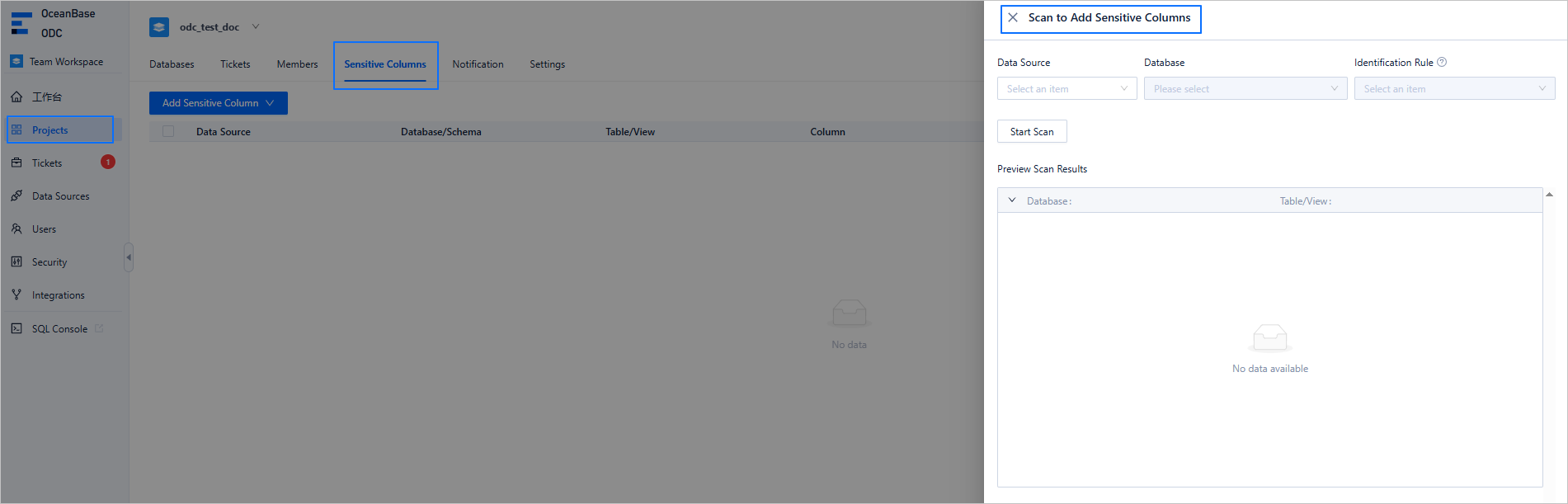
To address this challenge, ODC provides a data masking solution that allows you to access and use database information without exposing sensitive data. ODC can mask sensitive data during SQL queries, data exports, and other scenarios where data leaves the database, ensuring both accessibility and privacy. ODC currently supports more than 20 masking algorithms, including full masking, hash masking, default masking, and masking for fields with specific business meanings. You only need to configure the fields that require masking within the corresponding project. For more information, see Data masking and control practices.
Structural consistency assurance: multi-database changes
In daily operations, it is essential to ensure consistent database structures across development, testing, and production environments for the same business application. For structural changes, you must apply them across different environments. Without platform support, you would have to manually execute the same change in multiple environments, leading to inefficiencies and a higher risk of errors.
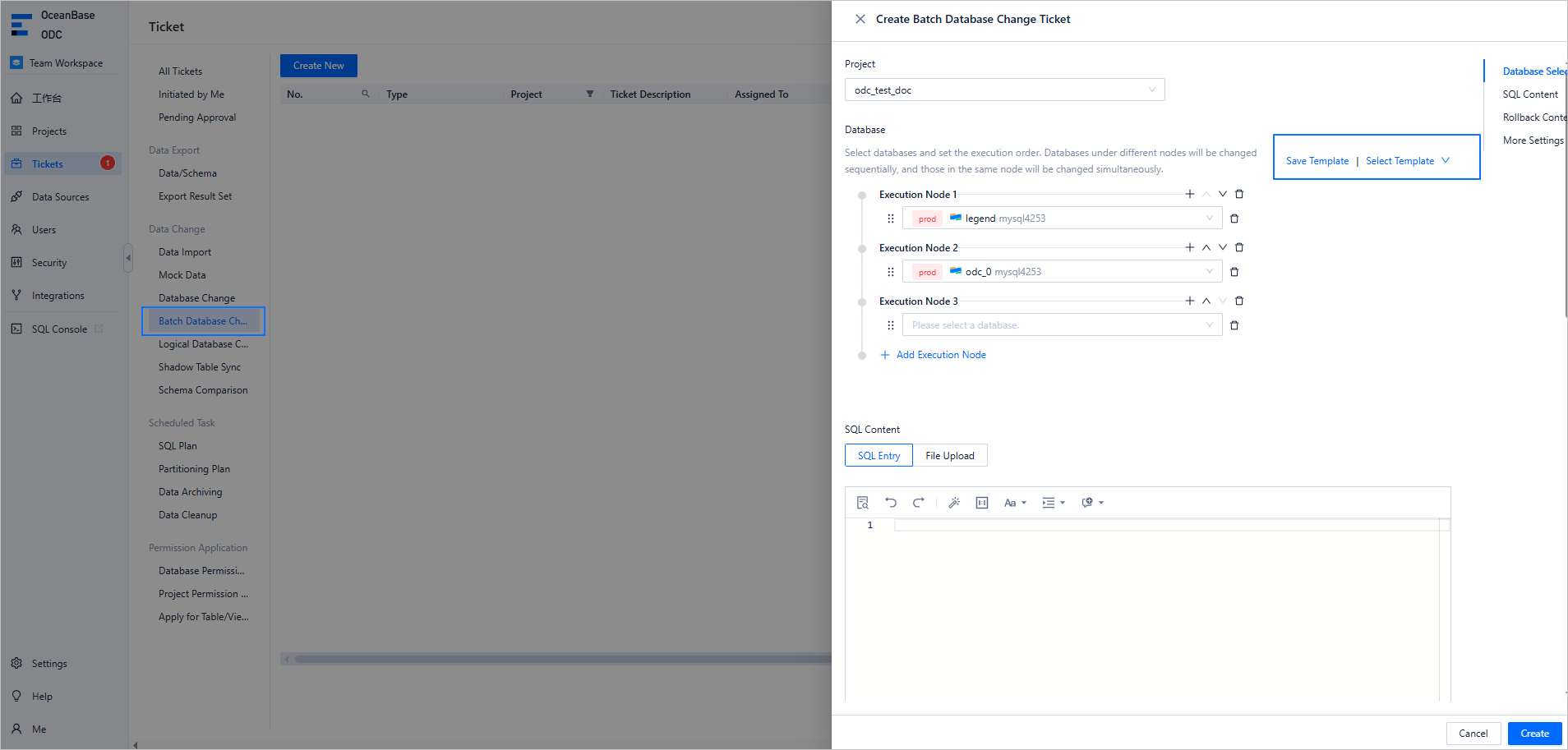
To solve this problem, ODC offers multi-database change capabilities. You can orchestrate changes across multiple databases of the same type within a single project through one change ticket, ensuring structural consistency across environments. For frequently used change workflows, you can save them as templates for reuse in future operations. For more information, see Batch database change management.
Sharded database management: logical database changes
In the era of big data, many enterprises use scalable distributed databases like OceanBase or sharding technologies to handle and manage massive amounts of data. For new businesses, distributed databases are often preferred due to their stronger scalability and lower management costs.
Sharding is a horizontal partitioning strategy that distributes data across multiple database instances or tables to improve processing capacity and query performance. Although sharding addresses business needs, managing a large number of shards can become a significant challenge for DBAs and developers.
To address this, ODC supports logical databases. Logical databases not only ease the burden of managing shards but also lay the foundation for migrating to distributed databases in the future (ODC will later support archiving logical database data to OceanBase databases).
You can configure a logical database with just a few simple steps. Once configured, ODC will regularly inspect the structural consistency of logical tables within the logical database. ODC currently supports GUI-based creation of logical tables and the initiation of DDL change tickets for logical databases, helping you manage and maintain sharded structures more easily. For more information, see Manage and modify sharded databases and tables via ODC.
