







This topic describes how to scale out a cluster by adding zones to the cluster.
You can add zones to a cluster by executing SQL statements or using OceanBase Cloud Platform (OCP).
Add zones to a cluster by using SQL statements
You can use SQL statements to add zones to a cluster. For example, you can use this method to increase the number of replicas from 3 to 5 for a tenant. When you add zones to a cluster, you must add the same number of OBServer nodes to each new zone as that of an existing zone.
Assume that the current cluster has three zones, which are z1, z2, and z3. The three zones belong to the same region, and each zone has one OBServer node. The cluster has a user tenant named tenant1, and the locality information is locality='F@z1,F@z2,F@z3', resource_pool_list=('pool1');. Assume that you need to increase the number of replicas from 3 to 5 for tenant1 to meet the business needs. You must change the locality of the tenant from F@z1,F@z2,F@z3 to F@z1,F@z2,F@z3,F@z4,F@z5.
To add zones to the cluster and change the tenant locality, perform the following steps:
Log on to the
systenant as therootuser.Create
z4andz5in the cluster that includes three zones:z1,z2, andz3.For more information about how to add zones in a cluster, see Add or delete a zone.
Add an OBServer node to each of
z4andz5.For more information about how to add an OBServer node to a zone, see Add an OBServer node.
Add resources to
z4andz5fortenant1.Note
To add tenant resources after zones are added, you can increase the usage scope of the tenant resource pool by setting the ZONE_LIST parameter or creating a new resource pool and allocating the resource pool to the tenant. The following example describes how to create a new resource pool and allocate it to the tenant. For more information about how to set the ZONE_LIST parameter, see Modify the resource configurations of a tenant.
Create a resource unit and a resource pool.
obclient>CREATE RESOURCE UNIT unit2 MAX_CPU 1, MAX_MEMORY '5G', MAX_IOPS 128,MAX_DISK_SIZE '10G', MAX_SESSION_NUM 64, MIN_CPU=1, MIN_MEMORY='5G', MIN_IOPS=128;

obclient>CREATE RESOURCE POOL pool2 unit = 'unit2', unit_num = 1, zone_list=('z4','z5');
Add resources to
z4andz5.obclient>ALTER TENANT tenant1 RESOURCE_POOL_LIST =('pool1', 'pool2') ;
Modify the locality of the tenant to add replicas.
Based on the locality modification rule, you can add only one zone at a time. For more information about the locality modification rule, see Locality overview.
obclient>ALTER TENANT tenant1 LOCALITY='F@z1,F@z2,F@z3,F@z4';

obclient>ALTER TENANT tenant1 LOCALITY='F@z1,F@z2,F@z3,F@z4,F@z5';
The scale-out process is completed.
Add zones to a cluster in OCP
You can add zones to a cluster in OCP. For example, you can use this method to increase the number of replicas from 3 to 5 for a tenant. When you add zones to a cluster, you must add the same number of OBServer nodes to each new zone as that of an existing zone.
Background
For example, the current cluster contains three zones, which are z1, z2, and z3, and each zone contains one OBServer node. Assume that you need to increase the number of replicas of a tenant from 3 to 5. You must add two zones to the cluster and add replicas to the zones. Each of the two zones must contain one OBServer node.
Notice
When you add a zone, make sure that the numbers of OBServer nodes in the new zones are the same as those in the existing zones in the cluster.
Add a host
Before you scale out a cluster, you must add a host. You must add a local host to OCP for subsequent operations, such as scale-out, replacement, and new cluster construction.
Note
Before you add a host, make sure that the specifications and operating system of the host meet the requirements and the dependent software packages are installed based on the instructions in OceanBase Database Deployment Guide of the latest version.
If you want to add multiple hosts, you must add them one by one based on the scale-out requirements. Perform the following steps:
Log on to the OCP console.
In the left-side navigation pane, click Hosts.
In the upper-right corner of the page, click Add Host.
Enter the IP address and SSH port number. Enter the IPv4 address of the new host. The SSH port number is 22 by default.
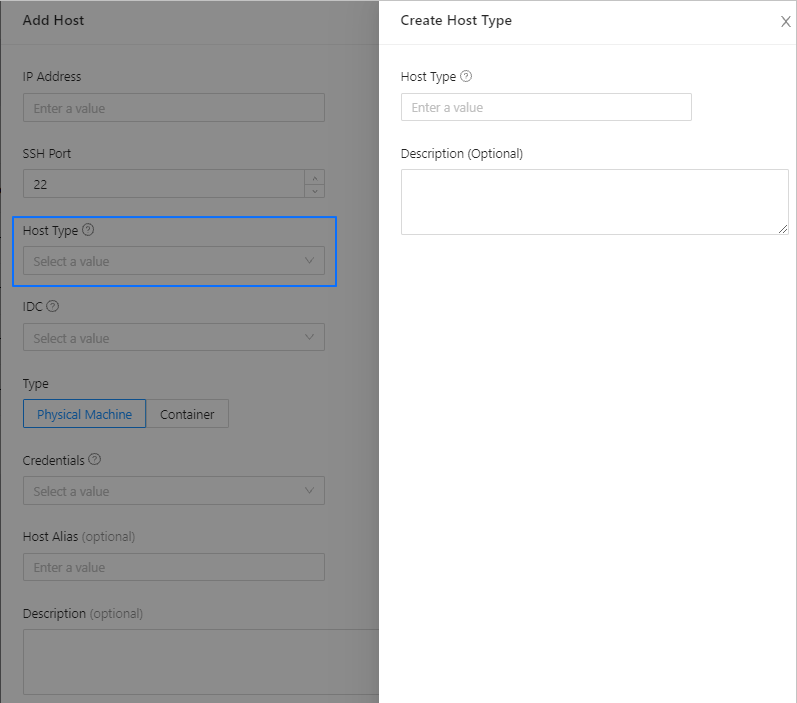
Select the host type. If the list does not include the corresponding host type, click Create Host Type to create a host type on OCP.
A host type is a label assigned by the user for hosts of the same configurations. We recommend that you use a meaningful name for easier management of your hosts.
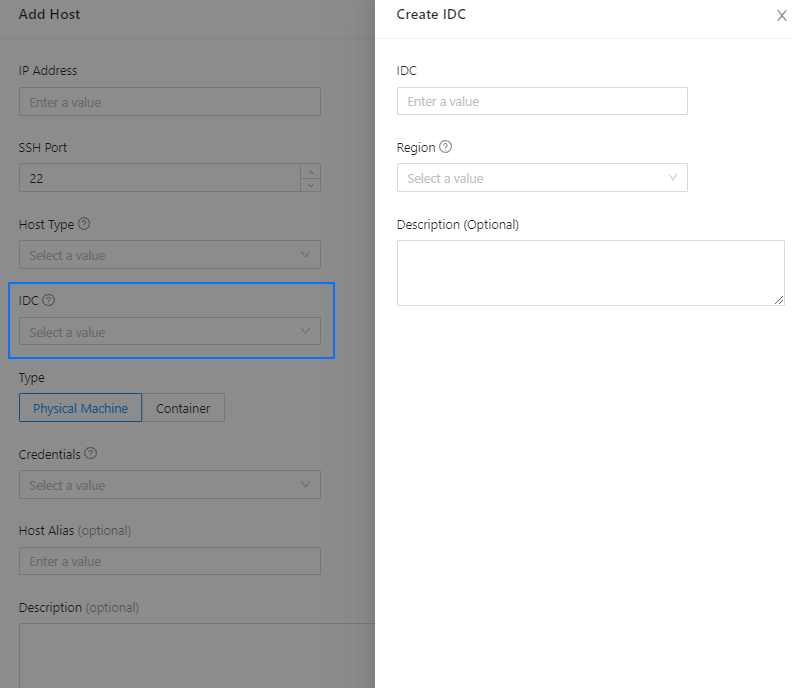
Select the IDC. If the list does not include the corresponding IDC, you can click Create IDC to create an IDC on OCP.
The region means the geographical region where the host is located. One physical region can have one or more physical IDCs.
The region and IDC are referenced in OceanBase load balancing and SQL statement routing strategies. Specify the actual region and IDC.
Note
OCP V3.1.1 and later support multi-zone mode. When you add an IDC, it is created in the zone where the current OCP is deployed.
In the Select Credential list, select the logon credentials for the host.
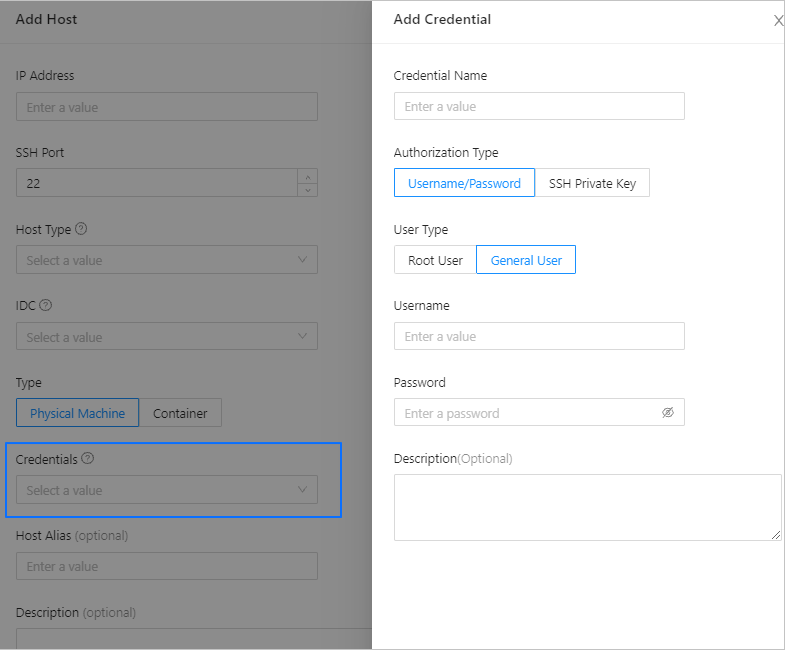 ParameterDescription
Credential Name The name must start with a letter and end with a letter or a digit. It can contain letters, digits, and underscores (_). It must be 2 to 32 characters in length. Authorization Type Two authorization types are supported: username/password and SSH private key. User Type Two types of users are supported: root user and common user. If you select a common user, you must grant the user the permission to run sudo commands without the password. Optional. Enter the host description.
Click OK.
Add zones
Log on to the OCP console.
Add two zones to the cluster and add one OBServer node to each of the zones.
For more information about how to add a zone to a cluster in OCP, see Add or delete a zone.
Add replicas to the two new zones.
For more information about how to add a replica in OCP, see Add a replica.
The scale-out process is completed.