

OceanBase logo

OceanBase

A unified distributed database ready for your transactional, analytical, and AI workloads.

DEPLOY YOUR WAY

OceanBase Cloud

The best way to deploy and scale OceanBase

OceanBase Enterprise

Run and manage OceanBase on your infra

TRY OPEN SOURCE

OceanBase Community Edition

The free, open-source distributed database

OceanBase seekdb

Open source AI native search database

Customer Stories

Real-world success stories from enterprises across diverse industries.

View All
BY USE CASES

Mission-Critical Transactions

Global & Multicloud Application

Elastic Scaling for Peak Traffic

Real-time Analytics

Active Geo-redundancy

Database Consolidation

Resources

Comprehensive knowledge hub for OceanBase.

Blog

Live Demos

Training & Certification

Documentation

Official technical guides, tutorials, API references, and manuals for all OceanBase products.

View All
PRODUCTS

OceanBase Cloud

OceanBase Database

Tools

Connectors and Middleware

QUICK START

OceanBase Cloud

OceanBase Database

BEST PRACTICES

Practical guides for utilizing OceanBase more effectively and conveniently

Company

Learn more about OceanBase – our company, partnerships, and trust and security initiatives.

About OceanBase

Partner

Trust Center

Contact Us

International - English
中国站 - 简体中文
日本 - 日本語
Sign In
Start on Cloud

A unified distributed database ready for your transactional, analytical, and AI workloads.

DEPLOY YOUR WAY

OceanBase Cloud

The best way to deploy and scale OceanBase

OceanBase Enterprise

Run and manage OceanBase on your infra

TRY OPEN SOURCE

OceanBase Community Edition

The free, open-source distributed database

OceanBase seekdb

Open source AI native search database

Customer Stories

Real-world success stories from enterprises across diverse industries.

View All
BY USE CASES

Mission-Critical Transactions

Global & Multicloud Application

Elastic Scaling for Peak Traffic

Real-time Analytics

Active Geo-redundancy

Database Consolidation

Comprehensive knowledge hub for OceanBase.

Blog

Live Demos

Training & Certification

Documentation

Official technical guides, tutorials, API references, and manuals for all OceanBase products.

View All
PRODUCTS
OceanBase CloudOceanBase Database
ToolsConnectors and Middleware
QUICK START
OceanBase CloudOceanBase Database
BEST PRACTICES

Practical guides for utilizing OceanBase more effectively and conveniently

Learn more about OceanBase – our company, partnerships, and trust and security initiatives.

About OceanBase

Partner

Trust Center

Contact Us

Start on Cloud
编组
All Products
    • Databases
    • iconOceanBase Database
    • iconOceanBase Cloud
    • iconOceanBase Tugraph
    • iconInteractive Tutorials
    • iconOceanBase Best Practices
    • Tools
    • iconOceanBase Cloud Platform
    • iconOceanBase Migration Service
    • iconOceanBase Developer Center
    • iconOceanBase Migration Assessment
    • iconOceanBase Admin Tool
    • iconOceanBase Loader and Dumper
    • iconOceanBase Deployer
    • iconKubernetes operator for OceanBase
    • iconOceanBase Diagnostic Tool
    • iconOceanBase Binlog Service
    • Connectors and Middleware
    • iconOceanBase Database Proxy
    • iconEmbedded SQL in C for OceanBase
    • iconOceanBase Call Interface
    • iconOceanBase Connector/C
    • iconOceanBase Connector/J
    • iconOceanBase Connector/ODBC
    • iconOceanBase Connector/NET
icon

OceanBase Cloud Platform

V4.0.0Community Edition

  • Document Overview
  • Product Introduction
    • What is OceanBase Cloud Platform?
    • System architecture
    • Features
    • Limits
      • System requirements
      • Dependencies
  • Deployment Guide
    • Overview
    • Installation process
    • Installation planning
      • User planning
      • Host planning
      • Disk and directory planning
      • Port planning
    • Prepare for the installation
    • Modify the configuration file
    • Deploy OCP
    • Upgrade OCP
    • Check after deployment or update
    • Appendix
      • Install Docker
      • Uninstall OCP
      • Restart OCP
  • User Guide
    • OCP overview
    • Log on to the OCP console
    • Features
      • Clusters
        • Cluster management
        • Cluster overview
        • Overview of the cluster details page
      • Tenants
        • Tenant and resource management
        • Tenant overview
        • Overview of the Tenant Details page
      • Hosts
        • Host overview
        • Host details
      • Packages
      • OBProxy
        • OBProxy management overview
        • OBProxy overview
        • OBProxy cluster overview
      • Monitoring
        • Drill-down monitoring
      • System management
        • Alert overview
        • View tasks
        • Log service
        • Security overview
        • View system parameters
      • Personal center
        • Specify personal information
        • Change your logon password
        • Alert subscription configuration
        • Password box
        • Log off the OCP console
    • Manage clusters
      • Cluster management operations
      • Basic cluster operations
        • Take over a cluster
        • Create a cluster
        • Delete a cluster
        • Stop a cluster
        • Restart a cluster
        • Manage zones of a cluster
          • Create a zone
          • Restart a zone
          • Stop a zone
          • Delete a zone
        • Manage OBServers of a cluster
          • Add an OBServer
          • Restart an OBServer
          • Stop an OBServer service
          • Stop an OBServer process
          • Replace an OBServer
          • Delete an OBServer
        • Upgrade the version of an OceanBase cluster
        • Change the password
        • Download logs
        • Disable SQL collection
        • View the SQL collection history
      • View the topology of a cluster
      • Overview of cluster tenant management
      • Performance monitoring
      • Cluster resource management
        • View unit distribution
        • View resource usage
      • Major compaction management
        • Modify the major compaction settings of a cluster
        • Details of major compaction
        • Major freeze statistics
        • Perform a major compaction
      • Backup and recovery
        • Create a backup strategy
        • Back up now
        • Cluster backup and recovery
        • Initiate a recovery task
      • Manage parameters
        • View parameters
        • Modify parameters
        • Parameter types
        • View the history of parameter changes
      • Manage cluster parameter templates
    • Manage tenants
      • Tenant management operations
      • Basic tenant operations
        • Create a tenant
        • Unit specification management
        • Lock a tenant
        • Copy a tenant
        • Delete a tenant
        • Create a replica
        • Change the password of the SYS tenant
        • Edit a tenant replica in a zone
        • Delete a tenant replica from a zone
        • Modify zone priorities
        • Modify the whitelist
      • View the topology of a tenant
      • Database management
      • User management under a tenant
      • Performance monitoring
      • Tenant resource management
      • SQL diagnostics
        • TopSQL diagnostics
        • SlowSQL diagnostics
        • View SQL statement details
        • View the SQL collection enable/disable history
      • Tenant major compaction management
        • Modify major compaction settings of a tenant
        • Details of tenant major compaction
        • Perform a major compaction
      • Manage sessions
        • View tenant sessions
        • View session statistics
      • Manage parameters
        • View the parameters
        • Modify a parameter
        • View the parameter modification history
      • Manage tenant parameter templates
    • Manage hosts
      • Host management operations
      • Add a host
      • Modify a host
      • Restart OCP Agent
      • Reinstall OCP Agent
    • Manage software packages
      • Upload a software package
      • Download a software package
      • Delete a software package
    • Manage OBProxies
      • Create an OBProxy cluster
      • Delete an OBProxy
      • Restart an OBProxy
      • Upgrade an OBProxy
      • Add an OBProxy
      • Refresh OBProxy configurations
      • Monitor OBProxy cluster performance
      • OBProxy cluster parameter management
      • Add a connectable OceanBase cluster
      • Delete an OBProxy cluster
      • Upgrade all OBProxies in an OBProxy cluster
      • Restart all OBProxies in an OBProxy cluster
      • Delete a connected OceanBase cluster
    • Manage alerts
      • Alert-related concepts
      • Create an alert item
      • View alert items
      • Copy an alert item
      • Edit an alert item
      • Delete an alert item
      • Alert groups
      • Create an alert channel
      • View alert channels
      • Edit an alert channel
      • Delete an alert channel
      • View alert events
      • View the alert notification history
      • Create a blocking condition
      • Edit a blocking condition
      • Delete a blocking condition
      • Add a filtering keyword
      • Modify the expiration time of a filter keyword
      • Delete a filter keyword
      • Create an alert subscription
      • Manage alert subscriptions
    • Use system management
      • Role overview
      • Create a role
      • Manage roles
      • Copy a role
      • Create a user
      • View users
      • Edit a user
      • Copy a user
      • Change a user password
      • Delete a user
      • Logon history
      • Manage system parameters
      • Manage tasks
      • Query logs
    • User center management
      • Create a connection
      • Export connection credentials
      • Import connection credentials
      • Share connection credentials
      • Edit connection credentials
      • Delete connection credentials
      • Batch operations on connection credentials
      • Accept a connection
      • Ignore a connection
    • FAQ
    • Appendix
      • OCP configuration parameters
      • SQL performance module
      • OCP resource unit specifications
      • OCP error codes
      • OCP alert template variables
      • Call an alert API
      • OCP background tasks
      • Monitoring metrics
      • Examples of alert channel configuration
      • OBProxy startup parameters
      • System privileges in a MySQL tenant
      • Component listening port list
      • OCP-Agent processes
      • Enable the OCP multi-cluster mode
      • PAM permission denied
      • Failed to upload the software package
      • Check the sudo permissions of a user
      • Default OCP roles
      • FAQ about multi-zone mode
      • FAQ about OBProxy takeover
      • Install dependent software
      • Use OCP-Agent to push time-series monitoring data
  • Alert Reference
    • Alert Reference
    • OceanBase alerts
      • ob_cannot_connected
      • ob_cluster_rs_not_same
      • ob_cluster_status_check_failed
      • ob_cluster_exists_inactive_server
      • ob_cluster_exists_index_fail_table
      • ob_cluster_frozen_version_delta_over_threshold
      • ob_cluster_merge_error
      • ob_cluster_merge_timeout
      • ob_cluster_no_frozen
      • ob_cluster_no_merge
      • ob_cluster_operation_info
      • ob_cluster_sync_failed
      • ob_cpu_assigned_percent_over_threshold
      • ob_cpu_percent_over_threshold
      • ob_host_connection_percent_over_threshold
      • ob_host_disk_readonly
      • ob_tenant_expired_trans_exist
      • ob_host_load1_per_cpu_over_threshold
      • ob_host_partition_count_over_threshold
      • ob_log_alarm
      • ob_mem_assigned_percent_over_threshold
      • ob_server_sstable_percent_over_threshold
      • ob_tenant_long_trans_exist
      • ob_tenant_operation_info
      • ob_tenant500_mem_hold_over_threshold
      • ob_tenant500_mem_hold_percent_over_threshold
      • ob_zone_sstable_percent_over_threshold
      • tenant_active_memstore_percent_over_threshold
      • tenant_cpu_percent_over_threshold
      • tenant_memstore_percent_over_threshold
      • obproxy_process_dead
      • obproxyd_process_dead
      • obproxy_cannot_connected
      • ob_cluster_sync_delay_time_too_long
      • ob_host_data_disk_percent_over_threshold
      • ob_host_log_disk_percent_over_threshold
      • ob_host_install_disk_percent_over_threshold
      • ob_tenant_exists_expired_xa_trans
      • ob_cluster_active_session_count_over_threshold
      • ob_tenant_active_session_count_over_threshold
      • ob_host_active_session_count_over_threshold
      • ob_tenant_full_clog_sync_delay
      • ob_tenant_readonly_clog_sync_delay
      • ob_tenant_logonly_clog_sync_delay
      • ob_tenant_slow_sql_exists
      • ob_tenant_large_trans_exist
      • same_alarm_rule_detect_too_many_targets
      • ob_tenant_task_timeout
      • ob_tenant_expired_trans_exist
      • ob_tenant_long_trans_exist
      • ob_host_task_timeout
      • ob_tenant_log_disk_usage_high
      • ob_tenant_no_compaction
      • ob_tenant_no_frozen
      • ob_tenant_compaction_error
    • Application alerts
      • ob_cluster_inspection_not_passed
      • ob_host_ssd_wear_indicator_over_threshold
      • ob_host_mem_percent_over_threshold
      • ob_host_net_recv_percent_over_threshold
      • ob_host_net_send_percent_over_threshold
      • ob_host_tcp_retrans_percent_over_threshold
      • ob_host_cpu_percent_over_threshold
      • no_enough_exporter
      • inc_backup_delay
      • base_backup_fail
      • base_backup_too_long_time_no_one_success_task
      • backup_process_dead
      • backup_storage_capacity_over_threshold
      • backup_storage_capacity_retry_times_exceeded
      • backup_storage_capacity_timeout_or_interrupted
      • ocp_remote_server_time_diff_too_large
      • monitor_exporter_unavaliable
      • system_obproxy_unavailable
      • host_unavailable
      • host_ntp_offset_too_large
      • host_ntp_service_not_exist
      • host_agent_res_memory_over_threshold
      • host_agent_open_fd_count_over_threshold
      • host_agent_goroutine_count_over_threshold
      • partition_create_failed
      • obagent_dead
      • host_disk_readonly
      • ic_server_connect_failed Inter-Connector
      • vpc_connect_failed
      • node_load1_peak
    • OAS alerts
      • os_cpu_irq_error
      • os_tsar_cpu_sys_abnormal
      • os_observer_fd_usage
      • os_tsar_cpu_util_full
      • os_tsar_cpu_util_hwm
      • os_kernel_io_hang
      • os_tsar_sda_ioawait
      • os_tsar_nvme_ioawait
      • os_tsar_traffic_drop
      • os_tsar_traffic_error
      • os_observer_not_exist
      • os_observer_core_dump
      • os_nic_1000m_full
      • os_nic_1000m_hwm
      • os_tsar_traffic_overload
      • node_file_root_usage
      • node_file_inode_usage
      • os_kernel_ntp_down
      • os_kernel_ntp_delay
      • node_memory_peak
      • os_home_file_usage
      • node_file_data1_usage
      • node_file_datalog1_usage
    • Appendix
      • Set an alert-blocking condition
      • Modify alert thresholds
      • Exception handling for OceanBase cluster compaction
      • OCP-Agent script
      • Apply throttling to an OceanBase cluster
      • Network troubleshooting
      • Tables managed by the daemon
      • Examples of alert channel configuration
  • API Reference
    • Overview
    • API call description
    • Cluster information
      • Query clusters
      • Create an OceanBase cluster
      • Delete an OceanBase cluster
      • Stop an OceanBase cluster
      • Start an OceanBase cluster
      • Restart an OceanBase cluster
      • Upgrade an OceanBase cluster
      • Query zones of an OceanBase cluster
      • Create a zone for an OceanBase cluster
      • Delete a zone from an OceanBase cluster
      • Stop a zone in an OceanBase cluster
      • Start a zone in an OceanBase cluster
      • Restart a zone in an OceanBase cluster
      • Add an OBServer
      • Delete multiple OBServers at a time
      • Stop an OBServer
      • Start an OBServer
      • Restart an OBServer
      • Replace an OBServer
      • Change the password of an OceanBase cluster
      • Query the parameter metadata of an OceanBase cluster
      • Query parameters of an OceanBase cluster
      • Modify parameters of an OceanBase cluster
      • Query servers
      • Query servers in a zone
    • Tenant information
      • Query tenants of a cluster
      • Query all tenants
      • Query details about a tenant
      • Create a tenant
      • Create a tenant
      • Delete a tenant
      • Lock a tenant
      • Unlock a tenant
      • Query units of a tenant
      • Delete a unit from a tenant
      • Add a replica for a tenant
      • Delete a replica of a tenant
      • Modify a replica of a tenant
      • Modify zone priorities of a tenant
      • Change the administrator password of a tenant
      • Modify the whitelist of a tenant
      • Query parameters of a tenant
      • Modify parameters of a tenant
      • Database management
        • Query databases
        • Create a database
        • Modify a database
        • Delete a database
    • Hosts
      • Query regions
      • Query details about a region
      • Add a region
      • Delete a region
      • Query IDCs
      • Query details about an IDC
      • Add an IDC
      • Delete an IDC
      • Query host types
      • Query details about a host type
      • Add a host type
      • Delete a host type
      • Query hosts
      • Query details about a host
      • Add multiple hosts at a time
      • Delete a host
      • Delete multiple hosts at a time
    • Software packages
      • Query software packages
      • Upload a software package
      • Delete a software package
    • OBProxy management
      • Create an OBProxy cluster
      • Delete an OBProxy cluster
      • Query OBProxy clusters
      • Query details about an OBProxy cluster
      • Update configurations of an OBProxy cluster
      • Add an OBProxy
      • Take over an OBProxy
      • Delete an OBProxy
      • Restart an OBProxy
      • Upgrade an OBProxy
      • Add a connectable OceanBase cluster for an OBProxy cluster
      • Remove a connectable OceanBase cluster from an OBProxy cluster
      • Query the parameter metadata of an OBProxy
      • Query parameters of an OBProxy cluster
    • Monitoring
      • Query the metadata of a monitoring metric
      • Query monitoring data
      • Query monitoring data and attach a tag to the data
    • Alerts
      • Alert events
        • Query the alert event list
        • Query alert events
      • Alert notifications
        • Query alert notifications
    • Task management
      • Query tasks
      • Query details about a task
      • Retry a task
      • Roll back a task
      • Query logs of a subtask instance
      • Retry a subtask
      • Skip a subtask
      • Cancel a subtask
    • OceanBase user and privilege management
      • Query database user details
      • Query database user details
      • Create a database user
      • Delete a database user
      • Change the password of a database user
      • Lock a database user
      • Unlock a database user
      • Query the database role details
      • Query database role details
      • Create a database role
      • Delete a database role
      • Query database objects
      • Grant global privileges to a user
      • Revoke global privileges of a user
      • Change global privileges of a user
      • Grant global privileges to a role
      • Revoke global privileges of a role
      • Change global privileges of a role
      • Grant roles to a user
      • Revoke roles of a user
      • Change roles of a user
      • Grant roles to a role
      • Revoke roles of a role
      • Change roles of a role
      • Grant database privileges to a user
      • Revoke database privileges of a user
      • Change database privileges of a user
      • Grant object privileges to a user
      • Revoke object privileges of a user
      • Change object privileges of a user
      • Grant object privileges to a role
      • Revoke object privileges of a role
      • Change object privileges of a role
    • OCP Agent management
      • Query OCP Agent details on a host
      • Stop basic OCP Agent processes on a host
      • Batch stop basic OCP Agent processes on a host
      • Restart basic OCP Agent processes on a host
      • Batch restart basic OCP Agent processes on a host
      • Query OCP Agent processes on a host
      • Restart OCP Agent processes on a host
      • Stop OCP Agent processes on a host
    • SQL performance
      • Query performance indicators of an SQL statement
      • Query the performance indicator trend of an SQL statement
      • Query SQL text
      • Query performance indicators of an execution plan
      • Query the performance indicator trend of an execution plan
      • Query the operator structure of an execution plan
    • Backup and recovery
      • Query backup capabilities of a cluster
      • Create a backup strategy for a cluster
      • Modify the backup strategy of a cluster
      • Delete the backup strategy of a cluster
      • Query the backup strategy of a cluster
      • Query the backup overview of a cluster
      • Query data backup tasks of a cluster
      • Query log backup tasks of a cluster
      • Query recovery tasks of a cluster
      • Query recovery tasks of a cluster
      • Parse cluster backup data
      • Initiate tenant recovery
    • Others
      • Query the basic information of an OCP application
      • Query OCP server time
      • Query OCP application status
    • Appendix
      • Task information
      • View alerts through APIs

Download PDF

Document Overview What is OceanBase Cloud Platform? System architecture Features System requirements Dependencies Overview Installation process User planning Host planning Disk and directory planning Port planning Prepare for the installation Modify the configuration file Deploy OCP Upgrade OCP Check after deployment or update Install Docker Uninstall OCP Restart OCPOCP overview Log on to the OCP console Packages Cluster management operations View the topology of a cluster Overview of cluster tenant managementPerformance monitoring Manage cluster parameter templates Tenant management operations View the topology of a tenantDatabase managementUser management under a tenantPerformance monitoringTenant resource management Manage tenant parameter templatesHost management operationsAdd a hostModify a hostRestart OCP AgentReinstall OCP AgentUpload a software packageDownload a software packageDelete a software packageCreate an OBProxy clusterDelete an OBProxy Restart an OBProxy Upgrade an OBProxy Add an OBProxyRefresh OBProxy configurations Monitor OBProxy cluster performance OBProxy cluster parameter managementAdd a connectable OceanBase clusterDelete an OBProxy cluster Upgrade all OBProxies in an OBProxy cluster Restart all OBProxies in an OBProxy cluster Delete a connected OceanBase cluster Alert-related conceptsCreate an alert itemView alert items Copy an alert item Edit an alert item Delete an alert item Alert groups Create an alert channelView alert channels Edit an alert channel Delete an alert channel View alert events View the alert notification history Create a blocking condition Edit a blocking condition Delete a blocking condition Add a filtering keyword Modify the expiration time of a filter keyword Delete a filter keyword Create an alert subscription Manage alert subscriptions Role overviewCreate a roleManage rolesCopy a roleCreate a userView usersEdit a userCopy a userChange a user passwordDelete a userLogon historyManage system parametersManage tasks Query logs Create a connection Export connection credentials Import connection credentials Share connection credentials Edit connection credentials Delete connection credentials Batch operations on connection credentials Accept a connection Ignore a connection
OceanBase logo

The Unified Distributed Database for the Al Era.

Follow Us
Products
OceanBase CloudOceanBase EnterpriseOceanBase Community EditionOceanBase seekdb
Resources
DocsBlogLive DemosTraining & Certification
Company
About OceanBaseTrust CenterLegalPartnerContact Us
Follow Us

© OceanBase 2026. All rights reserved

Cloud Service AgreementPrivacy PolicySecurity
Contact Us
Document Feedback
  1. Documentation Center
  2. OceanBase Cloud Platform
  3. V4.0.0
iconOceanBase Cloud Platform
V 4.0.0Community Edition
  • V 4.3.6
  • V 4.3.5
  • V 4.3.4
  • V 4.3.3
  • V 4.3.2
  • V 4.3.1
  • V 4.3.0
  • V 4.2.2
  • V 4.0.0 and earlier
Community Edition
  • V 4.0.0
  • V 3.1.1
Enterprise Edition
  • V 4.0.0
  • V 3.3.1

Create a tenant

Last Updated:2023-08-22 02:46:05  Updated
share
What is on this page
Prerequisites
Procedure

folded

share

A tenant can be seen as a container for database objects and resources such as CPU, memory, and I/O resources. You can create tenants in a cluster as needed the following ways:

  • Create a tenant on the Tenant Overview page.

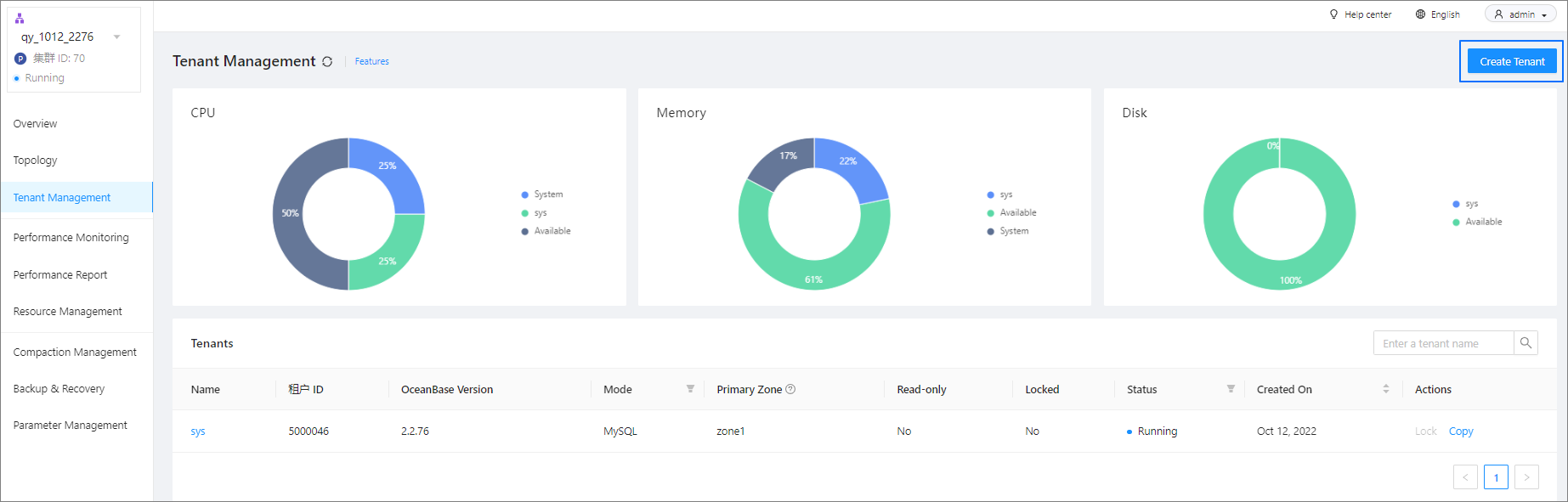
  • Create a tenant on the Tenant Management page of the specified cluster.

This topic describes how to create a tenant on the Tenant Management page of the specified cluster.

Prerequisites

  • The cluster where you want to create the tenant is the running primary cluster.

  • The logged-on user has the permission to manage the cluster, for example, the user is the system administrator or the OceanBase Cloud Platform (OCP) tenant administrator.

  • (Optional) You have created a parameter template by referring to Manage tenant parameter templates.

    When you need to create multiple tenants with the same parameter configuration, you can use a parameter template to avoid repeatedly configuring the same parameters.

Procedure

  1. Log on to the OCP console.

  2. In the left-side navigation pane, click Clusters.

  3. In the Clusters list, find the target cluster and click its name.

  4. In the left-side navigation pane of the page that appears, click Tenant Management.

  5. In the upper-right corner of the page that appears, click Create Tenant.
    16310527

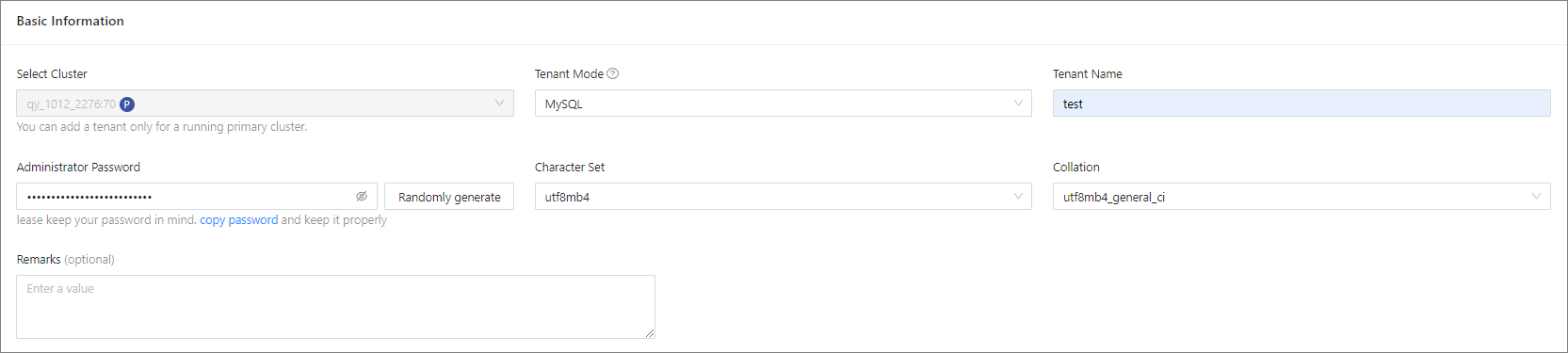
  6. Specify the parameters in the Basic Information section. The required fields and their descriptions are listed in the following table.

    Parameter Description
    Cluster The cluster to which the tenant belongs. The default value is the current cluster.
    Note
    When you create a tenant on the Tenant Overview page, you must specify the cluster of the tenant.
    Tenant Mode Valid values: MySQL .
    Tenant Name The tenant name must be 2 to 64 characters in length and can contain letters, digits, and underscores (_).
    Administrator Password The password of the tenant administrator account, which can be randomly generated.
    • The administrator account is root in MySQL mode.
    The password must meet the following requirements:
    • The length is 8 to 32 characters.
    • The password contains at least two uppercase letters, two lowercase letters, two digits, and two special characters.
    • The supported special characters are ~ ! @ # % \ ^ & * _ - + = `
    Character Set and Encoding In MySQL mode, the supported character sets are UTF8MB4, Binary, GBK, and GB18030. Default value: UTF8MB4.
    Collation The detailed collation corresponding to the specified character set.
    Remarks This field is optional, and allows you to add additional information.
    10

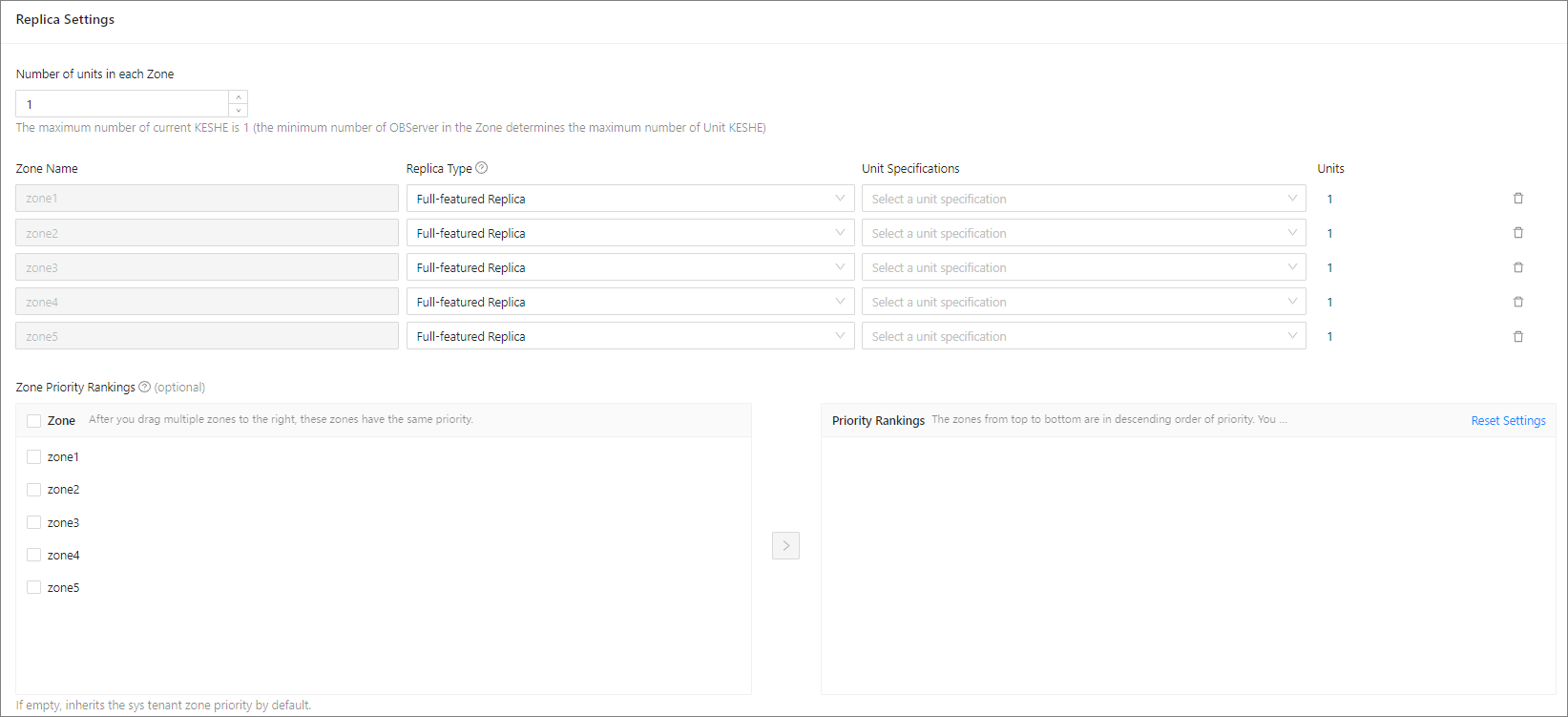
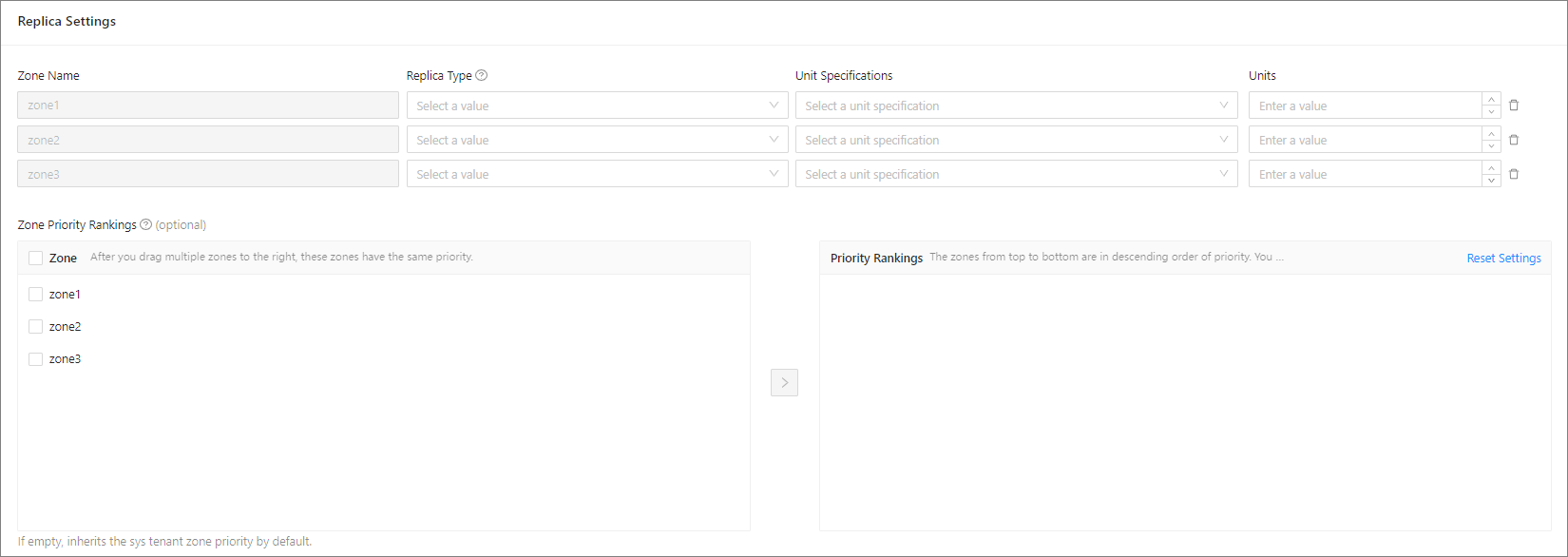
  7. Specify the parameters in the Replica Settings section.

    • If the version of the specified cluster is V4.0 or later, you can only set the same number of units for all zones, which is 1 by default.
    1

    • If the version of the specified cluster is earlier than V4.0, you can set different numbers of units for different zones.
    2

    By default, the system displays configurable zones based on the zone information of the selected cluster. If you do not need to create a replica in a zone, click the Delete icon to delete the zone. The zone information fields that need to be configured and their descriptions are listed in the following table.

    Parameter Description
    Replica Type The type of the replica. Valid values:
    • Full-featured replicas
    • Read-only replicas
    • Log-only replicas
    Select multiple full-featured replicas to ensure that they are in the majority.
    Unit Specification OCP has a set of built-in unit specifications. You can select the specification that you need from the list of unit specifications or click Add Specification at the bottom of the list to add a custom specification. For more information, see OCP resource unit specifications.
    Units The number of units in the zone. The number of resource units cannot exceed the number of OBServers in the zone.
    Zone Priority Rankings The priorities of the zones. This priority order affects the priority order of the primary zone of the sys tenant. The left-side list shows all zones in the cluster. You can select one or more zones from the list box on the left to add them to the list box on the right. By default, the priority of a zone selected earlier is higher than that of a zone selected later, and the zones selected at one time have the same priority. After you move the zones to the box on the right side, you can also drag them upward or downward to adjust their priority order. A zone takes priority over those beneath it.
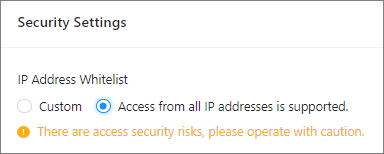
  8. Specify the parameters in the Security Settings section. You can select Access from all IP addresses is supported or Custom for IP Address Whitelist.

    • If you select Access from all IP addresses is supported, all IP addresses are allowed.

Note

There are access security risks, please operate with caution.

  • If you select Custom, you need to specify a list of clients that are allowed to access this tenant. The default value is %, which indicates that all client connections are allowed. When you configure the whitelist, you must add the IP addresses of the OCP and OBProxy servers to it. Otherwise, you cannot manage the tenant from OCP. Configure the whitelist in the following formats:
    • IP address example: xxx.xxx.xxx.1, xxx.xxx.xxx.2.
    • Subnet mask example: xxx.xxx.xxx.0/24.
    • Fuzzy match example: xxx.xxx.xxx.% or xxx.xxx.xxx._.
    • Mixed format example: xxx.xxx.xxx.1, xxx.xxx.xxx.2, xxx.xxx.xxx.%, xxx.xxx.xxx._, xxx.xxx.xxx.0/24.
3

Notice

You must add the IP addresses of the OCP and OBProxy servers to the whitelist. Otherwise, you cannot manage the tenant from OCP.

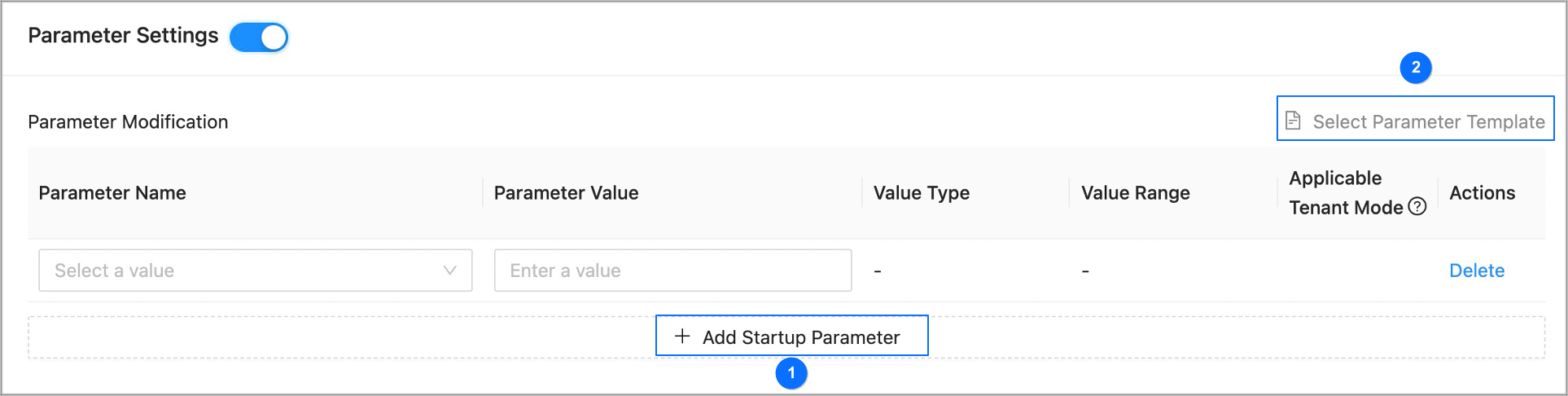
  1. Turn on the Parameter Configurations switch and configure the tenant parameters.

    • You can add startup parameters one by one and set values as shown in section ① of the following figure.

    • You can also move the pointer over Select Parameter Template as shown in section ② of the following figure, and select a parameter template. The system will automatically populate parameters in this section by using the template.

      If you are creating a tenant in MySQL mode by using a parameter template that contains parameters that are valid only in Oracle mode, you must manually delete those parameters.
      2

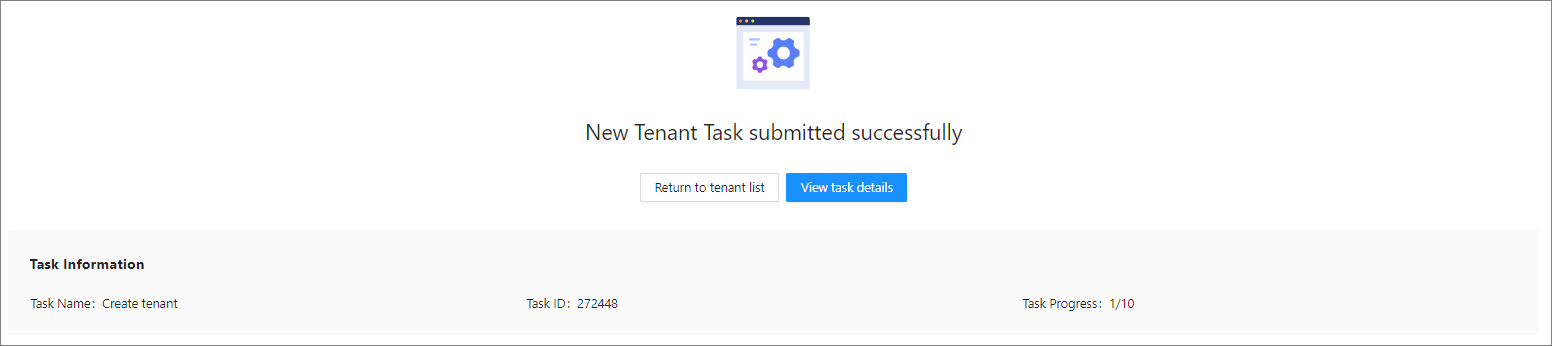
  2. Click Submit. The page that appears prompts you that the tenant creation task has been submitted and displays the summary information of the task.

    • To view the task details, click View Task Details.

    • To return to the Tenants list, click Return to Tenants List. In the Tenants list, you can view the status and task details of the new tenant, and delete the tenant if the tenant creation failed.
      1201

Note

When the task status is Completed, you can check the status of the new tenant in the Tenants list on the Tenant Management page. The new tenant is created if its status is Running.

Previous topic

Tenant management operations
Last

Next topic

Unit specification management
Next
What is on this page
Prerequisites
Procedure