







MyCat is a widely used database middleware that provides database sharding and table splitting. It enhances database performance and scalability by distributing data across multiple database instances or tables. This topic outlines the steps and key considerations for migrating data to OceanBase Database when using MyCat as the database sharding and table splitting middleware.
Preparations before migration
Environment assessment
As a traditional database sharding middleware, MyCat works by using an SQL parser to analyze and route query requests. In this process, MyCat performs key operations such as SQL parsing, sharding analysis, routing selection, and result merging. Note that by default, MyCat adds LIMIT-based pagination to query results. This automatic behavior may lead to differences in query results after migration to OceanBase. Therefore, this issue should be closely monitored during application adaptation.
In terms of application code, a thorough review is necessary to identify any specific MyCat-related logic in the existing system. While MyCat is designed to be transparent to applications, developers may have written code that relies on MyCat's features, particularly in pagination handling and special SQL rewriting. It is recommended to create a comprehensive checklist for code reviews to identify these potential dependencies.
Performance requirements assessment
Performance assessment is a key prerequisite for a successful migration. It is necessary to collect a complete performance profile during peak business hours, including concurrent access patterns, SQL characteristics of high-frequency queries, access hotspots of key business tables, and performance bottlenecks in the existing architecture.
These data will directly impact the partitioning strategy and global index planning in OceanBase. For example, high-frequency query conditions should be considered as potential partitioning key candidates, and access hotspots may require more granular partitions to distribute the load. It is recommended to use OceanBase Migration Assessment (OMA) to conduct a comprehensive compatibility check on the migration source and identify potential technical issues that may affect the migration.
Migration planning
Before designing the target architecture, it is essential to understand the motivations for using MyCat. Common scenarios include addressing single-machine database capacity bottlenecks, resolving performance issues in specific business scenarios, or overcoming limitations of the original database. Once these motivations are clear, we can proceed to plan the architecture on OceanBase. Database sharding leverages concurrent I/O capabilities, so we recommend deploying multiple replicas during data migration to OceanBase for high availability. The tenant mode is typically configured with the Random mode to maximize resource utilization. In special cases, such as when MyCat only uses a few MySQL instances, the tenant replica configuration for OceanBase can be adjusted accordingly.
Migration process design
The migration process involves two parts: schema migration and data migration. The basic process is as follows:
Schema migration: Migrate schemas at the database level. First, migrate all tables under the database related to MyCat, and then migrate the database and tables not related to MyCat. After schema migration, modify the partitioned tables on OceanBase based on the partitioning method.
Data migration: Use full and incremental synchronization. Two feasible options are available: migrating data through database sharding or using MyCat as the data source.
Data verification: After data migration, conduct a comprehensive verification of data consistency.
Migration Implementation
Schema migration
Schema migration is the foundation of overall migration work and requires targeted strategies based on different table types. In a MyCat environment, tables can typically be classified as follows:
Partitioned tables: These are tables defined under a database in MyCat. For these tables, you only need to migrate the schema definition of one database, and you cannot migrate the schema again.
Non-partitioned tables: These are tables defined under a database in MyCat. You need to confirm the actual data nodes (databases) specified in the MyCat configuration and migrate only the schema of the corresponding node.
Global tables: These are tables configured globally in MyCat. Like non-partitioned tables, global tables can only have their schemas migrated for the actual data nodes specified in the MyCat configuration file. Additionally, due to the possibility of tables with the same name existing on other nodes, global tables can only be migrated once.
Unconfigured tables: These tables exist in databases managed by MyCat but are not declared in the configuration file. If tables with the same name exist in different databases, you need to determine which table should be the reference for migration.
Irrelevant database tables: These are other business tables that are unrelated to the database sharding architecture. They can be migrated in the regular manner.
All of the above types of tables need to be migrated to OceanBase Database, without any data duplication. The migration is performed at the database level. First, all tables under databases related to MyCat's database sharding are migrated. Then, tables in databases unrelated to MyCat are migrated. The overall migration principle is to select each correct table only once.
Migrate tables related to MyCat database sharding
The first four types of tables mentioned are all related to MyCat database sharding. When migrating these tables, you can use the following two methods:
Specify objects for migration
This method is suitable for scenarios where there are few and well-defined objects, allowing precise control over each migration object.
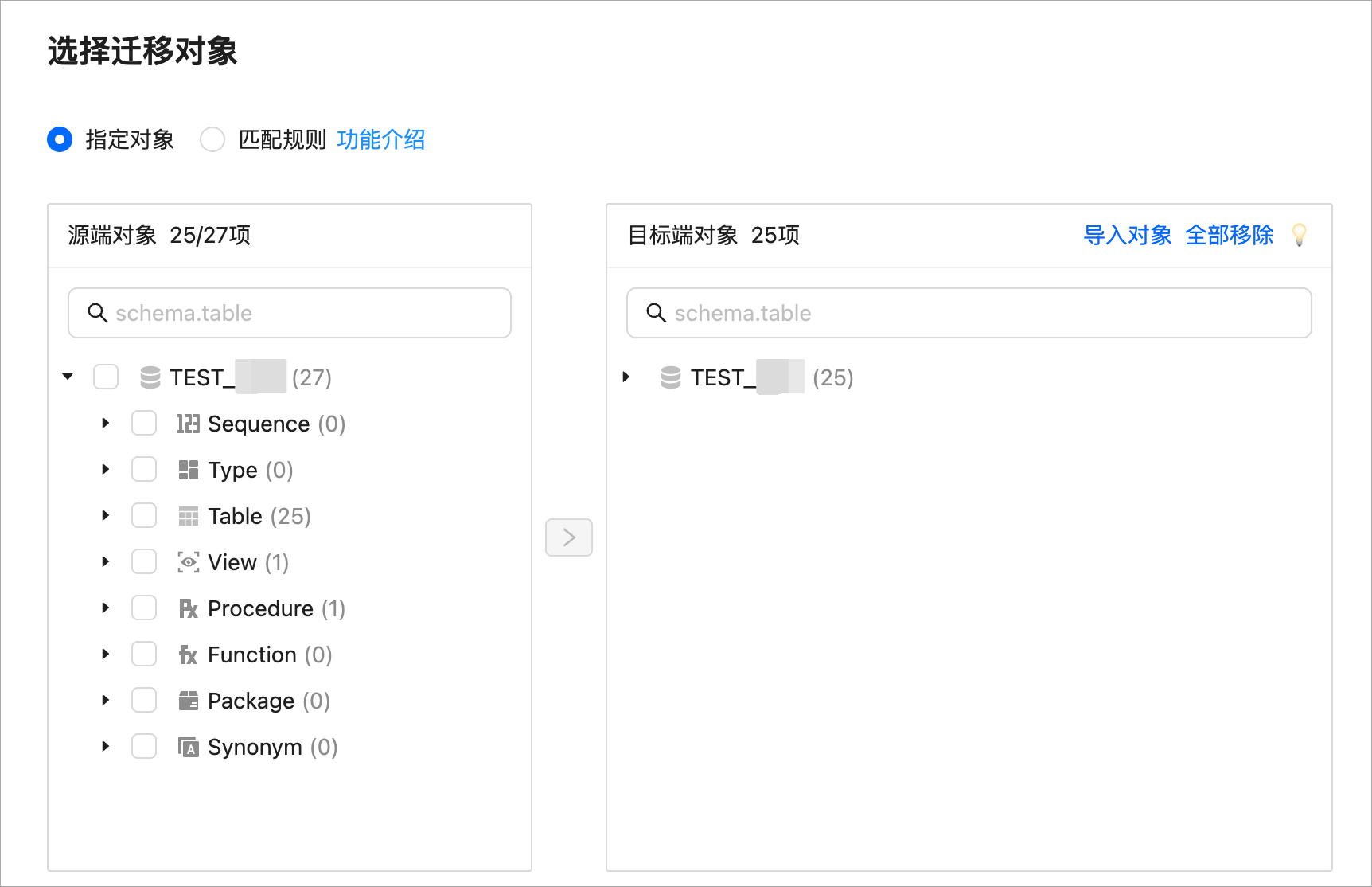
Match rules for migration
This method is more suitable for large-scale migrations. By configuring matching rules, you can simultaneously achieve renaming and table exclusion, efficiently completing the migration.
For example, consider two databases: Database 0 and Database 1. All tables in Database 1 are partitioned, while Database 0 contains both partitioned and non-partitioned tables. Database 1 can undergo normal schema migration, but when migrating Database 0, since schema migration only needs to be done once, you need to exclude the partitioned tables selected in Database 1. In this case, using rule-based matching is simpler than selecting each object individually. The following figure shows how to use rule-based matching to exclude tables in Database 0 that start with
st(MyCat partitioned tables).
Migrate tables not related to MyCat database sharding
The fifth type of tables mentioned are those not related to MyCat database sharding. These tables are not configured in MyCat but share a database instance with MyCat database sharding. They can be migrated normally. However, if two databases with the same name exist in different instances, you need to manually confirm the correct database before migration.
Modify the schema on the OceanBase side
Modifying the schema requires reference to the partition settings of the original database and table sharding. The partitioning design should be based on the original partitioning algorithm, taking into account the business peak behavior. While partition design is not strongly related to primary key constraints, OceanBase Database requires that the primary key must include the partitioning key. Therefore, adjustments to the original table schema are typically necessary. The following are two solutions:
Solution 1: If the primary key and partitioning key are different, you can add the partitioning key to the primary key to create a composite primary key. This is the optimal solution, but it requires that the partitioning key cannot be NULL. In practice, many existing systems may have a
DEFAULT NULLdefinition. In such cases, you need to assess whether this definition can be removed based on the actual situation.Solution 2: If
DEFAULT NULLcannot be removed, you can use a global unique index to ensure data uniqueness. While this method solves the NULL value issue, global indexes are independent data structures that can become performance bottlenecks in high-concurrency scenarios.
Here is a typical schema modification example:
-- Original table schema
CREATE TABLE `st_account` (
  `id` bigint(20) NOT NULL COMMENT 'id',
  `account_id` bigint(20) DEFAULT NULL COMMENT 'Account ID',
  ...
  PRIMARY KEY (`id`)
);

-- Modified OceanBase table schema
CREATE TABLE `st_account` (
  `id` bigint(20) NOT NULL COMMENT 'id',
  `account_id` bigint(20) NOT NULL COMMENT 'Account ID',  -- Removed the DEFAULT NULL definition
  ...
  PRIMARY KEY (`id`, `account_id`)  -- Created a composite primary key
) PARTITION BY HASH(`account_id`) PARTITIONS 6;
Data migration and verification
When using OMS for data migration, you must select full migration + incremental synchronization (only DML synchronization) + full verification. You can use one of the following two methods to complete the migration.
Data migration by using sub-databases
This method synchronizes data by using each sub-database and migrates data by using a renaming strategy. The specific process is as follows: first, migrate all tables related to the sub-databases of MyCat, including partitioned tables, non-partitioned tables, global tables, and tables that are not configured. Then, migrate all tables not related to the sub-databases of MyCat. All data in each sub-database of a partitioned table must be migrated, and other tables must be migrated only once.
This method migrates data by using databases and is less likely to cause data omissions. You can also reference schema migration to specify objects or use rule-based matching to limit data during migration. Note that the tables to be excluded are non-partitioned tables that are duplicated in different sub-databases. You only need to synchronize data of non-partitioned tables in the specified data sub-database specified in the MyCat configuration file. The disadvantage of this method is that the operations are complex.
For example, the following figure shows how to rename tables and migrate data of sub-database 1 and sub-database 0, and exclude some non-partitioned tables that start with member in sub-database 1. These non-partitioned tables exist in sub-database 1 but are pointed to sub-database 0 in the MyCat configuration file. Therefore, they need to be excluded.

Data migration by using a MyCat data source
This method directly extracts data by using a MyCat connection. This method is simpler than the previous method. However, because MyCat cannot provide incremental logs, this method supports only full data migration and does not support incremental synchronization.
The specific process of this method is as follows: first, fully migrate all database and table information in the MyCat configuration file. Then, fully migrate all tables that are not configured in the MyCat configuration file. Finally, fully migrate all databases that are not configured in the MyCat configuration file. All data in each sub-database of a partitioned table must be migrated, and other tables must be migrated only once.
Data verification
Data verification is a key step to ensure the migration quality. We recommend that you use the inmode verification mode. You can configure the filter.verify.inmod.tables parameter to specify tables to be verified in the inmode verification mode. If you want to enable full-table verification, you can configure filter.verify.inmod.tables=.*;.*;.*. Full-table verification is applicable only to the following scenarios. You must determine whether to enable full-table verification based on the actual situation:
- Multi-table aggregation migration exists in the migration chain. In other words, data from multiple source tables is aggregated into a single target table. For example, data from the A_1, A_2, ..., A_N tables in the source is migrated to the A table in the target.
- The target table contains data, and the target table object existence handling strategy option is set to Ignore when you configure the migration task. In this case, all tables are verified in the inmode verification mode.
When a verification failure is detected, you must follow the standard procedure: first, record the complete discrepancy details, then analyze the root cause, and finally develop a targeted repair plan. Note that you cannot directly correct the discrepancies. You must first determine the cause of the discrepancies.
Configure reverse links (as a fallback solution)
After the migration is completed, for business switchover scenarios, you can choose to start an incremental synchronization task from the target database to the source database (i.e., reverse synchronization) on OMS before switching the business database. This way, any changes made to the target database after the business switch can be synchronized back to the source business database in real time. In a MyCat migration task, you can configure reverse links by table type. For tables managed by MyCat, configure an incremental data link from OceanBase to MyCat for data transfer. For other tables not managed by MyCat at the source, set up a separate link for reverse synchronization.