







OceanBase Database offers multiple solutions for importing data files based on their storage location and size. When working with large datasets, it is essential to optimize parameters to improve performance and reduce resource usage. This topic outlines the key factors to consider during the import process and is specifically applicable to OceanBase Database V4.3.5, as some features may not be supported in earlier versions. For further details, refer to the official documentation.
Character set and encoding
Before importing data, you need to understand the principles of character sets and encoding to avoid garbled text when reading data after the import. Garbled text may occur if encoding and decoding follow different rules or if there is a mismatch between character sets. If a data file appears garbled after import, the issue could be due to correct data storage but incorrect encoding during reading, or incorrect encoding during storage.
The character set settings at every stage, from the data file itself to reading the file and writing it into OceanBase Database, affect the accuracy of the final data.
Character set of data files
Ensure that your data files use the correct character set. When exporting data files, save them in the UTF8 format to correctly preserve most characters (especially Chinese characters). If your data contains emoji characters or similar, save the data files in the UTF8MB4 format during export.
For example, in a Linux environment, you can check the file's encoding with the following command:
file /tmp/test.sql
/tmp/test.sql: UTF-8 Unicode text
Client character set
Ensure that your client can correctly read the data files. You can use the following clients to import data files into OceanBase Database:
Client |
Type |
|---|---|
| OceanBase Developer Center (ODC) | Graphical client tool |
| DBeaver | Graphical client tool |
| SQL Console of OceanBase Cloud | Graphical client tool |
| Shell | Command line |
Notice
Ensure that the language pack of your operating system includes the target character set (such as Simplified Chinese) and that the graphical client tools of OceanBase Database also support the target character set. We recommend that you set the encoding to UTF-8.
You can use graphical tools on Windows, Linux, or locally developed operating systems. If you are using a Linux system, make sure it supports the target character set. To check the available character encoding schemes on your system, run the locale -m command. Both GBK and UTF-8 support Chinese, but UTF-8 is recommended. If your operating system does not support GBK or UTF-8, you will need to install the appropriate language pack for Simplified Chinese. After that, set the LANG environment variable to either GBK or UTF-8 in the Shell environment.
The terminal's encoding determines how Chinese characters entered in the terminal are converted and how Chinese content is displayed when read.
To set the session language and encoding, run the following commands:
## Set the encoding.
export LANG=en_US.UTF-8
## Check whether the settings take effect.
locale
LANG=en_US.UTF-8
LC_CTYPE="en_US.UTF-8"
LC_NUMERIC="en_US.UTF-8"
LC_TIME="en_US.UTF-8"
LC_COLLATE="en_US.UTF-8"
...
Character set of OceanBase tenants
To ensure compatibility, make sure the character set of your OceanBase tenant supports the target character set. You can specify the character set when creating a tenant. We recommend setting the character set to UTF8MB4, as this minimizes the risk of garbled Chinese characters in any client environment. As mentioned earlier, it is also recommended to set the character encoding of your client operating system and tools to UTF-8.
If you are using an Oracle-compatible tenant, the character set of its data tables is determined by the character set specified during tenant initialization and cannot be changed.
If you are using a MySQL-compatible tenant, you can change the character set when creating a database or table. This change only applies to subsequent tables within the database or the specific table being created.
Since MySQL character set configurations can be complex, we recommend setting the character set of a MySQL-compatible tenant to UTF8MB4. In the following example, a MySQL-compatible tenant is created using the GBK character set. This character set allows for proper reading and writing of Chinese characters.
Note
This example is provided for demonstration purposes only and is not commonly used in production environments.
Although the tenant's character set is set to GBK, it is still recommended to to set the client programs and Linux environment variables to UTF-8, as UTF-8 is compatible with GBK. For example, assume you want to create another database named test2 with the character set set to utf8mb4.
CREATE DATABASE test2 CHARACTER SET = utf8mb4;
Query OK, 1 row affected (0.111 sec)

USE test2;
Database changed
CREATE TABLE t1(id bigint, c1 varchar(50));
Query OK, 0 rows affected (0.163 sec)

INSERT INTO t1 VALUES(1,'Chinese');
Query OK, 1 row affected (0.049 sec)

SHOW FULL COLUMNS FROM t1;
+-------+-------------+--------------------+------+-----+---------+-------+---------------------------------+---------+
| Field | Type        | Collation          | Null | Key | Default | Extra | Privileges                      | Comment |
+-------+-------------+--------------------+------+-----+---------+-------+---------------------------------+---------+
| id    | bigint(20)  | NULL               | YES  |     | NULL    |       | SELECT,INSERT,UPDATE,REFERENCES |         |
| c1    | varchar(50) | utf8mb4_general_ci | YES  |     | NULL    |       | SELECT,INSERT,UPDATE,REFERENCES |         |
+-------+-------------+--------------------+------+-----+---------+-------+---------------------------------+---------+
2 rows in set (0.004 sec)

SELECT id, c1, hex(c1) FROM t1;
+------+------+---------+
| id   | c1   | hex(c1) |
+------+------+---------+
|    1 | Chinese   | E4B8AD  |
+------+------+---------+
1 row in set (0.006 sec)

SHOW VARIABLES LIKE '%character%';
+--------------------------+---------+
| Variable_name            | Value   |
+--------------------------+---------+
| character_sets_dir       |         |
| character_set_client     | utf8mb4 |
| character_set_connection | utf8mb4 |
| character_set_database   | utf8mb4 |
| character_set_filesystem | binary  |
| character_set_results    | utf8mb4 |
| character_set_server     | gbk     |
| character_set_system     | utf8mb4 |
+--------------------------+---------+
8 rows in set (0.004 sec)
The return result shows that although the tenant character set is GBK, values of multiple character set variables follow the client environment and are utf8mb4. The variables are described as follows:
character_set_client: the character set of the query data sent by the client.character_set_connection: the character set of data during the connection between the client and the server.character_set_results: the character set used by the server when it returns results to the client.character_set_server: the character set used by the server when it stores data.
character_set_results determines the encoding of data in the result set. By default, character_set_results has the same value as character_set_connection. However, you can configure character_set_results separately to use a different character set for returning data.
In the above example, no garbled text appears. If you encounter garbled text during the data import process, refer to the example above to analyze which step in the character set encoding configuration is incorrect, leading to an encoding conversion error during data transmission. To identify whether it is a conversion error, pay attention to the displayed characters and their corresponding encodings.
Prepare for data import
To improve import performance, make sure that the target table for importing the data has no indexes or other constraints except for the primary key. You can create indexes and constraints on the target table after the data is imported. However, if your data file contains incremental data of the target table and the table has unique constraints or indexes, you must create the constraints or indexes in advance.
Data import methods
The data import method depends on the format and location of the data file. Common data file formats are SQL and CSV. The SQL files contain DDL and DML statements.
Import an SQL file
An SQL file may contain DDL and DML statements. We recommend that you separate the DDL and DML files. You can execute an SQL file by using the obclient command of OceanBase Database or the mysql command if you are using a MySQL tenant. In addition, some graphical client tools, such as ODC and DBeaver, can also execute an SQL file.
For example, you can execute an SQL file using the following command:
obclient -h27.0.0.1 -uroot@obmysql -P2883 -p******** -c -A test < /tmp/test.sql
You can also execute the SQL file from the command line:
## Connect to OceanBase Database
obclient -h27.0.0.1 -uroot@obmysql -P2881 -p -c -A test

# Execute the following statement in OceanBase Database
source /tmp/test.sql
Query OK, 1 row affected (0.003 sec)
If your SQL file is exported by using OceanBase obdumper, you can import it to an OceanBase tenant by using obloader. For more information, see the documentation on how to use obloader.
Import a CSV file
You can use the obloader client tool of OceanBase Database or the load data [local] infile SQL command to import a CSV file.
Before you import a CSV file, ensure the following:
The CSV file format is correct.
The first row of the file contains column headers.
Ensure that your data is imported into the corresponding columns. Misaligned data may result in errors due to type mismatches. If the columns in the source file cannot be directly mapped to the target table's columns, specify the column mapping in the import command. If you are using
obloader, define the mapping in the control file. If you are using theload datacommand, specify the column names directly.The maximum number of allowed error rows during import.
If the number of errors exceeds the allowed maximum, the data import will fail.
The format of date and time data.
When importing date and time data, make sure to adjust OceanBase Database's time format variables, such as
datetime_formatandtime_formatfor MySQL-compatible tenants, to match the format of the time columns in the data file. This helps prevent errors when converting string-formatted time data intodate,time, ordatetimecolumns.If you cannot modify the time format variable of your tenant, use a preprocessing function for the column in the
obloadercontrol file. Theload datacommand does not support preprocessing functions for columns.
obloader
The location of the CSV file affects the import plan. If your file is not stored in a location accessible to the OBServer node, you can use the import tool obloader. obloader supports reading files from local storage, Amazon Simple Storage Service (S3), and Hadoop Distributed File System (HDFS).
The following example shows how to export a large table from one OceanBase tenant and import it to another tenant. In this example, the OBServer nodes are connected directly for better performance.
# Export data
bin/obdumper -hxx.x.x.1 -P 2881 -utemp01@obmysql -p'**********'  -D testdb --table 'big_table' --csv -f /data/obdumper/20240801 --skip-check-dir --thread 64

# Import data
bin/obloader -hxx.x.x.2 -P 2881 -utemp02@obmysql -p'**********'  -D testdb --table 'big_table' --csv -f /data/obdumper/20240801 --parallel=16 --truncate-table
We recommend that you choose the node where the leader of the target table is located for direct connection. If the target table is a single table, this method provides the best performance. If the target table is a partitioned table and its leader replicas are located on multiple nodes, any node can be chosen for writing, which may result in secondary routing of OBServer. The import performance also depends on the partitioning strategy of the target table and the distribution characteristics of data in the data file. If you do not want to pay attention to the location of the leader replica node of the target table, you can connect to the OceanBase tenant through OceanBase Database Proxy (ODP).
The --truncate-table parameter clears the original data in the source table before data is imported. Otherwise, the data will be appended.
load data
If a CSV file is stored on a server where an OceanBase tenant is deployed, you can directly connect to an OBServer node and use the LOAD DATA INFILE statement to load the file from the server. Before importing the file, you must use a socket connection to directly connect to the OBServer node and set the tenant's global variable secure_file_priv to the directory that contains the file to be imported.
For example, you can use the following command to directly connect to a OBServer node in the business tenant of OceanBase Database.
# Connect to the OceanBase business tenant
obclient -S ~/oceanbase/run/sql.sock -uroot@obmysql -P2881 -p -c -A oceanbase
-- Set the tenant global variable `secure_file_priv`
SHOW GLOBAL VARIABLES LIKE '%secure_file_priv%';
+------------------+-------+
| Variable_name    | Value |
+------------------+-------+
| secure_file_priv |       |
+------------------+-------+
1 row in set (0.004 sec)

SET GLOBAL secure_file_priv = '/data';
Query OK, 0 rows affected (0.114 sec)

SHOW GLOBAL VARIABLES LIKE '%secure_file_priv%';
+------------------+-------+
| Variable_name    | Value |
+------------------+-------+
| secure_file_priv | /data |
+------------------+-------+
1 row in set (0.002 sec)
If the CSV file is not stored on a server where an OceanBase tenant is deployed, you can either directly connect to the OBServer node or connect to the tenant through ODP and use the LOAD DATA LOCAL INFILE statement to load the file from the client. In the latter case, the client tool obclient reads the file and transmits it over the network to the OceanBase server. To use the LOAD DATA LOCAL INFILE statement, you must start obclient with the --local-infile option to enable the local data loading feature.
A sample command is as follows:
load data /*+ parallel(12) append */ local infile '/data2/tpch/s100/lineitem.tbl.*' into table lineitem fields terminated by '|';
If the CSV file is stored in an object storage service, you can connect to the tenant through ODP and use theload data remote_oss infile statement to load the file from the object storage service. Currently, supported object storage services include Alibaba Cloud Object Storage Service (OSS) with the address protocol header oss://, Tencent Cloud Object Storage (COS) with the address protocol header cos://, and Amazon Simple Storage Service (S3) with the address protocol header s3://. In the object storage path, you must specify the host (host), access ID (access_id), and access key (access_key).
Additionally, if the CSV file is stored in an object storage service, you can create an external table in OceanBase Database based on the CSV file. Using the external table, you can directly read the content of the CSV file and load it into the target table by executing the INSERT INTO ... SELECT ... FROM ... statement.
When using the load data statement to import data, if the target table already contains data with a primary key or unique key, you can use the replace or ignore parameter to specify whether to replace the existing data or ignore the new data. If no primary key or unique key exists, these parameters can be omitted. Any errors encountered during data import are recorded in a log file. By default, the log file is stored in the log directory under the OceanBase installation directory, for example, /home/admin/oceanbase/log/. Large-scale import tasks may generate a significant number of log files in this directory. If there are many import errors, monitor the size of the log files.
Performance tuning
For large-scale data imports (greater than 100 GB), a flexible balancing strategy is required for performance optimization. Both excessively slow and excessively fast import speeds should be avoided. Slow import speeds can prolong waiting times and affect business progress, while fast import speeds may lead to excessive resource consumption in OceanBase Database. We recommend optimizing import performance while ensuring system stability. The resources involved can be categorized into three types: CPU, memory, and disk.
CPU resource analysis and optimization
By default, all sessions within the same tenant share equal access to CPU resources. OceanBase Database divides the SQL request queue of a tenant into two queues: one for fast SQL requests and one for slow SQL requests. The boundary between fast and slow SQL requests is determined by the cluster parameter large_query_threshold, which has a default value of 5s. The maximum proportion of CPU resources that can be used by the slow queue is controlled by the cluster parameter large_query_worker_percentage, which defaults to 30 (or 30%). In OceanBase Database V4.X, the cgroup feature is enabled by default to isolate CPU resources between tenants. However, in certain customer scenarios, the cgroup feature may be disabled. In such cases, the cluster parameter enable_cgroup can be used to control this feature. When this parameter is set to false, the system reverts to the resource isolation method used in versions prior to OceanBase Database V4.0. A data import session uses the CPU resources of the target tenant. If parallel import is not enabled, the session operates as a single-threaded session, which does not significantly impact the tenant's CPU resources (competing fairly with other business sessions).
Memory resource analysis and optimization
When using OceanBase Database, you must pay attention to the memory management mechanism for tenants. The total memory allocated to all sessions of a tenant is limited by its memory quota. If data is imported at an excessively fast speed, the memory consumption per unit of time may surge, squeezing the memory space available for business transactions. Although OceanBase Database provides a flexible MemStore (write memory) management mechanism—when memory usage exceeds the preset freeze_trigger_percentage threshold, the system automatically freezes some data and dumps it to disk to free up memory—if the data write speed significantly exceeds the memory dump speed, the MemStore utilization rate may still approach 100%. In such cases, both business transactions and data import sessions may encounter the -4002 error. Additionally, your data import task will also fail. To detect potential issues in time, we recommend that you continuously monitor the MemStore memory usage of the tenant.
We recommend that you use OCP to monitor the MemStore metric chart to check the performance of a tenant.
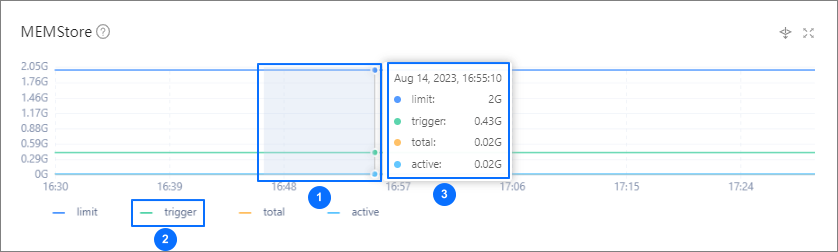
OceanBase Database provides a write throttling feature, which controls the data write process using the writing_throttling_trigger_percentage and writing_throttling_maximum_duration parameters. By default, writing_throttling_maximum_duration is set to 2 hours. However, in V4.2 and V4.3, the default value of writing_throttling_trigger_percentage is 100, meaning this protection mechanism is effectively disabled. To prevent MemStore memory exhaustion, we recommend setting this parameter to a value around 90. You can flexibly adjust the parameter value based on the tenant's memory size. Tenants with larger memory can set this parameter to a higher value, while tenants with smaller memory should set it to a lower value. The final setting should be based on a reasonable assessment of memory consumption during data import.
One of the core methods for optimizing data import performance to fine-tune the MemStore-related memory parameters:
writing_throttling_trigger_percentage: controls the trigger threshold for data dumps (minor compaction). A larger dump volume increases I/O overhead, leading to significant fluctuations and longer durations in write performance. Triggering data dumps earlier can reserve more memory space but increases the dump frequency, which may waste resources. We recommend setting an appropriate threshold based on your workload characteristics.writing_throttling_trigger_percentage: determines the trigger point for write throttling. Setting this value too low may cause excessive throttling, negatively impacting write performance and wasting memory resources. Setting it too high may lead to out-of-memory errors. We recommend conducting stress testing to determine the optimal threshold, achieving a balance between performance and stability.memstore_limit: controls the proportion of MemStore memory in the tenant's total memory. The default value is50. For write-intensive workloads, this value can be increased appropriately.Notice
- Parameter adjustments affect all tenants, so you need to evaluate the impact globally.
- For tenants with small memory (less than 8 GB), large queries may occupy MemStore memory, causing the parameter settings to become ineffective.
Disk resource analysis and optimization recommendations
During minor compactions, OceanBase Database writes memory data to disk files using the LZ4 compression algorithm by default. Each day, a major freeze (major compaction) operation is performed to combine the incremental data from the last 24 hours in memory, the incremental data on disks, and the baseline data from the previous major compaction to generate a new baseline version. These operations occupy disk space, and the system's multi-version storage feature may cause space amplification. Although major compaction handles only the data blocks that have changed, large-scale data imports can still trigger extensive data merges, temporarily increasing the storage space occupied by data files. If a data file runs out of space, the system reports an error. OceanBase Database allows you to control the automatic expansion of data files using the datafile_maxsize and datafile_next parameters. In clusters deployed with the default OCP configuration, these parameters are not set. For data files with small initial configurations (datafile_size), we recommend enabling the automatic expansion feature if sufficient file system space is available. For data files with large initial configurations, this setting is typically unnecessary. This is a common practice in enterprise-level deployments: configuring large initial data files and disabling automatic expansion.
The system uses different compression algorithms during minor compactions and major compactions. Data blocks of intermediate versions generated during minor compactions use the LZ4 algorithm, while final version data blocks generated after major compactions use the Zstd algorithm. The LZ4 algorithm consumes fewer CPU resources but provides a lower compression ratio, meaning intermediate data occupies more storage space. This factor should be considered when assessing the remaining capacity required by the system.
You can use OCP to view the tenant space usage in an OceanBase database, but note that OCP has a delay. Alternatively, you can execute the following SQL statement under the sys tenant of the cluster to view the size of all versions of a table's data on all nodes in real time:
WITH table_locs AS (
SELECT
    t.tenant_id,
    t.database_name,
    t.table_id,
    t.table_name,
    t.table_type tablet_type,
    t.tablet_id,
    REPLACE(concat(t.table_name,':',t.partition_name,':',t.subpartition_name),':NULL','') tablet_name,
    t.tablegroup_name,
    t.ls_id,
    t.ZONE,
    t.ROLE,
    t.svr_ip
FROM
    oceanbase.CDB_OB_TABLE_LOCATIONS t
WHERE
    t.data_table_id IS NULL
UNION
SELECT
    i.tenant_id,
    i.database_name,
    i.table_id,
    t.table_name,
    i.table_type tablet_type,
    i.tablet_id,
    REPLACE(
        REPLACE(concat(i.table_name,':',i.partition_name,':',i.subpartition_name) ,concat('__idx_', i.data_table_id, '_'),'')
        ,':NULL',''
    ) tablet_name,
    i.tablegroup_name,
    i.ls_id,
    i.ZONE,
    i.ROLE,
    i.svr_ip
FROM
    oceanbase.CDB_OB_TABLE_LOCATIONS i
INNER JOIN oceanbase.__all_virtual_table t ON
    ( i.tenant_id = t.tenant_id
        AND i.data_table_id = t.table_id  )
WHERE i.data_table_id IS NOT NULL
)
SELECT
    t.database_name,
    t.ls_id,
    t.ROLE,
    t.svr_ip,
    t.table_name,
    t.tablet_name,
    -- group_concat(s.table_type,',') tablet_types,
    round(sum(s.size)/1024/1024/1024,2) size_gb
FROM
    table_locs t JOIN oceanbase.GV$OB_SSTABLES s
        ON (t.tenant_id=s.tenant_id AND t.ls_id=s.ls_id AND t.svr_ip=s.svr_ip AND t.tablet_id=s.tablet_id)
WHERE
    t.tenant_id = 1004
    AND t.database_name IN ('tpccdb')
    AND t.table_name IN ('bmsql_stock2')
    AND s.table_type NOT IN ('MEMTABLE')
    -- AND t.ROLE IN ('LEADER')
GROUP BY
    t.database_name,
    t.ls_id,
    t.ROLE,
    t.svr_ip,
    t.table_name,
    t.tablet_name
WITH ROLLUP
ORDER BY
    t.database_name,
    t.ls_id,
    t.ROLE,
    t.svr_ip,
    t.table_name,
    t.tablet_name
;
You also need to pay attention to the impact of data imports on disk performance. This impact is reflected in two aspects: sequential write I/O during the minor compaction and major compaction processes, which occurs intermittently. The persistence of OceanBase transaction logs (clogs) is also sequential small I/O writes. When data files and transaction log files are deployed on NVMe SSD storage, the I/O impact can be ignored. If you notice excessive I/O pressure, you can mitigate it by reducing the data import speed. OCP provides real-time disk I/O performance monitoring, allowing you to perform precise evaluations and adjustments accordingly.
Parameter suggestions
Here are some empirical values for OBLOADER parameters:
--batch       Do not set the value of this option to be too large. Default value: 200.
--thread      We recommend that you set the value of this option to be twice the number of logical cores. Default value: 2*CPU.
--rw          The ratio between the number of parsing threads and writing threads. The number of parsing threads is equal to --thread * 0.2. Default value: 0.2.
Here are some empirical values for system variables and parameters of an OceanBase cluster:
-- Required system variables and parameters
set global max_allowed_packet=1073741824; -- Set the value to 1 GB.
set global ob_sql_work_area_percentage=30; -- Default value: 5.
alter system set freeze_trigger_percentage=30; -- Default value: 70.

-- Optional system variables and parameters
alter system set enable_syslog_recycle='True'; -- Default value: false.
alter system set max_syslog_file_count=100; -- Default value: 0.
alter system set minor_freeze_times=500; -- Default value: 5.
alter system set minor_compact_trigger=5; -- Default value: 5.
alter system set merge_thread_count=45; -- Default value: 0.
alter system set minor_merge_concurrency=20; -- Default value: 0.
alter system set writting_throttling_trigger_percentage=85; -- Default value: 10.
alter system set flush_log_at_trx_commit=0;  -- Default value: 1.
alter system set syslog_io_bandwidth_limit=100;  -- Default value: 30 MB.
Note
After data is imported, reset the system variables and parameters to the default values.
Parallel import
The primary method to improve data import efficiency is to increase concurrency. Both the obloader tool and the load data command support configuring the number of parallel loading tasks. obloader allows simultaneous use of multi-threading within the program and SQL parallel loading.
When using obloader, you can enable parallel loading by configuring the --thread and --parallel parameters. The --parallel parameter is used to set SQL parallel loading and must be used in conjunction with the bypass import parameter --direct.
bin/obloader -h 10.0.0.65 -P 2883 -u TPCH -t oboracle -c OB4216 -p ******** --sys-password aaAA11__ -D TPCH --table LINEITEM --external-data --csv -f /data/1/tpch/s4/bak/ --truncate-table --column-separator='|' --thread 16 --rpc-port=2885 --direct --parallel=16
Direct load
OceanBase Database supports direct load. This feature has the following characteristics:
- Bypasses most interfaces of the conventional SQL layer.
- Data is directly written to data files without passing through the tenant's MemStore memory.
- Data is written to data files via the memory buffer in the KV Cache.
- Due to the shorter write path, direct load provides better performance for bulk data insertion.
When performing a direct load, client programs (such as obclient, obloader, or Java programs) must send SQL through the RPC port (default 2882) of the OBServer. If you are using OBProxy to forward connections, you will also need to open the RPC port of OBProxy (default 2885). While it is possible to access and open the RPC port of OBProxy via load balancing devices, direct load operations generate significant network traffic, which could impact the bandwidth available for other applications. Therefore, for bulk data imports, it is recommended to connect directly to a fixed OBProxy.
To enable direct load for the obloader command, you need to specify the following parameters:
--rpc-port=: specifies theRPCport of anOBProxyorOBServernode to connect to.--direct: enables direct load.--parallel=: optional. Specifies the degree of parallelism in the MemStore of anOBServernode during direct load.
To enable direct load for an INSERT SQL statement or the load data statement entered on the command line of obclient, you need to add the following hints:
append: equivalent todirect(true,0). It allows online collection of statistics, which is equivalent toGATHER_OPTIMIZER_STATISTICS.direct(bool, int, [load_mode]):boolindicates whether to sort data during writes. The valuetrueindicates that data is sorted, and the valuefalseindicates that data is not sorted.intspecifies the maximum number of error rows tolerated.load_modeis optional and specifies the data loading mode. The default valuefullindicates full loading, and the new valueincindicates incremental loading (supported withinsert ignore). The new valueinc_replaceindicates incremental loading without checking for duplicate primary keys, which is equivalent toreplace(conflicts withignore).enable_parallel_dml parallel(N): optional. Specifies the degree of parallelism for data loading.
Here is an example of using direct load for an INSERT SQL statement:
INSERT /*+ DIRECT(true, 0, 'full') enable_parallel_dml parallel(16) */ INTO big_table2 SELECT * FROM big_table ;
In V4.3.5, OceanBase Database allows you to set the default data loading mode at the tenant level. In this case, you do not need to add the Hint for direct load in the preceding SQL statement.
ALTER SYSTEM SET default_load_mode ='FULL_DIRECT_WRITE';
After logging off and then logging on again,
INSERT INTO big_table2 SELECT * FROM big_table;
Direct load uses a separate memory space instead of the MemStore, which results in different memory usage characteristics compared to conventional data import. When using direct load, ensure that sufficient memory is allocated to the KV cache to prevent memory shortages. Additionally, data files grow rapidly because direct load writes data directly to data files with minimal compression. Therefore, it is recommended to reserve adequate storage space for data files in advance.
Direct load requires that the SQL query statement of a session be outside a transaction.
BEGIN;
Query OK, 0 rows affected (0.001 sec)

INSERT /*+ append enable_parallel_dml parallel(4) */ INTO bmsql_oorder2 SELECT * FROM bmsql_oorder;
ERROR 1235 (0A000): using direct-insert within a transaction is not supported
Case study
This section demonstrates how to import data into OceanBase Database using the TPC-H table LINEITEM as an example.
Environment introduction.
The business tenant is configured with 4C7G resources, a MEMTABLE memory ratio of 50%, a minor compaction parameter ratio of 70%, and a write throttling ratio of 90%.
Prepare data.
You will import LINEITEM, which is the largest table in TPC-H. The data scale (
scale) is set to4, with a total of23,996,604records. The data files are as follows:ls -lrth /data/1/tpch/s4/bak/LINEITEM.* -rwxr-xr-x 1 admin admin 325M Jul 16 11:48 /data/1/tpch/s4/bak/LINEITEM.1.csv -rwxr-xr-x 1 admin admin 326M Jul 16 11:48 /data/1/tpch/s4/bak/LINEITEM.2.csv -rwxr-xr-x 1 admin admin 326M Jul 16 11:48 /data/1/tpch/s4/bak/LINEITEM.3.csv -rwxr-xr-x 1 admin admin 327M Jul 16 11:48 /data/1/tpch/s4/bak/LINEITEM.4.csv -rwxr-xr-x 1 admin admin 328M Jul 16 11:49 /data/1/tpch/s4/bak/LINEITEM.5.csv -rwxr-xr-x 1 admin admin 329M Jul 16 11:49 /data/1/tpch/s4/bak/LINEITEM.6.csv -rwxr-xr-x 1 admin admin 329M Jul 16 11:49 /data/1/tpch/s4/bak/LINEITEM.7.csv -rwxr-xr-x 1 admin admin 329M Jul 16 11:49 /data/1/tpch/s4/bak/LINEITEM.8.csv -rwxr-xr-x 1 admin admin 329M Jul 16 11:49 /data/1/tpch/s4/bak/LINEITEM.9.csvImport data to OceanBase Database.
Run the following commands to import data to OceanBase Database:
Direct load:
bin/obloader -h xx.x.x.xx -P 2883 -u TPCH@oboracle#OB4216 -p -D TPCH --table LINEITEM --external-data --csv -f /data/1/tpch/s4/bak/ --truncate-table --column-separator='|' --thread 16 --rpc-port=2885 --direct --parallel=16Direct load is not performed through the SQL port (default 2881) but rather through the RPC port (default 2882) of OBServer nodes. If OBLOADER directly connects to an OBServer node without using ODP, direct load can still be implemented by specifying the RPC port. In ODP V4.3.0, the RPC port is 2885. However, it is not recommended to bypass ODP in a client application in a production environment. This is because the primary replica location of business data is transparent to the application client. In other words, the client does not need to know which OBServer node stores the data, as ODP handles SQL routing. If you bypass ODP and directly write data to an OBServer node, a cross-server transaction will occur if the primary replica is not located on the connected node.
Non-direct load:
bin/obloader -h xx.x.x.xx -P 2883 -u TPCH@oboracle#OB4216 -p -D TPCH --table LINEITEM --external-data --csv -f /data/1/tpch/s4/bak/ --truncate-table --column-separator='|' --thread 16The above commands will import all supported CSV data files in the
/data/1/tpch/s4/bak/directory into theLINEITEMtable. If your data files exceed a size of 1 TB, it is recommended to use direct load to improve efficiency. Efficiency can be further enhanced by allocating larger tenant resource specifications.
For more information, see Direct load.