

OceanBase logo

OceanBase

A unified distributed database ready for your transactional, analytical, and AI workloads.

DEPLOY YOUR WAY

OceanBase Cloud

The best way to deploy and scale OceanBase

OceanBase Enterprise

Run and manage OceanBase on your infra

TRY OPEN SOURCE

OceanBase Community Edition

The free, open-source distributed database

OceanBase seekdb

Open source AI native search database

Customer Stories

Real-world success stories from enterprises across diverse industries.

View All
BY USE CASES

Mission-Critical Transactions

Global & Multicloud Application

Elastic Scaling for Peak Traffic

Real-time Analytics

Active Geo-redundancy

Database Consolidation

Resources

Comprehensive knowledge hub for OceanBase.

Blog

Live Demos

Training & Certification

Documentation

Official technical guides, tutorials, API references, and manuals for all OceanBase products.

View All
PRODUCTS

OceanBase Cloud

OceanBase Database

Tools

Connectors and Middleware

QUICK START

OceanBase Cloud

OceanBase Database

BEST PRACTICES

Practical guides for utilizing OceanBase more effectively and conveniently

Company

Learn more about OceanBase – our company, partnerships, and trust and security initiatives.

About OceanBase

Partner

Trust Center

Contact Us

International - English
中国站 - 简体中文
日本 - 日本語
Sign In
Start on Cloud

A unified distributed database ready for your transactional, analytical, and AI workloads.

DEPLOY YOUR WAY

OceanBase Cloud

The best way to deploy and scale OceanBase

OceanBase Enterprise

Run and manage OceanBase on your infra

TRY OPEN SOURCE

OceanBase Community Edition

The free, open-source distributed database

OceanBase seekdb

Open source AI native search database

Customer Stories

Real-world success stories from enterprises across diverse industries.

View All
BY USE CASES

Mission-Critical Transactions

Global & Multicloud Application

Elastic Scaling for Peak Traffic

Real-time Analytics

Active Geo-redundancy

Database Consolidation

Comprehensive knowledge hub for OceanBase.

Blog

Live Demos

Training & Certification

Documentation

Official technical guides, tutorials, API references, and manuals for all OceanBase products.

View All
PRODUCTS
OceanBase CloudOceanBase Database
ToolsConnectors and Middleware
QUICK START
OceanBase CloudOceanBase Database
BEST PRACTICES

Practical guides for utilizing OceanBase more effectively and conveniently

Learn more about OceanBase – our company, partnerships, and trust and security initiatives.

About OceanBase

Partner

Trust Center

Contact Us

Start on Cloud
编组
All Products
    • Databases
    • iconOceanBase Database
    • iconOceanBase Cloud
    • iconOceanBase Tugraph
    • iconInteractive Tutorials
    • iconOceanBase Best Practices
    • Tools
    • iconOceanBase Cloud Platform
    • iconOceanBase Migration Service
    • iconOceanBase Developer Center
    • iconOceanBase Migration Assessment
    • iconOceanBase Admin Tool
    • iconOceanBase Loader and Dumper
    • iconOceanBase Deployer
    • iconKubernetes operator for OceanBase
    • iconOceanBase Diagnostic Tool
    • iconOceanBase Binlog Service
    • Connectors and Middleware
    • iconOceanBase Database Proxy
    • iconEmbedded SQL in C for OceanBase
    • iconOceanBase Call Interface
    • iconOceanBase Connector/C
    • iconOceanBase Connector/J
    • iconOceanBase Connector/ODBC
    • iconOceanBase Connector/NET
icon

OceanBase Best Practices

All Versions

  • Deploy
    • Configuration guide for read-write splitting in AP scenarios
    • Best practices for read-write splitting
  • Migrate
    • Data transfer solutions in OceanBase Database
    • Overview on data migration
    • Best practices for importing data files to OceanBase Database
    • Best practice for migrating data from other databases to OceanBase Database
    • Massive data migration strategy
    • Best practices for migrating data from MyCat to OceanBase Database
    • Best practices for migrating PostgreSQL to OceanBase MySQL-compatible mode
  • Route
    • ODP routing best practices
  • Table Design
    • Best practices for table design and index optimization
    • Best practices for creating indexes on large tables
    • Best practices for database development
  • Develop
    • Best practices for connecting Java applications to OceanBase Database
    • Best practices for integrating Spark Catalog with OceanBase Database
    • Best practices for achieving optimal performance in batch DML using JDBC and OBServer
    • Best practices for bulk data cleanup in OceanBase Database
    • Best practices for PDML processing in OceanBase Database
    • Best practices for hot tables in OceanBase Database
    • Best practices for auto-increment columns and sequences in OceanBase Database
  • Manage
    • Best practices for resource throttling
    • Best practices for data load balancing
    • Best practices for security certification
    • Best practices for access control
    • Best practices for data encryption
  • Diagnose
    • Best practices for log interpretation in common scenarios
    • Best practices for end-to-end tracing
    • Best practices for using obdiag to collect performance information
    • Best practices for using obdiag to collect diagnostic information of parallel and slow SQL statements
    • Best practices for troubleshooting OceanBase Database performance issues
  • Performance Tuning
    • Best practices for handling slow queries
    • Best practices for collecting statistics to generate an efficient execution plan
    • Best practices for updating hotspot rows
    • Best practices for large object storage performance
    • Best practices for semi-structured storage performance
    • Best practices for OceanBase materialized views
  • Cloud Database
    • Best practices for achieving high availability through cross-cloud active-active deployment
    • High availability through primary and standby databases across clouds
    • High host CPU usage
    • Best practices for read/write splitting in OceanBase Cloud

Download PDF

Configuration guide for read-write splitting in AP scenarios Best practices for read-write splitting Data transfer solutions in OceanBase Database Overview on data migration Best practices for importing data files to OceanBase Database Best practice for migrating data from other databases to OceanBase Database Massive data migration strategy Best practices for migrating data from MyCat to OceanBase Database Best practices for migrating PostgreSQL to OceanBase MySQL-compatible mode ODP routing best practices Best practices for table design and index optimization Best practices for creating indexes on large tables Best practices for database development Best practices for connecting Java applications to OceanBase Database Best practices for integrating Spark Catalog with OceanBase Database Best practices for achieving optimal performance in batch DML using JDBC and OBServer Best practices for bulk data cleanup in OceanBase Database Best practices for PDML processing in OceanBase Database Best practices for hot tables in OceanBase Database Best practices for auto-increment columns and sequences in OceanBase Database Best practices for resource throttling Best practices for data load balancing Best practices for security certification Best practices for access control Best practices for data encryption Best practices for log interpretation in common scenarios Best practices for end-to-end tracing Best practices for using obdiag to collect performance information Best practices for using obdiag to collect diagnostic information of parallel and slow SQL statements Best practices for troubleshooting OceanBase Database performance issues Best practices for handling slow queries Best practices for collecting statistics to generate an efficient execution plan Best practices for updating hotspot rows Best practices for large object storage performance Best practices for semi-structured storage performance Best practices for OceanBase materialized views Best practices for achieving high availability through cross-cloud active-active deployment High availability through primary and standby databases across clouds High host CPU usage Best practices for read/write splitting in OceanBase Cloud
OceanBase logo

The Unified Distributed Database for the AI Era.

Follow Us
Products
OceanBase CloudOceanBase EnterpriseOceanBase Community EditionOceanBase seekdb
Resources
DocsBlogLive DemosTraining & Certification
Company
About OceanBaseTrust CenterLegalPartnerContact Us
Follow Us

© OceanBase 2026. All rights reserved

Cloud Service AgreementPrivacy PolicySecurity
Contact Us
Document Feedback
  1. Documentation Center
  2. OceanBase Best Practices
  3. master
iconOceanBase Best Practices
master
  • master

High availability through primary and standby databases across clouds

Last Updated:2025-08-12 12:12:56  Updated
share
What is on this page
Overview
Scenarios
Prerequisites
Procedure

folded

share

OceanBase Cloud supports creating primary instances on Alibaba Cloud and standby instances on Huawei Cloud to implement primary and standby databases across clouds. This ensures that businesses can quickly switch to other cloud environments when a single cloud service provider or region fails, thereby ensuring high reliability and business continuity.

Overview

A cross-cloud primary-standby database allows you to create a standby instance of a database instance (primary database) in another cloud service provider and synchronize data to the standby instance.

A cross-cloud primary-standby database has the following characteristics:

  • Strong disaster recovery capability: Deploying the primary and standby databases in geographically separated regions can effectively mitigate regional disasters (such as natural disasters and data center failures). Even if the primary instance deployed in one cloud service provider fails, the standby instance deployed in another cloud service provider can quickly take over, reducing the impact on business continuity.

  • High service availability: Cross-cloud deployment reduces the risk of service interruptions caused by internal issues within a single cloud service provider, ensuring that you can quickly switch to a standby database in another cloud platform when a failure occurs, maintaining business continuity.

  • Compliance and data governance: For enterprises with specific regulatory requirements, cross-cloud deployment offers greater flexibility, helping them meet data sovereignty and compliance requirements in different countries or regions.

  • Cost-effectiveness: While cross-cloud deployment may increase management complexity and data synchronization costs, you can flexibly allocate resources across cloud service providers, achieving a better balance between cost and service quality.
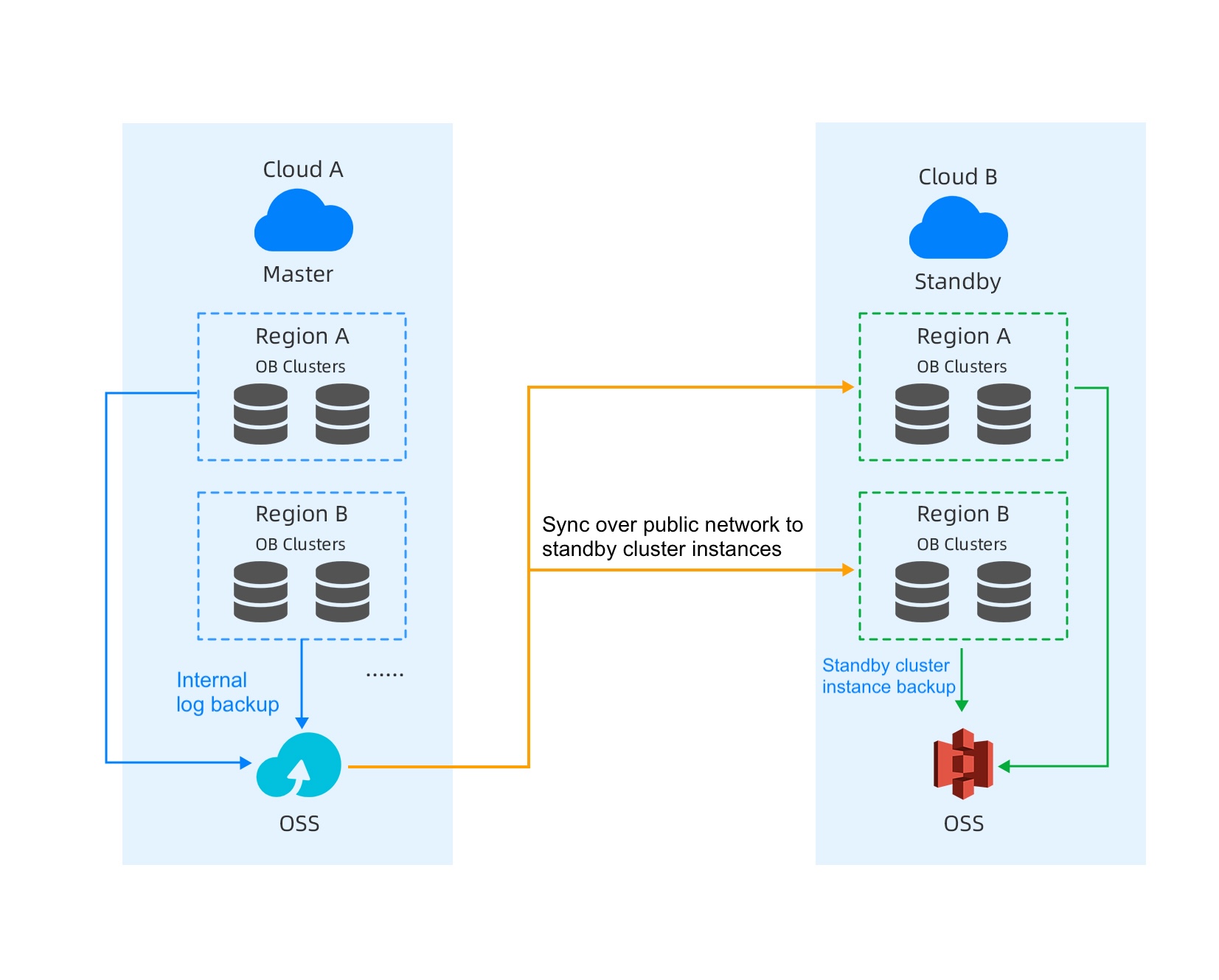
Scenarios

A company is an internet retailer whose core business systems are based on databases, such as order management, customer management, and product inventory. To ensure high availability of business and address risks such as downtime and network failures on a single cloud platform, the company plans to build a cross-cloud primary-standby database architecture to meet high-reliability and low-latency business requirements. It also needs to support fast switching and strong data consistency to ensure that business operations can continue uninterrupted after a failure.

Prerequisites

  • At present, only instances purchased on the Alibaba Cloud console can be primary instances, and instances on Huawei Cloud can be standby instances.

  • At present, only transactional instances support cross-cloud primary-standby databases.

  • Only one standby instance can be created for a primary instance.

  • You have the project admin and instance admin permissions.

Procedure

  1. Create an Alibaba Cloud instance on the Alibaba Cloud console. For more information, see Purchase an instance.

    1. Log in to the OceanBase Cloud console. If you are creating an instance for the first time, click Go To Create.

    2. In the left-side navigation pane, click Instances.

    3. In the upper-right corner of the page, click Create Database Instance.

    4. Select the required information, such as the service type and instance type, and click Buy Now. Then, select Service Agreement and click Proceed to Checkout. After the payment is successful, view the instance in the instance list.

  2. Grant access permissions to the Alibaba Cloud account.

    1. Log in to the OceanBase Cloud console, and click the icon in the pop-up window to grant access permissions to the Alibaba Cloud account.

    2. Click Log in to Alibaba Cloud console to obtain the main account ID.

    3. Log in to the RAM console, and use an existing or newly created AccessKey. Save your AccessKey ID and AccessKey Secret, and enter them in the corresponding fields on the OceanBase Cloud console.

    4. Enter the AccessKey ID and AccessKey Secret in the pop-up window of the OceanBase Cloud console, and click OK.

  3. Create a Huawei Cloud standby instance. You can create a standby instance in the OceanBase Cloud console or through Huawei Cloud Market. This topic describes how to create a standby instance in the OceanBase Cloud console. For more information, see Create a standby instance for an Alibaba Cloud primary instance.

    1. Click Create Alibaba Cloud Standby Instance. In the pop-up window, select the primary instance for which you want to create a standby instance.

    2. Click Create Standby Instance. The Create Instance page appears. The system automatically selects the same database version, deployment mode, and computing specification for the standby instance as for the primary instance.

      • The standby instance must have the same instance type, payment method, database version, and deployment mode as the primary instance.

      • The standby instance can have a different computing specification from the primary instance. The minimum node specification for the standby instance cannot be less than 0.33 times the node specification of the primary instance.

      • The storage specification for the standby instance cannot be less than that of the primary instance.

    3. Check whether your parameter configurations and purchase quantity are correct. After the check, select the service agreement and click Confirm Order. The instance list page appears, where you can view your instance.

  4. After the primary and standby instances are created, create a tenant in the primary instance and import data into the tenant. The standby instance automatically synchronizes data from the primary instance.

Previous topic

Best practices for achieving high availability through cross-cloud active-active deployment
Last

Next topic

High host CPU usage
Next
What is on this page
Overview
Scenarios
Prerequisites
Procedure