

OceanBase logo

OceanBase

A unified distributed database ready for your transactional, analytical, and AI workloads.

DEPLOY YOUR WAY

OceanBase Cloud

The best way to deploy and scale OceanBase

OceanBase Enterprise

Run and manage OceanBase on your infra

TRY OPEN SOURCE

OceanBase Community Edition

The free, open-source distributed database

OceanBase seekdb

Open source AI native search database

Customer Stories

Real-world success stories from enterprises across diverse industries.

View All
BY USE CASES

Mission-Critical Transactions

Global & Multicloud Application

Elastic Scaling for Peak Traffic

Real-time Analytics

Active Geo-redundancy

Database Consolidation

Resources

Comprehensive knowledge hub for OceanBase.

Blog

Live Demos

Training & Certification

Documentation

Official technical guides, tutorials, API references, and manuals for all OceanBase products.

View All
PRODUCTS

OceanBase Cloud

OceanBase Database

Tools

Connectors and Middleware

QUICK START

OceanBase Cloud

OceanBase Database

BEST PRACTICES

Practical guides for utilizing OceanBase more effectively and conveniently

Company

Learn more about OceanBase – our company, partnerships, and trust and security initiatives.

About OceanBase

Partner

Trust Center

Contact Us

International - English
中国站 - 简体中文
日本 - 日本語
Sign In
Start on Cloud

A unified distributed database ready for your transactional, analytical, and AI workloads.

DEPLOY YOUR WAY

OceanBase Cloud

The best way to deploy and scale OceanBase

OceanBase Enterprise

Run and manage OceanBase on your infra

TRY OPEN SOURCE

OceanBase Community Edition

The free, open-source distributed database

OceanBase seekdb

Open source AI native search database

Customer Stories

Real-world success stories from enterprises across diverse industries.

View All
BY USE CASES

Mission-Critical Transactions

Global & Multicloud Application

Elastic Scaling for Peak Traffic

Real-time Analytics

Active Geo-redundancy

Database Consolidation

Comprehensive knowledge hub for OceanBase.

Blog

Live Demos

Training & Certification

Documentation

Official technical guides, tutorials, API references, and manuals for all OceanBase products.

View All
PRODUCTS
OceanBase CloudOceanBase Database
ToolsConnectors and Middleware
QUICK START
OceanBase CloudOceanBase Database
BEST PRACTICES

Practical guides for utilizing OceanBase more effectively and conveniently

Learn more about OceanBase – our company, partnerships, and trust and security initiatives.

About OceanBase

Partner

Trust Center

Contact Us

Start on Cloud
编组
All Products
    • Databases
    • iconOceanBase Database
    • iconOceanBase Cloud
    • iconOceanBase Tugraph
    • iconInteractive Tutorials
    • iconOceanBase Best Practices
    • Tools
    • iconOceanBase Cloud Platform
    • iconOceanBase Migration Service
    • iconOceanBase Developer Center
    • iconOceanBase Migration Assessment
    • iconOceanBase Admin Tool
    • iconOceanBase Loader and Dumper
    • iconOceanBase Deployer
    • iconKubernetes operator for OceanBase
    • iconOceanBase Diagnostic Tool
    • iconOceanBase Binlog Service
    • Connectors and Middleware
    • iconOceanBase Database Proxy
    • iconEmbedded SQL in C for OceanBase
    • iconOceanBase Call Interface
    • iconOceanBase Connector/C
    • iconOceanBase Connector/J
    • iconOceanBase Connector/ODBC
    • iconOceanBase Connector/NET
icon

OceanBase Best Practices

All Versions

  • Deploy
    • Configuration guide for read-write splitting in AP scenarios
    • Best practices for read-write splitting
  • Migrate
    • Data transfer solutions in OceanBase Database
    • Overview on data migration
    • Best practices for importing data files to OceanBase Database
    • Best practice for migrating data from other databases to OceanBase Database
    • Massive data migration strategy
    • Best practices for migrating data from MyCat to OceanBase Database
    • Best practices for migrating PostgreSQL to OceanBase MySQL-compatible mode
  • Route
    • ODP routing best practices
  • Table Design
    • Best practices for table design and index optimization
    • Best practices for creating indexes on large tables
    • Best practices for database development
  • Develop
    • Best practices for connecting Java applications to OceanBase Database
    • Best practices for integrating Spark Catalog with OceanBase Database
    • Best practices for achieving optimal performance in batch DML using JDBC and OBServer
    • Best practices for bulk data cleanup in OceanBase Database
    • Best practices for PDML processing in OceanBase Database
    • Best practices for hot tables in OceanBase Database
    • Best practices for auto-increment columns and sequences in OceanBase Database
  • Manage
    • Best practices for resource throttling
    • Best practices for data load balancing
    • Best practices for security certification
    • Best practices for access control
    • Best practices for data encryption
  • Diagnose
    • Best practices for log interpretation in common scenarios
    • Best practices for end-to-end tracing
    • Best practices for using obdiag to collect performance information
    • Best practices for using obdiag to collect diagnostic information of parallel and slow SQL statements
    • Best practices for troubleshooting OceanBase Database performance issues
  • Performance Tuning
    • Best practices for handling slow queries
    • Best practices for collecting statistics to generate an efficient execution plan
    • Best practices for updating hotspot rows
    • Best practices for large object storage performance
    • Best practices for semi-structured storage performance
    • Best practices for OceanBase materialized views
  • Cloud Database
    • Best practices for achieving high availability through cross-cloud active-active deployment
    • High availability through primary and standby databases across clouds
    • High host CPU usage
    • Best practices for read/write splitting in OceanBase Cloud

Download PDF

Configuration guide for read-write splitting in AP scenarios Best practices for read-write splitting Data transfer solutions in OceanBase Database Overview on data migration Best practices for importing data files to OceanBase Database Best practice for migrating data from other databases to OceanBase Database Massive data migration strategy Best practices for migrating data from MyCat to OceanBase Database Best practices for migrating PostgreSQL to OceanBase MySQL-compatible mode ODP routing best practices Best practices for table design and index optimization Best practices for creating indexes on large tables Best practices for database development Best practices for connecting Java applications to OceanBase Database Best practices for integrating Spark Catalog with OceanBase Database Best practices for achieving optimal performance in batch DML using JDBC and OBServer Best practices for bulk data cleanup in OceanBase Database Best practices for PDML processing in OceanBase Database Best practices for hot tables in OceanBase Database Best practices for auto-increment columns and sequences in OceanBase Database Best practices for resource throttling Best practices for data load balancing Best practices for security certification Best practices for access control Best practices for data encryption Best practices for log interpretation in common scenarios Best practices for end-to-end tracing Best practices for using obdiag to collect performance information Best practices for using obdiag to collect diagnostic information of parallel and slow SQL statements Best practices for troubleshooting OceanBase Database performance issues Best practices for handling slow queries Best practices for collecting statistics to generate an efficient execution plan Best practices for updating hotspot rows Best practices for large object storage performance Best practices for semi-structured storage performance Best practices for OceanBase materialized views Best practices for achieving high availability through cross-cloud active-active deployment High availability through primary and standby databases across clouds High host CPU usage Best practices for read/write splitting in OceanBase Cloud
OceanBase logo

The Unified Distributed Database for the AI Era.

Follow Us
Products
OceanBase CloudOceanBase EnterpriseOceanBase Community EditionOceanBase seekdb
Resources
DocsBlogLive DemosTraining & Certification
Company
About OceanBaseTrust CenterLegalPartnerContact Us
Follow Us

© OceanBase 2026. All rights reserved

Cloud Service AgreementPrivacy PolicySecurity
Contact Us
Document Feedback
  1. Documentation Center
  2. OceanBase Best Practices
  3. master
iconOceanBase Best Practices
master
  • master

High host CPU usage

Last Updated:2025-08-12 09:47:55  Updated
share
What is on this page
Verify the issue
Troubleshoot the issue
Problem analysis
Automatic analysis
Manual analysis
FAQ
1. How is CPU time calculated?
2. Why is CPU time used instead of response time (v$ob_sql_audit.elapsed_time) for sorting?

folded

share

High host CPU usage is a common issue in database O&M, often triggered by business SQL. CPU resource exhaustion can lead to prolonged business response times and even service unavailability. Therefore, it is crucial to quickly identify and resolve the issue. This topic explains how to quickly confirm the issue and pinpoint critical SQL statements when business SQL causes high host CPU usage in a public cloud environment.

Verify the issue

You can confirm whether a host has high CPU usage in the following ways:

  • Configure alerts

    On the OceanBase Cloud console, configure the OceanBase Node CPU Usage alert to receive notifications when a host (OceanBase node) has high CPU usage. For more information, see Alert management.

  • View host monitoring data

    On the OceanBase Cloud console, view the CPU Usage monitoring data for each host. If the CPU usage remains around 95%, it indicates that the CPU resources are exhausted. For more information, see Monitor host performance in a cluster.

Troubleshoot the issue

High CPU usage on a host is typically caused by business SQL queries. Therefore, SQL-related issues should be prioritized during troubleshooting.

Problem analysis

Automatic analysis

The system provides root cause analysis for exceptions, automatically identifies SQL queries with excessively high CPU usage during abnormal periods, and offers optimization suggestions. For more information about how to view the root cause analysis feature, see Exception handling.

Manual analysis

For a single-tenant cluster, you can use the tenant-level Top SQL feature to identify the SQL query that consumes the most CPU resources. For a multi-tenant cluster, you can use the cluster-level Top SQL feature to quickly locate the problematic SQL query.

Procedure

  1. Log in to the OceanBase Cloud console.

  2. In the left-side navigation pane, click Instances.

  3. In the instance list, find the target instance, click the instance name, and go to the instance overview page.

  4. In the left-side navigation pane, click Diagnostics, and then select the Real-Time Diagnostics tab on the Diagnostics page.

  5. In the Real-Time Diagnostics section, select a tenant.

    • For a single-tenant cluster, the system displays the current tenant by default, so you do not need to select one.

    • For a multi-tenant cluster, select All Tenants.

  6. On the SQL tab, select the target node from the Node drop-down list, select the time period when the CPU usage was abnormal from the Time Range field (it is recommended to select a period that starts when the abnormality was first detected to ensure data accuracy), and click Query.

  7. On the Top SQL tab, select CPU proportion (%) and sort the results in descending order.

    Note

    CPU proportion (%) indicates the percentage of the total CPU time consumed by the SQL query to the total CPU time consumed by all SQL queries. The higher the value, the more CPU resources the query consumes.

  8. After you find the target SQL query, click the link in the SQL Text column to go to the SQL query details page, and check whether the following issues exist. If they do, take the corresponding measures:

    Issue Verification method Recommended action
    Plan degradation
    • Check whether the target SQL query is a suspicious SQL query (for more information, see Suspicious SQL).
    • View the execution plans of the target SQL query and analyze the time points of plan changes based on the historical SQL query trends.
    • Refresh the plan cache of the SQL query.
    • Fix the execution plan.
    • Implement throttling.
    Sudden increase in request volume Check whether the Total Executions of the target SQL query shows a sudden increase during the period when the CPU usage was abnormal (for more information, see Top SQL).
    • Comprehensively optimize the indexes.
    • Implement throttling.
    Performance degradation Check whether the CPU Time of the target SQL query shows an upward trend during the period when the CPU usage was abnormal (for more information, see Top SQL).
    • Refresh the plan cache of the SQL query.
    • Comprehensively optimize the indexes.
    • Implement throttling.

FAQ

1. How is CPU time calculated?

Currently, there is no metric for SQL CPU resource consumption on OBServer. OAS uses the following formula to calculate the CPU time consumed during SQL execution:

v$ob_sql_audit.execute_time + v$ob_sql_audit.get_plan_time - v$ob_sql_audit.total_wait_time_micro

Note

  • execute_time: the time taken to execute the plan.
  • get_plan_time: the time taken to generate the execution plan.
  • total_wait_time_micro: the total time spent on all waits during execution.

For more information about the monitoring metrics, see SQL Audit.

2. Why is CPU time used instead of response time (v$ob_sql_audit.elapsed_time) for sorting?

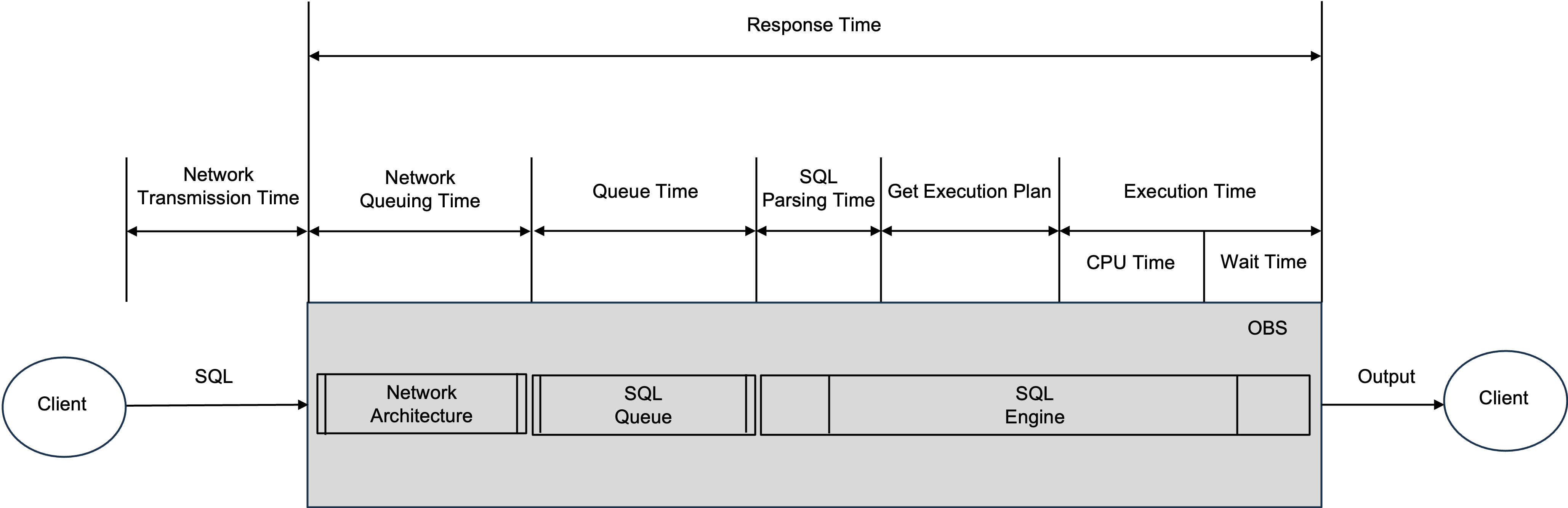
The following figure shows the general time model for SQL execution on OBServer.
3

Note

  • Unlike OBServer, OAS includes the time taken to obtain the execution plan in the CPU time.
  • Since SQL parsing time is usually short, it is not included in the CPU time.

As shown in the figure, SQL statements wait for resources (usually idle threads) in the SQL queue before execution. During this waiting period, they consume minimal CPU resources.

When CPU utilization is high, the SQL queue can become backed up, leading to longer queue times for SQL statements. In such cases, the response time (v$ob_sql_audit.elapsed_time) may not accurately reflect the CPU resources consumed by the SQL statements.

Therefore, when CPU utilization is high, it is recommended to prioritize sorting by CPU time.

Previous topic

High availability through primary and standby databases across clouds
Last

Next topic

Best practices for read/write splitting in OceanBase Cloud
Next
What is on this page
Verify the issue
Troubleshoot the issue
Problem analysis
Automatic analysis
Manual analysis
FAQ
1. How is CPU time calculated?
2. Why is CPU time used instead of response time (v$ob_sql_audit.elapsed_time) for sorting?