







This topic explains how to migrate data from other databases to OceanBase Database. It covers both full and incremental migration methods, along with performance optimization techniques, and provides an example.
We recommend that you use OceanBase Migration Service (OMS) to migrate data from other databases to OceanBase Database. For more information, see OMS documentation.
Data migration process
Perform the following steps to migrate data:
Prepare for data migration.
Before you migrate data by using OMS, create a user in the source or target database and grant required privileges to the user. For more information, see Create a database user.
Create data sources.
Log in to the OMS console and create a source data source and a target data source. For more information, see Create a data source.
Create a data migration project.
Specify the source database, target database, migration types, and migration objects for the data migration task as needed. For more information, see the topics about data migration tasks of the corresponding data source types.
After the precheck is passed, start the data migration project.
View the status of the data migration project.
After the data migration task is started, it is executed based on the selected migration types. For more information, see View details of a data migration task.
(Optional) Stop and release the data migration project.
After the data migration task is completed and no further migration is needed between the source and target databases, you can clear the current data migration task. For more information, see End and delete a data migration task.
Performance tuning
This section describes how to improve the data migration efficiency of OMS through performance tuning. You can optimize the performance from three aspects: source specifications, target specifications, and OMS.
Source specifications
Use a monitoring tool to check the source database for performance bottlenecks.
Monitoring metrics
- CPU utilization: Check whether the CPU resources are used up.
- Memory usage: Make sure that the memory is sufficient without memory leaks or overflows.
- Disk I/O: Check for disk bottlenecks, which affect the speed of data reads.
- Network bandwidth: Make sure that the network transmission speed is not limited.
Optimization methods
Upgrade hardware specifications:
- Increase the number of CPU cores.
- Increase the memory capacity.
- Use a disk with higher performance, such as solid-state disk (SSD).
Optimize database specifications:
- Adjust the buffer size and modify connection pool parameters.
- Clear unused indexes and tables.
- Perform necessary database maintenance operations, such as index rebuild and table analysis.
Optimize queries:
- Analyze and optimize slow queries.
- Use indexes to improve the query performance.
- Split complex queries into several simple queries.
Target specifications
Use a monitoring tool to check the target database for performance bottlenecks.
The following table lists the optimization suggestions for OceanBase Database.
Measure |
Description |
|---|---|
| Shuffle leader partitions | Shuffle leader partitions to all servers by specifying ALTER TENANT [tenant_name] primary_zone='RANDOM';. |
| Scale out the OceanBase Database tenant | Specify ALTER RESOURCE POOL <resource_pool_name> MODIFY UNIT='UNIT_CONFIG(unit_memory_size, ...)';. |
| Enable clog compression | At the global level: Specify ALTER SYSTEM SET clog_transport_compress_all = 'true'; and ALTER SYSTEM SET clog_transport_compress_func = 'zlib_1.0';.At the tenant level: Specify ALTER SYSTEM SET enable_clog_persistence_compress='true';. |
| Adjust the memory usage threshold that triggers write throttling | Specify ALTER SYSTEM SET write_throttling_trigger_percentage =80;. When the memory usage reaches the specified threshold, the write speed becomes low. |
| Adjust the memory usage threshold that triggers freezes | Change the value of freeze_trigger_percentage from 20, which is the default value, to 70. |
| Decrease the memory usage threshold that triggers minor compactions | Specify ALTER SYSTEM SET freeze_trigger_percentage=30;. If a large amount of data is to be written, you can decrease the memory usage threshold to trigger minor compactions earlier. |
| Increase the concurrency of minor and major compactions | Specify ALTER SYSTEM SET _mini_merge_concurrency=0; and ALTER SYSTEM SET minor_merge_concurrency=0;. If you set the concurrency to 0, two compaction tasks are performed concurrently by default. When the server has sufficient resources, you can increase the concurrency to accelerate compactions. |
| Increase the number of threads for major compactions | Specify ALTER SYSTEM SET merge_thread_count=64;. |
| Refresh the execution plan | Specify ALTER SYSTEM FLUSH PLAN CACHE TENANT = 'tenant_name';. Data migration may lead to changes in data distribution and statistics. Refreshing the execution plan can ensure that the latest statistics are used, thereby improving the query performance. |
OMS optimization
If you confirm that the source and target have no bottlenecks, you can adjust OMS components and concurrency to improve the performance.
Optimize OMS server resources
- Make sure that the CPU, memory, and network bandwidth resources on the OMS server are sufficient so that you can set a higher task concurrency for links.
- Deploy OMS on multiple servers to distribute the tasks of various components to these servers, so as to improve the overall performance.
Notice
The higher the OMS migration performance, the higher the pressure caused by massive data reads on the source database.
Components for performance tuning
Concurrency
OMS allows you to adjust the concurrency to limit the CPU usage. OMS does not support forcible CPU resource isolation. Therefore, severe CPU resource contention may occur in an environment with a high pressure on multiple links. You can increase the number of concurrent OMS tasks to accelerate data transmission.
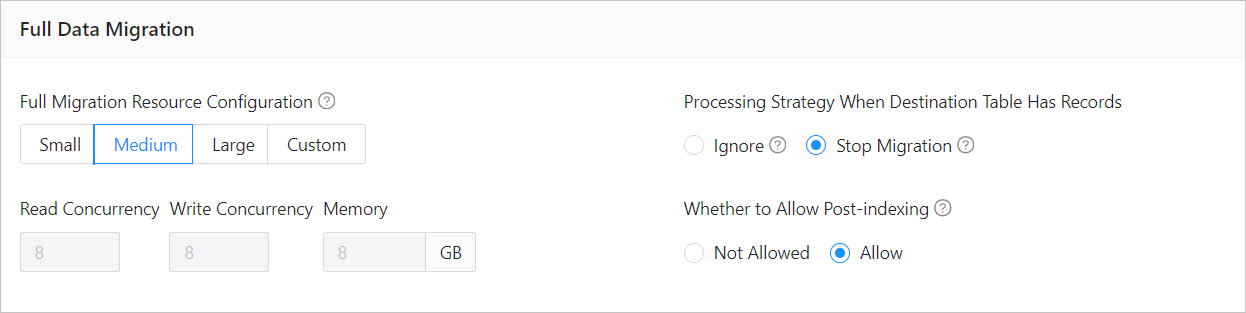
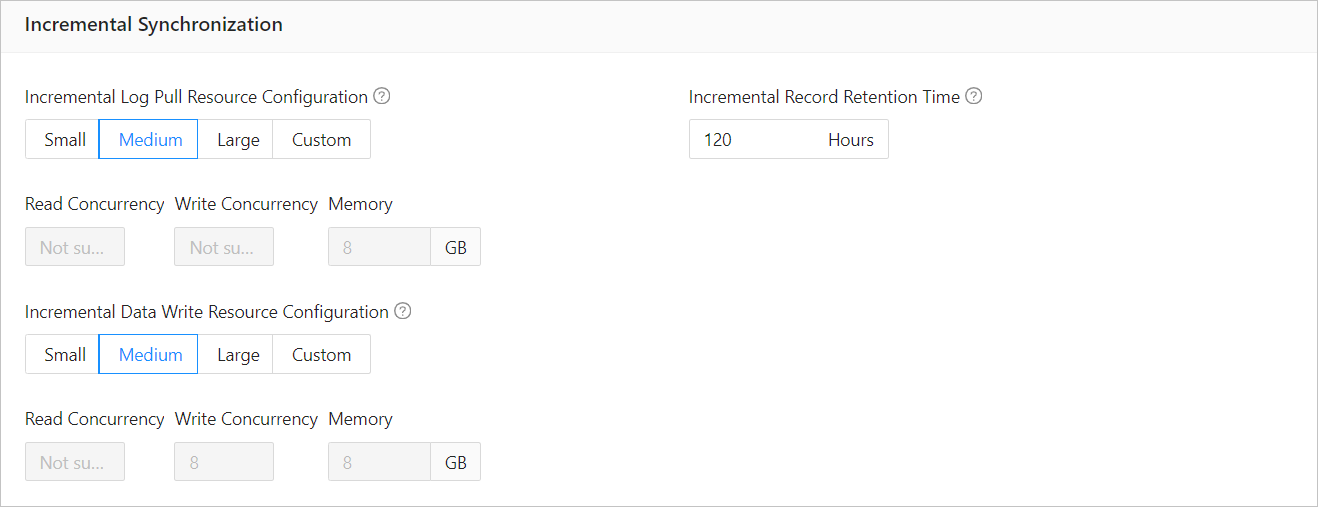
The concurrency is generally related to the number of CPU cores. You can set the maximum concurrency to four times the number of CPU cores. When you set the concurrency, take into consideration whether other tasks are running on the server. For full migration, we recommend that you modify the concurrency of tasks performed at the target, where bottlenecks occur more easily. You can adjust the concurrency of tasks performed at the source only when a bottleneck occurs at the source.
The following figure shows how to modify the concurrency for full migration tasks.
The following figure shows how to modify the concurrency for incremental synchronization tasks.
Run
./connector_utils.sh metricsin theconnectortask directory to view the metrics. InDISPATCHER: wait record:0, ready batch:0, if the value ofwait recordis 0 or a small value such as 100, a bottleneck occurs at the source. If the value ofready batchis large, a bottleneck occurs at the target. If the value ofwait recordis large but that ofready batchis0, hotspot data may exist.Task splitting
Split the data migration task of a large or complex table into multiple smaller tasks to improve the transmission efficiency.
Incremental synchronization parameters
Adjust the parameters of the Store and Incr-Sync/Full-Import components to improve the incremental synchronization performance. OMS provides the Store and Writer components for incremental synchronization. The Store component parses logs in the source and the Writer component writes data to the target. The Store component is started when a full migration task begins and the Writer component is started after the full migration task ends.
If an error occurs when the Store component parses logs, you can adjust the following parameters:
deliver2store.logminer.fetch_arch_logs_max_parallelism_per_instance=Size of daily archive logs/500 GB + 1
deliver2store.logminer.max_actively_staged_arch_logs_per_instance=Value of the previous parameter x 2
deliver2store.logminer.staged_arch_logs_in_memory=true  //You need to adjust the JVM memory together with this parameter. For large transactions, you can set this parameter to true to reduce logs stored on the disk.
deliver2store.logminer.max_num_in_memory_one_transaction=3000000  //This parameter is available only when the previous parameter is set to true.
deliver2store.logminer.only_fetch_archived_log=true  //Only archive logs are parsed.
deliver2store.logminer.enable_flashback_query=false
deliver2store.parallelism=32
The following table lists the empirical values of related parameters in OMS.
Parameter |
Empirical value |
|---|---|
| datasource.connections.max | 200 |
| light-thread | 200 |
| batch_select | 300 |
| batch_insert | 200 |
| ob max_allowed_packet | 512M |
Note
After the data migration is completed, restore the system variables and parameters to their default settings.
Example
This section takes a migration task that migrates data from an Oracle database to OceanBase Database as an example. Assume that the source Oracle database has totally 15 partitioned tables with 2.2 billion data records to be migrated to the target OceanBase database. Before optimization, it takes 11 hours to migrate all the data records at a speed of 55,000 records per second, which is too slow to meet the expectation of the customer.
Optimize related parameters in OMS.
-- Fine-tune related parameters in OMS to increase the concurrency.
## Read threads
source.workerNum: The concurrency is related to the number of CPU cores and its maximum value can be four times the number of CPU cores.
## Write threads
sink.workerNum: The concurrency is related to the number of CPU cores and its maximum value can be four times the number of CPU cores.
## Batch size for query by using the sharding column
source.sliceBatchSize: The value is usually set to 1000 for a large table.
## Maximum number of connections
source.databaseMaxConnection
limitator.platform.threads.number  32 --> 64
limitator.select.batch.max         1200 --> 2400
limitator.image.insert.batch.max   200  --> 400
-- Increase the number of connections.
limitator.datasource.connections.max 50  --> 200
-- Optimize the JVM memory.
-server -Xms16g -Xmx16g -Xmn8g -Xss256k --> -server -Xms64g -Xmx64g -Xmn48g -Xss256k
11
After the preceding adjustments, about 130 clog files are generated per minute. The size of each log file is 64 MB, adding up to about 8.5 GB in total. In this case, the CPU is fully loaded and the volume of data egress reaches 500 MB. This situation can be seen as a bottleneck at the target OceanBase database.
Optimize the target OceanBase database.
-- Enable log compression.
ALTER SYSTEM SET clog_transport_compress_all = 'true';
ALTER SYSTEM SET clog_transport_compress_func = 'zlib_1.0';
-- Enable log compression at the tenant level.
ALTER SYSTEM SET enable_clog_persistence_compress='true';
-- Increase the number of threads for minor compactions.
ALTER SYSTEM SET _mini_merge_concurrency=32;
ALTER SYSTEM SET minor_merge_concurrency=32;
-- Increase the number of threads for major compactions.
ALTER SYSTEM SET merge_thread_count=64;
-- Enable write throttling.
ALTER SYSTEM SET writing_throttling_trigger_percentage =80;
-- Decrease the memory usage threshold to trigger minor compactions earlier.
ALTER SYSTEM SET freeze_trigger_percentage=30;
After the kernel parameters are adjusted, the number of log files generated per minute decreases to 20, but the CPU utilization is still high due to the checksum task overhead resulted from a TRUNCATE operation performed on a large partitioned table. If checksum task maintenance is started but the import task is not started in OMS, the CPU utilization can reach 50% on the OBServer node.
Manually clear the internal tables.
-- Clear the metadata of the truncated partitioned table.
DELETE FROM __all_sstable_checksum WHERE sstable_id IN
(SELECT table_id FROM __all_virtual_table_history WHERE table_name='table_namexxx' minus
SELECT table_id FROM __all_virtual_table WHERE table_name='table_namexxx');
-- Distribute the leader partitions of the tenant to three zones.
ALTER TENANT tenant_name SET primary zone='RANDOM';
By adjusting the deployment architecture of OceanBase Database and leveraging multi-point writing, about 70,000 data records are migrated per second and the time required for full migration is reduced to about 7 hours, significantly improving the migration performance.
Analyze slow SQL queries.
SELECT * FROM gv_plan_cache_plan_explain WHERE ip=xxx.xx.xx.x AND port=2882 AND plan_id=160334 AND tenant_id=1004;You can convert a partitioned table into a non-partitioned table to avoid slow SQL queries. For a table that contains no more than 1 billion rows or 2,000 GB of data, you do not need to partition the table. You can temporarily drop the secondary indexes and retain only the primary key, and then rebuild the secondary indexes after the full migration is completed.
After you optimize the schema, convert the partitioned table into a non-partitioned table, and drop secondary indexes, which are to be rebuilt after full migration, full migration can be completed within 3 hours, which significantly shortens the time required for data migration.