







OceanBase Database Proxy (ODP), also known as OBProxy, is a dedicated proxy server for OceanBase Database. It can shield the complexity resulting from the distributed architecture of OceanBase Database, so that applications can access a distributed database the same way they access a standalone database.
The core feature of ODP is optimal routing. When receiving an SQL request from a user, ODP forwards the request to the optimal OBServer node and returns the execution result to the user. ODP supports a wide range of routing features to achieve the best routing effects in different scenarios. This topic describes the common routing features and configuration methods to help you correctly configure a routing strategy and quickly troubleshoot routing issues in actual business scenarios.
Common routing features and configuration methods
ODP offers a wide range of routing features. You can configure corresponding parameters to control routing strategies based on your specific needs.
Forcible routing
Forcible routing cannot be controlled by users. Instead, ODP decides whether to perform forcible routing. The following forcible routing modes are supported:
IP address-based routing: You can configure the
target_db_serverparameter to specify this routing mode. In this mode, ODP directly routes SQL requests to the specified OBServer node. This routing mode has the highest priority. Here is an example:ALTER PROXYCONFIG SET target_db_server = '127.0.0.1:2993;10.10.10.1:50109';In this example, all requests received by ODP are routed to the node with the IP address 127.0.0.1:2993. If this node does not exist or fails, the requests are routed to the node with the IP address 10.10.10.1:50109. For more information, see IP address-based routing.
Zone-based routing: You can configure the
proxy_primary_zone_nameparameter to specify the primary zone to which ODP routes requests in this mode. Here is an example:ALTER PROXYCONFIG SET proxy_primary_zone_name='z2';In this example, all requests received by ODP are routed to the
z2zone. For more information, see Primary zone-based routing for strong-consistency reads.Forcible routing in certain scenarios:
- Non-distributed transaction routing: Statements in a transaction are forcibly routed to the OBServer node that starts the transaction.
- Session-level temporary table-based routing: A query is forcibly routed to the OBServer node where the temporary table is queried for the first time.
- Cursor/Piece-based routing: When the client uses cursors or pieces to obtain or upload data, all requests are forcibly routed to the same OBServer node.
Note
- IP address-based routing and zone-based routing are forcible routing modes applicable to scenarios where requests need to be routed to the specified node without checking whether a request is a strong-consistency read or concerning the location of the leader.
- For strong-consistency read requests in business scenarios such as transaction payment, where the requests need to be routed to the leader, make sure that no forcible routing parameter is specified. Otherwise, issues such as remote routing and rerouting may arise.
Routing for strong-consistency reads
The following routing modes are supported for strong-consistency reads:
Partitioned table-based routing: In this mode, ODP parses the conditions such as the partitioning key value or expression or the partition name in an SQL request into a partition ID, finds the locations of the partition replicas by partition ID, and routes the request to the leader.
Here is an example of routing calculation based on the partitioning key value or expression:
CREATE TABLE T(C1 INT) PARTITION BY HASH(C1) PARTITIONS 8;

SELECT * FROM T WHERE C1=123;
SELECT * FROM T WHERE C1=ABS(123);
In this example, ODP routes the query request to the leader of the corresponding partition.
Here is an example of routing calculation based on the partition name:
CREATE TABLE T(C1 INT) PARTITION BY KEY(C1) PARTITIONS 8;

SELECT * FROM T PARTITION(P1);
In this example, ODP routes the query request to the leader of the P1 partition.
Note
- OceanBase Database supports three table-based routing types: local plan, remote plan, and distributed plan.
- Both the local plan and remote plan types refer to routing based on a single partition. ODP is designed to change remote plans into local plans as much as possible.
- If table-based routing types for a large number of SQL statements are remote plans, the routing of ODP may be abnormal and troubleshooting is required.
For more information, see Partitioned table-based routing for strong-consistency reads.
Global index table-based routing: When you initiate a request to the global index table, ODP performs routing calculation by using the index value provided in the SQL statement as the partitioning key. For strong-consistency reads to a partitioned table with a global index, the global index table-based routing feature of ODP can be used to improve the query efficiency when the index value is used as the query condition in read/write requests.
You can configure the parameters
enable_rerouteandenable_index_routeto use the index value provided in the statement as the partitioning key for routing calculation.ALTER PROXYCONFIG SET enable_reroute=true; ALTER PROXYCONFIG SET enable_index_route = true; CREATE TABLE T(C1 INT,C2 INT) PARTITION BY HASH(C1) PARTITIONS 8; CREATE INDEX INDEX1 ON T(C2); SELECT * FROM T WHERE C2=2; SELECT * FROM T WHERE C2=2;In this example, when you initiate an index-based query for the first time, the query is routed randomly. The OBServer node returns the leader of the index table. ODP builds the mapping from the statement to the index table name: [SELECT * FROM T WHERE C2=2;] -> [T_INDEX]. Then, ODP performs rerouting and obtains the mapping of the
T_INDEXtable for routing calculation.For more information, see Global index table-based routing for strong-consistency reads.
Replicated table-based routing: Replicated table is a special table schema in OceanBase Database. A replicated table can read the latest data changes from any replica and applies to scenarios with low write frequency requirements but high read latency and read load balancing requirements.
ODP uses random routing for replicated tables. Here is an example:
CREATE TABLE T_DUP(C1 INT) DUPLICATE_SCOPE = 'cluster';

SELECT * FROM T_DUP WHERE C1=123;
In this example, ODP randomly routes the query request to any replica of the
T_DUPtable. For more information, see Replication table-based routing for strong-consistency reads.Routing upon calculation failure: If ODP cannot obtain the table name from the SQL request or calculate accurate partition location information based on the conditions in the SQL request, it cannot accurately route the strong-consistency read request to the leader. In this case, you can try the following strategies to resolve this issue:
Primary zone-based routing: If
enable_primary_zoneis set toTrue, the request can be routed to the primary zone of the tenant.Session reuse-based routing: If
enable_cached_serveris set totrue, the request can be routed to the OBServer node where the last session resides.Random routing: If both
enable_primary_zoneandenable_cached_serverare set tofalse, the request is randomly routed.
Here are examples:
Scenario 1: enable_primary_zone=false && enable_cached_server =true
CREATE TABLE T(C1 INT,C2 INT) PARTITION BY HASH(C1) PARTITIONS 8;

SELECT * FROM T WHERE C1=1; # The request is routed to server1.
SELECT * FROM T WHERE C2=1; # No partitioning condition is available for routing calculation. Therefore, the request is routed to server1 where the last session resides.

SELECT * FROM T WHERE C1=2; # The request is routed to server2.
SELECT * FROM T WHERE C2=2; # No partitioning condition is available for routing calculation. Therefore, the request is routed to server2 where the last session resides.
Scenario 2: enable_primary_zone=true && enable_cached_server =true && The leader is on server1
SELECT * FROM T WHERE C1=1; # The request is routed to server1.
SELECT * FROM T WHERE C2=1; # No partitioning condition is available for routing calculation. Therefore, the request is routed to server1.

SELECT * FROM T WHERE C1=2; # The request is routed to server1.
SELECT * FROM T WHERE C2=2; # No partitioning condition is available for routing calculation. Therefore, the request is routed to server1.
Note
In a production or test environment, we recommend that you set
enable_cached_servertofalse.To analyze the routing strategy of ODP, you can execute the
EXPLAIN ROUTE executable sqlstatement to view the routing process of ODP.
Transaction routing
The following transaction routing modes are supported:
Distributed transaction routing: SQL requests in a transaction are routed to the leader.
Note
OceanBase Database supports distributed transaction routing since V4.1.0.
You can set the
enable_ob_protocol_v2andenable_transaction_INTernal_routingparameters totrueto enable distributed transaction routing. Here is an example:ALTER PROXYCONFIG SET enable_ob_protocol_v2 = true; ALTER PROXYCONFIG SET enable_transaction_INTernal_routing = true; CREATE TABLE T1(C1 INT,C2 INT) PARTITION BY HASH(C1) PARTITIONS 8; CREATE TABLE T2(C1 INT,C2 INT) PARTITION BY HASH(C1) PARTITIONS 8; BEGIN; INSERT INTO T1 VALUES(1,1);# The request is routed to server1. INSERT INTO T2 VALUES(11,11);# The request is routed to server2. SELECT * FROM T1 WHERE C1=1;# The request is routed to server1. SELECT * FROM T2 WHERE C1=11;# The request is routed to server2. COMMIT;In the preceding example, all requests in the transaction can be accurately routed to the corresponding leader. For more information, see Distributed transaction routing.
Non-distributed transaction routing: SQL requests in a transaction are forcibly routed to the OBServer node that starts the transaction.
Here is an example:
ALTER PROXYCONFIG SET enable_ob_protocol_v2 = false;
ALTER PROXYCONFIG SET enable_transaction_INTernal_routing = false;

CREATE TABLE T1(C1 INT,C2 INT) PARTITION BY HASH(C1) PARTITIONS 8;
CREATE TABLE T2(C1 INT,C2 INT) PARTITION BY HASH(C1) PARTITIONS 8;

BEGIN;
INSERT INTO T1 VALUES(1,1);# The request is routed to server1.
INSERT INTO T2 VALUES(11,11);# The request is routed to server1.
SELECT * FROM T1 WHERE C1=1;# The request is routed to server1.
SELECT * FROM T2 WHERE C1=11;# The request is routed to server1.
COMMIT;
In this example, all requests in the transaction are routed to server1 to which the first
INSERTstatement is routed.
Routing for weak-consistency reads
ODP provides two routing modes for weak-consistency read requests:
logical data center (LDC)-based routing: If the region and IDC attributes are specified for each zone in an OceanBase cluster and the IDC attribute is specified for ODP, ODP will select an OBServer node for a weak-consistency read request in the following sequence: an OBServer node in the same IDC > an OBServer node in the same region > a remote OBServer node.
You can configure the
proxy_idc_nameparameter to control LDC-based routing. Here is an example:alter system modify zone "z1" set region = "region1"; alter system modify zone "z1" set idc = "idc1"; alter system modify zone "z2" set region = "region1"; alter system modify zone "z2" set idc = "idc2"; alter proxyconfig set proxy_idc_name='idc1'; CREATE TABLE T(C1 INT,C2 INT) PARTITION BY HASH(C1) PARTITIONS 8; SELECT /*+READ_CONSISTENCY(WEAK) */ * FROM T;In this example, ODP routes the weak-consistency read request to
z1in the same IDC.Random routing: ODP randomly routes weak-consistency read requests to the leader or a follower. The replica priority is specified by
proxy_route_policy. Supported routing strategies areFOLLOWER_FIRST,FOLLOWER_ONLY, andUNMERGE_FOLLOWER_FIRST.Here is an example of ODP V4.3.0:
CREATE TABLE T(C1 INT,C2 INT) PARTITION BY HASH(C1) PARTITIONS 8;
# The leader of the T table is in z1, and the followers are in z2 and z3.
Scenario 1: alter proxyconfig set proxy_route_policy='';
SELECT /*+READ_CONSISTENCY(WEAK) */ * FROM T;
# ODP randomly forwards weak-consistency read requests to the replica in z1, z2, or z3.
Scenario 2: alter proxyconfig set proxy_route_policy='FOLLOWER_FIRST';
SELECT /*+READ_CONSISTENCY(WEAK) */ * FROM T;
# ODP forwards weak-consistency read requests to z2 and z3 first. If z2 and z3 are unavailable, ODP forwards the requests to z1.
Scenario 3: alter proxyconfig set proxy_route_policy='FOLLOWER_ONLY';
SELECT /*+READ_CONSISTENCY(WEAK) */ * FROM T;
# ODP forwards weak-consistency read requests only to z2 and z3. If z2 and z3 are unavailable, ODP returns an error for read requests.
Scenario 4: alter proxyconfig set proxy_route_policy='UNMERGE_FOLLOWER_FIRST';
SELECT /*+READ_CONSISTENCY(WEAK) */ * FROM T;
# ODP preferentially forwards weak-consistency read requests to z2 and z3 without major compactions.
LDC-based routing has a higher priority than random routing. When ODP selects a replica, it performs LDC-based routing first and then random routing.
Note
LDC-based routing and random routing also apply to strong-consistency read requests when partition calculation fails.
Typical scenarios
You need to properly configure routing strategies and priorities to achieve expected routing objectives in different business scenarios. The following sections describe two typical routing scenarios.
Read-write splitting
Routing scenario
In a scenario with hybrid transaction and analytical processing (HTAP) business loads, transaction requests are to be sent to the transaction processing (TP) replica and analysis requests are to be sent to the analytical processing (AP) replica. Two independent ODPs need to be deployed for TP business requests and AP business requests respectively. The ODP that receives AP requests needs to convert strong-consistency read requests into weak-consistency read requests and send the requests only to the AP replica. The following figure shows the deployment architecture.
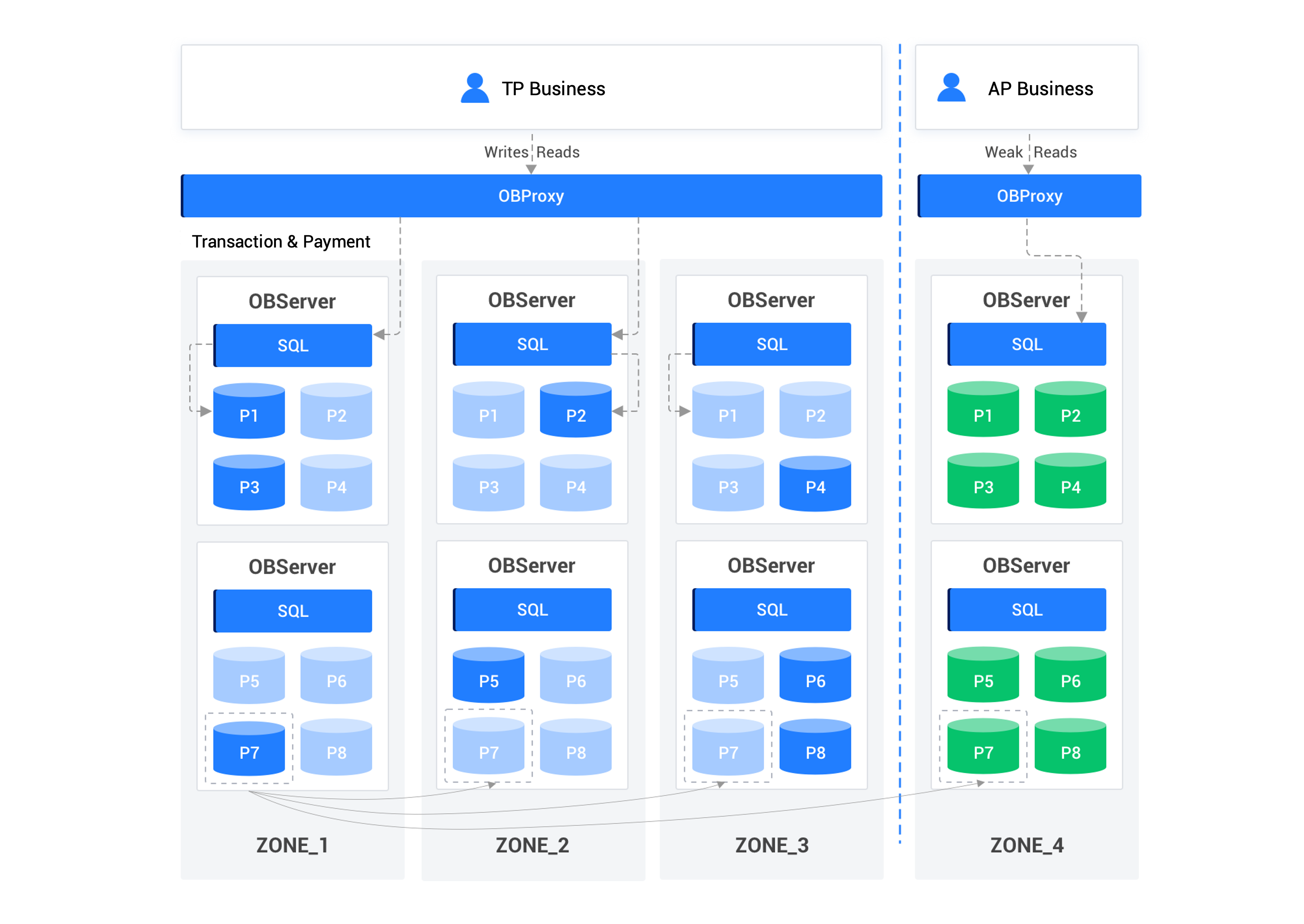
Routing configuration
Configure the ODP that receives AP requests:
alter proxyconfig set obproxy_read_consistency='1'; # Enable the weak-consistency read mode.

alter proxyconfig set proxy_primary_zone_name='zone_4'; # Specify the target replica for routing.
Notice
Before configuration, make sure that IP address-based routing is not configured. You can run the
show proxyconfig like 'target_db_server';command for verification.Configure the ODP that receives TP requests:
ALTER PROXYCONFIG SET enable_cached_server = false;
ALTER PROXYCONFIG SET enable_primary_zone = true;
Transaction requests must be accurately routed to partition leaders. If the locations of leaders cannot be accurately calculated, transaction requests must be routed to the primary zone of the tenant as much as possible to prevent remote routing.
ODP forwards transaction requests only to leaders in
ZONE_1,ZONE_2, andZONE_3.Notice
Before configuration, make sure that IP address-based routing and zone-based routing are not configured. You can run the
show proxyconfig like 'target_db_server';andshow proxyconfig like 'proxy_primary_zone_name';commands for verification.
Read-only replica
Routing scenario
Apart from full-featured replicas, OceanBase Database also supports read-only replicas. A read-only replica provides only read services and can serve only as a follower of a log stream. In actual business scenarios, analysis requests that do not demand high real-time performance can be sent to read-only replicas to reduce the pressure on the leader.
Routing configuration
Enable the weak-consistency read mode:
alter proxyconfig set obproxy_read_consistency='1';Configure an LDC-based routing strategy: Ensure that ODP is in the same IDC as the OBServer node that hosts the read-only replicas.
Configure a routing strategy:
alter proxyconfig set proxy_route_policy='FOLLOWER_ONLY';
Case study
A cloud customer of OceanBase Database executed a large query based on the read-only address of the tenant. However, the query did not access a read-only replica as expected but accessed the leader, which affected normal business requests to the leader.
Cause analysis
It was found during troubleshooting that the enable_cached_server and enable_primary_zone parameters were both set to true in the routing configurations of OceanBase Database.
When enable_primary_zone and enable_cached_server are set to true, the routing logic is as follows:
enable_primary_zone=true: When a user logs in, the login request is sent to the leader of the tenant.enable_cached_server=true: If ODP fails to parse the table name or calculate the locations of partitions, the previous connection is reused for subsequent requests. In other words, the requests are forwarded to the leader that executes the previous login request. As a result, ODP cannot optimize routing based on a read-only address, and all subsequent requests are forwarded to the leader.
Solution
Set both enable_cached_server and enable_primary_zone to false.
References
For more information, see ODP routing.